

Managing an online store can be overwhelming, but the right automation software and plugins can transform your workflow. From checkout design to optimizing marketing, discover how these top automation tools can enhance efficiency and drive growth. With some eCommerce automation software ideas for WooCommerce.
Contents
- 15 eCommerce automation tools for WooCommerce (2025)
- What is eCommerce automation?
- Why should you automate your WooCommerce store?
- Choosing the right eCommerce automation tool
- Top 15 eCommerce automation tools for WooCommerce (by WP Desk)
- 1. Flexible Checkout Fields – simplify checkout customization
- 2. Flexible Product Fields – customize products with ease
- 3. Print Orders and Address Labels – automate shipping documentation
- 4. Flexible Pricing – dynamic discounts for more sales
- 5. Automatic Payment Status – reduce manual payment updates
- 6. Dropshipping Import Products – automate product synchronization
- 7. WP Desk Omnibus – ensure pricing transparency
- 8. Flexible Refund and Return – automate the refund process
- 9. Flexible Invoices – automate invoice generation
- 10. Dropshipping Export Products – automate supplier product feeds
- 11. ShopMagic – automate email marketing and customer engagement
- 12. Dropshipping Orders Export – automate supplier order management
- 13. Flexible Subscriptions Recurring Shipping – automate subscription shipping costs
- 14. Flexible Subscriptions Payment Retry – reduce failed subscription payments
- 15. Flexible Subscriptions Stock Management – optimize inventory for subscription products
- Conclusion: The future of WooCommerce automation
- WordPress email marketing automation (free plugin guide)
- 5 essential WooCommerce tips to boost your sales
- How to increase sales and revenue from existing customers?
- 10-step WooCommerce review to help you understand why WooCommerce is the best e-commerce platform
- WooCommerce checkout add-ons: 20 plugins for better checkout
15 eCommerce automation tools for WooCommerce (2025)
First, you may read more about automation solutions for eCommerce. You can also jump to the software for automating WooCommerce processes.
Introduction to eCommerce automation
In this guide, we’ll walk through some of the best eCommerce automation tools available for WooCommerce in 2025 by WP Desk. Whether you're looking to clear checkout, simplify order fulfillment, or enhance marketing campaigns, these tools can help optimize your workflow and improve overall efficiency.
Running an online store comes with a long list of daily tasks - from processing orders and managing inventory to handling customer inquiries. While these are essential to keeping a business running, they can also be time-consuming. That’s where eCommerce automation comes in. By automating key processes, store owners can reduce manual work, improve accuracy, and focus on growing their business.
What is eCommerce automation?
eCommerce automation refers to using software solutions to handle repetitive tasks in an online store. Instead of manually updating orders, sending emails, or adjusting pricing, automation tools take care of these processes in the background. This reduces errors, saves time, and improves the customer experience.
What is the best software for eCommerce?
The best eCommerce automation tools depend on your specific needs. WooCommerce store owners often look for solutions that can:
- Automate order fulfillment
- Help with marketing efforts
- Improve customer support response times
- Manage pricing and discounts dynamically
- Enhance checkout customization
- Build an easy system for managing personalized products
- Issue invoices and reports automatically
Why should you automate your WooCommerce store?
The benefits of eCommerce automation
Implementing automation in your WooCommerce store has several advantages:
- Efficiency – Automation software reduces manual work and speeds up daily processes, for example, email marketing.
- Accuracy – Minimize errors in pricing, inventory, and order processing.
- Customer Experience – Deliver faster responses, personalized marketing, and smoother checkout.
- Sales Growth – Optimize pricing strategies, upsells, and abandoned cart recovery to increase revenue of eCommerce business.
How automation can improve business efficiency?
What's more, by automating key tasks, store owners can:
- Process orders faster and more accurately
- Improve customer communication through automated emails
- Maintain up-to-date inventory levels without manual adjustments
- Optimize marketing strategies with personalized campaigns for an eCommerce store
- Use automated workflow emails or sms marketing that use automation
Choosing the right eCommerce automation tool
What to look for in an automation tool?
When selecting a WooCommerce automation solution, consider the following:
- Compatibility – Does it integrate with your existing setup?
- Ease of Use – Can you set it up without technical expertise?
- Customization – Does it allow flexibility to fit your needs?
- Cost vs. Value – Will the tool provide a good return on investment?
Essential features for WooCommerce stores
Automation tools have their distinctive options. For WooCommerce stores, the most useful features include:
- Automated order processing
- Dynamic pricing adjustments
- Custom checkout field management
- Automated shipping label generation
- Subscription and recurring payment automation
- Automatic invoicing
- Automated emails (newsletters, follow-ups)
Top 15 eCommerce automation tools for WooCommerce (by WP Desk)
Let's take a look at plugins for automation in WooCommerce.
1. Flexible Checkout Fields – simplify checkout customization
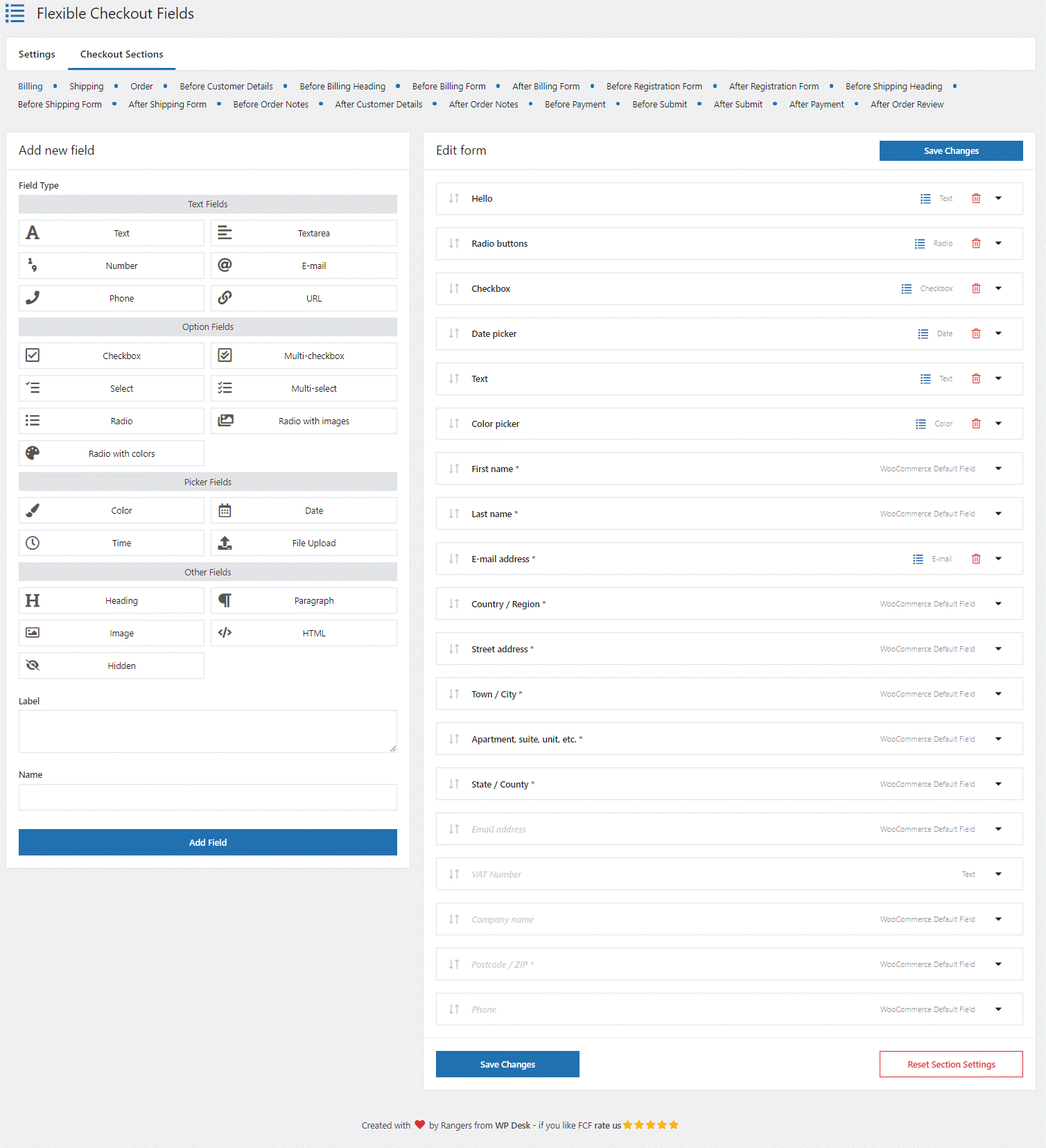
A smooth checkout process is essential for reducing cart abandonment. Flexible Checkout Fields allows store owners to modify checkout fields to suit their business needs, improving conversion rates.
Key automation features:
- Automatically populate checkout fields based on selection
- Conditional logic to show or hide fields
- Custom checkout fields
- Modify checkout form
- Add pricing per field
2. Flexible Product Fields – customize products with ease
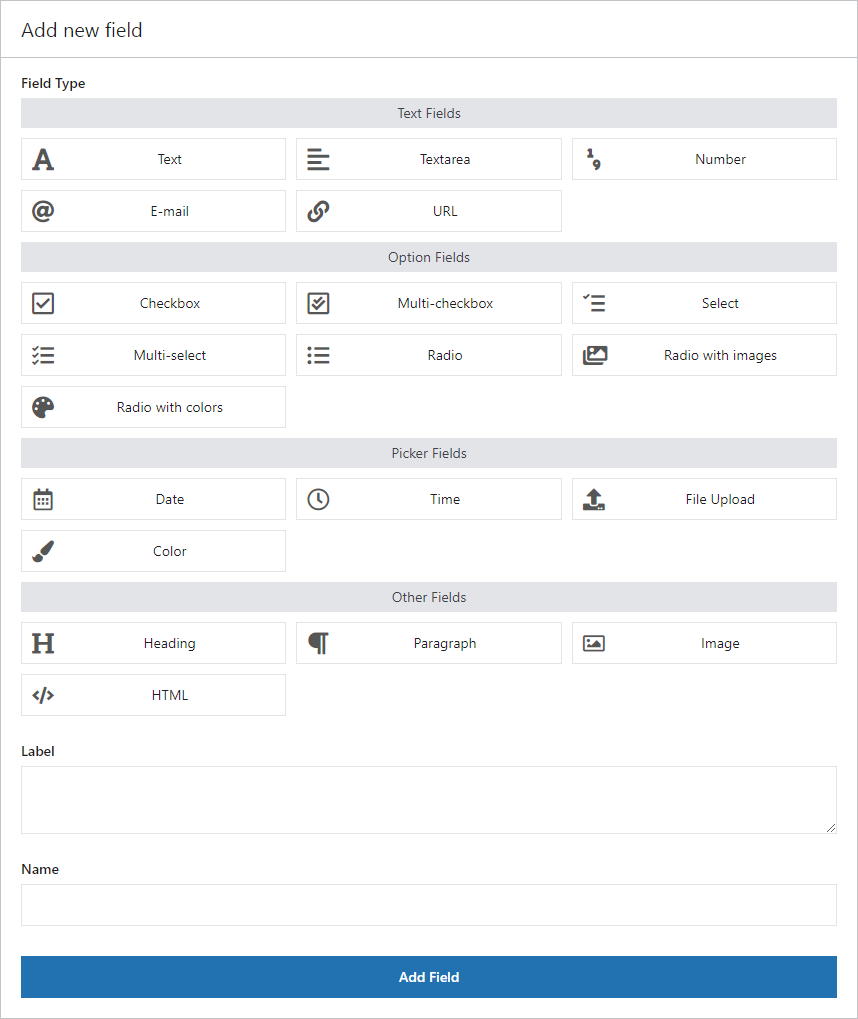
Product customization can enhance the shopping experience and boost average order value. This plugin lets you add custom fields, enabling customers to personalize their purchases.
Key automation features:
- Dynamic pricing based on selected options
- Conditional display of product fields
- Bulk updates across multiple products
- Additional options over default product variations
3. Print Orders and Address Labels – automate shipping documentation
Managing shipping labels and invoices manually can slow down fulfillment. This tool automates label generation and helps simplify logistics.
Key automation features:
- Generate shipping labels and order details
- Customize options
- Show order details in My account
- Bulk printing for order fulfillment

4. Flexible Pricing – dynamic discounts for more sales
Pricing strategies are quite important in a competitive environment. Flexible Pricing enables automated discounts, helping you maximize sales and customer loyalty.
Key automation features:
- Volume-based pricing rules
- Scheduled promotional discounts
- Cart-based dynamic pricing
- Discounts per user groups
- Promotions for specific products or categories
5. Automatic Payment Status – reduce manual payment updates
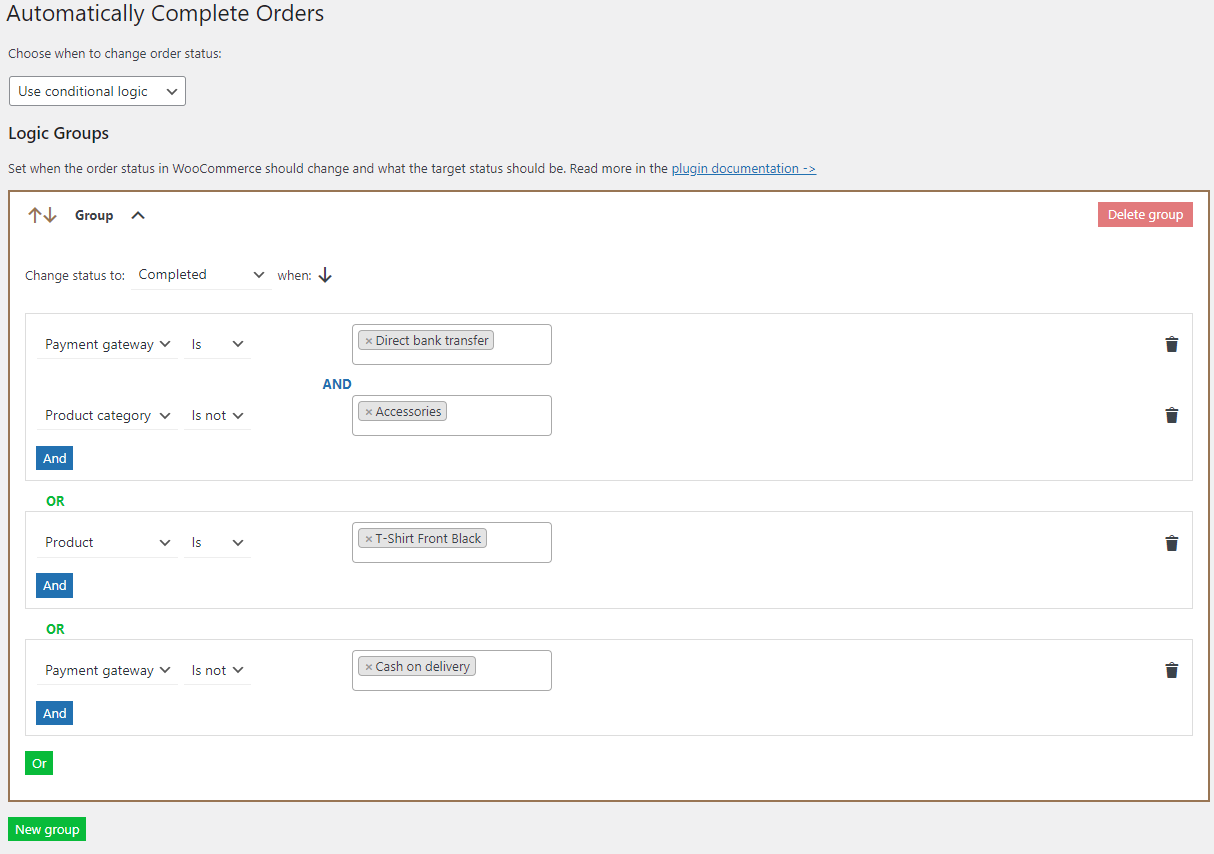
Handling payment verifications manually can slow down order processing. This plugin updates payment statuses automatically, ensuring faster fulfillment. This eCommerce automation software speeds up order processing after payments.
Key automation features:
- Automatic payment status updates
- Reduced manual order verification
- Enhanced payment processing efficiency
- Change order status based on product, product type, category, and payment gateway
6. Dropshipping Import Products – automate product synchronization
For dropshipping stores, keeping supplier catalogs updated is essential. This plugin automates product imports and ensures product details remain current.
This automation tool offers a lot of options to import and update WooCommerce products including their content. That's the plugin when migrating, for example, from a Shopify store.
Key automation features:
- Scheduled product imports
- Automatic category and attribute mapping
- Seamless supplier synchronization
- Update products automatically based on schedule and product feeds
- Change price and stock, update specific fields, add products as drafts, map fields, and more

7. WP Desk Omnibus – ensure pricing transparency
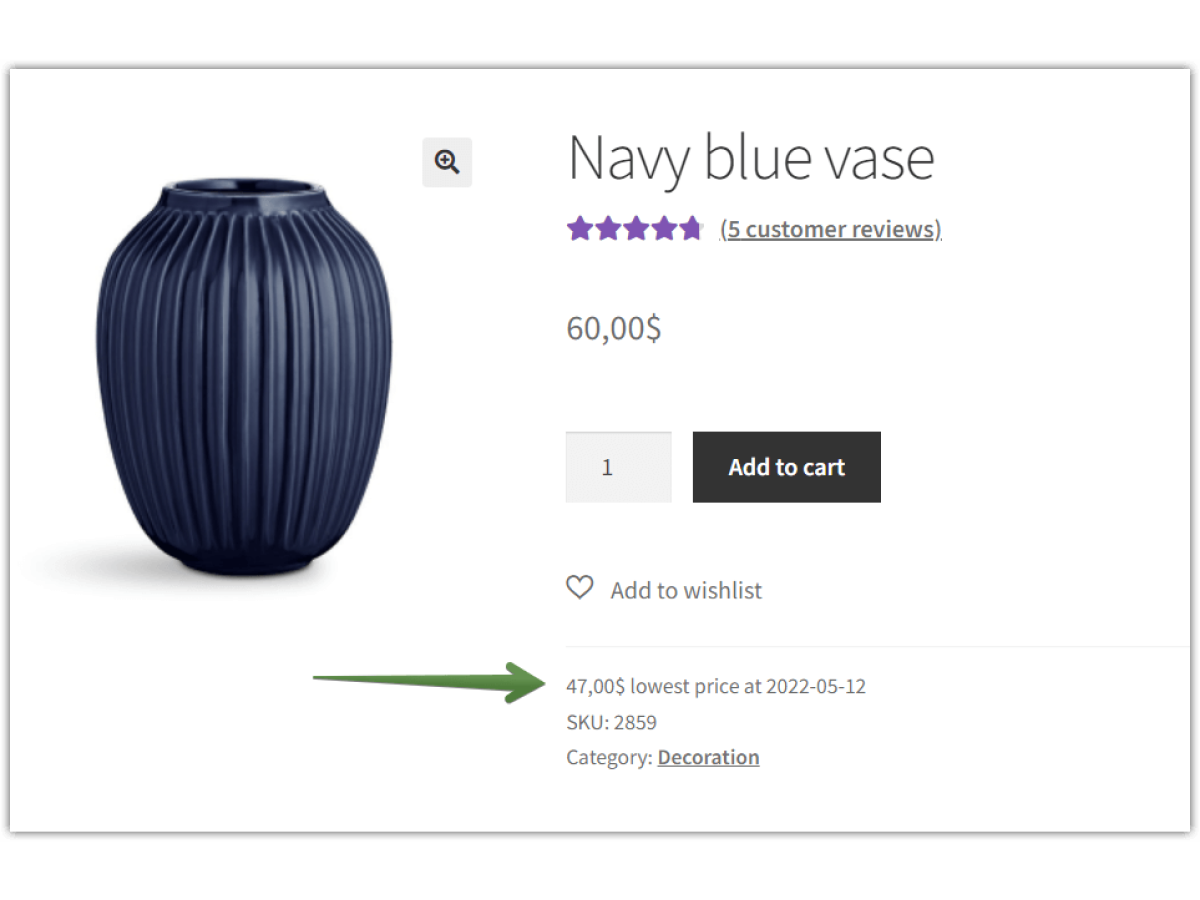
With the new pricing transparency directive in place, WP Desk Omnibus helps WooCommerce stores stay compliant by automatically displaying historical prices.
Using automation tools to show the lowest price in the last 30 days is not only possible for popular eCommerce platforms. It's a must when selling to European countries.
Key automation features:
- Auto-track and display past prices
- Ensure compliance with EU regulations
- Improve customer trust with pricing transparency
- Show the lowest price on catalog and product pages
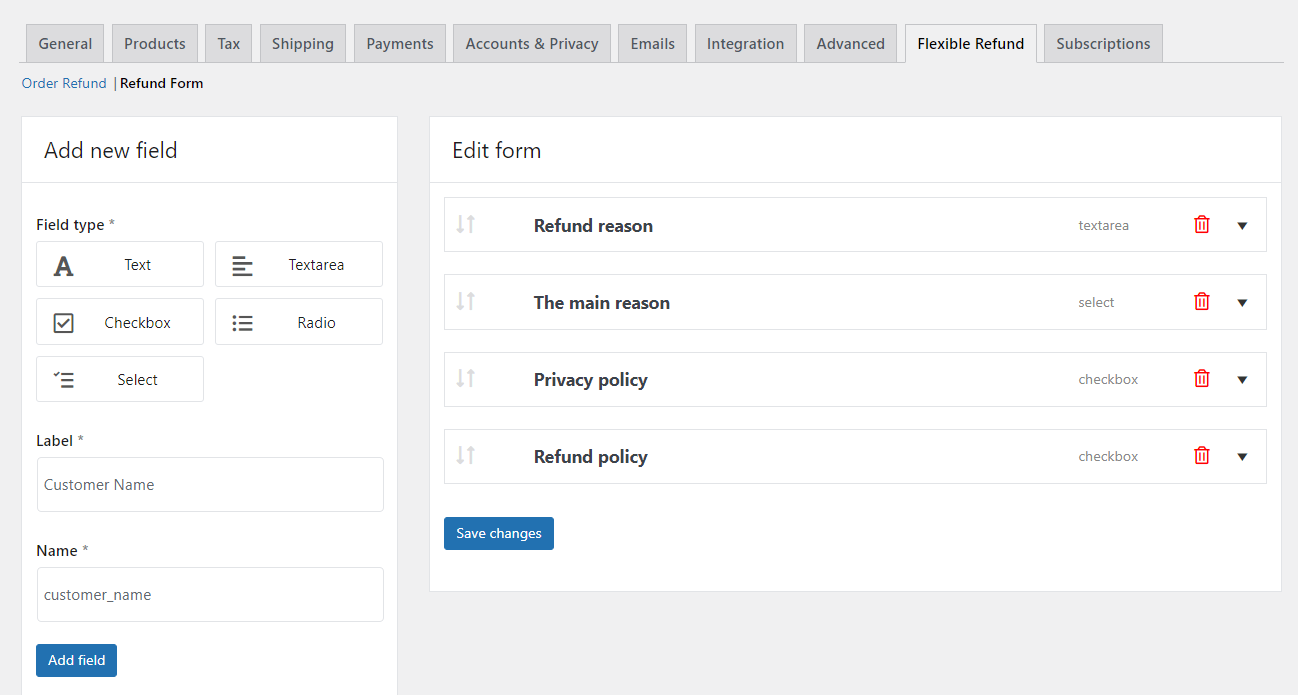
8. Flexible Refund and Return – automate the refund process
Processing returns manually can be inefficient and frustrating for customers. This tool automates return requests and refunds, making the process more seamless. Many eCommerce sites offer refunds. Of course, the benefits of automation are obvious.
Key automation features:
- Automated refund request handling
- One-click refund approvals
- Easy return management interface
- Refund form builder included
9. Flexible Invoices – automate invoice generation
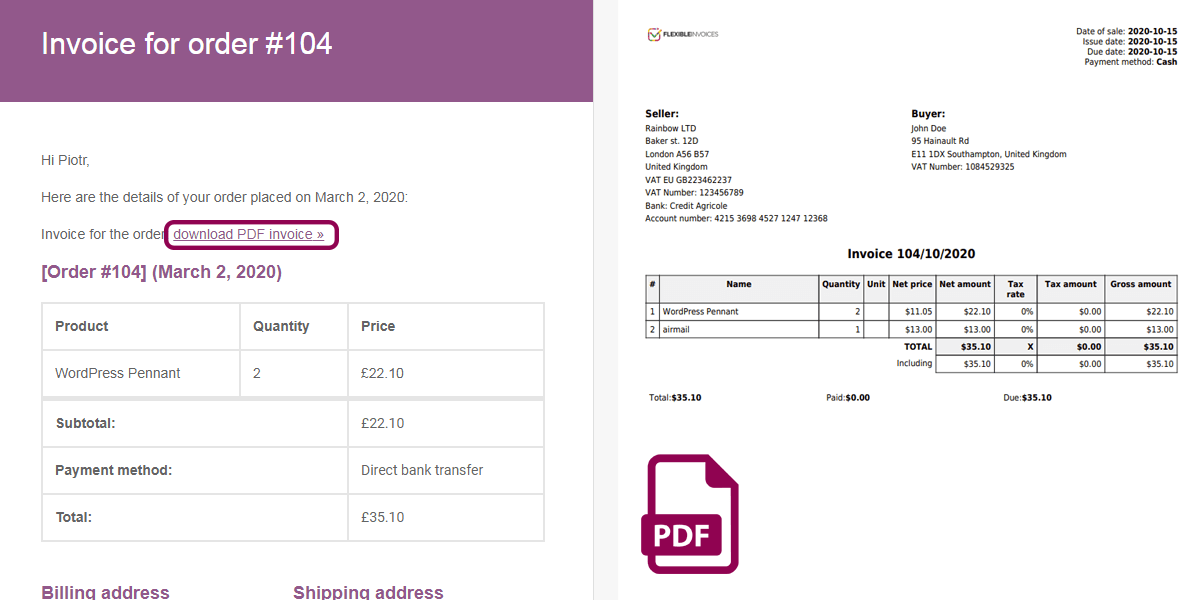
Manually creating invoices for every order is time-consuming. This plugin generates invoices automatically, ensuring accurate and timely documentation. This tool can give your eCommerce platform automated tools for invoicing and reports.
The eCommerce automation software for invoicing is necessary if you want to scale.
Key automation features:
- Auto-generate and send invoices
- Invoice template editor
- Bulk invoice processing
- Emails with invoices
- Reports
- Reverse charge and OSS support
- WPML ready
10. Dropshipping Export Products – automate supplier product feeds
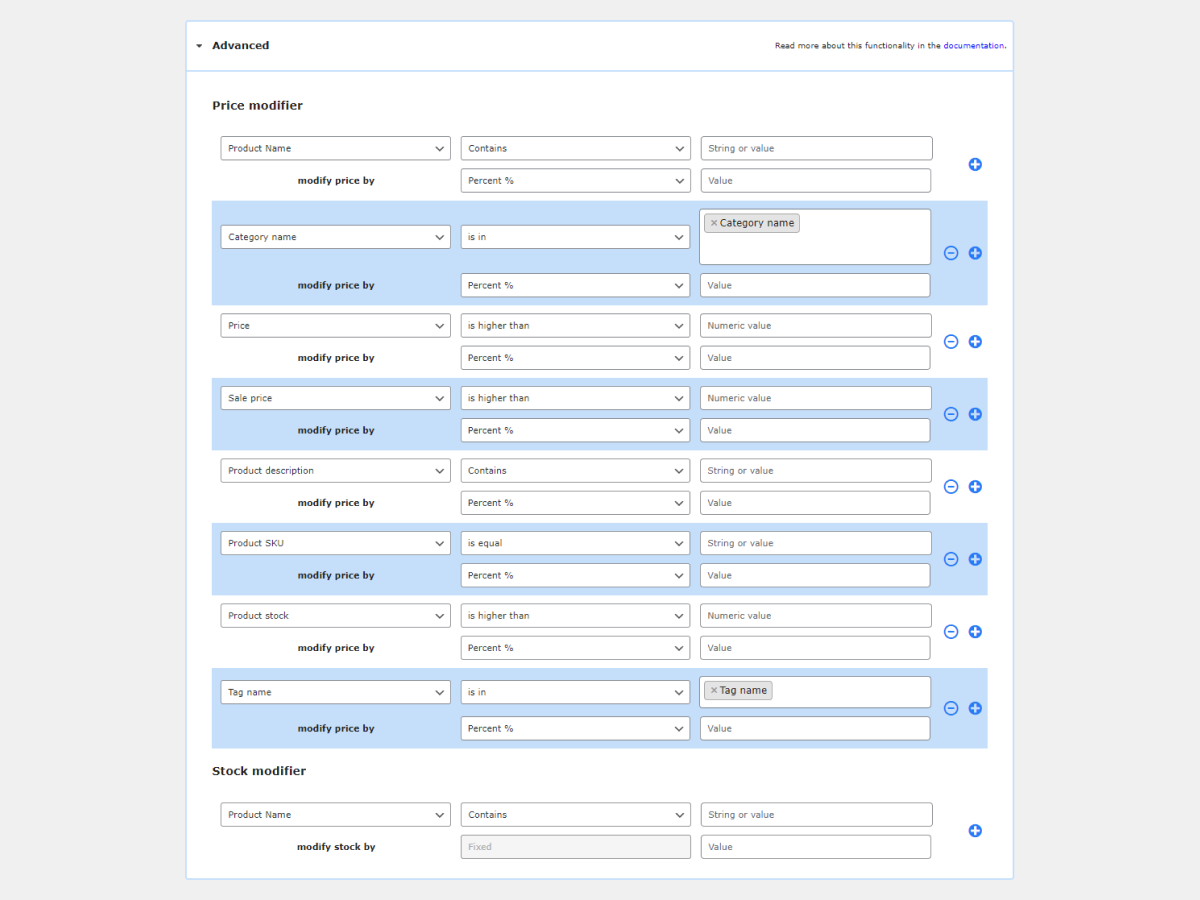
For businesses that sell on multiple platforms, automating product exports can save time and reduce errors in product listings.
Key automation features:
- Scheduled product exports
- Export to multiple file formats
- Automatic updates for supplier feeds
- Product field mapping
11. ShopMagic – automate email marketing and customer engagement
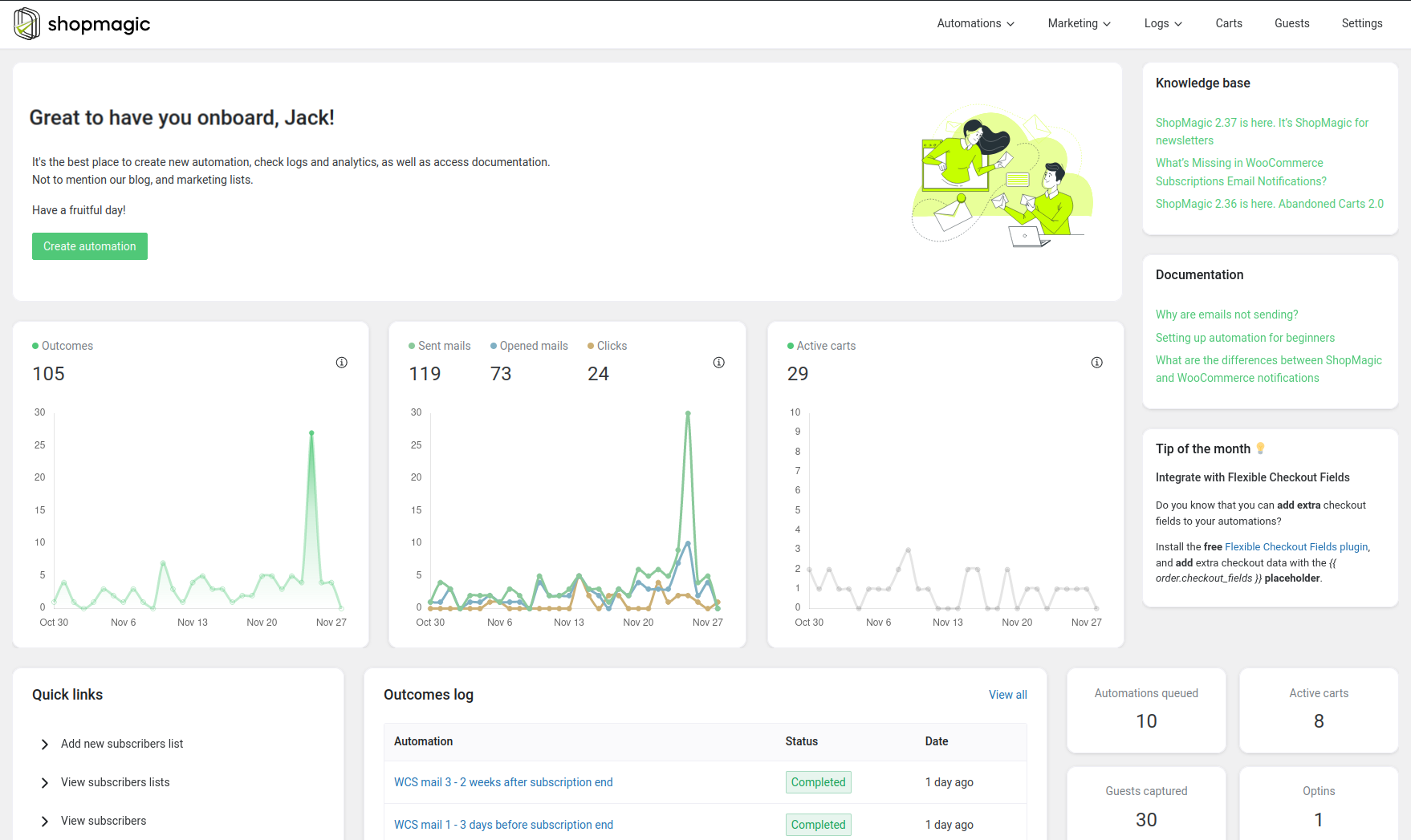
Effective marketing automation helps convert leads and retain customers. ShopMagic enables store owners to send targeted emails, automate follow-ups, and increase conversions effortlessly. This is an advanced eCommerce marketing automation software for WordPress and workflow automation for WooCommerce.
You can also use this plugin for customer service automation and other eCommerce operations such as: email list building, saving data to Google Spreadsheets, SMS marketing automation, etc.
Key automation features:
- Abandoned cart recovery emails
- Post-purchase follow-ups and review requests
- Automated email sequences for customer engagement
- Taking care of automated discounts and promo codes
- Comprehensive marketing automation tool for WordPress and WooCommerce
12. Dropshipping Orders Export – automate supplier order management
Managing supplier orders manually can be inefficient for dropshipping businesses. This tool automates the process of exporting orders to suppliers, ensuring timely fulfillment.
Key automation features:
- Export orders to suppliers automatically
- Support for multiple file formats
- Scheduled exports to maintain workflow consistency
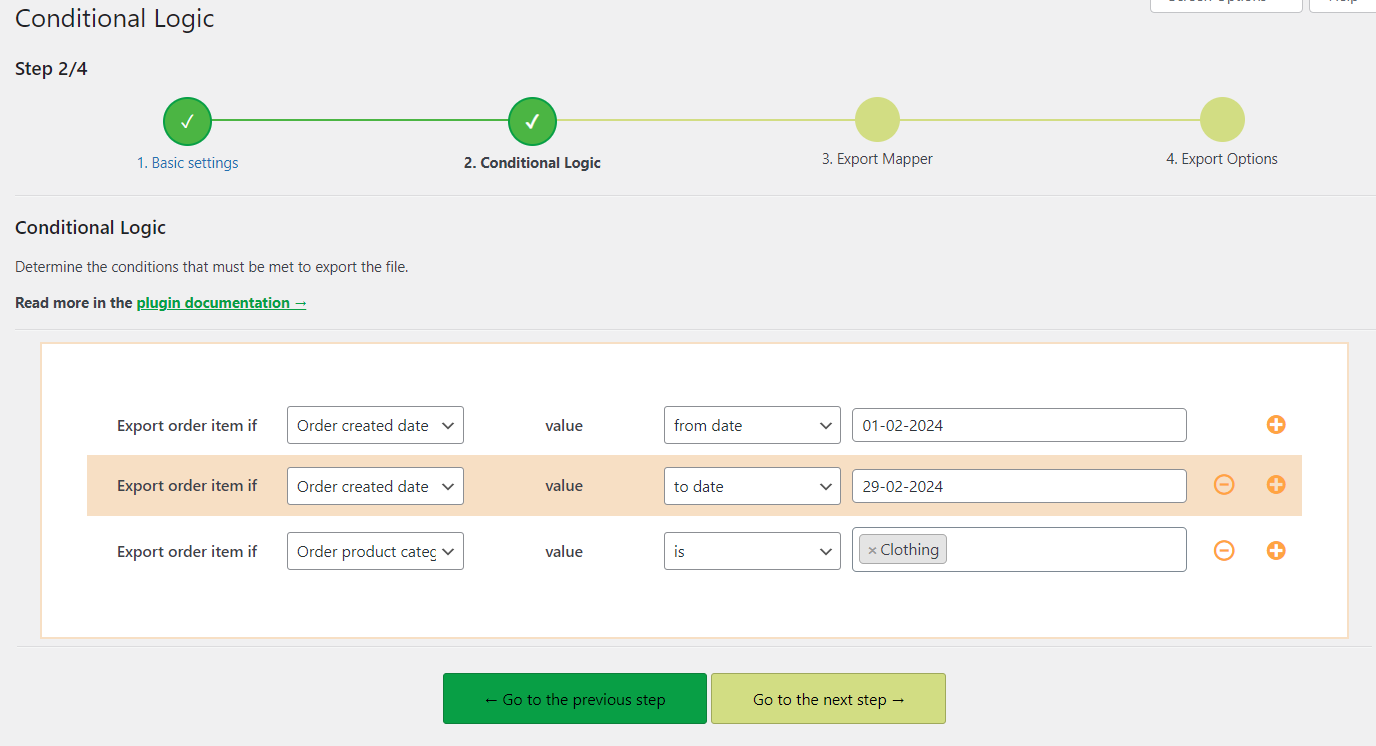
- Conditions for WooCommerce order export
13. Flexible Subscriptions Recurring Shipping – automate subscription shipping costs
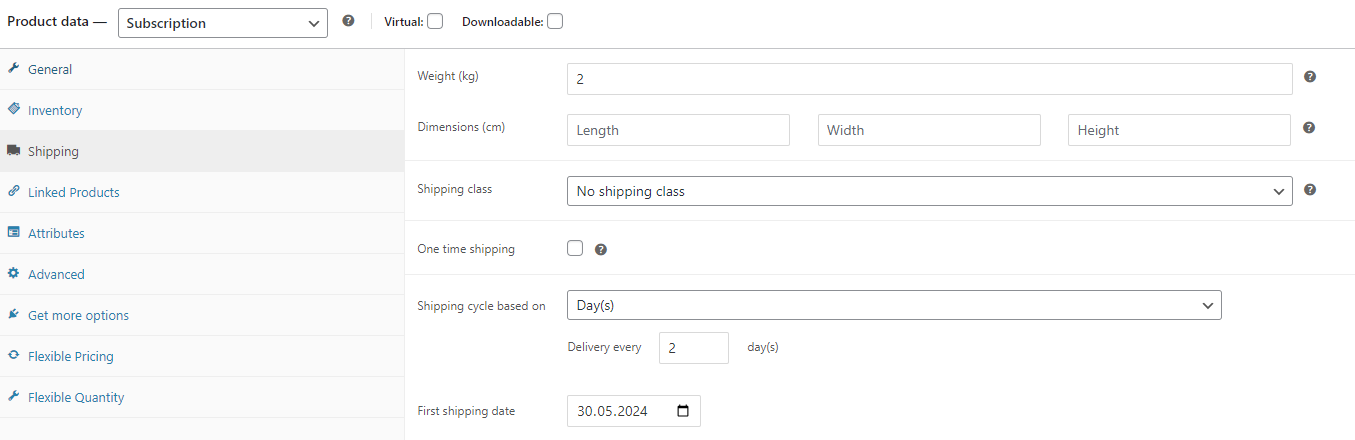
For subscription-based businesses, calculating and charging recurring shipping fees can be a challenge. This plugin ensures shipping charges are applied correctly to repeat orders.
Key automation features:
- Automatically charge recurring shipping fees
- Manage subscription-based shipping rates
- Ensure smooth renewals with accurate costs
- Automatic orders for shipping based on schedule
14. Flexible Subscriptions Payment Retry – reduce failed subscription payments
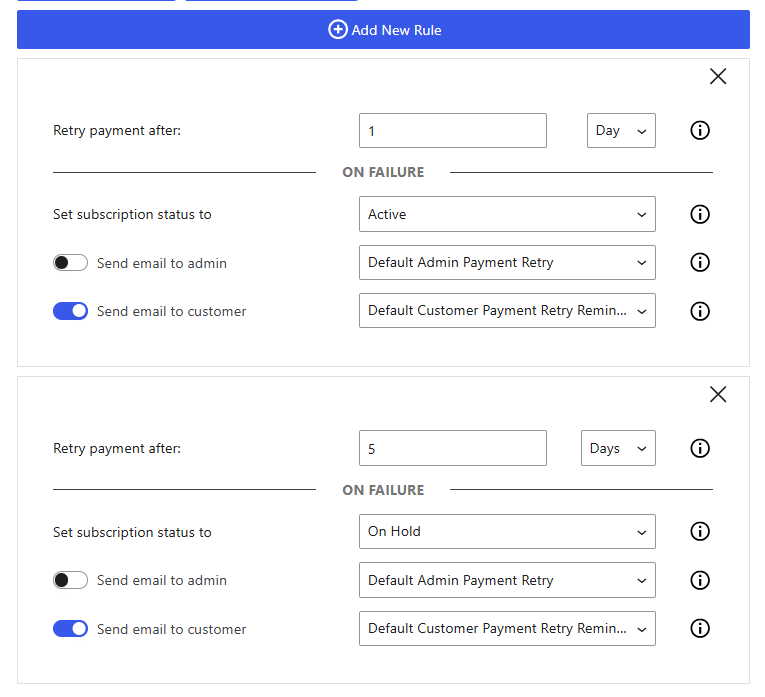
Failed payments can disrupt recurring revenue streams. This tool automates retrying failed subscription payments, ensuring smooth subscription renewals, and reducing abandoned subscriptions.
Key automation features:
- Automatic retries for failed payments
- Notifications to customers about payment failures
- Improved retention for subscription-based businesses
- Option to set payment retry flow
15. Flexible Subscriptions Stock Management – optimize inventory for subscription products
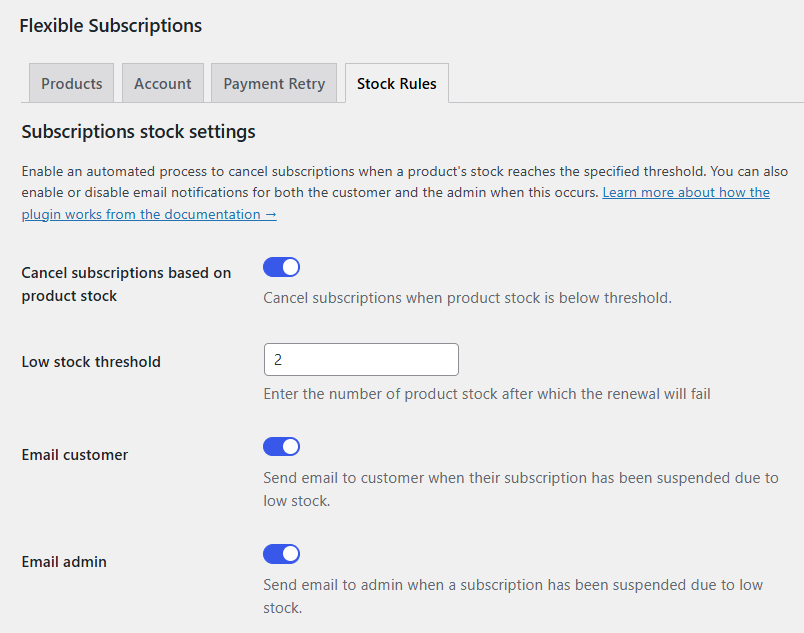
Keeping track of stock levels for subscription-based products is essential for ensuring availability. This plugin automates inventory management for recurring orders, preventing selling out-of-stock products.
Key automation features:
- Automatic stock updates for subscription products
- Ensure accurate inventory tracking
- Prevent issues with product availability for renewals
- Cancel subscriptions based on product stock
Conclusion: The future of WooCommerce automation
Automation is no longer just a convenience - it’s a necessity for scaling an online store. By integrating the right tools, WooCommerce store owners can eliminate repetitive tasks, reduce errors, and focus on business growth.
You may use the top eCommerce automation tools to optimize and automate eCommerce. The above examples: of eCommerce automation ideas are software tools built by WP Desk for WordPress/ WooCommerce.
You can set basic automation processes or use more in your automation strategies.
Key Takeaways
- Automating order fulfillment, marketing, and pricing strategies can increase efficiency and revenue.
- Choosing the right tools depends on your business goals and existing WooCommerce setup.
- The best automation solutions integrate seamlessly and provide measurable ROI.
- Marketing automation tools can improve e-commerce business (for email creation, discounts, product personalization, shipping labels, etc.).
- Right automation technique may help your eCommerce brand.
- Fully automation tools like ShopMagic let you create automated email campaigns and recover abandoned carts.
- eCommerce store owners can increase email marketing automation capabilities with best tools.
Investing in automation can help your WooCommerce store run smoothly, giving you more time to focus on scaling your online business and improving customer experience.







Leave a Reply