

Looking to improve your WooCommerce checkout page? You’re not alone. Checkout is one of the most important steps in the buyer journey — and one of the most common drop-off points. By customizing and enhancing the checkout experience, you can increase your conversion rates and make your store more user-friendly.
Contents
- Best WooCommerce checkout plugins for 2025: Customize your checkout page and boost conversions
- Flexible Checkout Fields PRO
- Active Payments for WooCommerce
- Flexible Product Fields PRO
- Automatic Payment Status WooCommerce
- Flexible Subscriptions
- YITH WooCommerce One-Click Checkout
- PeachPay for WooCommerce
- WooCommerce One Page Checkout
- Direct Checkout for WooCommerce
- Flux Checkout for WooCommerce
- Payment Gateway Based Fees and Discounts for WooCommerce
- FunnelKit Checkout
- WooCommerce Multistep Checkout Wizard
- WooCommerce Social Login
- Cart Notices for WooCommerce
- Currency Switcher for WooCommerce
- Digital Goods for WooCommerce Checkout
- WPCode – Insert Headers and Footers + Custom Code Snippets
- Payment Plugins for Stripe WooCommerce
- Booster for WooCommerce
- Comparison table: WooCommerce checkout plugins
- Checkout add-ons - final thoughts
- Customize the WooCommerce Checkout Page: Tips & Tools for Success
- Customize the WooCommerce Checkout Page: Top Tips for a Seamless Experience
- WooCommerce Checkout - Settings, Shortcode & Configuration Guide
- WooCommerce Checkout Field Editor: How to Add, Edit & Remove Billing Fields
- How to speed up & optimize WooCommerce checkout (15 tips)
Best WooCommerce checkout plugins for 2025: Customize your checkout page and boost conversions
Cart and checkout usability is a very important factor if you want to optimize your checkout page conversion rate. Default checkout process may not be enough or tailored to effectiveness.
You need to take a look at many things if you don't want to lose customers during the checkout process, for example, because of too many fields. So close to payment.
In this article, we’ll introduce 20 selected best WooCommerce checkout add ons. Each solves a specific problem — from custom fields and payment rules to checkout UX, speed, and design.
We’ll also include a comparison table to help you pick the best tools for your store.
-
Flexible Checkout Fields PRO
Flexible Checkout Fields PRO lets you add, edit, or remove fields from the default WooCommerce checkout page. You can also assign prices and use conditional logic for more dynamic checkout flows.
Use case: Add a “VAT ID” field only for B2B customers.
Features:
- Add custom fields to the checkout (17+ field types)
- Conditional logic for fields on your checkout form
- Pricing per field
- Custom CSS classes
- Rearranging fields to the checkout page based on products
- Easily manage fields on your checkout page
- Improve checkout experience for your customers (less fields)
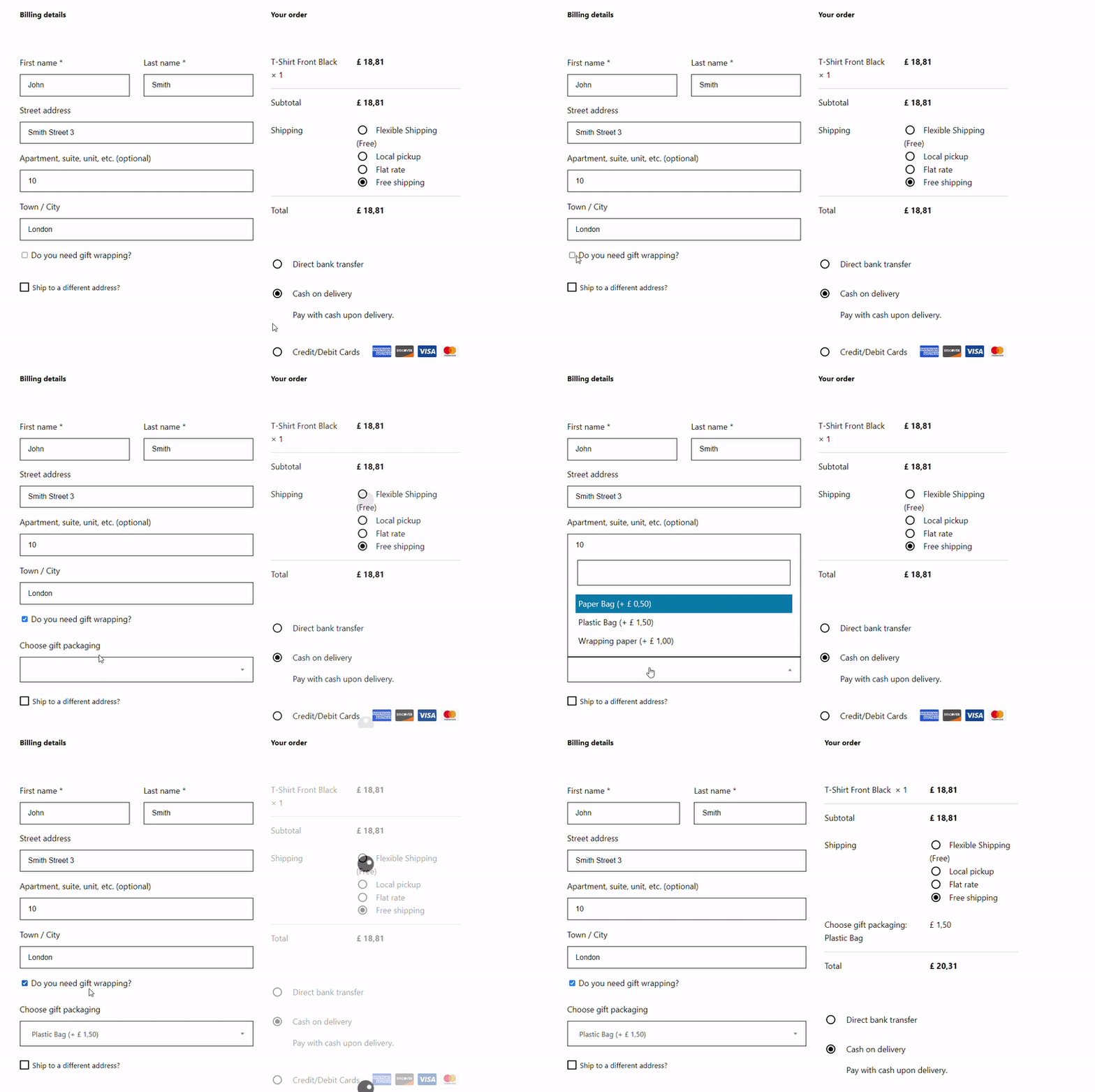
Flexible Checkout Fields plugin - checkout field editor for WooCommerce Customize the checkout form and optimize your WooCommerce checkout page speed. Adding custom fields to your checkout is easy with this plugin (there is also a free version of the extension). -
Active Payments for WooCommerce
Active Payments allows you to control which payment gateways appear based on shipping methods or order value. For example, you can disable PayPal for certain shipping zones.
Use case: Hide “Cash on Delivery” when the order exceeds $300.
Features:
- Conditional gateway visibility
- Fees per payment method
- Works with Checkout Blocks
- Highlight preferred methods
- Compatible with WPML
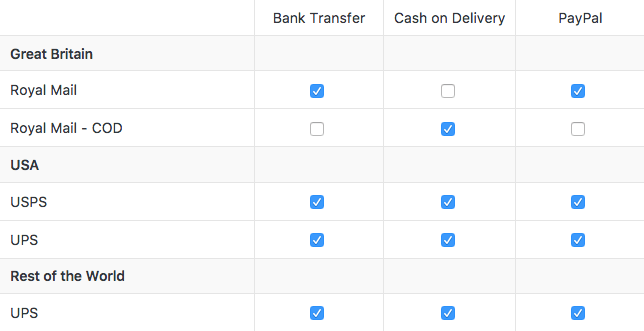
Hide selected payment options for shipping methods. You can set up all combinations of shipping and payment methods. -
Flexible Product Fields PRO
Flexible Product Fields PRO lets you add custom fields to product pages (not checkout). Great for custom orders, such as engraved items. Better product selection and checkout forms compatibility.
Use case: Add a “Your message” field on a mug product.
Features:
- Compatible with conditional logic in Flexible Checkout Fields
- File uploads, text, date fields
- Conditional display rules
- Add price to options
- Works with variations
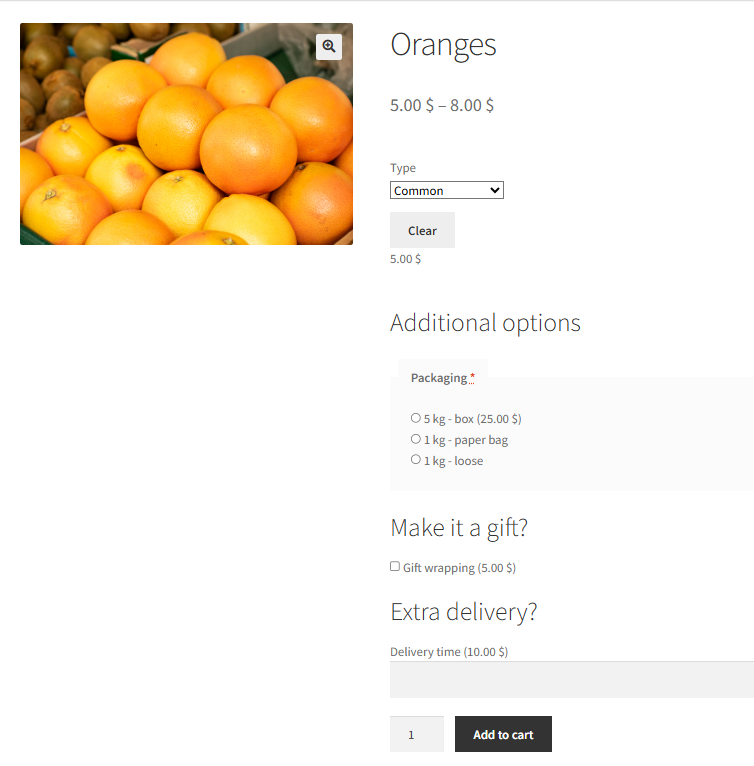
Variable products with custom fields There is also a free version of the extension). -
Automatic Payment Status WooCommerce
Automatic Payment Status helps you skip manual order status changes by automatically change the order status to selected ones, for example, completing orders after payment for specific products or payment gateway.
Use case: Auto-complete orders paid via PayPal.
Features:
- Per-gateway control
- Reduces admin workload
- Compatible with downloads
- Speeds up delivery
- Runs automatically based on conditions
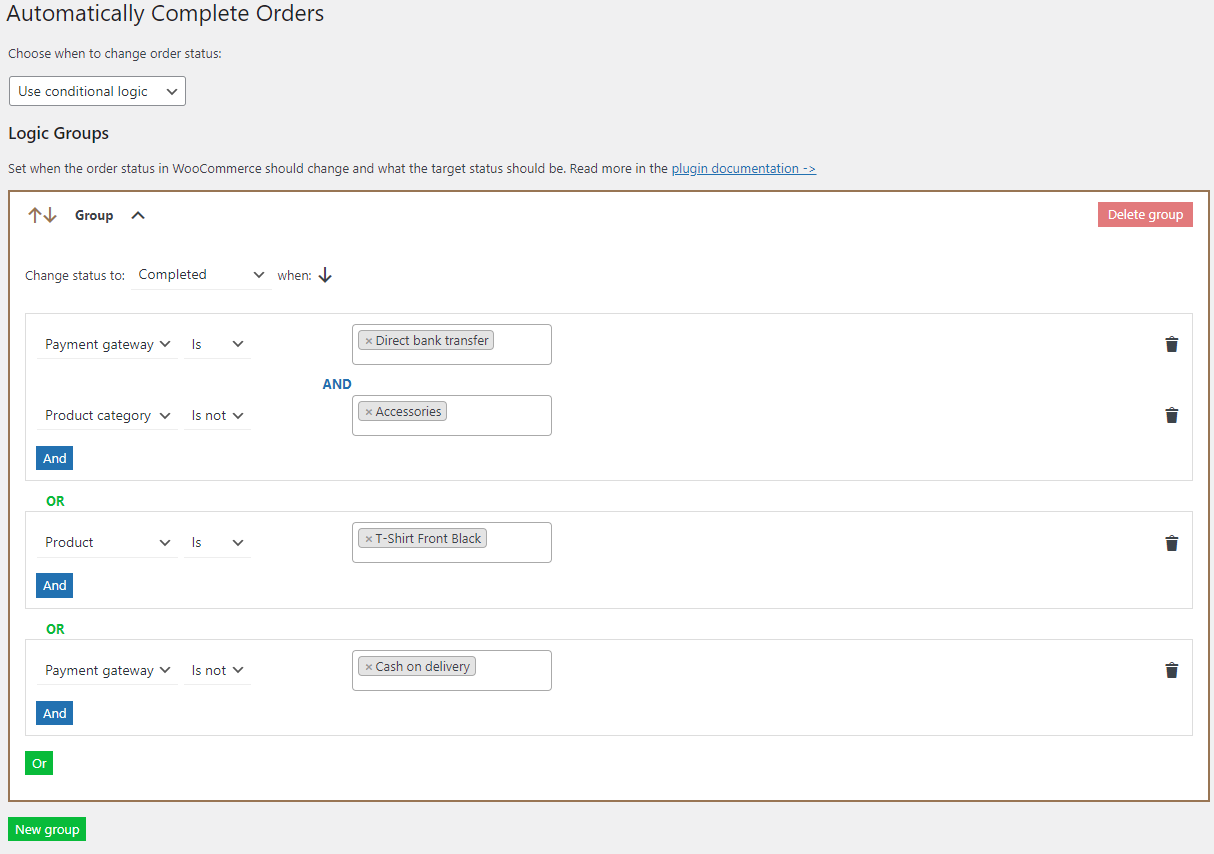
Logic groups divided by the logical operator OR -
Flexible Subscriptions
Flexible Subscriptions is a lightweight plugin for WooCommerce for selling recurring services or products for free. Simplify the checkout process for subscriptions in WooCommerce.
Use case: Sell a monthly subscription to a digital course.
Features:
- Simple or variable subscriptions
- Free alternative to WooCommerce Subscriptions
- Flexible billing intervals
- Recurring payments and reordering
- Payment gateway integration

WooCommerce product subscription -
YITH WooCommerce One-Click Checkout
YITH One-Click Checkout helps repeat customers complete purchases with a single click.
Use case: Registered customers can reorder without re-entering info.
Features:
- Skip cart and form
- Stripe integration
- Custom button styles
- Works on product pages
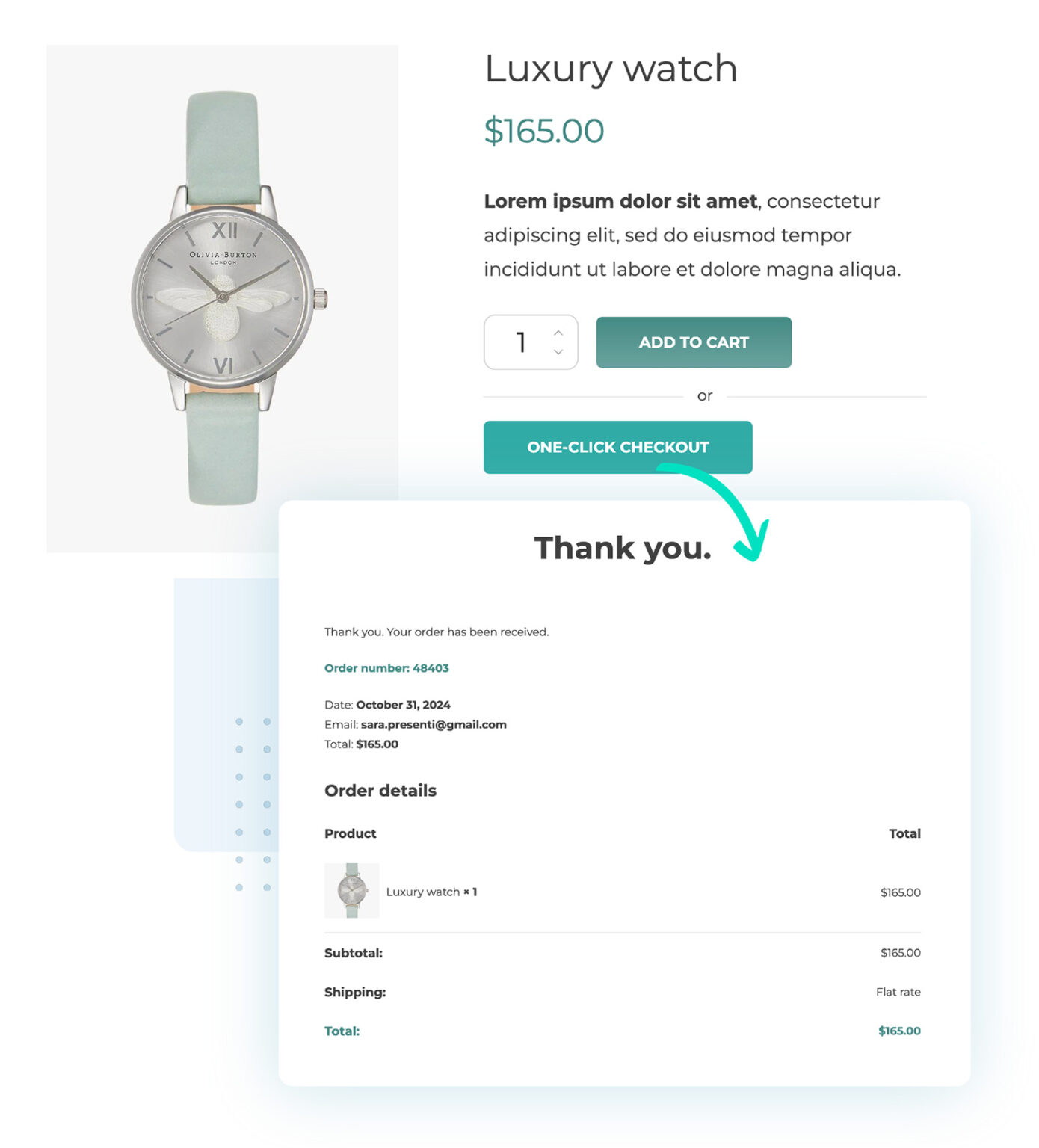
YITH WooCommerce One-Click Checkout use case image
source: https://yithemes.com/themes/plugins/yith-woocommerce-one-click-checkout/ -
PeachPay for WooCommerce
PeachPay offers a fast popup checkout overlay with built-in payment gateways and quick-fill for returning users.
Use case: One-click checkout for faster conversions.
Features:
- Stripe, PayPal, Google Pay support
- Branding customization
- Mobile-friendly
- Cart overlay integration
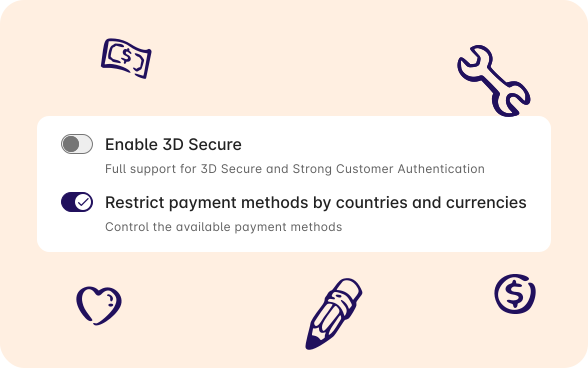
Peach Pay use case image
source: https://peachpay.app/ -
WooCommerce One Page Checkout
WooCommerce One Page Checkout combines product selection and checkout in one view.
Use case: Run promotions with landing pages that convert fast.
Features:
- Shortcode-based layout
- Product + form on one page
- Works with existing and custom templates

WooCommerce One Page Checkout main image
source: https://woocommerce.com/products/woocommerce-one-page-checkout/With the plugin, WooCommerce checkout process can be customized right on the product page.
-
Direct Checkout for WooCommerce
Direct Checkout simplifies the flow by skipping the cart page entirely. Thus an online store owner may lower the time needed to complete the purchase.
Use case: Redirect users directly to checkout after clicking “Buy.”
Features:
- Skip cart = direct checkout
- AJAX “Add to cart” option for easier shopping
- Minimal configuration
- Quick purchase button for products in PRO
- One-page checkout options in PRO
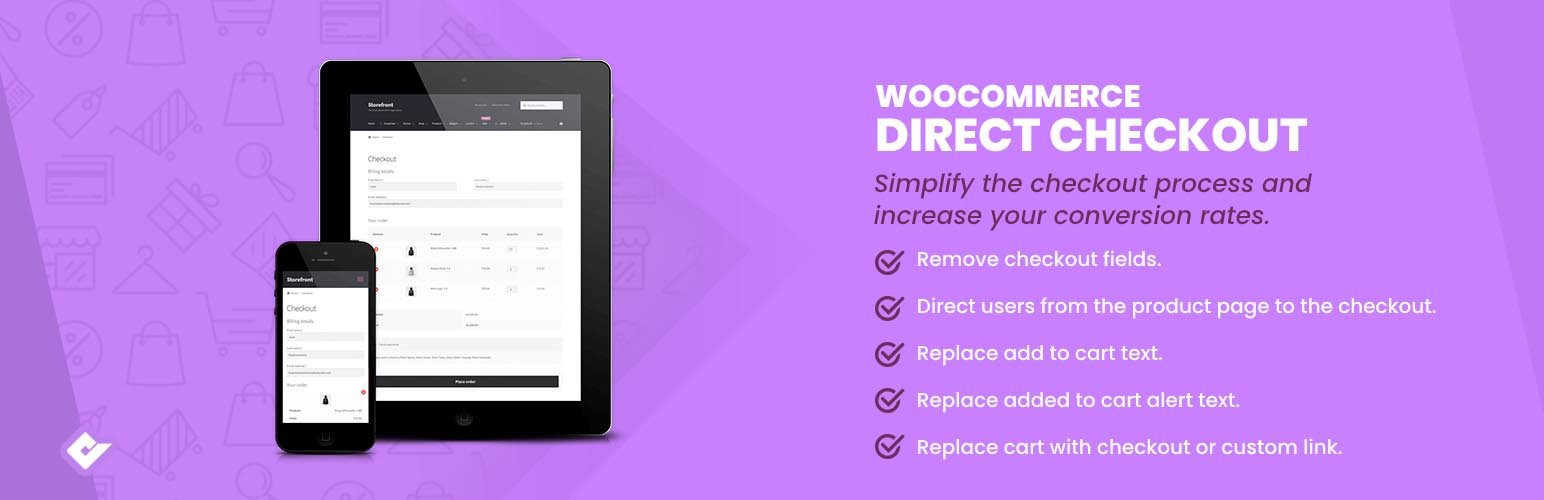
Direct Checkout for WooCommerce banner
source: https://wordpress.org/plugins/woocommerce-direct-checkout/ -
Flux Checkout for WooCommerce
Flux Checkout is a modern, step-by-step checkout optimized for UX and mobile.
Use case: Replace your full-page checkout with a cleaner flow.
Features:
- Multi-step interface
- Mobile-first design and styling
- No header, footer, or sidebars
- Address autocomplete
- Cross-selling options
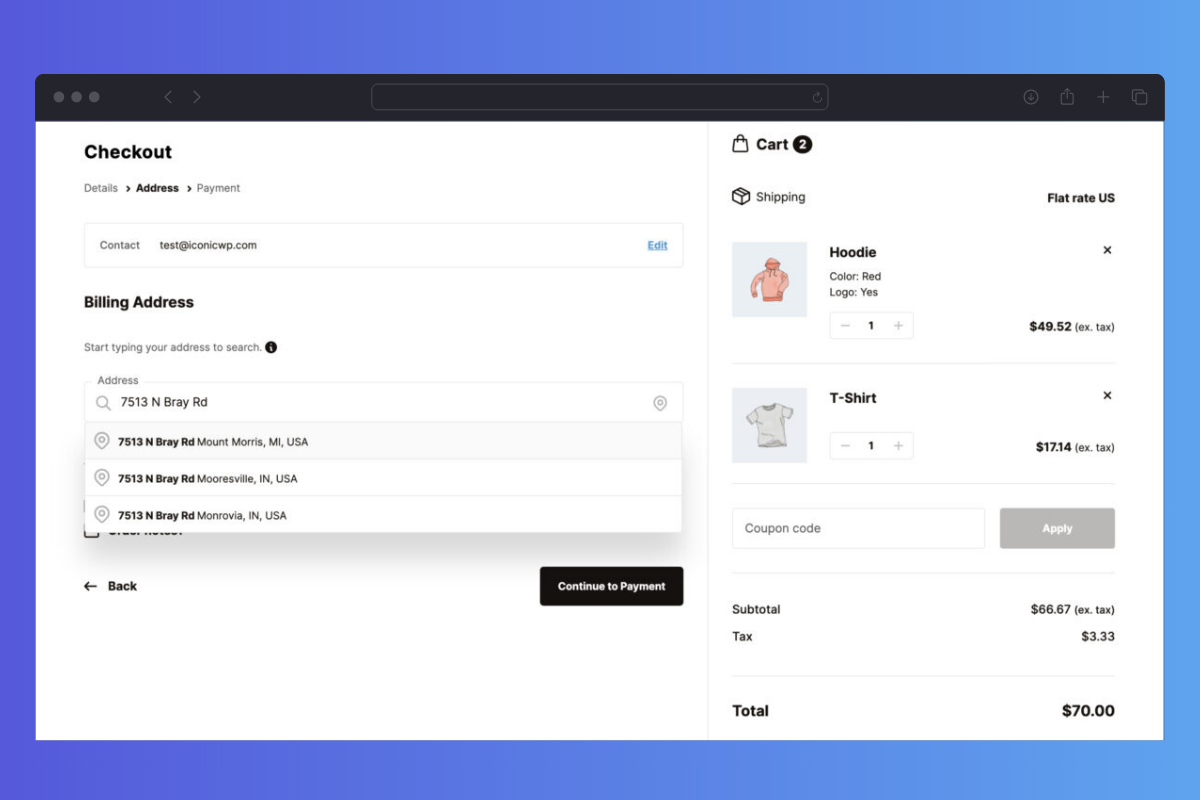
Flux Checkout use case image source: Iconic
-
Payment Gateway Based Fees and Discounts for WooCommerce
Payment Gateway Based Fees and Discounts adds a pricing layer to your checkout by enabling dynamic fees or discounts depending on the payment method chosen by the customer.
Use case: Add a 1.5% fee to PayPal and a 2% discount for direct bank transfers.
Features:
- Apply percentage- or fixed-fee per gateway
- Offer automatic discounts for low-fee payment options
- Fees and discounts for all products or selected ones
- Conditions based on cart total, countries, shipping methods, or user roles (in PRO)

Payment Gateway Based Fees and Discounts for WooCommerce banner
source: https://wordpress.org/plugins/checkout-fees-for-woocommerce/ -
FunnelKit Checkout
FunnelKit transforms the WooCommerce checkout into a customizable sales funnel with builder support.
Use case: Add order bumps to increase AOV at checkout.
Features:
- Pre-built funnel templates
- A/B testing
- Order bumps and upsells
- Custom checkout flows
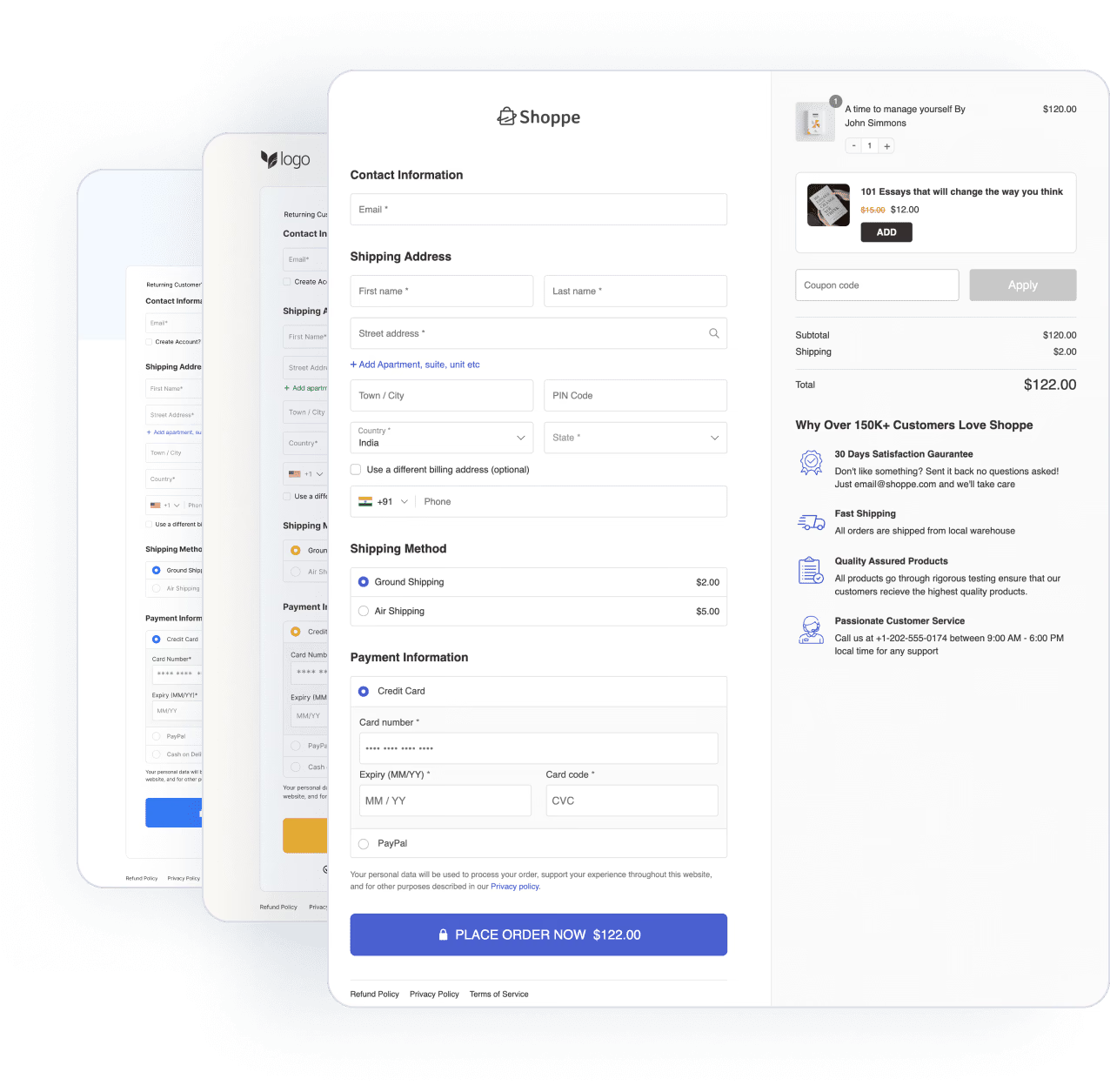
FunnelKit Checkout use case image
source: https://funnelkit.com/ -
WooCommerce Multistep Checkout Wizard
Multistep Checkout Wizard breaks the form into clear steps — helpful for stores with complex data needs.
Use case: Guide users step-by-step for better clarity.
Features:
- Progress bar
- Responsive layout
- Step title customization
- Smooth UX transitions
- Compatible with WPML

WooCommerce MultiStep Checkout Wizard main image
source: https://codecanyon.net/item/woocommerce-multistep-checkout-wizard/8125187 -
Social Login adds login options for Facebook, Google, and more.
Use case: Let customers skip account creation.
Features:
- Secure login via social media
- Auto-linking with WooCommerce accounts
- Usage reports
- Account management for users

Social Login for WooCommerce main image
source: https://woocommerce.com/products/woocommerce-social-login/ -
Cart Notices for WooCommerce
Cart Notices is a WooCommerce plugin to add additional messages on the cart or checkout page.
Use case: “You’re $12 away from free shipping!”
Features:
- Cart-conditional messages
- Limited-time offers
- Show notices on other pages with shortcode support
- Add urgency elements

Cart Notices for WooCommerce main image
source: https://woocommerce.com/products/cart-notices/ -
Currency Switcher for WooCommerce
Currency Switcher supports multiple currencies and lets users toggle based on location.
Use case: Show EUR, GBP, or USD depending on visitor geo-location.
Features:
- Automatic IP detection for displaying prices in local currency
- Manual switcher widget
- Currency symbol and format control
- Compatible with block-based checkout
- Real-time rate updates and multiple zone pricing
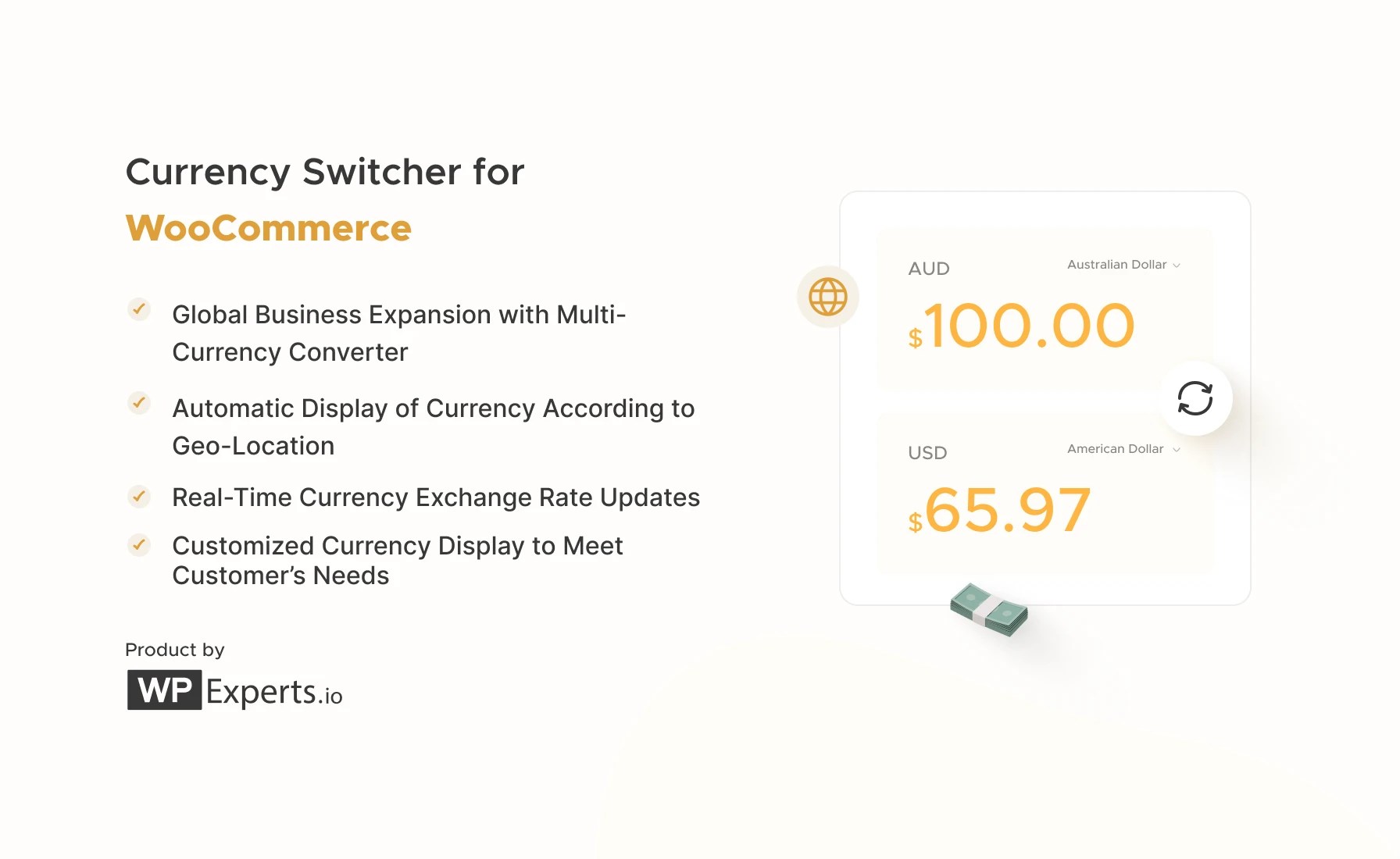
Currency Switcher for WooCommerce main image
source: https://woocommerce.com/products/currency-switcher-for-woocommerce/ -
Digital Goods for WooCommerce Checkout
The Digital Download Goods Checkout for WooCommerce streamlines the checkout process by removing unnecessary fields for digital and virtual products. Perfect for stores selling eBooks, music, videos, and other downloads, it ensures a faster, smoother buying experience, boosting conversions and reducing cart abandonment.
Use cases: Simplifies checkout for customers who expect instant access to digital goods.
Features:
- Quick checkout for all downloadable and/or virtual products.
- Exclude billing, shipping, and order note fields on checkout.
- Add a quick checkout button on product and shop pages.
- Insert the checkout process directly on the product page.
- Customize excluded fields based on product, category, or tag.
- Fully compatible with WooCommerce downloads & virtual products.
- Boosts sales by improving checkout speed and user experience.

-
The WPCode plugin lets you safely add code snippets — including tracking scripts and conversion pixels — to your WooCommerce checkout pages without editing theme files. Ideal if you want to connect Google Analytics, Meta Pixel, or run A/B tests.
Use case: Add a conversion tracking script to the “Thank You” page after successful checkout or user reviews on the checkout page.
Features:
- Insert code to header, footer, or specific pages (like checkout)
- Use conditional logic to target cart, checkout, or order pages
- No need to edit theme files
- Supports shortcodes, HTML, PHP, JavaScript

WPCode – Insert Headers and Footers + Custom Code Snippets – WordPress Code Manager banner
source: https://wordpress.org/plugins/insert-headers-and-footers/ -
Payment Plugins for Stripe WooCommerce
Payment Plugins for Stripe is a free plugin adds full Stripe integration to your WooCommerce store. It supports all major cards, mobile wallets like Apple Pay and Google Pay, and local payment methods.
Use case: Let users pay with a saved card or choose Klarna directly from the checkout page.
Features:
- Accept Apple Pay, Google Pay, Klarna, ACH, iDEAL, and more
- Supports 3DS 2.0
- Support for checkout blocks
- Compatible with WooCommerce Subscriptions

Payment Plugins for Stripe WooCommerce banner
source: https://wordpress.org/plugins/woo-stripe-payment/ -
Booster for WooCommerce
Booster for WooCommerce is a feature-packed all-in-one plugin offering 100+ modules — including checkout tweaks.
Use case: Add checkout fees, custom fields, and gateway rules.
Features:
- Customize checkout (coupon code, fees)
- Price and currency management
- Conditional rules per payment gateway
- No coding
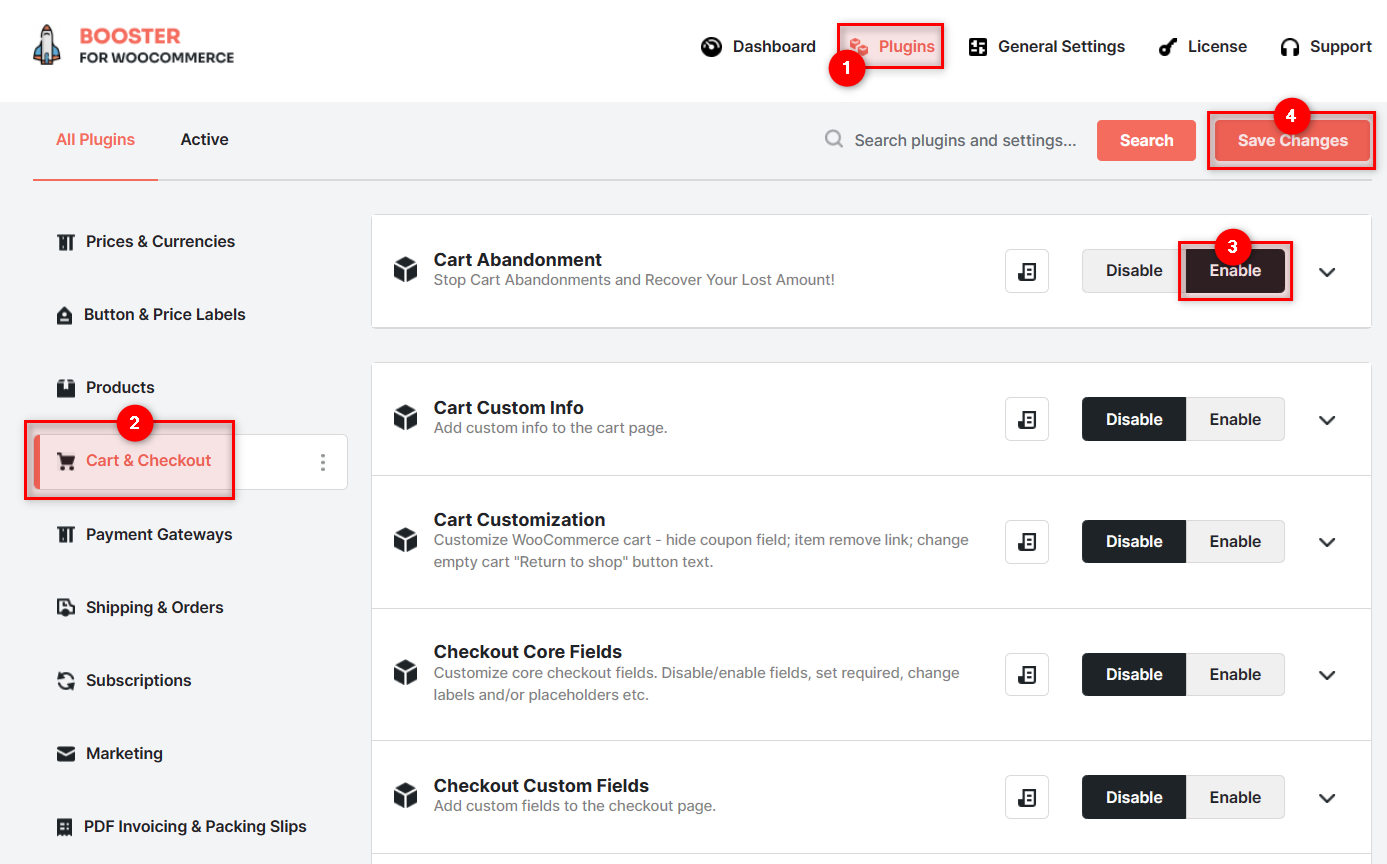
Booster for WooCommerce: Abandoned Cart Recovery for WooCommerce use case image
source: https://booster.io/features/woocommerce-cart-abandonment/
Comparison table: WooCommerce checkout plugins
Here's a table comparing the key features, benefits, and use cases of all 20 WooCommerce plugins / checkout add-ons mentioned above:
| Plugin Name | Main Feature | Example Use Case | Key Features |
|---|---|---|---|
| Flexible Checkout Fields PRO | Edit and add custom checkout fields | Add delivery instructions or VAT ID field | Conditional logic, pricing fields, CSS styling, multiple field types |
| Active Payments for WooCommerce | Conditional payment method visibility and fees | Disable PayPal for specific shipping zones | Payment restrictions, fee per payment gateway |
| Flexible Product Fields PRO | Custom fields on product pages | Collect engraving info or upload logos | Text/checkbox inputs, logic per variation, add pricing, file uploads |
| Automatic Payment Status | Auto-update order status after payment or selected order statuses | Auto-complete orders | Status automation, per-gateway rules, auto-complete logic, lower support load |
| Flexible Subscriptions | Create and manage recurring subscriptions | Sell monthly digital magazine subscriptions | Flexible billing periods, user-controlled subscriptions, variable subscriptions |
| YITH WooCommerce One-Click Checkout | One-click ordering for registered users | Let repeat customers reorder in one click | Custom button placement, Stripe integration, cart skip option, user targeting |
| PeachPay for WooCommerce | Fast one-click checkout overlay | Show sleek popup checkout for all products | Coupon support, Apple Pay & Google Pay, brand styling, 1-click checkout |
| WooCommerce One Page Checkout | Single-page checkout for product and payment | Bundle product selection and payment on one page | Shortcodes support, flexible layout, works with any product, real-time cart |
| Direct Checkout for WooCommerce | Bypass cart and go straight to checkout | Enable 'Buy Now' for quick conversions | Cart skip toggle, text change on Add to Cart, compatibility with variations, streamlined flow |
| Flux Checkout for WooCommerce | Modern multi-step checkout layout | Split checkout into digestible steps | Step styling, address validation, mobile-optimized, brand-fit templates |
| Payment Gateway Based Fees and Discounts for WooCommerce | Dynamic fees or discounts by payment method | Add a 1.5% fee to PayPal or discount for bank transfers | Fee/discount logic, cart conditions, user role rules, supports global/local configs |
| FunnelKit Checkout | Sales-funnel oriented checkout with bumps/upsells | Turn checkout into a marketing funnel | Ready templates, checkout flows |
| WooCommerce Multistep Checkout Wizard | Step-by-step checkout with progress bar | Show each step with editable labels | Progress bar UI, mobile-friendly, editable headings, smooth UX |
| WooCommerce Social Login | Login and registration with social accounts | Speed up checkout via Google login | Facebook, Twitter, Google login, user tracking, design match, Woo integration |
| Cart Notices for WooCommerce | Custom messages at checkout/cart | Notify user of free shipping threshold | Conditions-based alerts, shortcodes, urgency tools, countdown support |
| Currency Switcher for WooCommerce | Display prices and process payments in multiple currencies | Allow shoppers to switch to EUR, USD, GBP | Currency auto-detect, manual switching, country targeting, multi-gateway |
| Digital Goods for WooCommerce Checkout | Streamlined checkout for digital goods | Hide address fields when selling an eBook | Billing skip, optional data request, minimal checkout, field suppression |
| WPCode – Insert Headers and Footers + Custom Code Snippets | Add tracking scripts or custom code to checkout pages | Insert Google Analytics or Meta Pixel on checkout | Insert snippets by location, use conditions, no theme edits, JS/PHP supported |
| Payment Plugins for Stripe WooCommerce | Full Stripe integration with wallets and saved cards | Let users pay with saved cards or Apple Pay | Apple Pay, Google Pay, Klarna, 3DS 2.0, Subscriptions support |
| Booster for WooCommerce | 100+ modules including checkout customization | Apply custom fees and extra fields conditionally | Checkout field edit, conditional logic, multi-module integration, design tweaks |
Checkout add-ons - final thoughts
- Customize only what’s needed — don’t overwhelm users.
- Use a checkout field editor to customize the WooCommerce checkout page.
- Avoid using multiple plugins with overlapping functions.
- Always test your checkout flow with real test orders.
- Faster, simpler checkout = better sales.




Leave a Reply