• Skip to primary navigation
  • Skip to main content
  • Skip to primary sidebar
  • Skip to footer
WP Desk = premium plugins for WordPress & WooCommerce
  • Plugins
        • Checkout & OrdersMake your work easier and automate the orders. Adjust the order form to your needs and make it more useful to your customers. Print order labels directly from WooCommerce. Put the orders in order using our plugins. Find out how to streamline the procurement process in your store.
          • Flexible Checkout Fields
          • Active Payments
          • Automatic Payment Status
          • Flexible Refund and Return Order
          • Print Orders and Address Labels
          • Flexible Subscriptions Recurring Shipping
          • Flexible Subscriptions Payment Retry
          • Flexible Subscriptions Stock Management
        • ProductsThese plugins will help you manage your WooCommerce products. Here you will find the plugins to import and update products from XML or CSV files. Then you can change the product unit of measure, show the lowest price in the last 30 days (Omnibus Directive), or let customers name the product price!
          • Flexible Product Fields
          • Dropshipping Import Products
          • Dropshipping FTP Import Products
          • Dropshipping Export Products
          • Custom Price
          • WP Desk Omnibus
          • Flexible Quantity Calculator
          • Dropshipping Orders Export
        • MarketingPromote your store online. Add products from your shop to price comparison websites directly from WooCommerce. Acquire new customers and communicate with your existing ones. Build a customer base and communicate with clients using one of the most effective marketing tools, namely e-mail marketing. Check out our promotional tools!
          • Flexible Pricing
          • Flexible Wishlist - Analytics & Emails
          • OLX WooCommerce
          • Flexible PDF Coupons
          • ShopMagic
          • Flexible Invoices
  • Bundle🔥
  • WP Desk Care
  • Support
  • Blog
  • My Account
  • 0

More results

How to increase sales and revenue from existing customers?

Marketing Tips, WooCommerce tutorials, WordPress tips & plugins

WP Desk7 minutes readUpdated: 2025-03-24Updated: 2026-06-18
blog category heading image

Increasing sales from existing customers is a practical way to grow your business. Instead of spending resources on finding new clients, focusing on customer retention and upselling can generate more revenue. Let’s look at strategies to help you increase sales from your current customer base in WooCommerce and how WP Desk plugins can help.

Contents

  • How to increase online sales and revenue from existing (and potential) customers?
  • 1. Why focus on existing customers for revenue growth?
    • Why should you upsell to existing customers?
    • How does customer retention boost your profits?
    • What percentage of revenue comes from repeat customers?
  • 2. How to identify customer needs and preferences?
    • Which tools can help you gather customer feedback?
    • How can customer surveys help understand behavior?
    • Flexible Product Fields WooCommerce
  • 3. Upselling and cross-selling strategies
    • How do personalized recommendations increase sales?
    • How can product bundling increase the order value?
    • Flexible Product Fields PRO WooCommerce £59
    • How can loyalty programs drive repeat purchases?
  • 4. How customer communication boosts sales?
    • What are the best ways to communicate with customers?
    • How often should you contact customers?
    • What messages are most effective for sales?
  • 5. Why customer service is critical?
    • How can exceptional customer service lead to more sales?
    • What are the best practices for training your customer service team when dropshipping?
    • How does handling complaints well create more opportunities?
  • 6. How data analytics can help?
    • How can analyzing prices shape your strategy?
    • What key metrics should you track to understand customers?
    • How can predictive analytics help?
  • 7. Creating an engaging customer experience
    • What elements make a positive experience?
    • How can you use technology to improve interactions?
    • Why is personalizing the website customer journey essential?
  • 8. Store mistakes to avoid
    • Strategies to increase sales - summary
    • Related Articles
  • 5 essential WooCommerce tips to boost your sales
  • Promo codes & discounts for existing customers in WooCommerce (15 ideas)
  • 15 eCommerce automation tools for WooCommerce (2025)
  • 10-step WooCommerce review to help you understand why WooCommerce is the best e-commerce platform
  • 25 eCommerce Tips to eCommerce Personalization: Customize WooCommerce Product Page in 2026

How to increase online sales and revenue from existing (and potential) customers?

Increasing sales is a key strategy for growing your online store.

How to increase the customer experience, offer targeted promotions, and make smart use of automation tools in WooCommerce to boost your revenue with minimal effort?

This guide will show you practical, actionable steps and plugins to engage your current customers (and attract new ones) - maximizing your online sales potential in WooCommerce.

1. Why focus on existing customers for revenue growth?

Why should you upsell to existing customers?

Upselling is easier with customers who already know and trust your brand. You may use the WooCommerce built-in option for products. Of course, you have to add such product recommendations that existing customers will see.
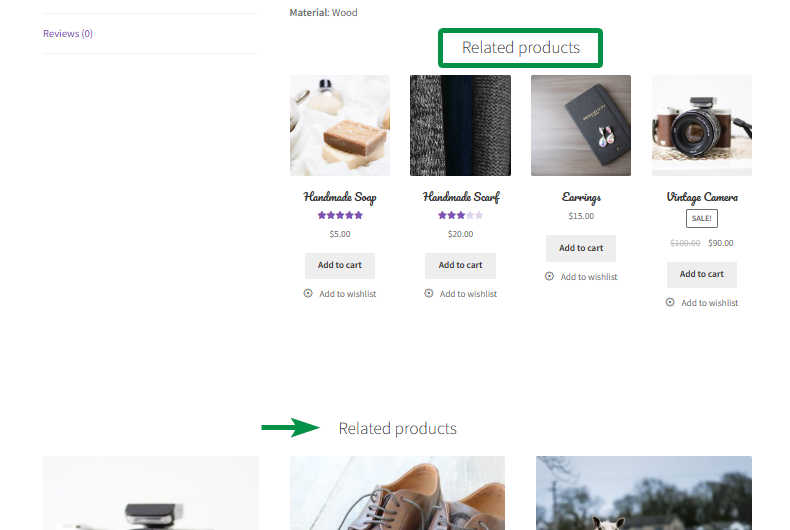
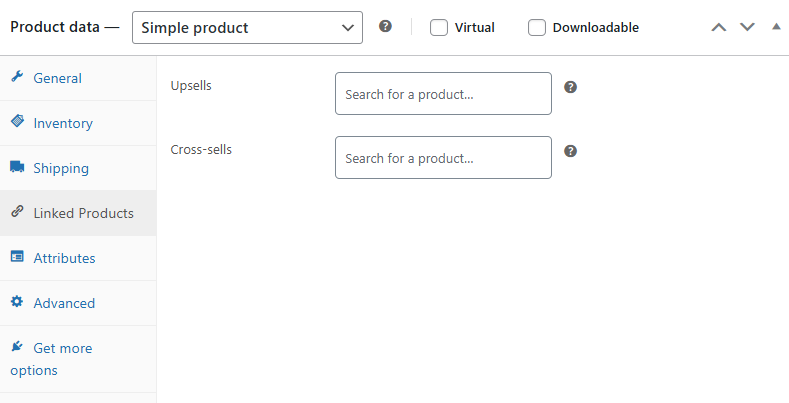
Related products - new sections with a shortcode


Upsell and cross-sell in WooCommerce


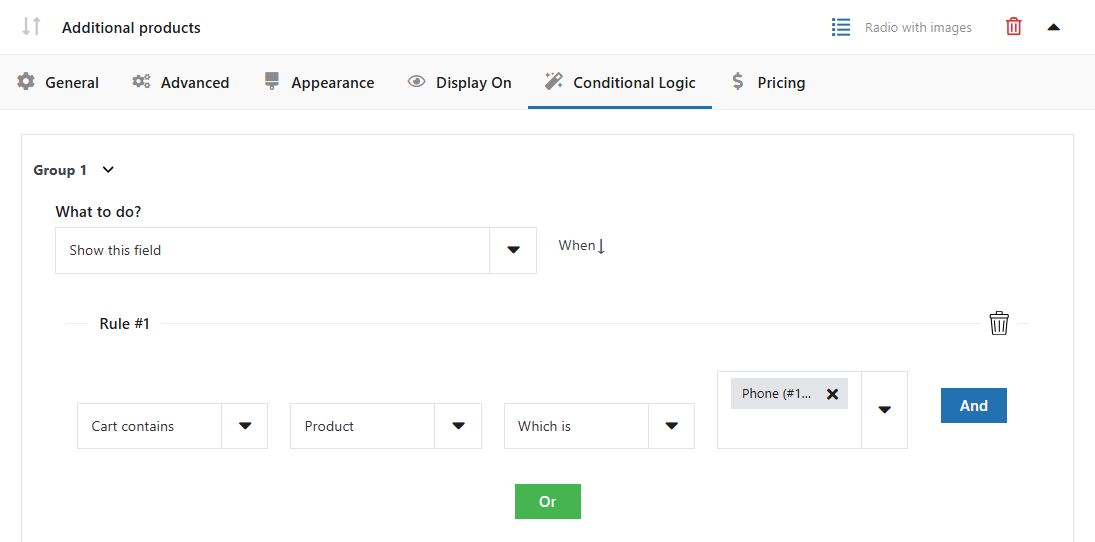
You may also upsell in cart or checkout. Flexible Checkout Fields lets you add upsell offers directly in the checkout process.

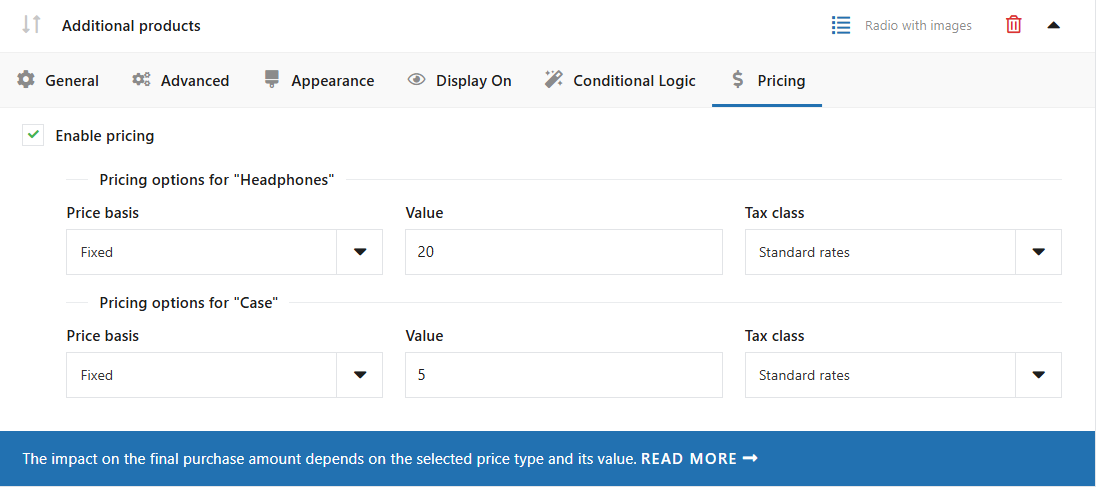
For example, when a customer purchases a phone, you can offer them a discount on related accessories like a case or headphones. This can help increase the order value with minimal effort.
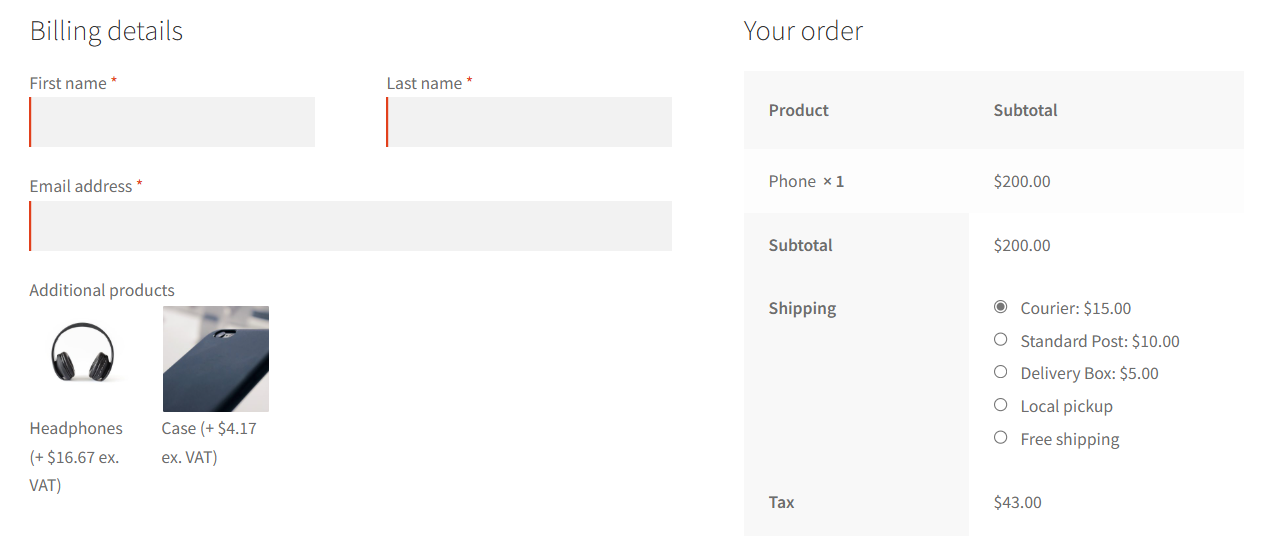
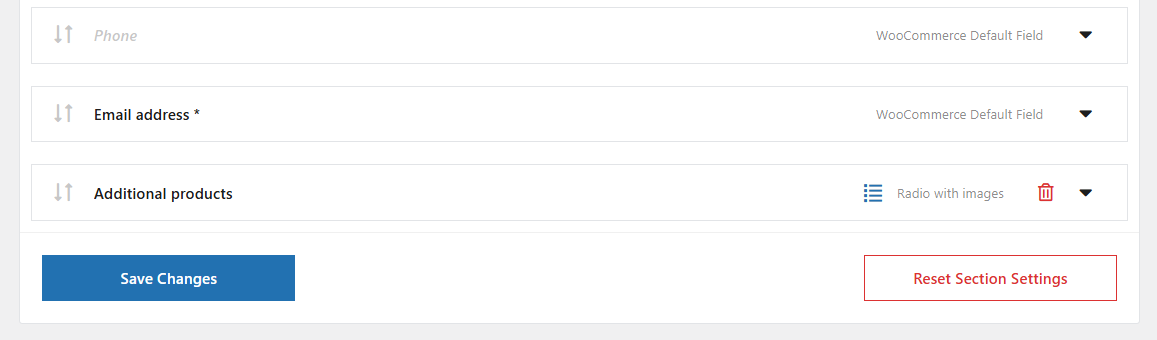
Additional items on the WooCommerce checkout page example


Additional items on the WooCommerce checkout page based on product


Checkout field based on item added to cart


Price per checkout field in WooCommerce


Moreover, you can focus on getting more sales after the initial purchases with email marketing campaigns e.g. newsletter with discounts, special offers, upsell, upgrades, and additional services based on previous sales.

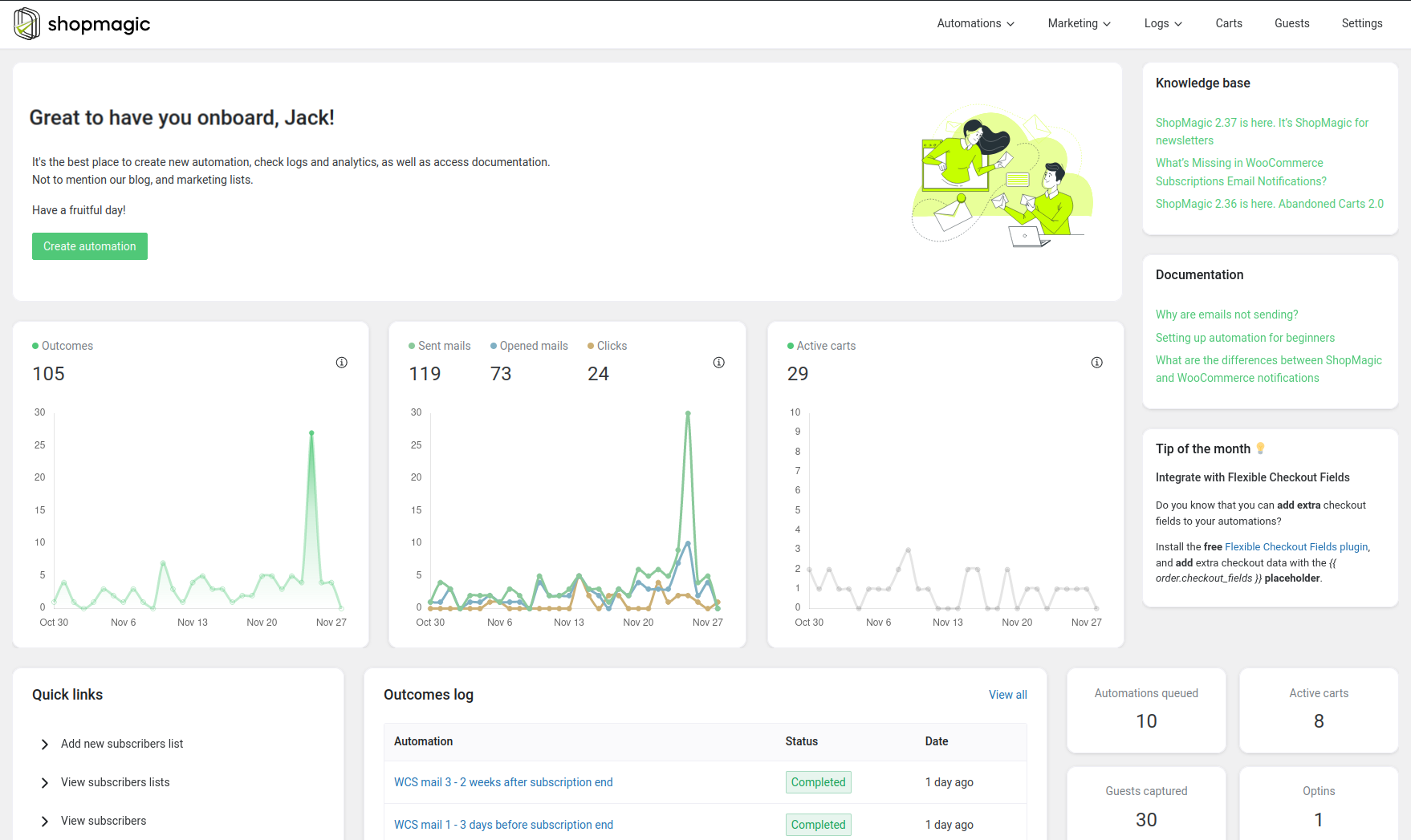
You can send emails yourself. Or design, and send promo emails automatically with a free plugin like ShopMagic for WooCommerce.
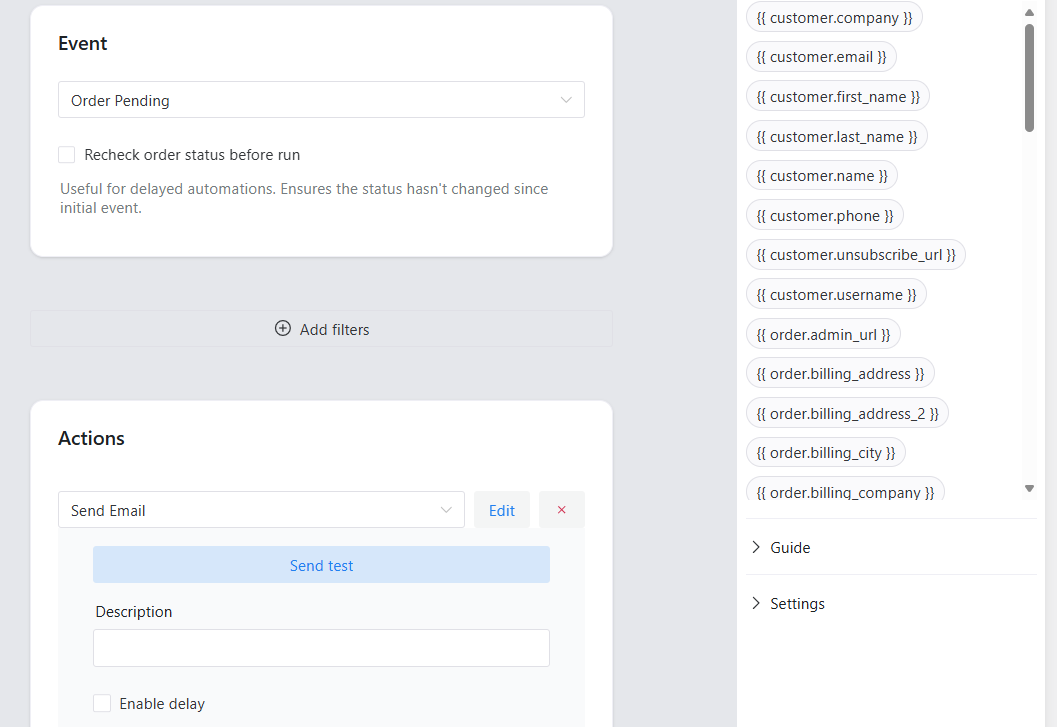
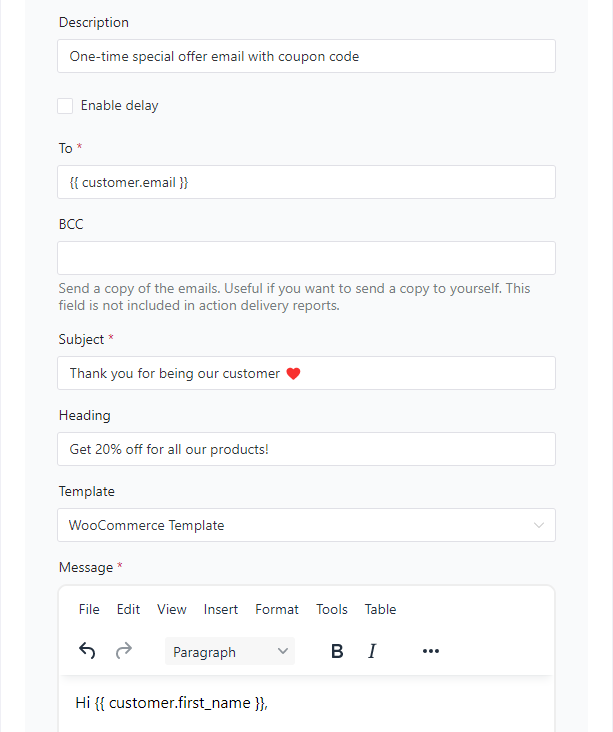
Emails with discount coupons for customers in ShopMagic


Automated and custom emails in WooCommerce


ShopMagic - email marketing automation, follow-ups, and newsletter in WordPress and WooCommerce


Learn more about ShopMagic →


How does customer retention boost your profits?

It costs less to retain existing customers than to acquire new ones. Loyal customers spend more and buy more often. Not taking care of existing clients can cost even more because of poor reviews and dissatisfaction.

Flexible Subscriptions lets you offer subscription-based products, providing consistent revenue. For example, a monthly subscription for skincare products ensures that customers keep returning, guaranteeing steady income.
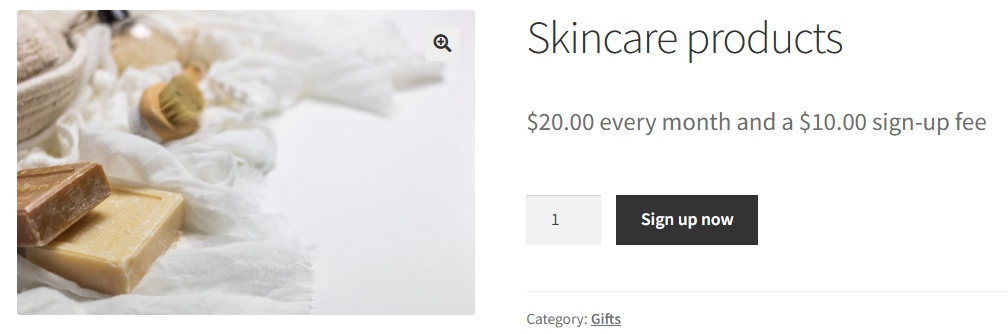
Subscription-based product example in WooCommerce


That's the subscription-based approach.

What percentage of revenue comes from repeat customers?

Repeat customers often account for a large part of your sales - usually above 55%.

With ShopMagic for WooCommerce, you can automate follow-up emails, reminding customers about products they may need again or offering them a discount on their next purchase.
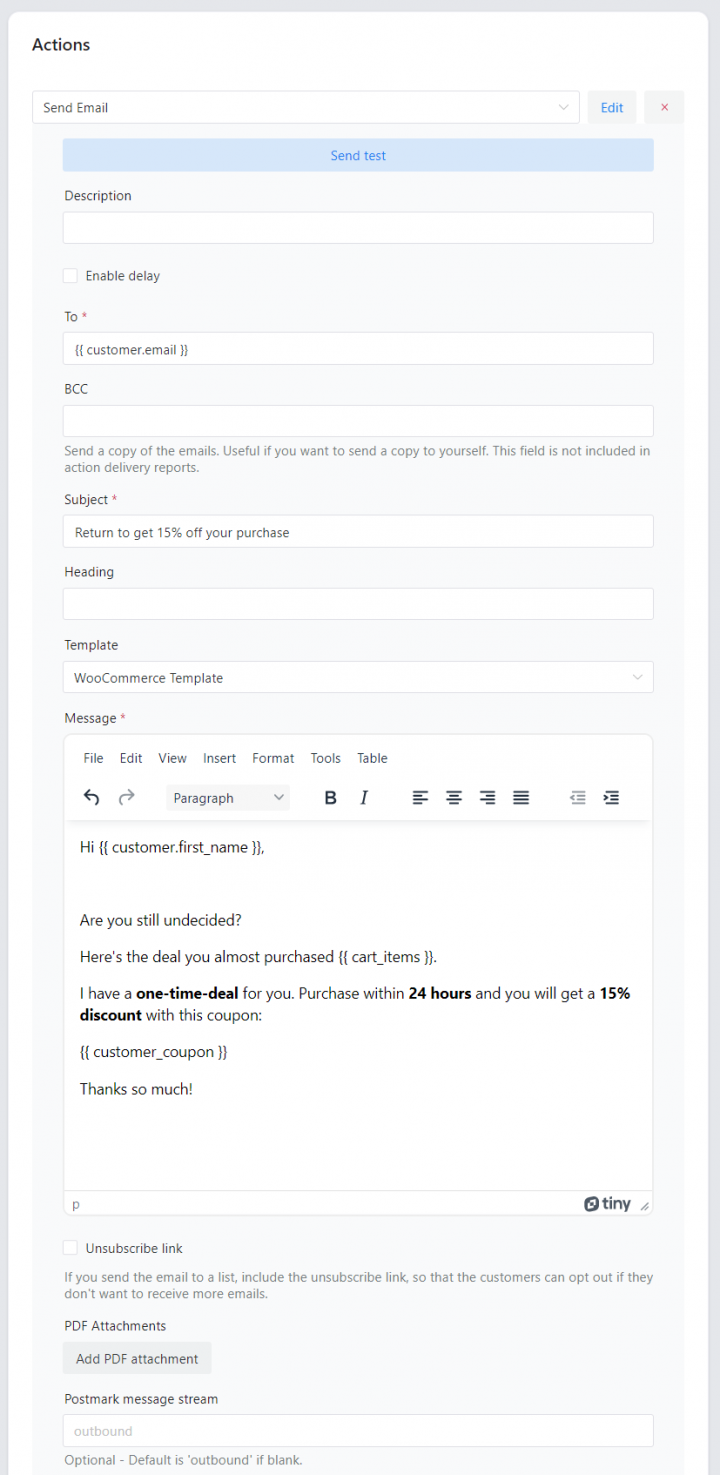
Payment reminder in WooCommerce custom emails with ShopMagic


Automation helps maintain customer engagement and speed up communication (or have one).

2. How to identify customer needs and preferences?

Which tools can help you gather customer feedback?

Customer feedback is key to understanding what they need. Flexible Wishlist PRO - Analytics & Emails allows you to segment your customers and offer more targeted promotions.
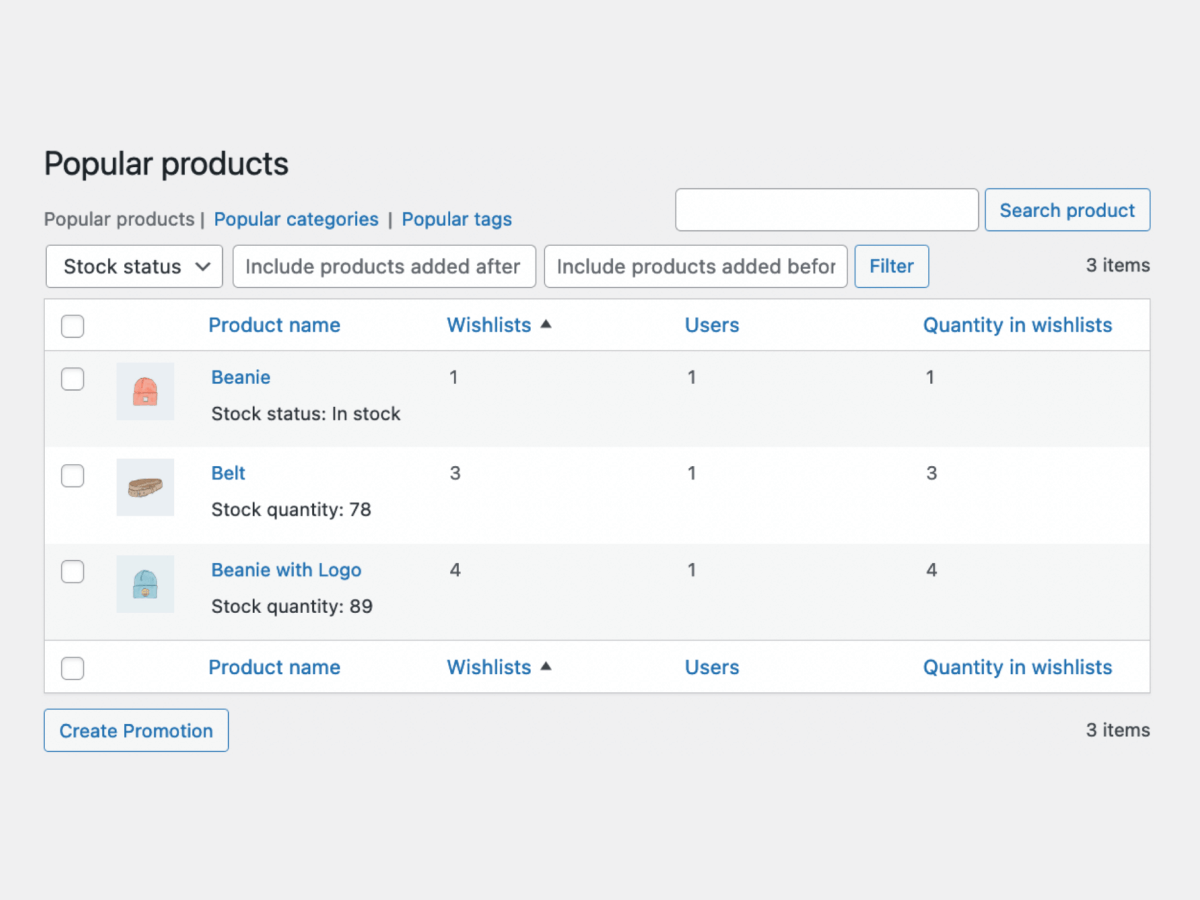
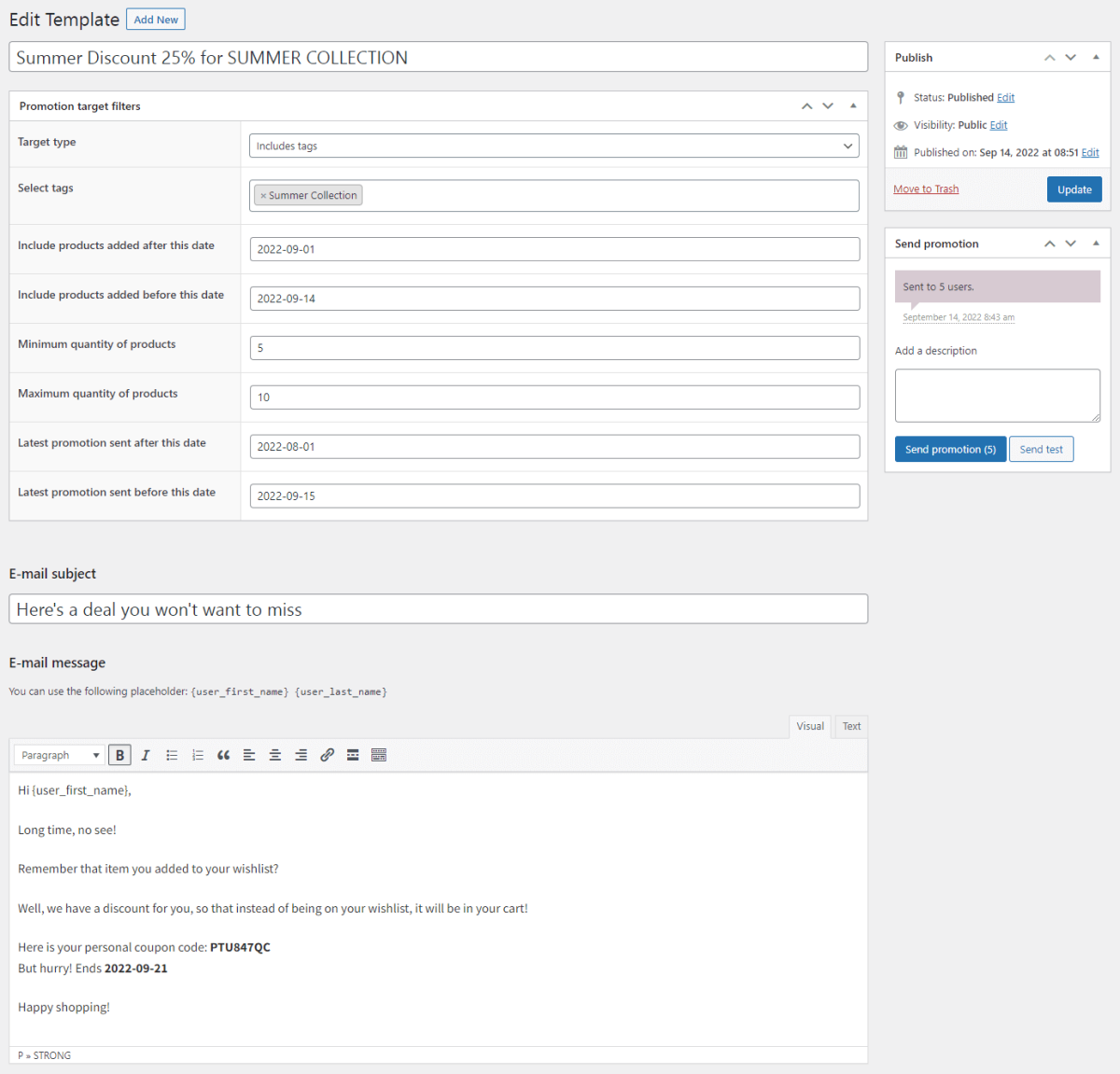
Track popular products, tags and categories


Flexible Wishlist PRO (WooCommerce plugin) - send promotional emails


Such wishlists can also help you understand the product popularity or seasonal patters.

How can customer surveys help understand behavior?

Surveys help you understand what customers want and need. Flexible Product Fields lets you add custom fields to WooCommerce product pages.
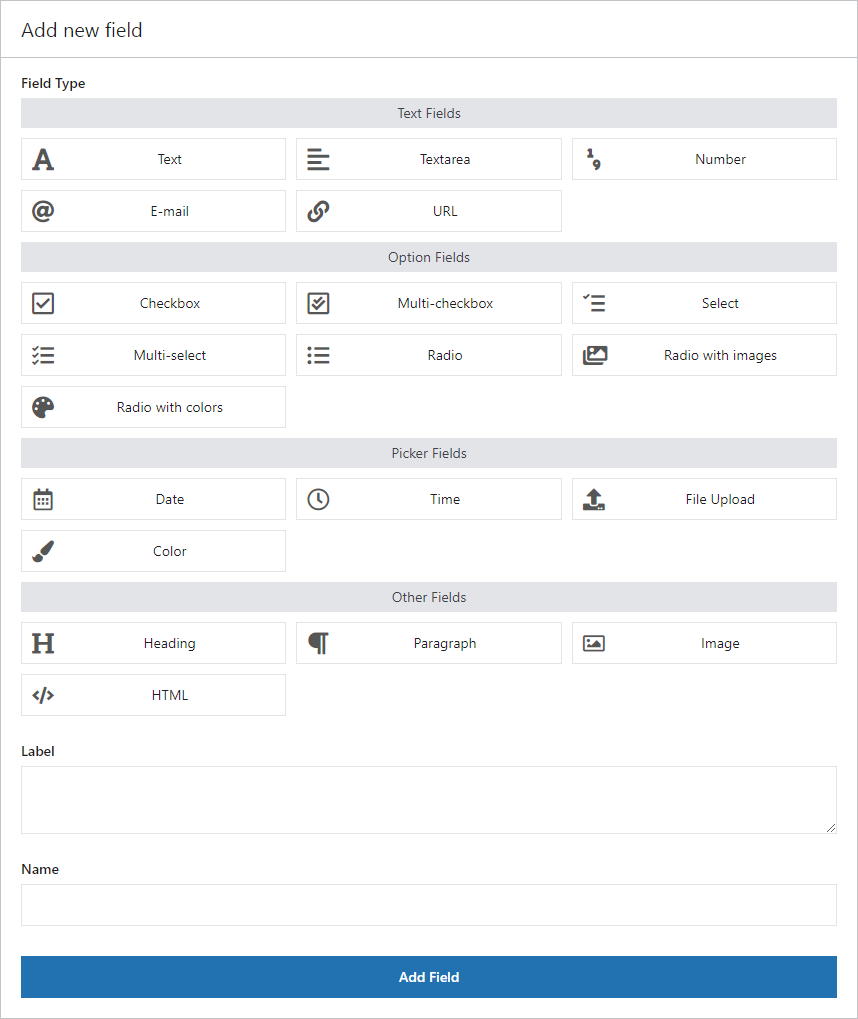
Flexible Product Fields - Add a new custom field


For example, you can ask customers what features they’d like to see in future products, helping you make better product decisions.
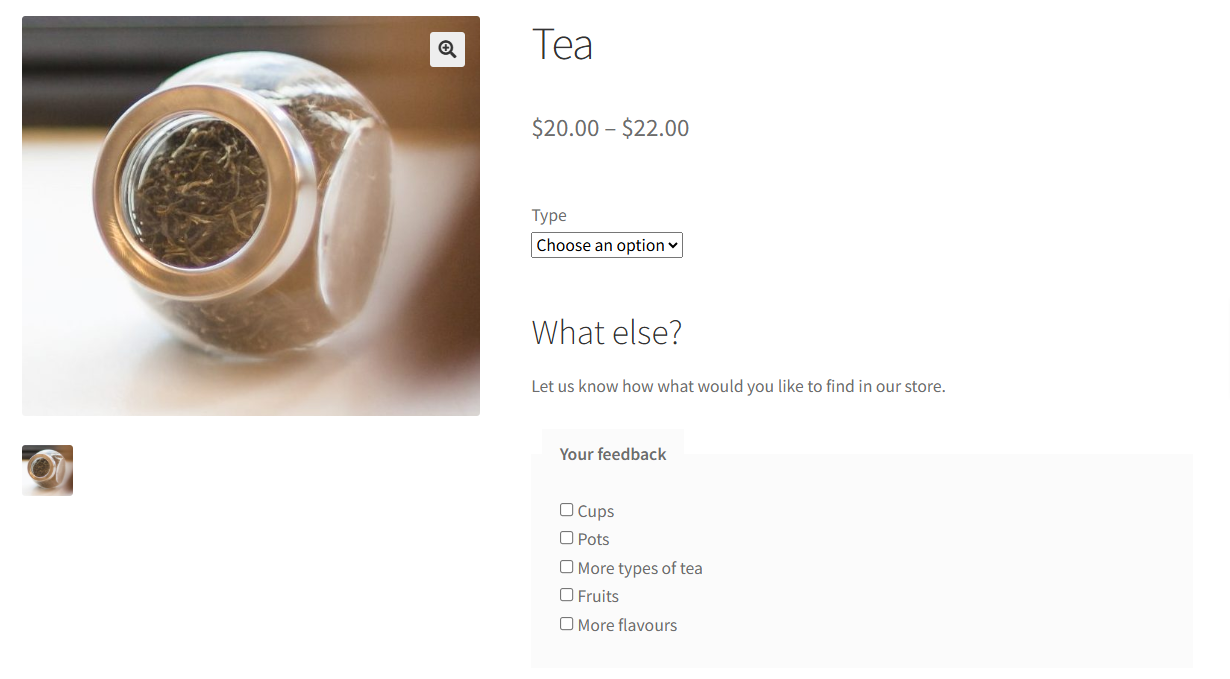
Customer feedback on product page


Flexible Product Fields WooCommerce

Create a product wizard to sell engravings, gift wrapping, gift messages, business cards, stamps and optionally charge for it (fixed or percentage).

💾 Active Installations: 10,000+ | WordPress Rating:

Download for free or Go to WordPress.org
WP Desk
10,000+ Active Installations
Last Updated: 2026-08-20
Works with WooCommerce 10.7 - 11.1

3. Upselling and cross-selling strategies

How do personalized recommendations increase sales?

Personalized recommendations are effective for upselling. Flexible Pricing WooCommerce allows you to offer discounts based on customer behavior.

For example, if a customer frequently buys a particular category of products, you can offer a discount on complementary items, encouraging additional purchases.
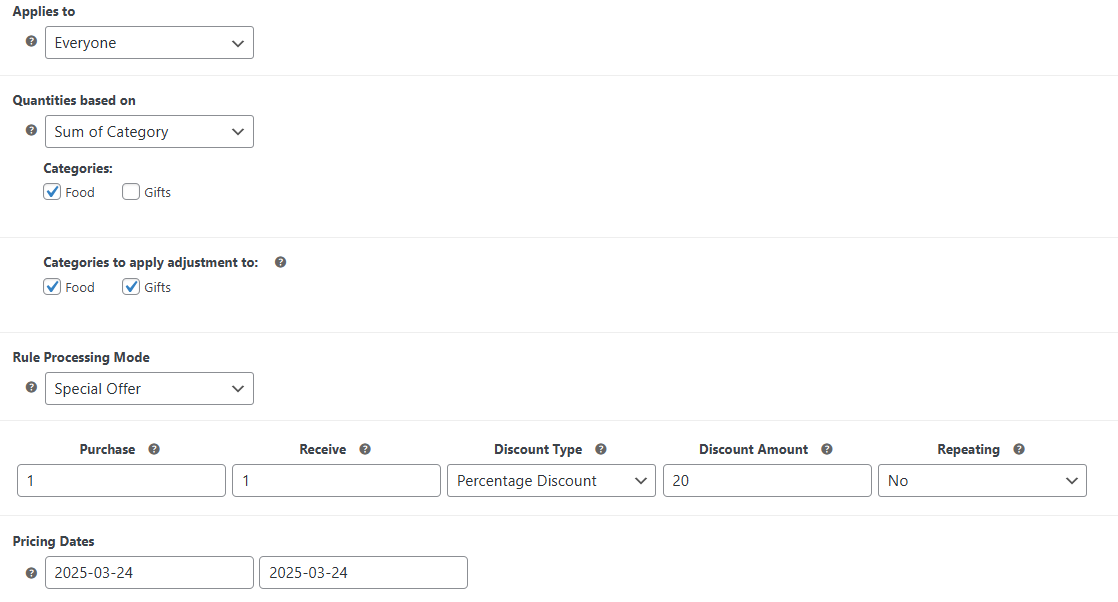
Dynamic discounts in WooCommerce


How can product bundling increase the order value?

Bundling related products is a great way to increase order value.

Flexible Product Fields makes it easy to create product bundles. For example, if a customer is buying a camera, offer a bundle or discounts for a memory card, tripod, and carrying bag.

Product add-ons in WooCommerce


Bundling and product options add value to the customer’s order while boosting sales.

Flexible Product Fields PRO WooCommerce £59

Create a product wizard to sell engravings, gift wrapping, gift messages, business cards, stamps and optionally charge for it (fixed or percentage).

💾 Active Installations: 10,000+ | WordPress Rating:

Add to cart or View Details
WP Desk
10,000+ Active Installations
Last Updated: 2026-08-19
Works with WooCommerce 10.7 - 11.1

How can loyalty programs drive repeat purchases?

Loyalty programs encourage repeat business. Flexible Subscriptions Payment Retry ensures that subscription payments don’t fail.
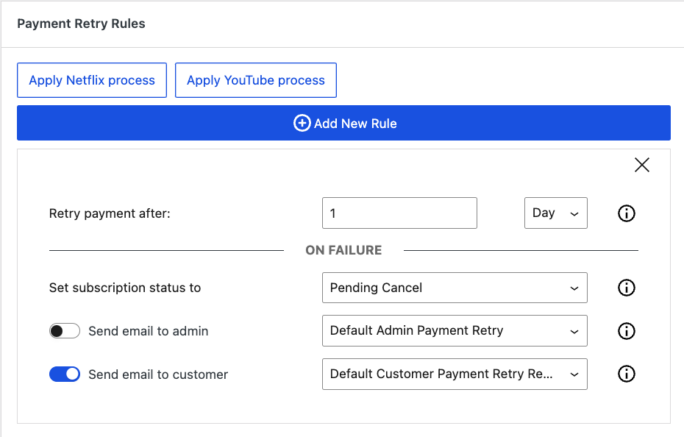
Conditions for subscription payment retry


If a payment is missed, the system automatically retries payments, keeping users subscribed and generating consistent more revenue.

4. How customer communication boosts sales?

What are the best ways to communicate with customers?

Automated emails are an effective way to stay in touch with customers.

ShopMagic for WooCommerce allows you to automate communications based on customer actions.
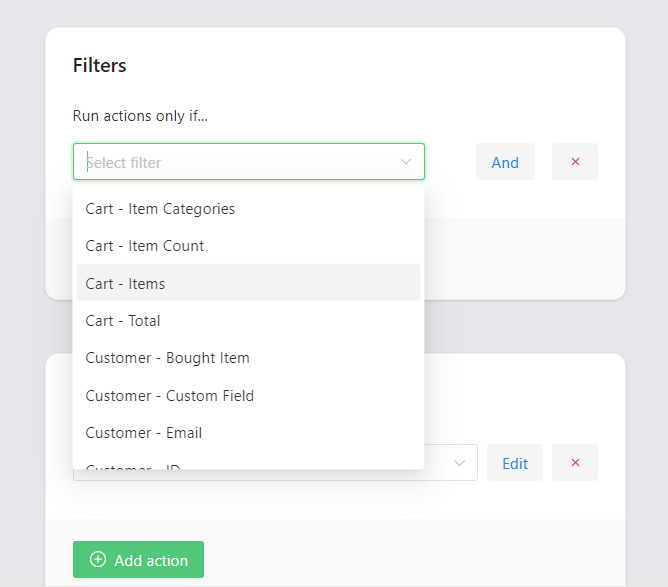
Filters for automated emails in WordPress and WooCommerce


For example, if a customer abandons their cart, you can automatically send an email offering a discount or reminding them of their incomplete purchase.

Payment reminder in WooCommerce custom emails with ShopMagic


How often should you contact customers?

You need to communicate consistently but without overwhelming customers. First, you can use ShopMagic to build email campaigns and communication workflows with automations.
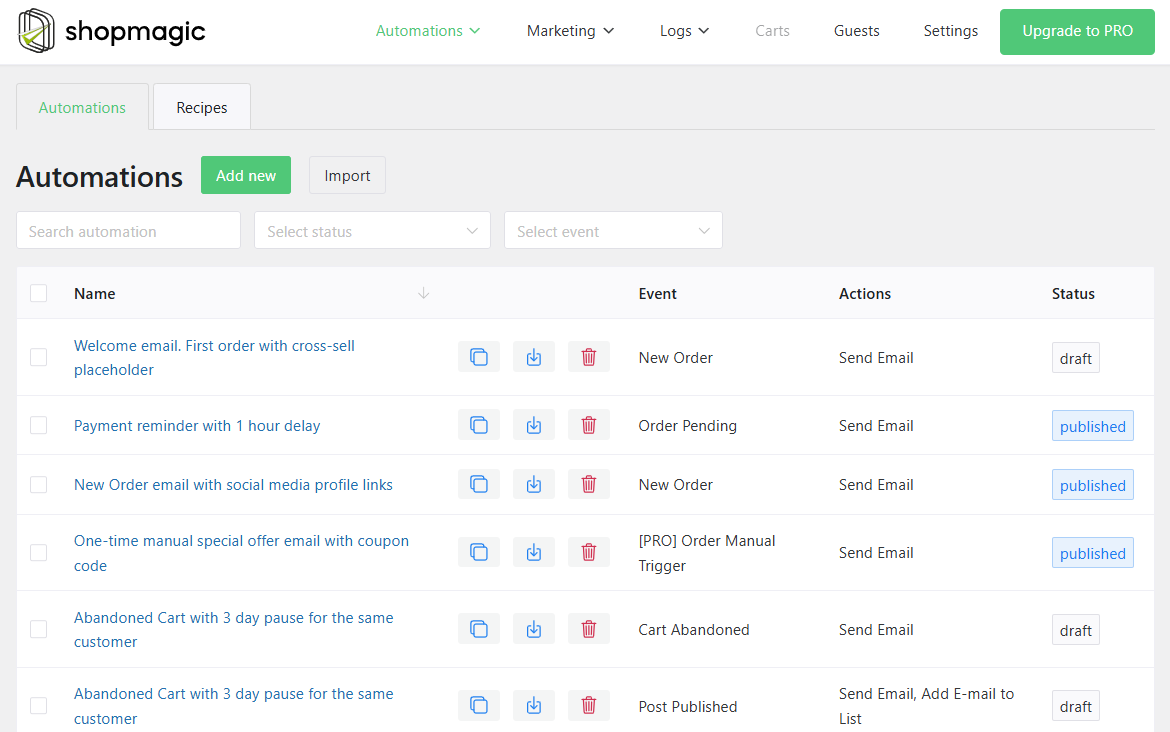
ShopMagic automated emails in WordPress and WooCommerce


Of course, you may adjust the default WooCommerce email templates but they do not have such flexibility that ShopMagic has.
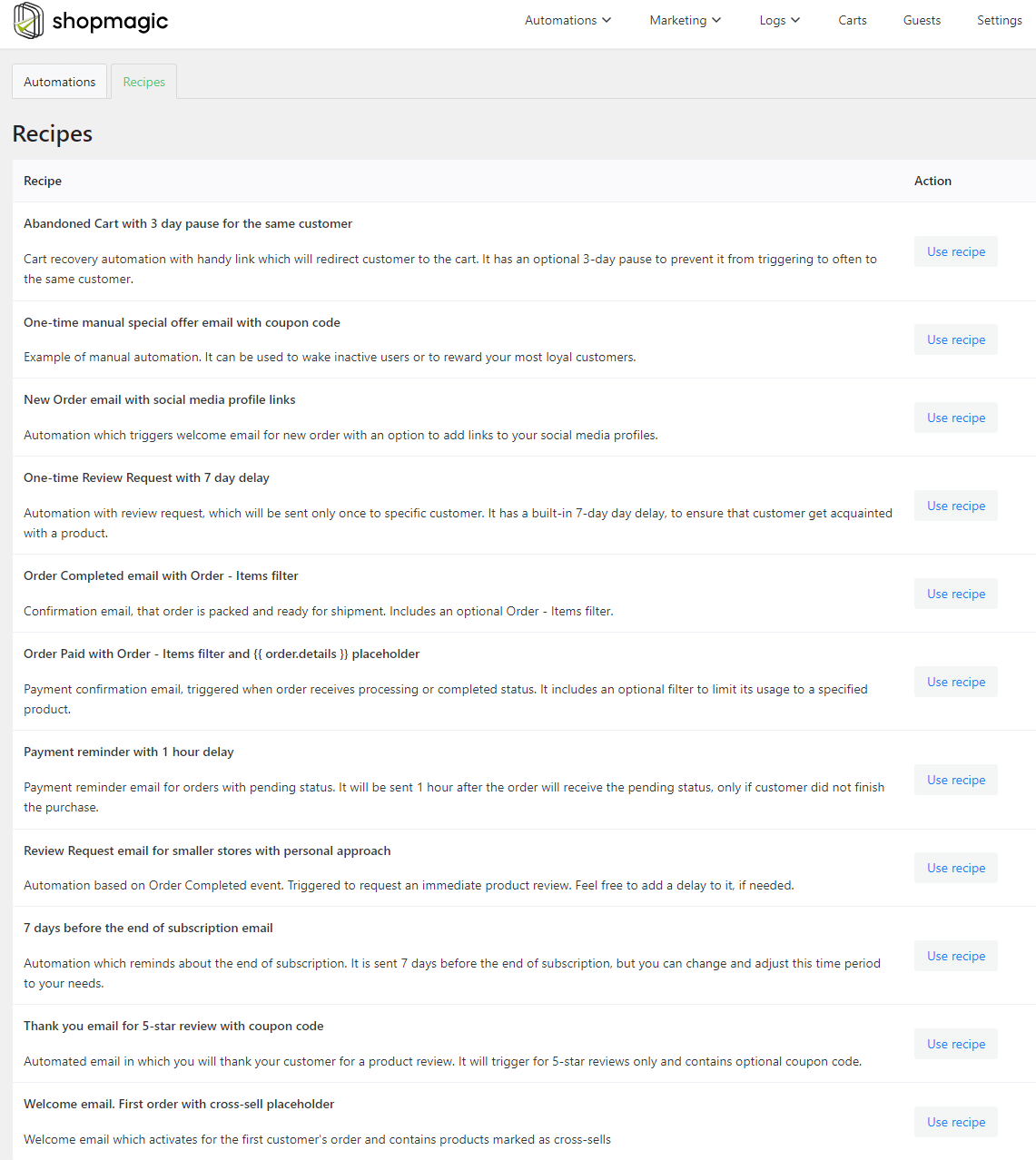
ShopMagic ready-to-use automations


Learn more about ShopMagic →


Finally, you can speed up refunds and returns (and use them to save some orders) with Flexible Refund and Return Order for WooCommerce.

The plugin allows customers to send refund/ return requests in WooCommerce.
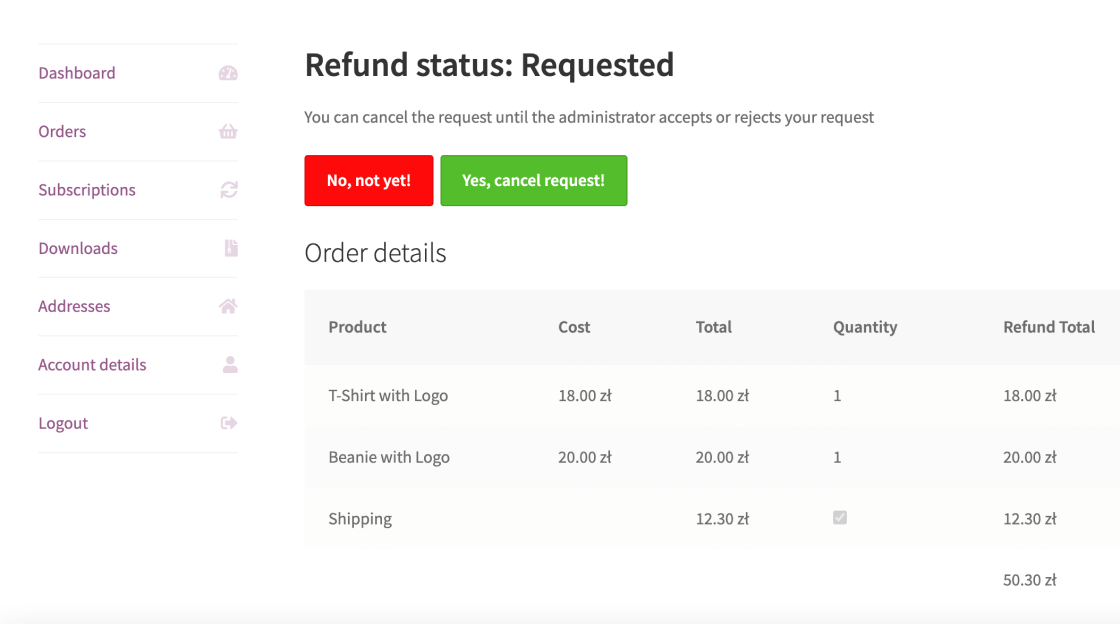
Flexible Refund and Return Order for WooCommerce - After sending the Refund Request


You may use that as an opportunity to offer another incentive for staying with the purchase (by customizing the automated message after refund requests).

Editable Refund Email Body


What messages are most effective for sales?

Personalized messages work best.

ShopMagic allows you to send tailored emails to customers. For example, after a customer completes a purchase, you can send an email offering a related product at a discounted price, prompting them to buy again.

Automated and custom emails in WooCommerce


5. Why customer service is critical?

How can exceptional customer service lead to more sales?

Good customer service builds trust and drives sales. Flexible Subscriptions Stock Management ensures that your subscription products are always available, preventing customers from looking elsewhere. Or if products are out of stock, subscriptions will automatically cancel preventing payments.
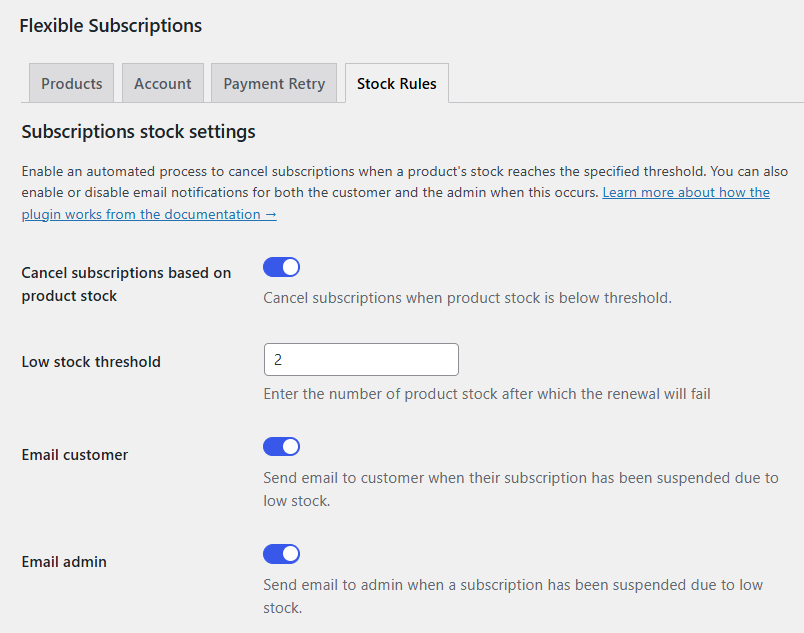
Auto cancel subscriptions in WooCommerce based on stock


If a product is out of stock, you can offer customers a similar item, ensuring that they continue their subscription without disruption.

What are the best practices for training your customer service team when dropshipping?

Equip your team with the right tools to handle customer inquiries efficiently. Dropshipping Import Products for WooCommerce provides your team with accurate, real-time product data, allowing them to respond to customer questions quickly.

The plugin allows importing and updating the necessary data with current stock and prices from external product feeds.
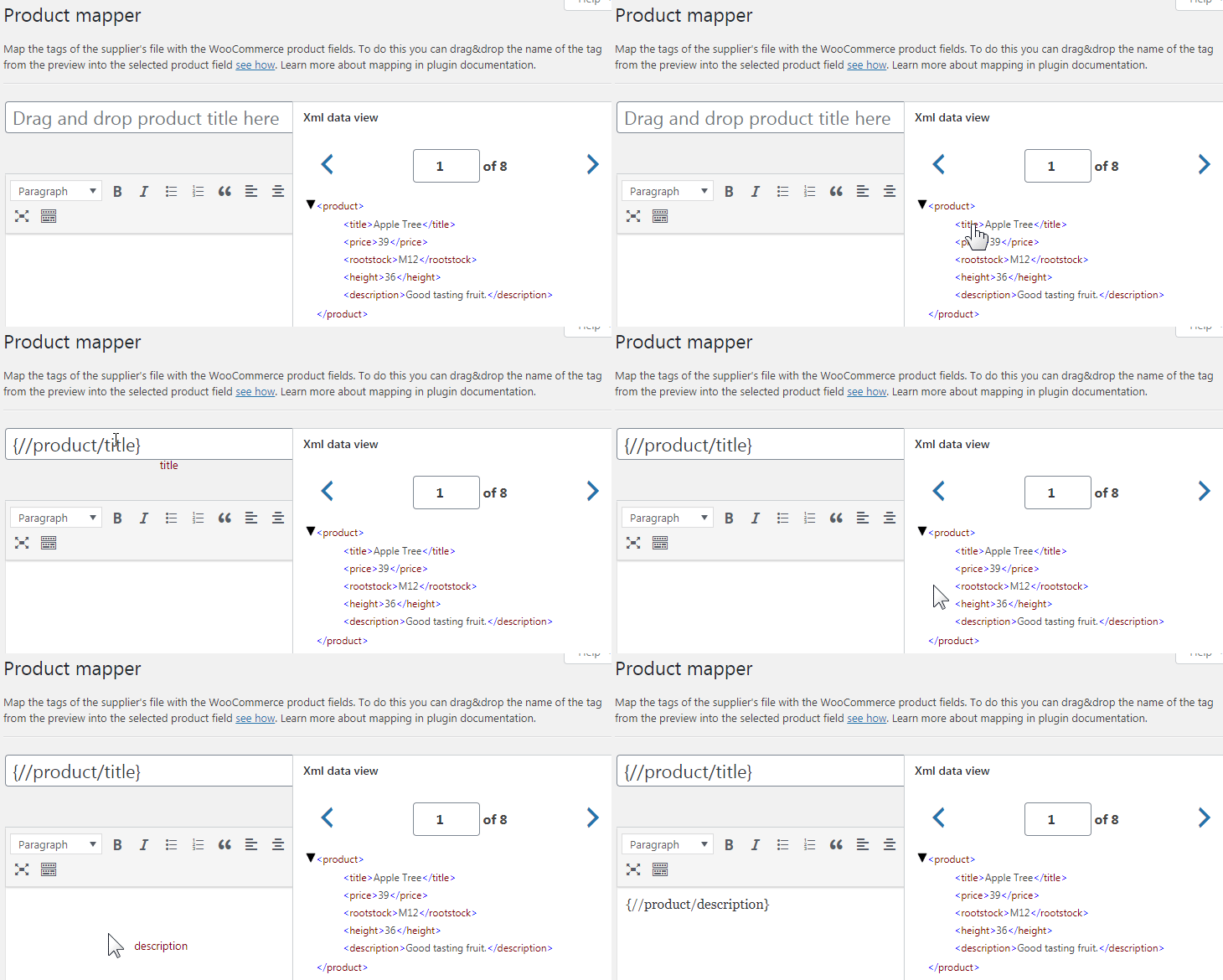
Dropshipping XML - Import products to WooCommerce - product mapper


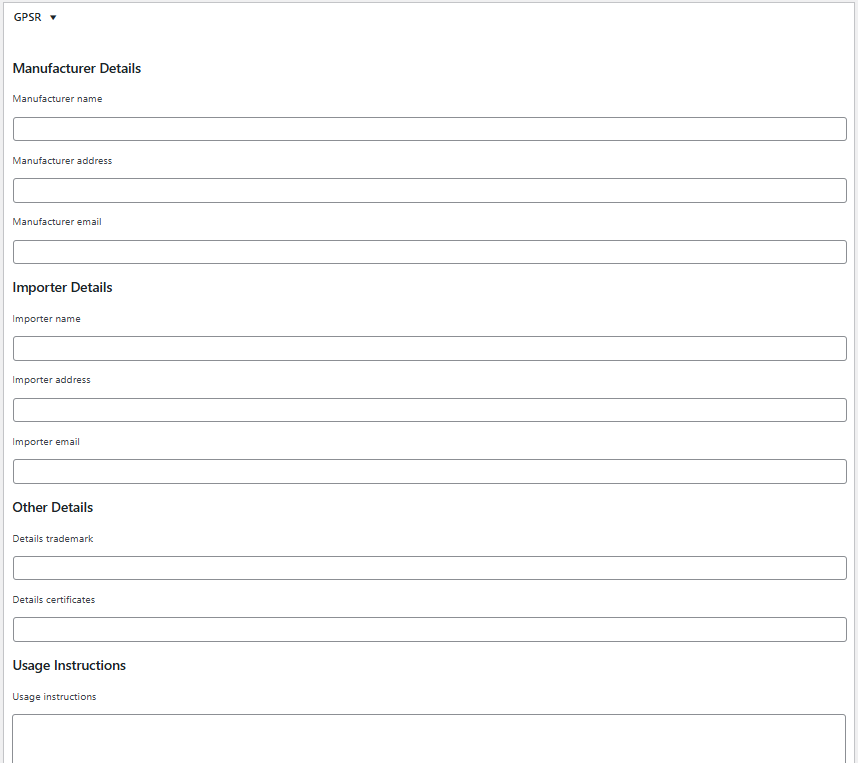
Dropshipping Import Products for WooCommerce is also compatible with Flexible EAN for WooCommerce and GSPR for WooCommerce.
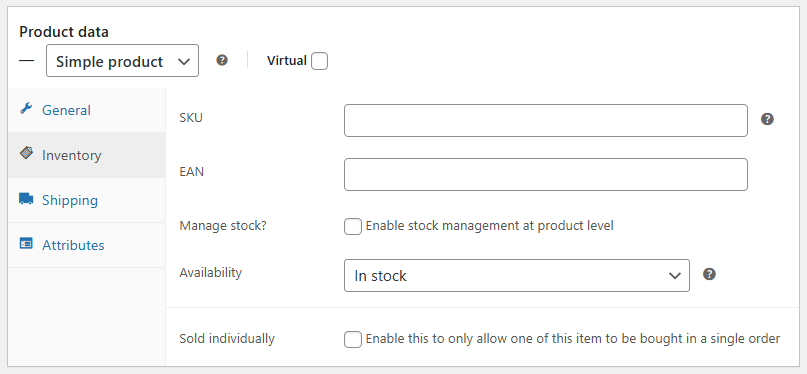
Import products with EAN in WooCommerce


Import products with details for GPSR in WooCommerce


The more product data the better information for customer service.

How does handling complaints well create more opportunities?

Resolving complaints effectively can turn dissatisfied customers into loyal ones.

Flexible Refund and Return Order for WooCommerce streamlines the return process, making it easier for customers to get refunds or exchanges.

Flexible Refund and Return Order for WooCommerce - my account


After resolving an issue, offer the customer a discount or suggest a related product to maintain a positive relationship.
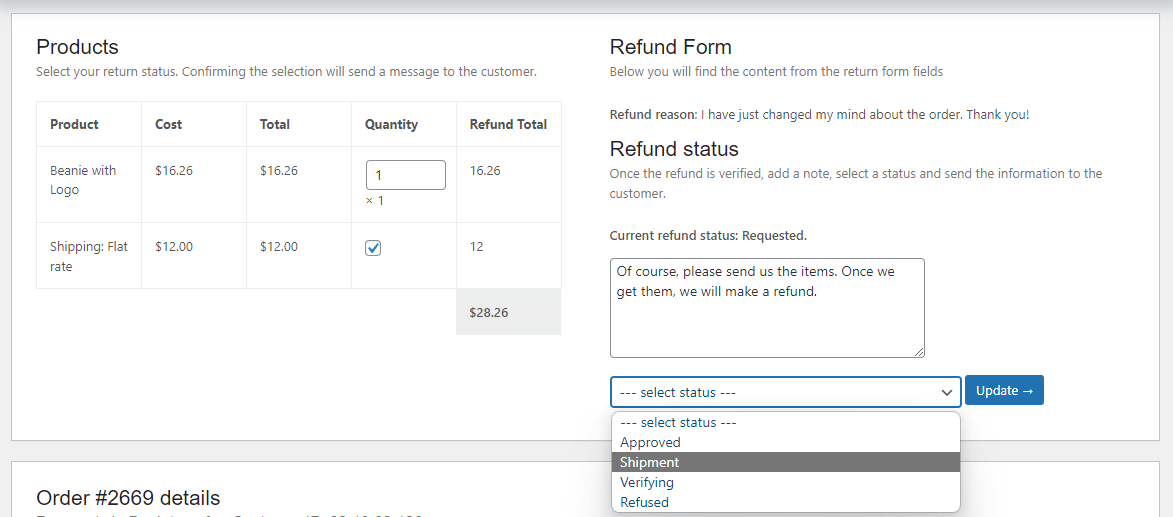
Add a note to the customer and change the refund request status


6. How data analytics can help?

How can analyzing prices shape your strategy?

If you see that a particular product sells at a certain prices, you can start promoting it with other products to increase your sales. You can also show the lowest price from the last 30 days to meet the Omnibus directive with WP Desk Omnibus.
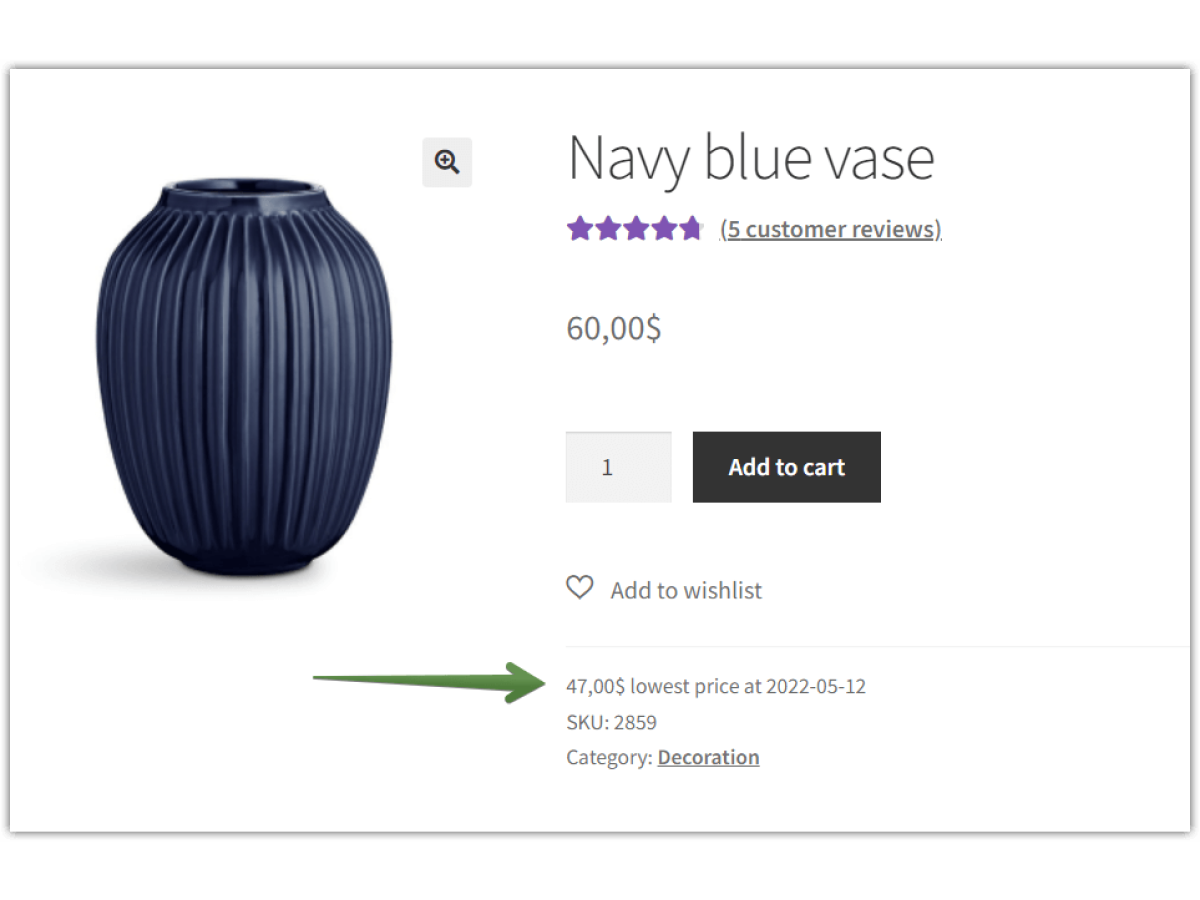
WP Desk Omnibus for WooCommerce - flexible use


What key metrics should you track to understand customers?

Track metrics like average order value and customer lifetime value. Flexible Pricing WooCommerce helps by adjusting product pricing based on these metrics, allowing you to offer discounts or promotions that increase sales from high-value customers.
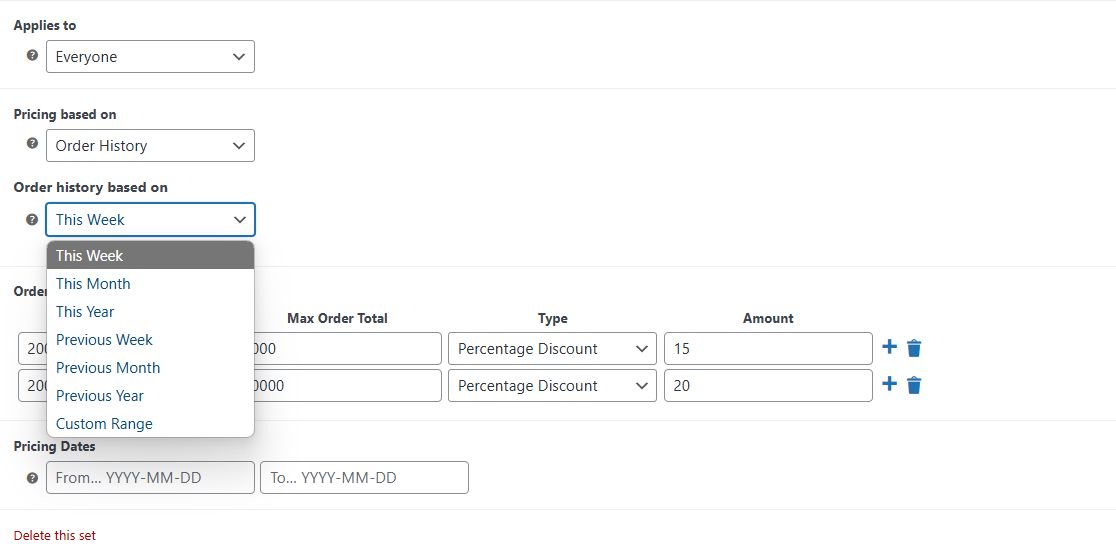
Promotions based on order history


You may increase revenue from your existing customers with discounts for loyal clients, specific user roles, groups, or based on historic order value.
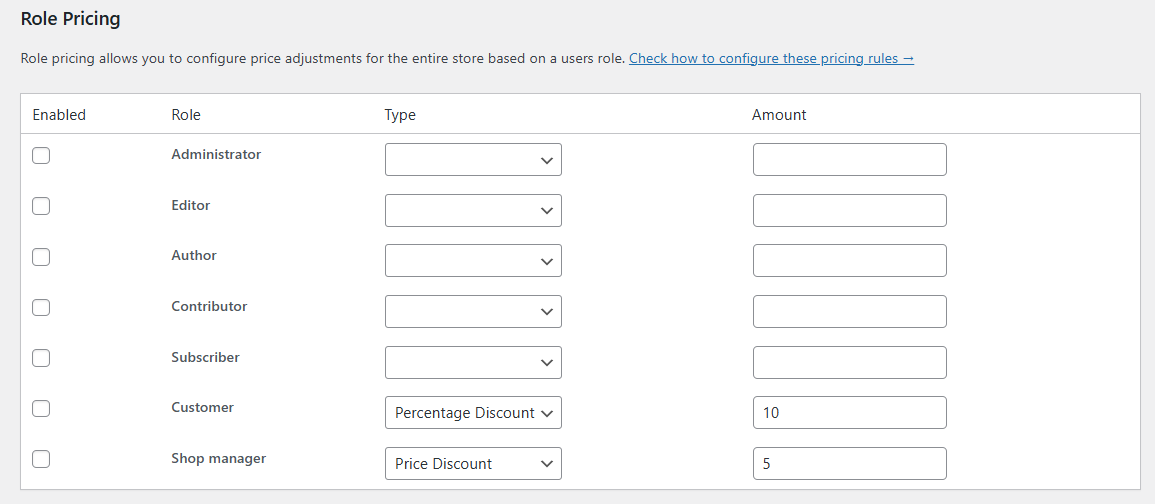
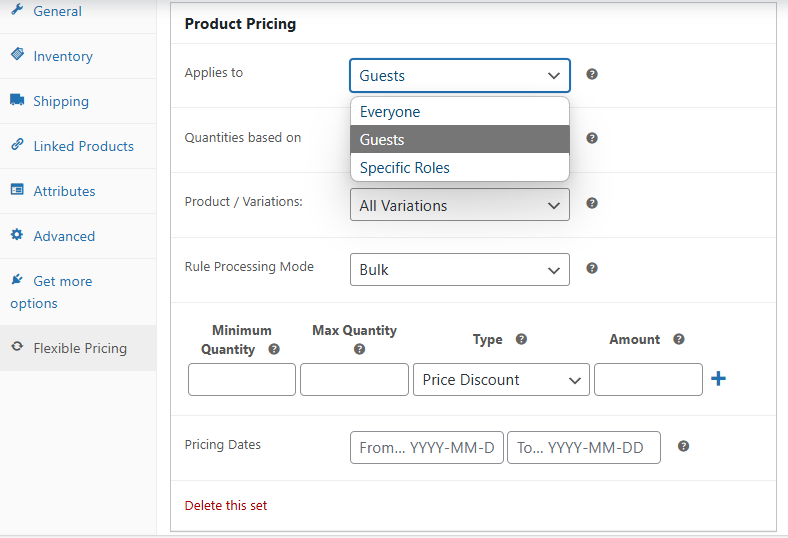
Percentage and price discount based on user role in WooCommerce


Product pricing with discounts in Flexible Pricing WooCommerce


Acquiring new customers, and making customers to keep coming back is also an effective way to increase sales for new products. For example, by using dedicated emails with discount codes for products and services. Or thank your customers or reward your loyal customers. How?

By using email marketing with a free plugin for WordPress and WooCommerce - ShopMagic.

ShopMagic automated emails in WordPress and WooCommerce


How can predictive analytics help?

Predictive analytics helps you anticipate what customers will buy next. For example, if a customer bought running shoes, you can automatically suggest related items like socks or sportswear.

Try to better understand what your customers want. Customers like to feel heard - also here, you may use email marketing automation with ShopMagic (and Flexible Pricing discounts).

7. Creating an engaging customer experience

What elements make a positive experience?

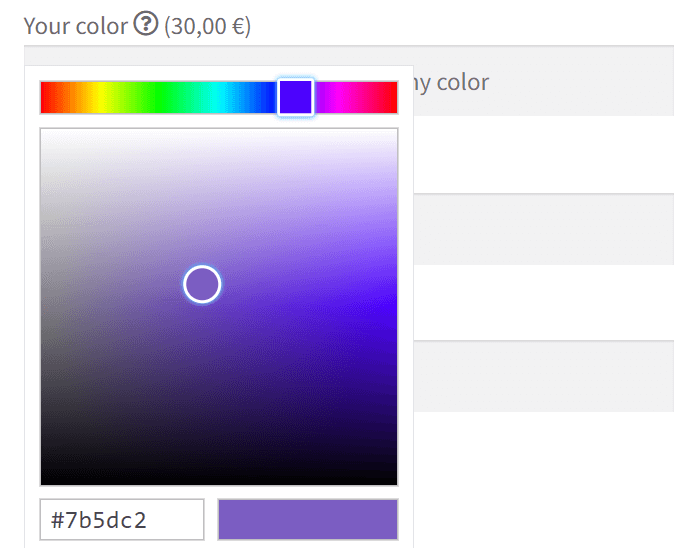
A great customer experience is built on personalization and ease. Flexible Product Fields allows customers to personalize their orders, such as selecting product colors or custom text.
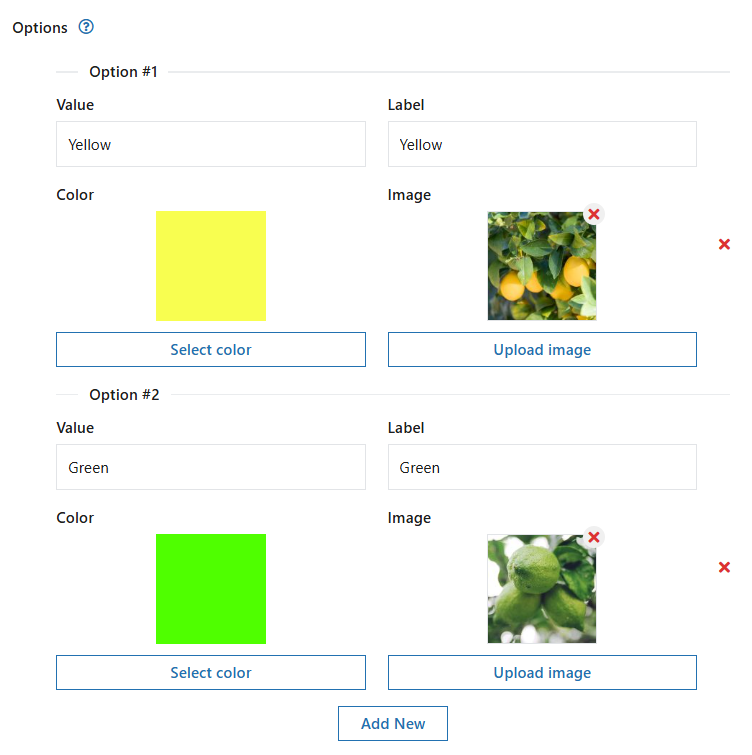
Radio with colors and images


Color picker field
Color picker field


Offering this level of customization enhances the shopping experience and increases satisfaction.

How can you use technology to improve interactions?

Automating post-purchase communication ensures customers stay engaged. ShopMagic for WooCommerce sends automated emails asking for feedback or offering discounts. This makes customers feel valued and keeps them coming back.

What's more, ShopMagic help bringing in new customers and help prevent customers to leave their carts with the Abandoned Carts free add-on.

Payment reminder in WooCommerce custom emails with ShopMagic


Why is personalizing the website customer journey essential?

Personalization helps you build stronger relationships with customers. You do not have to use only default WooCommerce products.

Flexible Subscriptions allows you to offer subscription plans tailored to each customer’s preferences, ensuring that they get what they want and are more likely to remain subscribed.

Flexible Subscriptions allows adding a new product type in WooCommerce - a subscription


Of course, increase the product or service value to your customers so subscriptions are just better. Customers are more likely to stay. There are more strategies to increase revenue and subscription quality - you may use a few Flexible Subscriptions add-ons to optimize subscriptions.

8. Store mistakes to avoid

  1. Focusing too much on new customers and neglecting existing ones.
  2. Not responding to customer complaints or delays in resolving issues.
  3. Failing to automate key processes, which leads to missed opportunities.
  4. Ignoring customer feedback and not adapting to their preferences.
  5. Force a customer to purchase products or services with aggressive popups or emails.
  6. Do not try to encourage existing customers to return.
  7. Not showing value to customers.
  8. Only getting new customers, and not reward existing customers.
  9. Not engaging with your customers when customers can help with ecommerce customer relationship.
  10. Do not concentrate on small improvements for existing clients.
  11. Make sales team too focused on sales for your business and forget about satisfied customers.

Strategies to increase sales - summary

Implementing new strategies and improvements to increase sales in WooCommerce can work both for existing and new customers. Let's take a look at the best techniques:

  • Upselling and cross-selling existing customers can significantly boost revenue.
  • Personalized offers using Flexible Checkout Fields and Flexible Product Fields can improve conversion rates.
  • Loyalty programs, bundling, and automated follow-ups help retain customers and encourage customers to make future purchases.
  • Excellent customer service and fast complaint resolution lead to repeat sales.
  • Data analytics with WP Desk Omnibus allows you to refine your sales strategy.

By using WP Desk plugins to automate these processes, you can easily increase sales from existing customers and grow your business. You may also check out other eCommerce optimization ideas.
See how Sandra automates sales analysis → Meet Sandra AI

Related Articles

WooCommerce tips

5 essential WooCommerce tips to boost your sales

Do you need valuable WooCommerce tips and tricks to boost your sales? I'll give you 5 most essential WooCommerce tips and tricks. If you follow them, ...
Promo codes and discounts for existing customers in WooCommerce (15 tips)

Promo codes & discounts for existing customers in WooCommerce (15 ideas)

A well-structured discount strategy can increase conversions, improve customer retention, and boost sales in your WooCommerce store. Whether you want ...
15 best eCommerce automation tools for WooCommerce (2025)

15 eCommerce automation tools for WooCommerce (2025)

Managing an online store can be overwhelming, but the right automation software and plugins can transform your workflow. From checkout design to optim...
WooCommerce Review

10-step WooCommerce review to help you understand why WooCommerce is the best e-commerce platform

In this WooCommerce review I will guide you through 10 reasons why WooCommerce should be your e-commerce platform of choice. Life is a series of choic...
Product Personalization 25 eCommerce Tips for WooCommerce product customization (2025)

25 eCommerce Tips to eCommerce Personalization: Customize WooCommerce Product Page in 2026

Personalization is shaping the future of eCommerce. Shoppers no longer want generic, one-size-fits-all products—they expect unique, customized options...

7 minutes read2000 views

Reader Interactions

Leave a Reply Cancel reply

Your email address will not be published. Required fields are marked *

WP Desk

...

Powered by WP Desk

WP Desk brings you great WooCommerce plugins. We strive to save your time and money by speeding up your processes. Use our plugins to build a better store. Awesome support included in the package.

Premium WooCommerce Plugins →
WP Desk › Blog › WordPress tips & plugins › How to increase sales and revenue from existing customers?

Primary Sidebar

Contents

  • How to increase online sales and revenue from existing (and potential) customers?
  • 1. Why focus on existing customers for revenue growth?
    • Why should you upsell to existing customers?
    • How does customer retention boost your profits?
    • What percentage of revenue comes from repeat customers?
  • 2. How to identify customer needs and preferences?
    • Which tools can help you gather customer feedback?
    • How can customer surveys help understand behavior?
    • Flexible Product Fields WooCommerce
  • 3. Upselling and cross-selling strategies
    • How do personalized recommendations increase sales?
    • How can product bundling increase the order value?
    • Flexible Product Fields PRO WooCommerce £59
    • How can loyalty programs drive repeat purchases?
  • 4. How customer communication boosts sales?
    • What are the best ways to communicate with customers?
    • How often should you contact customers?
    • What messages are most effective for sales?
  • 5. Why customer service is critical?
    • How can exceptional customer service lead to more sales?
    • What are the best practices for training your customer service team when dropshipping?
    • How does handling complaints well create more opportunities?
  • 6. How data analytics can help?
    • How can analyzing prices shape your strategy?
    • What key metrics should you track to understand customers?
    • How can predictive analytics help?
  • 7. Creating an engaging customer experience
    • What elements make a positive experience?
    • How can you use technology to improve interactions?
    • Why is personalizing the website customer journey essential?
  • 8. Store mistakes to avoid
    • Strategies to increase sales – summary

Flexible Product Fields PRO WooCommerce £59

Create a product wizard to sell engravings, gift wrapping, gift messages, business cards, stamps and optionally charge for it (fixed or percentage).

💾 Active Installations: 10,000+ | WordPress Rating:

Add to cart or View Details
WP Desk
10,000+ Active Installations
Last Updated: 2026-08-19
Works with WooCommerce 10.7 - 11.1

Stay updated on our how-to articles

WP Desk news, WooCommerce tips, promo codes - right to your inbox.

By entering your e-mail, you agree to our Terms & Conditions and Privacy Policy.

By entering your e-mail, you agree to our Terms & Conditions and Privacy Policy.

Footer

WP Desk - WooCommerce Plugins

At WP Desk we create great WooCommerce plugins with awesome support. Save time and money with our e-commerce solutions. See how we can help you improve your e-store →

Secured by Comodo

WP Desk

  • About us
  • Giving Back
  • Blog
  • Get Support
  • Contact us

Products

  • Premium Plugins
  • WP Desk Care
  • Documentation
  • WooCommerce Invoices
  • Email Marketing
  • PDF Coupons

Legal

  • Terms & Conditions
  • Refund Policy
  • Support Policy
  • Privacy Policy

© 2026 WP Desk

We value your privacy

We use necessary cookies to make our site work. We'd also like to set additional cookies to understand site usage, enhance your browsing experience, and serve personalized ads or content. By clicking ‘Accept All,’ you consent to our use of additional cookies.

Functional Always active
The technical storage or access is strictly necessary for the legitimate purpose of enabling the use of a specific service explicitly requested by the subscriber or user, or for the sole purpose of carrying out the transmission of a communication over an electronic communications network.
Preferences
The technical storage or access is necessary for the legitimate purpose of storing preferences that are not requested by the subscriber or user.
Statistics
The technical storage or access that is used exclusively for anonymous statistical purposes. Without a subpoena, voluntary compliance on the part of your Internet Service Provider, or additional records from a third party, information stored or retrieved for this purpose alone cannot usually be used to identify you. The technical storage or access that is used exclusively for anonymous statistical purposes. Without a subpoena, voluntary compliance on the part of your Internet Service Provider, or additional records from a third party, information stored or retrieved for this purpose alone cannot usually be used to identify you.
Marketing
The technical storage or access is required to create user profiles to send advertising, or to track the user on a website or across several websites for similar marketing purposes.
  • Manage options
  • Manage services
  • Manage {vendor_count} vendors
  • Read more about these purposes
View preferences
  • {title}
  • {title}
  • {title}