
A well-structured discount strategy can increase conversions, improve customer retention, and boost sales in your WooCommerce store. Whether you want to attract new customers, reward loyal buyers, or run seasonal promotions, WooCommerce provides flexible options to create and manage discounts. In this guide, we’ll explore the best practices, tools, and strategies to maximize the impact of coupons and promo codes for new and existing customers in WooCommerce.
Contents
- WooCommerce Coupons and promo codes for existing and new customers - 15 ideas!
- Best promotional ideas for WooCommerce with Step-by-Step implementation (15 ideas)!
- 1. First-time purchase discount (Flexible Pricing WooCommerce)
- 2. Abandoned cart coupons (ShopMagic for WooCommerce)
- 3. Bulk order discounts (Flexible Pricing WooCommerce)
- 4. VIP customer loyalty discounts (Flexible Pricing WooCommerce)
- 5. Personalized email offers (ShopMagic for WooCommerce)
- 6. Gift with purchase (Flexible Pricing WooCommerce)
- 7. Customer birthday discount or welcome emails (ShopMagic for WooCommerce)
- 8. Cart value-based discounts (Flexible Pricing WooCommerce)
- 9. Post-purchase upsell discount (ShopMagic for WooCommerce)
- 10. Offer gift cards with free shipping (Flexible PDF Coupons)
- 11. Limited-time flash sale (Flexible Pricing WooCommerce)
- 12. Exclusive coupon for newsletter subscribers (ShopMagic for WooCommerce)
- 13. Buy more, save more (Flexible Pricing WooCommerce)
- 14. Referral rewards (Flexible PDF Coupons)
- 15. Subscription renewal discount (ShopMagic for WooCommerce with WooCommerce Subscriptions add-on)
- Best Tools to Design Promotional Banners
- Summary
- FAQ
- WooCommerce Coupons - Complete Guide
- 5 essential WooCommerce tips to boost your sales
- Boost Sales with WooCommerce BOGO and Tiered Pricing
- How to increase sales and revenue from existing customers?
WooCommerce Coupons and promo codes for existing and new customers - 15 ideas!
How do WooCommerce discounts work?
WooCommerce allows store owners to create and apply various types of coupons.
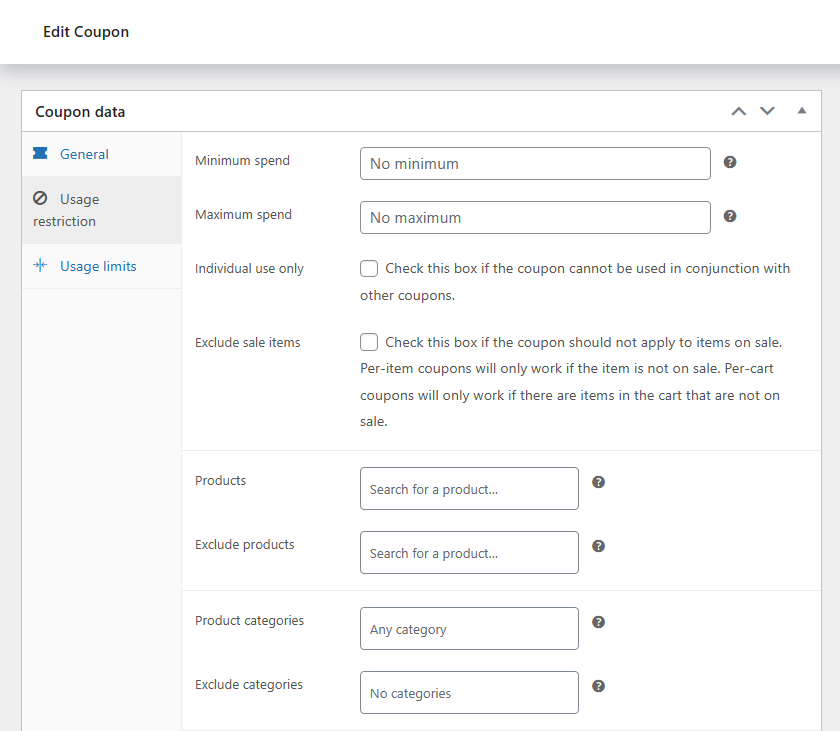
These codes provide customers with discounts, free shipping, or other incentives.
They can be applied manually at checkout or automatically added based on predefined conditions.
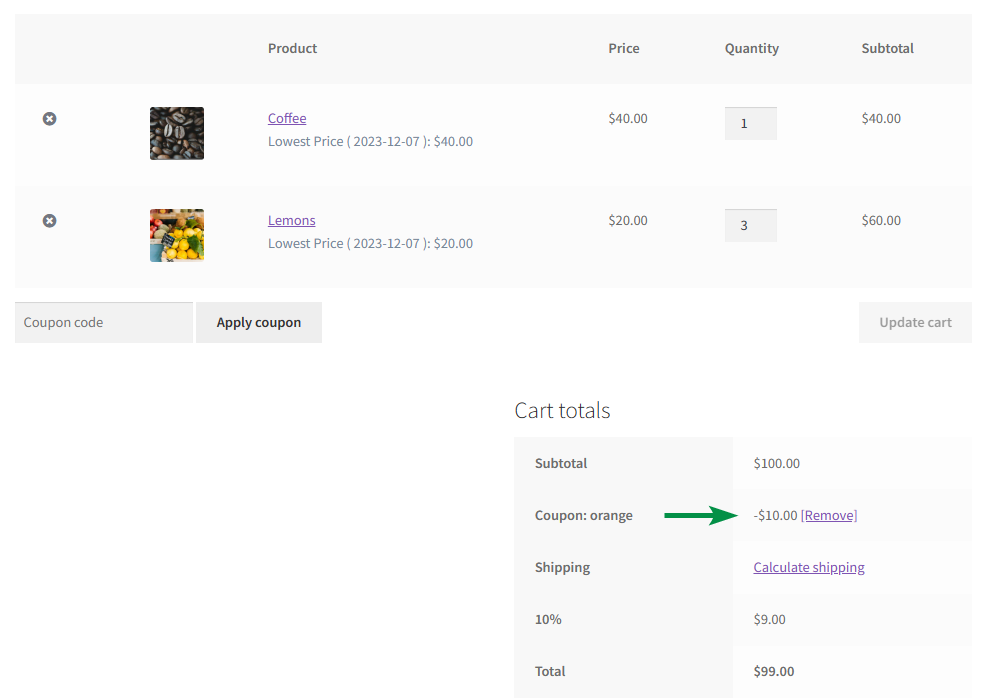
But that's only one tip to help increase user retention and sell more in WooCommerce.
There are also other types of promotion code and product discount examples that exist for customers to use.
Choosing the right type of promotion isn't just about picking whatever discount is easiest to configure — it's about matching the incentive to the customer's stage in the buying journey. A first-time visitor responds differently to an offer than a loyal customer who's already made ten purchases. Coupons and promo codes work best when they're built around a specific behavior you want to encourage, whether that's completing a first order, coming back after an abandoned cart, or spending more to unlock free shipping. Treating every discount as interchangeable tends to erode margins without meaningfully moving the metrics that matter.
Default WooCommerce discounts
- discount codes active for specific product or category - such WooCommerce discounts would expire after a chosen date for greater motivation (must redeem before).
- free delivery option - it's also possible to set minimum threshold and combine with discount coupons.
- sale prices - also for limited time with date restriction.
- promote related products (with discounts) or offer better prices for grouped products.
However, WooCommerce doesn't handle latest eCommerce trends in popular stores.
Additional promotional options in WooCommerce
You can test and optimize other methods and ways of promoting products for maximum profit.
- redeem promo code to save money on special occasions (birthday) for an account
- offer discounts for products, user roles, order value, 2+1 or 1+1 special offers, etc.
- pay less with specific payment methods or above certain value
- one time discount after first sale to upsell products for new customers
- cross-selling offers right in customer's mail inbox with email marketing
- initial location based promotions to boost sales
- set certain date for product discounts (with banner, in emails)
- best deals to shop online at affordable price - followup emails for existing (or new) customers
- prevent users from leaving with relevant monthly offers
Best promotional ideas for WooCommerce with Step-by-Step implementation (15 ideas)!
Let's take a look at 15 ideas to boost sales using discounts and promo codes in WooCommerce. Some of them are also for new customers. The fifteen ideas below are organized around two complementary tools: Flexible Pricing WooCommerce for rule-based, automatic discounts applied directly in the cart or on the product page, and ShopMagic for behavior-triggered email offers sent at the right moment in the customer relationship. Used together, they cover both ends of a promotional strategy — discounts customers see immediately while shopping, and personalized offers that bring them back later. Pick a handful that fit your store's customer base rather than trying to implement all fifteen at once; a few well-targeted promotions almost always outperform a scattershot approach.
1. First-time purchase discount (Flexible Pricing WooCommerce)
Encourage new customers to complete their first order with an exclusive discount.
This is a way to convince users that come across a store to buy. This method can also be modified for existing customers (with a specific user role or based on order value history).
Steps to set up in Flexible Pricing WooCommerce:
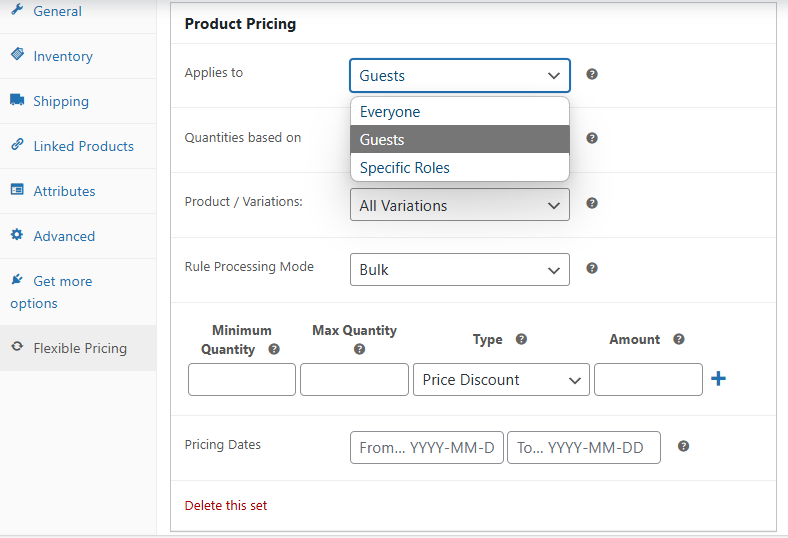
- Go to WooCommerce > Flexible Pricing > Role Pricing.
- Click Add Rule and select User Role Pricing.
- Choose specific role(s) as the target group. You can set it for all customers too or add higher discounts for specific groups while offering basic sale price (when editing products) for guests.
- You can also define custom customer roles with the free Groups plugin - Flexible Pricing WooCommerce is compatible and will add options for groups.
- Set a percentage discount (10%) or fixed discount ($5).
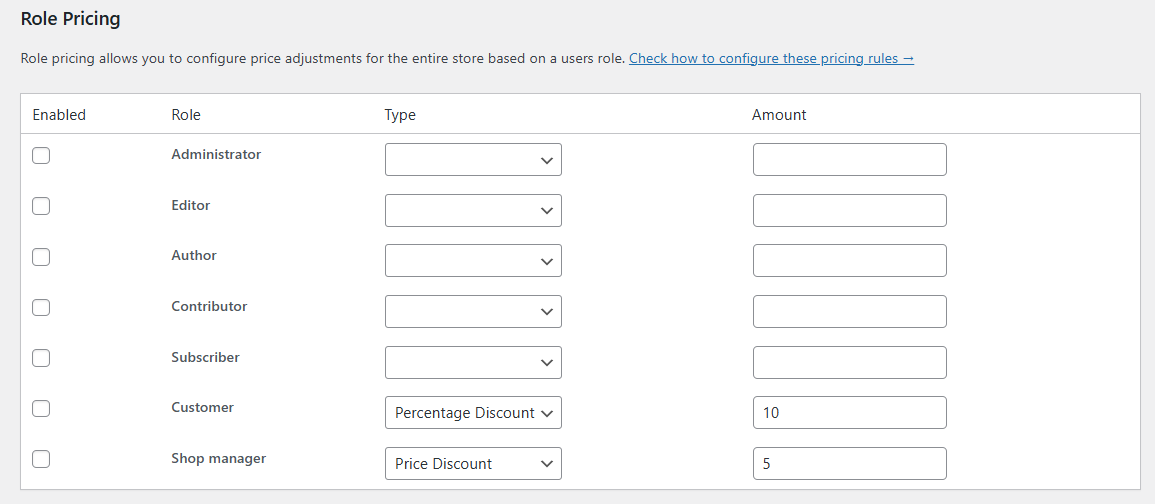
- Save changes, and new customers will see the discount automatically.
- You may also set discounts per role for selected products when editing them.
2. Abandoned cart coupons (ShopMagic for WooCommerce)
Recover lost sales by sending automatic discount emails to users who abandon their carts. Such users almost paid for products and become customers. You can automate the emails with ShopMagic.
Steps to set up in ShopMagic:
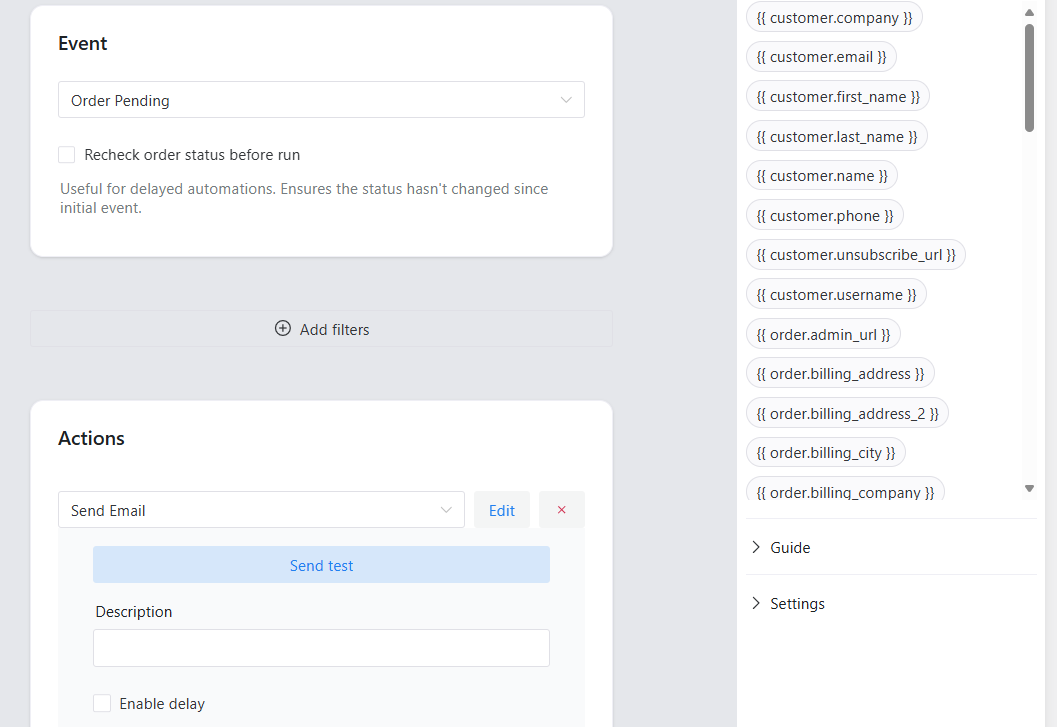
- Navigate to ShopMagic > Automations.
- Click Add New and name the automation.
- Set Event: Order Pending (for carts not completed in a specific timeframe).
- Add Action: Send Email and create an email with a coupon code.
- You can also use ShopMagic Customer Coupons (add-on) to add code discounts with the shop.coupon placeholder.
- What's more, it's possible to delay email sending with ShopMagic Delayed Actions (add-on).
- Save and activate the automation.
3. Bulk order discounts (Flexible Pricing WooCommerce)
Encourage customers to buy more by offering a discount for purchasing in bulk.
Steps to set up in Flexible Pricing WooCommerce:
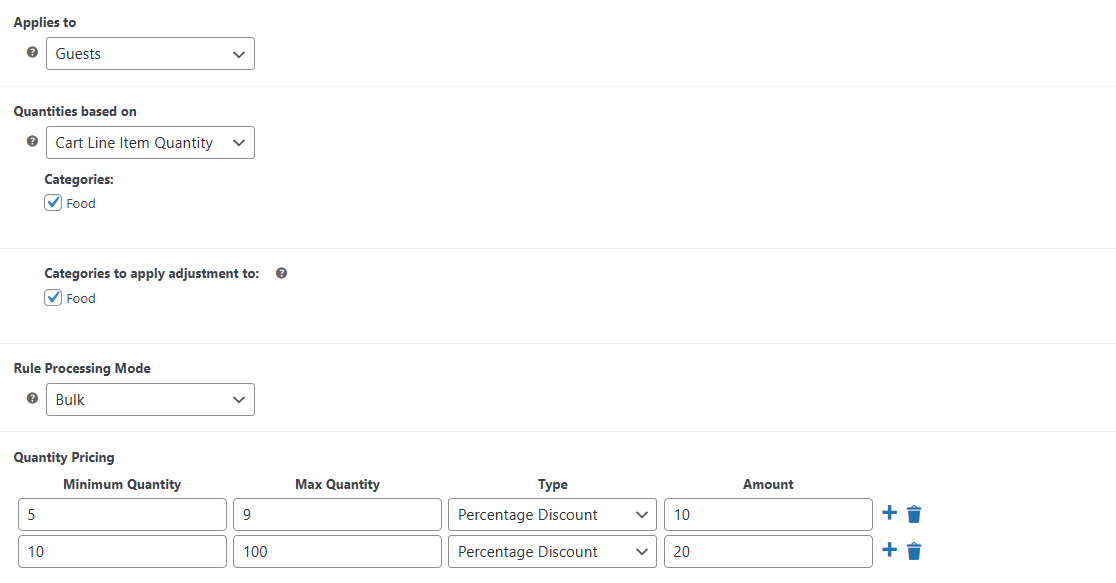
- Go to WooCommerce > Flexible Pricing > Category Pricing.
- Choose Advanced Category Pricing.
- Choose the product category (you may also set similar discounts per specific items).
- Set pricing tiers, for example, 10% off for 5+ items, 20% off for 10+ items.
- Save the rule to apply bulk discounts automatically.
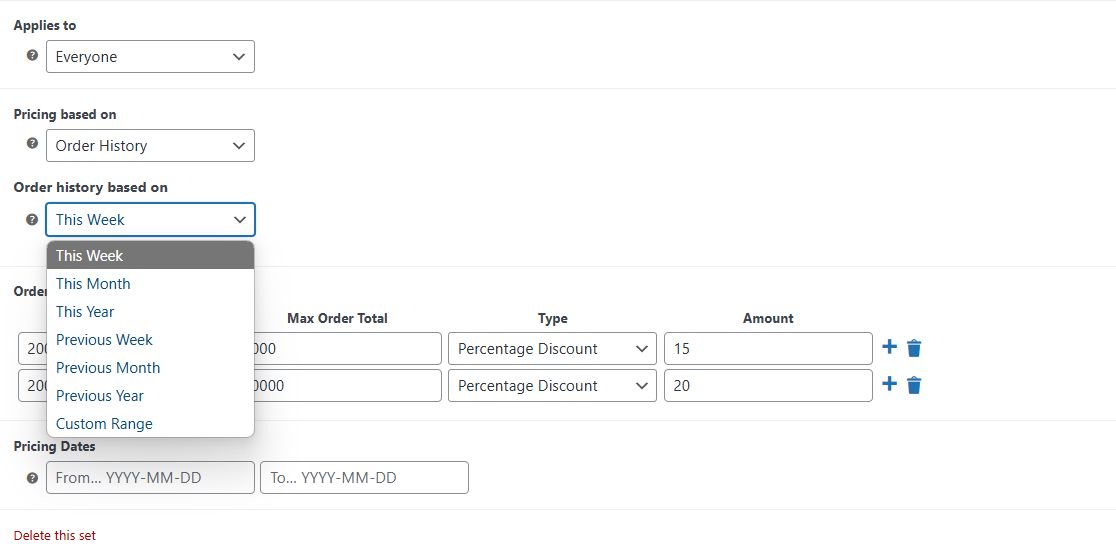
4. VIP customer loyalty discounts (Flexible Pricing WooCommerce)
Reward repeat buyers with special discounts based on order total or purchase history.
Steps to set up in Flexible Pricing WooCommerce:
- Navigate to WooCommerce > Flexible Pricing.
- Click Add Pricing Group for discounts based on order total.
- Set up special discounts (for example: 15% and 20%).
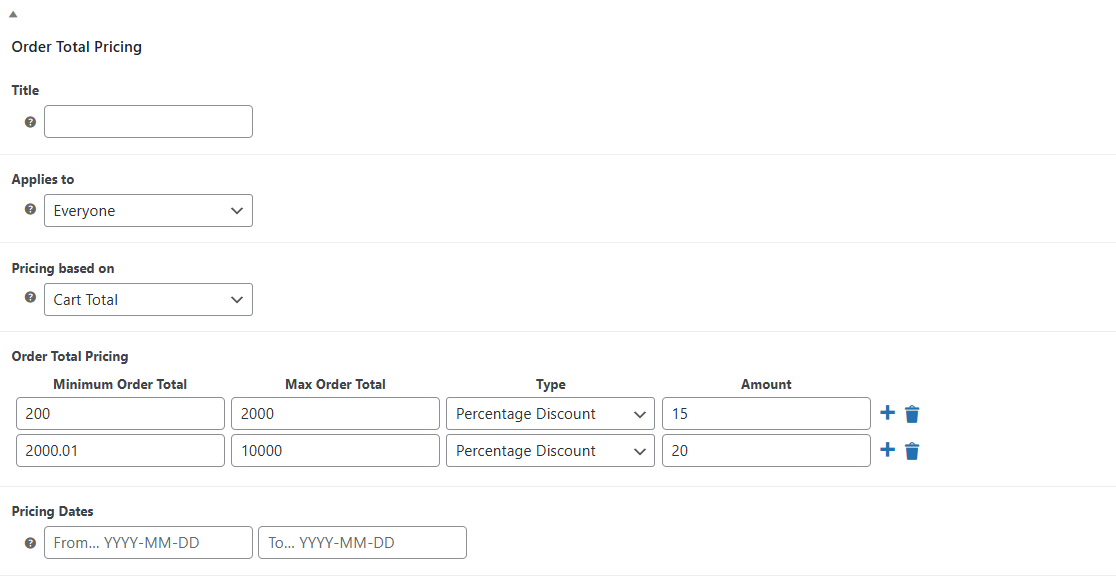
- Save changes, and the system will apply the discount automatically.
- You may also use order history rule and set the threshold for getting discounts.
5. Personalized email offers (ShopMagic for WooCommerce)
Send targeted discount offers based on customer behavior and order history.
Steps to set up in ShopMagic:
- Go to ShopMagic > Automations and create a new automation.
- Set Event: Order Completed.
- You may also use Advanced Filters add-on to segment customers (e.g., those who purchased in the last 30 days with the Customer - Total Spent filter).
- Add Action: Send Email with a personalized discount coupon.
- Activate automation to send targeted promotions.
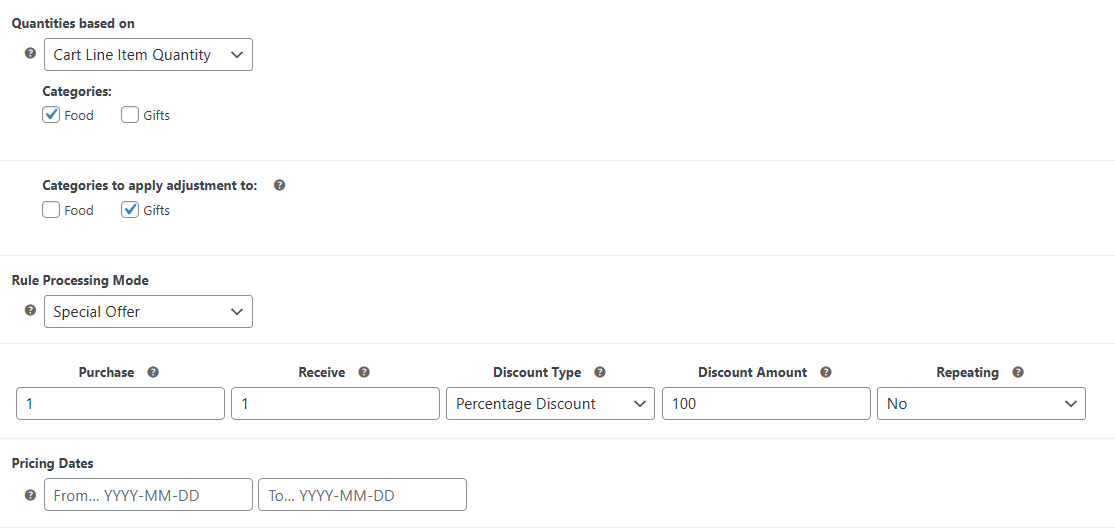
6. Gift with purchase (Flexible Pricing WooCommerce)
Offer a free product when customers buy specific items.
Steps to set up in Flexible Pricing WooCommerce:
- Go to WooCommerce > Flexible Pricing > Category Pricing > Advanced Category Pricing.
- Click Add Pricing Group and select Special Offer for Rule Processing Mode.
- Choose the required purchase category.
- Assign the free category (for example with items) that will be 100% off once a product from required category is added to cart.
- Save changes to activate the rule.
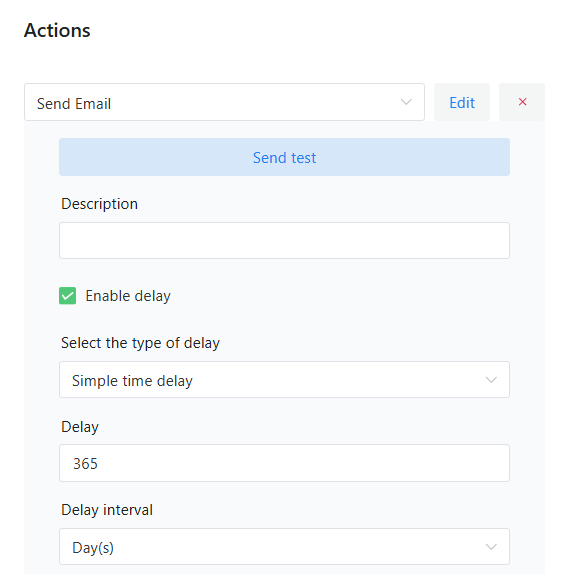
7. Customer birthday discount or welcome emails (ShopMagic for WooCommerce)
Reward customers with a personalized discount (for new users) or based on account history.
Steps to set up in ShopMagic:
- Navigate to ShopMagic > Automations.
- Click Add New and set Event: Customer Account Created (for welcome emails).
- Use Customer - Custom Field filter or the Advanced Filters add-on to segment users.
- Add Action: Send Email with a birthday discount.
- You may also use the Delayed Actions add-on to send emails after one year from opening an account.
- Activate automation, and customers will receive their discount automatically.
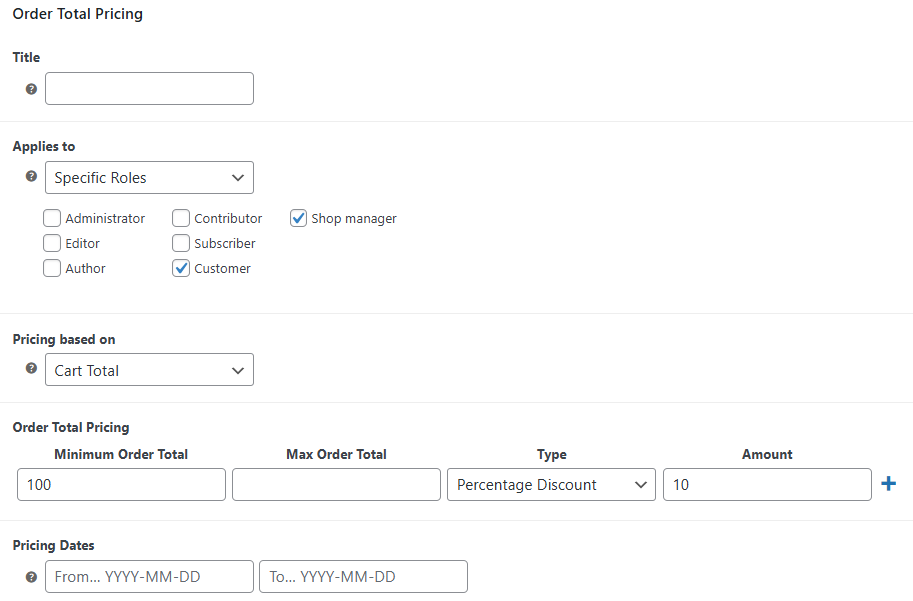
8. Cart value-based discounts (Flexible Pricing WooCommerce)
Encourage higher spending by offering discounts based on cart total.
Steps to set up in Flexible Pricing WooCommerce:
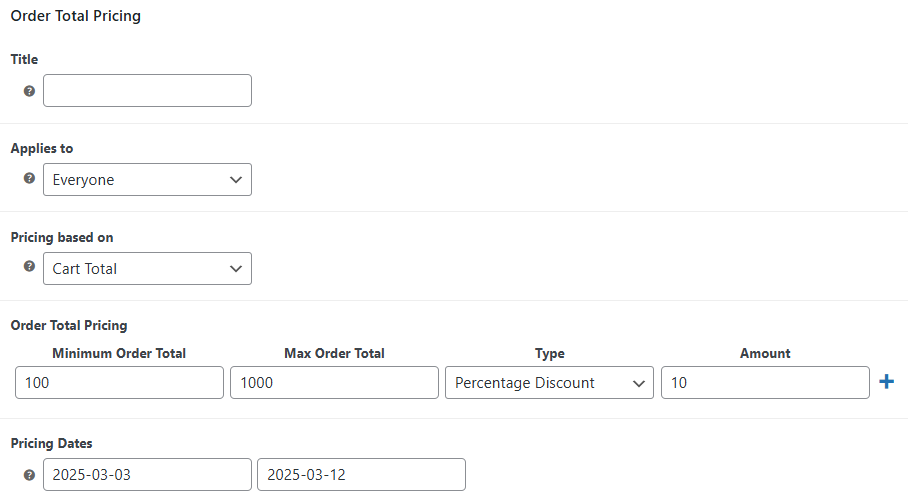
- Navigate to WooCommerce > Flexible Pricing > Order Totals Pricing.
- Add a new conditions based on cart total.
- Set minimum and maximum cart amounts (e.g., 10% off for orders over $100).
- You may also define such discount to specific products in their edit screens.
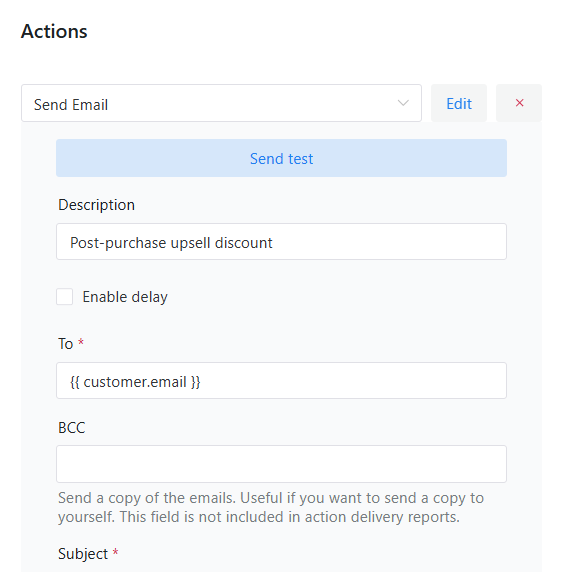
9. Post-purchase upsell discount (ShopMagic for WooCommerce)
Increase repeat purchases by offering a discount after checkout.
Steps to set up in ShopMagic:
- Go to ShopMagic > Automations.
- Click Add New and set Event: Order Completed.
- Add Action: Send Email with an exclusive upsell discount.
- Of course, you may use filters, for example, to send emails only to customers that bought certain products or above an order value.
- You may also include a limited-time offer to create urgency.
- Save and activate the automation.
- You may also send a test email to preview the offer.
10. Offer gift cards with free shipping (Flexible PDF Coupons)
Provide free shipping for vouchers.
Steps to set up in Flexible PDF Coupons:
- Navigate to PDF Coupons > Add New.
- Add a template
- Choose the template for a product that will be a voucher.
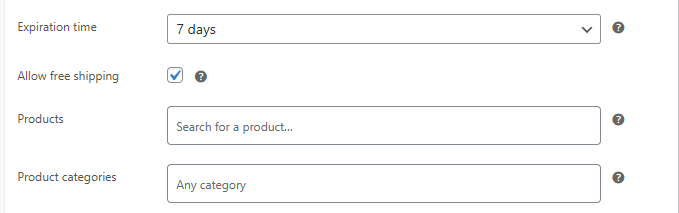
- Choose coupon settings and check Allow free shipping.
- Define expiration dates and other coupon restrictions.
- Save the product-coupon and promote a new product via email or checkout.
11. Limited-time flash sale (Flexible Pricing WooCommerce)
Create urgency by offering time-limited discounts on selected products.
Steps to set up in Flexible Pricing WooCommerce:
- Navigate to WooCommerce > Flexible Pricing.
- Add a new discount rule with time-limited requirement (schedule).
- Define the start and end date for the special discount.
- Apply a percentage or fixed discount for categories, order total, roles, or selected products.
- Save changes, and the discount will activate automatically only during the specified time.
- You may also add a special flash sale banner "Weekly savings".
Encourage email sign-ups by offering a special discount to newsletter subscribers.
Steps to set up in ShopMagic:
- Navigate to ShopMagic > Automations.
- Click Add New and set Event: Customer Opted In (choose a specific email list).
- Add Action: Send Email with a unique discount code.
- Customize the email with a compelling message.
- Save and activate automation to send coupons to new subscribers.
13. Buy more, save more (Flexible Pricing WooCommerce)
Offer tiered discounts to encourage higher spending for a WooCommerce product.
Steps to set up in Flexible Pricing WooCommerce:
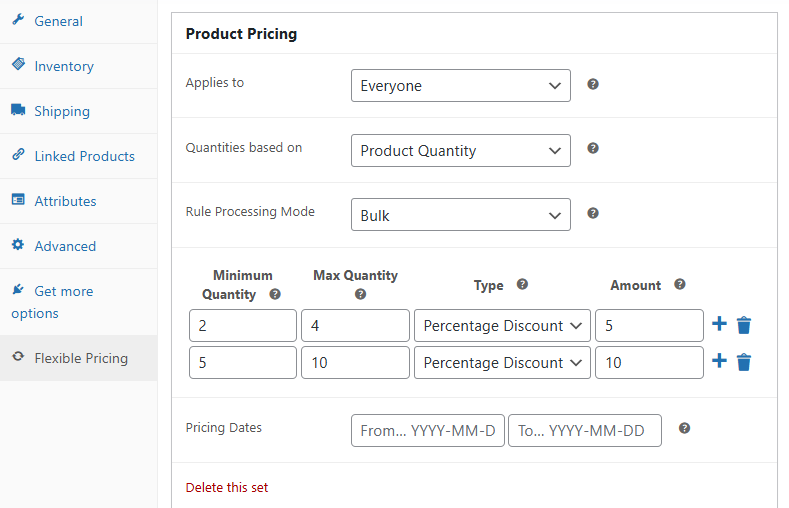
- Edit a product.
- Click Flexible Pricing tab in Product Data section
- Add a new rule for quantity-based pricing.
- Set discount tiers (for example, 5% off for 2+ items, 10% off for 5+ items).
- Save the rule, and the system will apply discounts automatically.
- You may also set such discounts with category pricing.
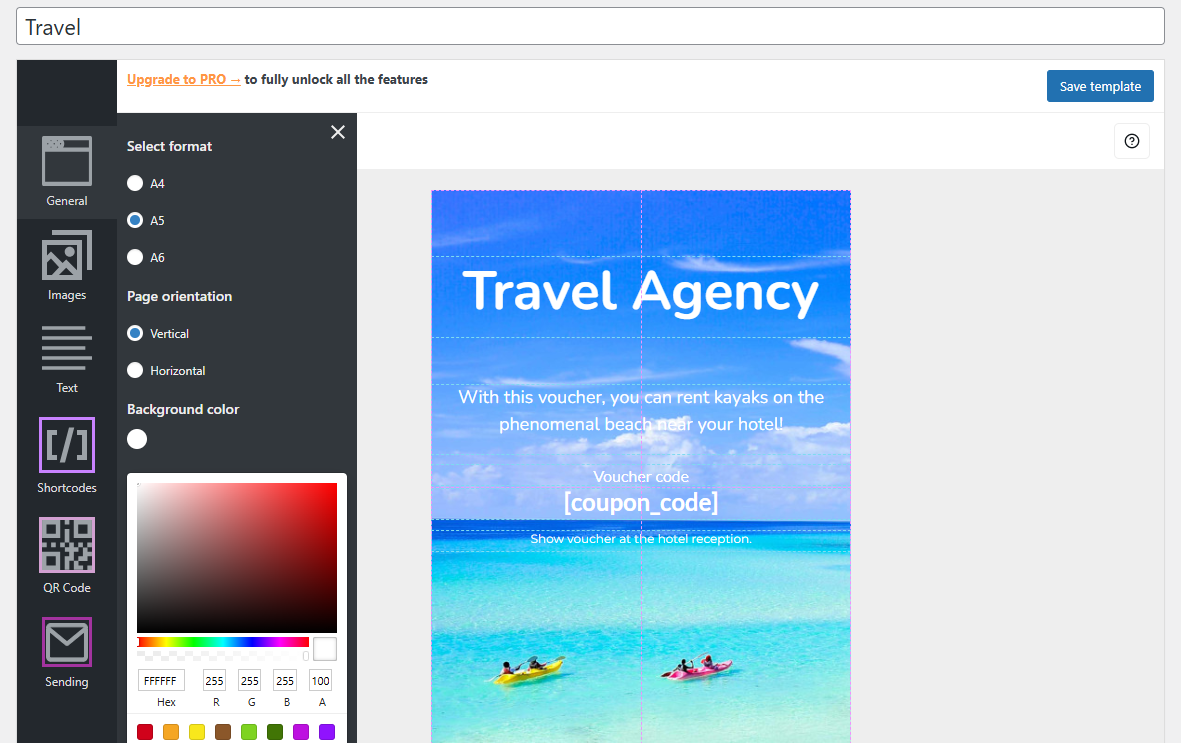
14. Referral rewards (Flexible PDF Coupons)
Encourage customers to refer friends by offering store credit.
Steps to set up in Flexible Coupons WooCommerce:
- Navigate to PDF Coupons > Add New.
- Customize the gift card template.
- Select PDF Coupon template for a WooCommerce product.
- Define redemption rules and expiration dates.
- Save the coupon and promote the new products.
- The plugin will generate unique referral codes for gift cards customers buy for themselves or others.
15. Subscription renewal discount (ShopMagic for WooCommerce with WooCommerce Subscriptions add-on)
Encourage customers to renew subscriptions by offering an exclusive discount.
Steps to set up in ShopMagic:
- Go to ShopMagic > Automations.
- Click Add New and set Event: Subscription - Before renewal.
- Add Action: Send Email with a renewal discount coupon.
- Customize the message to highlight the benefits of renewal.
- Activate automation to send timely renewal offers.
A visually appealing banner can enhance your promotional campaigns. Here are some of the best tools to design banners:
- Canva – User-friendly, customizable templates for web banners.
- Adobe Photoshop – Advanced design capabilities for professionals.
- Figma – Ideal for creating high-quality marketing visuals collaboratively.
- Banner Management For WooCommerce – For banner placement in your store.
Whichever promotions you implement, it's worth tracking their performance over time rather than setting them up once and forgetting about them. A discount that drove strong first-time purchases six months ago might be less effective today if customer expectations or your competitors' offers have shifted. Reviewing coupon usage rates, redemption patterns, and the resulting order values periodically helps you retire underperforming promotions and double down on the ones that are genuinely driving revenue rather than just giving away margin.
Summary
Coupons and promo codes are powerful tools for increasing sales and customer loyalty. Whether you’re offering discounts, free shipping, or gift vouchers, WooCommerce provides a range of features to maximize the effectiveness of promotions.
You may use Flexible Pricing WooCommerce, ShopMagic, and Flexible PDF Coupons to streamline coupon management and boost your store’s revenue.
FAQ
What's the difference between a WooCommerce coupon and a promo code?
In practice, the terms are used interchangeably in WooCommerce — both refer to a code customers enter (or that's applied automatically) to receive a discount, free shipping, or another incentive at checkout.
Can I combine multiple discount strategies in the same WooCommerce store?
Yes. Tools like Flexible Pricing WooCommerce and ShopMagic can run simultaneously, so you can offer automatic bulk discounts in the cart while also sending targeted email coupons based on customer behavior.
Do I need coding skills to set up these WooCommerce promotions?
No. All fifteen promotional ideas covered in this guide are configured through the plugin interfaces in the WordPress admin panel, with no custom code required.



Leave a Reply