• Skip to primary navigation
  • Skip to main content
  • Skip to primary sidebar
  • Skip to footer
WP Desk = premium plugins for WordPress & WooCommerce
  • Plugins
        • Checkout & OrdersMake your work easier and automate the orders. Adjust the order form to your needs and make it more useful to your customers. Print order labels directly from WooCommerce. Put the orders in order using our plugins. Find out how to streamline the procurement process in your store.
          • Flexible Checkout Fields
          • Active Payments
          • Automatic Payment Status
          • Flexible Refund and Return Order
          • Print Orders and Address Labels
          • Flexible Subscriptions Recurring Shipping
          • Flexible Subscriptions Payment Retry
          • Flexible Subscriptions Stock Management
        • ProductsThese plugins will help you manage your WooCommerce products. Here you will find the plugins to import and update products from XML or CSV files. Then you can change the product unit of measure, show the lowest price in the last 30 days (Omnibus Directive), or let customers name the product price!
          • Flexible Product Fields
          • Dropshipping Import Products
          • Dropshipping FTP Import Products
          • Dropshipping Export Products
          • Custom Price
          • WP Desk Omnibus
          • Flexible Quantity Calculator
          • Dropshipping Orders Export
        • MarketingPromote your store online. Add products from your shop to price comparison websites directly from WooCommerce. Acquire new customers and communicate with your existing ones. Build a customer base and communicate with clients using one of the most effective marketing tools, namely e-mail marketing. Check out our promotional tools!
          • Flexible Pricing
          • Flexible Wishlist - Analytics & Emails
          • OLX WooCommerce
          • Flexible PDF Coupons
          • ShopMagic
          • Flexible Invoices
  • Bundle🔥
  • WP Desk Care
  • Support
  • Blog
  • My Account
  • 0

More results

Boost Sales with WooCommerce BOGO and Tiered Pricing

Plugin Tutorials, WooCommerce coupons & wishlists, WooCommerce pricing & discounts, WooCommerce tutorials

Piotr Ostrowski4 minutes read2026-01-13
blog category heading image

WooCommerce BOGO and tiered pricing are powerful ways to boost your store’s sales during Black Friday and other major sales events. In this article, you’ll learn how to set up a “Buy One, Get Another for $1” promotion and create tiered discounts that reward bigger orders. We’ll also cover step-by-step instructions using the Flexible Pricing plugin, so your customers see the savings instantly and your revenue grows efficiently. But first, a few words about what you can do for free with WooCommerce.

Contents

  • Change product prices manually in WooCommerce
  • Set up WooCommerce BOGO and tiered pricing with the Flexible Pricing plugin
  • Buy one product, get another for $1
    • Flexible Pricing WooCommerce £79
  • Tiered pricing in WooCommerce – higher order value, higher discount
    • Flexible Pricing WooCommerce £79
  • Conclusion
    • Related Articles
  • 5 essential WooCommerce tips to boost your sales
  • WooCommerce Coupons - Complete Guide
  • WooCommerce advanced custom fields: a FREE product & checkout customizer
  • Promo codes & discounts for existing customers in WooCommerce (15 ideas)

Change product prices manually in WooCommerce

In WooCommerce, you can set a sale price for each product.

Of course, you can manually set the sale price for each product, and after the sale period, you manually restore the regular prices. Of course, you may use the built-in sale calendar, but please remember that you can use the tool only for one product at a time, so you would have to set it product by product.
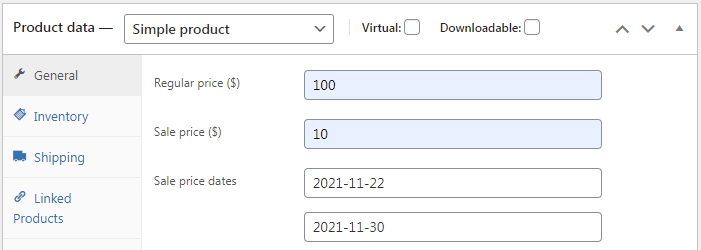
WooCommerce Black Friday normal sale

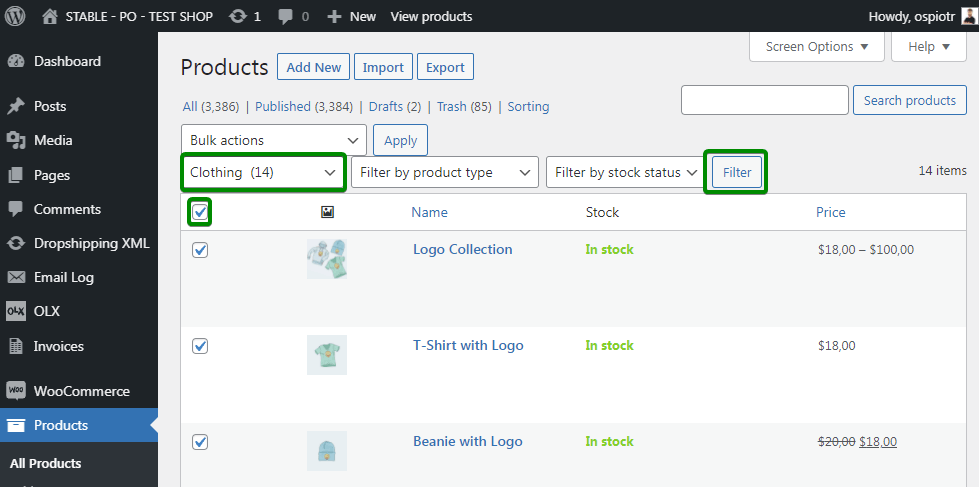
By default, in WooCommerce, you can set sale prices for many products using the Bulk Actions feature. Suppose you want to introduce sale prices for products from one category, 10% lower than the regular prices.

Just follow the steps below:

  1. Go to the product list screen
  2. List products from the category that interests you
  3. On the list, select the products that you want to sell at a sale priceSet sale price for more WooCommerce products on Black Friday
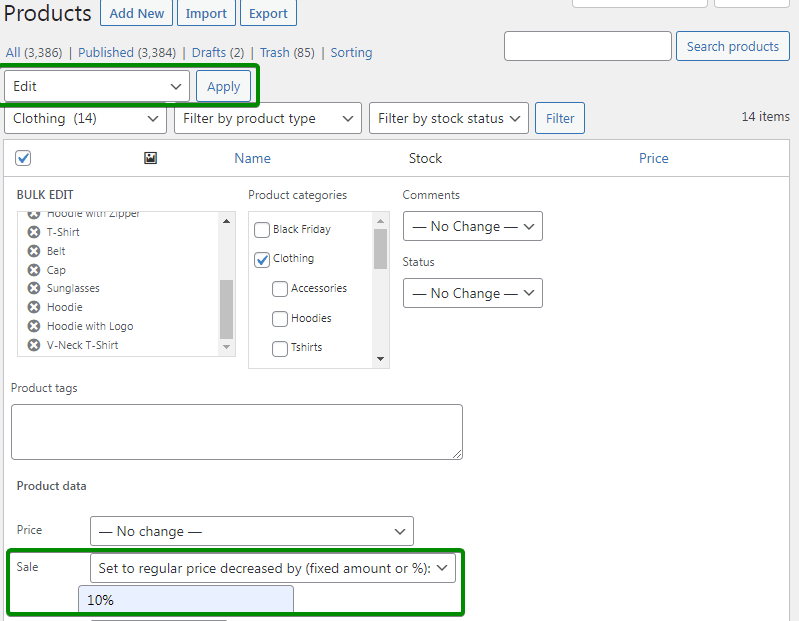
  4. Select Edit from the Bulk Actions
  5. Go to the Sale section
  6. Select Set to regular price decreased by (fixed amount or %):
  7. Enter the value 10% and confirm:Bulk edit sale price on Black Friday in your WooCommerce online store
Using the Bulk Actions menu, you will not remove the promotional prices! To undo the changes, you will have to "click" through each product separately….

As you can see, it's neither intuitive nor convenient, is it? Moreover, this method will only work for simple products.

If you use variations in your store, their prices will not be changed!

Set up WooCommerce BOGO and tiered pricing with the Flexible Pricing plugin

You can set up a similar promotion in seconds with the Flexible Pricing plugin.

Flexible Pricing is a plugin for creating promotions and discounts. Therefore, it is perfect for setting up promotions in WooCommerce on Black Friday! With its help, you can implement advanced scenarios.

You can find the plugin in our store:

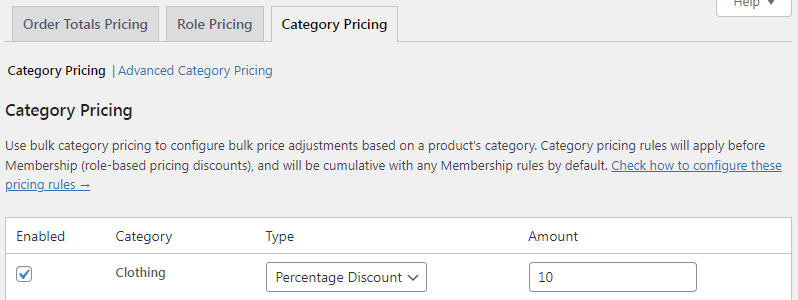
After installing and activating the plugin, go to the WooCommerce -> Flexible Pricing menu. Then go to the Category Pricing tab:Flexible WooCommerce product pricing on Black Friday
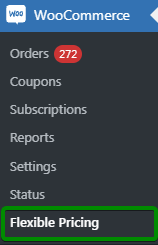
Here you can set a 10% discount on products from the selected category:

  1. First, activate the discount by checking the checkbox in the Enabled column
  2. Later, select Percentage Discount in the Type field
  3. Enter 10 in the Amount field:WooCommerce discounts for categories

And it's ready! It didn't take very long, did it?

After saving the changes, your customers will immediately see discounts in the store:
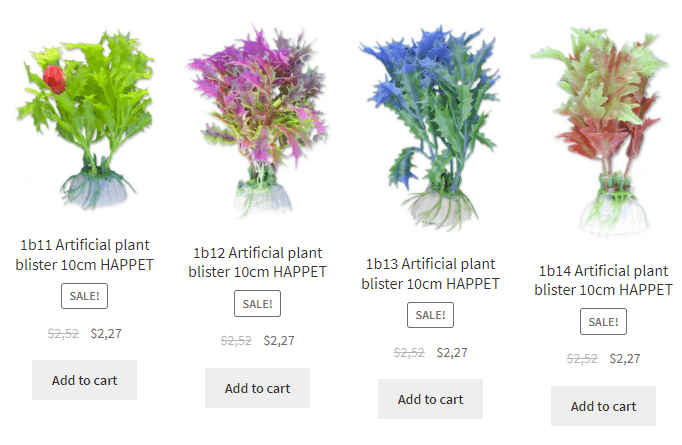
WooCommerce discounts visible on the product page and in the shop catalogue

Of course, you can set a discount for many product categories in your WooCommerce store this way. The discount will also work for variations!

When Black Friday is over, all you need to do is deactivate the WooCommerce promotions by unchecking the checkbox in the plugin settings. And the prices displayed in the store will return to regular prices.

Of course, in the plugin, you can use more of WooCommerce dynamic pricing & discounts.

Many ways to use the Flexible Pricing plugin are described by Natalia Suchodolska in the article "WooCommerce Buy One Get One Free: Step-by-Step Setup to Boost Sales". There, you can find instructions for setting up classic BOGO deals, Buy 3 Pay for 2 offers, WooCommerce Buy One Get One Free Across Categories, and Order-Total BOGO deals. It's a very comprehensive article, and I highly recommend reading it! 😊

Buy one product, get another for $1

A discount like "Buy one product, get another for $1" is one the most popular in e-commerce.

On Black Friday, it's a good idea to offer some WooCommerce products to your customers by lowering the price - all to drive sales of other products. Take a look at how easy it is to set up a "Buy one product, get another one for 1 dollar" promotion with the Flexible Pricing plugin:

Create a new category of WooCommerce products, to which you will then assign products that will be available for purchase in the promotion.

Go to the Products -> Categories -> Add new:Category based promotions
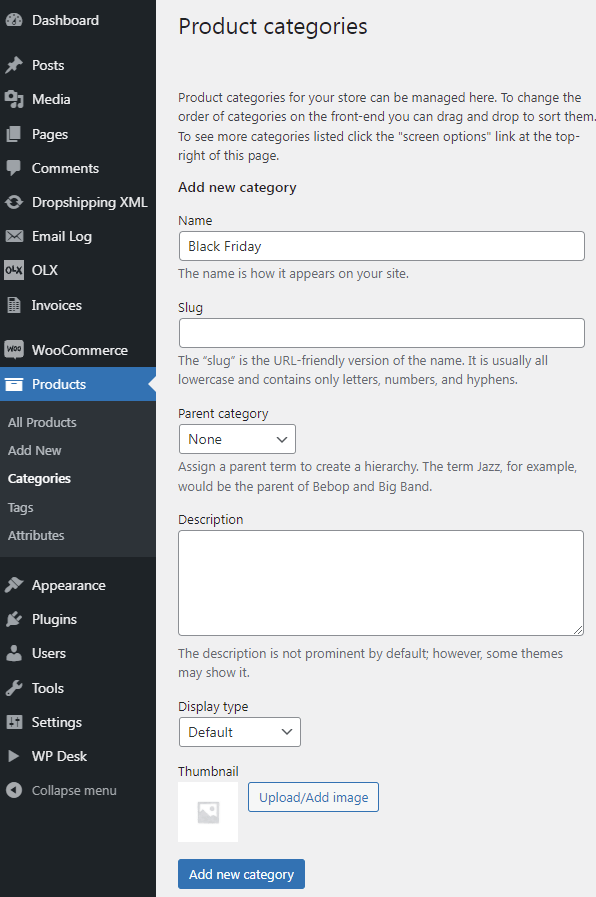
Then assign products to the new category that are to be offered for $1 when buying other products from the selected categories. You can do this by using the Bulk Actions feature again:Dynamic category discounts for Black Friday in WooCommerce
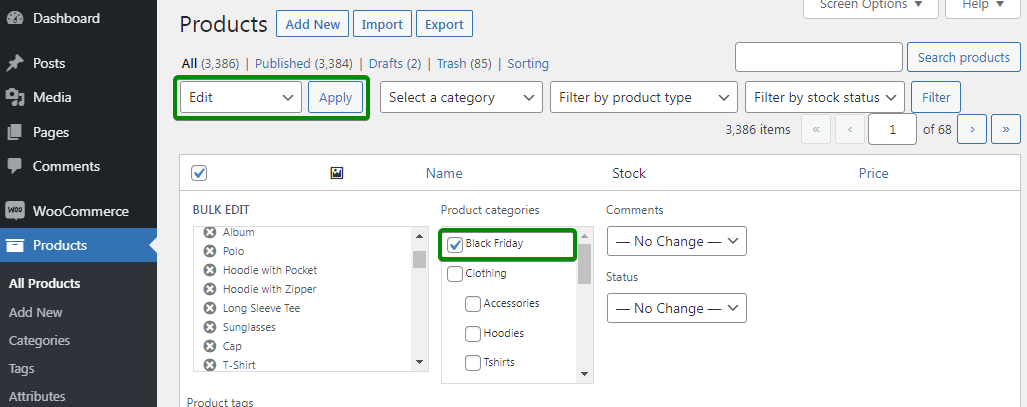
You have just created a new product category. Also, you've added products to that category so buyers will get the $1 product if the contents of their cart meet the appropriate conditions.

Now configure the "Second product for 1$" sale.

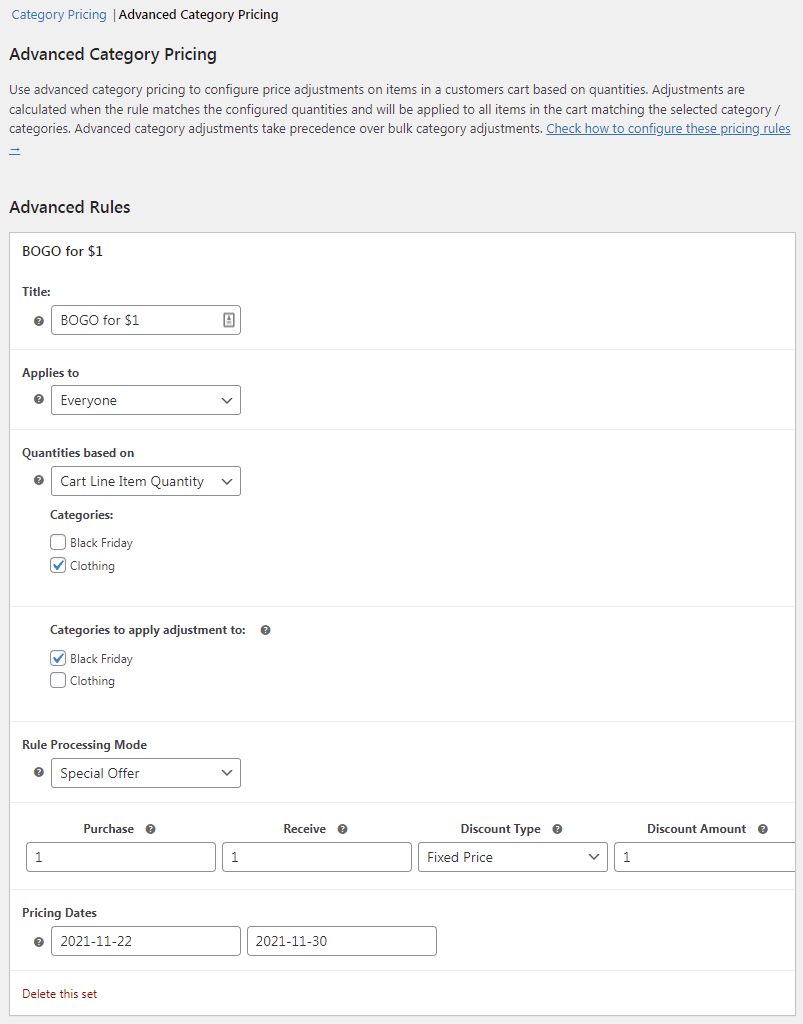
Go to the menu: WooCommerce -> Flexible Pricing -> Promotions for categories -> Advanced promotions for categories:

  1. Enter the title of the promotion (optional)
  2. Then, select Everyone in the Applies to field from the drop-down list
  3. Specify that the terms of the promotion should be based on the number of items in the cart: Calculate quantity based on cart item quantity
  4. And select the categories on which the terms of the promotion will depend and the categories that will be discounted in the cart.BOGO WooCommerce dynamic pricing and discounts

Final result: if the buyer adds a product from the category to the cart, he will be able to buy a WooCommerce product from the Black Friday category for $1.

Flexible Pricing WooCommerce £79

Customers love sales and pricing deals. Use this! Create promotions like Buy One Get One Free to get more sales in your store. The most dynamic pricing plugin for WooCommerce.

💾 Active Installations: 8000+ | 🔄 Last update: 2026-08-19

Add to cart or View Details
WP Desk
Plugins used by 239,741+ shops
Last Updated: 2026-08-19
Works with WooCommerce 10.7 - 11.1

Tiered pricing in WooCommerce – higher order value, higher discount

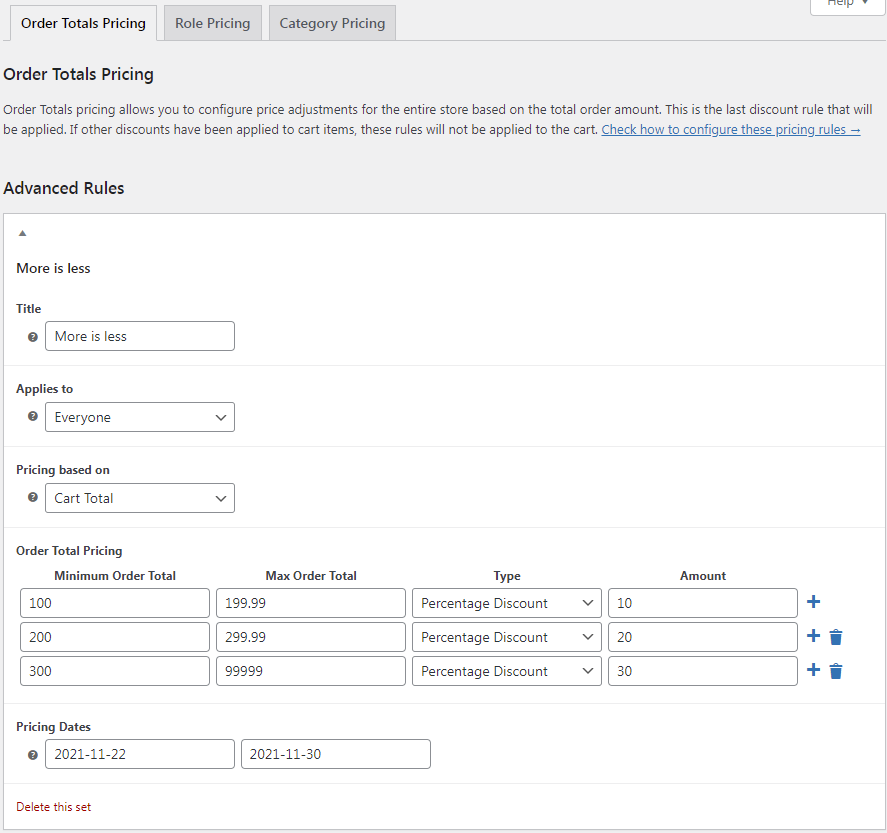
You can also offer your customers a progressive discount - the more, the cheaper. Increase the value of shopping carts by encouraging buyers to add more products as they shop. The higher the value of the order, the higher the discount will be charged in the cart.

If the order value:

  1. exceeds $100, the discount will be 10%
  2. will be higher than $200, the discount will be 20%
  3. exceeds $300, the discount will be 30%

To implement this promotion in your store, go to the Order Totals Pricing section and configure the promotion thresholds as indicated in the screenshot below:WooCommerce BOGO in the cart - buy one get one free discount type
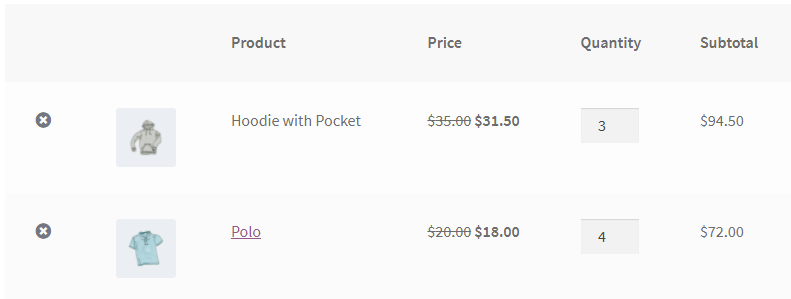
The final result will be visible in the cart:WooCommerce Black Friday discount in the cart - flexible sale plugin
Flexible Pricing WooCommerce £79

Customers love sales and pricing deals. Use this! Create promotions like Buy One Get One Free to get more sales in your store. The most dynamic pricing plugin for WooCommerce.

💾 Active Installations: 8000+ | 🔄 Last update: 2026-08-19

Add to cart or View Details
WP Desk
Plugins used by 239,741+ shops
Last Updated: 2026-08-19
Works with WooCommerce 10.7 - 11.1

The Flexible Pricing plugin and other plugins from WP Desk can be tested in a free demo!

Conclusion

This article explained how WooCommerce BOGO and tiered pricing can boost your store’s sales, especially during Black Friday and other major sales events. You learned how to manually set sale prices and why this method can be inconvenient for large stores or variable products. The Flexible Pricing plugin offers an easy solution, allowing you to create advanced promotions like "Buy One, Get Another for $1" and tiered discounts based on order value. Using this plugin, discounts can be applied instantly across product categories and variations, making your store more appealing to customers while increasing revenue. For more detailed BOGO setups, check out Natalia Suchodolska's comprehensive guide on Flexible Pricing.


Related Articles

WooCommerce tips

5 essential WooCommerce tips to boost your sales

Do you need valuable WooCommerce tips and tricks to boost your sales? I'll give you 5 most essential WooCommerce tips and tricks. If you follow them, ...
WooCommerce coupons - complete guide

WooCommerce Coupons - Complete Guide

Offering WooCommerce coupons during the Black Friday campaign to your customers always comes with win-win situations - customers are more willing to b...
Advanced custom product fields for WooCommerce products

WooCommerce advanced custom fields: a FREE product & checkout customizer

Are you looking for a way to easily customize your WooCommerce? Let's build advanced product and checkout pages with custom fields in WooCommerce with...
Promo codes and discounts for existing customers in WooCommerce (15 tips)

Promo codes & discounts for existing customers in WooCommerce (15 ideas)

A well-structured discount strategy can increase conversions, improve customer retention, and boost sales in your WooCommerce store. Whether you want ...

4 minutes read5578 views

Piotr Ostrowski

...

Powered by WP Desk

WP Desk brings you great WooCommerce plugins. We strive to save your time and money by speeding up your processes. Use our plugins to build a better store. Awesome support included in the package.

Premium WooCommerce Plugins →
WP Desk › Blog › WooCommerce marketing plugins › WooCommerce pricing & discounts › Boost Sales with WooCommerce BOGO and Tiered Pricing

Primary Sidebar

Contents

  • Change product prices manually in WooCommerce
  • Set up WooCommerce BOGO and tiered pricing with the Flexible Pricing plugin
  • Buy one product, get another for $1
    • Flexible Pricing WooCommerce £79
  • Tiered pricing in WooCommerce – higher order value, higher discount
    • Flexible Pricing WooCommerce £79
  • Conclusion

Flexible Pricing WooCommerce £79

Customers love sales and pricing deals. Use this! Create promotions like Buy One Get One Free to get more sales in your store. The most dynamic pricing plugin for WooCommerce.

💾 Active Installations: 8000+ | 🔄 Last update: 2026-08-19

Add to cart or View Details
WP Desk
Plugins used by 239,741+ shops
Last Updated: 2026-08-19
Works with WooCommerce 10.7 - 11.1

Stay updated on our how-to articles

WP Desk news, WooCommerce tips, promo codes - right to your inbox.

By entering your e-mail, you agree to our Terms & Conditions and Privacy Policy.

By entering your e-mail, you agree to our Terms & Conditions and Privacy Policy.

Footer

WP Desk - WooCommerce Plugins

At WP Desk we create great WooCommerce plugins with awesome support. Save time and money with our e-commerce solutions. See how we can help you improve your e-store →

Secured by Comodo

WP Desk

  • About us
  • Giving Back
  • Blog
  • Get Support
  • Contact us

Products

  • Premium Plugins
  • WP Desk Care
  • Documentation
  • WooCommerce Invoices
  • Email Marketing
  • PDF Coupons

Legal

  • Terms & Conditions
  • Refund Policy
  • Support Policy
  • Privacy Policy

© 2026 WP Desk

We value your privacy

We use necessary cookies to make our site work. We'd also like to set additional cookies to understand site usage, enhance your browsing experience, and serve personalized ads or content. By clicking ‘Accept All,’ you consent to our use of additional cookies.

Functional Always active
The technical storage or access is strictly necessary for the legitimate purpose of enabling the use of a specific service explicitly requested by the subscriber or user, or for the sole purpose of carrying out the transmission of a communication over an electronic communications network.
Preferences
The technical storage or access is necessary for the legitimate purpose of storing preferences that are not requested by the subscriber or user.
Statistics
The technical storage or access that is used exclusively for anonymous statistical purposes. Without a subpoena, voluntary compliance on the part of your Internet Service Provider, or additional records from a third party, information stored or retrieved for this purpose alone cannot usually be used to identify you. The technical storage or access that is used exclusively for anonymous statistical purposes. Without a subpoena, voluntary compliance on the part of your Internet Service Provider, or additional records from a third party, information stored or retrieved for this purpose alone cannot usually be used to identify you.
Marketing
The technical storage or access is required to create user profiles to send advertising, or to track the user on a website or across several websites for similar marketing purposes.
  • Manage options
  • Manage services
  • Manage {vendor_count} vendors
  • Read more about these purposes
View preferences
  • {title}
  • {title}
  • {title}