

When it comes to boosting online sales, few promotions work as well as a WooCommerce Buy One Get One Free (BOGO) deal. It’s an irresistible offer that instantly increases customer value perception and encourages bigger purchases. That said, setting up these dynamic promotions in WooCommerce isn’t always straightforward with its native features.
WooCommerce’s default coupon system handles basic discounts but struggles with advanced BOGO setups — like “buy 3, pay for 2,” conditional offers, or cross-category deals. In fact, without the right tools, creating these flexible promotions can feel frustrating and time-consuming.
This step-by-step guide shows you exactly how to set up WooCommerce BOGO deals the easy way. Specifically, using the Flexible Pricing WooCommerce plugin, you’ll learn how to build everything from simple “buy 1, get 1 free” offers to complex tiered discounts — all designed to increase conversions and revenue.
Contents
- What Is WooCommerce Buy One Get One Free (BOGO)?
- Why Native WooCommerce Isn’t Enough for BOGO Deals
- Flexible Pricing WooCommerce: The Ultimate WooCommerce Buy One Get One Free Plugin
- How to Set Up WooCommerce Buy One Get One Free (BOGO) Deals
- Advanced WooCommerce BOGO Strategies
- Beyond BOGO: Other Powerful Discounts You Can Create
- Why Choose Flexible Pricing for WooCommerce Buy One Get One Free Deals
- Enhance Your Store with Complementary WP Desk Plugins
What Is WooCommerce Buy One Get One Free (BOGO)?
WooCommerce Buy One Get One Free is a powerful marketing strategy where customers get a free or discounted product when purchasing a qualifying item. Beyond giving something away, it’s about increasing average order value, clearing inventory, and attracting new shoppers.
In your WooCommerce store, BOGO deals could mean “buy one t-shirt, get one 50% off,” or “buy two items from the Summer Collection and get a free beach towel.” These promotions encourage shoppers to buy more and help your business grow through higher order totals and improved loyalty.
Why Native WooCommerce Isn’t Enough for BOGO Deals
Although WooCommerce is flexible, its built-in tools for creating WooCommerce BOGO coupons are limited. You can set basic discounts or minimum spend requirements, but true “buy X, get Y” offers require manual workarounds and can confuse customers.
- No automatic addition of free items to the cart
- No control over quantities (e.g., buy 3, pay for 2)
- No cross-product or cross-category flexibility
- No targeting by customer role or purchase history
To run smooth and smart BOGO campaigns, you need a dedicated plugin that lets you automate complex pricing rules without hassle.
Flexible Pricing WooCommerce: The Ultimate WooCommerce Buy One Get One Free Plugin
The Flexible Pricing WooCommerce plugin solves these challenges by giving you full control over dynamic pricing. It lets you create unlimited WooCommerce BOGO offers without coding — from simple “buy one, get one free” to advanced conditional promotions.
- Standard BOGO: Buy one product, get one free or discounted
- BOGOHO: Buy one, get one half off
- Tiered Discounts: Buy 3, pay for 2
- Cross-Product BOGO: Buy product A, get product B free
- Category-Based BOGO: Buy from category X, get one from Y free
- Role-Based BOGO: Offer exclusive deals to VIPs or wholesalers
With its intuitive interface, you can easily set up, schedule, and manage deals that fit your marketing strategy — helping you convert browsers into loyal customers.
How to Set Up WooCommerce Buy One Get One Free (BOGO) Deals
Setting up WooCommerce Buy One Get One Free promotions is easy with the Flexible Pricing WooCommerce plugin. Here’s a streamlined guide to create different BOGO scenarios.
1. General Plugin Setup
After installing and activating the plugin, go to WooCommerce → Flexible Pricing.
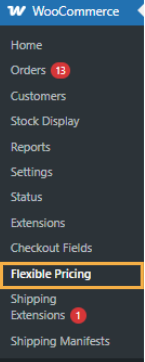
For BOGO deals, focus on Product Pricing or Advanced Category Pricing sections to manage rules.
2. Scenario 1: Simple WooCommerce Buy One Get One Free Deal
For a classic “Buy 1, Get 1 Free”:
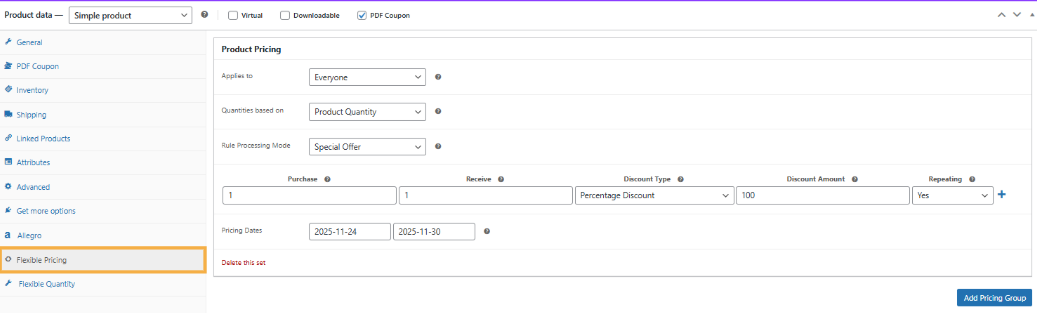
- Edit the product → Flexible Pricing tab → Add Pricing Group.
- Set Applies to → Everyone, Rule Processing Mode → Special Offer.
- Set Purchase: 1, Receive: 1, Type: Percentage Discount → 100%, Repeating: if needed.
- Save the product.
3. Scenario 2: WooCommerce Buy One Get One Free Variation – Buy 3, Pay for 2
Use Bulk Pricing mode for tiered discounts:
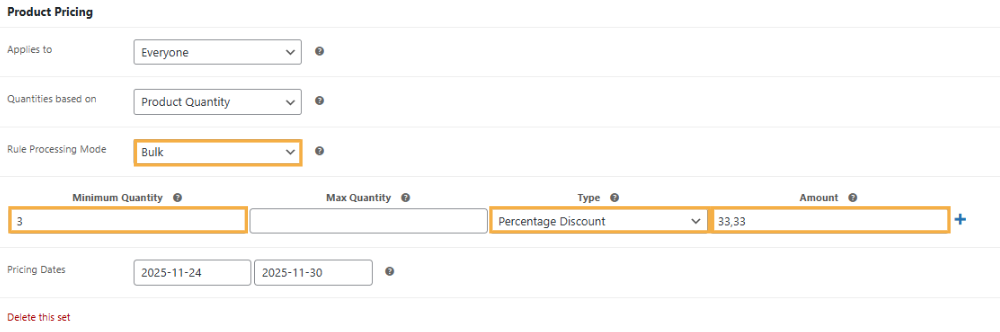
- In the product’s Flexible Pricing tab, add a new pricing group.
- Select Rule Processing Mode → Bulk Pricing.
- Set Minimum Quantity: 3, Type: Percentage Discount → 33.33%.
- Update to save.
4. Scenario 3: WooCommerce Buy One Get One Free Across Categories
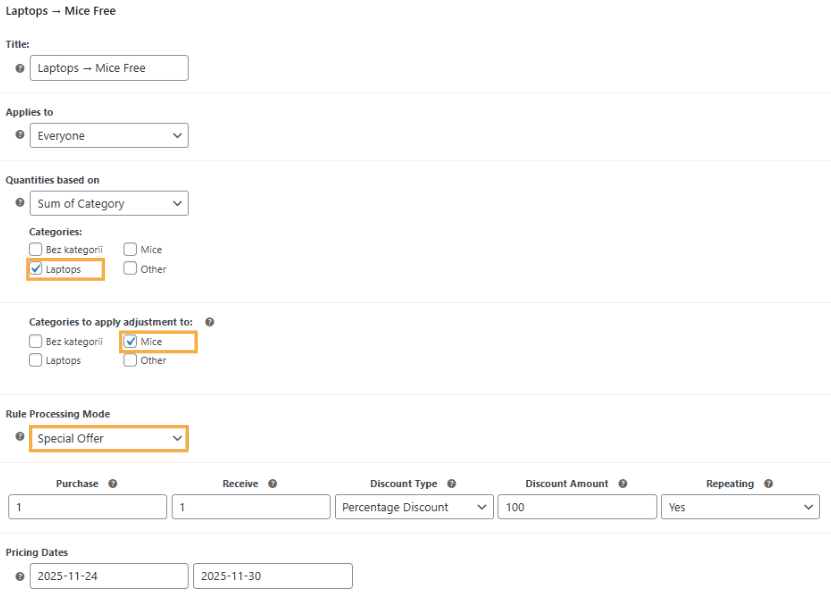
For cross-product deals, e.g., “Buy Laptop, Get Mouse Free”:
- Go to WooCommerce → Flexible Pricing → Advanced Category Pricing → Add Pricing Group.
- Set purchase category (e.g., Laptops), receive category (e.g., Mice), Rule Processing Mode → Special Offer.
- Set Purchase: 1, Receive: 1, Discount: 100%, optionally repeating.
- Save changes.
Flexible Pricing allows endless variations of WooCommerce Buy One Get One Free deals. For detailed examples, see the Flexible Pricing WooCommerce documentation.
Advanced WooCommerce BOGO Strategies
After mastering the basics, Flexible Pricing lets you build advanced WooCommerce buy one get one free strategies tailored to your customers and sales goals.
Role-Based BOGO Offers
For instance, offer exclusive BOGO deals to specific user roles — like wholesalers or VIP members. When creating a pricing group, simply choose the role under Applies to. You can even combine this with WooCommerce Group Pricing for more personalized targeting.
Order-Total BOGO Deals
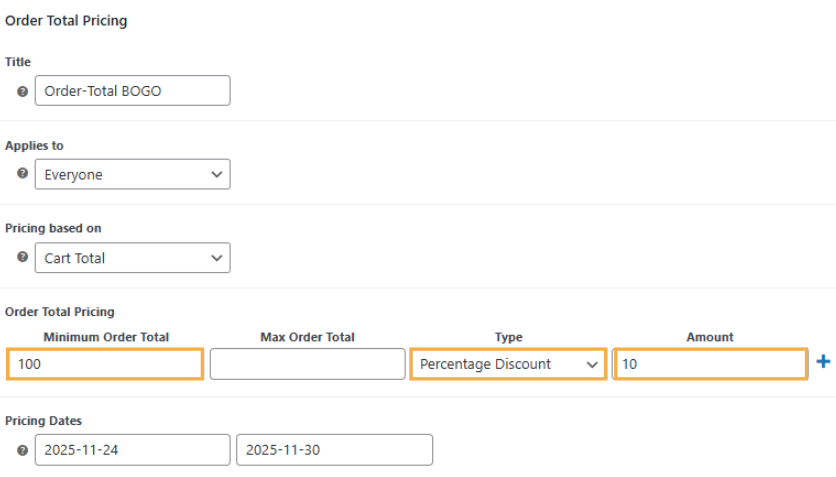
Encourage higher spending with cart value–based promotions — for example, “Spend $100, get 10% off.”
In the Order Totals Pricing section, set a minimum spend and the discount value, which will be automatically applied once the threshold is reached.
Note: You cannot assign a specific product or category as a free item in this section — for classic BOGO deals like “Buy X, Get Y,” use Product Pricing or Advanced Category Pricing.
Historical Order BOGO
Reward loyal customers based on past purchases — for example, offer “Buy One, Get One Half Off” to shoppers who spent over $200 last month. Flexible Pricing makes it easy to define time-based conditions.
Time-Limited WooCommerce BOGO Campaigns
Use date ranges to automate seasonal or flash BOGO promotions — perfect for events like Black Friday or Cyber Monday. Set start and end dates within each pricing rule to save time and avoid manual adjustments.
Pro Tip: Combine these strategies for maximum impact — for instance, “Buy 2, Get 1 Free” available only to VIPs who spent $500+ in the past 6 months. The Flexible Pricing WooCommerce plugin makes every WooCommerce buy one get one free campaign simple, smart, and profitable.
Beyond BOGO: Other Powerful Discounts You Can Create
While WooCommerce buy one get one free promotions are incredibly effective, the Flexible Pricing WooCommerce plugin goes far beyond BOGO. It’s a complete dynamic pricing engine that lets you implement a wide range of WooCommerce quantity discount strategies and more:
- Bulk Pricing: Offer discounts based on quantity—buy 5–9 for 10% off, 10+ for 20% off—to boost larger purchases.
- Category Pricing: Apply discounts to all products in a category, perfect for clearing stock or promoting new lines.
- Order Total Discounts: Give a percentage or fixed discount when the cart reaches a specific total, increasing average order value.
- Role-Based Pricing: Show different prices for different customer types, such as wholesale vs. retail.
- Loyalty Discounts: Reward repeat buyers based on cumulative spending.
- Fixed Price Discounts: Set a specific price once conditions are met instead of a percentage off.
These versatile discount options make Flexible Pricing WooCommerce much more than a BOGO plugin — it’s your all-in-one solution for advanced dynamic pricing and smarter promotions.
Why Choose Flexible Pricing for WooCommerce Buy One Get One Free Deals
When implementing WooCommerce BOGO deals and other promotions, the right plugin makes all the difference. Flexible Pricing WooCommerce delivers functionality, stability, and top-tier support trusted by thousands of store owners and developers worldwide.
- Seamless WooCommerce Integration: 100% compatible with core WooCommerce, popular themes, and major plugins — no conflicts, no issues.
- User-Friendly Setup: Create even complex BOGO rules step-by-step without coding, saving hours of development time.
- Real Sales Impact: Drive conversions, boost average order value, and automate promotions for measurable business growth.
- Excellent Support & Documentation: Backed by WP Desk’s responsive English-speaking support and detailed guides for quick troubleshooting.
- Trusted Expertise: Built by WooCommerce specialists who understand real-world e-commerce pricing needs.
Flexible Pricing WooCommerce £79
Customers love sales and pricing deals. Use this! Create promotions like Buy One Get One Free to get more sales in your store. The most dynamic pricing plugin for WooCommerce.
💾 Active Installations: 8000+ | 🔄 Last update: 2026-10-07
With Flexible Pricing, you’re investing in a professional solution that helps deliver faster projects, higher client satisfaction, and stronger store performance.
Enhance Your Store with Complementary WP Desk Plugins
Flexible Pricing is your go-to for WooCommerce buy one get one free and dynamic discounts. WP Desk also offers additional tools to optimize your store.
Pair it with Flexible Checkout Fields PRO WooCommerce to customize your checkout. Add, edit, or hide fields to simplify the process and reduce cart abandonment, turning more BOGO visitors into paying customers.
This is perfect for tailored checkout setups, whether creating a WooCommerce checkout without an address or customizing Checkout Notes.
What is the best WooCommerce plugin for BOGO offers?
The Flexible Pricing WooCommerce plugin is the most flexible solution for WooCommerce buy one get one free deals, cross-category promotions, role-based discounts, and tiered offers.
Can I create WooCommerce dynamic pricing beyond BOGO?
Yes! Flexible Pricing WooCommerce supports bulk pricing, category-based discounts, order total discounts, role-based pricing, and promotions based on customer purchase history, making it ideal for advanced sales strategies.
Does Flexible Pricing WooCommerce support product variations for BOGO?
Yes, you can apply WooCommerce buy one get one free rules to all variations or specific ones, based on main product quantity or variation quantity.
Can I schedule WooCommerce BOGO deals automatically?
Flexible Pricing WooCommerce allows you to set start and end dates for promotions using the "Pricing Dates" option, perfect for seasonal campaigns like Black Friday or holidays.

