

In this WooCommerce review I will guide you through 10 reasons why WooCommerce should be your e-commerce platform of choice. Life is a series of choices. You don't need to convince any business owner that it's important to have an online sales channel. It's worthwhile. But where should you start? What solutions should you choose so that you won't regret it after half a year? Please read on to get some insights on WooCommerce as an e-commerce platform.
Why WooCommerce? In the e-commerce world, there's an ongoing debate about the superiority of one solution over the other. The old hand users are convinced the old school solutions are the best ones. They do not seem to take into account a simple fact that such solutions might be outdated and not in line with the current demands. Yet better has always been the enemy of good. I won't be wasting time here over other online trading platforms. This article is dedicated to our favorite: WooCommerce!
Contents
- This WooCommerce review probably won't convince the skeptics
- 1. Simple setup with the WooCommerce wizard
- 2. Open source at the heart of its core
- 3. Flexibility is the foundation of WooCommerce
- 4. The most SEO friendly e-commerce platform
- 5. WooCommerce security is guarded by hundreds of specialists
- 6. Mobile friendly WooCommerce themes (and apps)
- 7. Great community will solve your problems in a heartbeat
- 8. WooCommerce is built with developers in mind
- 9. The versatility of the sales model
- 10. Automattic develops WooCommerce
- The ultimate WooCommerce review?
- 5 essential WooCommerce tips to boost your sales
- WooCommerce Opinions from 5 Real World Shop Owners
- 15 Best Websites to Learn WordPress and WooCommerce
- WooCommerce Products - The basics of e-commerce product management
- WooCommerce shortcodes & blocks - the complete list with examples
This WooCommerce review probably won't convince the skeptics
I've seen it too many times: an old hand web developer told everybody not to use WordPress to build a sales platform. We are all familiar with such arguments: "WordPress is for blogs only!, "We've got our trusted solutions. We don't need new gadgets."
Are you still wondering which platform to use to create your online store? I will try to help you out and show you the most versatile, flexible, and simple solution which is WooCommerce. So please stay open minded read this WooCommerce review and you'll see that it offers everything you need to run an online store.
1. Simple setup with the WooCommerce wizard
The ease with which you can configure WordPress and WooCommerce is already legendary. WordPress itself - from the first months of its existence - was famous for its 5-minute installation. The creators of WooCommerce took a similar path. A path that is connected with the entire WordPress philosophy: simplicity, transparency, and ease of configuration.
As not to make baseless claims, I will give you an example of a rapid WooCommerce store configuration. After the installation of the WooCommerce plugin, you can use a convenient configuration wizard:
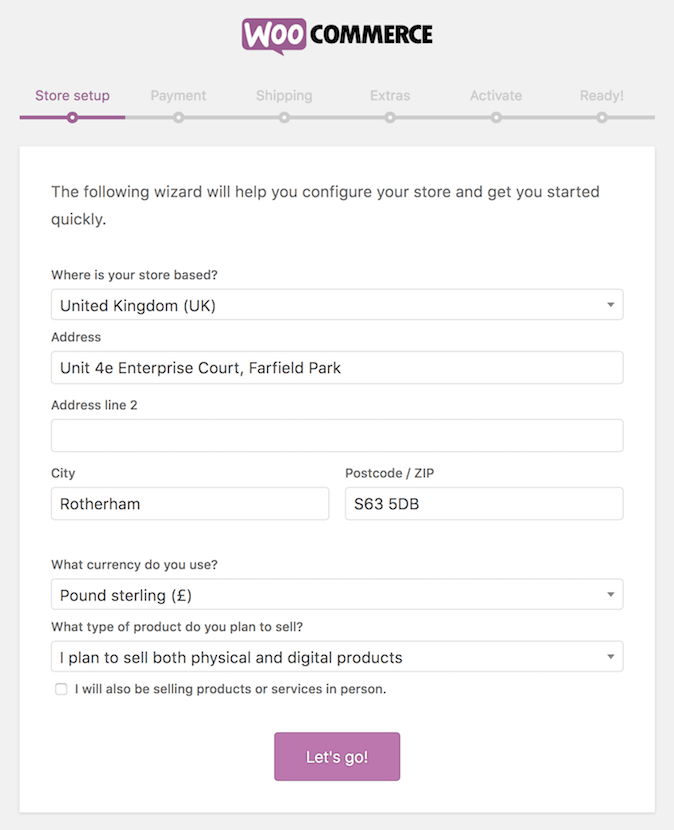
You are able to set up a new store in literally a few steps. This includes setting up sotre basic settings like address, payment methods and shipping options! WooCommerce will even detect your current location and preconfigure your location, currency and even basic tax settings. Amazing, isn't it? Obviously, you can change the more advanced settings later on.
The entire process is clear and convenient. What is also important, you don't need to have any programming skills. Each and every option can be easily set up using just your mouse. Below you will find some more content about setting up WooCommerce and basic
Further reading:
2. Open source at the heart of its core
Commercial e-commerce platforms can be really expensive. Regardless of whether you have a subscription or just buy an e-commerce platform, you need to pay. As we all know, money is particularly important in the beginning when you need to stock your store and bear all the costs of starting up your business.
The open source movement provides a relief for the corporate world and the closed source software model. The open source movement is one of the best things that could have ever happened to us - users. Not only do we get a superb product on which hundreds of developers had been working, but we also acquire a right to look into its source code and edit it.
Thanks to this you can look under the hood of our store and start to customize the code as you see fit. You can also easily hire a developer to do it for you. The developers will appreciate how easy it is to customize WooCommerce with hooks and filters. Have a sneak peak and read our tutorial on customizing the WooCommerce checkout experience with hooks →
3. Flexibility is the foundation of WooCommerce
A WooCommerce store is, as a matter of fact, a complete WordPress website. I don't think I need to convince anyone of the advantages of using WordPress. Just think about the thousands of high quality plugins extending its core functionality. We gain access to the entire spectrum of professional solutions which turn our platform into a real selling machine. A selling machine that not only allows you to set up a website and a blog, but also lets you freely (and easily!) modify its functionality.
Facebook integration? Not a problem! It will take three minutes. Caching? Easy-peasy! All you have to do is to make use of one of the most popular plugins, and you are ready to face even the most intensive traffic on your website. Functional forms? Why not? Setting them up will take no more than several minutes. The possibilities are almost endless. Yet many people still underestimate WordPress which is really a powerful tool. You simply cannot put a price on the ease of implementing new WordPress integrations.
WooCommerce plugins and themes are easy to find
There is a huge collections of themes, both free and paid ones. They are often created by the top coders. Such themes allow you to quickly and easily change the website's layout according to your needs. WooCommerce plugins, on the other hand, turn your store into a powerful selling machine. It may provide various payment methods, shipping options, and accounting solutions.
At WP Desk, we made it our mission to create essential WooCommerce plugins that are easy to implement. We also realize how important it is to smoothly handle shipping which is one of the most difficult things in WooCommerce. Therefore, we decided to create Flexible Shipping, a plugin that expands WooCommerce shipping with weight, totals or item count calculations. It is the state of the art table rate shipping plugin trusted by over 10,000 users world wide. And it has a free version, too!
I also encourage you to take a closer look at Flexible Invoices - a plugin that will help you to invoice in your WooCommerce store.
4. The most SEO friendly e-commerce platform
We all know how powerful website optimization is these days. The world is driven by the search result obsession. It is a popular belief that if you can't be found on the first page of search results, you simply don't exist online.
WordPress has been known for years now for its outstanding SEO handling. While building its very core, the WordPress developers had search engine-related features at their hearts. It's no wonder that specialists recommend WordPress to those unfamiliar with the positioning techniques. It's because WordPress comes with multiple innate SEO features.
The WooCommerce creators went down a similar road. Why create an online store and then spend days fighting for its presence in the search engine results if you can have built-in SEO features? That's why WooCommerce itself is a superb SEO tool: friendly URLs, standard compliance, schema.org metadata, breadcrumbs, well-thought through website structure... I can keep on going like this for a long time.
See how to improve you WooCommerce SEO even more with Yoast:
https://www.youtube.com/watch?v=Gx3M9wG2Qpk
5. WooCommerce security is guarded by hundreds of specialists
In a way, this is related to the point two. The possibility to look into the source code allows thousands of specialists worldwide to constantly analyze WooCommerce in terms of new threats. Whenever one of them finds a security hole, they inform the development team. The developers, in turn, instantly create a security update. This is one of the reasons why it's so important to regularly update your WordPress and WooCommerce. To top it all off, WooCommerce source code audits are conducted by the leader in online application security Sucuri. You can read more about Sucuri's take on e-commerce security.
What is more, WooCommerce comes with a built-in secure connection feature via SSL. It's highly important if you want your customers' data to be always safe. When it comes to WooCommerce competitors, implementing a secure connection solution can often be like pulling teeth. In our case, however, all you have to do is to get your own SSL certificate and then configure WooCommerce:
Further reading:
- How to make you WooCommerce checkout secure →
- The complete guide to configuring WooCommerce checkout →
6. Mobile friendly WooCommerce themes (and apps)
A vast majority of your prospective customers will visit your online store using a mobile device. When you are building a WooCommerce website, it's well worth your effort to make sure your store looks good on a tablet or smartphone. Luckily, it's not a problem at all! Almost 100% WooCommerce themes available on the market have been built in line with the Responsive Web Design standard. It means that your website will be fully functional on any device: from a smartphone to a TV set.

What is more, both WordPress (Android, iOS) and WooCommerce (an unofficial Android app, iOS) have their mobile applications that allow you to manage your selling platform even when you are out of office.
7. Great community will solve your problems in a heartbeat
WordPress brings together a huge number of people worldwide. There are so many users who follow its development that you can be sure at least one of your friends created a WordPress website in the past. I'm convinced that any web developer has had a chance to use it. The wild popularity of WordPress and WooCommerce make dedicated forums teem with activity. You can never run out of WordPress users who are ready to help out beginners. Also, you can easily find thousands of tutorials and manuals online. Having said that, just look at our dedication on giving back to the WooCommerce community →
8. WooCommerce is built with developers in mind
This point somehow results from all the other ones. WooCommerce philosophy, its versatility, and flexibility, have led to the situation as we know it today: there is a great number of people who are WordPress professionals. There are multiple companies and many freelancers with indispensable skills who may convince you to make WooCommerce your selling platform of choice. You don't have to look far for experienced specialists who can help you implement and configure e-commerce solutions. If you encounter problems along the way, you shouldn't worry as you won't be left alone. There are many users who are always ready to help you out.
Further reading:
9. The versatility of the sales model
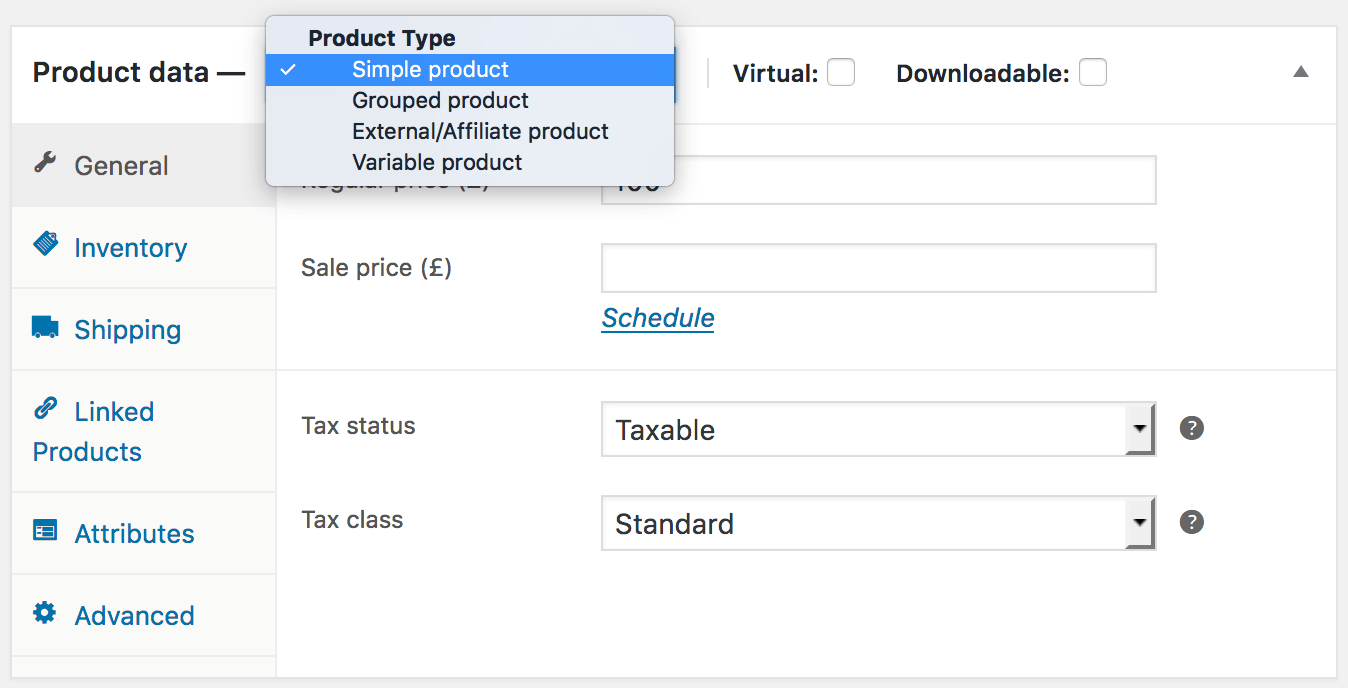
Sell anything you want. For example, you run a record store and want to offer both CDs and digital music? You're more than welcome! All you need to do is to use the built-in product types. Make CDs physical products and downloadable files - virtual products. A WooCommerce store can handle any industry.
Further reading:
10. Automattic develops WooCommerce
Automattic is the company behind the development of WordPress. Their leader, Matt Mullenweg, is a true visionary when it comes to the online world. He's been developing WordPress since its beginning. Certainly a company with a mission. They guarantee a long-term technical support and constant platform development. You can be sure that a project that is as popular as WooCommerce, under the aegis of such a company as Automattic, will never be abandoned.
The ultimate WooCommerce review?
The above WooCommerce review and the 10 reasons merely makes a fraction of what WooCommerce has to offer. Read the opinions of those who use WooCommerce on a daily basis. You can really see what a powerful yet easy solution WooCommerce is when you get to know the stories of people who already appreciate working with it. Personally, I can say that WooCommerce is a truly flexible platform. I am sure you can use it to effortlessly build your own profitable business.





Leave a Reply