

Email marketing automation helps you stay connected with your users - without writing every message by hand. Whether you run a store, a membership site, or a blog, automating your WordPress emails can save time and improve user experience.
Contents
- WordPress email marketing automation: what to automate and with which plugin
- When to use email automation in WordPress?
- Best WordPress plugins for email automation
- Before you automate: will the emails arrive?
- Tips to keep your automations user-friendly
- Top 5 free email marketing plugins for WordPress compared
- FAQ – WordPress email automation
- 1. When to use email marketing automation?
- 2. Can you send emails directly from your WordPress dashboard?
- 3. What is the best free email marketing plugin for WordPress?
- 4. How to get WordPress email subscribers and build email lists?
- 5. Can WordPress be used for email marketing?
- 6. Do marketers use WordPress?
- 7. How to build email automation that works?
- 8. Why do my automated WordPress emails go to spam?
- 9. How many automated emails is too many?
- Related Articles
- Configure your WordPress email settings & Complete guide to sending email
- 15 eCommerce automation tools for WooCommerce (2025)
- 5 essential WooCommerce tips to boost your sales
- 15 Best Websites to Learn WordPress and WooCommerce
- WooCommerce Emails - step by step configuration
WordPress email marketing automation: what to automate and with which plugin
In this guide you will learn when automation is worth setting up, which plugin fits your store, how to build your first flow, and how to test whether the messages reach the inbox.
When to use email automation in WordPress?
Automation is perfect for repeatable tasks. Here are common examples:
- Send a welcome email when someone registers
- Follow up after a WooCommerce purchase
- Remind users about abandoned carts
- Notify customers about subscription renewals
- Send a payment reminder for unpaid orders
- Ask for a product review a few days after delivery
- Send a newsletter to a segment of your customers
- Win back customers who have not ordered in several months
These scenarios use events, schedules or selected audiences. Check that your plugin and plan support the required trigger, timing and integrations; a scheduled newsletter is different from an event-triggered message.
Best WordPress plugins for email automation
To automate your emails, you’ll need the right plugin. Here are some reliable options:
- ShopMagic – Made for WordPress and WooCommerce. Automates emails based on orders, cart actions, and user behavior. Set up automated email sequences from WordPress; some scenarios require add-ons.
- FluentCRM – A full CRM inside WordPress with email campaigns and automation sequences.
- MailPoet – Great for newsletters and welcome flows. Simple setup.
- Newsletter – For building subscriber lists and newsletters; check the add-ons needed for automated sequences.
- AutomateWoo – Advanced automation for WooCommerce, including personalized coupons (premium).
Each plugin has its own strengths depending on your setup. If you're running a store, ShopMagic or AutomateWoo might be the best fit to send emails directly from your WordPress.
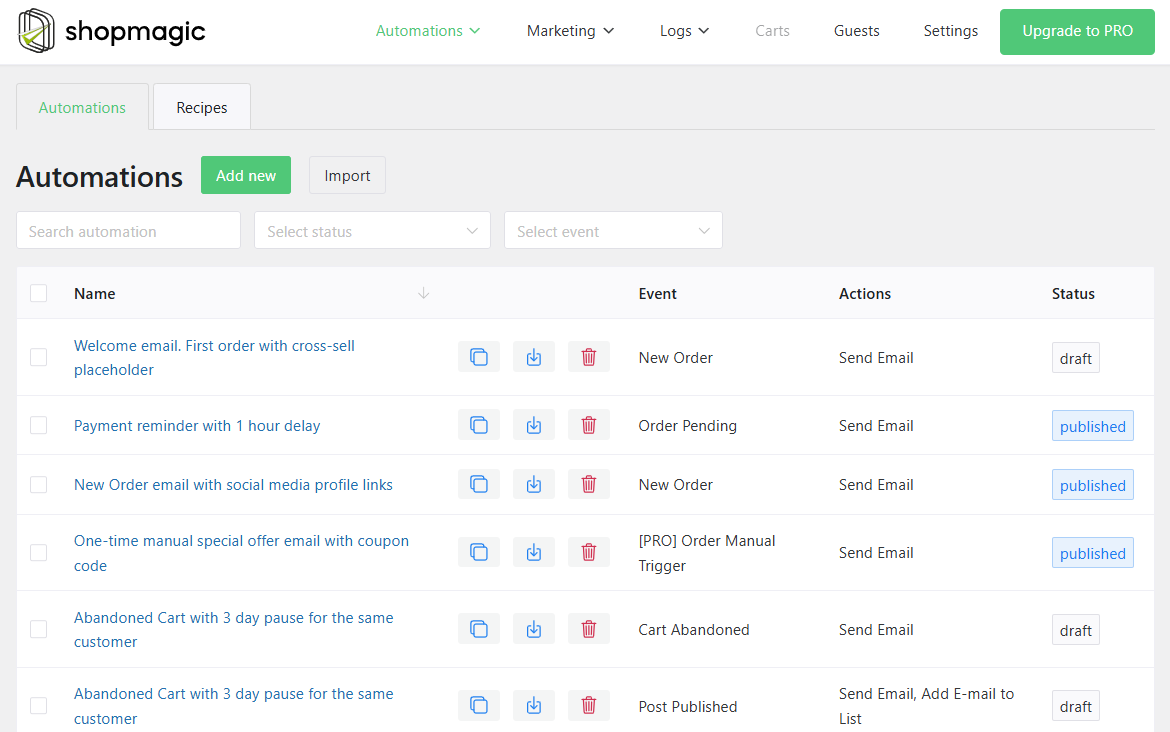
How to set up your first automated flow in ShopMagic?
Start small. For example, create a simple “Welcome” email that goes out when someone registers.
Steps:
- Choose a trigger (like user registration or order completed)
- Add a delay if needed; in ShopMagic, delayed actions require the PRO add-on
- Write your message and insert the first-name placeholder from the editor’s available placeholders for your chosen event
- Test with a test registration or order and your own recipient address before enabling the flow for customers
- Optimize email content to increase its open rate and CTR
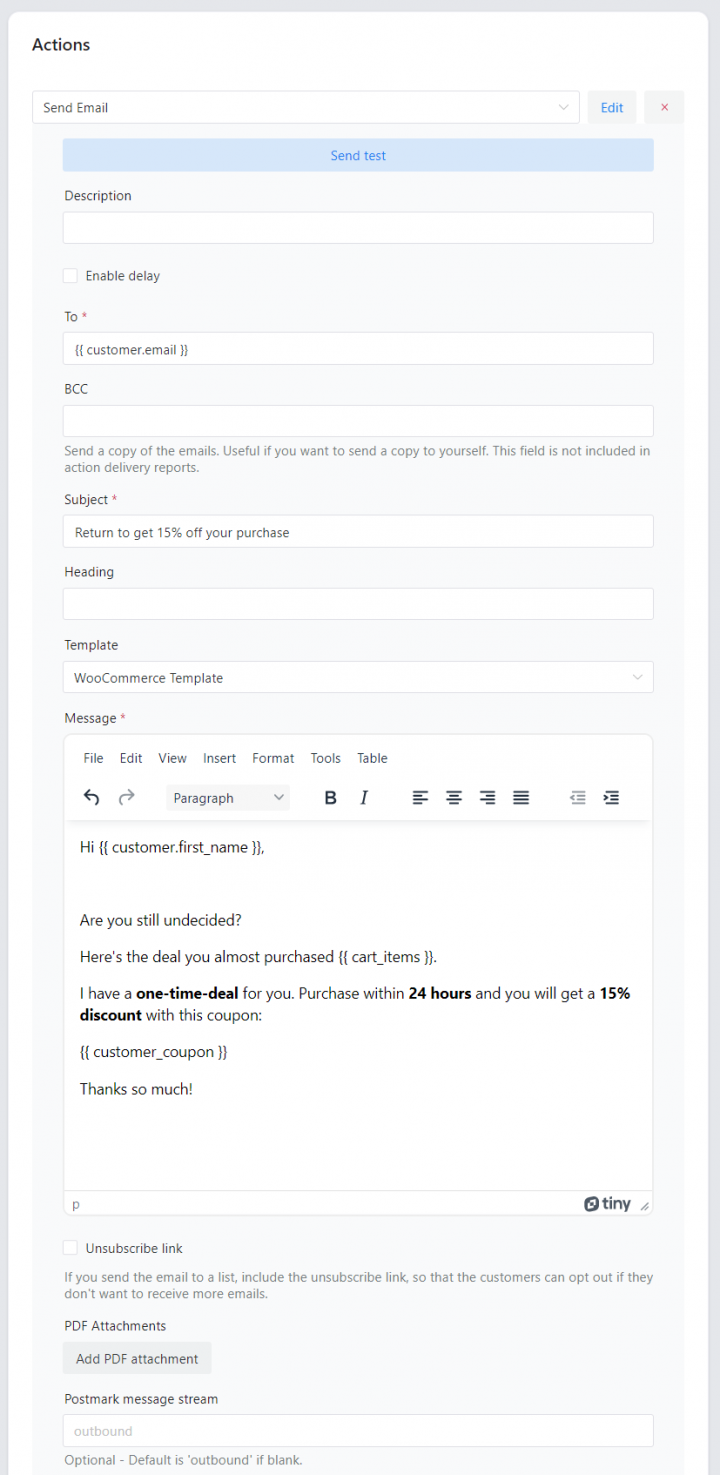
Many plugins include visual builders or dropdowns, so basic setup does not require a developer. WordPress-based tools can keep automation settings close to customer and order data, while connected services may handle delivery or store subscriber lists externally.
Before you automate: will the emails arrive?
An automation can run successfully while its message is rejected or filtered into spam. WordPress uses wp_mail(), which normally hands mail to PHPMailer and the server's PHP mail transport unless a plugin or service changes that route. A successful send result does not prove that the recipient received the message.
SPF identifies authorised senders for the envelope domain. DKIM adds a verifiable signature. DMARC checks alignment with the visible From domain and publishes a policy for messages that fail aligned authentication. DMARC can pass through either aligned SPF or aligned DKIM. Publish the records at your DNS provider using your mail service's instructions.
An SMTP or API integration can route messages through an authenticated mail provider. Check which route your automation plugin actually uses. Authentication helps, but reputation, complaints, list quality and content also affect delivery; no SMTP plugin guarantees inbox placement.
Before enabling the automation, send a real test to another mail provider. Check delivery, spam placement and the message headers for SPF, DKIM and DMARC results. Review sending logs for rejections. An email in a Promotions tab has arrived; it is not the same as spam.
Tips to keep your automations user-friendly
Good automation feels personal - not robotic. Here are a few best practices:
- Don’t send too many emails at once
- Make sure each email has a clear purpose
- Allow users to unsubscribe easily
- Test and tweak over time based on open and click rates
- Optimize your email for UX
- Use abandoned cart email automation campaigns
- Segment your email content based on marketing funnels
- Test email every time you add a new automation
Even simple flows can support retention when they are well-timed and relevant. Measure the results rather than assuming every automation improves them.
Top 5 free email marketing plugins for WordPress compared
You don’t need a paid solution to start email marketing on WordPress. Whether you're building a newsletter, sending updates, or collecting subscribers, there are free plugins that can help you do it reliably - right from your dashboard.
Here’s a quick look at the best free email marketing plugins for WordPress and how to choose the one that fits your needs.
What to look for in an email plugin?
Before picking a plugin, think about how you plan to use it. Some are better for sending newsletters. Others focus more on automation or WooCommerce integration.
Key features to look for:
- Subscriber list management
- Drag-and-drop email builder
- Email customizer
- Email automation options
- Consent records, subscription preferences and unsubscribe handling
- Integration with forms or checkout pages
- Support for WooCommerce email marketing
Also, make sure the plugin is easy to use and well-supported, even in the free version.
Top free plugins compared
Here are the most popular options:
- ShopMagic – Offers email marketing automation with analytics and list building inside the plugin. Email personalization and automation for WordPress and WooCommerce.
- MailPoet – Made for WordPress. Works inside your dashboard. Great for newsletters and WooCommerce emails.
- FluentCRM – Email campaigns and automation sequences inside WordPress ecosystem.
- Newsletter – Newsletter and subscriber management without a plugin-level subscriber limit. Your host or sending service can still impose sending limits and charges; automation may require paid add-ons.
- Mailchimp for WordPress – Connects signup forms to Mailchimp. Campaigns and automations depend on your separate Mailchimp account and plan.
Each has a free plugin version, but feature access, subscriber allowances and email delivery costs vary. Compare the plugin and the sending-service plan before choosing a workflow.
Which plugin should you choose?
Here’s a quick recommendation:
- Use MailPoet if you want a native WordPress experience
- Go with Newsletter for a clean UI and flexibility
- Already using Mailchimp? Stick with MC4WP
- ShopMagic if you are using (or plan to use) WooCommerce.
You can always test more than one to see what works best with your theme and email goals.
Final thoughts on emails in WordPress
Free plugins can do a lot, especially if you are just starting out. From growing your list to sending regular updates, you don’t need to invest in premium tools right away.
The WordPress repository lists free email automation plugins. Check recent updates, compatibility and support activity, then confirm that the free version includes the workflow you need.
Test the delivery route you use. An integration such as WP Mail SMTP can connect WordPress to a mail provider, but you still need to test delivery and review failures.
FAQ – WordPress email automation
1. When to use email marketing automation?
Use automation when messages follow a repeatable event or schedule, such as registration, purchase or a renewal. A weekly newsletter can be scheduled without a complex event-based workflow; subscriber count alone does not decide whether automation is useful.
Email automation tools can help send emails using prebuilt sequences but plugins can also bring additional cost for hosting and site speed.
2. Can you send emails directly from your WordPress dashboard?
Usually, plugins have their dashboard to customize email templates and send emails.
They may also have some widgets inside the WordPress admin to help in navigation.
Of course, there are email marketing service options outside WordPress. You can use them and send marketing emails there instead of WordPress or you can integrate with such an email marketing solution, for example, for email list building.
3. What is the best free email marketing plugin for WordPress?
It depends. You can test free plugins from the WordPress repository, for example searching for: ShopMagic, MailPoet, FluentCRM, Newsletter, or Mailchimp for WordPress.
4. How to get WordPress email subscribers and build email lists?
Some plugins have the built-in options for adding email lists and automation to add users as subscribers to such email lists. Others sync addresses to a service such as Mailchimp or MailerLite instead, or in addition to a local list. MailPoet manages subscribers in WordPress and can use its own sending service.
And some plugins can also have integration with such services.
To get user emails you may ask for that with the opt-in field, checkbox, form in the blog post, or with a pop-up. Plugins can have different options for that, or they may use email automation to get user email addresses.
5. Can WordPress be used for email marketing?
WordPress sends built-in account and administrative notifications. These are transactional messages, not a complete email marketing system. Examples include:
- New user registration
- Password reset request
- Password changed notification
- Email address changed notification
- Comment notifications
- Admin notifications
You can customise these notifications with a suitable plugin or WordPress hooks. Avoid editing WordPress core files.
You may use WordPress for email marketing with additional plugins to add and send new emails.
6. Do marketers use WordPress?
It's possible to use WordPress for marketing campaigns, including email marketing. WordPress is a huge CMS with a lot of plugins, also for marketing (emails, social, ads, banners).
7. How to build email automation that works?
Start with a plan and end goal in mind. Then, think from the user's perspective and prepare a new automation with an email template. You may both build automated workflows for your WordPress as well as for WooCommerce.
Test both delivery and design before you switch the automation on, using a test order or a test registration rather than a preview. Usually, you can use a WordPress email marketing plugin for testing.
8. Why do my automated WordPress emails go to spam?
Check authentication, domain alignment, sender reputation and sending logs. Missing or incorrect DNS records can contribute, but even authenticated mail can be filtered. An SMTP or API connection addresses the sending route, not every cause of spam placement. Review complaints, recipients and message content as well.
9. How many automated emails is too many?
There is no universal limit. Map which automations can reach the same customer on the same day, remove duplicate messages and monitor unsubscribes and complaints. Keep transactional notices separate from optional marketing sequences.






Leave a Reply