Having an online store is not just about completed orders and shipping purchased goods. In addition to completed orders, it is worth remembering cancelled and returned ones. Such orders usually take a lot of time, so it is worth equipping your store with mechanisms to facilitate the handling of such orders. This article will focus on order returns and how to cancel an order in WooCommerce and how to clear the cart after a certain time. I will cover topics such as:
Contents
- WooCommerce order cancellation
- Cleaning up abandoned shopping carts in WooCommerce.
- Order returns in WooCommerce
- Cancel WooCommerce orders and carts - Summary
- WooCommerce refunds even more flexible!
- How to make a full and partial refund in WooCommerce?
- How to set your WooCommerce refund and return system (with a free plugin)
- Return policy and process order refund in WooCommerce stores
- Enable WooCommerce guest checkout plus 3 small tips to get more customers
WooCommerce order cancellation
During a purchase on your store, it may happen that a user is not able to pay the order correctly, and then instead of trying to pay again, he creates a new order. There can be really quite a few reasons for this, and each of them can result in the creation of an order that will have the status of “Pending payment”.

WooCommerce reserves the product's inventory for orders with this order status and does not allow you to purchase the reserved pieces. By default, WooCommerce locks the inventory for 7 days, which can cause quite a problem for some store owners. In this case, you can wait for the order to be paid or take matters into your own hands and cancel such an order manually.

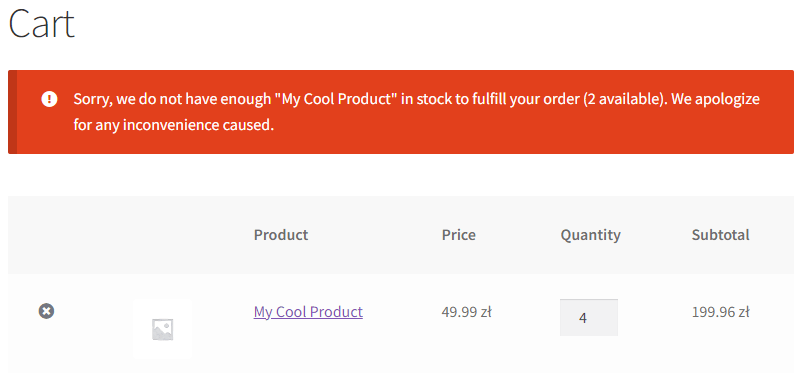
How to cancel an order in WooCommerce manually
Manually changing the status of an order to “cancelled” will make the reservation disappear, allowing customers to buy available products again. Of course, it would be great to give the cancel WooCommerce order option for customers. By default, you may cancel a WooCommerce order manually.
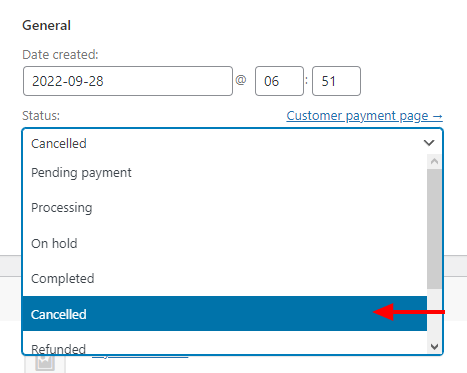
How to auto cancel an order in WooCommerce
WooCommerce has an option to automatically cancel orders if the order has the status of “Pending payment” for longer than the set value of “Hold stock” in WooCommerce > Settings > Products > Inventory. The default is 10080 minutes, which is 7 days.
This is sometimes called the WooCommerce pending payment time limit
That option will let you make a WooCommerce order cancelled after the time limit reached your settings.
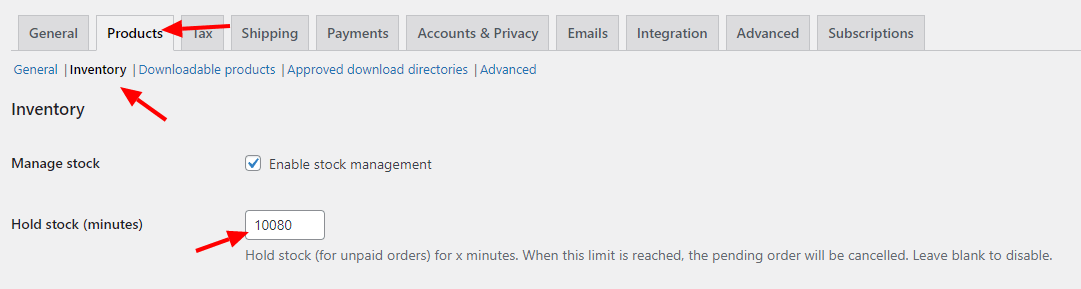
Changing this option to a smaller value will make the product reservation shorter, allowing other customers to purchase the selected item. This option does not affect the status of “On hold” so that, orders paid by traditional transfer will not be taken into account.
How to cancel a WooCommerce order programmatically
There may be times when you would like to cancel orders in a situation other than a timeout, but you want it to happen automatically. In those cases, programming comes to the rescue. Using a code, you can make the order be canceled when the set conditions are met!
What are the advantages of such a solution? Certainly one of the biggest is that you decide when such an order should be canceled. Here are some examples of cancelling an order programmatically that can come in handy:
- Cancellation of orders that have not been paid before the store closes (e.g., for delivery restaurants),
- Automatically deleting orders if the information is missing from the order form,
- Allowing a customer to cancel an order via a link in an email,
- Canceling a reservation if the customer does not confirm it within X hours.
WooCommerce auto cancel order code
Anyone who needs such functionality could certainly add something from themselves, enlarging this list to a truly gigantic size. Creating the code to fit your needs will require programming knowledge to implement the new store functionality well. A common part of these codes could be the snippet responsible for changing the WooCommerce order status programmatically:
$order = wc_get_order( $order_id );

if($order){

$order->update_status( “cancelled”);

}
This piece of code used in the right way will certainly make it easier to run the store and cancel orders.
Cleaning up abandoned shopping carts in WooCommerce.
While shopping in the store, it may happen that a customer leaves the page with products in the shopping cart. After a few days, he may return to our store, but with a completely different shopping list. In this case, before starting a new shopping, he will first have to get rid of the old shopping cart by removing products from it. There will be no problem with this if his previous purchases consisted of a few products, however, if he has to spend more time cleaning out his shopping cart, this may annoy him.
Therefore, it is important to take care of the hygiene of your store by cleaning abandoned shopping carts.
How to clear the WooCommerce cart after a specified time?
Certainly, a big advantage of WooCommerce is its modularity. Again, some plugins can solve this problem. One of them is Clear Cart and Sessions for WooCommerce. The plugin will not only allow you to clear the contents of the WooCommerce cart but also to clear the entire user session after any time you want.
But what if you have other plans to implement cart emptying?
Similar to order cancellation, you can do it with code:
add_action('woocommerce_init',function(){

if (is_admin()) return;

if(!isset($_COOKIE["clear_woo_cart"])) {

$cart = WC()->cart;

if(!empty($cart)){

WC()->cart->empty_cart();

}

}

});
add_action('woocommerce_add_to_cart', function(){

setcookie("clear_woo_cart", "no", time() + (3600 *12), "/");

});
This code snippet will make WooCommerce clear the shopping cart if there is no new item in it after a certain time (12 hours). You can freely modify it according to your needs.
Order returns in WooCommerce
WooCommerce has a built-in option to handle returns, however, it may not meet users; requirements due to the way it is built.
So we recommend that you use another plugin that will expand your store's ability to make faster order returns. One such plugin is Flexible Refund which expands WooCommerce returns with several new capabilities.
Flexible Refund and Return Order for WooCommerce - plugin
All Plugins Bundle
28 plugins included! 1 Site for each plugin Regular updates and support Priority 1-on-1 Support 30-day money back guarantee
Download for free or Go to WordPress.orgIf you want your store to gain new capabilities for merchandise returns, I recommend you check out the Flexible Refund plugin. It will expand your store's capabilities by adding features such as:
- Integration with WooCommerce My Account
- Option to automatically accept returns
- Option to disable late returns
- Refund option for selected products
- Return option for selected product types
- Return option for selected payment methods
- Option to return for selected user types
- Option to enable return for shipping
- Partial refunds
- Option to accept a portion of the requested refund
- Option to cancel a customer's return request
- Return metabox nested within the order
- Return history in order notes
- Dedicated emails for return statuses
- Quick preview of returned orders
- Flexible return form options
The plugin will make the return process in your store much more convenient and faster for the customer. This is important for the customer's future purchases from your store and for building buyer trust.
Default returns vs flexible refunds
WooCommerce's default returns may be enough for some businesses, however, if you run a store and want it to look professional, we recommend that you use Flexible Refund. The plugin adds a multitude of capabilities that standard refunds don't have, and for which your users will be grateful. To clear up any doubts, I'll compare standard WooCommerce returns to Flexible Refund plugin returns below:
| Default WooCommerce refunds | Flexible Refunds | |
| Integration with WooCommerce my account | ✕ | ✓ |
| Automatic return acceptance option | ✕ | ✓ |
| Option to exclude the possibility of return after the deadline | ✕ | ✓ |
| Return option for selected products | ✕ | ✓ |
| Return option for selected types of products | ✕ | ✓ |
| Return option for selected payment methods | ✕ | ✓ |
| Return option for selected types of users | ✕ | ✓ |
| Option to enable return for shipping | ✓ | ✓ |
| Partial return option | ✓ | ✓ |
| Option to accept part of the requested refund | ✕ | ✓ |
| Option to cancel the customer's return request | ✕ | ✓ |
| Return history in order notes | ✓ | ✓ |
| Flexible return form options | ✕ | ✓ |
| Ability to create a discount code with a refund value | ✕ | ✓ |
Cancel WooCommerce orders and carts - Summary
As you can see, even such a simple thing as handling WooCommerce returns can be made much easier if you use the right plugin!
Hopefully, these few tips on how to cancel an order in WooCommerce and clear the cart after time will make it easier for you to run your store and help you retain existing customers, as well as attract new ones.
All Plugins Bundle
28 plugins included! 1 Site for each plugin Regular updates and support Priority 1-on-1 Support 30-day money back guarantee
Download for free or Go to WordPress.orgAll Plugins Bundle €99
28 plugins included! 1 Site for each plugin Regular updates and support Priority 1-on-1 Support 30-day money back guarantee
Add to cart or View DetailsIf you have any questions, contact us!
One more thing!