

In this article, I will show you Flexible Quantity in action - a FREE measurement price calculator for WooCommerce plugin. If you want to sell products by a different unit of measure in your store, the plugin is for you! Read when and how to use Flexible Quantity to have prices based on weight, dimensions, area, or volume 🚀.
Looking for a quick link to download the free plugin right away😊?
There you go:
Contents
- Get a FREE Measurement Price Calculator plugin for WooCommerce
- Measurement Price Calculator plugin for WooCommerce
- Get Flexible Quantity to calculate the price based on a new unit of measurement
- Add new units of measure
- Use increment value and the minimum / maximum quantity to manage your sales
- Use unit dimensions, pricing table, and flexible shipping classes with PRO ⭐
- Summary
- FAQ
- WooCommerce measurement price calculator: Free download
- Advanced product quantities, decimals, and new units in WooCommerce
- WooCommerce Price Calculator – Free Plugin to Calculate Product Prices by Weight, Volume & Dimensions
- How to set the new unit of measure for WooCommerce products
- Unit of measure in WooCommerce - all that you need to know!
Flexible Quantity Calculator for WooCommerce
Enable product price calculation based on dimensions on the product page. Set price and shipping thresholds for product quantities. Support for product variations.
💾 Active Installations: 2,000+ | WordPress Rating:
In this article, you will learn when and how to use the Flexible Quantity plugin for the measurement price calculation in your WooCommerce store 😊.
Get a FREE Measurement Price Calculator plugin for WooCommerce
Usually, we buy the product’s exact number of items, right? But if you think about it there may be a lot of situations when you buy products by weight, area, size, or volume. There are some scenarios when you just need the specific unit price calculator. And a customized way for selling products with new units of measure that extend the simple item offered by WooCommerce!
Today you’ll learn how and when to change the unit of measure in WooCommerce. Next, you will see how to calculate the product price dynamically based on the weight, dimension, area, or volume. You will also read how to manage the quantity with the increment, minimum and maximum values. Get a FREE Measurement Price Calculator plugin for WooCommerce ⭐!
The core value of a WooCommerce measurement price calculator lies in matching the price to what customers actually take away, not to an arbitrary "item" unit that doesn't reflect the product. A customer buying firewood doesn't think in pieces — they think in kilograms or cubic meters. A customer ordering fabric doesn't think in units — they think in meters. When your store's pricing logic mirrors how customers naturally measure what they're buying, you remove a layer of mental math and guesswork that would otherwise slow down or derail the purchase decision.
Flexible Quantity plugin for FREE →Measurement Price Calculator plugin for WooCommerce
By default, WooCommerce gives you a product item. So, your customers can buy one, two, three, and more pieces of the product. It’s enough if you sell products by the items.
But what about the scenarios where you want to sell/ buy products based on a different unit of measure. For example, let’s look at some products sold by their weight, size, area, or volume:
- cooking ingredients,
- fruits and vegetables,
- coffee,
- fabric,
- liquids,
- wrapping paper,
- wooden panels,
- wallpaper,
- custom paint,
- coal,
- transportation services,
- etc.
WooCommerce measurement price calculator plugin examples


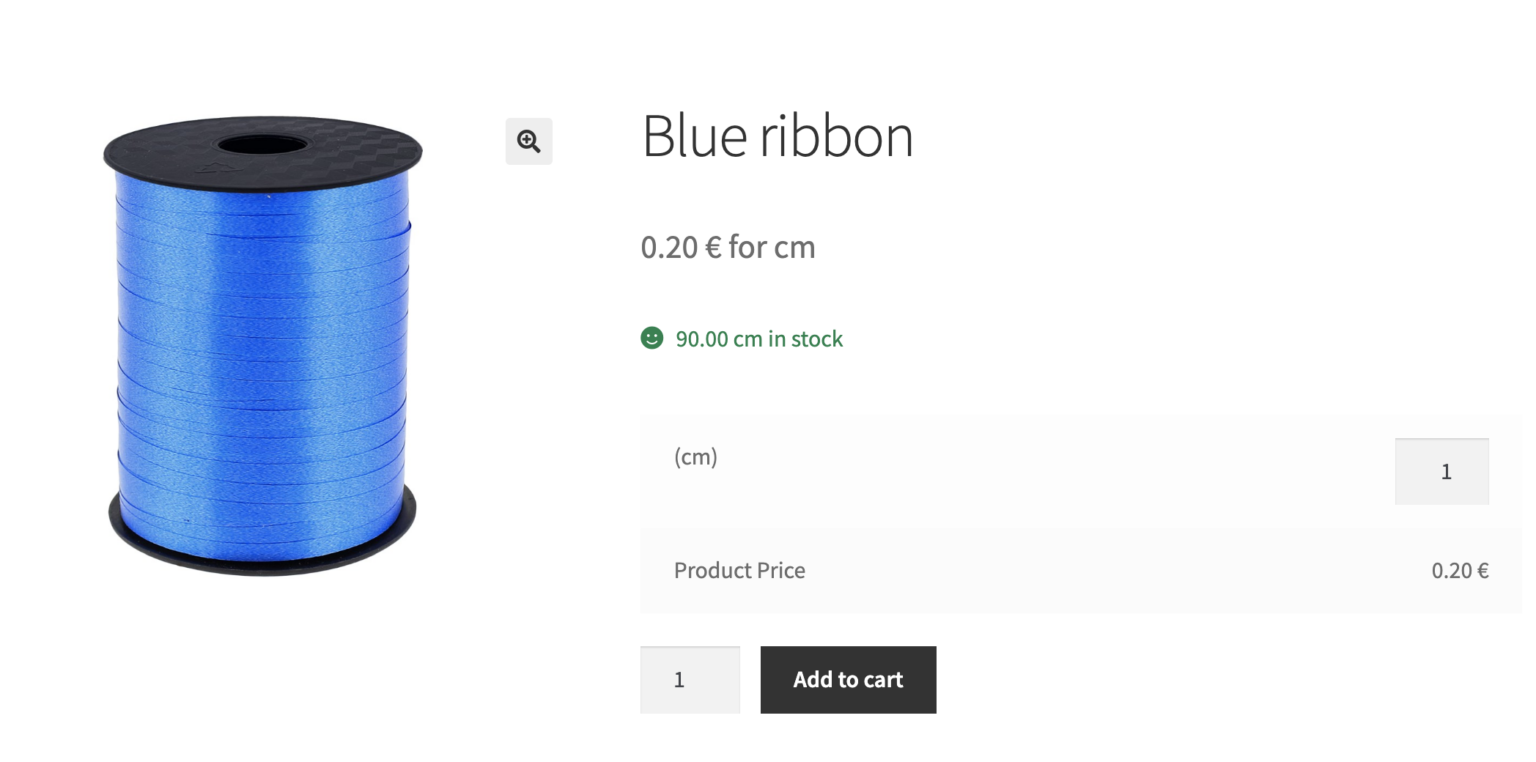

The measurement calculator will help you sell these products & services precisely. It means that the customer will buy the exact quantity, weight, area, or volume 🚀.
Now, let’s see some examples of the shopping scenarios you may want to achieve with such precise measurements in your store:
- feet and inches measurement calculator,
- prices based on the exact weight (coal, firewood, stone),
- professional and raw materials cut,
- a precise area for building renovation services,
- measurement calculator for property & service price based on the house or land area,
- selling the exact volume of the product,
- granite measurement calculator,
- flexible price based on the final measurement of the product (food, transportation),
- wooden panels, wallpaper, or painting service price based on the area,
- selling products based on the volume (paint, oil, soup),
- offering storage space by the area (parking space) or volume (food containers, truck space),
- estimating the rent or property price based on the area of a real estate.
Get Flexible Quantity to calculate the price based on a new unit of measurement
- First, download the free plugin 😊.
WP Desk
Flexible Quantity Calculator for WooCommerce
Enable product price calculation based on dimensions on the product page. Set price and shipping thresholds for product quantities. Support for product variations.
Download for free or Go to WordPress.org💾 Active Installations: 2,000+ | WordPress Rating:
Last Updated: 2026-10-14Works with WooCommerce 10.9 - 11.2 - Then, install and activate it in WordPress → Plugins → Add new.
- And that’s it! You can now use the measurement price calculator in WooCommerce.
Next, let’s see how to add new units of measurement and use other settings of the plugin.
Add new units of measure
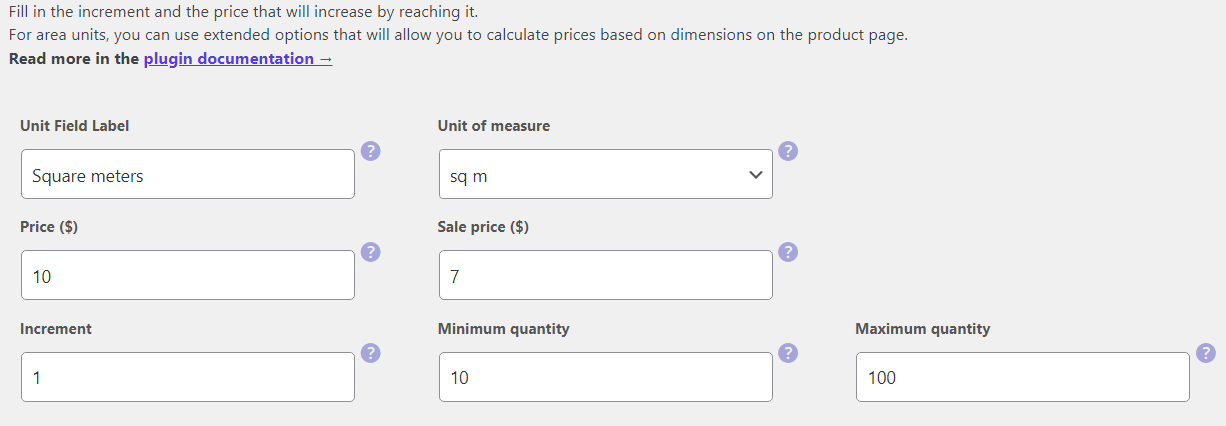
- First, go to the WordPress Dashboard -> Flexible Quantity tab -> Add New section and enable the calculator and choose the new unit of measurement for the WooCommerce product.

- Your customers will see the new unit on the product page.
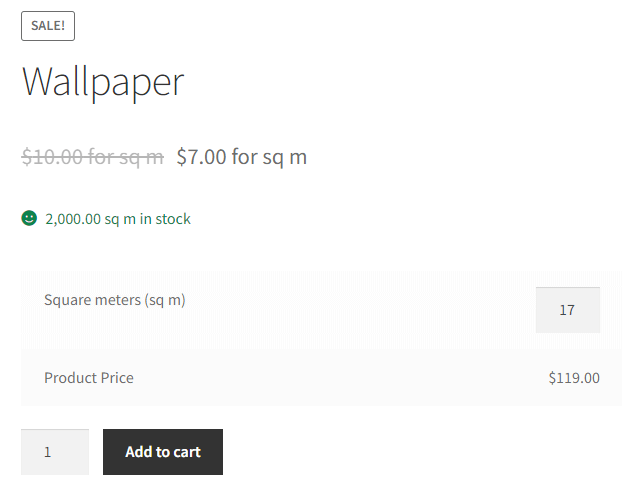
You may choose a new unit like weight, dimension, area, or volume. Of course, you can now create many products with different units of measurement. So, you may offer many package options and flexible and precise measurements for the quantity 💪!
Now, let’s see how to control the increment value of the unit and the quantity of the product.
Use increment value and the minimum / maximum quantity to manage your sales
Increment, decimal values, or min/max quantity are usually a part of Flexible Quantity - the free WooCommerce measurement price calculator plugin.
Sometimes, you may want to sell products that are packed in different quantities. Let’s assume that you want to offer a transportation service for every 100km started. So you can add 100 as an increment value.
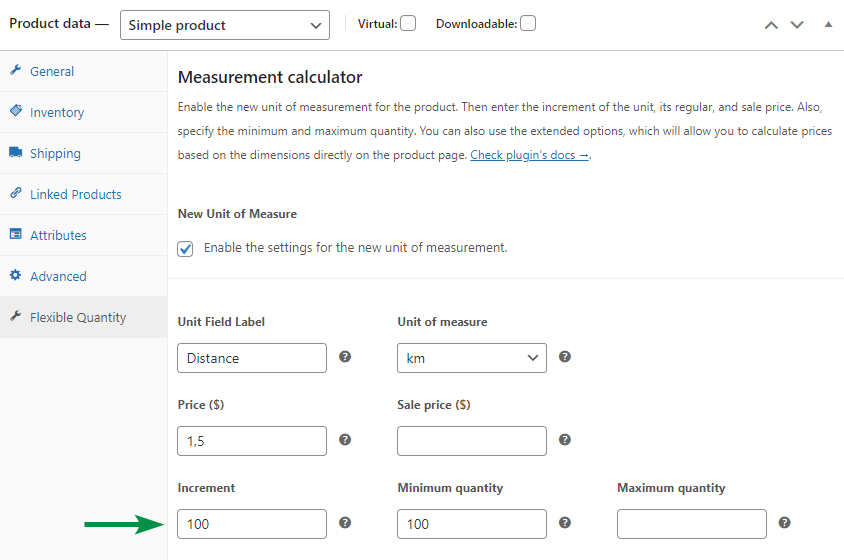
There is also a way to limit the quantity of the product. Let’s assume that we offer stone transported by your company. You want to set the minimum and maximum weight the customer can buy. Let’s set the minimum quantity to 1000kg and the maximum to 5000kg (as your track can handle that weight). Of course, it’s wise to define the increment value here as well. For example, 100kg should suffice.
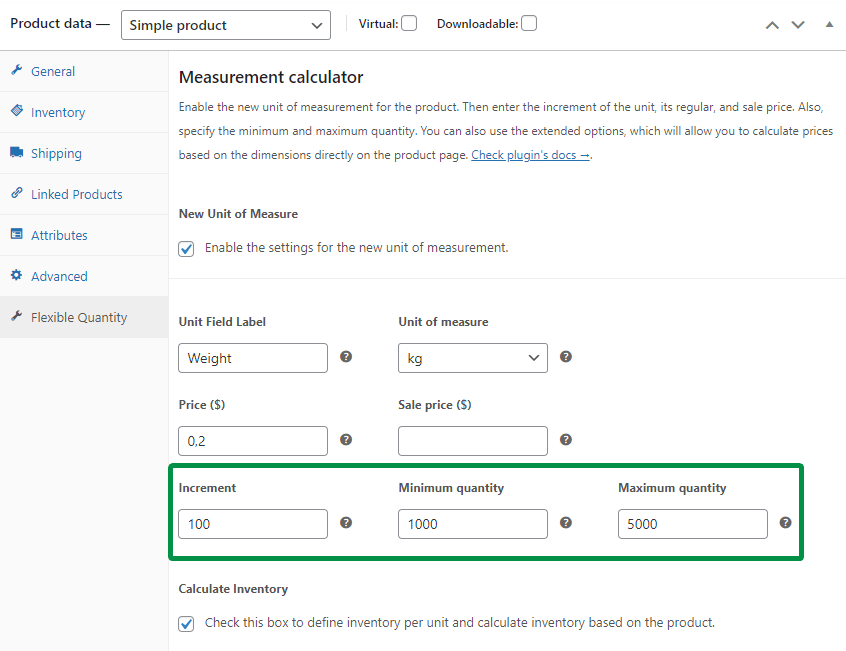
As you can imagine, there are a lot of cases where you can benefit from using the increment value, and setting the minimum and maximum quantity for your WooCommerce products.
Increment values are especially useful for products that can't realistically be sold in single-unit steps. A transportation service billed "per 100 km started" or stone sold in fixed 100 kg increments reflects real operational constraints — you're not going to dispatch a truck for 3 km, and you're not going to weigh out an odd 47 kg of stone. By setting the increment to match how the product or service is actually delivered, you avoid orders that don't align with your fulfillment process, while still giving customers a flexible, measurement-based way to buy.
Use unit dimensions, pricing table, and flexible shipping classes with PRO ⭐
So, you’ve added new units of measurements and set the increment and min/ max quantity. You can now sell your products with more flexibility. You will achieve all of the above scenarios with the free version of Flexible Quantity.
But let’s suppose now, that you want to let your customers define the exact dimension of the product. In this case, you may need an advanced solution for selling WooCommerce products based on the quantity and new units of measurement.
So, the goal is to allow your customers to set up the exact size, volume, or product weight. You can use additional features for better measurement price calculations and flexible product pricing with Flexible Quantity PRO:
Let’s see now how to use the PRO features of the plugin for many scenarios in a store!
Unit Dimensions 🪟
The first functionality will let you show the dimensions for the new unit of measure. It will allow you to get the user input for the exact measurement of the product quantity, and thus the price calculation.
For example, you can let your customers calculate the product (wooden panels) price based on the precise dimensions of the area.
- Start with choosing the new unit of measurement (square meters).
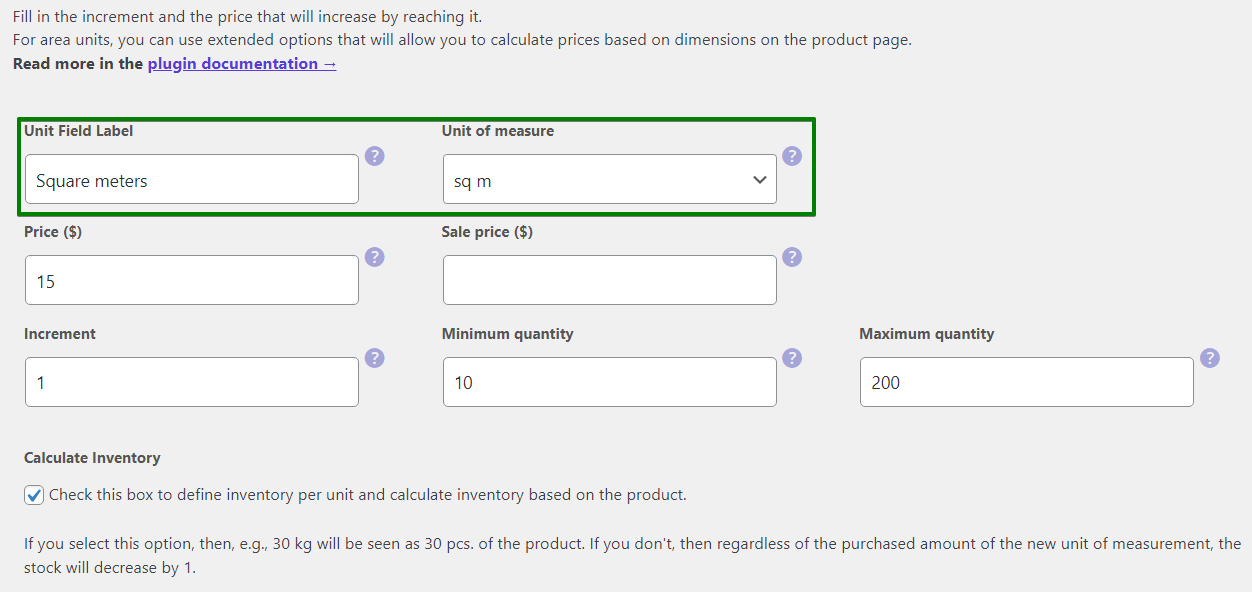
- Then, define the labels and the settings of the unit dimensions.
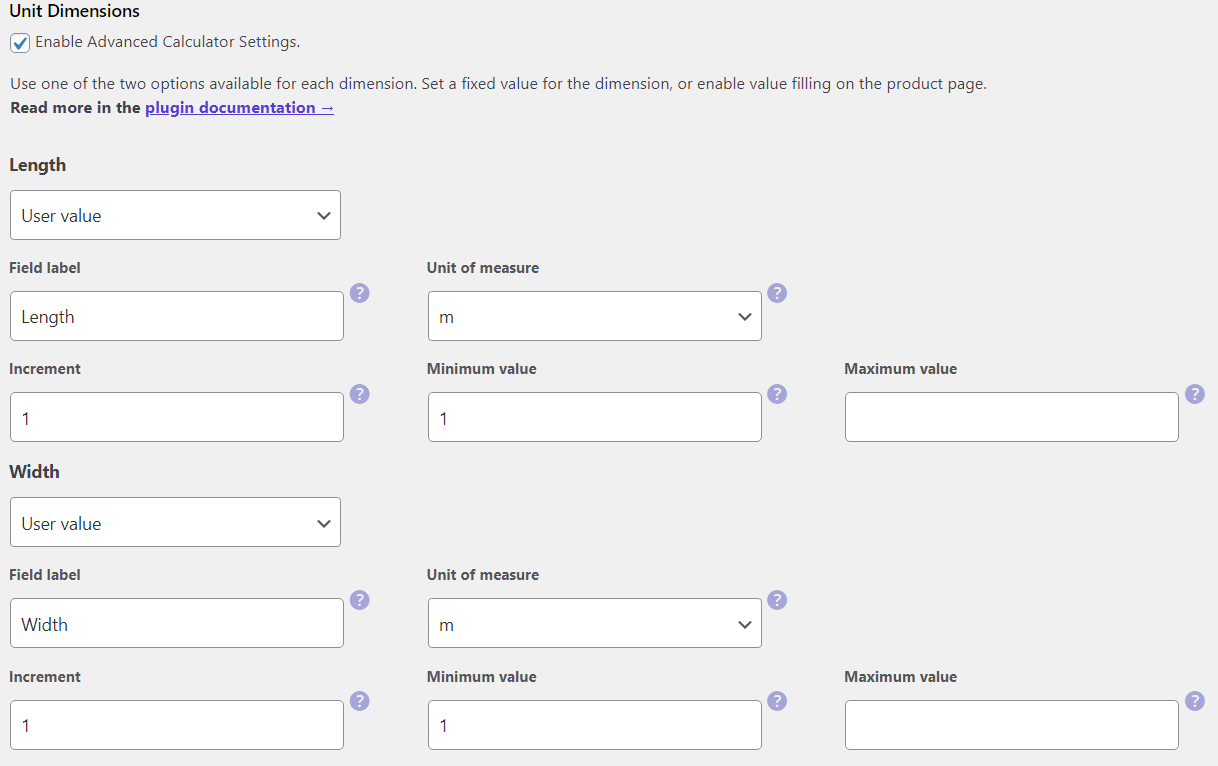
- As a result, your customers will be able to define the exact dimensions of the wooden panels.

You can also predefine the dimension yourself, for example, when a product has a fixed width of one meter (like fabric, wallpaper, or carpeting).
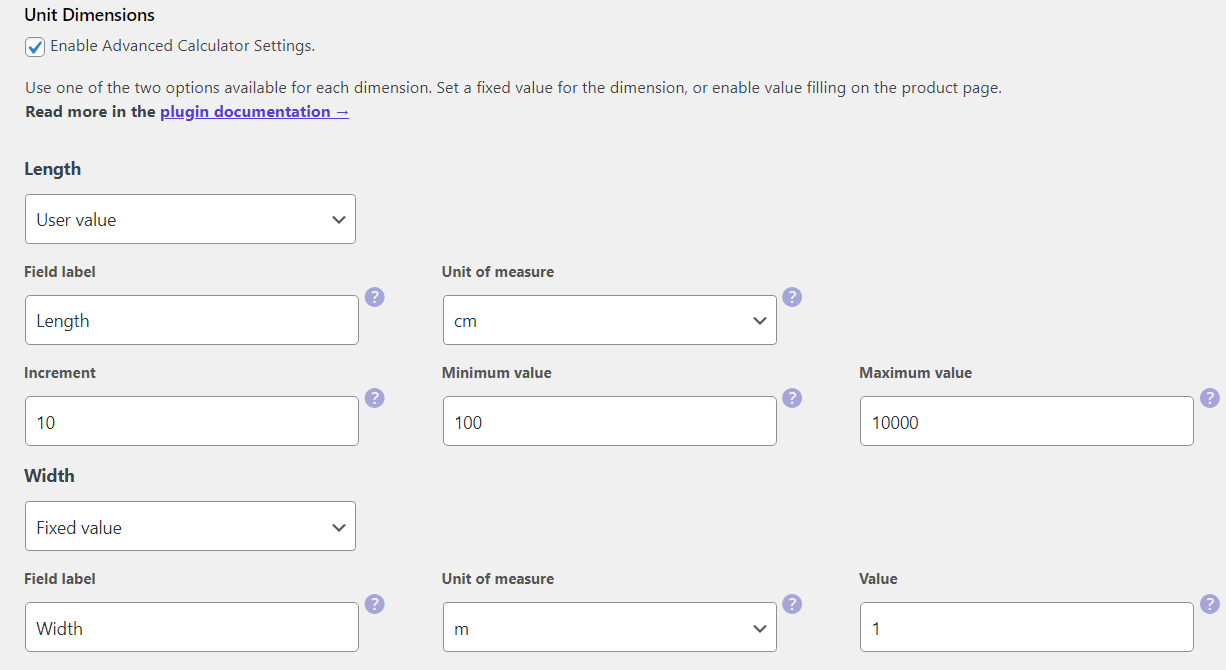
As you can see, the Flexible Quantity plugin gives you a lot of flexibility and possible settings 💪!
Pricing Table 🔖
Now, let’s look at the second PRO feature - a pricing table.
You can set different product prices depending on the quantity. For example, you want to offer better prices for retailers that will buy more. So, let’s set some thresholds in the pricing table for the product.
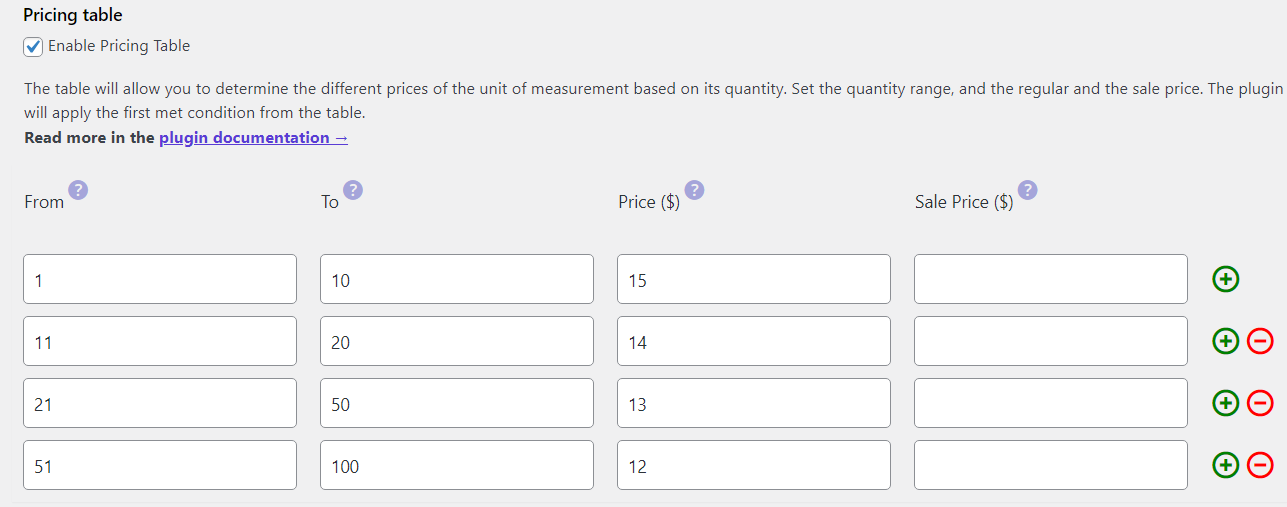
Now the price per unit will depend on the quantity of the order. The customer will see better prices directly on the product page when choosing more (the higher quantity or the dimensions of the product).
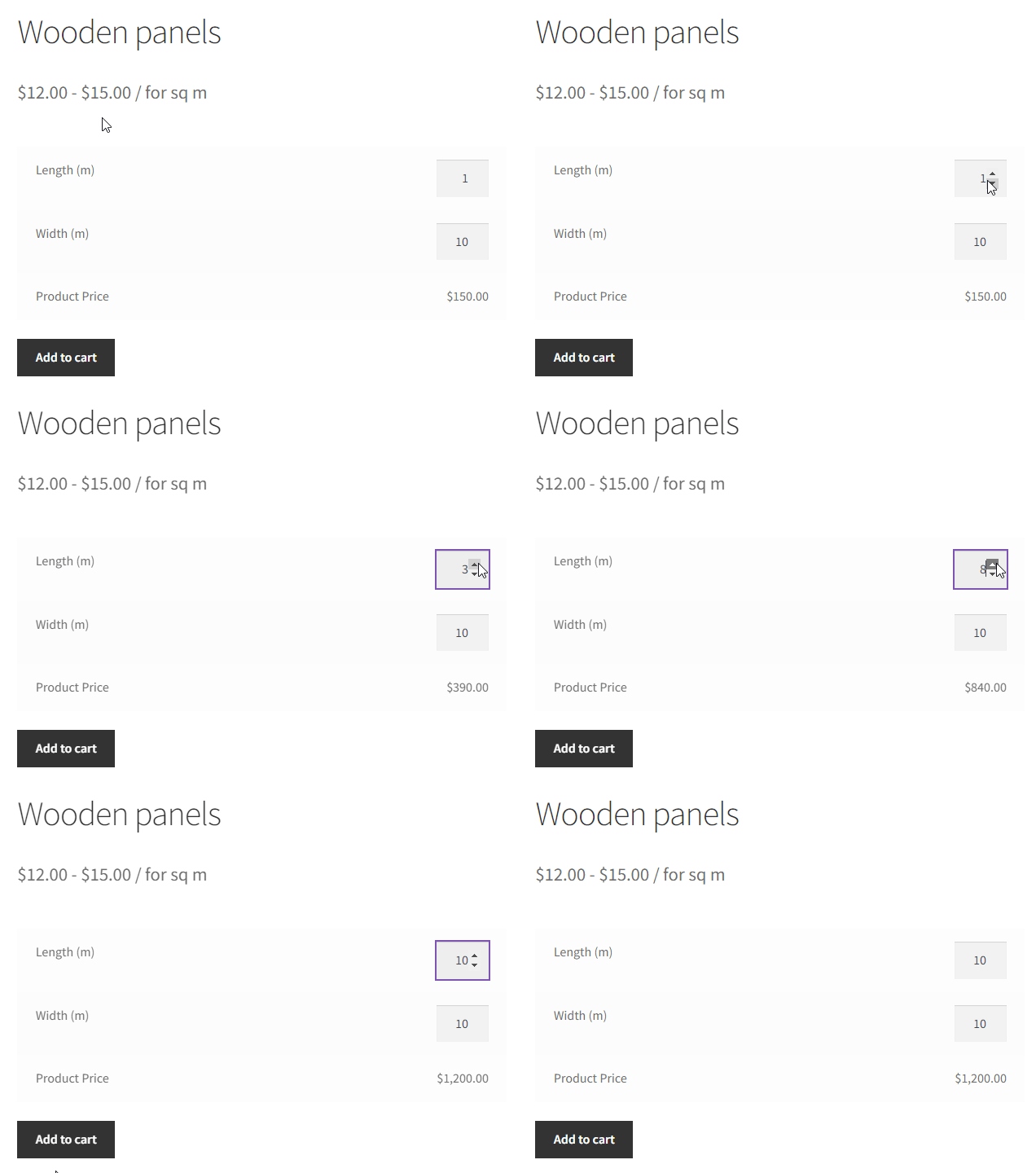
The pricing table for your WooCommerce product will give you control over the exact prices per unit and quantity ⭐.
Shipping Class Table 📦
The third feature of the PRO will help you to adjust the shipping cost based on the quantity.
Let’s assume that you sell wood or stone. The customer can buy a specific amount (in kg). The shipping cost should depend on the quantity as you will use a different transportation means depending on the weight.
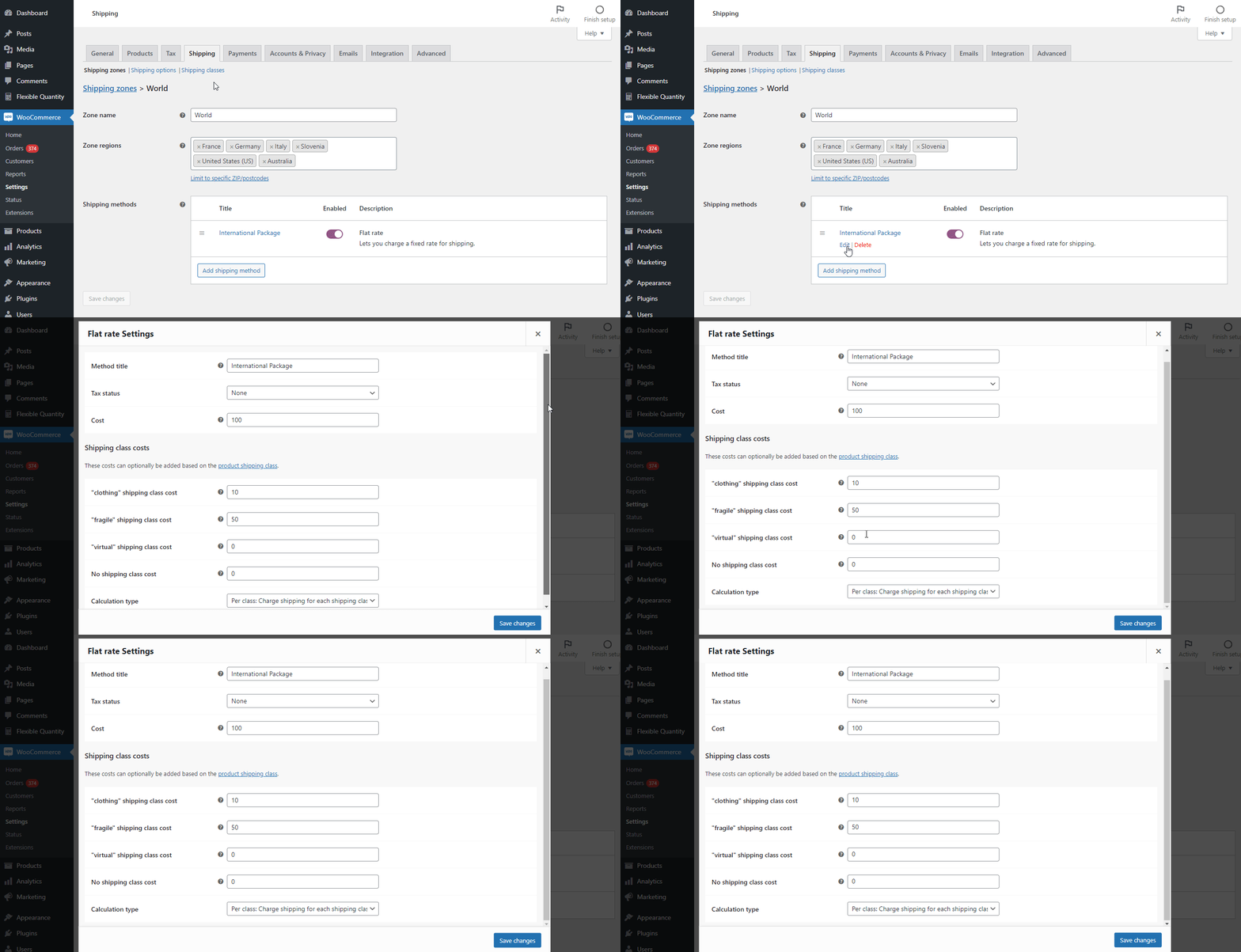
- You have 3 shipping classes with additional shipping costs.
- Now, you use Flexible Quantity to define the shipping class based on the quantity.
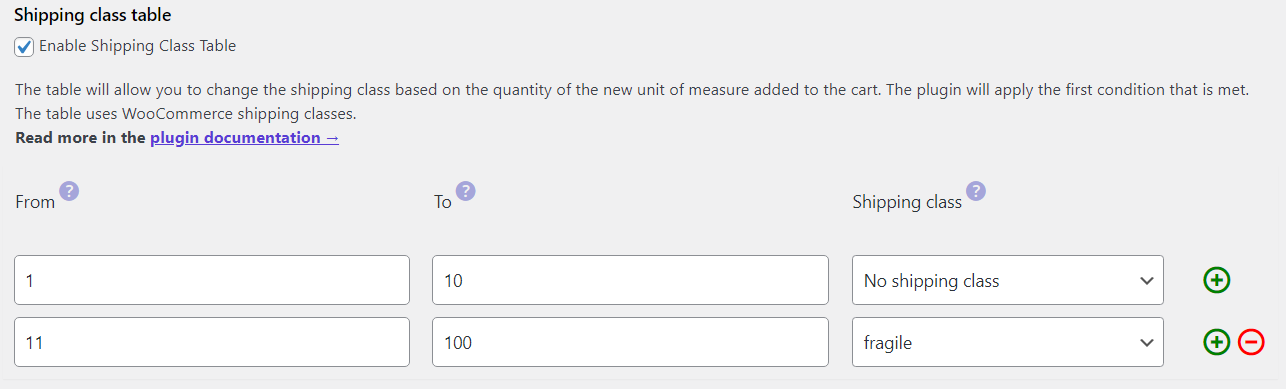
- The product shipping class (thus the shipping cost) will depend on the quantity (weight) of the product.
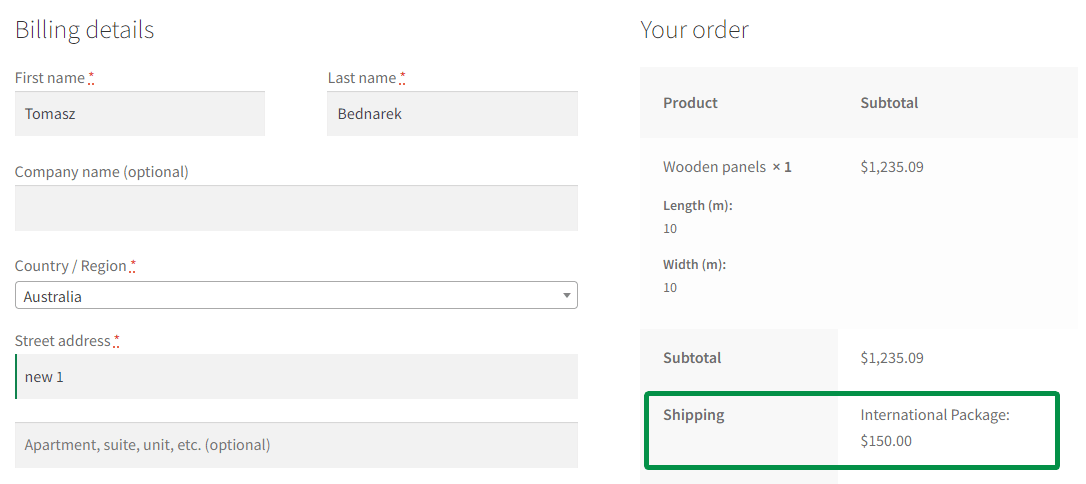
The shipping class table settings will let you create tailored solutions for your WooCommerce store for better shipping cost management 🚀.
Read more about setting the WooCommerce shipping classes.
Summary
In this article, you’ve learned when and how to use the Measurement Price Calculator in WooCommerce. Also, about the option to set the increment value, the maximum and minimum quantity of the product 😊.
Start selling products with new units of measure today!
WooCommerce measurement price calculator quick guide
✔️ First, download the free version of the Flexible Quantity to extend your WooCommerce!
Flexible Quantity Calculator for WooCommerce
Enable product price calculation based on dimensions on the product page. Set price and shipping thresholds for product quantities. Support for product variations.
💾 Active Installations: 2,000+ | WordPress Rating:
✔️ Then, check the plugin’s documentation to read about the settings.
✔️ Also, visit the Flexible Quantity product page & see all PRO features of the Measurement Price Calculator for WooCommerce.
✔️ Finally, test the plugin (free and PRO) in your free demo.
Of course, if you have any questions or suggestions, let us know!
FAQ
What is a WooCommerce measurement price calculator used for?
It's used to price products by weight, volume, area, or dimension instead of a fixed per-item price, so the amount customers pay always matches the exact quantity they select.
Can I combine increment values with minimum and maximum quantity limits?
Yes. You can set all three together — for example, an increment of 100 kg with a minimum of 1,000 kg and a maximum of 5,000 kg — to match real operational or shipping constraints.
Do I need the PRO version to offer quantity-based pricing?
Yes, for tiered or bulk pricing. The free version covers unit setup, increments, and min/max quantities, while the PRO version adds the pricing table, unit dimensions, and shipping class table for more advanced pricing rules.






I was so happy to find it. This is exactly what I need. But I have noticed that it just doesn’t work with variable products. Is there a way to make it work on variable products? Thanks in advance
I was so happy to find it. This is exactly what I need. But I have noticed that it just doesn’t work with variable products. Is there a way to make it work on variable products?
Thanks in advance