

Are you tired of being limited to selling your WooCommerce products by standard units like items or packages? Imagine unlocking new sales opportunities by selling products based on custom measurements like weight, length, or area. With the Flexible Quantity Calculator plugin, your WooCommerce store can effortlessly adapt to various measurement types, offering your customers greater flexibility and convenience.
Contents
- Flexible Quantity – Measurement price calculator plugin for WooCommerce - possible use cases
- Quick guide to selling products by new units of measure:
- WooCommerce price calculator - questions
- What is a measurement price calculator for WooCommerce?
- Why use Flexible Quantity Calculator plugin in your WooCommerce store?
- Flexible Quantity Calculator for WooCommerce
- How to set up a measurement price calculator plugin?
- What are the advantages of pricing based on new units of measure?
- Is dynamic price calculation possible with new units of measure?
- How to optimize WooCommerce product page using Flexible Quantity?
- What are differences between Flexible Quantity free and PRO?
- How to calculate shipping cost based on measurements?
- How to add different pricing based on measurement ranges?
- Summary - add a measurement price calculator in WooCommerce
- Bonus: Best WooCommerce measurement price calculator plugins
- FAQ
- Use Measurement Price Calculator for WooCommerce (free plugin)
- Unit of measure in WooCommerce - all that you need to know!
- WooCommerce price per unit and by quantity (guide & free plugin)
- How to set the new unit of measure for WooCommerce products
- WooCommerce Price Calculator – Free Plugin to Calculate Product Prices by Weight, Volume & Dimensions
Flexible Quantity – Measurement price calculator plugin for WooCommerce - possible use cases
Let's take a look at eight practical product examples using Flexible Quantity:
- Fabric sold per square meter
- Timber sold per linear meter
- Wallpaper sold per square foot
- Bulk food products sold by weight
- Garden soil sold by cubic meter
- Custom-cut ropes and cables
- Glass panes sold per square inch
- Flooring materials priced by area coverage
Here's why you need to read this article:
- Discover how selling by custom measurements can significantly boost your sales.
- Understand why the Flexible Quantity Calculator plugin is a nice plugin for WooCommerce stores.
- Explore step-by-step instructions to easily implement new measurement units.
- Gain practical product examples.
- Learn differences between the free and PRO plugin versions to maximize your benefits.
Choosing the right WooCommerce measurement price calculator can be the difference between a product page that converts and one that confuses customers with rigid, per-item pricing. Businesses selling raw materials, custom-cut goods, or bulk products often lose sales simply because WooCommerce's default setup forces every product into a fixed quantity model. A measurement price calculator removes that friction by letting the price reflect exactly what the customer is buying — whether that's 2.5 meters of fabric or 15 square feet of flooring — without requiring separate products or variations for every possible size.
Quick guide to selling products by new units of measure:
- Install and activate the Flexible Quantity Calculator plugin.You may also start with the free version of Flexible Quantity.
- Define your desired unit of measurement in the plugin settings for WooCommerce products using templates.
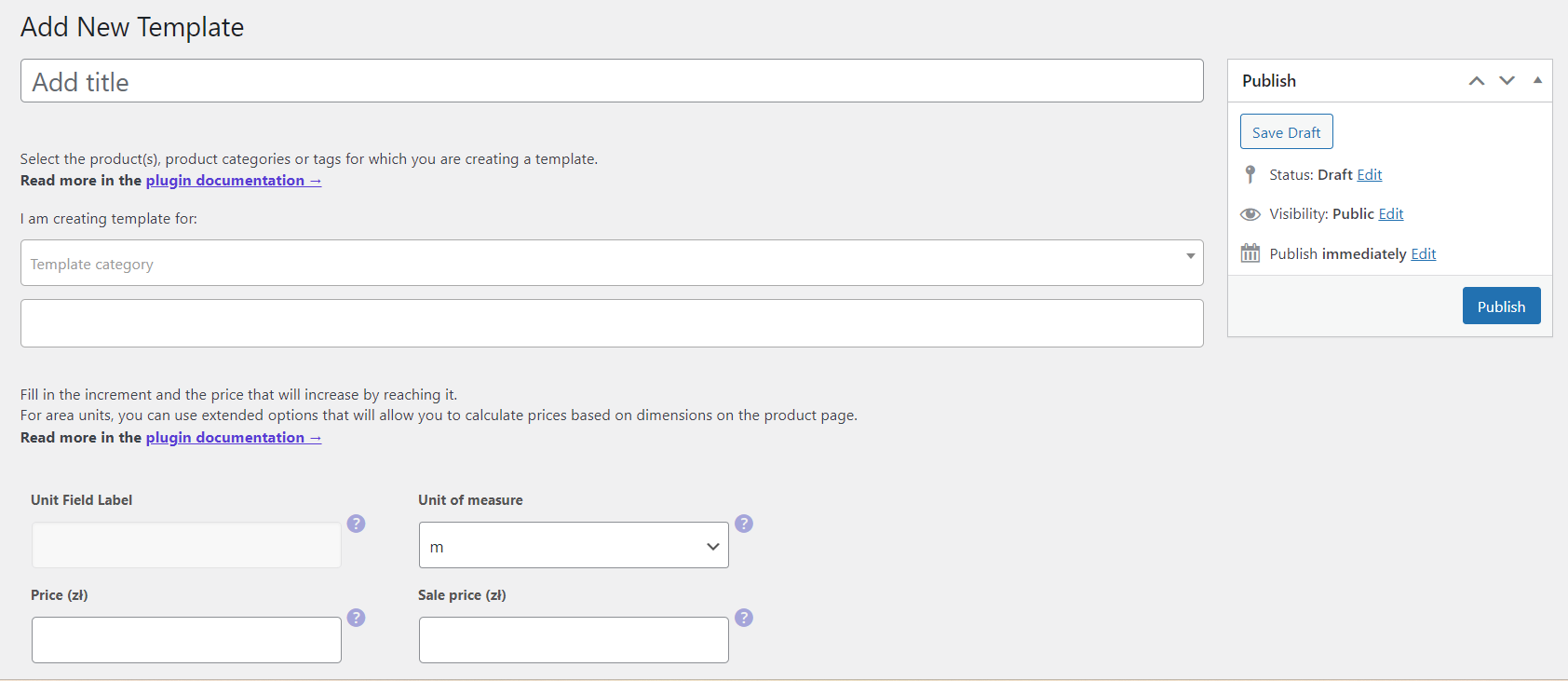
Flexible Quantity - adding a new template - Configure unit of measure settings, minimum and maximum product quantities.
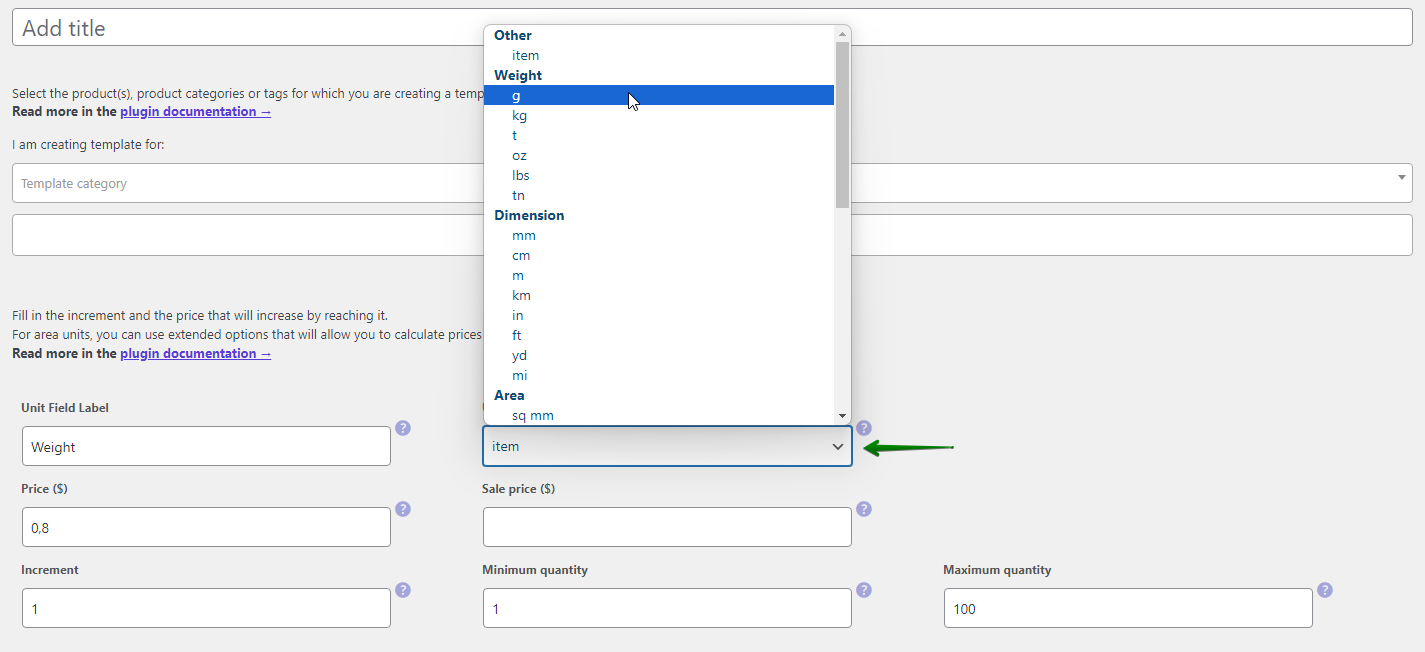
Set weight unit of measure for a template in Flexible Quantity - Clearly display calculated pricing on your WooCommerce product pages.
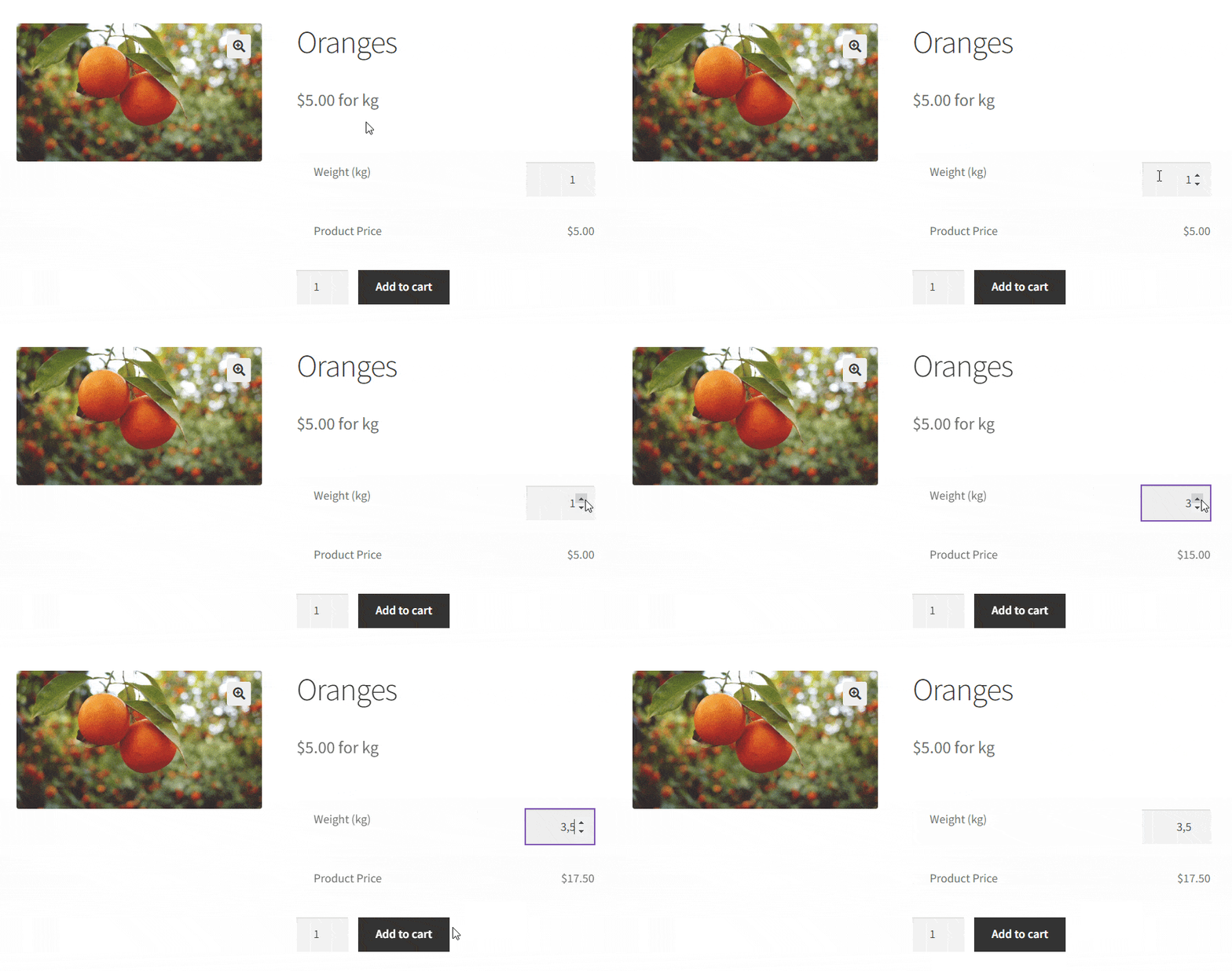
Sell products based on weight WooCommerce with decimal quantity - You can also set pricing rules based on your chosen measurement type (in PRO).
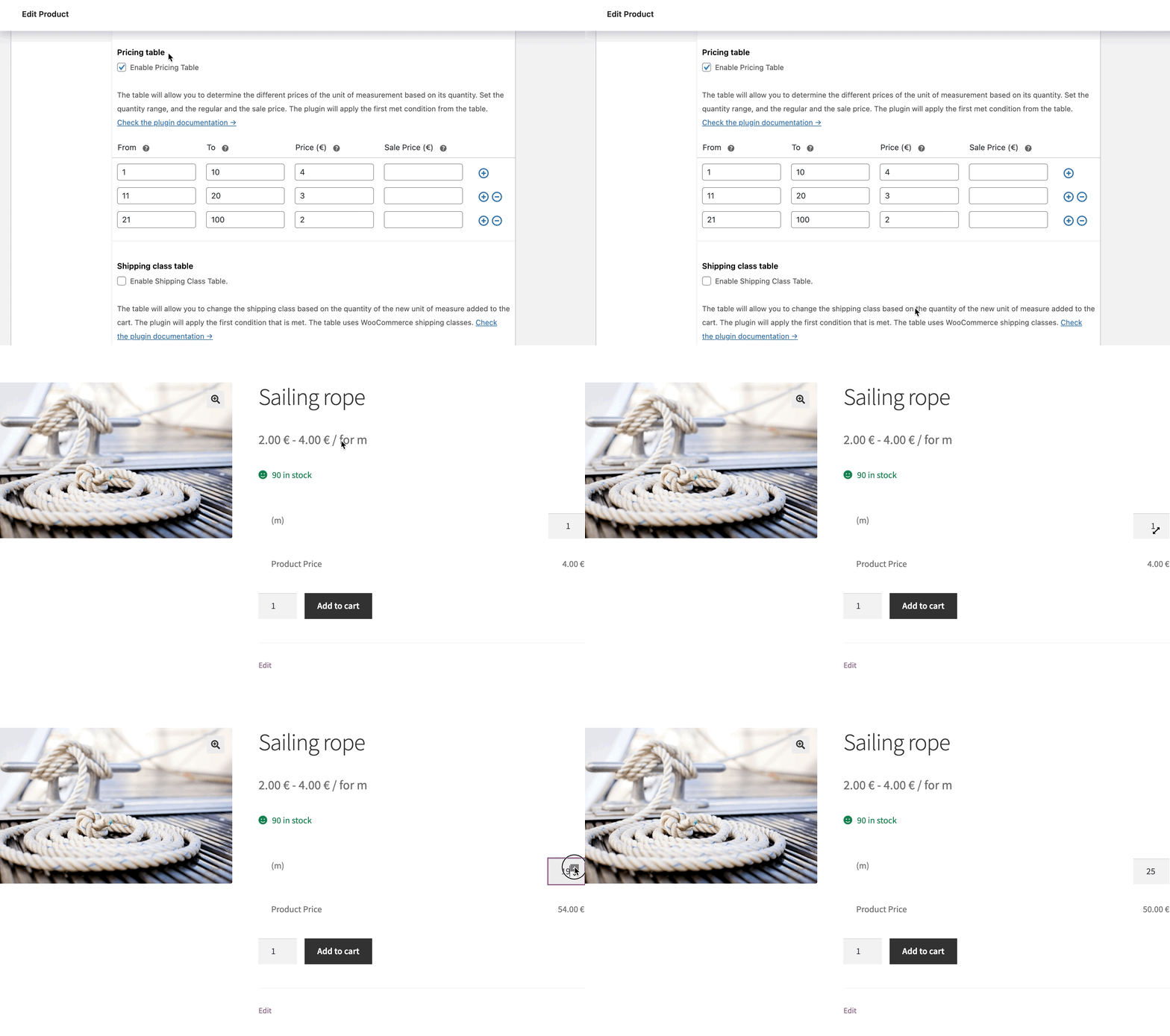
Flexible Quantity - pricing table
WooCommerce price calculator - questions
-
What is a measurement price calculator for WooCommerce?
Measurement price calculators simplify selling products by different measurements. These plugins calculate product prices dynamically, based on measurements entered by customers, enhancing flexibility and customer satisfaction.
For instance, customers can purchase fabrics by entering the required length, and the plugin automatically calculates the total price based on that measurement. Or even based on custom unit dimensions.
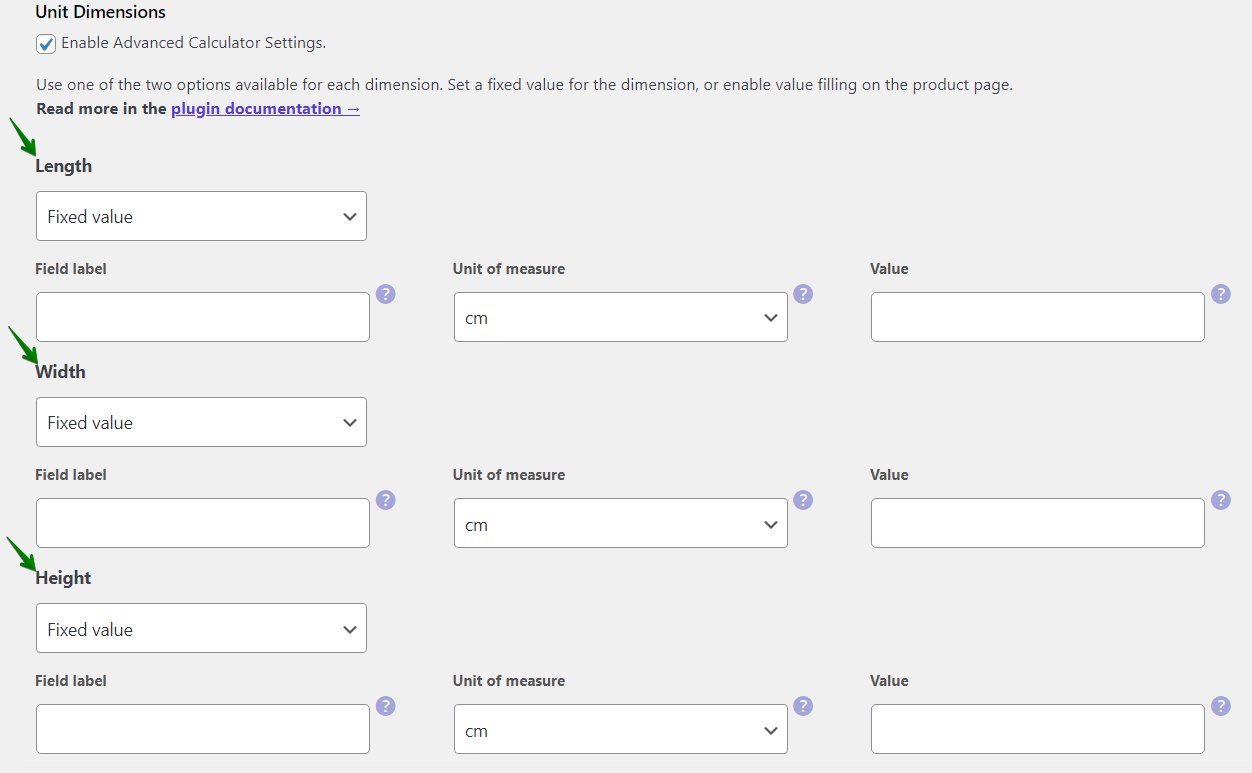
Unit dimensions in Flexible Quantity -
Why use Flexible Quantity Calculator plugin in your WooCommerce store?
This plugin enhances WooCommerce stores by offering dynamic pricing solutions. It supports new measurement types (length, area, volume, weight, etc.), making it versatile for various products.
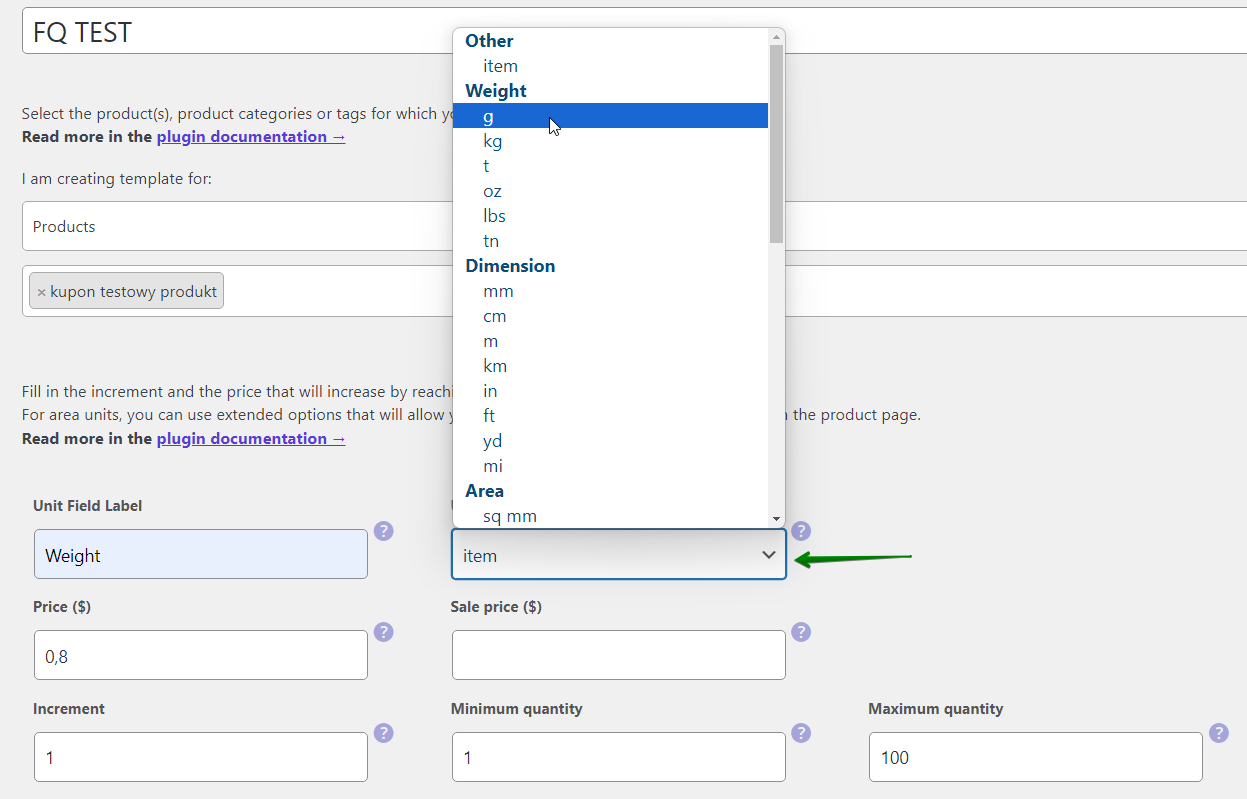
Choosing a new unit of measure in Flexible Quantity Example: flooring sold per square foot—customers enter dimensions, and the plugin instantly displays the calculated price.
You may download it from the WordPress repository:
WP DeskFlexible Quantity Calculator for WooCommerce
Enable product price calculation based on dimensions on the product page. Set price and shipping thresholds for product quantities. Support for product variations.
Download for free or Go to WordPress.org💾 Active Installations: 2,000+ | WordPress Rating:
Last Updated: 2026-10-14Works with WooCommerce 10.9 - 11.2It's also possible to add custom units of measure in PRO.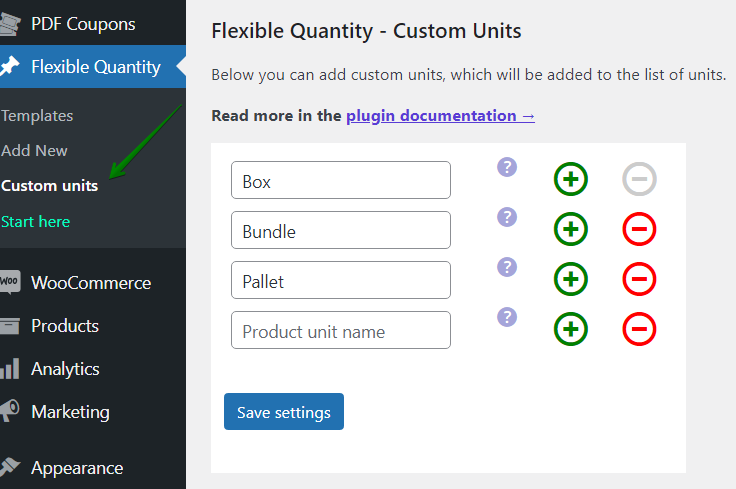
Custom units of measure in Flexible Quantity -
How to set up a measurement price calculator plugin?
Installing and configuring this plugin is straightforward. Start by activating it on your WooCommerce store.
Then, add a new template with settings for a new unit of measure and assign it to WooCommerce product(s).
Example: configure personalized measurement sizes and prices for customized wooden planks.
Setting up a measurement price calculator is only half the equation — the other half is making sure the calculated price is clear to the customer before they add the product to their cart. Flexible Quantity displays the live calculated price directly on the product page as customers adjust their measurements, so there are no surprises at checkout. This transparency matters especially for higher-value custom orders, like cut timber or made-to-measure wallpaper, where customers want certainty about the final cost before committing to a purchas
-
What are the advantages of pricing based on new units of measure?
Selling products by new measurement units allows precise pricing and greater flexibility. This approach reduces product waste and boosts customer satisfaction.
Example: sell wallpaper rolls based on customer-provided wall dimensions.
-
Is dynamic price calculation possible with new units of measure?
Yes. The plugin lets you set dynamic prices that adjust based on user-defined inputs. Customers instantly see price changes, enhancing their shopping experience.
The price for the product can also be based on the quantity:
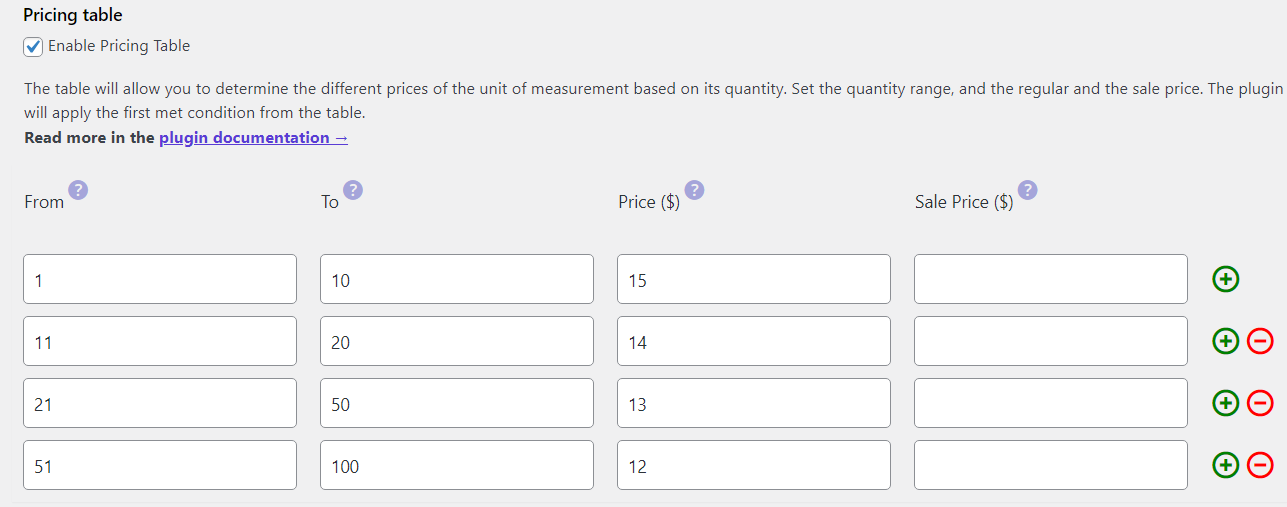
Pricing table settings example in Flexible Quantity Example: customers purchasing garden soil by entering cubic meter requirements directly on the product page.
-
How to optimize WooCommerce product page using Flexible Quantity?
Clearly displaying calculated prices boosts user confidence. The Flexible Quantity plugin seamlessly integrates price calculations on product pages.
What's more, Flexible Quantity measurement price calculator is compatible with the Flexible Product Fields WooCommerce plugin!Example: precise price display for ropes cut to customer-specified lengths.
-
What are differences between Flexible Quantity free and PRO?
The free version offers basic measurement types, but the PRO version unlocks advanced features like user-defined measurement ranges, customizable pricing tables, and more complex calculation rules.
Example: PRO version supports dynamic pricing tables for bulk purchases.
Of course, you may start with the free version of the plugin to sell products by new units of measure.
-
How to calculate shipping cost based on measurements?
Shipping costs can be accurately calculated based on product measurements, enhancing the checkout experience.
Example: different shipping class based on product quantity.
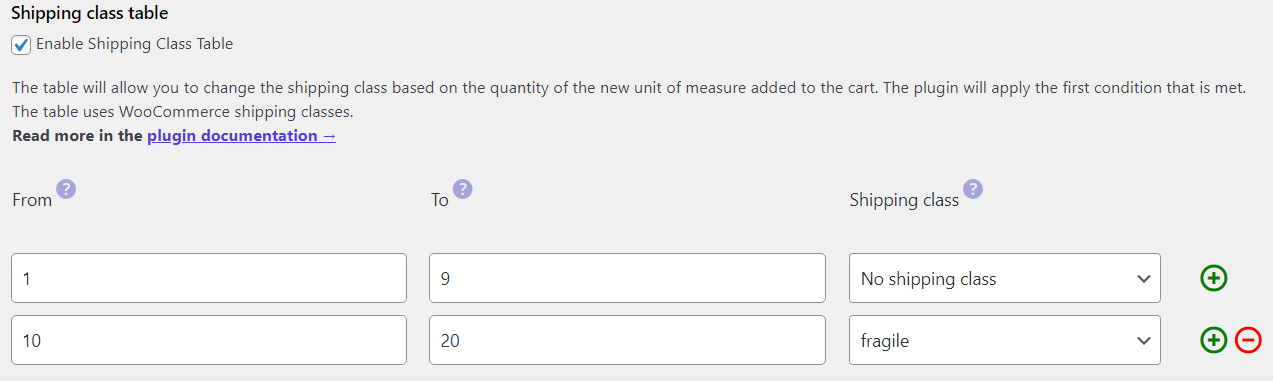
Shipping class table example in Flexible Quantity Changing product price based on shipping classes is one of PRO features of the plugin. -
How to add different pricing based on measurement ranges?
This feature helps you offer tiered pricing based on measurement ranges, increasing sales opportunities through bulk incentives. That means, the final price on the product page may be based on size, product weight, dimensions, or user-defined calculator values.
The plugin will calculate the price on the measurement data and advanced plugin settings.
Example: discounted prices for bulk orders of cables based on length.
Adding such a price calculator to your products is also possible with the free version of Flexible Quantity.
Summary - add a measurement price calculator in WooCommerce
Key points to remember:
- Flexible Quantity Calculator enhances your WooCommerce store by allowing new measurement-based sales.
- Choose the PRO version for advanced features like pricing tables, price per unit, advanced measurement calculator based on shipping classes, and customized measurement ranges.
- Clear product pricing based on measurements boosts customer satisfaction.
- Implement this plugin to stand out from competitors and offer a tailored shopping experience.
Ready to transform your WooCommerce store? Start selling smarter with the Flexible Quantity Calculator plugin today!
Bonus: Best WooCommerce measurement price calculator plugins
Here are five recommended WooCommerce measurement price calculator plugins for diverse needs:
-
Flexible Quantity Calculator
Easily sell products based on length, area, volume, and more. Ideal for flooring, fabrics, and customizable products, featuring dynamic pricing tables and precise quantity controls.
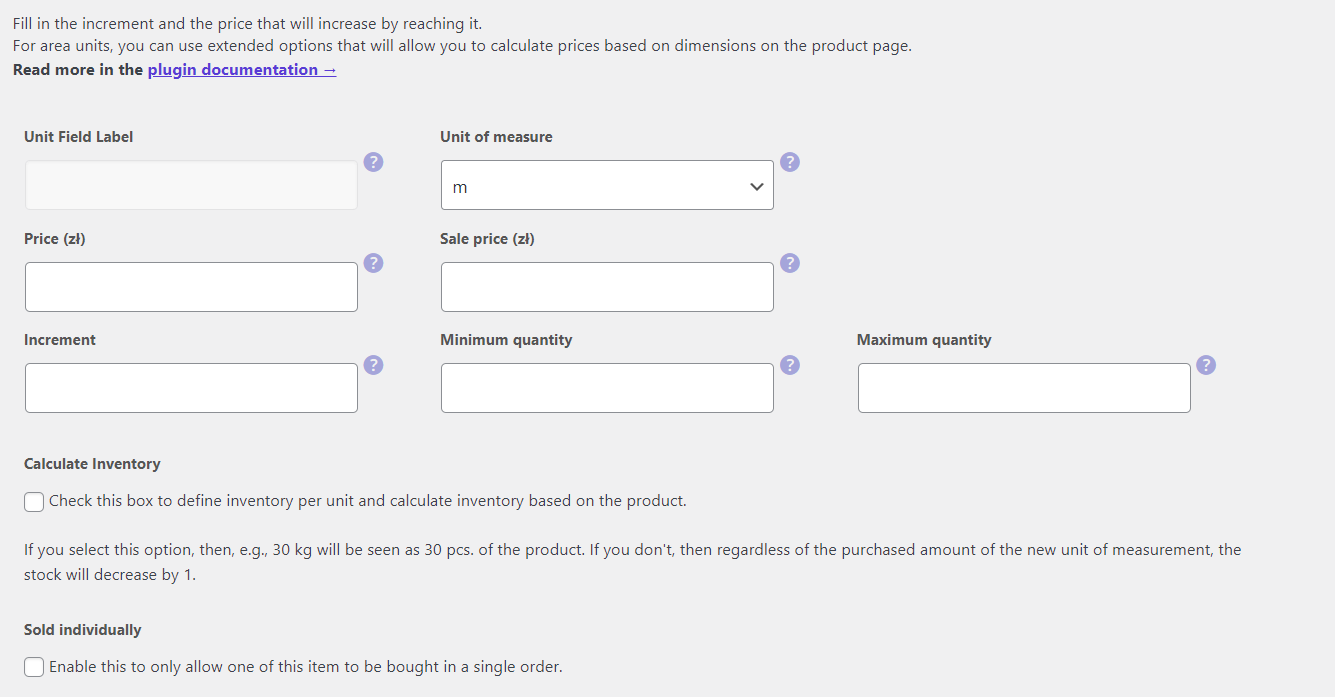
Flexible Quantity settings for unit of measure with inventory options -
WooCommerce Unit of Measure
Adds clarity by displaying units of measurement alongside prices, perfect for bulk items like food or materials sold by weight or length.

WooCommerce Unit Of Measure use case image source: https://wphive.com/plugins/woocommerce-unit-of-measure/
-
Measurement Price Calculator by WooCommerce
Perfect for selling products like wallpaper, mulch, or fabric by custom measurements, offering dynamic calculations and inventory management based on input.

Measurement Price Calculator for WooCommerce banner source: https://woocommerce.com/products/measurement-price-calculator/
-
WooCommerce Measurement Price Calculator – Formula Based Pricing
Suitable for products needing custom pricing formulas, like custom furniture or glass, featuring complex conditions and formula-based calculations.

WooCommerce Measurement Price Calculator Plugin, Formula Based Pricing - Unit Pricing banner source: https://codecanyon.net/item/woocommerce-measurement-price-calculator-plugin-formula-based-pricing-unit-pricing/34599610
-
SUMO WooCommerce Measurement Price Calculator
The plugin provides flexible measurement-based pricing for products such as construction materials or textiles, integrating multiple measurement types seamlessly.

SUMO WooCommerce Measurement Price Calculator banner source: https://codecanyon.net/item/sumo-woocommerce-measurement-price-calculator/21637332
FAQ
Is a WooCommerce measurement price calculator free to use?
Yes. Flexible Quantity offers a free version that covers the core measurement types (weight, length, area, and volume), with PRO reserved for advanced features like custom pricing tables and shipping class rules.Which products benefit most from a measurement price calculator?
Products sold by custom size or quantity benefit most — fabric, timber, flooring, garden materials, ropes and cables, and any item where a fixed "per piece" price doesn't reflect what the customer is actually buying.Can a measurement price calculator work alongside product variations?
Yes. You can combine standard WooCommerce variations (like color or material) with measurement-based pricing, so a single product can offer both variation choices and custom, measurement-driven pricing.







Leave a Reply