
• Skip to primary navigation
  • Skip to main content
  • Skip to primary sidebar
  • Skip to footer
WP Desk = premium plugins for WordPress & WooCommerce
  • Plugins
        • Checkout & OrdersMake your work easier and automate the orders. Adjust the order form to your needs and make it more useful to your customers. Print order labels directly from WooCommerce. Put the orders in order using our plugins. Find out how to streamline the procurement process in your store.
          • Flexible Checkout Fields
          • Active Payments
          • Automatic Payment Status
          • Flexible Refund and Return Order
          • Print Orders and Address Labels
          • Flexible Subscriptions Recurring Shipping
          • Flexible Subscriptions Payment Retry
          • Flexible Subscriptions Stock Management
        • ProductsThese plugins will help you manage your WooCommerce products. Here you will find the plugins to import and update products from XML or CSV files. Then you can change the product unit of measure, show the lowest price in the last 30 days (Omnibus Directive), or let customers name the product price!
          • Flexible Product Fields
          • Dropshipping Import Products
          • Dropshipping FTP Import Products
          • Dropshipping Export Products
          • Custom Price
          • WP Desk Omnibus
          • Flexible Quantity Calculator
          • Dropshipping Orders Export
        • MarketingPromote your store online. Add products from your shop to price comparison websites directly from WooCommerce. Acquire new customers and communicate with your existing ones. Build a customer base and communicate with clients using one of the most effective marketing tools, namely e-mail marketing. Check out our promotional tools!
          • Flexible Pricing
          • Flexible Wishlist - Analytics & Emails
          • OLX WooCommerce
          • Flexible PDF Coupons
          • ShopMagic
          • Flexible Invoices
  • Bundle🔥
  • WP Desk Care
  • Support
  • Blog
  • My Account
  • 0

More results

Let Your Customers Ask for Gift Wrapping at the WC Checkout

Plugin Tutorials, WooCommerce checkout fields

WP Desk2 minutes readUpdated: 2018-10-09Updated: 2025-08-20
blog category heading image

We all love receiving gifts! So what if I told you we love giving presents even more? Use this fact. Offer gift wrapping to boost sales in your WooCommerce store. You can simply implement a new option in the WC checkout. Read this step-by-step guide to learn how to do that!

Have you ever received questions about additional features for the ordered items like packaging, service, or guarantee? It's quite ok if it's inside the order notes. But what about a lot of phone calls & emails? Especially during the most profitable weeks when you have tons of work with shipping, invoicing, and promotion anyway?

It would be great to see additional customer needs at a glance! You can add new fields at the WC checkout to get this information quickly. Learn how to do that with a free WooCommerce checkout editor plugin!

Contents

  • Gift Wrapping at WC checkout
    • Flexible Checkout Fields WooCommerce
  • More custom fields for your WC Checkout
  • Let's further customize the WC checkout
    • Related Articles
  • How to add gift wrapping option to WooCommerce products
  • Add a gift wrap option for a WooCommerce product
  • Gift a product with purchase & 3 FREE plugins to sell gifts in WooCommerce
  • Create Custom Fields in WooCommerce Checkout and Product Pages
  • Customize the WooCommerce Checkout Page: Tips & Tools for Success

Gift Wrapping at WC checkout

Let's now look at how your customers could check for a checkout gift packing🎁 .

First, you have this Ship to address section by default in your store's checkout.
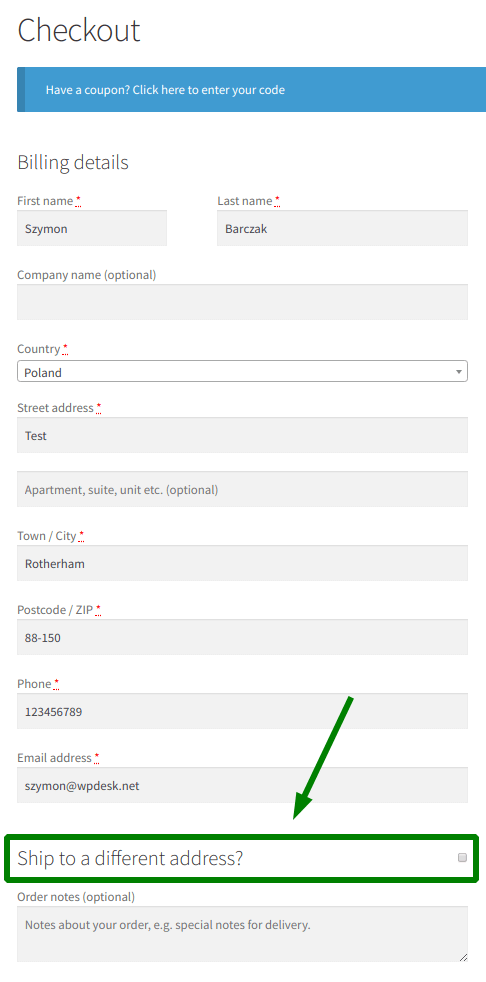
WC Checkout fields
WooCommerce Checkout: Checkbox field example

So it'll be the place to put our WooCommerce checkout gift option. I called it Send as a gift🎁 .
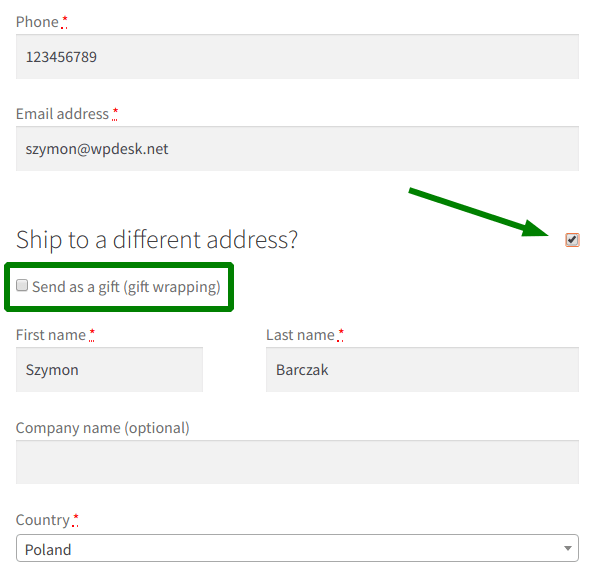
WooCommerce Checkout Gift Feature
Add gift wrapping checkbox

To add new WC checkout fields you need Flexible Checkout Fields - a free WooCommerce plugin. Watch a video that shows you the plugins' features in the free version, which is the one you'll need to add gift wrapping to your checkout:

Flexible Checkout Fields WooCommerce

Customize WC Checkout. Add a gift wrapping checkbox to your checkout and add other custom fields.

Download for free or Go to WordPress.org
WP Desk
80,000+ Active Installations
Last Updated: 2026-08-19
Works with WooCommerce 10.7 - 11.1

Add gift wrapping to WooCommerce Checkout

Once you install and activate the plugin, go to WooCommerce → Checkout Fields. You'll find a Shipping tab there.

Then, add a new Checkbox. Enter your label name and click Add Field:
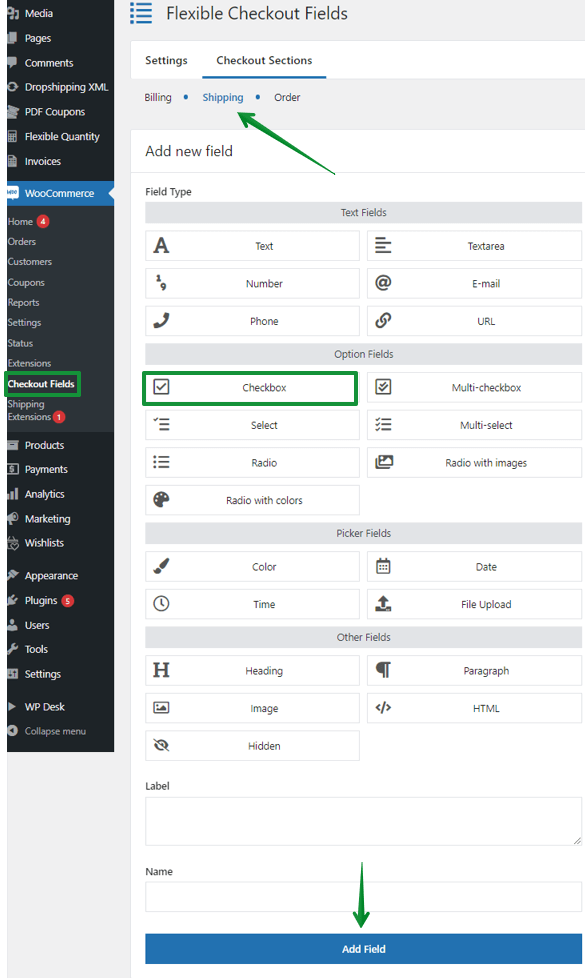
gift wrapping checkbox
WooCommerce Checkout: Add a new checkbox

Next, move the new field to the top of the WooCommerce checkout shipping section. You can change a few options there too:
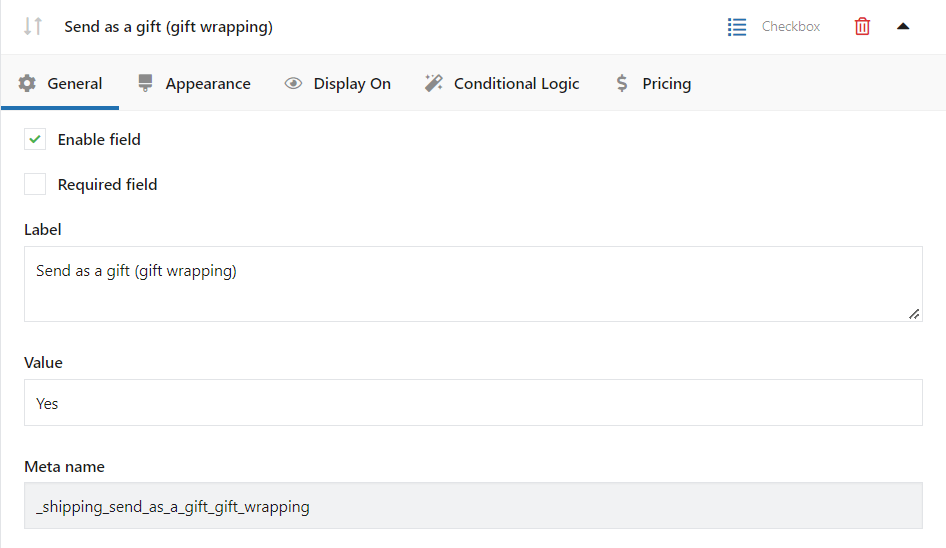
gift wrapping checkbox
Add gift wrapping to your WC Checkout form

Also, look at the Appearance tab. You can set your own CSS styling there.

See our guide on How to design WooCommerce checkout page CSS →

That's all! You have just implemented the WC checkout gift feature in your store.

Read more on how to add the gift-wrapping option for WooCommerce products.

More custom fields for your WC Checkout

In short, Flexible Checkout Fields lets you create custom fields in the WooCommerce checkout.

Also, with this plugin, you can edit or rearrange default WC checkout fields. For example, you can disable address fields if you sell digital products.
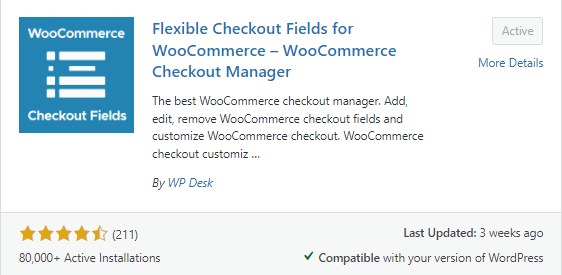
fcf ratings
Flexible Checkout Fields will let you customize the Checkout form

Almost 80,000 stores worldwide use this plugin daily. Ratings are 4.6 out of 5 stars.

The free version lets you create:

  • Single Line Text
  • Paragraph Text
  • Textarea
  • Number
  • E-mail
  • Phone
  • URL
  • Checkbox
  • Color
  • Headline
  • Paragraph
  • Image
  • HTML

You can also upgrade to the PRO if you need more features. With the PRO version you can create even more WooCommerce checkout fields: 

  • Multi-checkbox
  • Select (Drop Down)
  • Multi-select
  • Radio
  • File Upload
  • Radio with images
  • Radio with colors
  • Date
  • Time
  • File Upload
  • Hidden

Also, the PRO lets you use conditional logic.

This way you can create WooCommerce checkout conditional fields →

Let's further customize the WC checkout

You have learned how to configure the WooCommerce checkout message. You may also find interesting our articles about:

  • personalizing the WooCommerce checkout page
  • configuring WooCommerce checkout settings

Has this article helped you? Let us know in the comments section below!

Related Articles

WooCommerce add gift wrapping option

How to add gift wrapping option to WooCommerce products

Gift wrapping is a simple add-on that you can use in your shop. Not only does it make your store's brand more customer friendly, but it will also let ...
WooCommerce product gift wrap plugin

Add a gift wrap option for a WooCommerce product

Christmas is a special time and the peak of online sales. Shops refine their sales mechanisms and each product turns into a gift. Use additional produ...
WooCommerce free gift plugin

Gift a product with purchase & 3 FREE plugins to sell gifts in WooCommerce

56% of people buy gifts Just Because. That's quite a lot! You need to think about giving gifts in your store. Without it, your sales may drop. I'll sh...
WooCommerce product page fields and checkout fields

Create Custom Fields in WooCommerce Checkout and Product Pages

Standard WooCommerce doesn't let you create custom fields without writing your code. However, there are situations when you need the custom product or...
Custom checkout page WooCommerce

Customize the WooCommerce Checkout Page: Tips & Tools for Success

The WooCommerce Checkout Page is simple by default for there is no built-in option to customize the form in the WooCommerce plugin. So, how to edit, c...

2 minutes read11518 views

Reader Interactions

Leave a Reply Cancel reply

Your email address will not be published. Required fields are marked *

WP Desk

...

Powered by WP Desk

WP Desk brings you great WooCommerce plugins. We strive to save your time and money by speeding up your processes. Use our plugins to build a better store. Awesome support included in the package.

Premium WooCommerce Plugins →
WP Desk › Blog › WooCommerce checkout & orders › WooCommerce checkout fields › Let Your Customers Ask for Gift Wrapping at the WC Checkout

Primary Sidebar

Contents

  • Gift Wrapping at WC checkout
    • Flexible Checkout Fields WooCommerce
  • More custom fields for your WC Checkout
  • Let’s further customize the WC checkout

Flexible Checkout Fields PRO WooCommerce £59

Customize WC Checkout. Add a gift wrapping checkbox to your checkout and add other custom fields.

Add to cart or View Details
WP Desk
80,000+ Active Installations
Last Updated: 2026-08-20
Works with WooCommerce 10.7 - 11.1

Stay updated on our how-to articles

WP Desk news, WooCommerce tips, promo codes - right to your inbox.

By entering your e-mail, you agree to our Terms & Conditions and Privacy Policy.

By entering your e-mail, you agree to our Terms & Conditions and Privacy Policy.

Footer

WP Desk - WooCommerce Plugins

At WP Desk we create great WooCommerce plugins with awesome support. Save time and money with our e-commerce solutions. See how we can help you improve your e-store →

Secured by Comodo

WP Desk

  • About us
  • Giving Back
  • Blog
  • Get Support
  • Contact us

Products

  • Premium Plugins
  • WP Desk Care
  • Documentation
  • WooCommerce Invoices
  • Email Marketing
  • PDF Coupons

Legal

  • Terms & Conditions
  • Refund Policy
  • Support Policy
  • Privacy Policy

© 2026 WP Desk

We value your privacy

We use necessary cookies to make our site work. We'd also like to set additional cookies to understand site usage, enhance your browsing experience, and serve personalized ads or content. By clicking ‘Accept All,’ you consent to our use of additional cookies.

Functional Always active
The technical storage or access is strictly necessary for the legitimate purpose of enabling the use of a specific service explicitly requested by the subscriber or user, or for the sole purpose of carrying out the transmission of a communication over an electronic communications network.
Preferences
The technical storage or access is necessary for the legitimate purpose of storing preferences that are not requested by the subscriber or user.
Statistics
The technical storage or access that is used exclusively for anonymous statistical purposes. Without a subpoena, voluntary compliance on the part of your Internet Service Provider, or additional records from a third party, information stored or retrieved for this purpose alone cannot usually be used to identify you. The technical storage or access that is used exclusively for anonymous statistical purposes. Without a subpoena, voluntary compliance on the part of your Internet Service Provider, or additional records from a third party, information stored or retrieved for this purpose alone cannot usually be used to identify you.
Marketing
The technical storage or access is required to create user profiles to send advertising, or to track the user on a website or across several websites for similar marketing purposes.
  • Manage options
  • Manage services
  • Manage {vendor_count} vendors
  • Read more about these purposes
View preferences
  • {title}
  • {title}
  • {title}