

You can find a lot of books about professional WordPress design and development. There are also courses, videos, and tutorials on how to excel in designing or developing websites on WordPress. Today, I will give you a list of important things a professional should bear in mind when diving into WordPress (and WooCommerce) design and development 🚀!
Contents
- Professional WordPress design and development - important intro
- Subjects to learn
- Speed up design and development (tools & plugins)
- FAQ – professional WordPress design and development
- Summary
- 5 essential WooCommerce tips to boost your sales
- WooCommerce SEO services & do you need a consultant, company, or agency?
- WooCommerce shortcodes & blocks - the complete list with examples
- WooCommerce advanced custom fields: a FREE product & checkout customizer
- 10-step WooCommerce review to help you understand why WooCommerce is the best e-commerce platform
Professional WordPress design and development - important intro
First, you need to bear in mind, that it’s not rocket science 🧑🚀 the topic is huge 😏. I will point out the most important areas and topics you may want to learn.
Also, I advise you to choose a book, video, tutorial, podcast, or lecture about professional WordPress design and development. Start with a quality one in the format you like 🙂.
Finally, remember that practicing may also be a key to fast learning. If you can implement the knowledge right away, there is a chance to keep the momentum 💨.
Subjects to learn
The areas of expertise in professional WordPress (or WooCommerce) design and development are HUGE! You may focus on designing and developing the backend, and frontend, implementing security measures, testing, giving support, adjusting, customizing, taking care of projects, accounting, hiring staff, or organizing the smooth run of the company 😨.

Of course, remember that you do not need to do everything on your own 🙂. I know it only scratches the surface with topics, but you know at once you may need help with projects, pick smaller ones and run them slowly only by yourself, or pick just one area of expertise.
Ok, let’s jump to the list!
Professional WordPress design and development - subject list
-
Technical & Development
- WordPress CMS (installing, settings, security, server settings, themes, and plugins)
- Build an eCommerce site/ WooCommerce
- Mobile, Apps
- HTML and CSS
- PHP
- custom code (filters, actions, child theme, and plugins)
- JavaScript
- Frameworks, libraries, SCSS
- AJAX, API, DOM
- SQL, database queries & optimization
- Staging, SVN, testing, troubleshooting
- FTP, backups, migrating, and updates
- Support, customer service, and maintenance
- Custom post types, taxonomies, multisite
- Cron, Cache, SMTP, SSL
- Developer tools (coding, managing, support)
-
Design
- Goals, planning, strategy
- Content architecture, layouts, formats
- Prototyping and mockups
- Mobile, scalability, apps
- Graphical elements (images, photos, logo, banners)
- Functional elements, user flow, and conversion goals
- Colors, fonts, effects
- Testing, analyzing, and optimizing
-
Marketing
- Content strategy
- Content architecture and types
- SEO
- Content writing
- SEM
- Internal (emails, forms, processes, etc.)
- External (social media, printed ads, meetings)
- Analytics
-
User/ Customer
- Finding new customers
- Contact forms, auto-replies
- Support and customer care
- Product feedback and comments
- Emails and newsletters
- Privacy policy, terms & conditions, legal
- Sales
- UX
- Invoicing, shipping, and payments
- Products, orders, and refunds
- User flow
- Marketing
- Community
-
Organization
- Business stuff (type of company, legal, invoicing, and taxes)
- Coworkers, hiring, and communication
- Project & time management
- Costs, funding, and planning a budget
- Improving skills/ learning
- Agreements, NDA, and paperwork
- Conflict management
- External cooperation, affiliate, campaigns
- Management, reports, and business efficiency
Block-based development: what changed in professional WordPress work
The list above covers the classic stack, but modern WordPress development has moved towards blocks. A professional WordPress developer today builds block themes rather than classic PHP templates, defines global styles in a theme.json file and registers custom blocks through a block.json manifest. Full Site Editing lets clients edit headers, footers and templates from the same interface they use to write a post, which removes a large share of the small change requests that used to land in your inbox.
This shifts the skill set. Custom block development relies on JavaScript and React, so JSX, the WordPress data layer and the build tooling around wp-scripts now sit next to PHP rather than behind it. Server-side rendering still matters for dynamic blocks, and hooks and filters have not gone anywhere, but a developer who only knows classic themes will struggle to quote a modern project accurately.
The same shift reached WooCommerce. The block-based cart and checkout replaced the shortcode versions as the default, which means WooCommerce customization now happens through checkout blocks and their extensibility API instead of template overrides. If you customize checkout fields for clients, this is the single most important change to learn, because code written for the classic checkout does not carry over automatically.
Frazy wpięte naturalnie: block themes, Full Site Editing, theme.json, custom block development, WordPress developer skills, WooCommerce customization, block checkout.
Of course, each area is huge so you may choose one specialization or become a jack of all trades. Being a backend, frontend, or full-stack developer has its pros and cons 🙂.
Let me know if you see any additional big subjects to learn. I’ve not gone too deep in frameworks, libraries, and tools as they require the knowledge of general stuff anyway 🧑🎓.
Speed up design and development (tools & plugins)
When creating professional WordPress sites for customers you need to remember about each aspect of the process (design, code, support, legal, marketing). The quality of your service will determine your success 🚀!
Tools
To build a beautiful website you will probably need some tools. Certainly, you can start with a pen and paper 😉 but you will need to move your ideas to the computer screen later on anyway. You can skip that step if you delegate the work or use design tools from day one 😀.
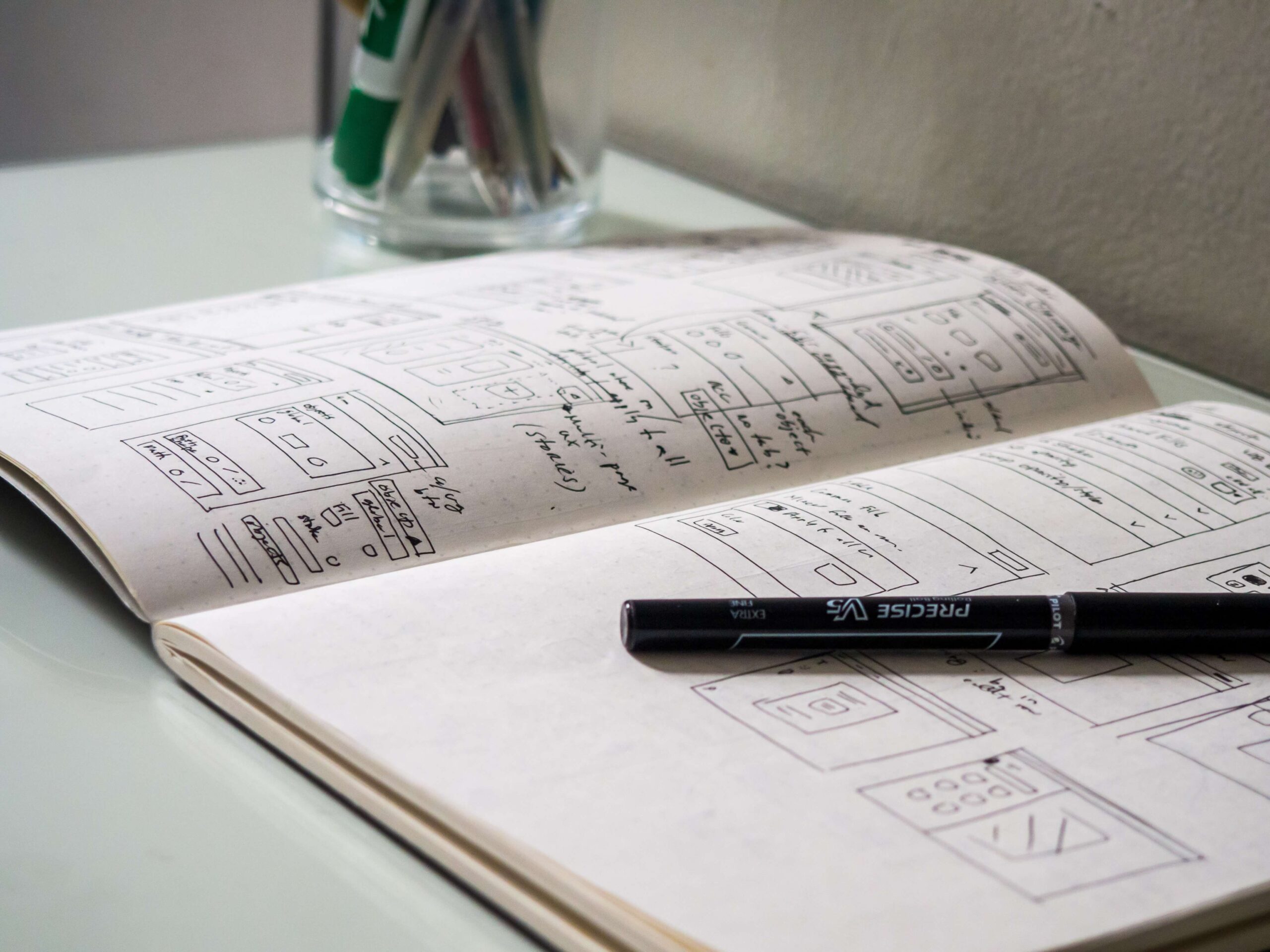
Most of the time you will need some kind of program to:
- code
- work simultaneously over code/ use SVN
- sketch and prototype
- plan and write your content
- analyze SEO, traffic, or sales
- plan and run a project/ business
- communicate with coworkers
- send emails and provide customer support
- take care of marketing, community, etc.
There are probably more areas that need an online tool or program. It’s nice to have good ones that will help you work effectively 🙂.
Plugins
As you know, you don’t always have to build custom extensions. You may also find premium plugins with advanced functionalities on the internet.
WP Desk has also developed dozens of plugins for WordPress and WooCommerce. I encourage you to check out our free plugins → 🚀
Download free plugins →Use them in your professional process of WordPress design and development ⭐, for example for invoicing or email marketing! What's more, most of them offer powerful new features for WooCommerce (better checkout and products, gift cards, product import, wishlists, or refunds).
Our extensions
Let's take a look at 5 examples of our plugins that can add value and speed up your projects 🙂.
Email marketing in WordPress and WooCommerce
The plugin lets you set email marketing but also get data from Contact Form 7 to Google Spreadsheets automatically. Create newsletters, and email lists, recover abandoned carts in WooCommerce, and more. It's compatible with WordPress & WooCommerce ⭐!
Download ShopMagic free →Invoicing in WordPress and WooCommerce
Running a blog, selling services, or having eCommerce have, most of the time, one thing in common. Issue PDF invoices for your customers (both in WordPress & WooCommerce) 🗃️!
Download Flexible Invoices for WordPress and WooCommerce →Customize the WooCommerce checkout page
Speed up your WooCommerce checkout page with our checkout manager. Add custom fields, hide, remove, reorder them, and customize the WooCommerce checkout with a few clicks. You can also set additional pricing per field and use conditional logic for advanced checkout customization in PRO 💪!
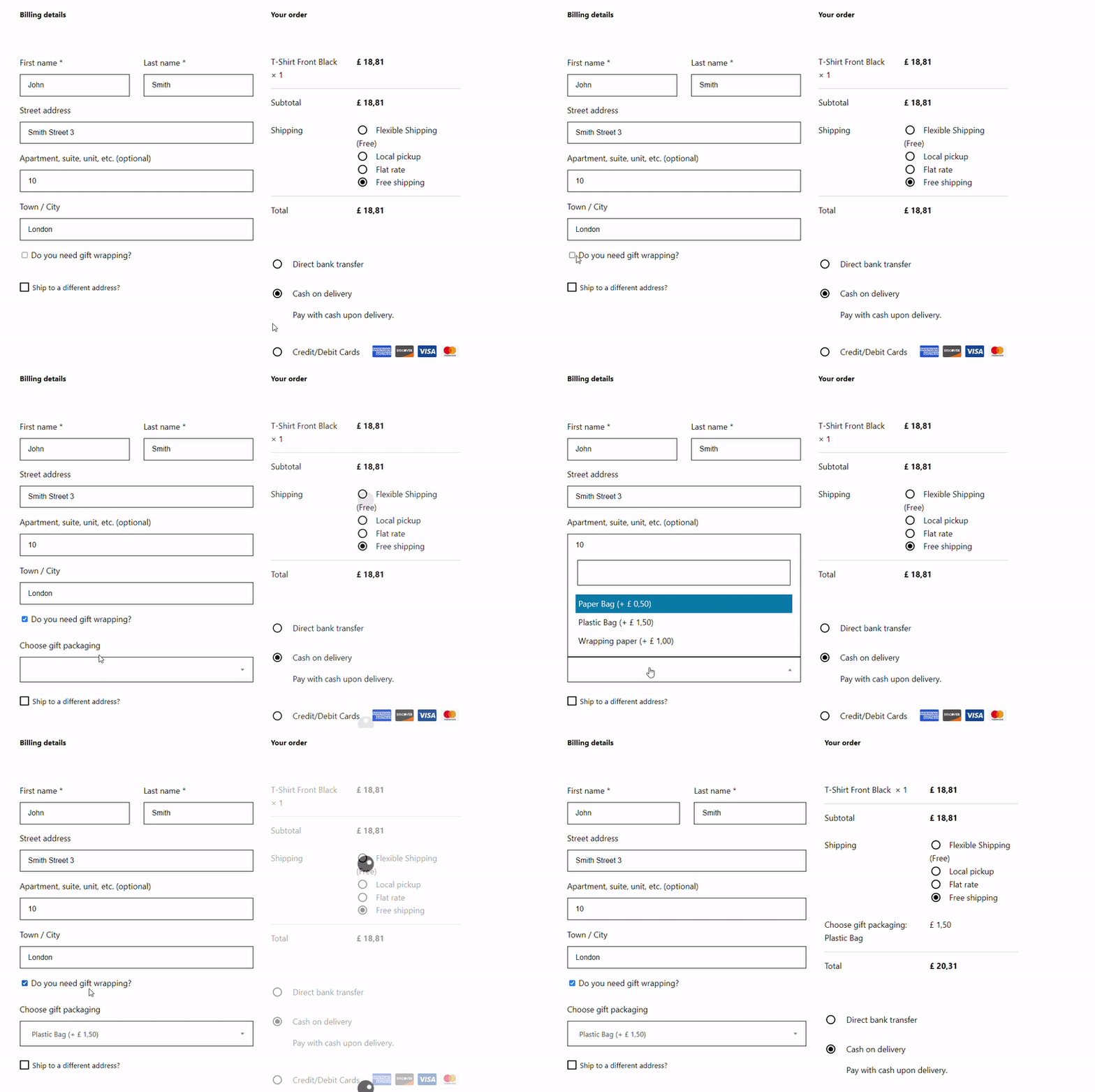
Flexible Checkout Fields PRO WooCommerce £59
Edit, add new or hide unnecessary fields from the WooCommerce checkout form. Add pricing to fields and use conditional logic. It's all about conversions and better user experience. NEW: now you can set multiple conditions (OR) under one or more condition groups (AND).
💾 Active Installations: 80,000+ | WordPress Rating:
You can also start with a free version of the plugin 🙂!
Download Flexible Checkout Fields (free) →Sell products with custom fields in WooCommerce
Default WooCommerce products (variations, attributes, and taxonomies) may not be enough when designing and developing advanced products. Use the plugin to add custom fields to WooCommerce products with pricing, conditional logic, and other customization options (some of them in PRO) 🎨. You may read more on how to use the free alternative to WooCommerce attributes.
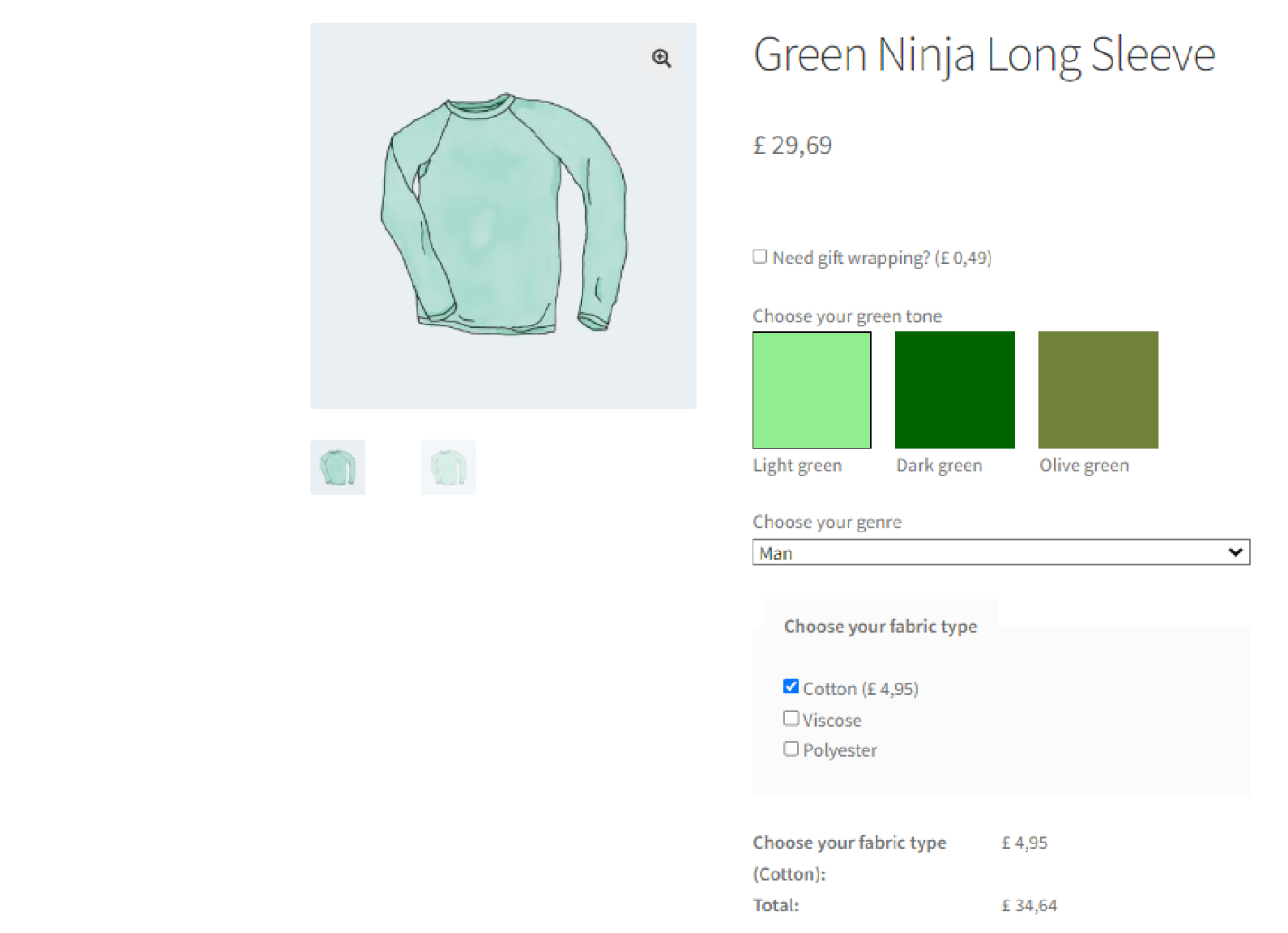
Flexible Product Fields PRO WooCommerce £59
Create a product wizard to sell engravings, gift wrapping, gift messages, business cards, stamps and optionally charge for it (fixed or percentage).
💾 Active Installations: 10,000+ | WordPress Rating:
There is also a free version of the plugin 🙂!
Download Flexible Product Fields (free) →Import products from any XML or CSV file
If your customer (or you) needs to add multiple products to WooCommerce, you will probably want a plugin. Our product importer can handle the job. Import products, synchronize specific fields, set the schedule, conditional logic, auto-create categories, and add prices. You may import (and update) simple, variable, or affiliate products faster (some options in PRO) ⏩.
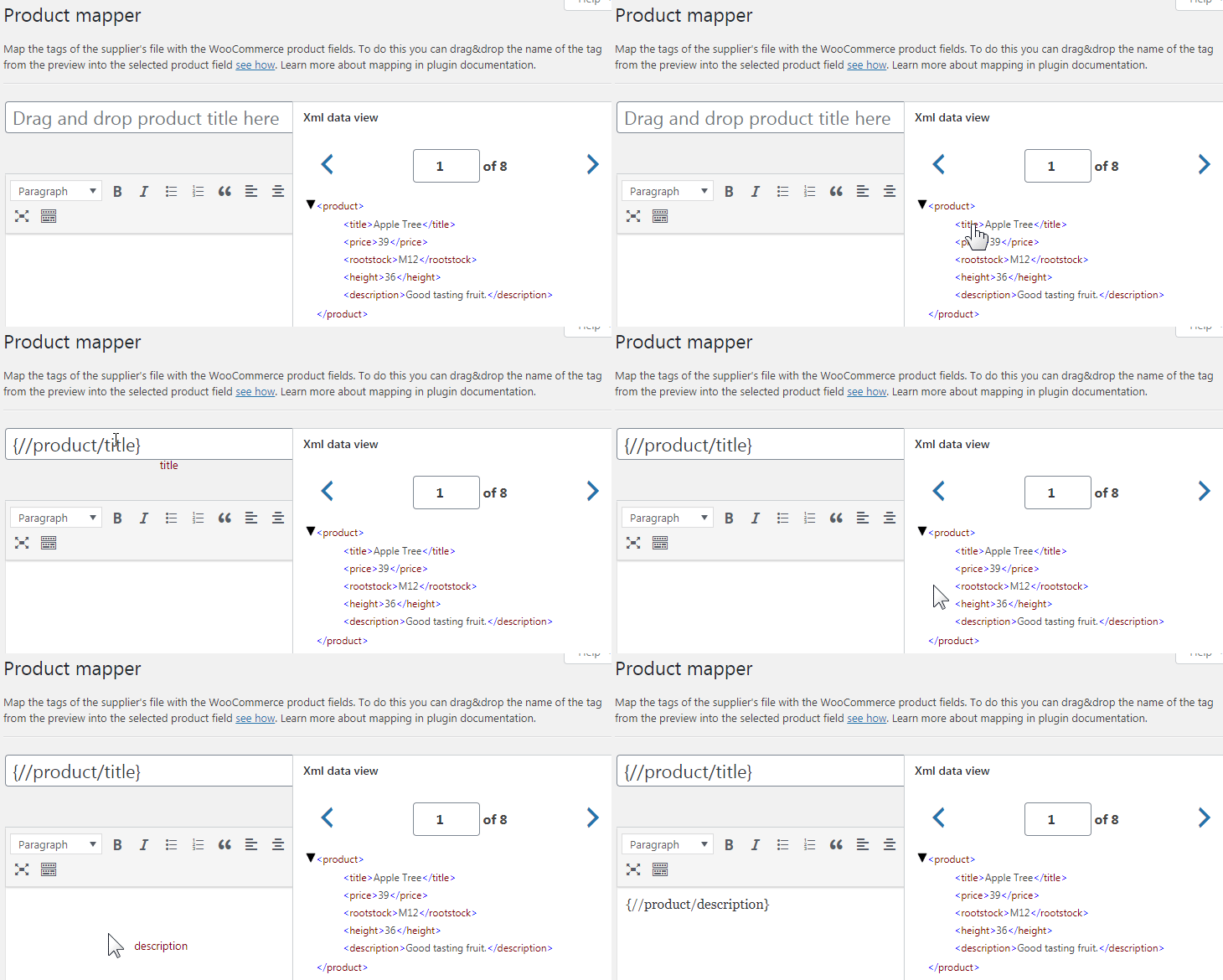
Dropshipping Import Products for WooCommerce £79
Import and synchronize wholesale products with WooCommerce products. Add margin to the prices of imported products. Use conditional logic. Make your work easier.
💾 Active Installations: 700+ | WordPress Rating:
You can also start with a basic version of the extension to run the product import 🙂!
Download the free version →Of course, that’s only a few examples. See the plugins and read our blog for more information & inspiration.
As you can see, our plugins can speed up your work. And there are also hooks and shortcodes! See our All Plugins Bundle if you need professional plugins with premium support one day 🏅 to develop and design WooCommerce stores with WordPress 🙂.
All Plugins Bundle £99
28 plugins included! 1 Site for each plugin Regular updates and support Priority 1-on-1 Support 30-day money back guarantee
Add to cart or View DetailsFAQ – professional WordPress design and development
How long does it take to learn WordPress development?
Building a working site with a block theme takes weeks. Reaching a level where you can take paid client projects usually takes six to twelve months of regular practice, because it requires PHP, JavaScript, hosting and debugging on top of the WordPress interface itself. Picking one area first shortens that considerably.
Do I need to know how to code to build WordPress sites professionally?
Not for every role. Designers, content strategists and site builders work with block themes and page builders without writing code. Coding becomes necessary when a client needs custom functionality, an integration with an external system or performance work that goes beyond configuration.
Should I specialize or become a full-stack WordPress developer?
Specialists usually charge more per hour and get referred for specific problems. Generalists win smaller projects where the client wants one person to handle everything. Most people start as generalists and narrow down once they see which work they enjoy and which pays best.
Which plugins should a WordPress developer know?
Beyond the ones you install for clients, learn the categories: caching, security, backups, SEO, forms and, for stores, invoicing, shipping and checkout customization. Knowing two reliable options per category is more useful than knowing twenty plugins superficially.
Do I still need to learn PHP for WordPress in 2026?
Yes. WordPress core, plugins and dynamic blocks all run on PHP, and most maintenance work involves reading someone else's PHP. JavaScript has become equally important for block development, but it replaces nothing on the server side.
Summary
Today, you’ve learned about professional WordPress design and development. Then, I’ve pointed out learning areas and important tools you may need to plan, develop, and run your projects.
I’ve also shown our plugins (free & premium) that may speed up your work in the future 💪.
Finally, if you have any questions about the article, learning paths, tools, or plugins, just leave a comment 🙂.


Leave a Reply