• Skip to primary navigation
  • Skip to main content
  • Skip to primary sidebar
  • Skip to footer
WP Desk = premium plugins for WordPress & WooCommerce
  • Plugins
        • Checkout & OrdersMake your work easier and automate the orders. Adjust the order form to your needs and make it more useful to your customers. Print order labels directly from WooCommerce. Put the orders in order using our plugins. Find out how to streamline the procurement process in your store.
          • Flexible Checkout Fields
          • Active Payments
          • Automatic Payment Status
          • Flexible Refund and Return Order
          • Print Orders and Address Labels
          • Flexible Subscriptions Recurring Shipping
          • Flexible Subscriptions Payment Retry
          • Flexible Subscriptions Stock Management
        • ProductsThese plugins will help you manage your WooCommerce products. Here you will find the plugins to import and update products from XML or CSV files. Then you can change the product unit of measure, show the lowest price in the last 30 days (Omnibus Directive), or let customers name the product price!
          • Flexible Product Fields
          • Dropshipping Import Products
          • Dropshipping FTP Import Products
          • Dropshipping Export Products
          • Custom Price
          • WP Desk Omnibus
          • Flexible Quantity Calculator
          • Dropshipping Orders Export
        • MarketingPromote your store online. Add products from your shop to price comparison websites directly from WooCommerce. Acquire new customers and communicate with your existing ones. Build a customer base and communicate with clients using one of the most effective marketing tools, namely e-mail marketing. Check out our promotional tools!
          • Flexible Pricing
          • Flexible Wishlist - Analytics & Emails
          • OLX WooCommerce
          • Flexible PDF Coupons
          • ShopMagic
          • Flexible Invoices
  • Bundle🔥
  • WP Desk Care
  • Support
  • Blog
  • My Account
  • 0

More results

WooCommerce SEO services & do you need a consultant, company, or agency?

Marketing Tips, WooCommerce coupons & wishlists, WooCommerce tutorials

Tomasz Bednarek4 minutes readUpdated: 2024-12-20Updated: 2025-08-20
blog category heading image

Usually, shoppers find online stores via search engines. Organic traffic comes after your pages, posts, or products rank high in SERP (Search Engine Results Page). Read the article to learn key factors in getting more visitors. Also, you’ll learn where to start, and if you need extra services (consultant, company, or agency) to boost your WooCommerce SEO 🚀!

Contents

  • How you rank in SERP
  • WooCommerce SEO: Key Factors
  • WooCommerce SEO: To-Do List
    • To-Do List
    • Is that all?
  • Services for better WooCommerce SEO
    • When do you need a WooCommerce SEO consultant, company, or agency?
  • Free WooCommerce plugins to boost your store
    • All Plugins Bundle £99
  • Summary
    • Related Articles
  • 5 essential WooCommerce tips to boost your sales
  • Professional WordPress design and development (learning, tools & plugins)
  • WooCommerce shortcodes & blocks - the complete list with examples
  • 10-step WooCommerce review to help you understand why WooCommerce is the best e-commerce platform
  • WooCommerce Products - The basics of e-commerce product management

How you rank in SERP

In short, you need good content 🙂. Search engines “digest” the internet looking for the best articles, pages, products, and media that will answer the specific questions (keywords).

When your store goes online these search engines will crawl your pages and “understand” it. Of course, you can block their service on your site but you probably don’t want to do that if you look for better WooCommerce SEO, right 😀?

So, people give the search engine the specific keyword and get the best results based on several factors (next heading 🙂). The better your content and site rating are, the higher you position yourself in SERP 👍.

What part of your site is crawled? All of them except ones you block or that need logging in.

💡 Hint: The robots.txt, sitemap.xml, and Google Search Console are terms you need to know to successfully declare your content to search engines. There are also several plugins for WordPress and WooCommerce to help you index your content properly and with SEO 🙂.

WooCommerce SEO: Key Factors

You can start search engine optimization (SEO) for your WooCommerce store by shifting your attention and focus on one thing: your content 🦸. That’s your hero, but only if you take care of the following factors for content (any page, post, or product you add) on your site:

  • good quality
  • longer but interesting, examples, images
  • proper layout, headings, lists, or text formatting
  • user engagement, UX, and value for readers
  • new and thorough approach to the topic
  • specificity of the post, expertise
  • focus of your entire site on a certain niche
  • backlinks, shares, internal linking
  • proper WordPress/ WooCommerce SEO standards

💡 Hint: To get your content higher in SERP you don’t necessarily have to be an SEO expert or you don’t need a consultant, company, or agency for WooCommerce SEO services. You can do it 💪. Or at least try. Search engines like quality content, maybe you don’t need to know all the nuances & SEO tactics but this one thing is crucial 🙂!

WooCommerce SEO expert

WooCommerce SEO: To-Do List

As you can see, getting ranked in SERP needs some hard work, especially if you want to give good content to readers (and potential customers). And of course, it requires TIME 🙂.

I will show you the short list of things you can do yourself for better WooCommerce or WordPress SEO in general (like an expert) before you think about hiring a consultant, company, or agency services 🪙.

To-Do List

  1. Plan the structure of your site (architecture) and link between each section.
  2. Prepare the offline content: quality images, product descriptions, or a Q&A list.
  3. Use the WordPress theme with a nice layout that supports WooCommerce products.
  4. Prepare keyword lists for your content and plan the content (calendar) 📅.
  5. Think about keywords but remember about users’ search intent and their needs.
  6. Write a blog about things connected to your products and user search queries.
  7. Be consistent about the content: blog articles, pages, products, and images 🙂.
  8. Write the description of the product pointing out the important stuff for shoppers.
  9. When you add images to blog posts or products optimize their size and resolution.
  10. Save the product/ blog pics with names containing keywords 🏷️.
  11. Add the title, alt, and caption for your images for better WooCommerce SEO results.
  12. Add well-written descriptions with keywords for WooCommerce product categories.
  13. Allow readers to share your posts and products. Also, try getting quality backlinks.
  14. Optimize the page speed - try to lower the time your content appears in the browser.
  15. Use fast hosting/ server, cache results, and CDN to speed up your site 🚀.
  16. Use content formats (how-to, comparison, in-depth description, use case, story, etc.) that are engaging for readers and fit their search intent. Also, do not remember about good design 🎨!
  17. Add testimonials, allow comments, get feedback, and be present in your old content.
  18. You may also use social media services, send emails, offer newsletters, start an affiliate program, and cooperate with the best to boost your WooCommerce SEO like an expert.
  19. Track the position of your posts, pages, and products in search engines 📈.
  20. Optimize the older content to rank higher. Add more text, fresh images, or video.
  21. Avoid ranking for the same keyword twice, rather look for opportunities in more specific ones (long-tail keywords). If you do, you can think about the proper site/ link structure 🔗.

Is that all?

As you can see, multiple factors are important for successful WooCommerce SEO and getting higher in SERPs. Remember that SEO depends on other non-content things too, for example, good coding, WordPress, WooCommerce, and plugin updates, your hosting quality, market competition, niche, seasonal demand, local needs, or trends.

You may write good content but remember about the overall technical quality of your page as well 👍!

💡 Hint: Lately, I’ve written an article about professional WordPress design and development. WooCommerce, or more general WordPress, SEO services can be successful but do not forget about the site security, architecture, UX, UI, or code 🙂.

Services for better WooCommerce SEO

Running your business is challenging. You may try to prepare your WordPress and WooCommerce, and then think about accounting, sales, and shipping alone but it can be time-consuming 😨. You may decide to delegate some things to your employees, outsource, or use SaaS services, for example for WooCommerce SEO 😀.

💡 Hint: Think if you want to use external services for your business - quality content, knowledge, and good SEO may be crucial for your business - and if you’re an expert in your niche, try to do WordPress/ WooCommerce SEO by yourself - at least at the beginning 💪.

When do you need a WooCommerce SEO consultant, company, or agency?

The short answer is when you think you can’t handle a specific part of WooCommerce SEO or you can’t do it at all 🙂. Then, you can hire someone to create an SEO strategy, prepare the site architecture with a content list, or even a detailed roadmap 🛣️!

Try to cover every aspect of WooCommerce SEO Key Factors, To-Do List, and things that work best in your case. Some of them may work better or worse depending on your niche so plan a specific combination that works.

If you are looking for a good WooCommerce SEO expert, for example, a consultant, a small company, or even a bigger agency, use online freelance services or a local company.

💡 Hint: Finding someone closer to you may be a better option if you’d like to meet a person and talk face-to-face about your SEO strategy and content plan 📓.

Free WooCommerce plugins to boost your store

Running your WooCommerce store is not only about SEO 😀. You’ll probably need to adjust it to your needs with a beautiful WordPress theme or extensions.

WP Desk built multiple plugins for boosting WordPress and WooCommerce with new functionalities. For example, you can find extensions to customize product and checkout pages, sell gift cards, invoice, send additional emails, rescue abandoned carts, use dynamic product pricing, add new units of measure, name product prices, or adjust your store to the Omnibus directive 💪!

For example, you can let shoppers create and share their product wishlists online:
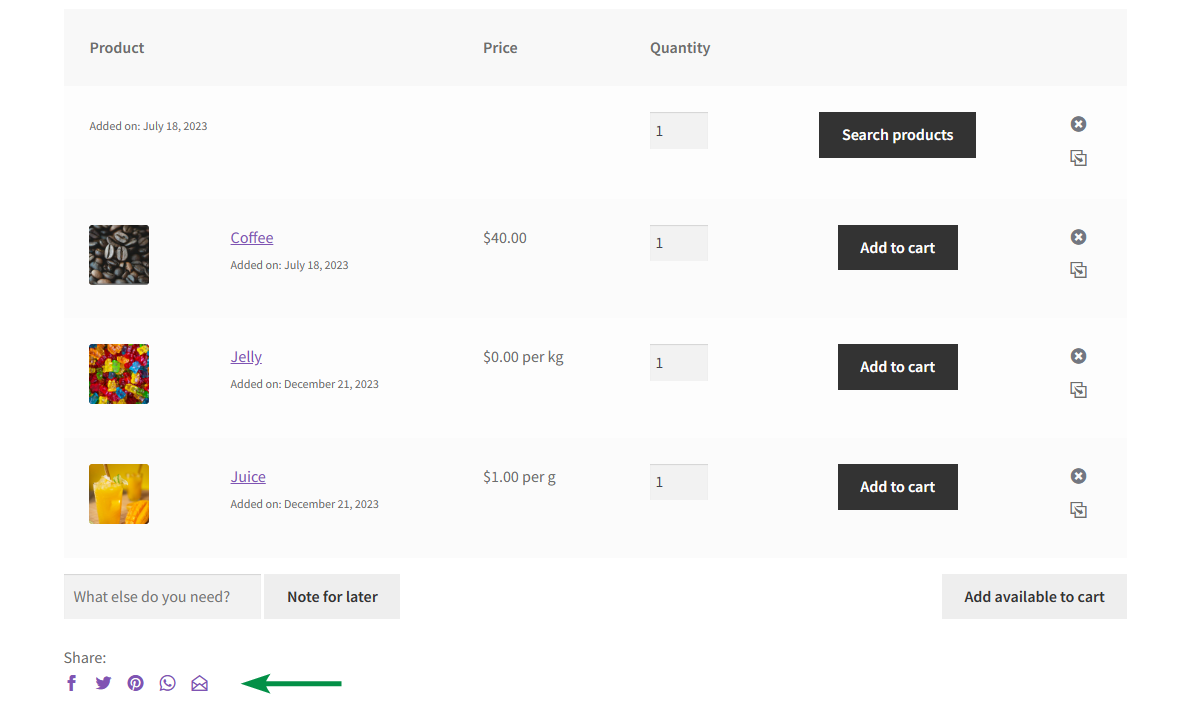
Share product wishlists in WooCommerce

Other plugins will help you boost your WooCommerce UX with better products (fields, gift cards, new units of measure), customized checkout form, or email marketing 🚀.

Browse our plugins and see our competitive offer - All Plugins Bundle.

All Plugins Bundle £99

28 plugins included! 1 Site for each plugin Regular updates and support Priority 1-on-1 Support 30-day money back guarantee

Add to cart or View Details
WP Desk
Plugins used by 239,859+ shops
💡 Hint: Also, check out our free plugins in the WordPress repository 🙂.

Summary

Today, I’ve shown you solid fundamentals for successful WooCommerce SEO. You don’t necessarily need to become a WooCommerce SEO expert, but I hope the article will help you in making good content 🙂.

Knowing the key factors and using the To-Do list I wrote, may save you from jumping right into external services and hiring a consultant, company, or big WooCommerce SEO agency.

Let me know if you have more questions in the comments section.
Related Articles

WooCommerce tips

5 essential WooCommerce tips to boost your sales

Do you need valuable WooCommerce tips and tricks to boost your sales? I'll give you 5 most essential WooCommerce tips and tricks. If you follow them, ...
Professional WordPress design and development (learning, tools & plugins)

Professional WordPress design and development (learning, tools & plugins)

You can find a lot of books about professional WordPress design and development. There are also courses, videos, and tutorials on how to excel in desi...
WooCommerce shortcodes (practical guide with the cart, checkout, products, shop, product, and login shortcode examples)

WooCommerce shortcodes & blocks - the complete list with examples

You may find many posts about WooCommerce shortcodes online. In this article, you’ll find the full WooCommerce shortcode list with screenshots. Quickl...
WooCommerce Review

10-step WooCommerce review to help you understand why WooCommerce is the best e-commerce platform

In this WooCommerce review I will guide you through 10 reasons why WooCommerce should be your e-commerce platform of choice. Life is a series of choic...
WooCommerce product manager plugin guide

WooCommerce Products - The basics of e-commerce product management

Launching and running a WooCommerce shop is very simple in the long-term perspective. The beginnings are difficult in any field. To make a start easy ...

4 minutes read3754 views

Reader Interactions

Leave a Reply Cancel reply

Your email address will not be published. Required fields are marked *

Tomasz Bednarek

Copywriter and Marketing Specialist

Author of numerous articles and educational materials created for WP Desk and related services focused on WooCommerce plugins (Flexible Invoices, F...

Powered by WP Desk

WP Desk brings you great WooCommerce plugins. We strive to save your time and money by speeding up your processes. Use our plugins to build a better store. Awesome support included in the package.

Premium WooCommerce Plugins →
WP Desk › Blog › WooCommerce tutorials › WooCommerce SEO services & do you need a consultant, company, or agency?

Primary Sidebar

Contents

  • How you rank in SERP
  • WooCommerce SEO: Key Factors
  • WooCommerce SEO: To-Do List
    • To-Do List
    • Is that all?
  • Services for better WooCommerce SEO
    • When do you need a WooCommerce SEO consultant, company, or agency?
  • Free WooCommerce plugins to boost your store
    • All Plugins Bundle £99
  • Summary

All Plugins Bundle £99

28 plugins included! 1 Site for each plugin Regular updates and support Priority 1-on-1 Support 30-day money back guarantee

Add to cart or View Details
WP Desk
Plugins used by 239,859+ shops

Stay updated on our how-to articles

WP Desk news, WooCommerce tips, promo codes - right to your inbox.

By entering your e-mail, you agree to our Terms & Conditions and Privacy Policy.

By entering your e-mail, you agree to our Terms & Conditions and Privacy Policy.

Footer

WP Desk - WooCommerce Plugins

At WP Desk we create great WooCommerce plugins with awesome support. Save time and money with our e-commerce solutions. See how we can help you improve your e-store →

Secured by Comodo

WP Desk

  • About us
  • Giving Back
  • Blog
  • Get Support
  • Contact us

Products

  • Premium Plugins
  • WP Desk Care
  • Documentation
  • WooCommerce Invoices
  • Email Marketing
  • PDF Coupons

Legal

  • Terms & Conditions
  • Refund Policy
  • Support Policy
  • Privacy Policy

© 2026 WP Desk

We value your privacy

We use necessary cookies to make our site work. We'd also like to set additional cookies to understand site usage, enhance your browsing experience, and serve personalized ads or content. By clicking ‘Accept All,’ you consent to our use of additional cookies.

Functional Always active
The technical storage or access is strictly necessary for the legitimate purpose of enabling the use of a specific service explicitly requested by the subscriber or user, or for the sole purpose of carrying out the transmission of a communication over an electronic communications network.
Preferences
The technical storage or access is necessary for the legitimate purpose of storing preferences that are not requested by the subscriber or user.
Statistics
The technical storage or access that is used exclusively for anonymous statistical purposes. Without a subpoena, voluntary compliance on the part of your Internet Service Provider, or additional records from a third party, information stored or retrieved for this purpose alone cannot usually be used to identify you. The technical storage or access that is used exclusively for anonymous statistical purposes. Without a subpoena, voluntary compliance on the part of your Internet Service Provider, or additional records from a third party, information stored or retrieved for this purpose alone cannot usually be used to identify you.
Marketing
The technical storage or access is required to create user profiles to send advertising, or to track the user on a website or across several websites for similar marketing purposes.
  • Manage options
  • Manage services
  • Manage {vendor_count} vendors
  • Read more about these purposes
View preferences
  • {title}
  • {title}
  • {title}