

Email marketing automation helps you stay connected with your users - without writing every message by hand. Whether you run a store, a membership site, or a blog, automating your WordPress emails can save time and improve user experience.
Contents
- Mastering WordPress email marketing automation in 2025
- When to use email automation in WordPress?
- Best WordPress plugins for email automation
- Tips to keep your automations user-friendly
- Top 5 free email marketing plugins for WordPress compared
- What to look for in an email plugin?
- Questions about email marketing automation
- 1. When to use email marketing automation?
- 2. Can you send emails directly from your WordPress dashboard?
- 3. What is the best best free email marketing plugin for WordPress?
- 4. How to get WordPress email subscribers and build email lists?
- 5. Can WordPress be used for email marketing?
- 6. Do marketers use WordPress?
- 7. Where can I find a free email marketing plugin for WordPress?
- 8. How to build email automation that works?
- Related Articles
- Configure your WordPress email settings & Complete guide to sending email
- 15 eCommerce automation tools for WooCommerce (2025)
- 5 essential WooCommerce tips to boost your sales
- 15 Best Websites to Learn WordPress and WooCommerce
- WooCommerce Emails - step by step configuration
Mastering WordPress email marketing automation in 2025
In this guide, you’ll learn when to use automation, which tools to choose, and how to set up simple but powerful email template flows and build marketing campaign inside WordPress.
When to use email automation in WordPress?
Automation is perfect for repeatable tasks. Here are common examples:
- Send a welcome email when someone registers
- Send email newsletter and notifications
- Grow your email list for specific email marketing campaign
- Send automated emails and regular email notifications
- Build an email sequence and automation workflow
- Use the power of marketing automation plugin for a WooCommerce store
- Prepare personalized email templates for specific events or WordPress user lists
- Follow up after a WooCommerce purchase
- Remind users about abandoned carts
- Notify customers about subscription renewals
- Use visual email marketing automation plugin tools rather than customize PHP templates
- Ease marketing efforts with targeted email campaigns
These are all great opportunities to send targeted, timely messages that add value without needing manual effort.
Best WordPress plugins for email automation
To automate your emails, you’ll need the right plugin. Here are some reliable options:
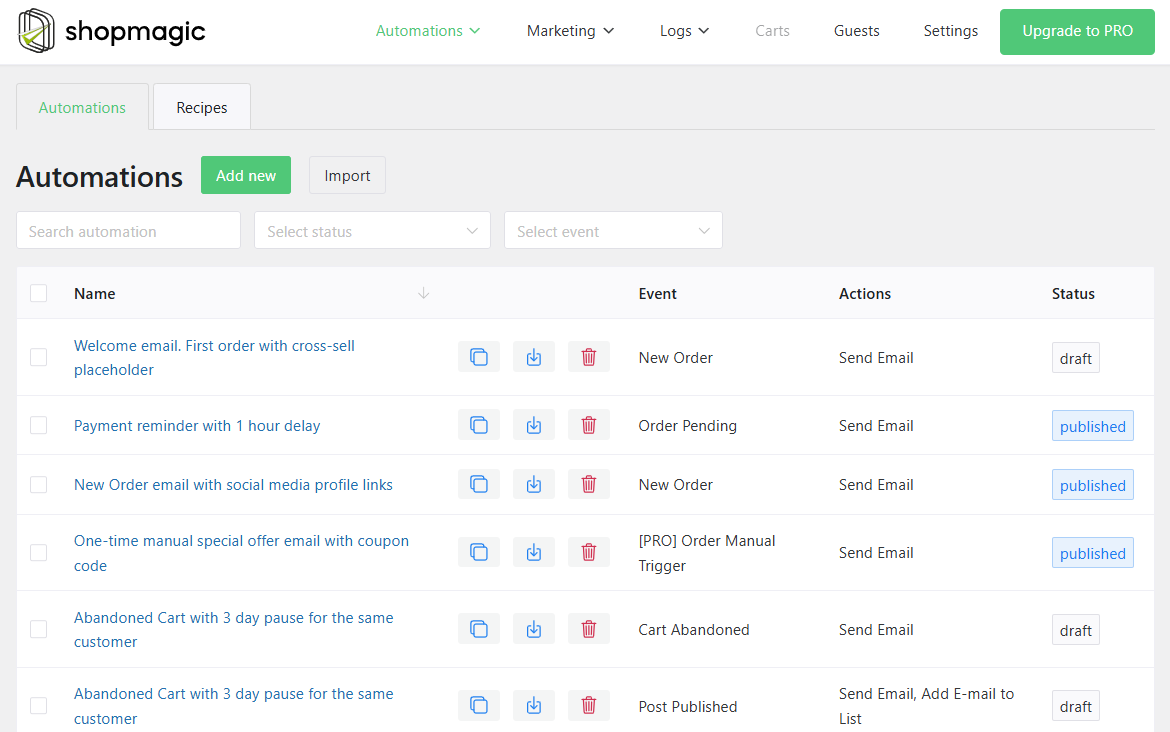
- ShopMagic – Made for WordPress and WooCommerce. Automates emails based on orders, cart actions, and user behavior. Set up an automated email sequences right from your WordPress.
- FluentCRM – A full CRM inside WordPress with email campaigns and automation sequences.
- MailPoet – Great for newsletters and welcome flows. Simple setup.
- Newsletter - For sending emails with visual automation email preview.
- AutomateWoo – Advanced automation for WooCommerce, including personalized coupons (premium).
Each plugin has its own strengths depending on your setup. If you're running a store, ShopMagic or AutomateWoo might be the best fit to send emails directly from your WordPress.
How to set up your first automated flow in ShopMagic?
Start small. For example, create a simple “Welcome” email that goes out when someone registers.
Steps:
- Choose a trigger (like user registration or order completed)
- Add a delay if needed
- Write your message and add variables like {{ customer.first_name }}
- Test the flow before turning it on
- Optimize email content to increase its open rate and CTR
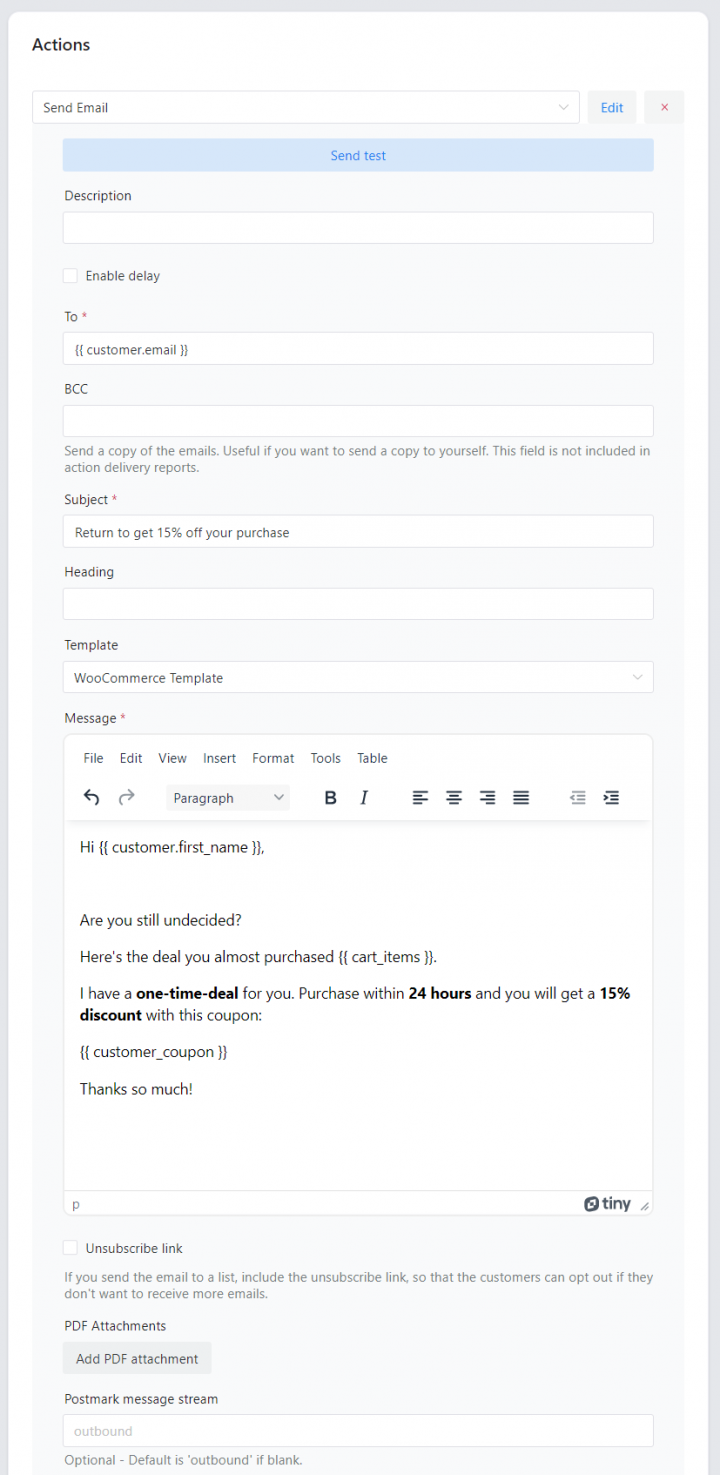
Most plugins include visual builders or simple dropdowns to guide you through setup - even if you’re not a developer. So, your email marketing efforts can be managed within your WordPress. No more email marketing strategies and tasks spread across several platforms.
Tips to keep your automations user-friendly
Good automation feels personal - not robotic. Here are a few best practices:
- Don’t send too many emails at once
- Make sure each email has a clear purpose
- Allow users to unsubscribe easily
- Test and tweak over time based on open and click rates
- Optimize your email for UX
- se abandoned cart email automation campaigns
- Segment your email content based on marketing funnels
- Test email every time you add a new automation
Even simple flows can improve retention and conversion - if they’re well-timed and relevant.
Top 5 free email marketing plugins for WordPress compared
You don’t need a paid solution to start email marketing on WordPress. Whether you're building a newsletter, sending updates, or collecting subscribers, there are free plugins that can help you do it reliably - right from your dashboard.
Here’s a quick look at the best free email marketing plugins for WordPress and how to choose the one that fits your needs.
What to look for in an email plugin?
Before picking a plugin, think about how you plan to use it. Some are better for sending newsletters. Others focus more on automation or WooCommerce integration.
Key features to look for:
- Subscriber list management
- Drag-and-drop email builder
- Email customizer
- Email automation options
- GDPR compliance
- Integration with forms or checkout pages
- Support for WooCommerce email marketing
Also, make sure the plugin is easy to use and well-supported, even in the free version.
Top free plugins compared
Here are the most popular options:
- ShopMagic – Offers email marketing automation with analytics and list building inside the plugin. Email personalization and automation for WordPress and WooCommerce.
- MailPoet – Made for WordPress. Works inside your dashboard. Great for newsletters and WooCommerce emails.
- FluentCRM – Email campaigns and automation sequences inside WordPress ecosystem.
- Newsletter – Unlimited subscribers and emails. Clean and simple interface to set up automated emails.
- Mailchimp for WordPress – Best if you're already using Mailchimp. Easy to connect with forms.
Each of these free plugins is a solid starting point, with paid options available if you need more features later.
Which plugin should you choose?
Here’s a quick recommendation:
- Use MailPoet if you want a native WordPress experience
- Go with Newsletter for a clean UI and flexibility
- Already using Mailchimp? Stick with MC4WP
- ShopMagic if you are using (or plan to use) WooCommerce.
You can always test more than one to see what works best with your theme and email goals.
Final thoughts on emails in WordPress
Free plugins to run email campaigns can do a lot- especially if you're just starting out. From growing your list to sending regular updates, you don’t need to invest in premium tools right away.
There are a lot of free email marketing automation tools (WordPress email plugins) in the WordPress repository.
Just make sure to test your email delivery with a reliable SMTP plugin (for example WP Mail SMTP) so that your messages actually reach your subscribers.
Questions about email marketing automation
1. When to use email marketing automation?
If you have more subscribers and want to save time. If you want to send an email once a week, you probably don't need email marketing automation for WordPress.
Email automation tools can help sending an email using prebuilt sequences but plugins can also bring additional cost for hosting and site speed.
2. Can you send emails directly from your WordPress dashboard?
Usually, plugins have their dashboard to customize email templates and send emails.
They may also have some widgets inside the WordPress admin to help in navigation.
Of course, there are email marketing service options outside WordPress. You can use them and send marketing emails there instead of WordPress or you can integrate with such a email marketing solution, for example, for email list building.
3. What is the best best free email marketing plugin for WordPress?
It depends. You can test free plugins from the WordPress repository, for example searching for: ShopMagic, MailPoet, FluentCRM, Newsletter, or Mailchimp for WordPress.
4. How to get WordPress email subscribers and build email lists?
Some plugins have the built-in options for adding email lists and automation to add users as subscribers to such email lists. Some will instead/ also save the email addresses to an external email list service like Mailchimp, OptinMonster, MailPoet, or MailerLite.
And some plugins can also have integration with such services.
To get user emails you may ask for that with the opt-in field, checkbox, form in the blog post, or with a pop-up. Plugins can have different options for that, or they may use email automation to get user email addresses.
5. Can WordPress be used for email marketing?
WordPress has built-in email automation. These are the default email templates:
- New user registration
- Password reset request
- Password changed notification
- Email address changed notification
- Comment notifications
- Comment approval emails
- Admin notifications
However, you need to customize PHP files or use filters to modify the content of such emails.
You may use WordPress for email marketing with additional plugins to add and send new emails.
6. Do marketers use WordPress?
It's possible to use WordPress for marketing campaigns, including email marketing. WordPress is a huge CMS with a lot of plugins, also for marketing (emails, social, ads, banners).
7. Where can I find a free email marketing plugin for WordPress?
In the WordPress repository, for example, ShopMagic for WordPress and WooCommerce email automation.
8. How to build email automation that works?
Start with a plan and end goal in mind. Then, think from the user's perspective and prepare a new automation with an email template. You may both build automated workflows for your WordPress as well as for WooCommerce.
I recommend using email testing to check out the email delivery and their design. Usually, you can use a WordPress email marketing plugin for testing.







Leave a Reply