• Skip to primary navigation
  • Skip to main content
  • Skip to primary sidebar
  • Skip to footer
WP Desk = premium plugins for WordPress & WooCommerce
  • Plugins
        • Checkout & OrdersMake your work easier and automate the orders. Adjust the order form to your needs and make it more useful to your customers. Print order labels directly from WooCommerce. Put the orders in order using our plugins. Find out how to streamline the procurement process in your store.
          • Flexible Checkout Fields
          • Active Payments
          • Automatic Payment Status
          • Flexible Refund and Return Order
          • Print Orders and Address Labels
          • Flexible Subscriptions Recurring Shipping
          • Flexible Subscriptions Payment Retry
          • Flexible Subscriptions Stock Management
        • ProductsThese plugins will help you manage your WooCommerce products. Here you will find the plugins to import and update products from XML or CSV files. Then you can change the product unit of measure, show the lowest price in the last 30 days (Omnibus Directive), or let customers name the product price!
          • Flexible Product Fields
          • Dropshipping Import Products
          • Dropshipping FTP Import Products
          • Dropshipping Export Products
          • Custom Price
          • WP Desk Omnibus
          • Flexible Quantity Calculator
          • Dropshipping Orders Export
        • MarketingPromote your store online. Add products from your shop to price comparison websites directly from WooCommerce. Acquire new customers and communicate with your existing ones. Build a customer base and communicate with clients using one of the most effective marketing tools, namely e-mail marketing. Check out our promotional tools!
          • Flexible Pricing
          • Flexible Wishlist - Analytics & Emails
          • OLX WooCommerce
          • Flexible PDF Coupons
          • ShopMagic
          • Flexible Invoices
  • Bundle🔥
  • WP Desk Care
  • Support
  • Blog
  • My Account
  • 0

More results

WooCommerce webhooks for store integrations

WooCommerce tutorials

WP Desk3 minutes readUpdated: 2025-04-15Updated: 2026-06-05
blog category heading image

Managing your WooCommerce store efficiently means automating and integrating with the right external tools. WooCommerce webhooks are an excellent way to send data to external apps or systems in real-time, without manual intervention. In this guide, we’ll walk you through the benefits of using webhooks, show you how to set them up, and introduce the ShopMagic Webhooks add-on.

Contents

  • WooCommerce webhooks & why you should read this post
  • What are WooCommerce webhooks and why use them?
  • Setting up webhooks in WooCommerce
  • Managing and testing webhooks
  • Fixing common webhook issues
  • Integrate WooCommerce with ShopMagic Webhooks
    • ShopMagic Webhooks features:
    • Combining ShopMagic Webhooks with other add-ons
  • Summary
    • What to rememeber
    • Related Articles
  • 15 eCommerce automation tools for WooCommerce (2025)
  • 5 essential WooCommerce tips to boost your sales
  • 10-step WooCommerce review to help you understand why WooCommerce is the best e-commerce platform
  • WooCommerce Cart Page Hooks - A Visual Guide (code examples)
  • WordPress email marketing automation (free plugin guide)

WooCommerce webhooks & why you should read this post

If you’re looking to automate key workflows and enhance customer management, webhooks are essential. By setting up webhooks, you can:

  • Send real-time data without delays.
  • Automate repetitive tasks like order updates or customer notifications.
  • Sync customer data with CRMs or marketing platforms.
  • Custom-tailor integrations to meet your needs.
  • Send data for invoicing or stock management/ updates.

Let’s dive into how webhooks can benefit your store.

What are WooCommerce webhooks and why use them?

Webhooks in WooCommerce allow your store to send data to external systems through REST API when specific events happen. This means you no longer need to manually send information; it’s done automatically and instantly.

For example, every time a customer places an order, a webhook can send the order details to your CRM, keeping your records up-to-date.

Webhooks eliminate the need for constant monitoring and ensure data is delivered in real-time. This streamlines your operations and allows for quicker responses to customers.

Setting up webhooks in WooCommerce

To get started, go to your WordPress dashboard and navigate to WooCommerce > Settings > Advanced > Webhooks.
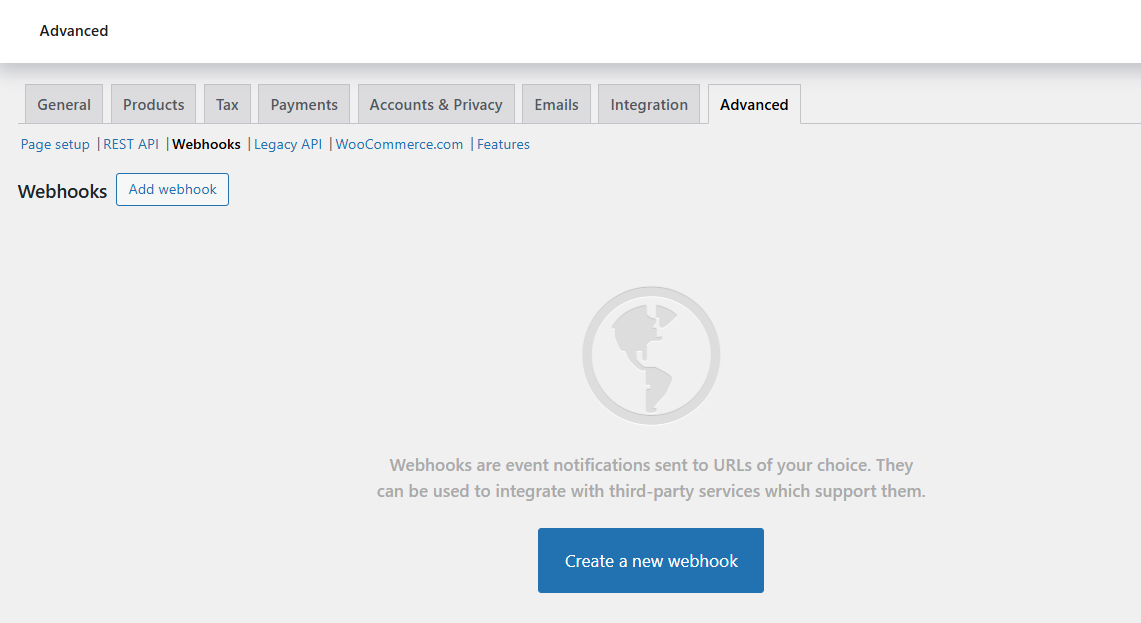
Webhooks in WooCommerce

Then, click Add Webhook.

Let’s say you want to notify your CRM every time an order is created. Select “Order Created” from the topic dropdown and enter your CRM’s API URL in the Delivery URL field.

Make sure the webhook status is set to Active, then click Save Changes.

That’s it! WooCommerce will automatically send data to your CRM whenever a new order is placed.
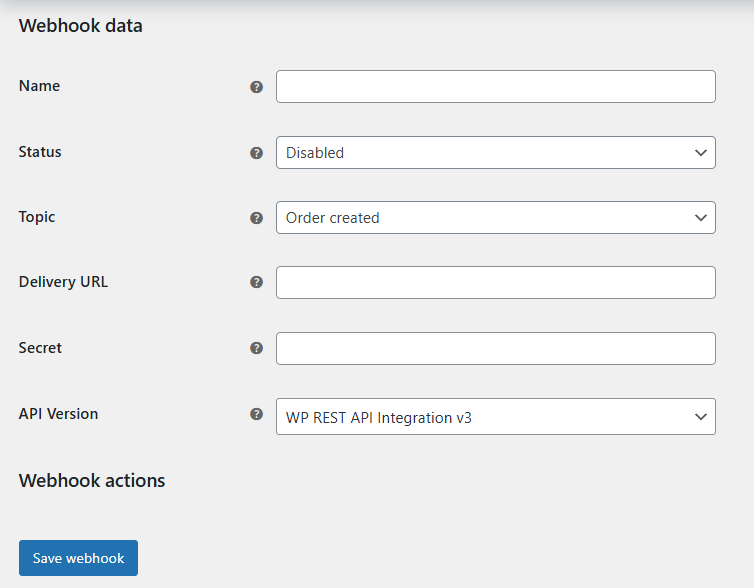
Adding a new webhook in WooCommerce

Managing and testing webhooks

Once your webhook is live, managing it is easy. You can view and edit your webhooks from the Webhooks page in WooCommerce. Here, you can also deactivate or delete webhooks as needed.

To test, create a test order in your WooCommerce store. Check if the data is correctly received by your external service.

If something’s wrong, WooCommerce logs (in WooCommerce > Status > Logs) provide helpful insights into what’s going wrong.

Fixing common webhook issues

Webhook issues can range from incorrect URLs to failed deliveries. Always ensure your Delivery URL is correct.

If your external service requires an API key or other authentication, make sure those are added in the webhook settings.

If you’re getting an error like 401 (Unauthorized), it’s usually an issue with authentication. Double-check your API keys or tokens, and confirm that the receiving service allows your requests.

Also, make sure you use the right version of REST API.
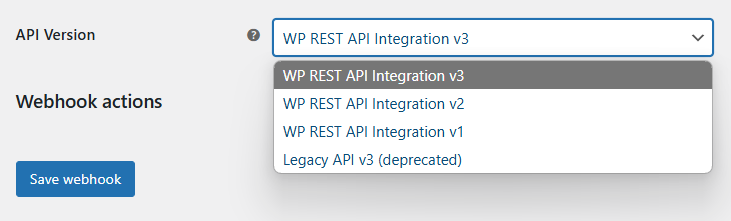
WooCommerce webhook REST API version

Finally, check the security settings (for example, if you have such a plugin in WordPress).

Integrate WooCommerce with ShopMagic Webhooks

ShopMagic Webhooks add-on makes it easier to integrate WooCommerce with external services like CRMs, email platforms, and more directly through ShopMagic.

ShopMagic is a plugin to send automated emails, save data to Google Sheets, get data from form submissions, take care of abandoned carts, create marketing automations, etc.

But with ShopMagic, you can also send data to multiple services automatically whenever a specific event occurs in your store with the ShopMagic Webhooks add-on.
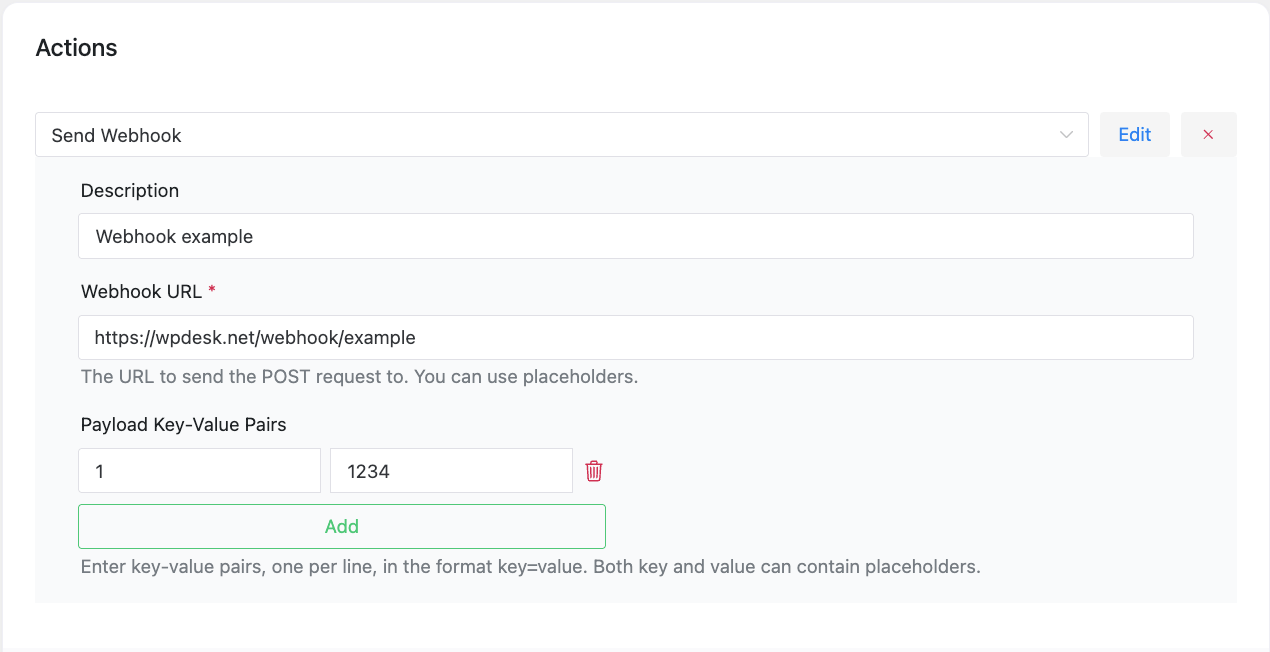
WooCommerce webhooks in ShopMagic automations

For instance, you can use the Order Created event to send customer data to an email marketing platform. You can also use custom triggers from ShopMagic automations to send data to other services, enhancing ShopMagic automations.
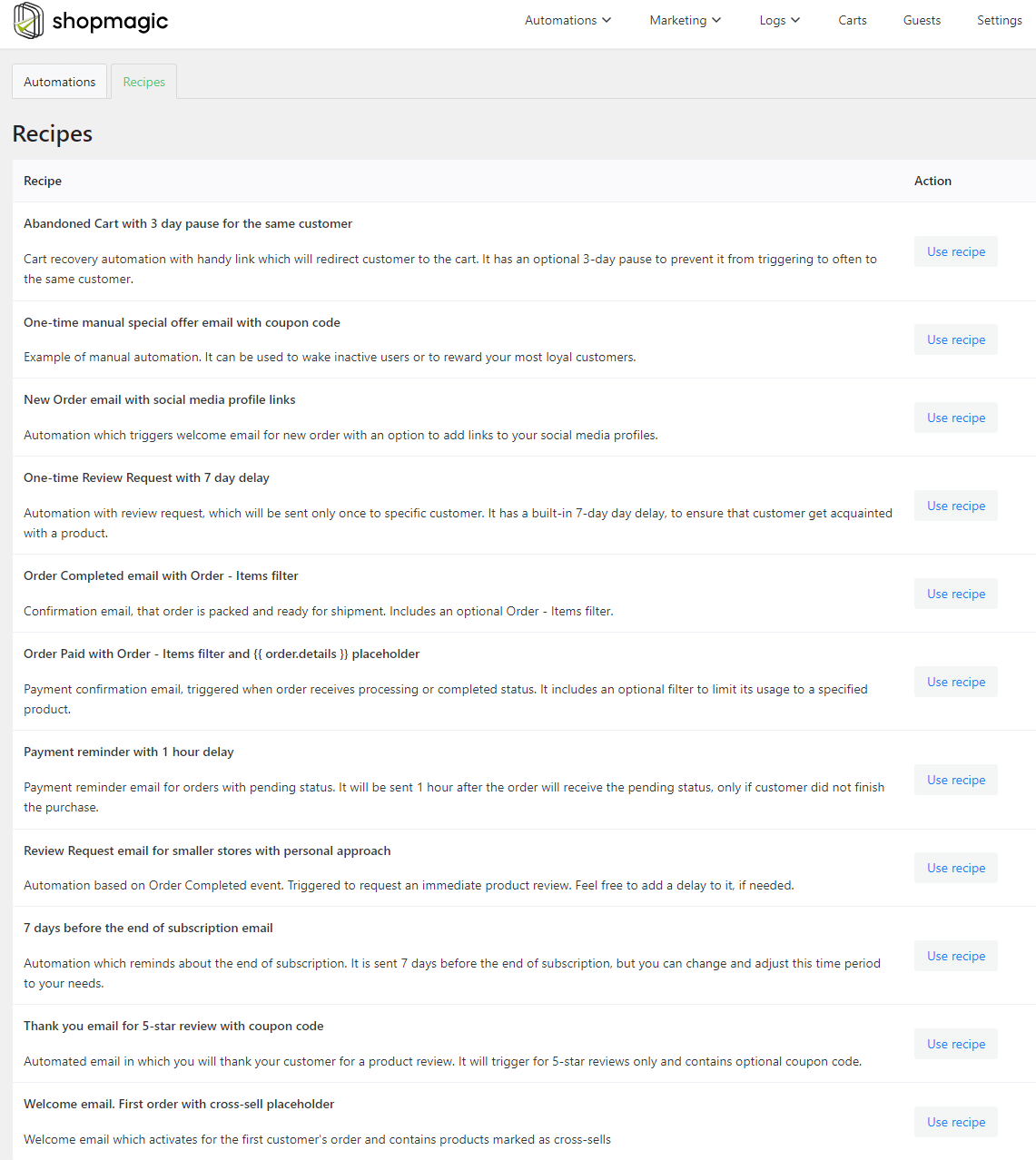
ShopMagic ready-to-use automations

ShopMagic Webhooks features:

  • Currently, the add-on supports POST method. It's planned to add GET, PUT, and DELETE methods in the future.
  • You may send data to more endpoints using several webhooks.
  • It's possible to set URL and use ShopMagic placeholders.
  • Data and headers are sent using HTTP POST and Content-Type: application/json.
  • Enables testing and troubleshooting directly from the ShopMagic interface (the plugin gathers errors).

For example, you can set up a webhook to send order details to a marketing CRM whenever a new order is placed. Set the URL, add any authentication headers, or use ShopMagic placeholders to send data.

This keeps your customer database updated in real-time, ready for the next marketing campaign.

Combining ShopMagic Webhooks with other add-ons

You can further enhance webhooks by combining them with ShopMagic’s other add-ons.

For example, use the ShopMagic Delayed Actions add-on to trigger webhooks after a delay.

This is perfect for situations where you want to follow up with a customer two days after they place an order, rather than immediately.

You may now check out information about ShopMagic. Or read the ShopMagic Webhooks' documentation.

Summary

Webhooks are an excellent way to automate your WooCommerce store’s communication with external services. By using ShopMagic Webhooks, you unlock even more powerful integrations for ShopMagic automations, making your store smarter and more efficient.

What to rememeber

  1. Webhooks allow for instant, real-time data transfer.
  2. Setting up webhooks is simple: just go to WooCommerce > Settings > Webhooks.
  3. Test and manage your webhooks regularly to ensure smooth operation.
  4. ShopMagic Webhooks add-on offers advanced features like method customization and integration with external services.

Start using webhooks today and streamline your WooCommerce store's integrations!
Related Articles

15 best eCommerce automation tools for WooCommerce (2025)

15 eCommerce automation tools for WooCommerce (2025)

Managing an online store can be overwhelming, but the right automation software and plugins can transform your workflow. From checkout design to optim...
WooCommerce tips

5 essential WooCommerce tips to boost your sales

Do you need valuable WooCommerce tips and tricks to boost your sales? I'll give you 5 most essential WooCommerce tips and tricks. If you follow them, ...
WooCommerce Review

10-step WooCommerce review to help you understand why WooCommerce is the best e-commerce platform

In this WooCommerce review I will guide you through 10 reasons why WooCommerce should be your e-commerce platform of choice. Life is a series of choic...
WooCommerce cart page hooks

WooCommerce Cart Page Hooks - A Visual Guide (code examples)

WooCommerce is extremely friendly for developers because it has a ton of actions and filters - called hooks. We use them often when we develop WooComm...
WordPress email marketing automation

WordPress email marketing automation (free plugin guide)

Email marketing automation helps you stay connected with your users - without writing every message by hand. Whether you run a store, a membership sit...

3 minutes read8896 views

Reader Interactions

Leave a Reply Cancel reply

Your email address will not be published. Required fields are marked *

WP Desk

...

Powered by WP Desk

WP Desk brings you great WooCommerce plugins. We strive to save your time and money by speeding up your processes. Use our plugins to build a better store. Awesome support included in the package.

Premium WooCommerce Plugins →
WP Desk › Blog › WooCommerce tutorials › WooCommerce webhooks for store integrations

Primary Sidebar

Contents

  • WooCommerce webhooks & why you should read this post
  • What are WooCommerce webhooks and why use them?
  • Setting up webhooks in WooCommerce
  • Managing and testing webhooks
  • Fixing common webhook issues
  • Integrate WooCommerce with ShopMagic Webhooks
    • ShopMagic Webhooks features:
    • Combining ShopMagic Webhooks with other add-ons
  • Summary
    • What to rememeber

Stay updated on our how-to articles

WP Desk news, WooCommerce tips, promo codes - right to your inbox.

By entering your e-mail, you agree to our Terms & Conditions and Privacy Policy.

By entering your e-mail, you agree to our Terms & Conditions and Privacy Policy.

Footer

WP Desk - WooCommerce Plugins

At WP Desk we create great WooCommerce plugins with awesome support. Save time and money with our e-commerce solutions. See how we can help you improve your e-store →

Secured by Comodo

WP Desk

  • About us
  • Giving Back
  • Blog
  • Get Support
  • Contact us

Products

  • Premium Plugins
  • WP Desk Care
  • Documentation
  • WooCommerce Invoices
  • Email Marketing
  • PDF Coupons

Legal

  • Terms & Conditions
  • Refund Policy
  • Support Policy
  • Privacy Policy

© 2026 WP Desk

We value your privacy

We use necessary cookies to make our site work. We'd also like to set additional cookies to understand site usage, enhance your browsing experience, and serve personalized ads or content. By clicking ‘Accept All,’ you consent to our use of additional cookies.

Functional Always active
The technical storage or access is strictly necessary for the legitimate purpose of enabling the use of a specific service explicitly requested by the subscriber or user, or for the sole purpose of carrying out the transmission of a communication over an electronic communications network.
Preferences
The technical storage or access is necessary for the legitimate purpose of storing preferences that are not requested by the subscriber or user.
Statistics
The technical storage or access that is used exclusively for anonymous statistical purposes. Without a subpoena, voluntary compliance on the part of your Internet Service Provider, or additional records from a third party, information stored or retrieved for this purpose alone cannot usually be used to identify you. The technical storage or access that is used exclusively for anonymous statistical purposes. Without a subpoena, voluntary compliance on the part of your Internet Service Provider, or additional records from a third party, information stored or retrieved for this purpose alone cannot usually be used to identify you.
Marketing
The technical storage or access is required to create user profiles to send advertising, or to track the user on a website or across several websites for similar marketing purposes.
  • Manage options
  • Manage services
  • Manage {vendor_count} vendors
  • Read more about these purposes
View preferences
  • {title}
  • {title}
  • {title}