• Skip to primary navigation
  • Skip to main content
  • Skip to primary sidebar
  • Skip to footer
WP Desk = premium plugins for WordPress & WooCommerce
  • Plugins
        • Checkout & OrdersMake your work easier and automate the orders. Adjust the order form to your needs and make it more useful to your customers. Print order labels directly from WooCommerce. Put the orders in order using our plugins. Find out how to streamline the procurement process in your store.
          • Flexible Checkout Fields
          • Active Payments
          • Automatic Payment Status
          • Flexible Refund and Return Order
          • Print Orders and Address Labels
          • Flexible Subscriptions Recurring Shipping
          • Flexible Subscriptions Payment Retry
          • Flexible Subscriptions Stock Management
        • ProductsThese plugins will help you manage your WooCommerce products. Here you will find the plugins to import and update products from XML or CSV files. Then you can change the product unit of measure, show the lowest price in the last 30 days (Omnibus Directive), or let customers name the product price!
          • Flexible Product Fields
          • Dropshipping Import Products
          • Dropshipping FTP Import Products
          • Dropshipping Export Products
          • Custom Price
          • WP Desk Omnibus
          • Flexible Quantity Calculator
          • Dropshipping Orders Export
        • MarketingPromote your store online. Add products from your shop to price comparison websites directly from WooCommerce. Acquire new customers and communicate with your existing ones. Build a customer base and communicate with clients using one of the most effective marketing tools, namely e-mail marketing. Check out our promotional tools!
          • Flexible Pricing
          • Flexible Wishlist - Analytics & Emails
          • OLX WooCommerce
          • Flexible PDF Coupons
          • ShopMagic
          • Flexible Invoices
  • Bundle🔥
  • WP Desk Care
  • Support
  • Blog
  • My Account
  • 0

More results

Add your own refund form in a WooCommerce store [🤫Free plugin inside]

Plugin Tutorials, WooCommerce refunds

Dorota Ingielewicz3 minutes readUpdated: 2023-12-20Updated: 2025-08-20
blog category heading image

Dealing with returns and refunds can be a hassle for any WooCommerce store owner. But fear not, the Flexible Refund and Return Order for WooCommerce plugin is here to make your life easier! Let's dive into what this plugin offers in terms of refund form customization and how it can transform your online store's return process.

Guess what? You can create your own refund form in WooCommerce with the free version of the plugin. Download it for free and try it out in the store!

Contents

    • One Click Return for WooCommerce
  • But first... What's the importance of a customizable return form?
  • Flexible Refund and Return Order for WooCommerce
  • Refund Form: the core of the plugin
  • WooCommerce return form customization
    • Refund Form fields
    • One Click Return for WooCommerce
    • Related Articles
  • How to set your WooCommerce refund and return system (with a free plugin)
  • WooCommerce refunds even more flexible!
  • How to handle returns and warranty requests in your WooCommerce store (with a free plugin)?
  • How to make a full and partial refund in WooCommerce?
  • Return policy and process order refund in WooCommerce stores

One Click Return for WooCommerce

Activate refund form, enable automatic returns, disable refund form after a specific time, and manage refunds directly from WooCommerce orders. Adapt your Shop to EU One Click Return Directive

💾 Active Installations: 2,000+ | WordPress Rating:

Download for free or Go to WordPress.org
WP Desk
2,000+ Active Installations
Last Updated: 2026-08-25
Works with WooCommerce 10.7 - 11.1

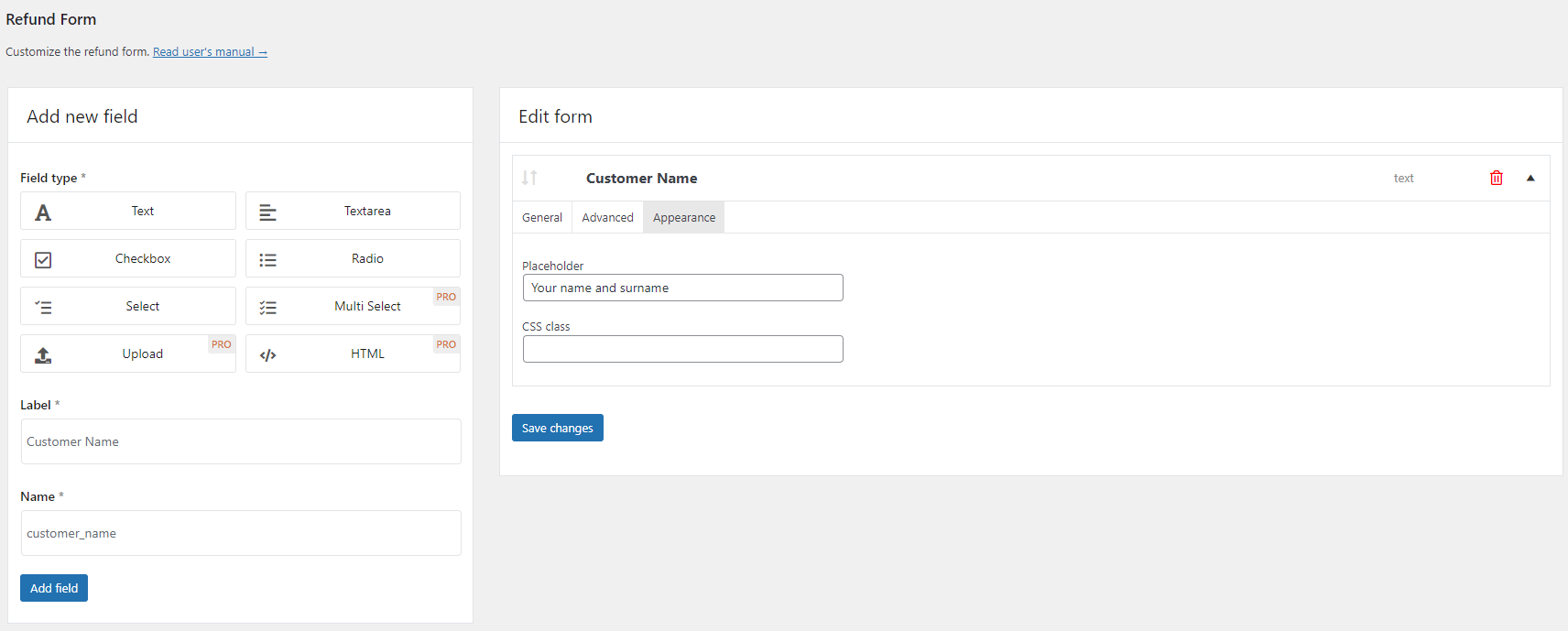
👉 Curious about what the refund form customization looks like from the inside? Take a look at the image carousel, which includes screenshots of the personalized returns form settings:
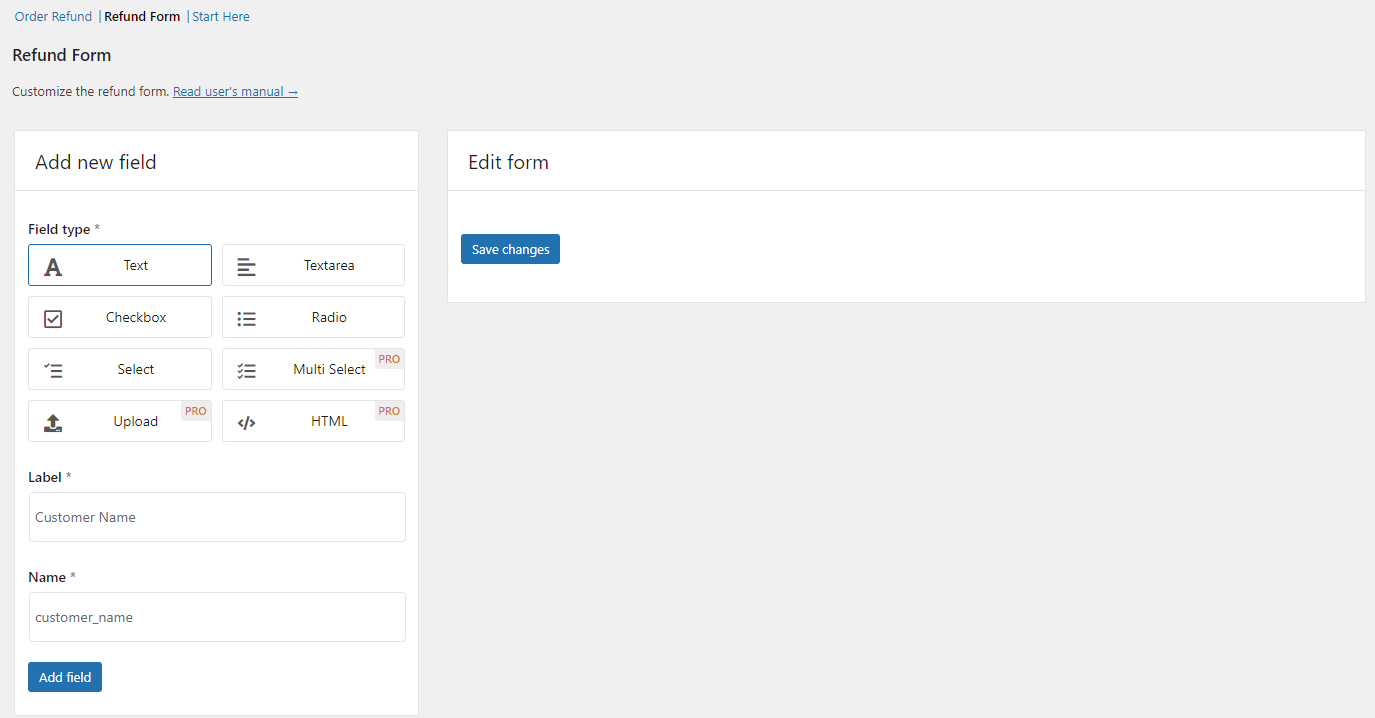
adding a text field to the refund form
Refund form builder [FREE]
general settings
General settings - Text field example
advanced settings
Advanced settings - Text field example
appearance settings
Appearance settings - Text field example

But first... What's the importance of a customizable return form?

A customizable return form, especially in the context of e-commerce and retail, plays a crucial role in managing returns efficiently and enhancing customer satisfaction. Here are 3 key reasons why a customizable return form is important:

  1. Flexibility for Customers 👨‍🎨: Customizable return forms allow customers to specify their reasons for return accurately. This flexibility can include options for size, fit, quality issues, or incorrect items, ensuring that the customer's needs are clearly communicated to the retailer.
  2. Data Collection and Analysis 📋: Customizable forms can serve as a valuable tool for collecting data on why customers return products. This information can be analyzed to identify trends, improve product quality, adjust inventory levels, or even modify product descriptions and images online to reduce future returns.
  3. Enhanced Customer Experience 🥰: A straightforward and user-friendly return process, including an easy-to-use return form, can significantly improve the overall customer experience. This can lead to increased customer loyalty and repeat business, as customers are more likely to shop again with retailers who offer a hassle-free return process.

A customizable return form is a key tool in the retail and e-commerce sector for managing returns effectively, improving customer satisfaction, and gaining valuable insights into product performance and customer preferences.

You're probably coming to this post looking for something more interesting than just theory. Naturally, we have a solution for you. Read on, in the next paragraph we talk about a free plugin for creating refurn forms in WooCommerce 🤩.

Flexible Refund and Return Order for WooCommerce

In a nutshell, this plugin is an absolute lifesaver when it comes to handling returns and refunds for your WooCommerce store. It offers both you, as the store owner, and your customers a seamless and hassle-free way to deal with the sometimes daunting return process. The best part is you can effortlessly handle refunds and returns right from your WordPress dashboard, ensuring that everything is well-organized and easily accessible.

Refund Form: the core of the plugin

The refund form builder is the central feature of the plugin, allowing you to easily incorporate it into your Refund Request page. This form offers a wide range of customization options, including text fields, textarea fields, checkboxes, radio buttons, select dropdowns, and even the ability to upload files and use HTML. You have the flexibility to make certain fields mandatory and even apply your own CSS classes to give it a unique and personalized look.

Creating your own return form is child's play. Add the fields you want the form to include. Everything happens intuitively, and you add fields using drag'n'drop.

👉 Here's a short example of how it's done:

Customizable refund form
Customizable refund form available in Flexible Refund and Return Order [FREE]

WooCommerce return form customization

You can access the Refund Form settings in WooCommerce → Settings → Flexible Refund → Refund Form section.

The plugin allows you to add a refund form to the refund request page. As previously mentioned, these fields can be arranged using a drag & drop method for ease of use. Each field can be labeled and configured for required input, and you can also add descriptions and set character limits for text fields​​.

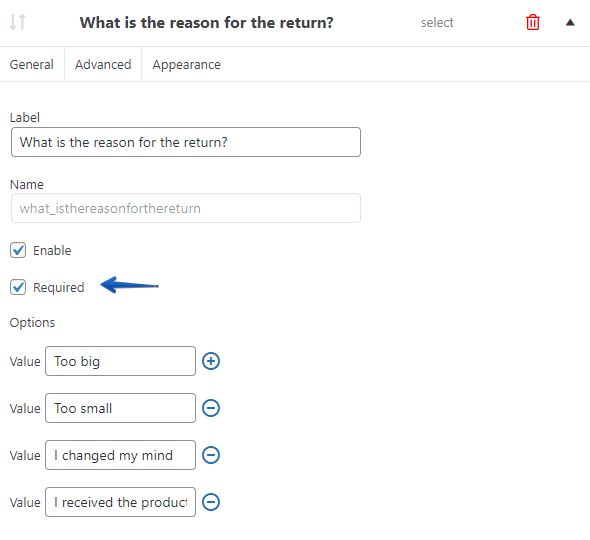
required field refund form
Setting a field as required

Oh and I also forgot to tell you that you can add more fields and arrange their order as you wish 😋:
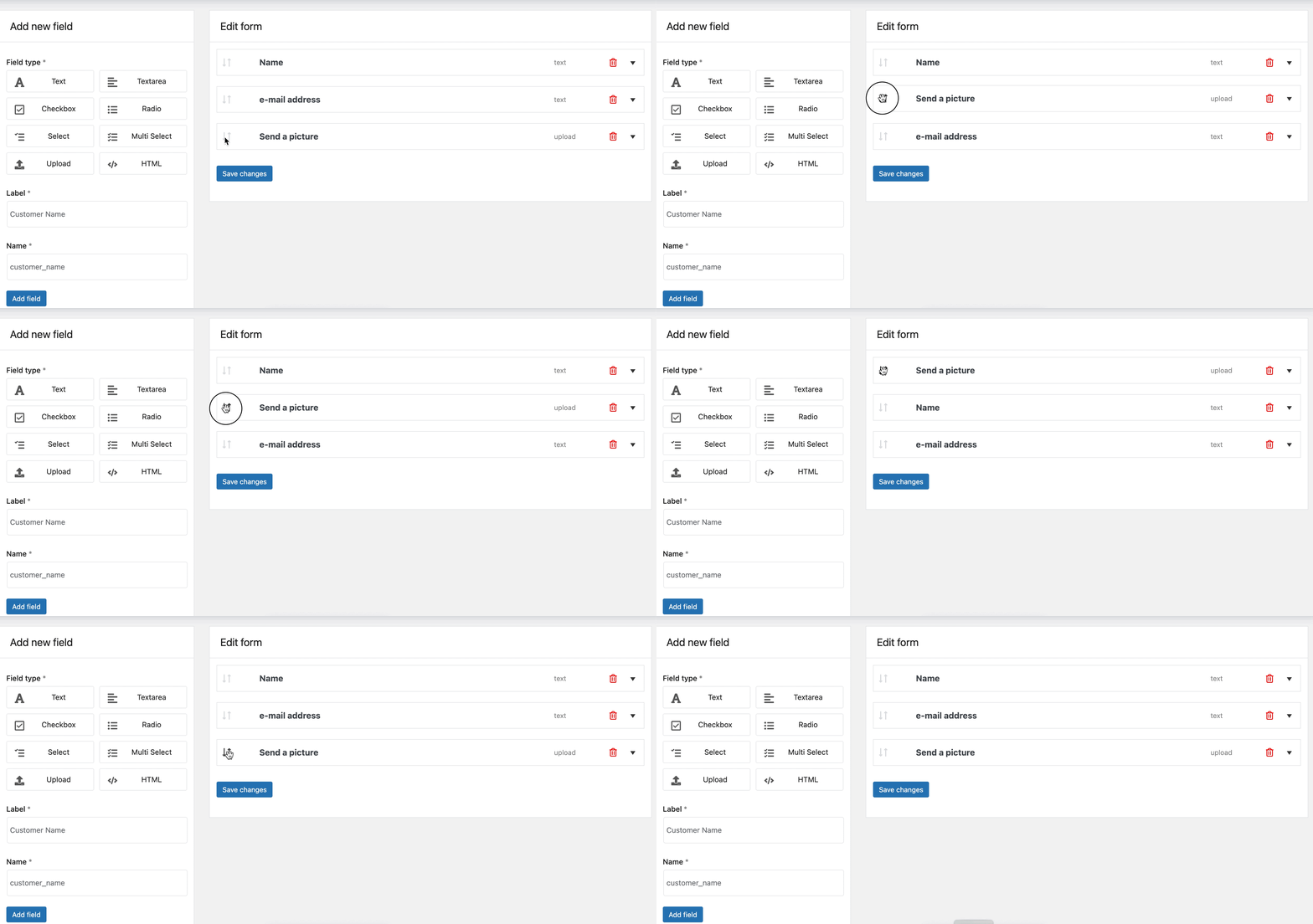
Flexible refund and cancel order for WooCommerce form fields
Changing the order in which the fields appear

Okay, so now I suggest we see what effect we can achieve by personalizing our own return form. All that with the plugin in its free version, of course.

Let's assume that our store sells clothes 👚 and we give the user the opportunity to return the purchased goods.
In the case of my personalized return form, I added the following types of fields to my return form:

  • Select, Checkbox, Radio and Textarea

👉 I added the following labels, descriptions and selection options to them:
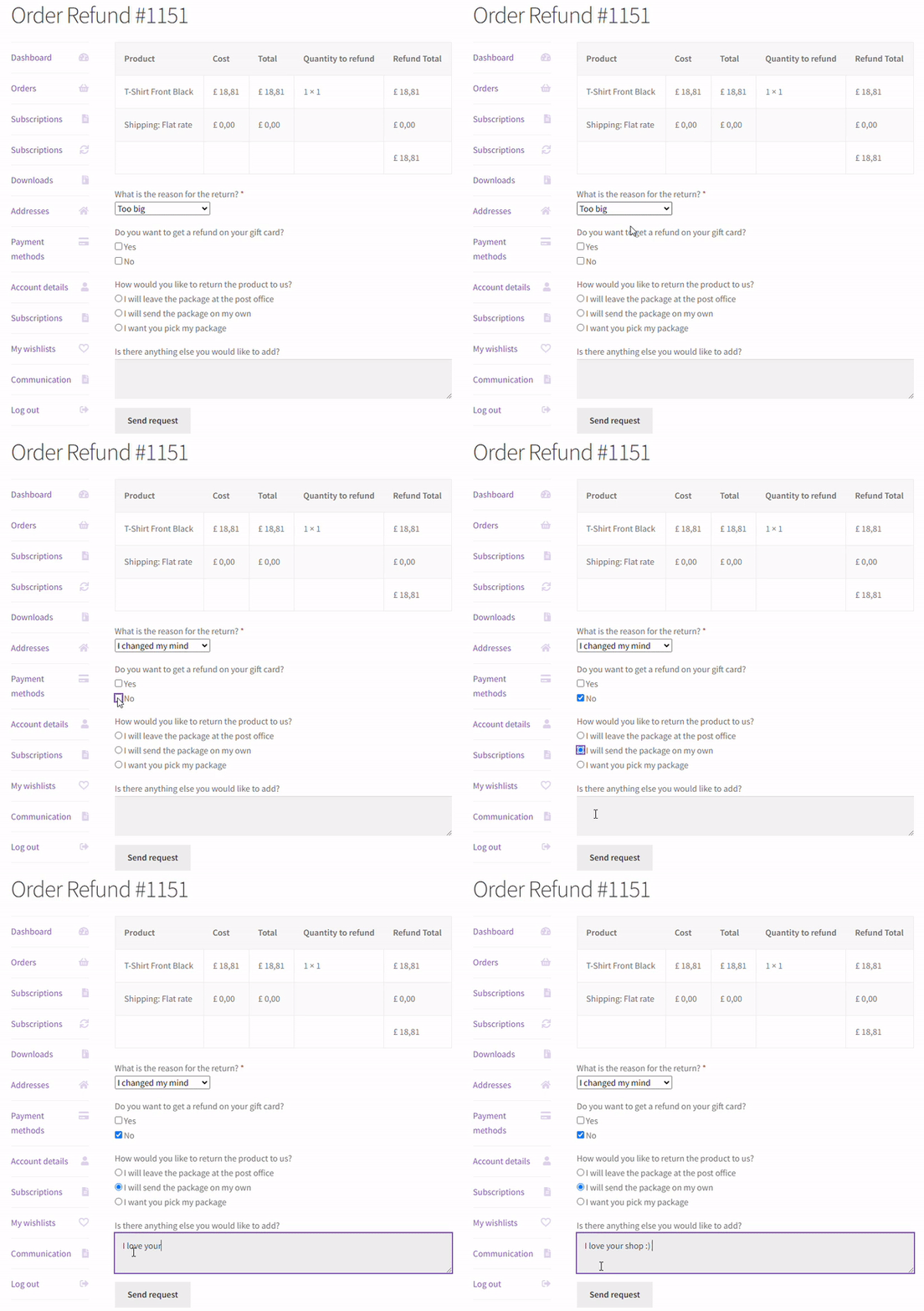
Return form buildeer for WooCommerce
Refund form created with Flexible Refund and Return Order [FREE]

The whole thing took me about 2 minutes and didn't cost me a cent - I used the plugin in the free version 😊.

Flexible Refund and Return Order plugin for FREE →

Refund Form fields

In my screenshots and gifs, I'm sure you've noticed that not all fields that can be added to the return form are available in the free version. Those that are not available are labeled PRO.

🆓 In short, using the plugin in the free version, you can add the following fields:

  • Text - text field
  • Text area - text area
  • Checkbox - selection box
  • Radio - radio buttons
  • Select - drop-down list

🤑 No less, the PRO version expands the number and types of fields available with another 3 listed below:

  • Multi select - drop-down list with multiple selectable options PRO
  • Upload - field used to allow users to upload attachments PRO
  • HTML - add HTML code PRO

Beyond that, the PRO version offers additional functionalities like partial refunds, automatic coupon refunds, and more. For detailed information and documentation, visit the plugin's page.

One Click Return for WooCommerce

Activate refund form, enable automatic returns, disable refund form after a specific time, and manage refunds directly from WooCommerce orders. Adapt your Shop to EU One Click Return Directive

💾 Active Installations: 2,000+ | WordPress Rating:

Download for free or Go to WordPress.org
WP Desk
2,000+ Active Installations
Last Updated: 2026-08-25
Works with WooCommerce 10.7 - 11.1
💡 You may read more on how to enable partial refunds in WooCommerce.

Related Articles

How to set your WooCommerce refund and return system (with a free plugin)

How to set your WooCommerce refund and return system (with a free plugin)

As you know, the WooCommerce refund process may take some of your time. Especially if you have questions about reasons and want to provide a higher cu...
Even more flexible returns

WooCommerce refunds even more flexible!

Refunds in online sales are an integral part of running an online store. By introducing appropriate refund procedures and meeting legal requirements, ...
How to handle returns and warranty requests in your WooCommerce store with a free plugin

How to handle returns and warranty requests in your WooCommerce store (with a free plugin)?

Probably you’d rather not have them at all! But returns and warranty requests may happen, so let’s see how to manage them in your WooCommerce shop wit...
How to make full refunds and a partial refund in WooCommerce?

How to make a full and partial refund in WooCommerce?

We aim to make sales when creating a shop, managing its products, promotions, or customer communication. Right? But, in addition to sales, we also fac...
WooCommerce return policy and refund processing

Return policy and process order refund in WooCommerce stores

Returns of goods are an indispensable part of any online store. As many customers as many reasons why a product can be returned so it's a good idea to...

3 minutes read4386 views

Dorota Ingielewicz

...

Powered by WP Desk

WP Desk brings you great WooCommerce plugins. We strive to save your time and money by speeding up your processes. Use our plugins to build a better store. Awesome support included in the package.

Premium WooCommerce Plugins →
WP Desk › Blog › WooCommerce checkout & orders › WooCommerce refunds › Add your own refund form in a WooCommerce store [🤫Free plugin inside]

Primary Sidebar

Contents

    • One Click Return for WooCommerce
  • But first… What’s the importance of a customizable return form?
  • Flexible Refund and Return Order for WooCommerce
  • Refund Form: the core of the plugin
  • WooCommerce return form customization
    • Refund Form fields
    • One Click Return for WooCommerce

One Click Return for WooCommerce £59

Activate refund form, enable automatic returns, disable refund form after a specific time, and manage refunds directly from WooCommerce orders. Adapt your Shop to EU One Click Return Directive

💾 Active Installations: 2,000+ | WordPress Rating:

Add to cart or View Details
WP Desk
Plugins used by 239,859+ shops
Last Updated: 2026-08-25
Works with WooCommerce 10.7 - 11.1

Stay updated on our how-to articles

WP Desk news, WooCommerce tips, promo codes - right to your inbox.

By entering your e-mail, you agree to our Terms & Conditions and Privacy Policy.

By entering your e-mail, you agree to our Terms & Conditions and Privacy Policy.

Footer

WP Desk - WooCommerce Plugins

At WP Desk we create great WooCommerce plugins with awesome support. Save time and money with our e-commerce solutions. See how we can help you improve your e-store →

Secured by Comodo

WP Desk

  • About us
  • Giving Back
  • Blog
  • Get Support
  • Contact us

Products

  • Premium Plugins
  • WP Desk Care
  • Documentation
  • WooCommerce Invoices
  • Email Marketing
  • PDF Coupons

Legal

  • Terms & Conditions
  • Refund Policy
  • Support Policy
  • Privacy Policy

© 2026 WP Desk

We value your privacy

We use necessary cookies to make our site work. We'd also like to set additional cookies to understand site usage, enhance your browsing experience, and serve personalized ads or content. By clicking ‘Accept All,’ you consent to our use of additional cookies.

Functional Always active
The technical storage or access is strictly necessary for the legitimate purpose of enabling the use of a specific service explicitly requested by the subscriber or user, or for the sole purpose of carrying out the transmission of a communication over an electronic communications network.
Preferences
The technical storage or access is necessary for the legitimate purpose of storing preferences that are not requested by the subscriber or user.
Statistics
The technical storage or access that is used exclusively for anonymous statistical purposes. Without a subpoena, voluntary compliance on the part of your Internet Service Provider, or additional records from a third party, information stored or retrieved for this purpose alone cannot usually be used to identify you. The technical storage or access that is used exclusively for anonymous statistical purposes. Without a subpoena, voluntary compliance on the part of your Internet Service Provider, or additional records from a third party, information stored or retrieved for this purpose alone cannot usually be used to identify you.
Marketing
The technical storage or access is required to create user profiles to send advertising, or to track the user on a website or across several websites for similar marketing purposes.
  • Manage options
  • Manage services
  • Manage {vendor_count} vendors
  • Read more about these purposes
View preferences
  • {title}
  • {title}
  • {title}