• Skip to primary navigation
  • Skip to main content
  • Skip to primary sidebar
  • Skip to footer
WP Desk = premium plugins for WordPress & WooCommerce
  • Plugins
        • Checkout & OrdersMake your work easier and automate the orders. Adjust the order form to your needs and make it more useful to your customers. Print order labels directly from WooCommerce. Put the orders in order using our plugins. Find out how to streamline the procurement process in your store.
          • Flexible Checkout Fields
          • Active Payments
          • Automatic Payment Status
          • Flexible Refund and Return Order
          • Print Orders and Address Labels
          • Flexible Subscriptions Recurring Shipping
          • Flexible Subscriptions Payment Retry
          • Flexible Subscriptions Stock Management
        • ProductsThese plugins will help you manage your WooCommerce products. Here you will find the plugins to import and update products from XML or CSV files. Then you can change the product unit of measure, show the lowest price in the last 30 days (Omnibus Directive), or let customers name the product price!
          • Flexible Product Fields
          • Dropshipping Import Products
          • Dropshipping FTP Import Products
          • Dropshipping Export Products
          • Custom Price
          • WP Desk Omnibus
          • Flexible Quantity Calculator
          • Dropshipping Orders Export
        • MarketingPromote your store online. Add products from your shop to price comparison websites directly from WooCommerce. Acquire new customers and communicate with your existing ones. Build a customer base and communicate with clients using one of the most effective marketing tools, namely e-mail marketing. Check out our promotional tools!
          • Flexible Pricing
          • Flexible Wishlist - Analytics & Emails
          • OLX WooCommerce
          • Flexible PDF Coupons
          • ShopMagic
          • Flexible Invoices
  • Bundle🔥
  • WP Desk Care
  • Support
  • Blog
  • My Account
  • 0

More results

WooCommerce Personalized Product with options & custom units of measure

WooCommerce product fields, WooCommerce quantity & price

WP Desk4 minutes read2025-08-20
blog category heading image

Personalizing products is essential for standing out in today's competitive e-commerce landscape. The Flexible Product Fields plugin for WooCommerce helps you easily create customizable products, enhancing customer satisfaction and boosting your store's conversions.

Contents

  • Boost your WooCommerce - a custom product with Flexible Product Fields
    • Flexible Product Fields WooCommerce
  • WooCommerce product personalization with Flexible Product Fields
  • Why personalize products using Flexible Product Fields?
  • Dynamic pricing per quantity made simple
    • Personalized product in WooCommerce - price options
  • Override the WooCommerce product base price
    • Integrate seamlessly with Flexible Quantity (extra product options and unit of measure customization)
  • Dynamic percentage-based pricing - product option explained
  • How to quickly set up Flexible Product Fields custom fields?
    • Flexible Product Fields WooCommerce
  • Avoid common product personalization mistakes
    • Effective pricing strategies for personalized products
    • Boost credibility with customer reviews
  • WooCommerce product personalization - summary
    • Flexible Product Fields WooCommerce
    • Flexible Quantity Calculator for WooCommerce
    • Related Articles
  • WooCommerce product personalization with a free plugin!
  • 25 eCommerce Tips to eCommerce Personalization: Customize WooCommerce Product Page in 2026
  • Create Custom Fields in WooCommerce Checkout and Product Pages
  • WooCommerce advanced custom fields: a FREE product & checkout customizer
  • How to add a custom product field in WooCommerce? (free plugin)

Boost your WooCommerce - a custom product with Flexible Product Fields

The plugin allows adding new custom product fields (also for product variations):
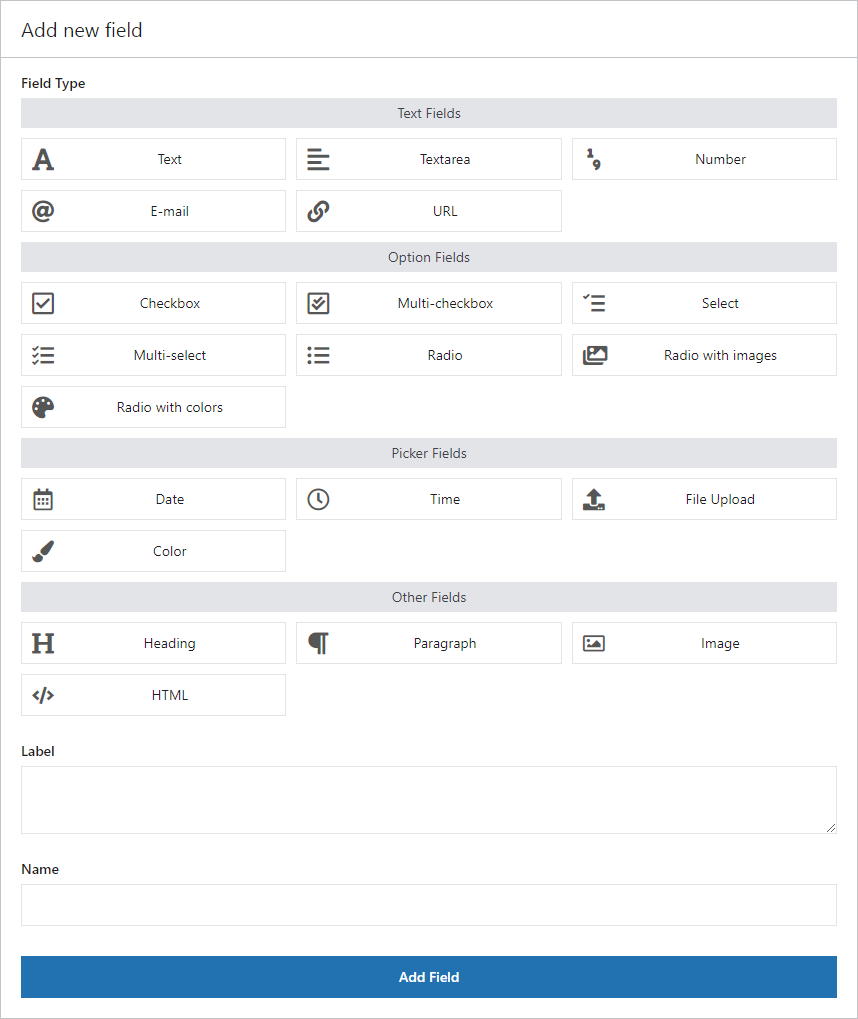
Flexible Product Fields - Add a new custom field

Explore powerful new features designed to simplify your pricing and provide a seamless shopping experience:

  • Dynamic pricing per quantity – automatically adjust product prices based on how many items your customers order and for every field with custom pricing rules. The plugin is compatible with Flexible Quantity (free and PRO) plugins.
  • Custom unit of measure - a lot of product field type in the customizer can now be enhanced with custom units of measure (with Flexible Quantity).
  • Base price override – allow selected product options to instantly replace your product’s base price. You have a few product price personalization options.
  • Flexible Quantity integration – combine Flexible Product Fields with Flexible Quantity to accurately calculate pricing based on dimensions or measurements.
💡 Some options described in the post are available in PRO.

However, WooCommerce product personalization is also possible with a free plugin.

Flexible Product Fields WooCommerce

Create a product wizard to sell engravings, gift wrapping, gift messages, business cards, stamps and optionally charge for it (fixed or percentage).

💾 Active Installations: 10,000+ | WordPress Rating:

Download for free or Go to WordPress.org
WP Desk
10,000+ Active Installations
Last Updated: 2026-08-20
Works with WooCommerce 10.7 - 11.1

WooCommerce product personalization with Flexible Product Fields

Flexible Product Fields is a WooCommerce plugin that enables you to quickly add custom fields such as text boxes, dropdown lists, text field, and checkboxes directly to your product pages. These fields allow customers to customize their orders, creating personalized shopping experiences.

💡 A lot of extra product options are available in the free version of the plugin as well.

For example, your customers can easily order personalized T-shirts with "Extra Print" costs calculated per shirt, or select a one-time "Gift Wrap" option, regardless of how many shirts they purchase.
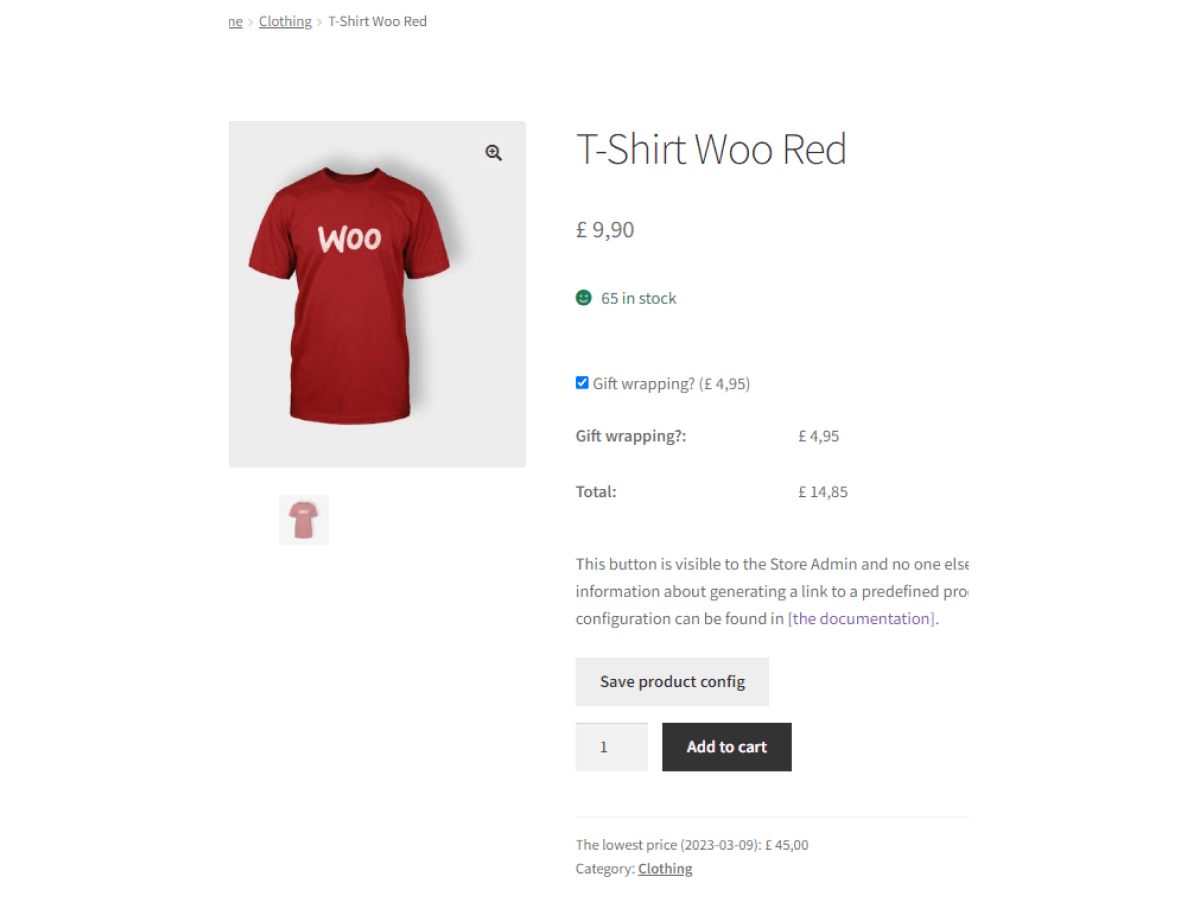
Extra pricing for custom fields

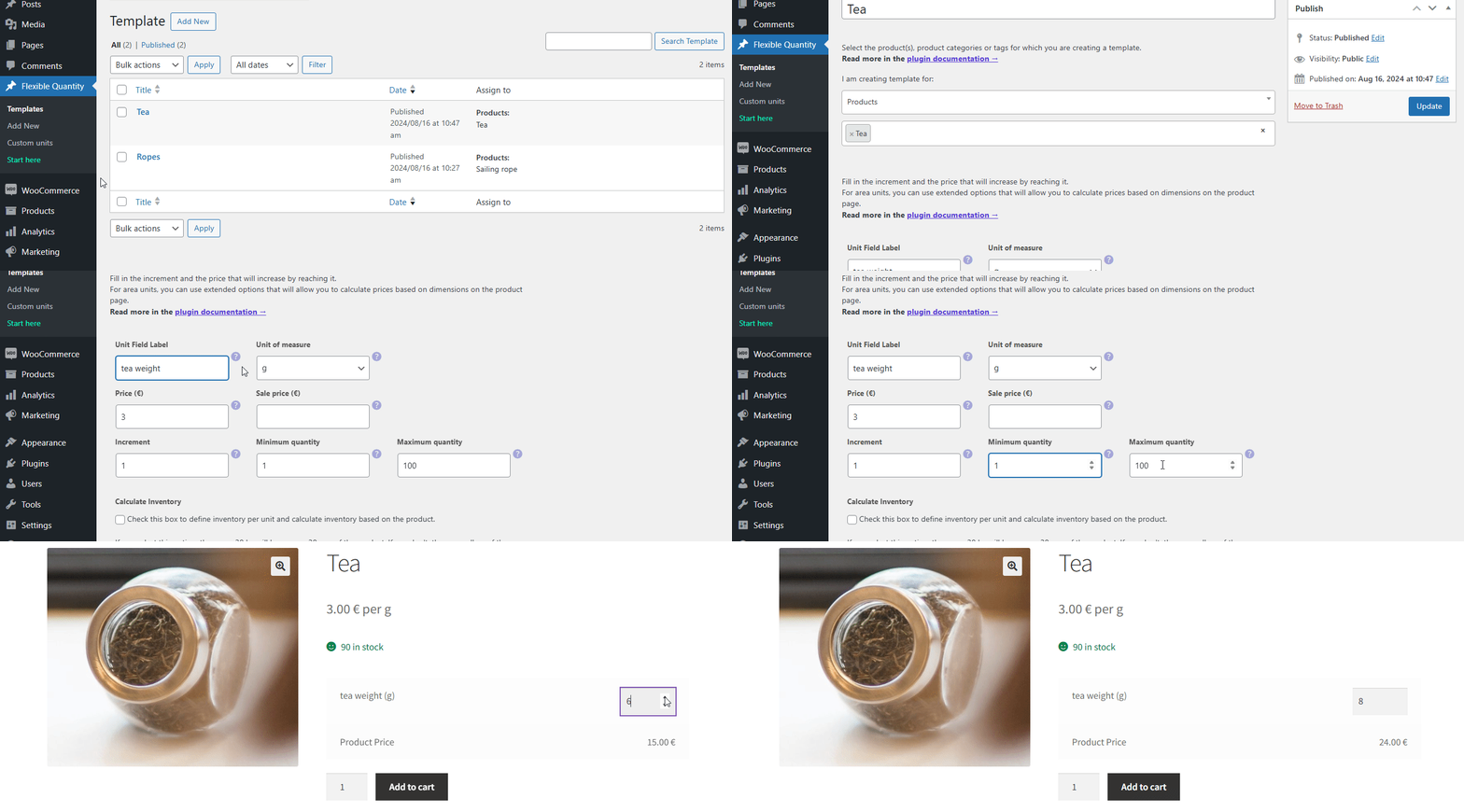
Customizable products in WooCommerce are quite easy to add with the right plugin. What's more, now you may combine Flexible Product Fields with new units of measure (with Flexible Quantity).

Why personalize products using Flexible Product Fields?

Offering personalized products can significantly increase sales and customer loyalty. Flexible Product Fields simplifies the personalization process, making your WooCommerce store more appealing and user-friendly.

Imagine a customer visiting your furniture store and being able to select their preferred desk dimensions and materials directly from the product page, clearly seeing the updated price in real-time.
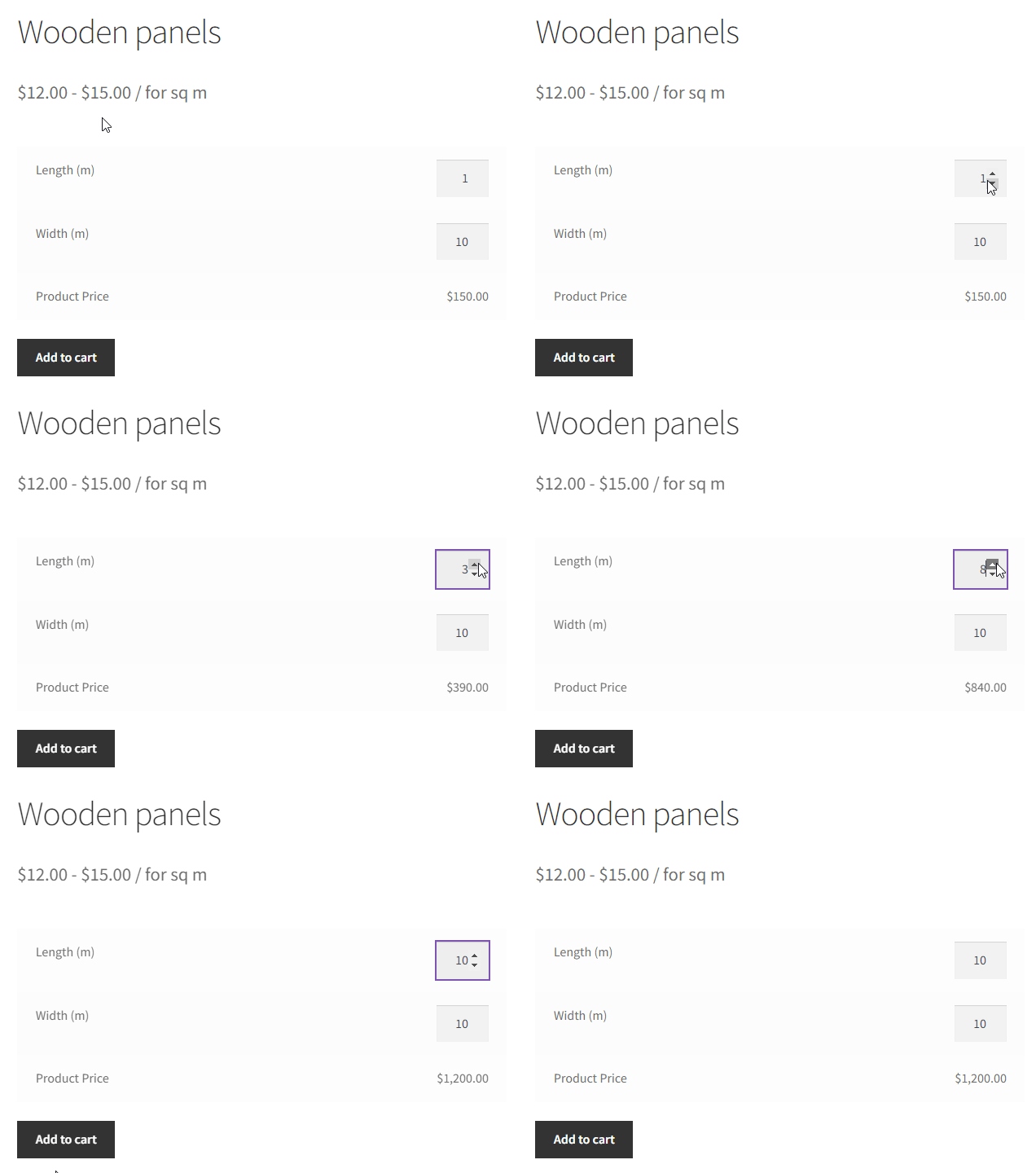
Flexible Quantity - Measurement Price Calculator and pricing based on the quantity of the new unit of measure for a WooCommerce product

Using both plugins can help add more WooCommerce personalized product options and add-ons.

You may add new product fields or/and units of measure to a specific product, multiple products, or even the whole product category.

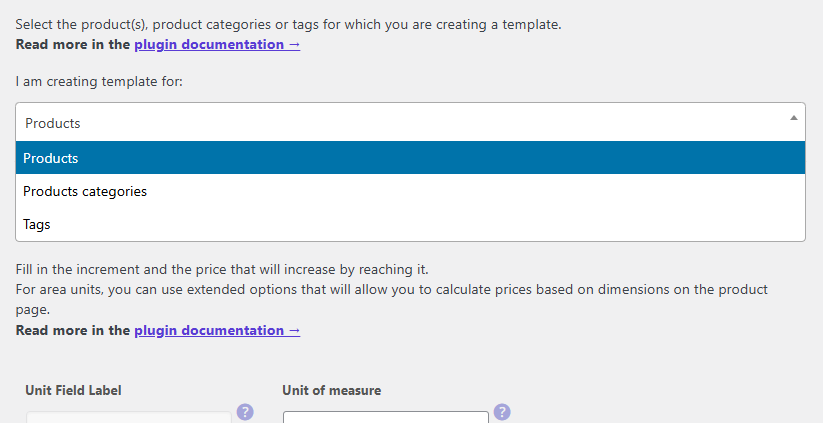
WooCommerce Flexible Product Fields - Groups
New units of measure for categories - product template
Units of measure in the Flexible Quantity plugin

Dynamic pricing per quantity made simple

Flexible Product Fields PRO WooCommerce introduces dynamic pricing using custom field visibility conditions and also pricing options (fixed or percentage).
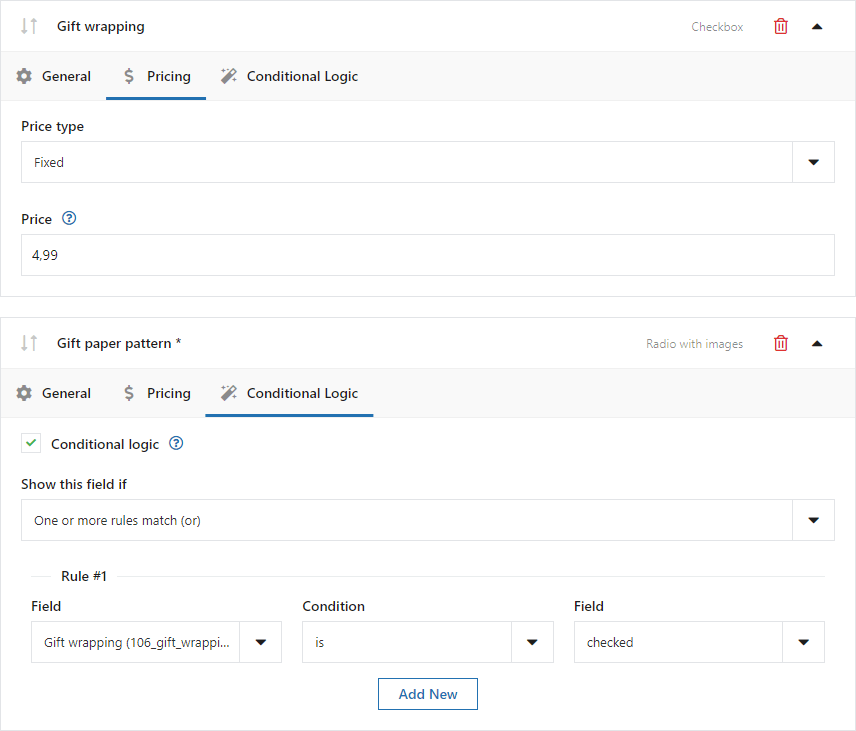
Conditional logic and pricing in Flexible Product Fields (WooCommerce Product Addons) – WooCommerce Product Page Editor
Conditional logic and pricing are available in the pro version

You can also use price based on product unit of measure or combining two options (with Flexible Quantity). Offering either a fixed price per item or a single charge per order (rather than using variations) can be easier.
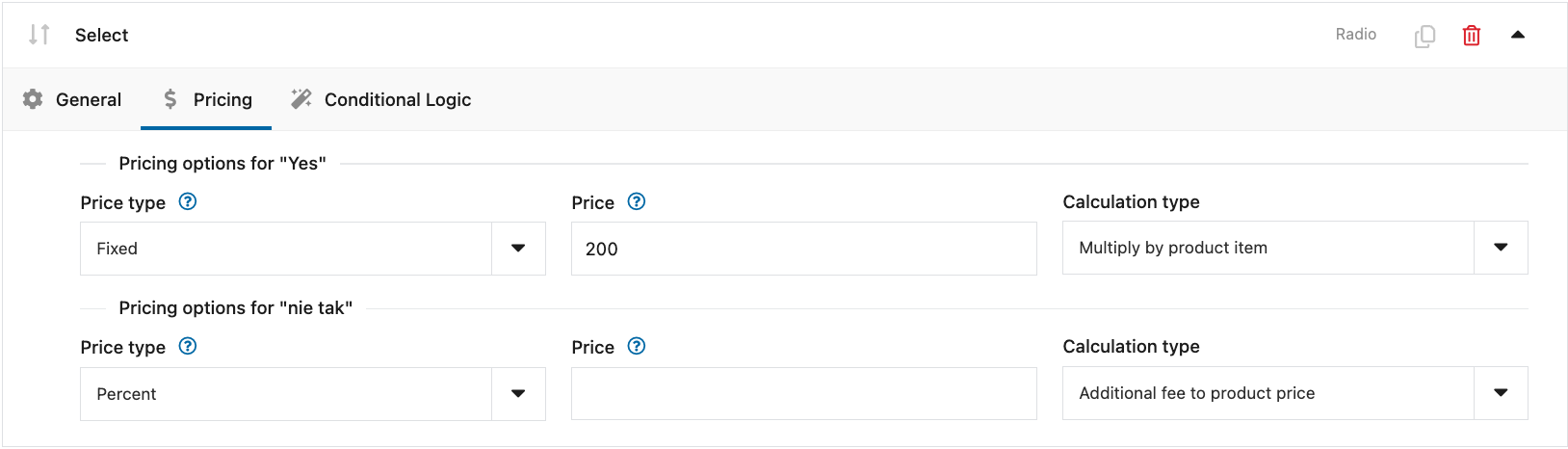
Pricing options for Flexible Product Fields

Of course, you can use both plugins with variable products.

For instance, if you sell custom mugs, you can easily set a personalized engraving fee per mug while applying a single gift-wrap fee, regardless of quantity. This flexibility makes your pricing transparent and customer-friendly. Or you can set different pricing based on quantity (also for decimal units with Flexible Quantity).
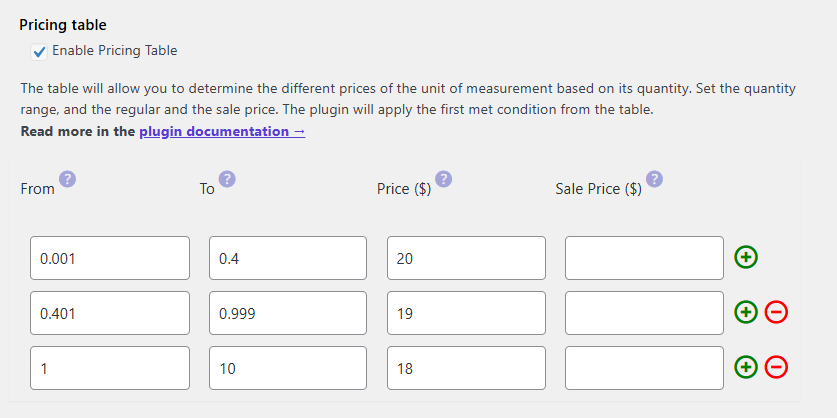
Dynamic pricing based on product quantity in WooCommerce

Personalized product in WooCommerce - price options

So, you can customize products with and add some fields:

  • without price,
  • some with fixed/ percentage price,
  • some based on calculations of custom units of measure (with Flexible Quantity),
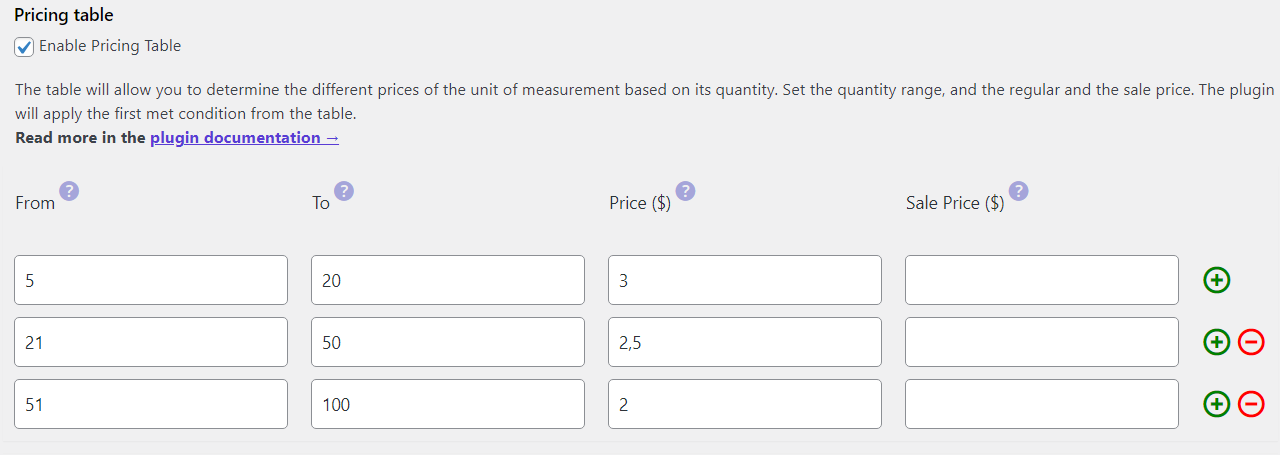
    Pricing table in Flexible Quantity
    Pricing table in Flexible Quantity
  • finally, using two plugins, you may implement dynamic pricing based on the unit of measure.
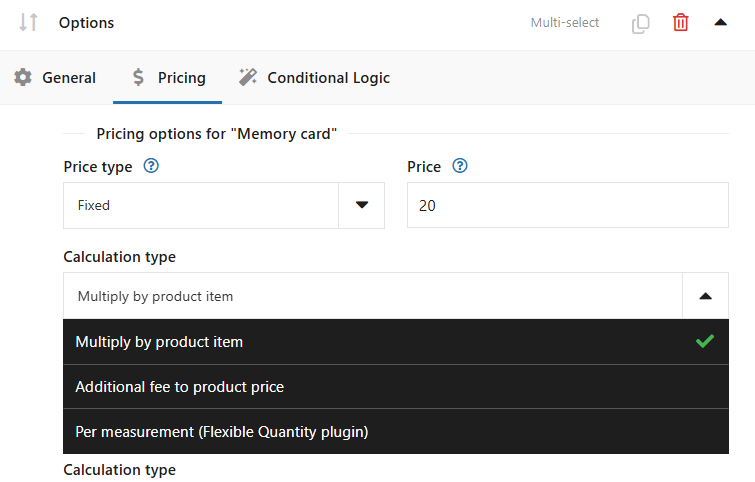
    Price calculation options with Flexible Product Fields and Flexible Quantity
    Price calculation options with Flexible Product Fields and Flexible Quantity

Override the WooCommerce product base price

With Flexible Product Fields, you can now allow certain product options to replace the default base price entirely. This feature is perfect for products whose pricing varies significantly depending on customer selections.

Consider a store selling handmade furniture, where customers select different materials. Once a premium material is chosen, the displayed product price updates automatically, simplifying the shopping process.

Flexible Quantity - Measurement Price Calculator and pricing based on the quantity of the new unit of measure for a WooCommerce product

Integrate seamlessly with Flexible Quantity (extra product options and unit of measure customization)

Flexible Product Fields integrates effortlessly with the Flexible Quantity plugin, accurately adjusting prices based on entered dimensions or measurements.

For example, a flooring store can precisely calculate prices per square meter using customer-entered measurements, providing clear and accurate pricing instantly.
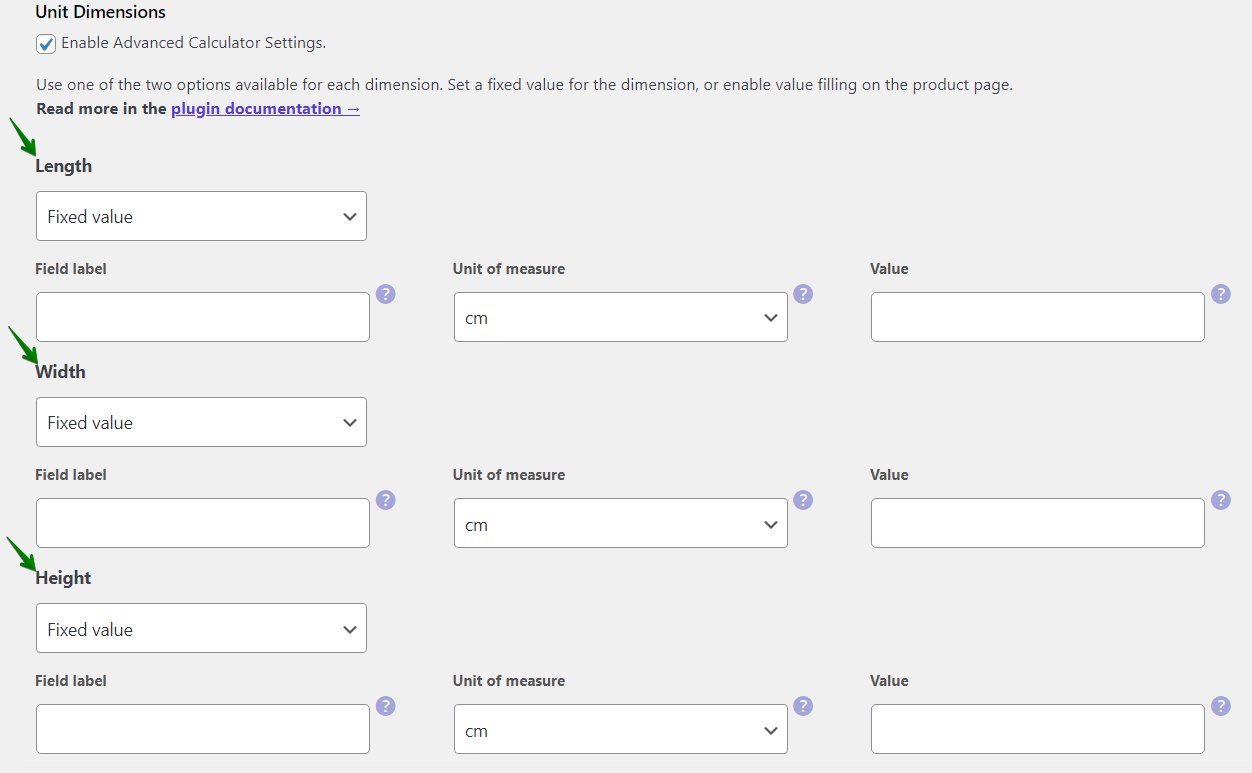
Unit dimensions in Flexible Quantity

Combining multiple options of both plugins is also possible.

Selling furniture with price based on material, and calculated area of furniture cover, with delivery and installation options, etc.? Flexible Product Fields and Flexible Quantity can handle such idea.
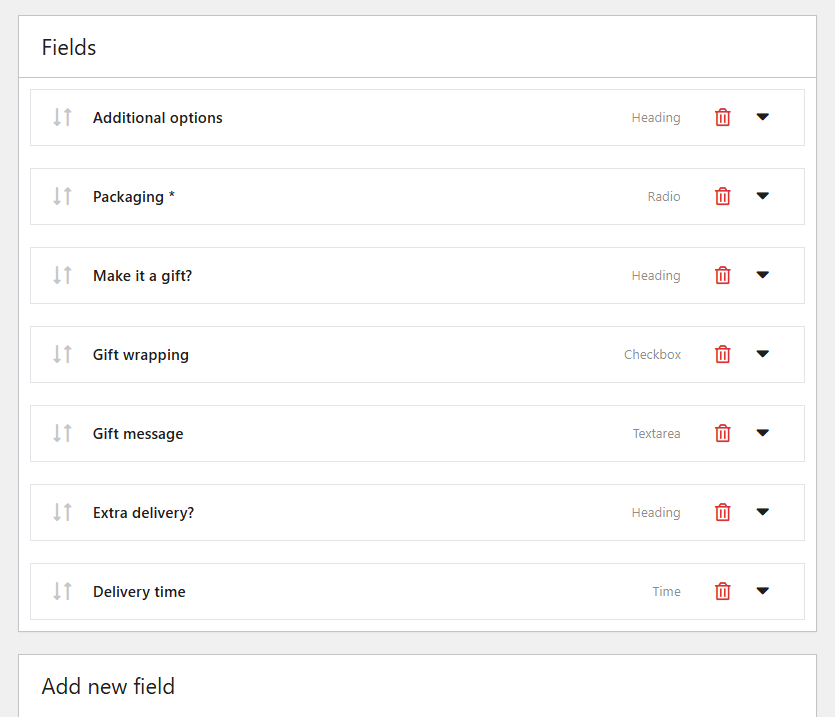
Additional product fields example

Dynamic percentage-based pricing - product option explained

Flexible Product Fields also supports dynamic percentage-based pricing, integrating perfectly with Flexible Quantity calculations. Prices automatically adjust based on total calculated dimensions or quantities.

Imagine a banner printing service: customers specify the banner size, and your pricing adjusts dynamically by applying a percentage to the total measurement, ensuring accurate pricing regardless of size.

How to quickly set up Flexible Product Fields custom fields?

Setting up Flexible Product Fields is straightforward:

  1. Download the plugin (below)
  2. Install the plugin in your WooCommerce store.
  3. Add a new group of fields and assign it to a specific product or many products.
  4. Select relevant fields (text, checkbox, dropdown, select, etc.).
  5. Define clear pricing rules for each field.

Flexible Product Fields WooCommerce

Create a product wizard to sell engravings, gift wrapping, gift messages, business cards, stamps and optionally charge for it (fixed or percentage).

💾 Active Installations: 10,000+ | WordPress Rating:

Download for free or Go to WordPress.org
WP Desk
10,000+ Active Installations
Last Updated: 2026-08-20
Works with WooCommerce 10.7 - 11.1

For instance, you can quickly add fields like "Custom Logo Upload" or "Specify Dimensions," enhancing your product personalization effortlessly.
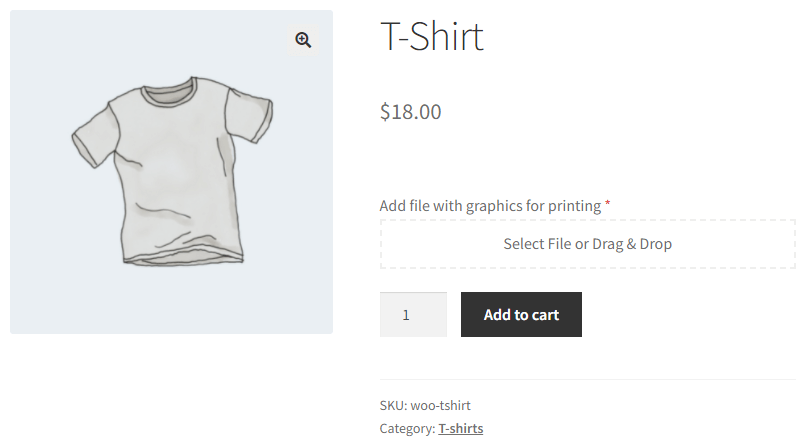
File Upload on the WooCommerce product page

With Flexible Quantity, you may enable dimension of the logo area (with dynamic pricing) to be defined by users.

Such a WooCommerce custom product price will then change based on customer input:
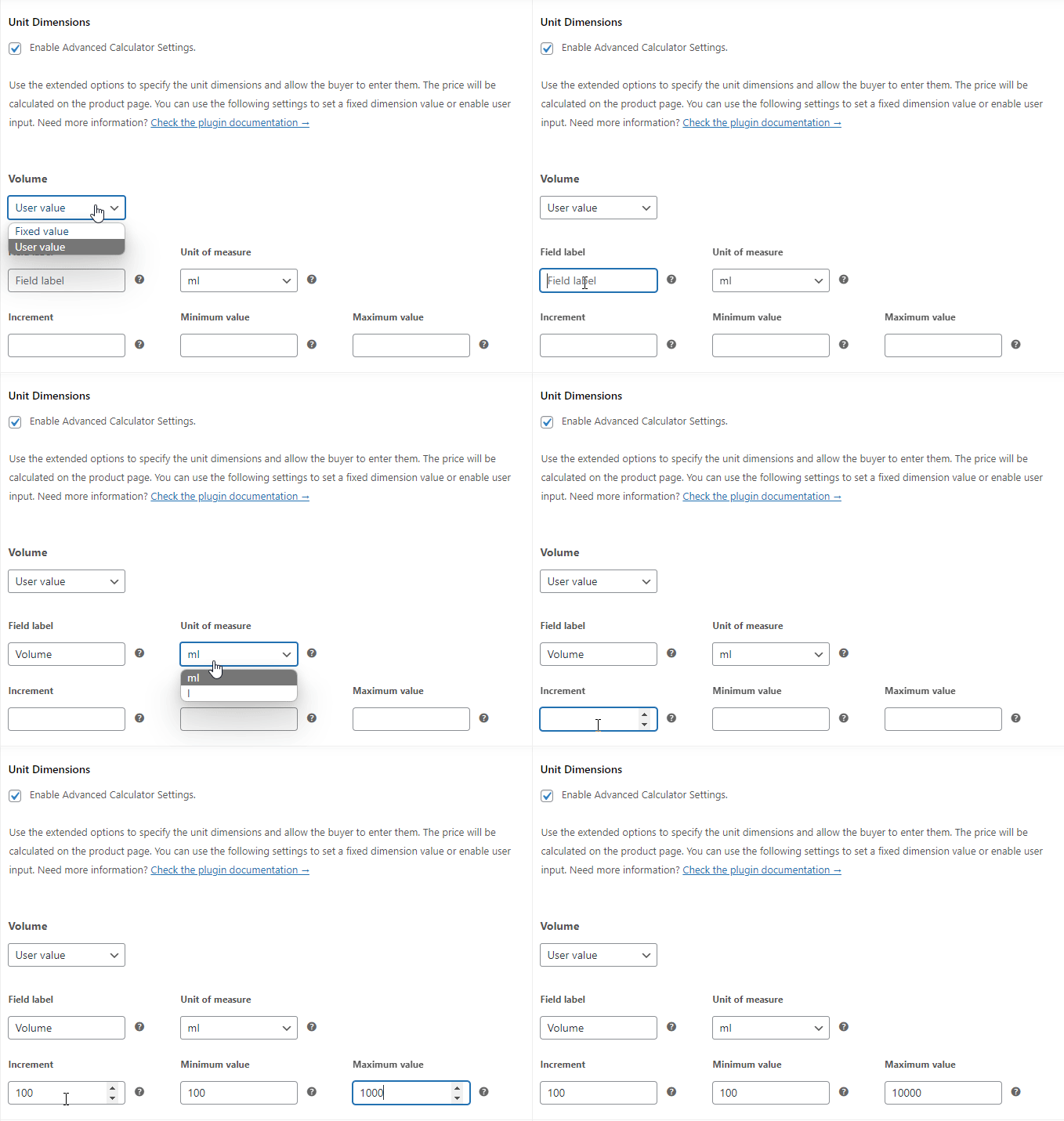
Sell products by milliliters and user input in WooCommerce

Avoid common product personalization mistakes

Avoid overwhelming customers by clearly structuring your personalization fields. Too many or confusing options can lead to abandoned carts.

Keep personalization simple by logically grouping related fields, such as "Material Choices" or "Custom Dimensions," providing clarity and improving conversion rates.

You can add some design/ layout options to your products using Flexible Product Fields as well.
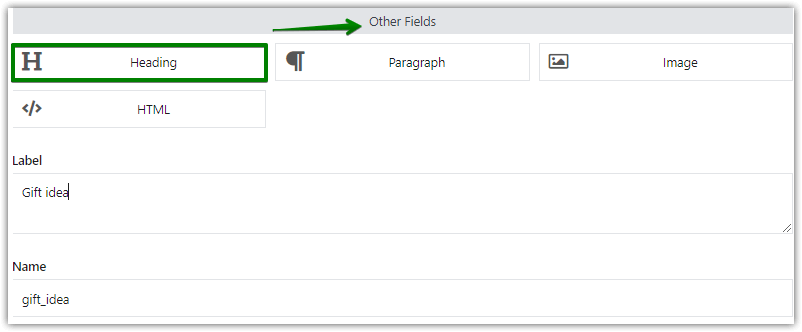
Add the heading text field to the WooCommerce product page

Custom product fields will show or hide on the product page. You may use conditional logic in PRO to make fields appear based on conditions, for example:
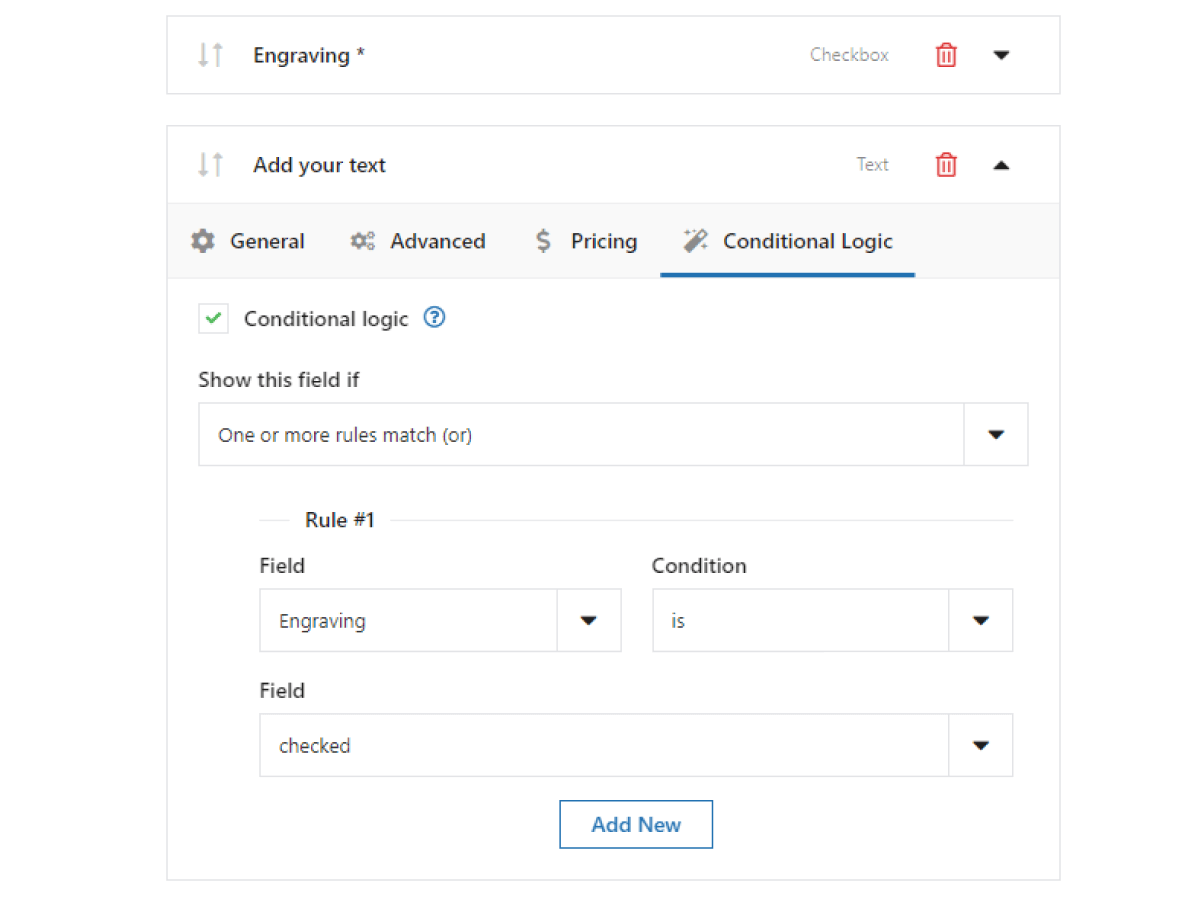
Conditional logic for the advanced product builder in WooCommerce

Effective pricing strategies for personalized products

To effectively price personalized products, consider customer perceptions of added value. Flexible Product Fields helps you implement strategic pricing easily.

For example, adding a reasonable premium for customized engraving or packaging enhances perceived value and can boost your average order value without deterring customers.

Boost credibility with customer reviews

Customer reviews are essential, especially for personalized products. They reassure potential buyers about the quality and ease of your product personalization.

Encourage customers to leave reviews detailing their experiences, emphasizing satisfaction and how straightforward it was to personalize products using Flexible Product Fields.

💡 You may also add a field to get user feedback about shopping experience or on product quality.

Leverage these new features in Flexible Product Fields to provide exceptional shopping experiences, precise dynamic pricing, and highly engaging product personalization, ensuring your WooCommerce store stands out.

WooCommerce product personalization - summary

In this blog post, you've learned how to add extra options with a product configurator for WooCommerce.

What's more, you now know how to customize your products with custom product fields and new units of measure.

The plugins let users personalize their products. If you are looking for a personalization plugin for WooCommerce you should try Flexible Product Fields and Flexible Quantity. Of course, each extension integrates with your WooCommerce giving you many options and product add-ons.

You may start WooCommerce product customization with free plugins.

Flexible Product Fields WooCommerce

Create a product wizard to sell engravings, gift wrapping, gift messages, business cards, stamps and optionally charge for it (fixed or percentage).

💾 Active Installations: 10,000+ | WordPress Rating:

Download for free or Go to WordPress.org
WP Desk
10,000+ Active Installations
Last Updated: 2026-08-20
Works with WooCommerce 10.7 - 11.1

Flexible Quantity Calculator for WooCommerce

Enable product price calculation based on dimensions on the product page. Set price and shipping thresholds for product quantities. Support for product variations.

💾 Active Installations: 2,000+ | WordPress Rating:

Download for free or Go to WordPress.org
WP Desk
2,000+ Active Installations
Last Updated: 2026-08-05
Works with WooCommerce 10.7 - 11.0

Related Articles

WooCommerce product customizer free (product personalization and a plugin to build a personalized product)

WooCommerce product personalization with a free plugin!

WooCommerce product personalization options allow you to offer customers extra choices such as text fields, date pickers or checkboxes directly on the...
Product Personalization 25 eCommerce Tips for WooCommerce product customization (2025)

25 eCommerce Tips to eCommerce Personalization: Customize WooCommerce Product Page in 2026

Personalization is shaping the future of eCommerce. Shoppers no longer want generic, one-size-fits-all products—they expect unique, customized options...
WooCommerce product page fields and checkout fields

Create Custom Fields in WooCommerce Checkout and Product Pages

Standard WooCommerce doesn't let you create custom fields without writing your code. However, there are situations when you need the custom product or...
Advanced custom product fields for WooCommerce products

WooCommerce advanced custom fields: a FREE product & checkout customizer

Are you looking for a way to easily customize your WooCommerce? Let's build advanced product and checkout pages with custom fields in WooCommerce with...
Custom field product WooCommerce

How to add a custom product field in WooCommerce? (free plugin)

Let's see how to add a custom product field in WooCommerce with a free product designer plugin! Boost your sales by letting customers personalize prod...

4 minutes read2463 views

Reader Interactions

Leave a Reply Cancel reply

Your email address will not be published. Required fields are marked *

WP Desk

...

Powered by WP Desk

WP Desk brings you great WooCommerce plugins. We strive to save your time and money by speeding up your processes. Use our plugins to build a better store. Awesome support included in the package.

Premium WooCommerce Plugins →
WP Desk › Blog › WooCommerce products › WooCommerce product fields › WooCommerce Personalized Product with options & custom units of measure

Primary Sidebar

Contents

  • Boost your WooCommerce – a custom product with Flexible Product Fields
    • Flexible Product Fields WooCommerce
  • WooCommerce product personalization with Flexible Product Fields
  • Why personalize products using Flexible Product Fields?
  • Dynamic pricing per quantity made simple
    • Personalized product in WooCommerce – price options
  • Override the WooCommerce product base price
    • Integrate seamlessly with Flexible Quantity (extra product options and unit of measure customization)
  • Dynamic percentage-based pricing – product option explained
  • How to quickly set up Flexible Product Fields custom fields?
    • Flexible Product Fields WooCommerce
  • Avoid common product personalization mistakes
    • Effective pricing strategies for personalized products
    • Boost credibility with customer reviews
  • WooCommerce product personalization – summary
    • Flexible Product Fields WooCommerce
    • Flexible Quantity Calculator for WooCommerce

Flexible Product Fields PRO WooCommerce £59

Create a product wizard to sell engravings, gift wrapping, gift messages, business cards, stamps and optionally charge for it (fixed or percentage).

💾 Active Installations: 10,000+ | WordPress Rating:

Add to cart or View Details
WP Desk
10,000+ Active Installations
Last Updated: 2026-08-19
Works with WooCommerce 10.7 - 11.1

Stay updated on our how-to articles

WP Desk news, WooCommerce tips, promo codes - right to your inbox.

By entering your e-mail, you agree to our Terms & Conditions and Privacy Policy.

By entering your e-mail, you agree to our Terms & Conditions and Privacy Policy.

Footer

WP Desk - WooCommerce Plugins

At WP Desk we create great WooCommerce plugins with awesome support. Save time and money with our e-commerce solutions. See how we can help you improve your e-store →

Secured by Comodo

WP Desk

  • About us
  • Giving Back
  • Blog
  • Get Support
  • Contact us

Products

  • Premium Plugins
  • WP Desk Care
  • Documentation
  • WooCommerce Invoices
  • Email Marketing
  • PDF Coupons

Legal

  • Terms & Conditions
  • Refund Policy
  • Support Policy
  • Privacy Policy

© 2026 WP Desk

We value your privacy

We use necessary cookies to make our site work. We'd also like to set additional cookies to understand site usage, enhance your browsing experience, and serve personalized ads or content. By clicking ‘Accept All,’ you consent to our use of additional cookies.

Functional Always active
The technical storage or access is strictly necessary for the legitimate purpose of enabling the use of a specific service explicitly requested by the subscriber or user, or for the sole purpose of carrying out the transmission of a communication over an electronic communications network.
Preferences
The technical storage or access is necessary for the legitimate purpose of storing preferences that are not requested by the subscriber or user.
Statistics
The technical storage or access that is used exclusively for anonymous statistical purposes. Without a subpoena, voluntary compliance on the part of your Internet Service Provider, or additional records from a third party, information stored or retrieved for this purpose alone cannot usually be used to identify you. The technical storage or access that is used exclusively for anonymous statistical purposes. Without a subpoena, voluntary compliance on the part of your Internet Service Provider, or additional records from a third party, information stored or retrieved for this purpose alone cannot usually be used to identify you.
Marketing
The technical storage or access is required to create user profiles to send advertising, or to track the user on a website or across several websites for similar marketing purposes.
  • Manage options
  • Manage services
  • Manage {vendor_count} vendors
  • Read more about these purposes
View preferences
  • {title}
  • {title}
  • {title}