
• Skip to primary navigation
  • Skip to main content
  • Skip to primary sidebar
  • Skip to footer
WP Desk = premium plugins for WordPress & WooCommerce
  • Plugins
        • Checkout & OrdersMake your work easier and automate the orders. Adjust the order form to your needs and make it more useful to your customers. Print order labels directly from WooCommerce. Put the orders in order using our plugins. Find out how to streamline the procurement process in your store.
          • Flexible Checkout Fields
          • Active Payments
          • Automatic Payment Status
          • One Click Return for WooCommerce
          • Print Orders and Address Labels
          • Flexible Subscriptions Recurring Shipping
          • Flexible Subscriptions Payment Retry
          • Flexible Subscriptions Stock Management
        • ProductsThese plugins will help you manage your WooCommerce products. Here you will find the plugins to import and update products from XML or CSV files. Then you can change the product unit of measure, show the lowest price in the last 30 days (Omnibus Directive), or let customers name the product price!
          • Flexible Product Fields
          • Dropshipping Import Products
          • Dropshipping FTP Import Products
          • Dropshipping Export Products
          • Custom Price
          • WP Desk Omnibus
          • Flexible Quantity Calculator
          • Dropshipping Orders Export
        • MarketingPromote your store online. Add products from your shop to price comparison websites directly from WooCommerce. Acquire new customers and communicate with your existing ones. Build a customer base and communicate with clients using one of the most effective marketing tools, namely e-mail marketing. Check out our promotional tools!
          • Flexible Pricing
          • Flexible Wishlist - Analytics & Emails
          • OLX WooCommerce
          • Flexible PDF Coupons
          • ShopMagic
          • Flexible Invoices
  • Bundle🔥
  • WP Desk Care
  • Support
  • Blog
  • My Account
  • 0

More results

WooCommerce Dropshipping: Keeping Supplier Stock in Sync Through Peak Season

WordPress tips & plugins

patrycja.wojas3 minutes readUpdated: 2026-11-15Updated: 2026-11-05
blog category heading image

Dropshipping works until a customer buys a product the supplier no longer has. In an ordinary month this happens now and then and ends with an apology. In the last week of November it happens much more often, to customers buying presents, and an apology is not enough.

Contents

  • How supplier stock gets out of sync
  • What to change before the volume arrives
  • What to do when it happens anyway
  • Summary
  • Frequently asked questions
    • How often should a supplier feed update?
    • Should out of stock products be hidden or shown?
    • What if the supplier feed has no stock figures at all?
    • Related Articles
  • 3 Legal Documents Every WooCommerce Store Must Have
  • 25 eCommerce Tips to eCommerce Personalization: Customize WooCommerce Product Page in 2026
  • 15 eCommerce automation tools for WooCommerce (2025)

How supplier stock gets out of sync

Supplier stock gets out of sync because the store shows a copy of a number kept by the supplier, and the copy is only as current as the last update.

A feed imported once a day is accurate when the import runs and becomes less accurate over the next twenty-three hours. That is acceptable when the store sells four pieces of a product a day, but risky when it sells forty, because the faster you sell, the more orders fall into the period when the displayed stock is out of date.

The second cause is that you are not the supplier's only customer. Their stock also changes because of orders you cannot see, so a product can go from ten to zero without anything happening in your store.

The third cause is the least visible. Feeds fail, and usually without warning: the file was not updated, the connection timed out or the file format changed. The store keeps showing yesterday's or last week's numbers, and nothing shows that they are out of date.
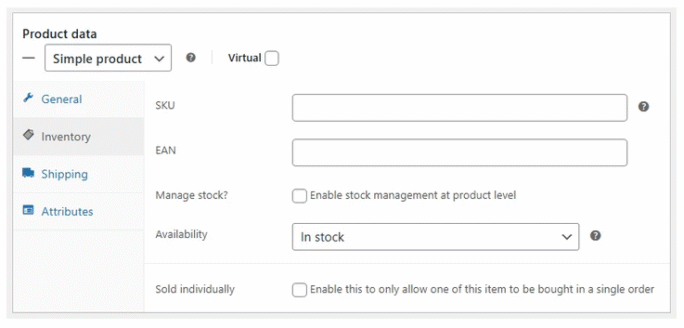
Supplier feed import settings in Dropshipping Import Products for WooCommerce

What to change before the volume arrives

Update the products that matter more often, not the whole catalogue. Syncing the full catalogue every hour puts a heavy load on the server and is usually unnecessary, while the same frequency for your two hundred best sellers costs little and covers most of the risk.

Add a buffer for products with low stock. Treating a supplier stock of three pieces as zero costs you a few sales but prevents cancelled orders, and in the gift season that trade-off is worth it.

Monitor the sync itself, not only the stock levels. The most important alert is about when the feed was last imported successfully, because a sync that stopped three days ago looks exactly like one that works until somebody checks. The same rule applies to any stock automation, as we describe in our article on stock management for recurring orders.
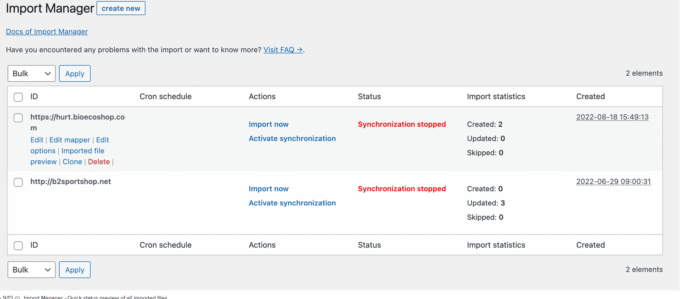
Scheduled supplier feed import in Dropshipping Import Products for WooCommerce

What to do when it happens anyway

Even with good settings, a product will sometimes sell out, so plan how you will respond. Decide now what you tell a customer who paid for a product that is no longer available, before somebody has to write that email at eleven at night.

Offer an alternative in the same message as the bad news. An email that only says the product is unavailable ends in a refund. An email that suggests a similar product and offers to switch, with any price difference settled, keeps some of those orders.

Refund the money straight away, not on a fixed schedule. A customer whose present fell through in early December needs the money to buy something else, and how quickly you return it strongly affects how they remember your store.

Sync frequency per product group, and a visible record of when the feed last ran, are what separate a working dropshipping setup from a hopeful one. Dropshipping Import Products imports supplier feeds on a schedule you set and logs each run.

Summary

Supplier stock in a dropshipping store gets out of sync for three reasons: the store shows a copy of the supplier's stock that is only as current as the last import, the supplier also sells to other customers, and feeds can fail without any warning, so the store keeps showing old numbers. The faster the store sells, the more orders fall into the gap between imports. Before the busy season, update your best-selling products more often than the rest of the catalogue, treat low supplier stock, such as three pieces, as zero and monitor when the feed was last imported successfully, not only the stock levels. When a product sells out anyway, decide in advance what to tell the customer, suggest a similar product in the same message and refund the money straight away.

Frequently asked questions

These three questions come up before the busy season.

How often should a supplier feed update?

As often as the supplier allows and your hosting can handle. For most stores that means every hour for fast-selling products. Once a day is enough only outside the busy season.

Should out of stock products be hidden or shown?

Usually it is better to show them with a clear status, because a hidden product can lose its position in search results, and some customers will wait for it to come back. Make sure, however, that an out of stock product cannot be ordered, and hide it only if it will not return.

What if the supplier feed has no stock figures at all?

Then your own buffer is the only protection, so set it conservatively. Check what the feed contains before November, not during the sale.


Related Articles

Witch 3 Legal Documents Every WooCommerce Store Must Have

3 Legal Documents Every WooCommerce Store Must Have

Whether you run a shop, a blog or a company website – there are legal documents that must be in place. For a WooCommerce store, the list is slightly l...
Product Personalization 25 eCommerce Tips for WooCommerce product customization (2025)

25 eCommerce Tips to eCommerce Personalization: Customize WooCommerce Product Page in 2026

Personalization is shaping the future of eCommerce. Shoppers no longer want generic, one-size-fits-all products—they expect unique, customized options...
15 best eCommerce automation tools for WooCommerce (2025)

15 eCommerce automation tools for WooCommerce (2025)

Managing an online store can be overwhelming, but the right automation software and plugins can transform your workflow. From checkout design to optim...

3 minutes read101 views

patrycja.wojas

Product Content Hero

LinkedIn Profile

Patrycja has 14 years of experience in copywriting and SEO. She is one of the few specialists in Poland who writes with equal confidence about mor...

Powered by WP Desk

WP Desk brings you great WooCommerce plugins. We strive to save your time and money by speeding up your processes. Use our plugins to build a better store. Awesome support included in the package.

Premium WooCommerce Plugins →
WP Desk › Blog › WordPress tips & plugins › WooCommerce Dropshipping: Keeping Supplier Stock in Sync Through Peak Season

Primary Sidebar

Contents

  • How supplier stock gets out of sync
  • What to change before the volume arrives
  • What to do when it happens anyway
  • Summary
  • Frequently asked questions
    • How often should a supplier feed update?
    • Should out of stock products be hidden or shown?
    • What if the supplier feed has no stock figures at all?

Dropshipping Export Products for WooCommerce $79

Export products from WooCommerce to CSV or XML files in an easy way. With Dropshipping Export Products for WooCommerce, it's child's play! New: support for Google Merchant Center feed

💾 Active Installations: 3000+ | 🔄 Last update: 2026-10-22

Add to cart or View Details
WP Desk
Plugins used by 239,820+ shops
Last Updated: 2026-10-22
Works with WooCommerce 10.9 - 11.2

Stay updated on our how-to articles

WP Desk news, WooCommerce tips, promo codes - right to your inbox.

By entering your e-mail, you agree to our Terms & Conditions and Privacy Policy.

By entering your e-mail, you agree to our Terms & Conditions and Privacy Policy.

Footer

WP Desk - WooCommerce Plugins

At WP Desk we create great WooCommerce plugins with awesome support. Save time and money with our e-commerce solutions. See how we can help you improve your e-store →

Secured by Comodo

WP Desk

  • About us
  • Giving Back
  • Blog
  • Get Support
  • Contact us

Products

  • Premium Plugins
  • WP Desk Care
  • Documentation
  • WooCommerce Invoices
  • Email Marketing
  • PDF Coupons

Legal

  • Terms & Conditions
  • Refund Policy
  • Support Policy
  • Privacy Policy

© 2026 WP Desk

We value your privacy

We use necessary cookies to make our site work. We'd also like to set additional cookies to understand site usage, enhance your browsing experience, and serve personalized ads or content. By clicking ‘Accept All,’ you consent to our use of additional cookies.

Functional Always active
The technical storage or access is strictly necessary for the legitimate purpose of enabling the use of a specific service explicitly requested by the subscriber or user, or for the sole purpose of carrying out the transmission of a communication over an electronic communications network.
Preferences
The technical storage or access is necessary for the legitimate purpose of storing preferences that are not requested by the subscriber or user.
Statistics
The technical storage or access that is used exclusively for anonymous statistical purposes. Without a subpoena, voluntary compliance on the part of your Internet Service Provider, or additional records from a third party, information stored or retrieved for this purpose alone cannot usually be used to identify you. The technical storage or access that is used exclusively for anonymous statistical purposes. Without a subpoena, voluntary compliance on the part of your Internet Service Provider, or additional records from a third party, information stored or retrieved for this purpose alone cannot usually be used to identify you.
Marketing
The technical storage or access is required to create user profiles to send advertising, or to track the user on a website or across several websites for similar marketing purposes.
  • Manage options
  • Manage services
  • Manage {vendor_count} vendors
  • Read more about these purposes
View preferences
  • {title}
  • {title}
  • {title}