

WooCommerce does not check stock when a subscription renews. The renewal order is created from a schedule, and nothing in that process looks at the warehouse. To fix it, enable stock tracking on your subscription products and add the Stock Management add-on for Flexible Subscriptions, which can cancel or hold the renewal when the product runs out. Set one rule per product group before you turn it on, and keep a small buffer of units reserved for existing subscribers, because recurring revenue is harder to replace than a single sale.
Contents
- The renewal that fires into an empty warehouse
- Why recurring orders break stock control in WooCommerce
- What stock management for subscriptions should do
- How to set it up
- Which stores need this most
- Summary
- Frequently asked questions
- Does WooCommerce check stock on subscription renewals by default?
- Should a renewal be cancelled or put on hold when stock runs out?
- Does subscription stock control apply to digital products?
- What should the customer be told when a renewal is stopped?
- How do I stop the last unit going to a new customer instead of a subscriber?
The renewal that fires into an empty warehouse
Subscriptions for physical products create a problem digital subscriptions never face. The renewal runs on schedule whether or not the item is on the shelf.
The result is a charged customer, a renewal order you cannot fulfil, and a refund that costs you the payment fee twice. Multiply that by a hundred active subscriptions and one sold-out variant becomes a morning of apologies.
Physical subscriptions bring a second recurring cost with them: delivery. If you are not yet charging for it on every cycle, see how recurring shipping works for subscriptions.
Why recurring orders break stock control in WooCommerce
A standard order checks stock at the moment of purchase, because a customer is standing at the checkout. A subscription renewal involves nobody. It is generated from a schedule, and by default nothing in that process asks whether the product still exists in the warehouse.
The gap widens in stores where subscriptions renew on the same day each month, because the whole batch hits inventory at once.
What stock management for subscriptions should do
Three things, in this order. Check availability before the renewal charge. Stop, hold or cancel the renewal when the product is unavailable. Make the situation visible, so somebody notices before customers do.
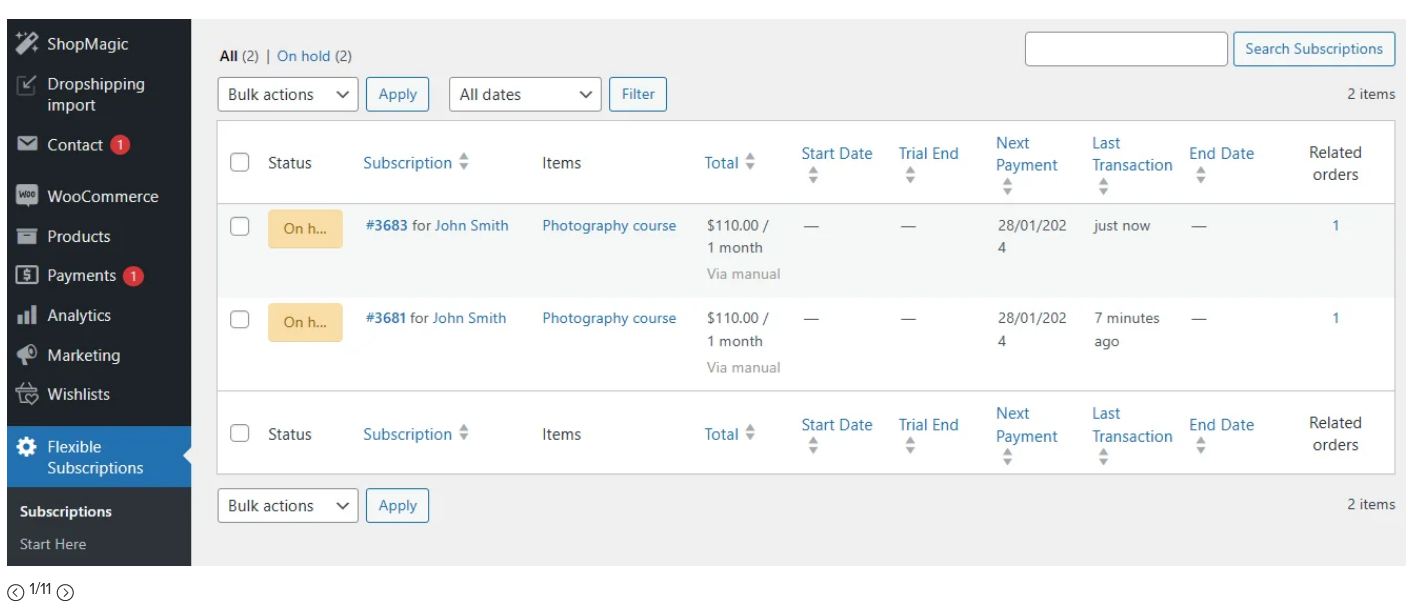
The Stock Management add-on for Flexible Subscriptions covers the first two, including cancelling subscriptions when the product runs out of stock.
How to set it up
Step 1: Turn on stock tracking at product level
Subscription products need the same inventory settings as any other WooCommerce product. Without a stock quantity, there is nothing for the renewal to check against, and no automation can help.
Step 2: Decide what happens at zero
Cancelling the renewal protects the customer from paying for something that will not arrive. Holding the subscription keeps the relationship open but assumes somebody restocks quickly. Pick one rule per product group and write it down, because support will need it.
Whichever rule you choose, pair it with a message. The renewal reminder is the natural place to warn a subscriber that this cycle may be delayed.
Step 3: Keep a buffer for existing subscribers
Do not let the last unit go to a first-time buyer at checkout when renewals are due the same week. Recurring revenue is harder to replace than a single sale, so reserving a small buffer for active subscriptions is usually the better trade.
Step 4: Review inventory before each renewal peak
If most subscriptions renew at the start of the month, check stock a week earlier. Automation prevents a bad charge. It does not refill the shelf.
Which stores need this most
Coffee, cosmetics, supplements, pet food, anything with a shelf life or a seasonal supply chain. In those categories the variant that runs out is almost always the most popular one, so the problem lands on your best customers first.
WP Desk telemetry from 19,803 WooCommerce stores, August 2026, shows that 42.7% of stores carry fifty products or fewer. In a small catalogue a single unavailable variant represents a large share of what you sell, which is exactly the situation where an unchecked renewal does the most damage.
Summary
Recurring orders are convenient because nobody has to touch them, and that is exactly why they need a guardrail. Enable stock tracking on subscription products, decide in advance whether a shortage cancels or holds the renewal, keep a buffer for existing subscribers, and check inventory before the monthly peak.
Frequently asked questions
Does WooCommerce check stock on subscription renewals by default?
No. The renewal order is created on schedule regardless of inventory, because no customer is standing at the checkout for the stock check to run against. That is why a dedicated setting is needed.
Should a renewal be cancelled or put on hold when stock runs out?
Cancel when restocking is uncertain. Hold when the delay is short and you can ship within days.
Does subscription stock control apply to digital products?
No. Stock control matters only where a physical item has to leave the warehouse.
What should the customer be told when a renewal is stopped?
That the renewal was stopped and why, before they notice the missing delivery. A short message about a temporary shortage costs far less than a refund request.
How do I stop the last unit going to a new customer instead of a subscriber?
Reserve a buffer. Set the stock quantity slightly below the real count during a renewal week, so the remaining units are only available to renewals already in the queue.

