If you run a hotel, guesthouse, or cabin rental, one thing matters most: customers should book and pay online themselves. Therefore, you can sell hotel services in WooCommerce without a separate booking platform. Also, the whole booking and payment process happens directly in your online store. As a result, guests book 24/7, and your staff saves time. Consequently, you get fewer calls, fewer emails, and less manual confirmation work.
Contents
- Why sell hotel services in WooCommerce?
- What products can you sell with booking in WooCommerce?
- Required plugins: Flexible Product Fields and Flexible Product Fields – Booking for WooCommerce
- Step 1 – Create a hotel or all-day product in WooCommerce
- Step 2 – Add booking fields (date, date range, time)
- Step 3 – Add booking options and extras (Flexible Product Fields)
- Step 4 – Configure pricing logic: per night, per person, per package
- Step 5 – Booking flow from the customer perspective
- Configuration examples: hotel, stay package, conference room, or cabin rental
- How to combine stay bookings with gift offers?
- Best practices for selling hotel and all-day services
- Summary – when should you choose bookable products in WooCommerce?
- The best & free WooCommerce plugin for booking (hotel, services, meetings)
- WooCommerce Extra Product Options - power up your products with one plugin
- WooCommerce product personalization with a free plugin!
Why sell hotel services in WooCommerce?
Product booking in WooCommerce lets customers choose a date, add options, and pay immediately. From an owner’s view, this model is simple for selling hotel services online. Moreover, you get automatic payments and complete booking data inside each order. Instead, you use one consistent system, not several disconnected tools.
This solution is especially useful when service dates are crucial. For example, it works for overnight stays, weekends, packages, events, and room rentals. Therefore, date booking in WooCommerce stays clear for customers and teams. Also, selling stays in WooCommerce becomes repeatable, not manual inquiry handling.
What products can you sell with booking in WooCommerce?
- Overnight stays and hotel packages (1–x nights). First, customers select check-in and check-out dates. Thus, it fits hotel service sales in WooCommerce.
- Weekend or stay packages. Next, customers buy ready offers with add-ons and package pricing. So, you can sell hotel products as predefined bundles.
- All-day products. For instance, this includes training, workshops, events, and day spa stays. Then, customers choose a specific date in WooCommerce.
- Hourly bookings. For example, this covers conference rooms, relaxation zones, and attractions. Consequently, you sell services by hourly schedule.
The same mechanism supports different business models and booking lengths. Meanwhile, you manage everything in one system. Therefore, you build fully online hotel service sales with calendar-based booking and online payments.
Required plugins: Flexible Product Fields and Flexible Product Fields – Booking for WooCommerce
- Flexible Product Fields (PRO). First, it adds fields like guest count, variants, add-ons, and guest details. Therefore, you can sell hotel products in WooCommerce with extras.
- Flexible Product Fields – Booking. Next, it adds date, date-range, and time fields with booking logic. Thus, a standard product becomes a bookable product.
Flexible Product Fields Add-on - Booking for WooCommerce $39
Add simple and flexible bookings to your online store — without building a separate booking system and without unnecessary configuration. Booking Calendar for WooCommerce is an add-on for the Flexible Product Fields PRO plugin that lets you sell accommodations, hourly services, and conference days using standard WooCommerce products.
Add to cart or View DetailsIn this model, these plugins handle date booking and availability calendars. Also, they create a clear booking process in WooCommerce. Therefore, they answer how to sell hotel services in WooCommerce through proper fields and availability rules.
Step 1 – Create a hotel or all-day product in WooCommerce
First, add a product, usually simple or virtual. Then, set the base price and prepare the offer description. You can price per night, package, or person, depending on your model. Next, add photos and stay details. This way, customers quickly understand what they buy and which options they have.
After this step, you have a standard product. Then, in the next stage, you add date booking in WooCommerce. As a result, real hotel service sales in your WooCommerce store can start.
Step 2 – Add booking fields (date, date range, time)
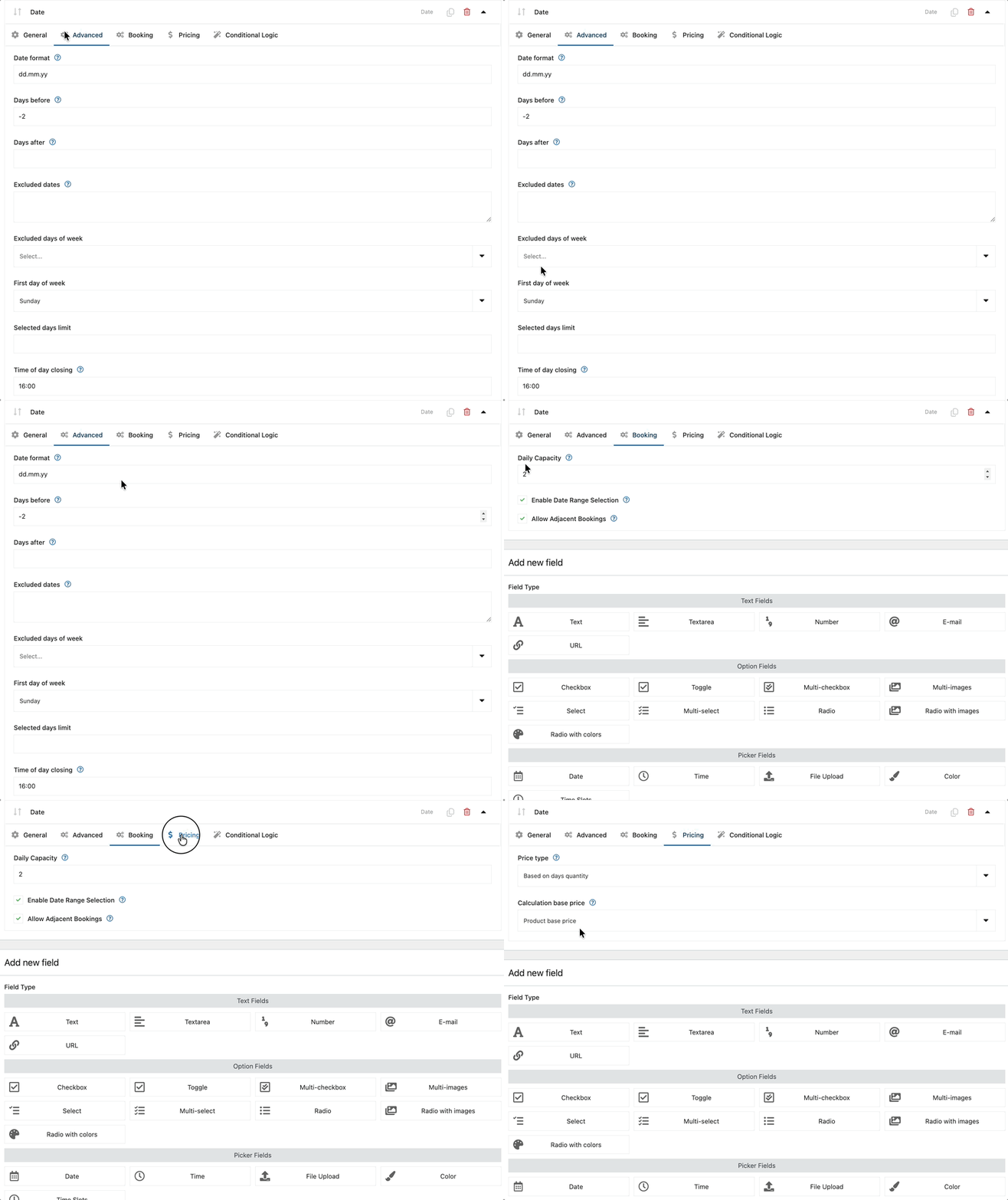
With the Booking add-on, add these fields to the product:
- arrival date or date range (check-in and check-out),
- optionally, start time for hourly services,
- restrictions, such as minimum stay, maximum stay, and excluded dates.
Then, customers choose dates directly in the product calendar. Also, they instantly see availability. Therefore, date booking in WooCommerce stays clear at every stage. As a result, customers can book and buy hotel services online without contacting reception.
Step 3 – Add booking options and extras (Flexible Product Fields)
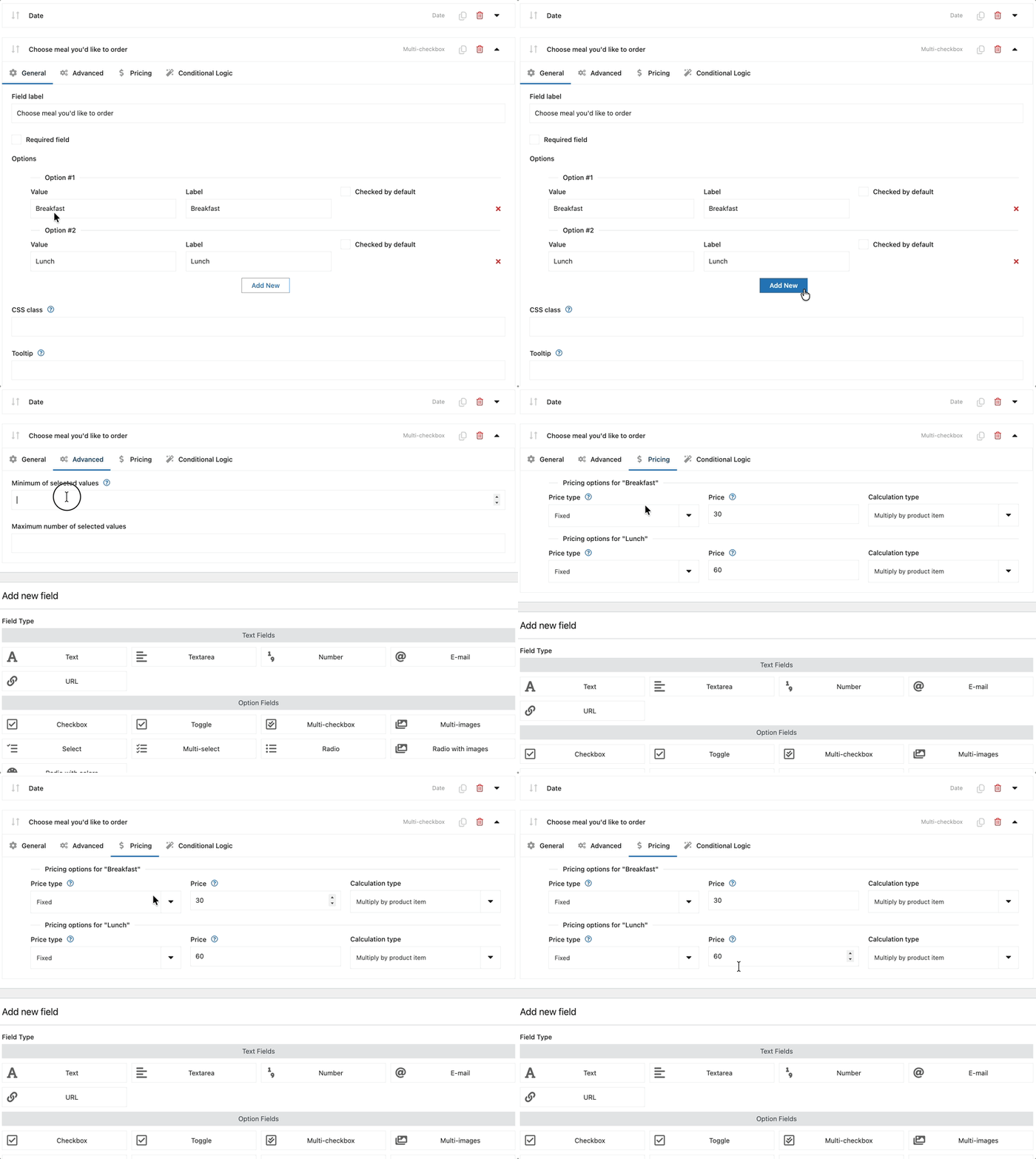
- fields: guest count, children count, room standard, or package variant,
- extras: breakfast, parking, relaxation zone, late checkout, and catering,
- booker details: first name, last name, phone, email, and notes.
Each field can affect price. Therefore, cart value grows, and the offer fits guest needs better. So, you not only sell stays in WooCommerce. You also upsell extras effectively, which increases revenue per booking.
Step 4 – Configure pricing logic: per night, per person, per package
Next, combine billing models to match real pricing:
- base price per night or per package,
- surcharges for additional guests,
- surcharges for extras from Flexible Product Fields,
- minimum-stay conditions.
This creates a flexible model for selling hotel products in WooCommerce and all-day products. At the same time, management stays simple. Therefore, you know how to sell hotel services in WooCommerce with automatic, correct rates and stay conditions.
Step 5 – Booking flow from the customer perspective
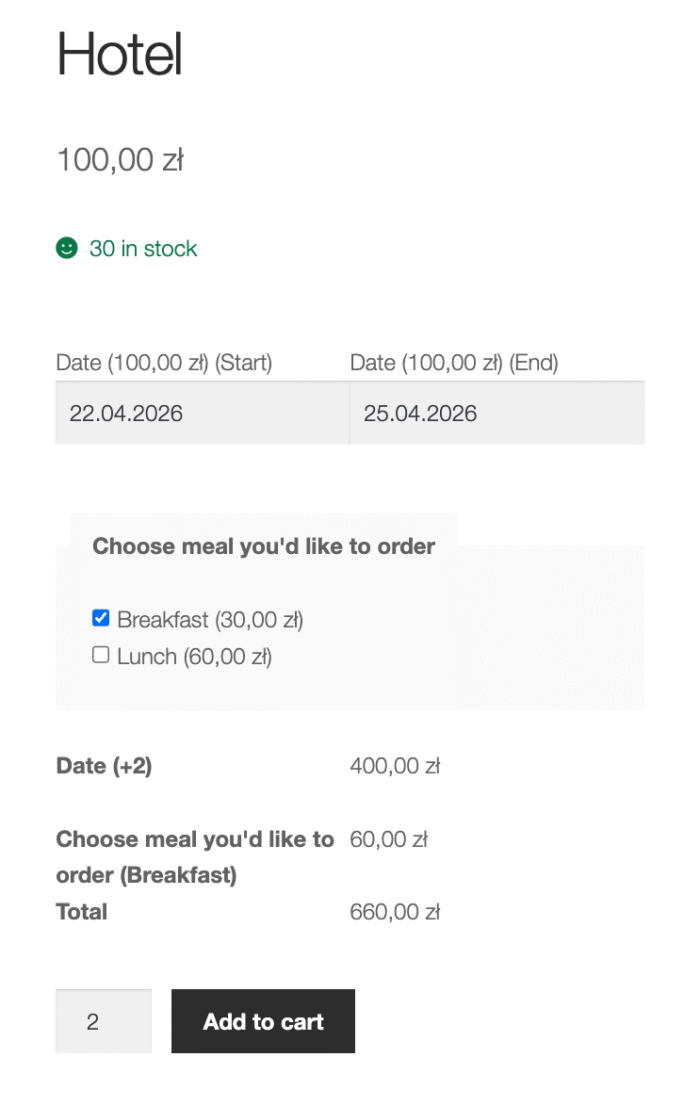
- First, the customer opens the product page and selects dates in the calendar.
- Next, the customer chooses options and extras.
- Then, the customer goes to cart and pays online.
- Finally, the customer receives confirmation with dates, service scope, and contact details.
All field data goes into the WooCommerce order. Therefore, booking handling stays organized and needs no extra systems. Also, this process supports both hotel services and other bookable products in your WooCommerce store.
Configuration examples: hotel, stay package, conference room, or cabin rental
- Hotel or guesthouse: several nights, guest count, breakfast, and parking extras. Thus, you sell hotel services in WooCommerce, not through external systems.
- Stay package or all-day product: day selection, optional start time, package variant, and extras. Therefore, you combine many offer elements in one product.
- Conference room or cabin: day or time-slot booking plus technical options or catering. So, besides stays, you also sell booking services in WooCommerce.
How to combine stay bookings with gift offers?
Date bookings work best for stays and events with fixed dates. Meanwhile, gift offers can run as a separate sales path. Therefore, use two product types:
- one product with a stay booking calendar,
- another product as a gift offer with later date selection.
This way, you sell hotel services in WooCommerce and build a gift offer redeemed later.
Best practices for selling hotel and all-day services
- clear cancellation and date-change rules,
- clear check-in and check-out times with stay conditions,
- visible contact details for reception or support,
- full order-flow testing on desktop and mobile.
Clarity and automation reduce customer questions and misunderstandings. Therefore, team work becomes easier and faster. This is the foundation of effective online hotel service sales, supported by well-configured WooCommerce.
Summary – when should you choose bookable products in WooCommerce?
For stays, packages, and all-day services, booking by specific date works best. Therefore, combine Flexible Product Fields with Flexible Product Fields – Booking. This setup enables hotel service sales without building a separate booking system. In short, this plugin duo covers calendar, options, and pricing logic.
Flexible Product Fields Add-on - Booking for WooCommerce $39
Add simple and flexible bookings to your online store — without building a separate booking system and without unnecessary configuration. Booking Calendar for WooCommerce is an add-on for the Flexible Product Fields PRO plugin that lets you sell accommodations, hourly services, and conference days using standard WooCommerce products.
Add to cart or View Details