
In the world of email marketing, finding the right balance in how many emails you send is key to achieving success. Too many emails in inbox can overwhelm your audience, leading to unsubscribes and reduced engagement. Too few, and you might miss out on valuable opportunities to connect with your customers. It's called email marketing frequency, and it can impact the effects of your email campaigns.
Sending emails regularly, for example, once a month can bring the best click and open rates. On the other hand, more emails may help getting more orders. Let's find out.
Contents
- How many emails should your business send?
- Why does email marketing frequency matter and how to manage multiple email strategy?
- Best practices for email marketing frequency
- 1. Know your audience’s preferences including number of emails
- 2. Avoid overloading your subscribers starting with welcome emails
- 3. Segment your professional email list
- 4. Monitor and adjust based on performance and spam risk
- 5. Experiment with email timing (also for cold email campaigns)
- 6. Use specific types of email accounts for different purposes
- Types of marketing emails you should send
- The best time to send many marketing emails
- Summary: how to get the email marketing frequency right
- WordPress email marketing automation (free plugin guide)
- Configure your WordPress email settings & Complete guide to sending email
- Fixing WordPress Emails Going to Spam (in 5 steps)
- WooCommerce Emails - step by step configuration
- How to fix the WordPress not sending email issue: 2 steps
How many emails should your business send?
So, how many marketing emails should you send? In this post, we’ll walk you through the best practices for email frequency and offer tips for getting the most out of your email marketing strategy.
Why does email marketing frequency matter and how to manage multiple email strategy?
When it comes to email marketing, frequency plays a critical role.
Sending too many emails can annoy your subscribers, while sending too few can lead to disengagement. Understanding the ideal frequency is essential for maintaining high open rates and keeping your audience engaged.
How can business email frequency impact open rates?
Frequency can directly affect your open rates. If you send too many emails, your audience may start ignoring them, which leads to a drop in engagement. On the other hand, if you send too few emails, your subscribers may forget about your brand, and your emails may get lost in their inboxes.
How often should you send marketing emails?
The ideal frequency for your emails depends on your business, audience, and goals. For instance, e-commerce businesses might send daily emails to promote sales, while other businesses might find a weekly or bi-weekly email cadence more effective. Testing and analyzing your results will help you find the best approach for your brand.
So, how many emails to send?
Fewer emails may be better. A lot of information about the email marketing frequency you may find in this article.
However, the key point is that emails should be good, personal. It's a nice move to let users decide on the frequency of emails they receive.
You can test more emails to find out what are the results for 100 mails sent:
- open rate
- open a link(s) in the email
- reply rate
- conversions and orders from email campaigns
- unsubscribe rate
- social share
- support tickets
- customer engagement
You may apply the metrics above for testing email content, title, etc.
Best practices for email marketing frequency
1. Know your audience’s preferences including number of emails
The key to effective email marketing is understanding your audience’s preferences. Some subscribers appreciate frequent updates, while others may find too many emails overwhelming.
To determine the right frequency, consider sending out a survey or using A/B testing to see what works best for your list.
That includes not only subject lines but also email content that can influence email open rates.
You can check the effects with tools from your email service providers that send emails. Of course, you can also track separate email success rate:
- emails a day that give the best results
- primary email template/ content winner
- automated email flow that gives the best CTR
- emails you should be sending and avoiding
- strategy for a tone of voice and personalized emails
2. Avoid overloading your subscribers starting with welcome emails
Sending too many emails can backfire. Research shows that if you send too many emails, subscribers are more likely to unsubscribe or mark your emails as spam. Aim for a frequency that is manageable for your subscribers and ensures they remain engaged with your content.
Let users decide how often they want to receive newsletters or emails with new blog posts.
3. Segment your professional email list
Segmentation is one of the most effective ways to send relevant and timely emails to your subscribers. By dividing your email list into different groups based on their interests, behavior, or stage in the customer journey, you can tailor your messages and send fewer, more relevant emails.
For example, send promotional offers to active buyers and re-engagement emails to inactive users.
Add multiple email lists and send personalized email attachments depending on the user's country or level of proficiency. This can be used for some email programs with automated catalog delivery based on location.
A single email template won't work here.
4. Monitor and adjust based on performance and spam risk
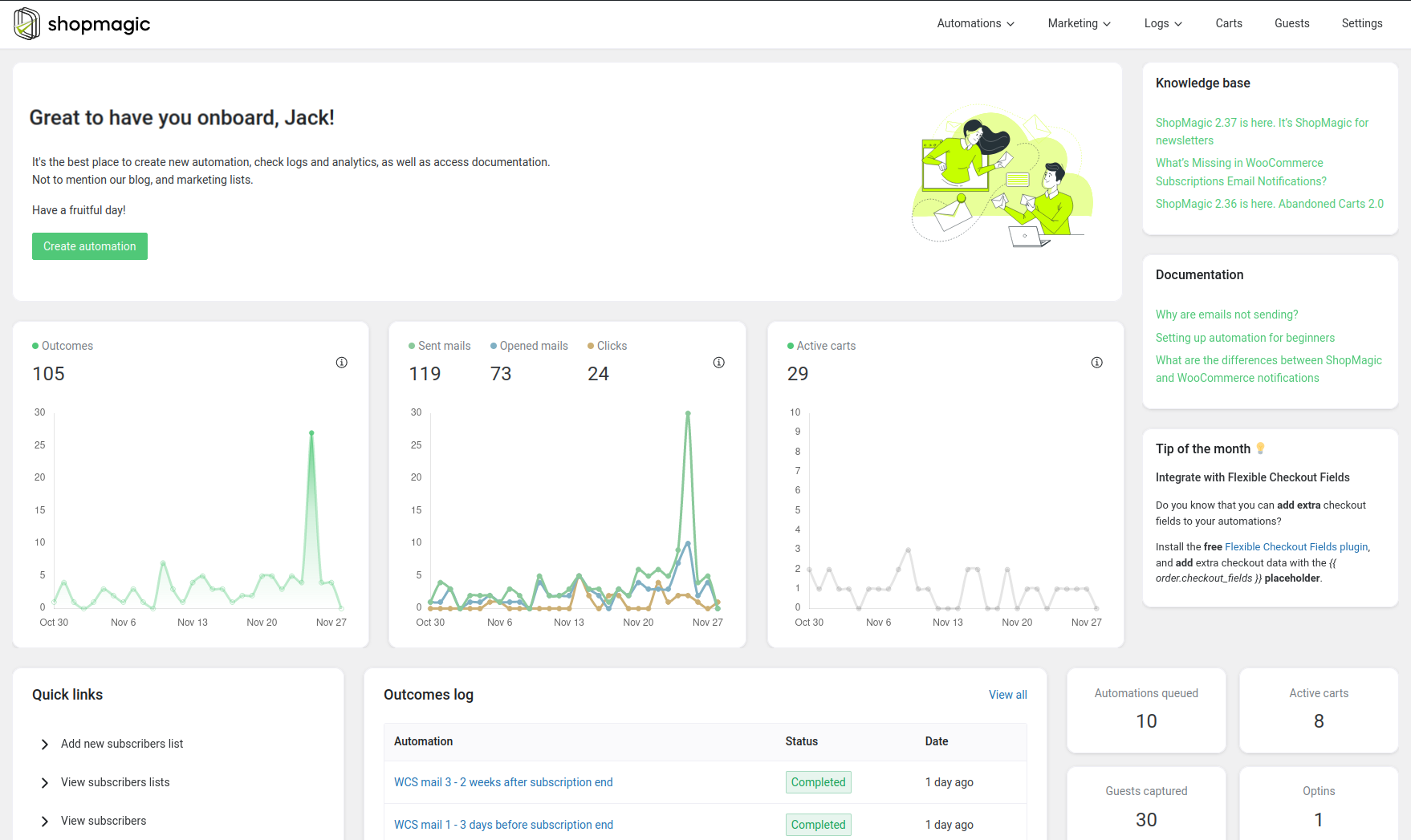
Keep track of key metrics such as open rates, click-through rates, and unsubscribe rates to assess how your email frequency is performing. If your open rates start to drop or unsubscribes increase, it may be a sign that you are sending too many emails, and you should adjust accordingly.
5. Experiment with email timing (also for cold email campaigns)
Timing plays a significant role in email marketing success. Consider experimenting with different sending times to determine when your audience is most likely to engage with your emails. For example, early mornings or late afternoons on weekdays often have higher open rates.
You should also take into consideration the time zone in email management, don't send hundreds of emails to all users globally at the same time. You can organize your emails for 4-5 regions.
6. Use specific types of email accounts for different purposes
If you plan to send many marketing messages including notifications, payment reminders, follow-up emails, or personal email campaigns, you may think if you don't need different email accounts for different tasks.
Multiple email addresses will also help understand easily the subject or the person responsible for taking care of the email.
Types of marketing emails you should send
There are many types of emails that can be part of a successful email marketing strategy. Here are some of the most common:
1. Welcome emails
A well-crafted welcome email sets the tone for future communication with your subscribers. It’s an opportunity to introduce them to your brand, outline what they can expect from your emails, and possibly offer a special discount to encourage further engagement.
2. Promotional emails
Promotional emails are sent to announce sales, new product launches, or limited-time offers. While these can be sent more frequently, it’s essential to avoid over-saturating your audience with too many promotional emails in a short period.
Newsletters help keep your audience informed about your latest content, industry updates, and product announcements. These can be sent on a regular schedule (e.g., weekly or monthly) and serve as a great way to nurture ongoing relationships with your subscribers.
4. Transactional emails
Transactional emails, such as order confirmations, shipping updates, and password resets, are crucial for providing a seamless customer experience. Although not part of your regular marketing efforts, these emails should still be sent promptly and professionally.
5. Abandoned cart emails
If a customer adds products to their cart but doesn’t complete the purchase, abandoned cart emails can help bring them back to your store. These emails typically include a reminder of the abandoned items and a call-to-action encouraging them to complete their order.
6. Re-engagement emails
Re-engagement emails are aimed at subscribers who haven’t interacted with your emails in a while. They can include special offers, product updates, or requests for feedback to help rekindle the relationship.
The best time to send many marketing emails
The timing of your emails is just as important as the frequency. Research suggests that sending emails on specific days and times can result in higher open rates.
For instance, many studies show that emails sent on Tuesday mornings have better open rates than emails sent on weekends. Testing different sending times will help you pinpoint the best time for your audience.
The negative impacts of sending too many emails
While email marketing can be highly effective, sending too many emails can have detrimental effects on your business. Here’s what can happen when you send excessive emails:
- Higher unsubscribe rates: When subscribers are bombarded with too many emails, they are more likely to unsubscribe, reducing your audience size and engagement.
- Increased spam complaints: Sending frequent emails can lead to more spam complaints, damaging your sender reputation and affecting your email deliverability.
- Email fatigue: Subscribers may start ignoring or deleting your emails if they feel overwhelmed by the volume, resulting in a decrease in open rates and overall engagement.
To avoid these issues, carefully monitor your email frequency and adjust it based on your audience’s feedback and engagement.
Summary: how to get the email marketing frequency right
Finding the right email frequency for your business is key to maintaining good email deliverability, boosting engagement, and building relationships with your audience. Here are a few key takeaways to keep in mind:
- Avoid sending too many emails that overwhelm your subscribers.
- Segment your email list to send relevant emails based on interests and preferences.
- Test different email frequencies and adjust based on performance metrics.
- Monitor your open rates, click-through rates, and unsubscribes to track the effectiveness of your email campaigns.
- Experiment with timing to find the best time for your audience to engage with your emails.
By following these best practices and regularly analyzing your results, you can refine your email marketing strategy and maximize your ROI.


Leave a Reply