• Skip to primary navigation
  • Skip to main content
  • Skip to primary sidebar
  • Skip to footer
WP Desk = premium plugins for WordPress & WooCommerce
  • Plugins
        • Checkout & OrdersMake your work easier and automate the orders. Adjust the order form to your needs and make it more useful to your customers. Print order labels directly from WooCommerce. Put the orders in order using our plugins. Find out how to streamline the procurement process in your store.
          • Flexible Checkout Fields
          • Active Payments
          • Automatic Payment Status
          • Flexible Refund and Return Order
          • Print Orders and Address Labels
          • Flexible Subscriptions Recurring Shipping
          • Flexible Subscriptions Payment Retry
          • Flexible Subscriptions Stock Management
        • ProductsThese plugins will help you manage your WooCommerce products. Here you will find the plugins to import and update products from XML or CSV files. Then you can change the product unit of measure, show the lowest price in the last 30 days (Omnibus Directive), or let customers name the product price!
          • Flexible Product Fields
          • Dropshipping Import Products
          • Dropshipping FTP Import Products
          • Dropshipping Export Products
          • Custom Price
          • WP Desk Omnibus
          • Flexible Quantity Calculator
          • Dropshipping Orders Export
        • MarketingPromote your store online. Add products from your shop to price comparison websites directly from WooCommerce. Acquire new customers and communicate with your existing ones. Build a customer base and communicate with clients using one of the most effective marketing tools, namely e-mail marketing. Check out our promotional tools!
          • Flexible Pricing
          • Flexible Wishlist - Analytics & Emails
          • OLX WooCommerce
          • Flexible PDF Coupons
          • ShopMagic
          • Flexible Invoices
  • Bundle🔥
  • WP Desk Care
  • Support
  • Blog
  • My Account
  • 0

More results

Advanced order export for WooCommerce. Is that even possible?

Plugin Tutorials, Print & export orders in WooCommerce

Dorota Ingielewicz4 minutes readUpdated: 2024-03-14Updated: 2026-06-18
blog category heading image

The short answer to the question is: YES🚀!

Jumping into the ever-changing WooCommerce scene, finding ways to smooth out your workflow is key. That's where diving into cool tools like advanced order export plugins comes in handy. Among the sea of options, Dropshipping Orders Export for WooCommerce really shines. It's not just another tool – it's like having a secret weapon. Thanks to its smart conditional logic feature, it's a game changer for managing your e-commerce orders. 

Contents

  • Advanced order export for WooCommerce with a plugin
  • Dropshipping Orders Export for WooCommerce
  • The Brilliance of Conditional Logic
    • Scenario 1: Specific time and products from a particular category
    • Scenario 2: Sending the exported file by email
    • Scenario 3: Advanced export of orders with a specific status and currency
  • Wrapping Up
    • Related Articles
  • How to export orders from WooCommerce to CSV, XML, JSON, or Excel?
  • Export products from WooCommerce in 4 steps
  • How to export WooCommerce products to CSV file (the easy way)
  • All you need to know about WooCommerce product export import
  • How to export WooCommerce products to Excel?

Advanced order export for WooCommerce with a plugin

Let's get this straight without beating around the bush: advanced order export for WooCommerce is only possible with a plugin.

⛔ By default, WooCommerce does not give you such a solution. Yes, you can export orders from WooCommerce by default, but this is a very limited option and has nothing to do with the word "advanced".

But what if you only want to export orders that meet the conditions you specify? In such cases, the Advanced Order Export plugin will come to your aid 🆘.

Dropshipping Orders Export for WooCommerce

If this is your first time encountering this plugin, have a look at the highlights of the plugin:

Pros of this plugin in a nutshell:

  • Exports orders from WooCommerce to CSV, XML or JSON files 📁.
  • Advanced conditional logic 🧩 - Export only those orders that meet the conditions you specify.
  • Cron scheduler ⏱️- Schedule automatic synchronization and the plugin will do all the work for you. Meanwhile, you can calmly watch your store's sales grow 🤩.
  • Send exported file by email 📧 - Email generated files straight to wholesalers you cooperate with.
  • Manage the export template 🖌️ - Sort the columns and rename them to customize the shape of the file according to the requirements of the wholesaler.
  • It's easy, it's fast, it's lightweight!

You can purchase the plugin by clicking on the link below:

The Brilliance of Conditional Logic

Imagine conditional logic as that smart kid from high school who always had the right answers. Now, picture that intellect dedicated to managing your orders with unmatched precision. Dropshipping Orders Export for WooCommerce plugin’s conditional logic is undoubtedly something that definitely sets it apart from the competition. With it, you will successfully perform advanced order export for WooCommerce without much effort. It also  empowers you to establish particular criteria for the export of your orders, transforming what could be a disorderly process into a model of efficiency. But what does this look like in action?

Let's explore three real-world scenarios where conditional logic proves its worth.

Scenario 1: Specific time and products from a particular category

There are hundreds of orders in your WooCommerce store. However, your needs are strict and you want to export orders only from a certain time period (let's say, February 2024). Plus, you don't want to export all orders from that month, but only those with products from the Clothing category. In addition, you want the plugin to export these orders every week, every Wednesday at 12:00 p.m. Add to that, the exported file should be called Clothing File.

🤔 How do you do this?

⚠️ Our starting point is when you already have the Dropshipping Orders Export for WooCommerce installed and activated on your WooCommerce store.

In the menu on the left, click Export orders:
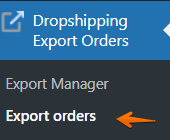
Dropshipping Export Orders in the menu

You will be shown the following screen, where you select the type of file you want to export. Choose between CSV, XML or JSON. 

I choose XML:
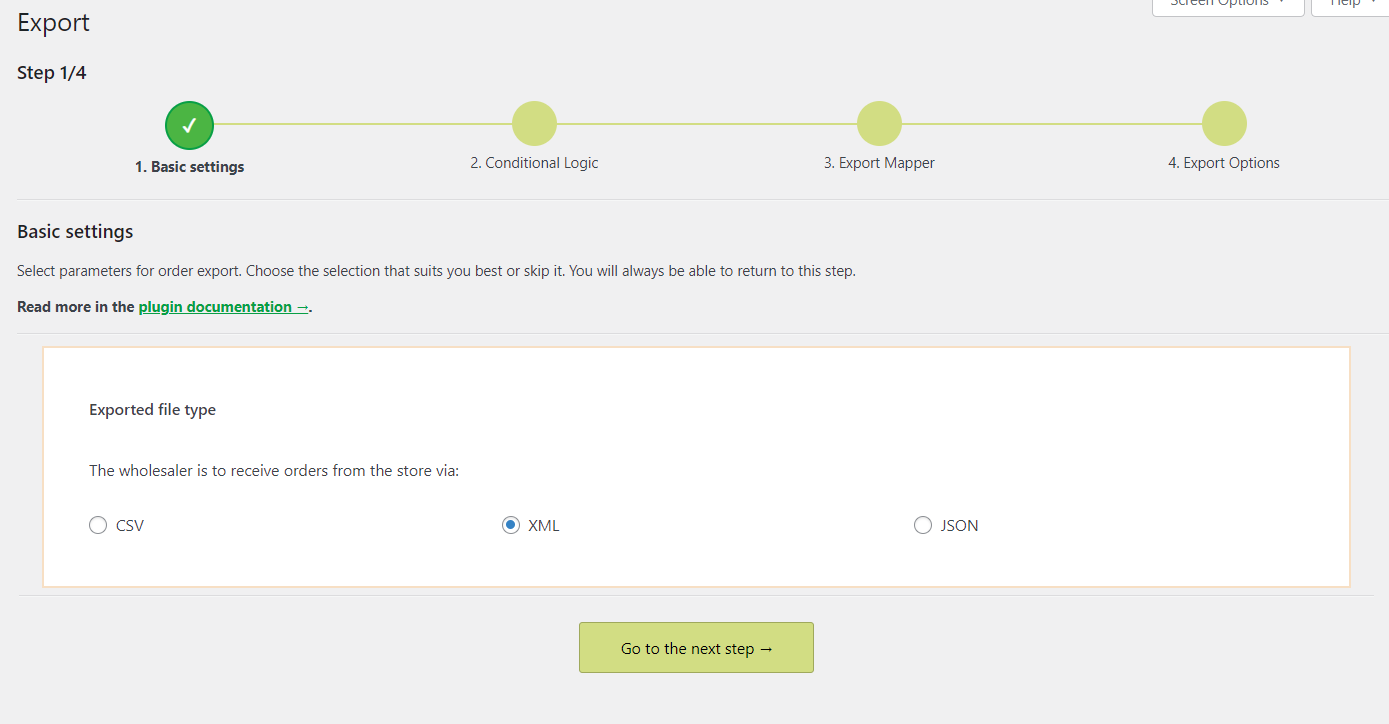
advanced order export for WooCommerce
Choose the exported file type

Now the most interesting step, we choose the conditions to export, that is, we test the conditional logic.
As I mentioned above, we want to export orders from the month of February 2024, and these are to be only those orders that contain products from the Clothing category.

See how I set up the conditions:
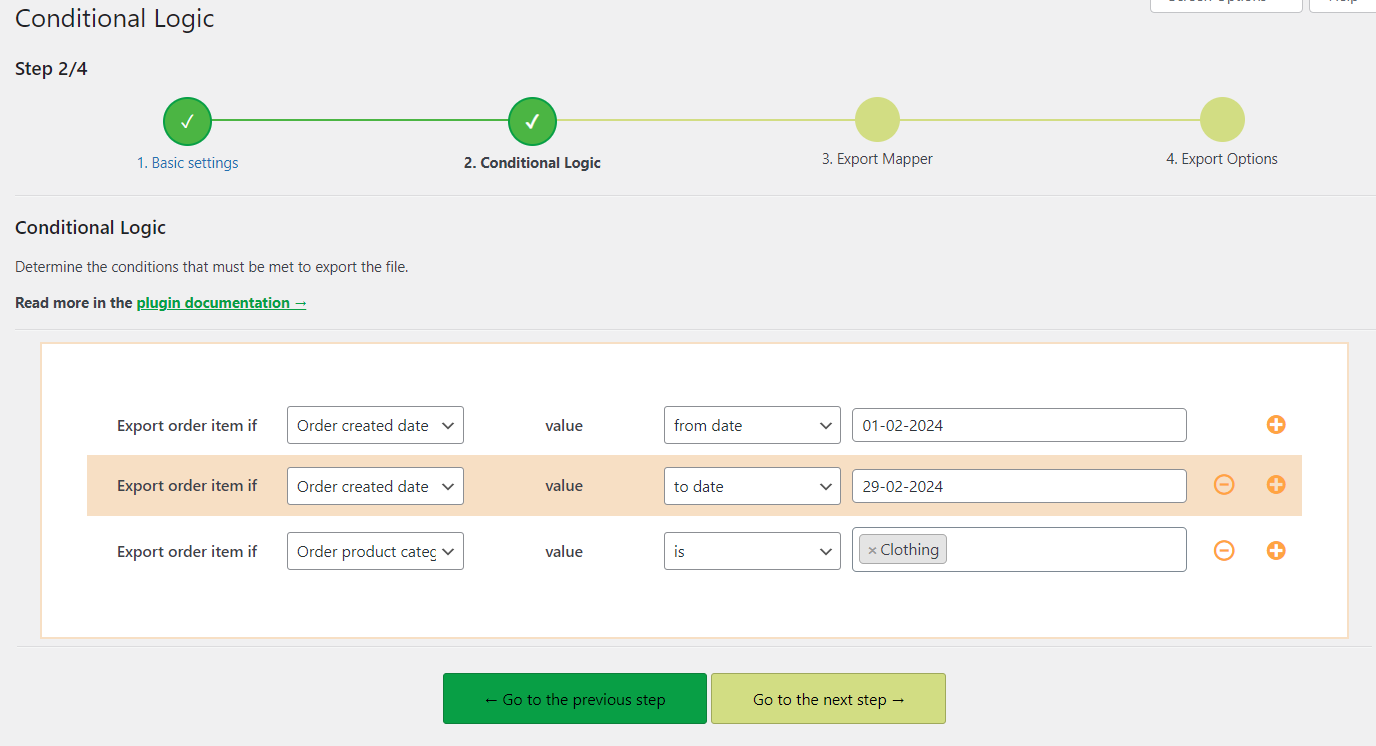
advanced order export plugin for WooCommerce
Setting the conditions in the 2/4 step

Order mapper - choosing order fields for our target file

The third step is the order mapper. Here, you can perform the advanced order export by allowing us to select the fields we want to be included in our exported target file. You have a whole lot of fields to choose from. In my scenario, however, I will only select a few of them. I select the following fields to be included in my target file: Order number, Order item ID, Order item name, Order item quantity, Order item price total, Order date created, Order date modified, Order date paid, Order date completed. 
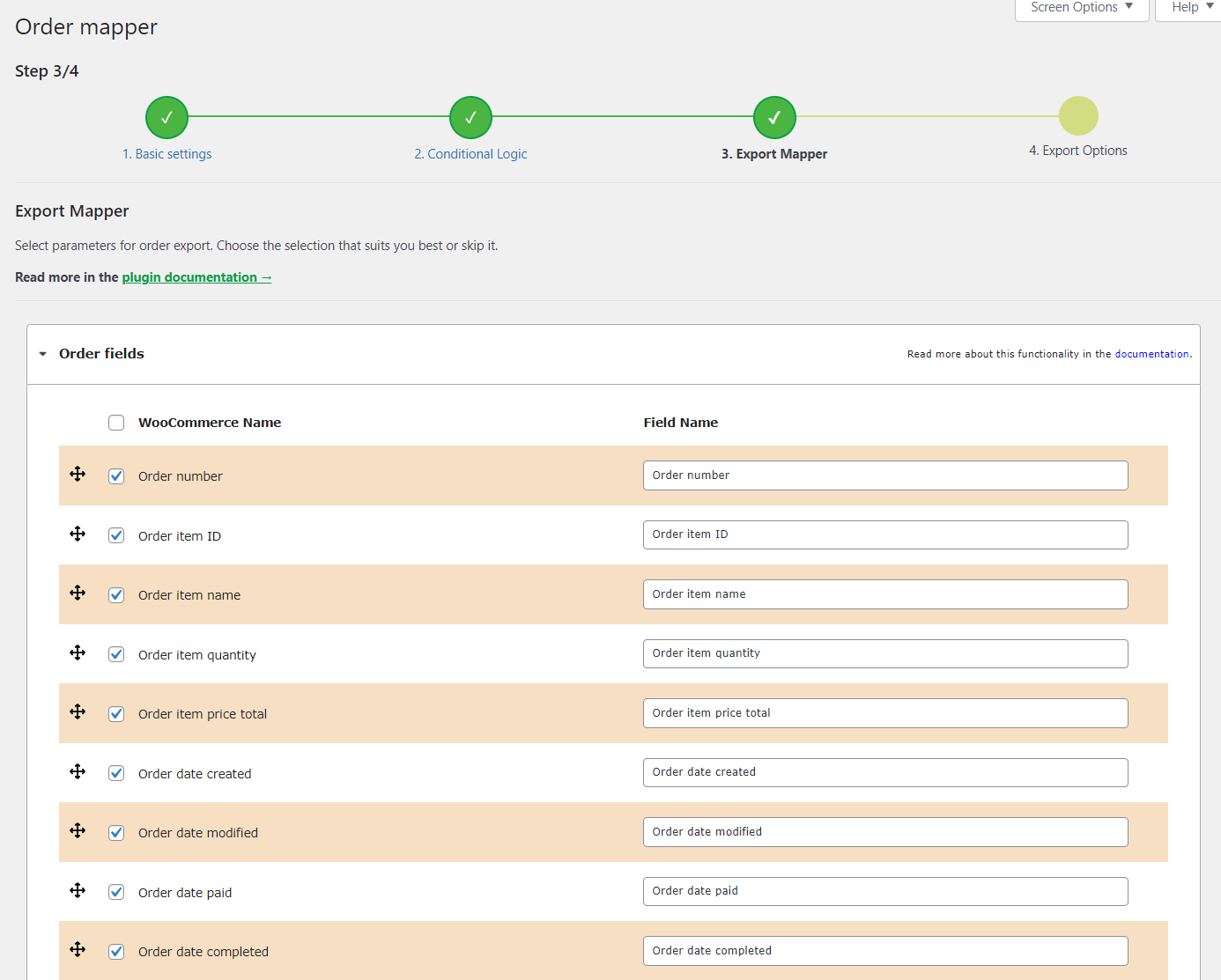
The plugin gives you the ability to change the order in which the fields appear in the target form. You can also change the default field title to one that suits your needs better.
Order mapper: Choose only the fields you want to include in the target file

Ok, now we move on to meet the last conditions of our exported file, namely setting up cron and the name of our file.

These settings are found in the last step of the exported file settings.
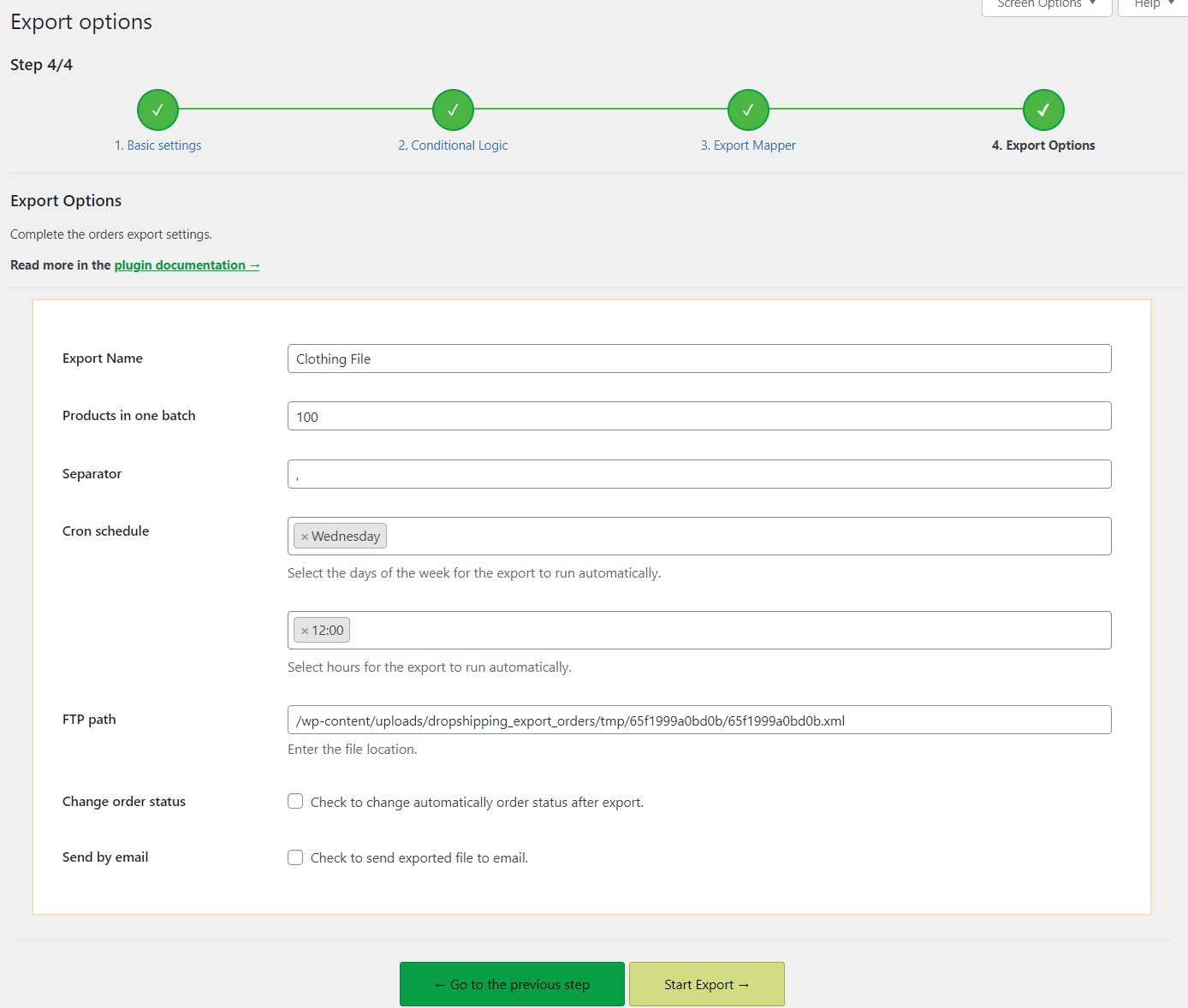
Export file name and cron schedule

When we go to the next step, we will see our exported file with orders that contain products only from the Clothing category and those that were placed in the month of February 2024. To download the file, click the green Go to your File button at the bottom of the page and that's it!
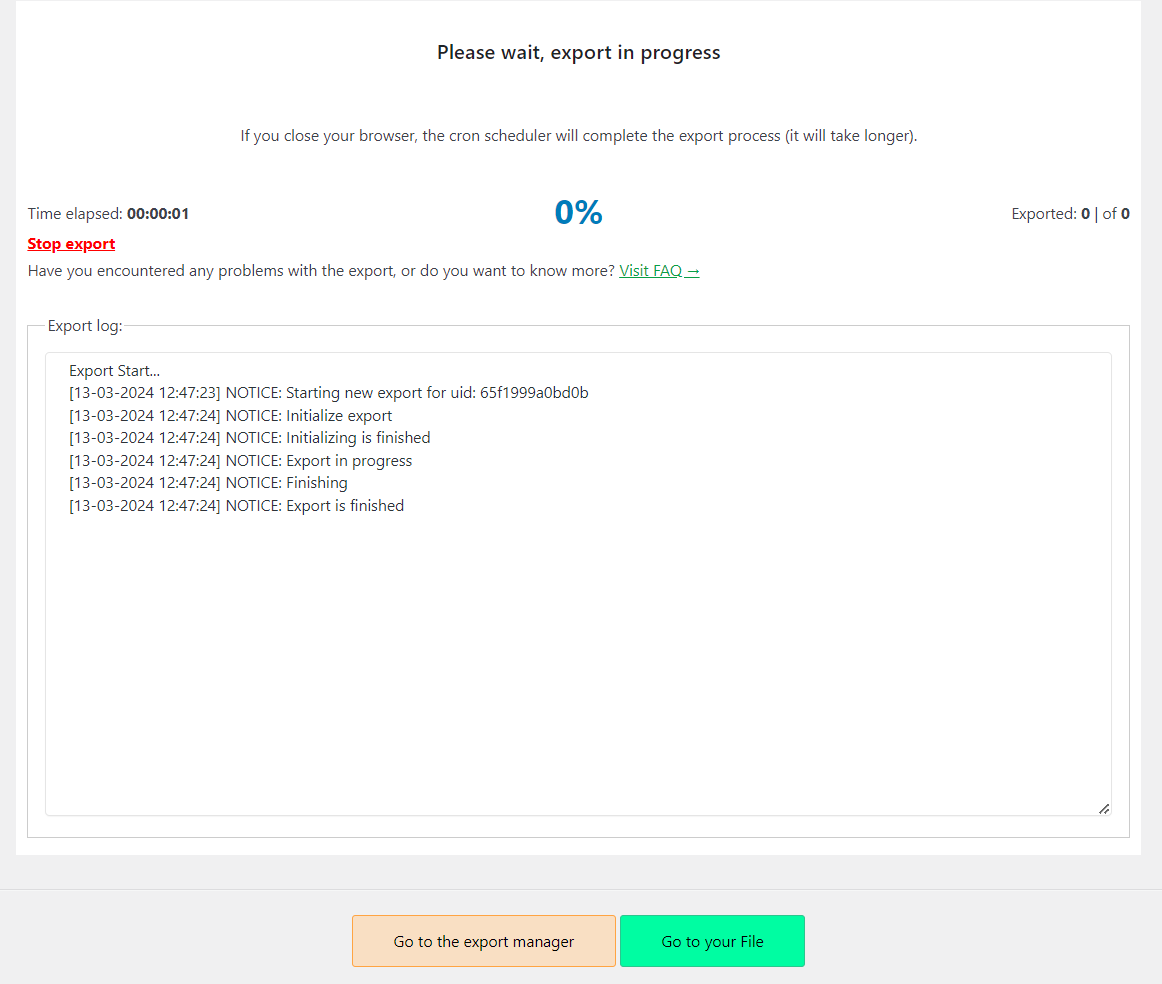
Export in progress. Download your file

Scenario 2: Sending the exported file by email

In this scenario, in addition to the above mentioned guidelines, let's imagine that we want to send the generated and exported file by email. Is such an advanced export order export also possible using the Dropshipping Export Orders plugin for WooCommerce?

Let's find out 😉
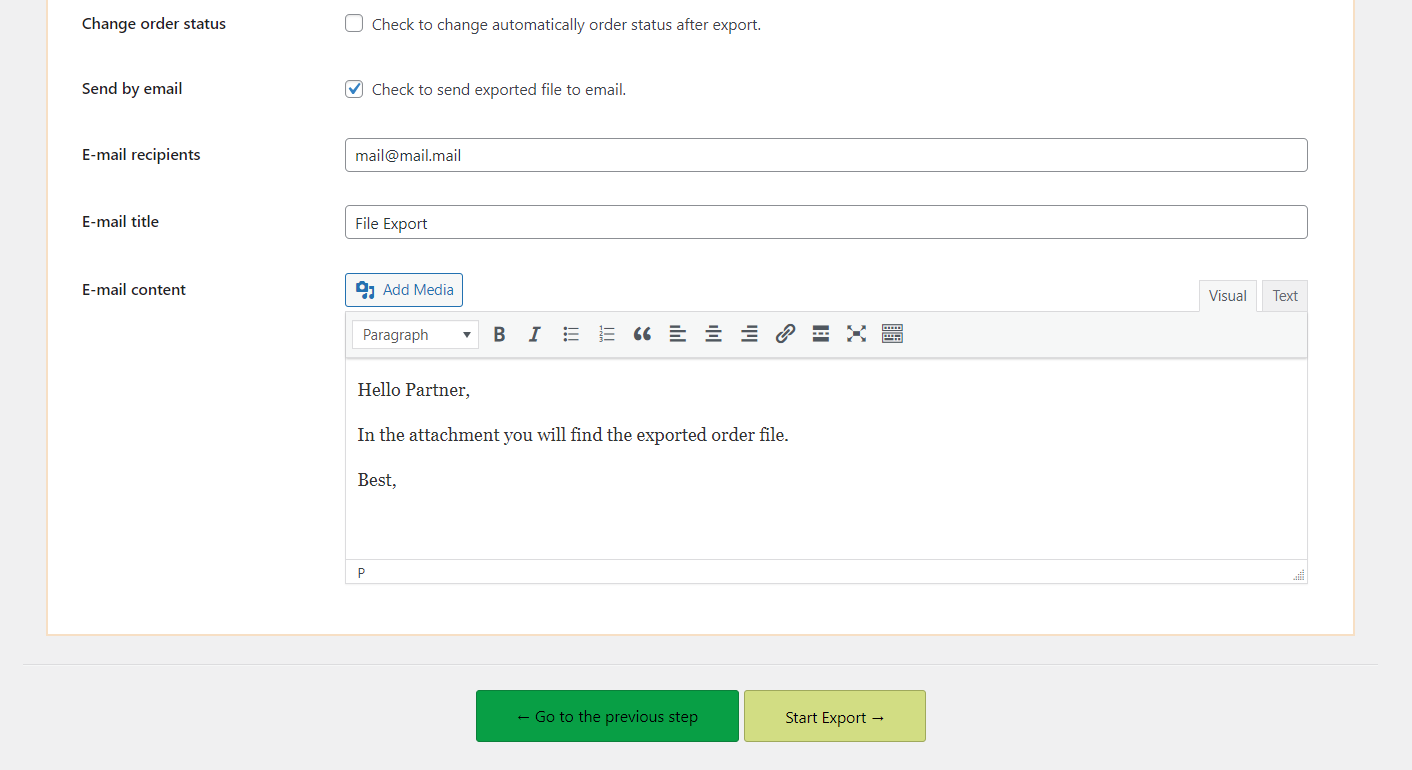
We will not go through all the steps again one by one. I'll reveal to you that advanced order export for WooCommerce by email is possible to set up in step 4/4 of export 😉

Advanced order export for WooCommerce: sending the exported file by email

After sending the email, you will see an envelope sign in the Export Manager tab, which indicates that the file has been sent by email:
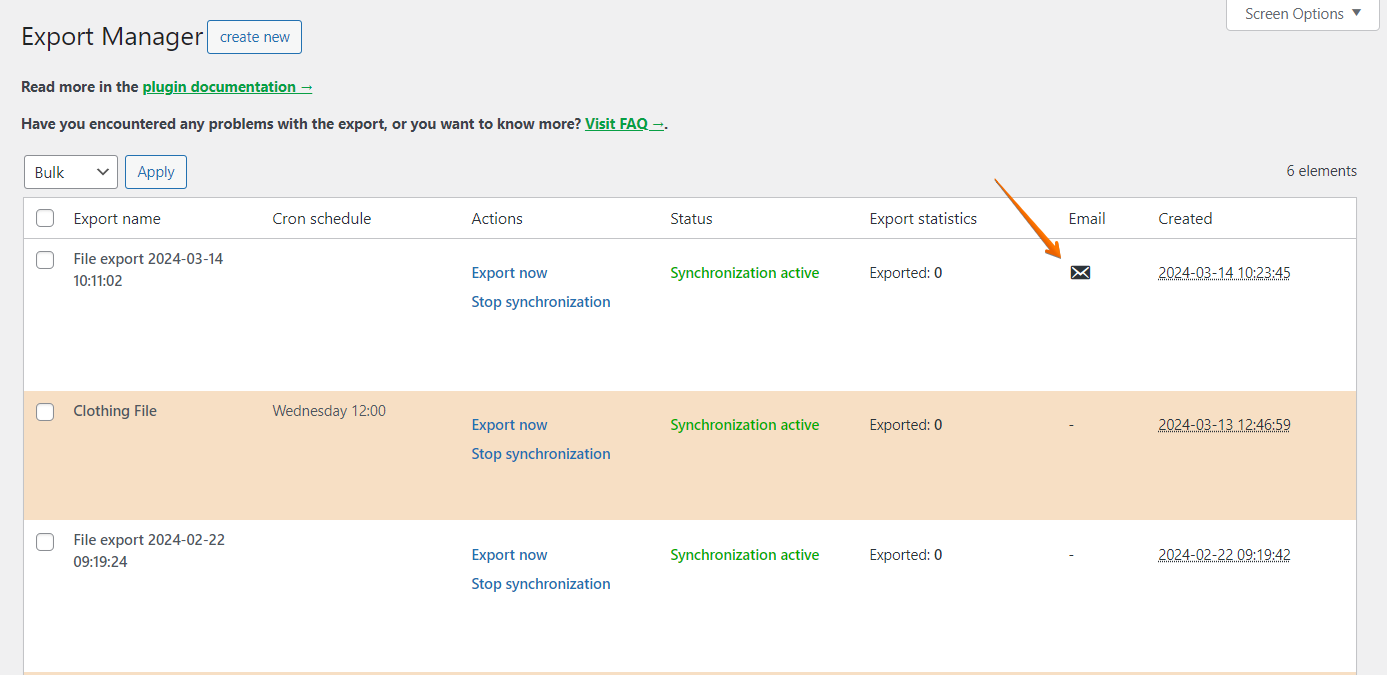
The e-mail has been sent

Scenario 3: Advanced export of orders with a specific status and currency

In this scenario, we envision a situation where we want to export only orders with a certain order status (all order statuses except Completed) and those where the payment currency was the Pound Sterling.
This scenario can be met in Step 2: Conditional Logic.

To meet this scenario, I set the following conditions:
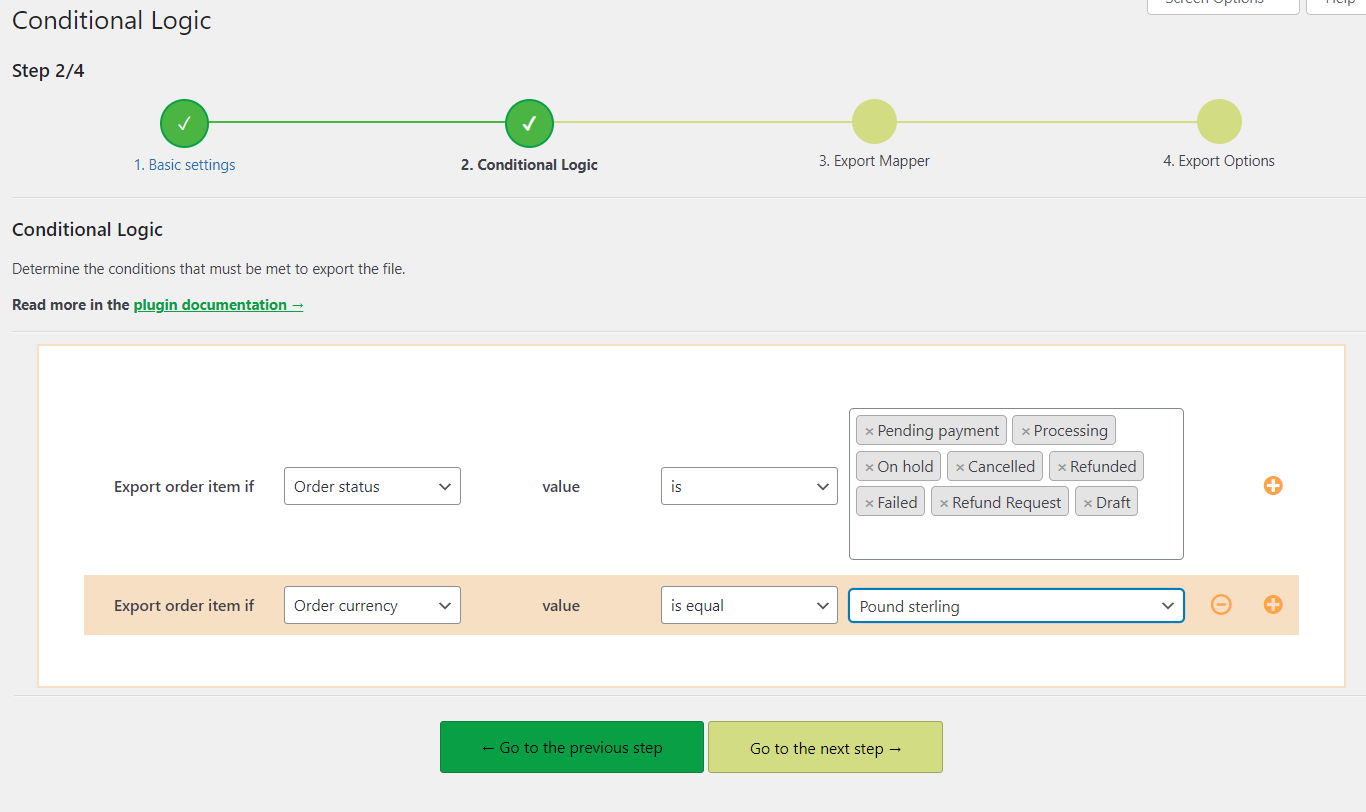
Conditional Logic: Order status and currency

The rest of the steps needed for this advanced order export for WooCommerce follow the same steps I showed you in the earlier examples.

💡 You may also read how to print an order and address label in WooCommerce.

Wrapping Up

In the huge world of WooCommerce plugins, Dropshipping Orders Export for WooCommerce really pops. It's not just about the loads of features it's got, but also how it uses smart rules to make sending out orders way easier. This plugin makes everything run smoother and faster. In the WooCommerce universe, that's not just cool; it's a total game-changer.

Once again, I encourage you to give this plugin a try. You can find the link to it by clicking on the box below.


See how Sandra automates sales analysis → Meet Sandra AI

Related Articles

How to export WooCommerce orders to CSV (Excel), XML, JSON

How to export orders from WooCommerce to CSV, XML, JSON, or Excel?

There are numerous reasons why you need to export orders in WooCommerce. Sending orders to an external warehouse/ shipping company, bulk updating orde...
Product export from WooCommerce

Export products from WooCommerce in 4 steps

There are many situations in which WooCommerce requires exporting products. Your store needs a backup, you have to adjust the prices of all your produ...
WooCommerce export products CSV

How to export WooCommerce products to CSV file (the easy way)

There are multiple situations where exporting WooCommerce products may be useful or even required. For example, if you decide to migrate your WooComme...
Product import export plugin for WooCommerce

All you need to know about WooCommerce product export import

Are you running a WooCommerce store and tired of manually transferring your products from one store to another? Nobody has time for that, after all! L...
Export WooCommerce products to Excel

How to export WooCommerce products to Excel?

You may need to export or import products to WooCommerce when migrating to or from another store or CMS. Today, I will show you how to export WooComme...

4 minutes read5262 views

Dorota Ingielewicz

...

Powered by WP Desk

WP Desk brings you great WooCommerce plugins. We strive to save your time and money by speeding up your processes. Use our plugins to build a better store. Awesome support included in the package.

Premium WooCommerce Plugins →
WP Desk › Blog › WooCommerce checkout & orders › Print & export orders in WooCommerce › Advanced order export for WooCommerce. Is that even possible?

Primary Sidebar

Contents

  • Advanced order export for WooCommerce with a plugin
  • Dropshipping Orders Export for WooCommerce
  • The Brilliance of Conditional Logic
    • Scenario 1: Specific time and products from a particular category
    • Scenario 2: Sending the exported file by email
    • Scenario 3: Advanced export of orders with a specific status and currency
  • Wrapping Up

Dropshipping Orders Export for WooCommerce $79

Export orders from WooCommerce to CSV, XML or JSON files in an easy way. With Dropshipping Export Orders for WooCommerce, it's child's play!

💾 Active Installations: 1000+ | 🔄 Last update: 2026-07-06

Add to cart or View Details
WP Desk
Plugins used by 239,857+ shops
Last Updated: 2026-07-06
Works with WooCommerce 10.6 - 10.9

Stay updated on our how-to articles

WP Desk news, WooCommerce tips, promo codes - right to your inbox.

By entering your e-mail, you agree to our Terms & Conditions and Privacy Policy.

By entering your e-mail, you agree to our Terms & Conditions and Privacy Policy.

Footer

WP Desk - WooCommerce Plugins

At WP Desk we create great WooCommerce plugins with awesome support. Save time and money with our e-commerce solutions. See how we can help you improve your e-store →

Secured by Comodo

WP Desk

  • About us
  • Giving Back
  • Blog
  • Get Support
  • Contact us

Products

  • Premium Plugins
  • WP Desk Care
  • Documentation
  • WooCommerce Invoices
  • Email Marketing
  • PDF Coupons

Legal

  • Terms & Conditions
  • Refund Policy
  • Support Policy
  • Privacy Policy

© 2026 WP Desk

We value your privacy

We use necessary cookies to make our site work. We'd also like to set additional cookies to understand site usage, enhance your browsing experience, and serve personalized ads or content. By clicking ‘Accept All,’ you consent to our use of additional cookies.

Functional Always active
The technical storage or access is strictly necessary for the legitimate purpose of enabling the use of a specific service explicitly requested by the subscriber or user, or for the sole purpose of carrying out the transmission of a communication over an electronic communications network.
Preferences
The technical storage or access is necessary for the legitimate purpose of storing preferences that are not requested by the subscriber or user.
Statistics
The technical storage or access that is used exclusively for anonymous statistical purposes. Without a subpoena, voluntary compliance on the part of your Internet Service Provider, or additional records from a third party, information stored or retrieved for this purpose alone cannot usually be used to identify you. The technical storage or access that is used exclusively for anonymous statistical purposes. Without a subpoena, voluntary compliance on the part of your Internet Service Provider, or additional records from a third party, information stored or retrieved for this purpose alone cannot usually be used to identify you.
Marketing
The technical storage or access is required to create user profiles to send advertising, or to track the user on a website or across several websites for similar marketing purposes.
  • Manage options
  • Manage services
  • Manage {vendor_count} vendors
  • Read more about these purposes
View preferences
  • {title}
  • {title}
  • {title}