• Skip to primary navigation
  • Skip to main content
  • Skip to primary sidebar
  • Skip to footer
WP Desk = premium plugins for WordPress & WooCommerce
  • Plugins
        • Checkout & OrdersMake your work easier and automate the orders. Adjust the order form to your needs and make it more useful to your customers. Print order labels directly from WooCommerce. Put the orders in order using our plugins. Find out how to streamline the procurement process in your store.
          • Flexible Checkout Fields
          • Active Payments
          • Automatic Payment Status
          • Flexible Refund and Return Order
          • Print Orders and Address Labels
          • Flexible Subscriptions Recurring Shipping
          • Flexible Subscriptions Payment Retry
          • Flexible Subscriptions Stock Management
        • ProductsThese plugins will help you manage your WooCommerce products. Here you will find the plugins to import and update products from XML or CSV files. Then you can change the product unit of measure, show the lowest price in the last 30 days (Omnibus Directive), or let customers name the product price!
          • Flexible Product Fields
          • Dropshipping Import Products
          • Dropshipping FTP Import Products
          • Dropshipping Export Products
          • Custom Price
          • WP Desk Omnibus
          • Flexible Quantity Calculator
          • Dropshipping Orders Export
        • MarketingPromote your store online. Add products from your shop to price comparison websites directly from WooCommerce. Acquire new customers and communicate with your existing ones. Build a customer base and communicate with clients using one of the most effective marketing tools, namely e-mail marketing. Check out our promotional tools!
          • Flexible Pricing
          • Flexible Wishlist - Analytics & Emails
          • OLX WooCommerce
          • Flexible PDF Coupons
          • ShopMagic
          • Flexible Invoices
  • Bundle🔥
  • WP Desk Care
  • Support
  • Blog
  • My Account
  • 0

More results

Active Payments & WPML support

Plugin Updates, WooCommerce payments & shipping

Tomasz Bednarek2 minutes readUpdated: 2020-04-21Updated: 2025-08-20

From version 3.6.1, the WooCommerce Active Payments plugin is compatible with WPML. Today you will learn how to add a translation of fee titles for such conditional payments with WPML in WooCommerce. I invite you to the article!

WPML support Active Payments WooCommerce

Contents

  • Conditional payments fee with WPML translations
    • How to add fee translations for payment methods in WooCommerce
    • WPML support for fee titles in Active Payments WooCommerce
    • Active Payments = payment methods for shipping methods
    • Conditional payments with WPML support
    • Active Payments WooCommerce £59
    • Related Articles
  • Add payment fees in WooCommerce with Active Payments flexible options!
  • WooCommerce Conditional Shipping and Payments - Complete Tutorial
  • Sorry, it seems that there are no available payment methods ...
  • WooCommerce order status control
  • Take Control of WooCommerce Edit Checkout Fields Using Smart Conditional Logic

Conditional payments fee with WPML translations

The well-known WPML plugin allows you to display the page in different languages. Thanks to translations, you can present your company and shop for the whole world. Also, you can reach potential customers abroad with your offer easier. Of course, adding language versions will help you be more effective in the international market.

How to add fee translations for payment methods in WooCommerce

First, add fees for selected payment gateways with a title that will appear in the WooCommerce checkout:

Active Payments fee titles

Read more about all functionalities of the Active Payments WooCommerce plugin.

Then take advantage of WPML support for the WooCommerce Active Payments plugin. From version 3.6.1 you can add a translation for fee titles for conditional payments with WPML with ease. Use the WPML String Translation functionality to achieve this:

String Translation of Fee Titles for Active Payments WooCommerce

WPML support for fee titles in Active Payments WooCommerce

So as you can see, you may add fee titles for several different languages at the same time. The customer will see such a translated title for a given language in the order summary. Of course, after selecting the preferred payment method for which such fee has been set:
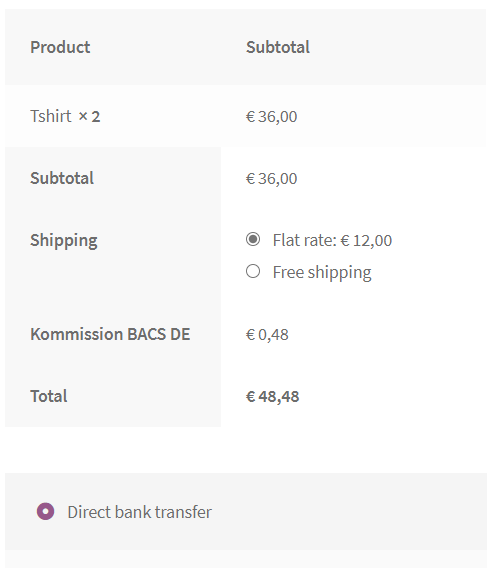
Fee titles for Active Payments in WooCommerce checkout

Active Payments = payment methods for shipping methods

Thanks to the plugin, you can display conditionally payment methods for shipping options. You can add additional shipping methods using the free Flexible Shipping plugin. More importantly, that plugin will allow you to set additional shipping costs based on weight or basket value.

Read more information about WooCommerce payments and shipping methods, and available options.

Some reviews of Active Payments WooCommerce:

Very useful plugin solving assigning payment methods to shipping options, which is unsolvable in the "bare" WooCommerce. Intuitive plugin, even a baby could set it up.
Roman Jarocki

Very good plugin. Everything works as described. Mega plus for the customer service - great contact and fast answers to all questions.
Iwona Kusion

A must-have plugin - if anyone creates an online store based on WooCommerce, there is no way to overlook this plugin. Recommended.
Radosław Libiszewski

One of the best application to configure the conditions for your payments. Very easy configuration. Completeley compatible with Flexible Shipment.
Νικόλας Σακελλαρίδης

On the other hand, please remember that you can add more payment methods too. They will be displayed in Active Payments WooCommerce settings. There you will be able to configure and specify for which shipping options a given payment method will be available. Besides, you may want to set fees for selected payment methods with appropriate titles for such fees. Then, these strings will be ready for translation in WPML String Translation.

Conditional payments with WPML support

To sum up, the WooCommerce Active Payments plugin allows you also to set fees for selected payment methods. What's more, I have shown you that the plugin had been improved and is compatible with WPML. Now, you can easily add translations for conditional payments with WPML in your WooCommerce store. I encourage you to visit the WooCommerce Active Payments plugin's product page. Discover all the possibilities of the plugin and see how you can use it to enhance your store. If you have any questions, let me know!

Active Payments WooCommerce £59

Conditionally hide upfront payment methods for cash on delivery shipping options. Add fixed or percentage fees to payment methods. Choose which payment methods will be available at checkout.

💾 Active Installations: 12000+ | 🔄 Last update: 2026-08-20

Add to cart or View Details
WP Desk
Plugins used by 239,857+ shops
Last Updated: 2026-08-20
Works with WooCommerce 10.7 - 11.1

Related Articles

Add payment fees in WooCommerce with Active Payments flexible options

Add payment fees in WooCommerce with Active Payments flexible options!

When selling online you often have to include and bear additional transactional costs. For example, provisions for WooCommerce online payments or insu...
WooCommerce Conditional Shipping and Payments

WooCommerce Conditional Shipping and Payments - Complete Tutorial

Today, you will read how to set WooCommerce shipping & payment methods. You will also see how to use conditional shipping and payments in WooCommerce ...
Sorry, it seems that there are no available payment methods

Sorry, it seems that there are no available payment methods ...

WooCommerce is an easy plugin to configure. But sometimes, you may have missed something, and you will see a warning message in WooCommerce: Sorry, it...
WooCommerce order status control

WooCommerce order status control

Choosing the conditions for the order completion is possible in the Automatic Payment Status WooCommerce plugin. Let’s have a look at the advanced Woo...
WooCommerce conditional checkout fields

Take Control of WooCommerce Edit Checkout Fields Using Smart Conditional Logic

In this guide, you'll learn how to configure conditional logic for checkout fields in your WooCommerce store. I'll guide you step by step through the ...

2 minutes read2923 views

Reader Interactions

Leave a Reply Cancel reply

Your email address will not be published. Required fields are marked *

Tomasz Bednarek

Copywriter and Marketing Specialist

Author of numerous articles and educational materials created for WP Desk and related services focused on WooCommerce plugins (Flexible Invoices, F...

Powered by WP Desk

WP Desk brings you great WooCommerce plugins. We strive to save your time and money by speeding up your processes. Use our plugins to build a better store. Awesome support included in the package.

Premium WooCommerce Plugins →
WP Desk › Blog › WooCommerce checkout & orders › WooCommerce payments & shipping › Active Payments & WPML support

Primary Sidebar

Contents

  • Conditional payments fee with WPML translations
    • How to add fee translations for payment methods in WooCommerce
    • WPML support for fee titles in Active Payments WooCommerce
    • Active Payments = payment methods for shipping methods
    • Conditional payments with WPML support
    • Active Payments WooCommerce £59

Active Payments WooCommerce £59

Conditionally hide upfront payment methods for cash on delivery shipping options. Add fixed or percentage fees to payment methods. Choose which payment methods will be available at checkout.

💾 Active Installations: 12000+ | 🔄 Last update: 2026-08-20

Add to cart or View Details
WP Desk
Plugins used by 239,857+ shops
Last Updated: 2026-08-20
Works with WooCommerce 10.7 - 11.1

Stay updated on our how-to articles

WP Desk news, WooCommerce tips, promo codes - right to your inbox.

By entering your e-mail, you agree to our Terms & Conditions and Privacy Policy.

By entering your e-mail, you agree to our Terms & Conditions and Privacy Policy.

Footer

WP Desk - WooCommerce Plugins

At WP Desk we create great WooCommerce plugins with awesome support. Save time and money with our e-commerce solutions. See how we can help you improve your e-store →

Secured by Comodo

WP Desk

  • About us
  • Giving Back
  • Blog
  • Get Support
  • Contact us

Products

  • Premium Plugins
  • WP Desk Care
  • Documentation
  • WooCommerce Invoices
  • Email Marketing
  • PDF Coupons

Legal

  • Terms & Conditions
  • Refund Policy
  • Support Policy
  • Privacy Policy

© 2026 WP Desk

We value your privacy

We use necessary cookies to make our site work. We'd also like to set additional cookies to understand site usage, enhance your browsing experience, and serve personalized ads or content. By clicking ‘Accept All,’ you consent to our use of additional cookies.

Functional Always active
The technical storage or access is strictly necessary for the legitimate purpose of enabling the use of a specific service explicitly requested by the subscriber or user, or for the sole purpose of carrying out the transmission of a communication over an electronic communications network.
Preferences
The technical storage or access is necessary for the legitimate purpose of storing preferences that are not requested by the subscriber or user.
Statistics
The technical storage or access that is used exclusively for anonymous statistical purposes. Without a subpoena, voluntary compliance on the part of your Internet Service Provider, or additional records from a third party, information stored or retrieved for this purpose alone cannot usually be used to identify you. The technical storage or access that is used exclusively for anonymous statistical purposes. Without a subpoena, voluntary compliance on the part of your Internet Service Provider, or additional records from a third party, information stored or retrieved for this purpose alone cannot usually be used to identify you.
Marketing
The technical storage or access is required to create user profiles to send advertising, or to track the user on a website or across several websites for similar marketing purposes.
  • Manage options
  • Manage services
  • Manage {vendor_count} vendors
  • Read more about these purposes
View preferences
  • {title}
  • {title}
  • {title}