EU One Click Return in WooCommerce changes how refunds and withdrawals work in online stores. Your shop needs a clear, intuitive withdrawal button in the customer account area, so buyers do not waste time searching for hidden forms. In this article, you will see how to prepare your WooCommerce store for EU Directive 2023/2673 and still keep the buying experience friendly.
Contents
- EU One Click Return in WooCommerce – main requirements
- Automating refunds in a WooCommerce store
- Solution for agencies implementing one‑click refunds
- Easy refund management for WooCommerce store administrators
- One Click Return rule WooCommerce – EU One Click Return in practice
- FAQ – EU One Click Return in WooCommerce
- How to set your WooCommerce refund and return system (with a free plugin)
- Return policy and process order refund in WooCommerce stores
- How to make a full and partial refund in WooCommerce?
- Add your own refund form in a WooCommerce store [🤫Free plugin inside]
EU One Click Return in WooCommerce – main requirements
The new rules simplify the return path and highlight the need for clear information for consumers.
The withdrawal button must be clearly labeled, visible and easy to reach from the customer interface, preferably in the orders section. A good practice is to keep the path to two steps: start the return and confirm it. The store must also confirm the withdrawal on a durable medium, for example by an automatic email with order data and return details. The requirements of EU One Click Return in WooCommerce affect all B2C stores active in the European Union, no matter how big they are.
Even a small online shop should offer a clear online return process and adjust it to EU One Click Return in WooCommerce. Plan the implementation early, so you have enough time for tests and better communication. The One Click Return rule WooCommerce plugin helps you automate many key refund steps and fits well with other extensions,.
Automating refunds in a WooCommerce store
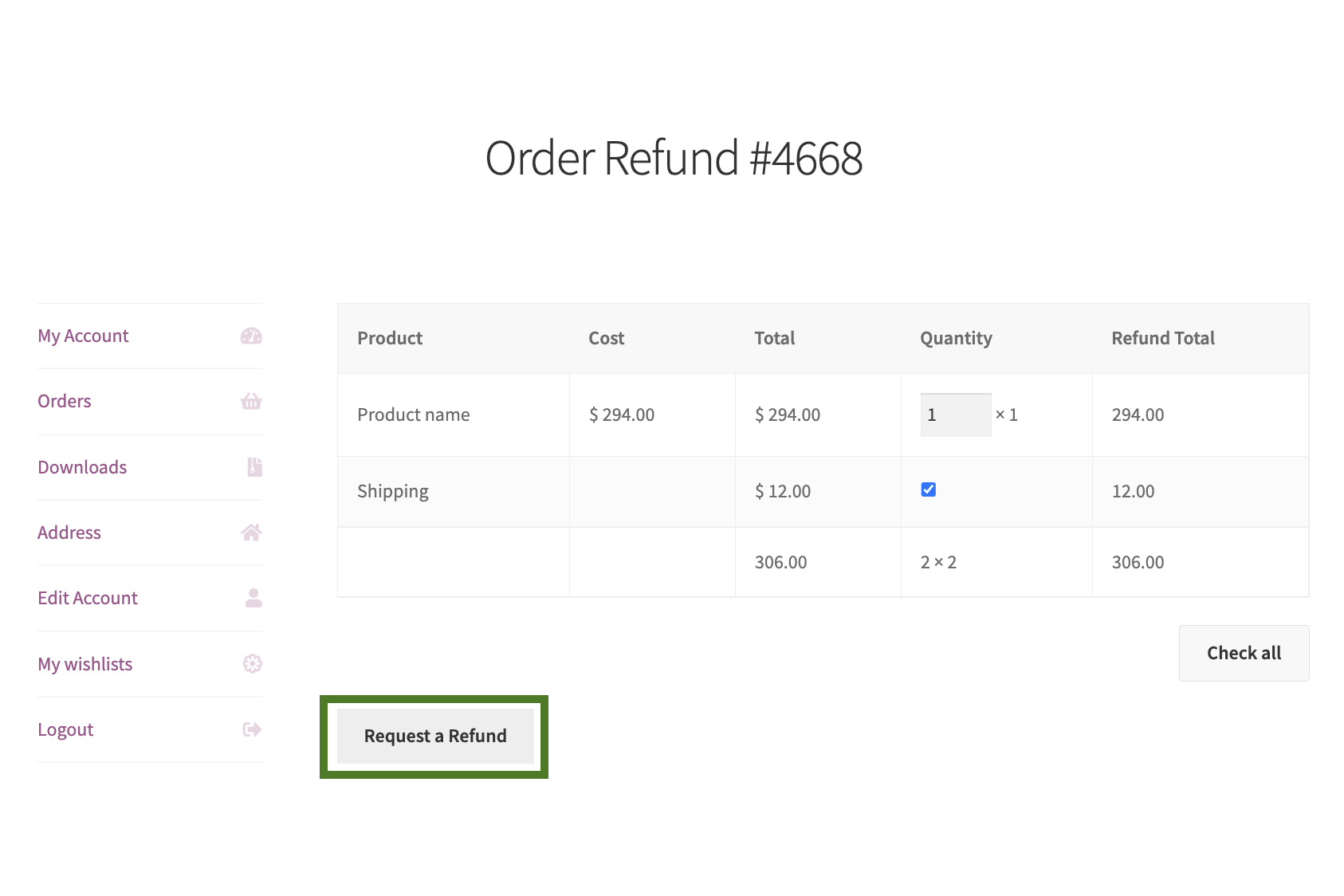
The core of the refund process in WooCommerce is usually the “My Account” section with the customer’s order list.
Here the customer should quickly find an option to cancel the purchase, without downloading PDF forms or reading long guides. A simple, user‑friendly path can look like this:
- Step 1: The customer opens the order list, chooses a specific order and clicks the refund or withdrawal button.
- Step 2: They see a short summary with the list of products, mark physical items for return and confirm the decision with one more click.
At this moment, refund automation in the WooCommerce store starts to work.
The right plugin creates the refund request, updates the order status (for example to “Awaiting return”) and sends the confirmation email required by law. The system can also tell the difference between physical and digital products and automatically exclude downloads from the standard refund path. After configuration, the process runs in the background and does not need constant manual work, so your support team can handle real customer problems instead of repeating the same tasks.
Solution for agencies implementing one‑click refunds
For agencies that build WooCommerce stores, standardization, security and repeatable setups stay crucial.
A stable One Click Return rule WooCommerce plugin is a practical solution for agencies implementing one‑click refunds, because you can reuse it across many projects. This approach saves time on custom development related to EU One Click Return in WooCommerce. You also limit technical debt, as updates and fixes arrive in one proven module instead of many custom add‑ons.
Try the plugin that supports refunds in WooCommerce to roll out modern and compliant processes in client projects faster.
Easy refund management for WooCommerce store administrators
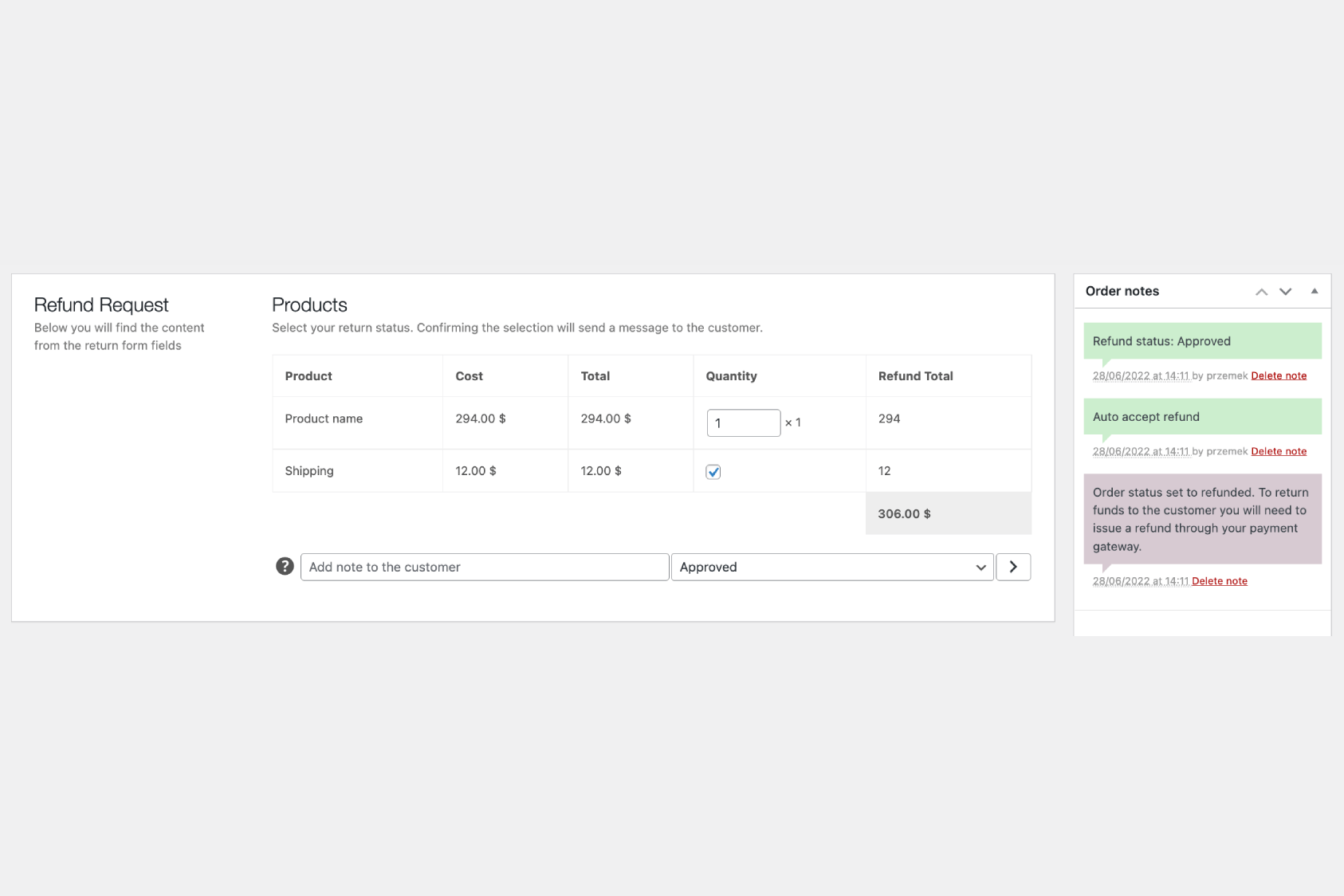
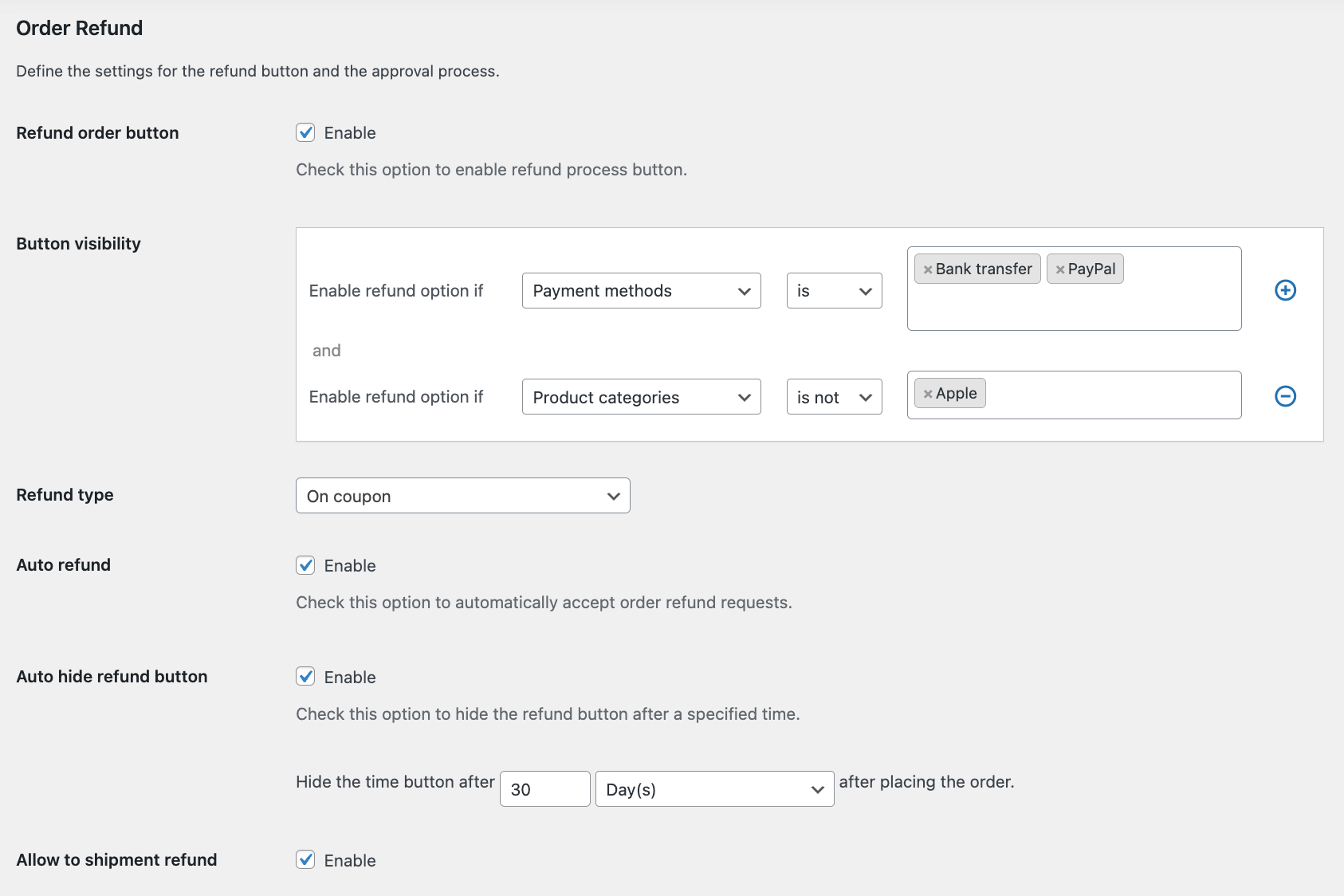
From the administrator’s point of view, refund handling can stay simple. They can turn on automatic approval and set clear rules, such as time limits, required order status or product types that fall under EU One Click Return in WooCommerce.
If you need more control, the admin can review each request from the refund list or directly on the order edit screen. They approve or reject the request in one place, and the system keeps the full decision history in order notes. After approval, integrations with gateways like Stripe, PayPal, Klarna, or Autopay WooCommerce can send the refund automatically. This makes the whole flow, from customer request to refund payout, fast and predictable, with very little manual work.
One Click Return rule WooCommerce – EU One Click Return in practice
A well‑planned post‑purchase process builds trust in your brand and can reduce disputes.
The One Click Return rule WooCommerce plugin automates refund handling, notifications and legal compliance. The interface leads customers through each step in a clear way, while the system reduces the risk of mistakes when you update order statuses. Thanks to this, you can focus on growing sales instead of tracking every refund request by hand.
Set clear rules and a simple refund process, so customers will be more willing to come back to your WooCommerce store.
Invest in an automation tool and enjoy a hands‑off, compliant process aligned with EU One Click Return in WooCommerce, even when legal requirements change.
FAQ – EU One Click Return in WooCommerce
Do the new rules apply to every WooCommerce store?
Yes, the EU rules cover all B2C stores that sell goods to consumers in the European Union. Every online seller should offer a clear and easy‑to‑find withdrawal interface. So even small shops have to adapt their processes to EU One Click Return in WooCommerce.
What is the easiest way to implement the new refund rules in WooCommerce?
The easiest way is to use dedicated extensions built for EU One Click Return in WooCommerce. From the WordPress dashboard, you can configure statuses and emails without coding or hiring developers. This will speeds up implementation and future changes.
Can I separate physical and digital products when configuring refunds?
Yes, modern WooCommerce plugins clearly separate physical and digital products. The solution analyzes your catalog and can exclude downloadable files from the standard refund process, while it shows customers which items they can return and which they cannot.