Contents
Key Plugin Features
Flexible Subscriptions One Time Payment lets you sell one-time purchase variations and subscription variations within the same variable WooCommerce product.
The add-on adds a Subscription variation checkbox to each variation in a standard variable product. When you enable it, that specific variation is treated as a Flexible Subscriptions subscription product. Other variations in the same product can remain regular one-time purchases.
The plugin reuses the subscription fields and behavior from Flexible Subscriptions, including billing schedule and trial settings. It does not add global settings. Configuration is handled directly in the product variation settings.
Compatibility & requirements
- WooCommerce is required.
- Flexible Subscriptions is required. This add-on extends the Flexible Subscriptions plugin.
- WordPress: requires at least
6.6. - WooCommerce: requires at least
10.1. - PHP: requires at least
7.4.
Make sure WooCommerce and Flexible Subscriptions are installed and active before you activate this add-on.
Installation
- Install and activate WooCommerce and Flexible Subscriptions first.
- Upload the add-on ZIP or place the plugin folder into
wp-content/plugins/and activate it in Plugins → Installed Plugins. - After activation, the add-on integrates with the product edit screen automatically — there are no extra global settings to configure.
How to enable subscription behavior per variation
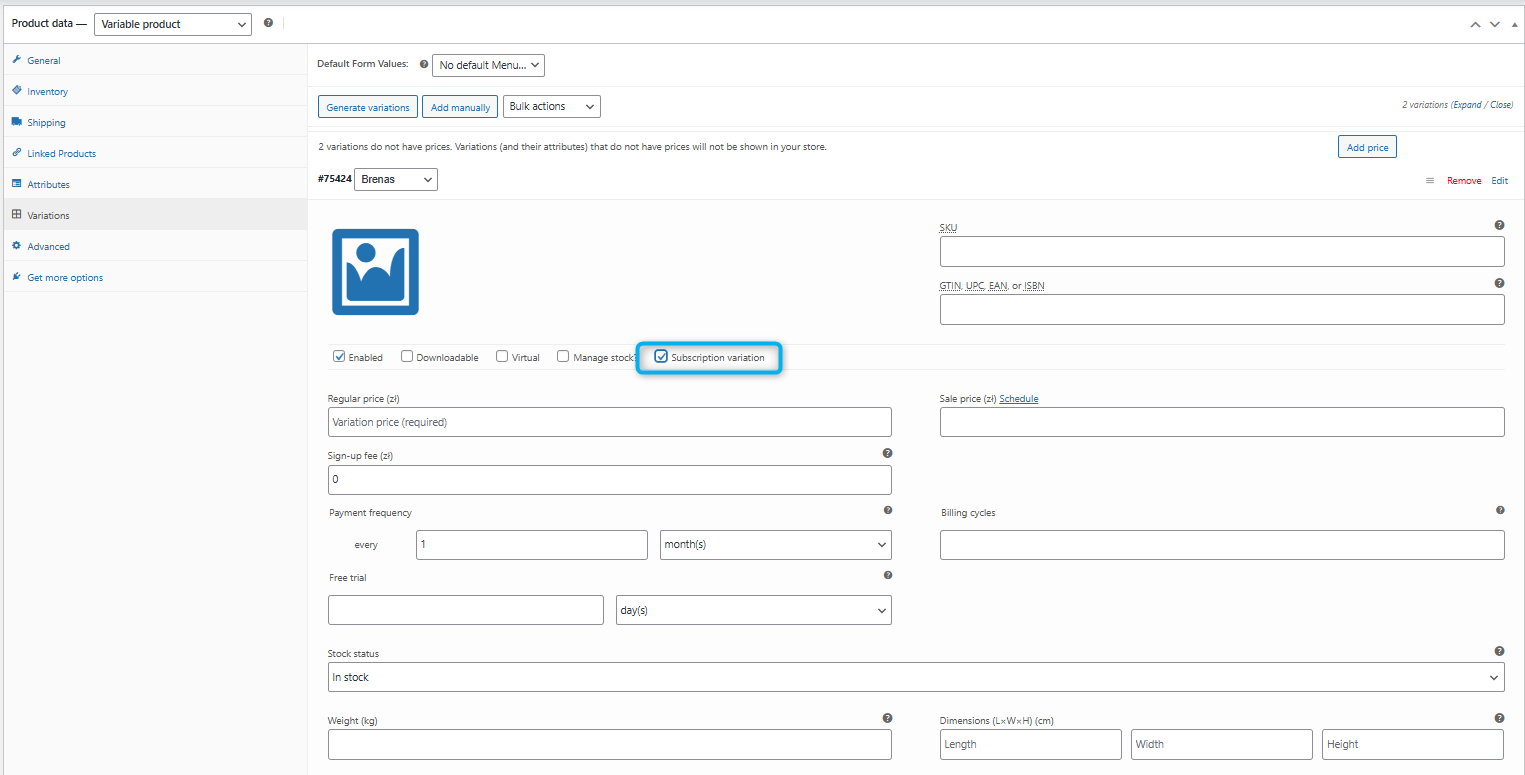
Follow these steps to enable subscription mode for a specific variation:
- Open the product you want to edit: Products → All Products → (select product).
- Make sure the product type is Variable product. The checkbox is added to standard variable products. It is not displayed for products that are already configured as Flexible Subscriptions variable subscription products.
- Go to the Variations tab inside the Product data panel and expand the variation you want to make a subscription.
- Find the checkbox labeled Subscription variation and tick it. This will mark that variation as a subscription variant.
- When the checkbox is enabled, the usual subscription fields (billing schedule, subscription price fields and trial options) will be available for that variation — fill them as needed.
- Save changes and update the product.
What your customers will see
- On the product page, subscription variations display subscription pricing and billing schedule (for example “billed every month”) just like regular subscription products.
- Regular variations remain regular one-time purchases — customers can buy them without creating a subscription.
- If a customer selects a subscription variation, the cart and checkout follow Flexible Subscriptions’ normal subscription flow (recurring payment rules, trials, etc.).
Practical examples
- Example 1 — Coffee tin: Size S & M are one-time purchases; Size L is available as a monthly subscription. Use the add-on to only mark Size L as a subscription.
- Example 2 — Software licenses: Offer “Basic” as a one-time license and “Pro” as a monthly subscription under the same product listing.
Tips & behavior notes
- There are no global settings in this add-on. The per-variation checkbox is the only control you need to enable/disable subscription behaviour for the variation.
- The add-on reuses Flexible Subscriptions’ existing pricing, billing schedule and trial fields — you don’t need to recreate subscription settings.
- Remember to set correct prices, stock and availability per variation — subscription variations behave the same as subscription products from Flexible Subscriptions.
Troubleshooting
Nothing changes after enabling the checkbox
- Update and save the variation after checking the box — unsaved changes aren’t applied.
- Clear object / page caches and test in an incognito browser to avoid cached admin pages.
Subscription fields do not appear
- Confirm you expanded the specific variation row in the Variations tab (each variation has its own fields).
- Check that the product is a Variable product (product type must be “Variable product”).
Compatibility or version issues
- Check your WordPress, WooCommerce and PHP meet the versions listed in the Compatibility & requirements section above.
- If you use other plugins that alter the product edit screen, temporarily disable them to rule out conflicts.
If you still have problems after these checks, contact support (see the Support section below).
FAQ
Can I mix subscription and non-subscription variations in the same product?
Yes. This is the main purpose of the add-on. In a standard variable product, mark only the variations that should behave as subscriptions and leave the other variations unchecked. Unchecked variations remain regular one-time purchases.
Does this add-on alter my existing subscriptions?
No — it only affects how variations behave moving forward. Existing subscription orders/subscriptions remain handled by Flexible Subscriptions as before.
Are there any new global settings to configure?
No. The add-on adds a per-variation checkbox. Subscription fields are available when the checkbox is enabled.
Support
If you need help:
- Check your plugin versions and compatibility (WooCommerce and Flexible Subscriptions must be active).
- Try the troubleshooting steps above.
- Contact the WP Desk support team on support page
