

Keeping product information up to date on your WooCommerce store can be time-consuming. With product scraping, you can automate the process of importing product data from your website and then import products into a WooCommerce store.
Contents
- WooCommerce scraper & fast and simple product data import
- Product scraper - available tools
- How importing products into WooCommerce saves time?
- How does the Dropshipping Import Products plugin work?
- Can I import products from other CRMs or WooCommerce sites?
- How to import product data with the plugin?
- Dropshipping Import Products for WooCommerce
- What are the advantages of using this plugin?
- What features does the free version of the Dropshipping plugin have?
- Dropshipping Import Products for WooCommerce
- What are the benefits of the PRO version of the Dropshipping plugin?
- How to use product scraping with the import plugin in WooCommerce?
- Summary
- FAQ
- Faster WooCommerce with the bulk import of products (free plugin)
- All you need to know about WooCommerce product export import
- WooCommerce import products with images - how-to guide
- Import WooCommerce products with images: product image guide
- WooCommerce & FTP Import for Dropshipping XML WooCommerce<br>Import Products the way you like!
WooCommerce scraper & fast and simple product data import
This article will explain what product scraping is, give you a look at three tools for scraping, and show you how the Dropshipping Import Products for WooCommerce plugin makes importing data easier.
Why this article is worth your time?
You’ll learn:
- What product scraping is and how it works.
- Three tools for scraping product data.
- How scraping saves time in updating product data.
- How the Dropshipping Import Products plugin handles product imports.
- Free vs PRO features of the import plugin.
- How to use product scraping with the import plugin.
Product scraper - available tools
Here are three great tools to help you scrape product data for WooCommerce:
-
Web Scraper (Chrome Extension)
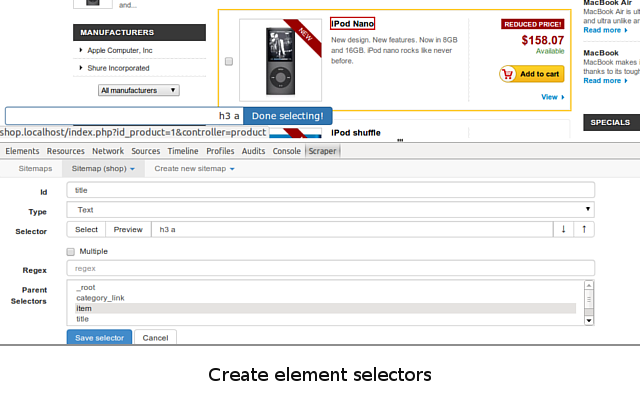
The Web Scraper extension lets you scrape product data from any website. It’s simple to use: set up the scraper, select the data you want to extract (product titles, prices, images), and export it to CSV. You can then import it directly into your store.
Web Scraper - Free Web Scraping use case image source: https://chromewebstore.google.com/detail/web-scraper-free-web-scra/jnhgnonknehpejjnehehllkliplmbmhn
-
Scrapy (Open Source Python Framework)
Scrapy is a flexible open-source Python framework that lets you build custom scrapers. It’s perfect for developers who want to extract data from complex websites and handle large amounts of data.
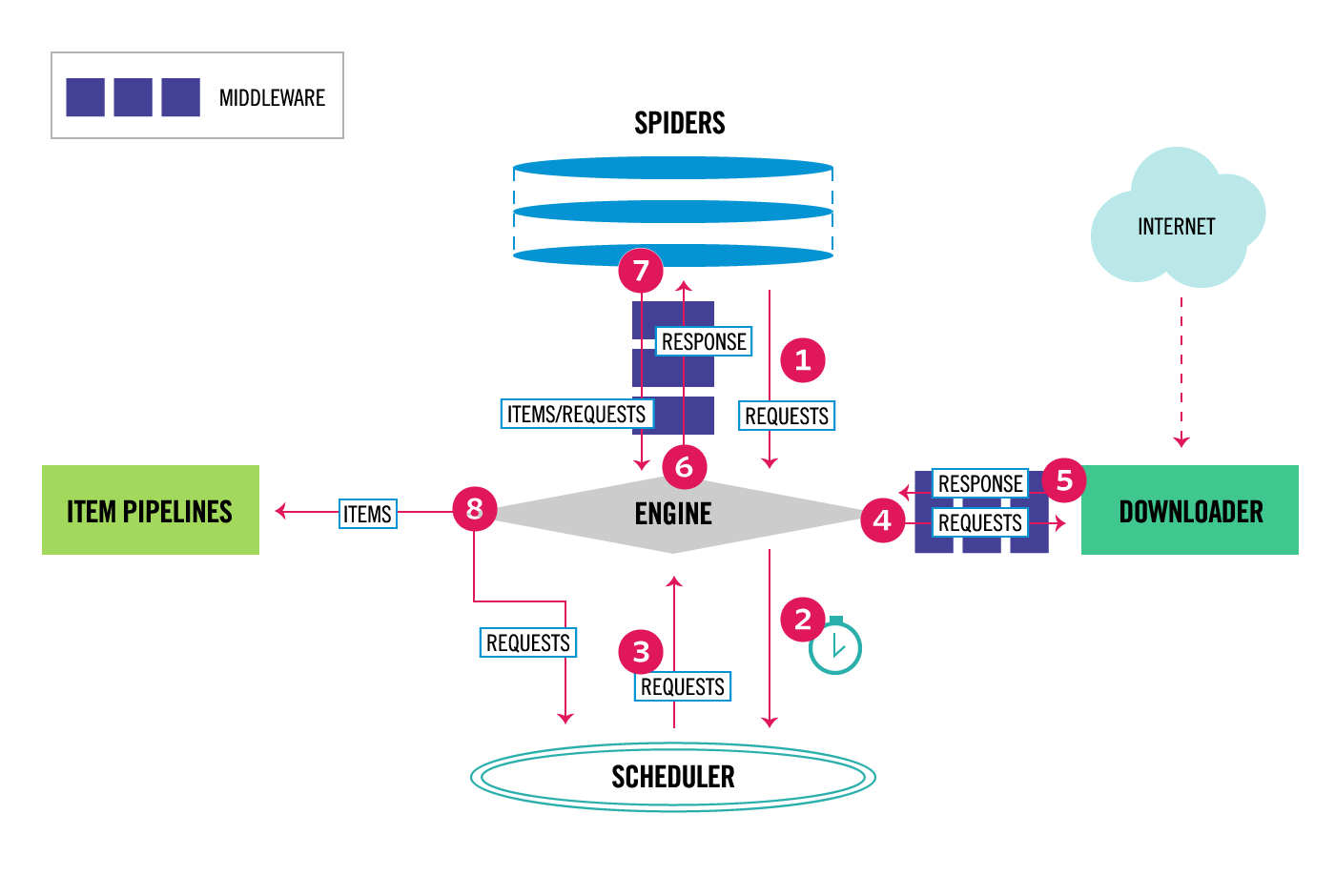
Scrapy architecture - documentation image source: https://docs.scrapy.org/en/latest/topics/architecture.html
-
WooCommerce Scraper by ScrapeHero
WooCommerce Scraper by ScrapeHero is designed specifically for WooCommerce stores. It extracts product details like titles, descriptions, prices, and images, making it easy to import data from WooCommerce stores in bulk.
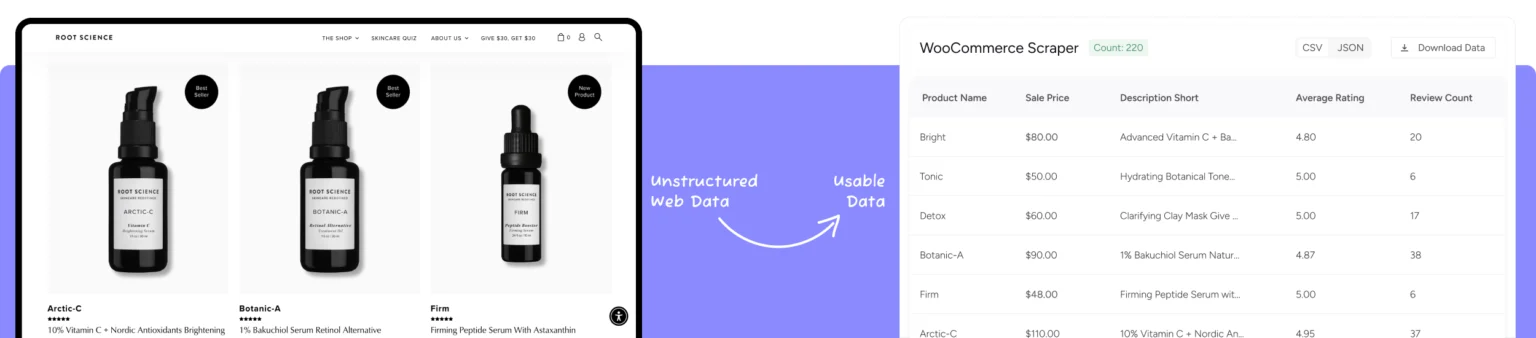
WooCommerce Scraper by ScrapeHero use case image source: https://www.scrapehero.com/marketplace/woocommerce-scraper/
Example: If you’re managing products from multiple WooCommerce suppliers, ScrapeHero’s WooCommerce Scraper will save you time by scraping all the product data at once.
Why use a WooCommerce product scraper?
A WooCommerce product scraper helps you save time and keep your store’s product data accurate. Here’s why:
- Save time - Scrape and import product data automatically.
- Accurate data - Always have up-to-date product prices, stock, and descriptions.
- Quick imports - Import products from multiple sources without manual entry.
- Get product data - If software doesn't allow product export.
Having a product feed is the first step, but then you need to import products into WooCommerce.
A WooCommerce product scraper is particularly valuable for dropshipping businesses and stores sourcing from multiple suppliers, where product catalogs change constantly and manually tracking every price or stock update simply isn't sustainable. Instead of checking supplier websites one by one, a scraper collects the current state of every listed product in a single pass, giving you a fresh product feed you can act on immediately. This becomes even more important as your supplier list grows — what takes minutes for ten products can take hours for a thousand without automation.
How importing products into WooCommerce saves time?
Updating product prices, stock, and descriptions manually takes hours. With importing, you can automate:
- Fast updates - Import product data directly to your store.
- Efficient product addition - Skip manual data entry.
- Accurate inventory - Sync stock levels with your suppliers.
- Consistent product details - Always have up-to-date prices, descriptions, and images.
Example 1: Price and Stock Updates
Using the Dropshipping Import Products for WooCommerce plugin, you can set it to automatically update product prices and stock based on the supplier’s data. No need to manually adjust prices again.
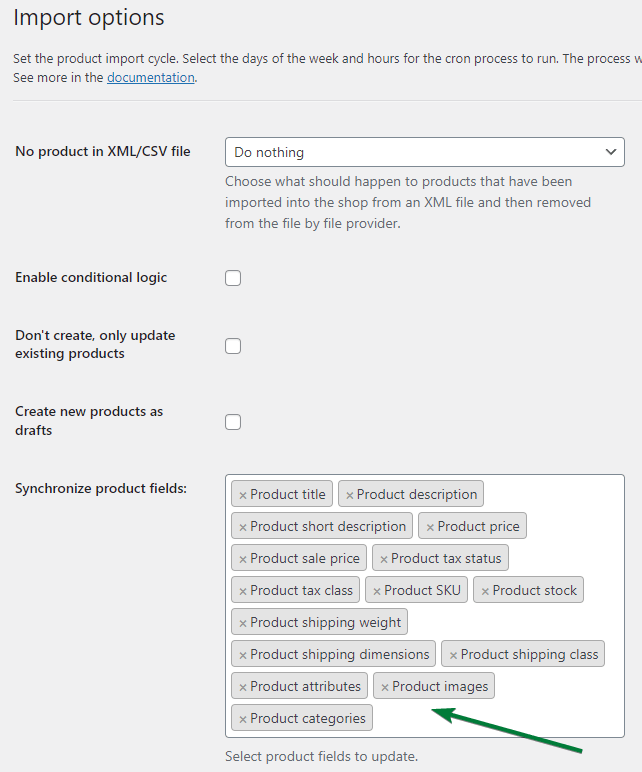
Example 2: New Product Listings
Add products from suppliers quickly by scraping the data - titles, descriptions, images, prices and importing them directly into your store with just a few clicks.
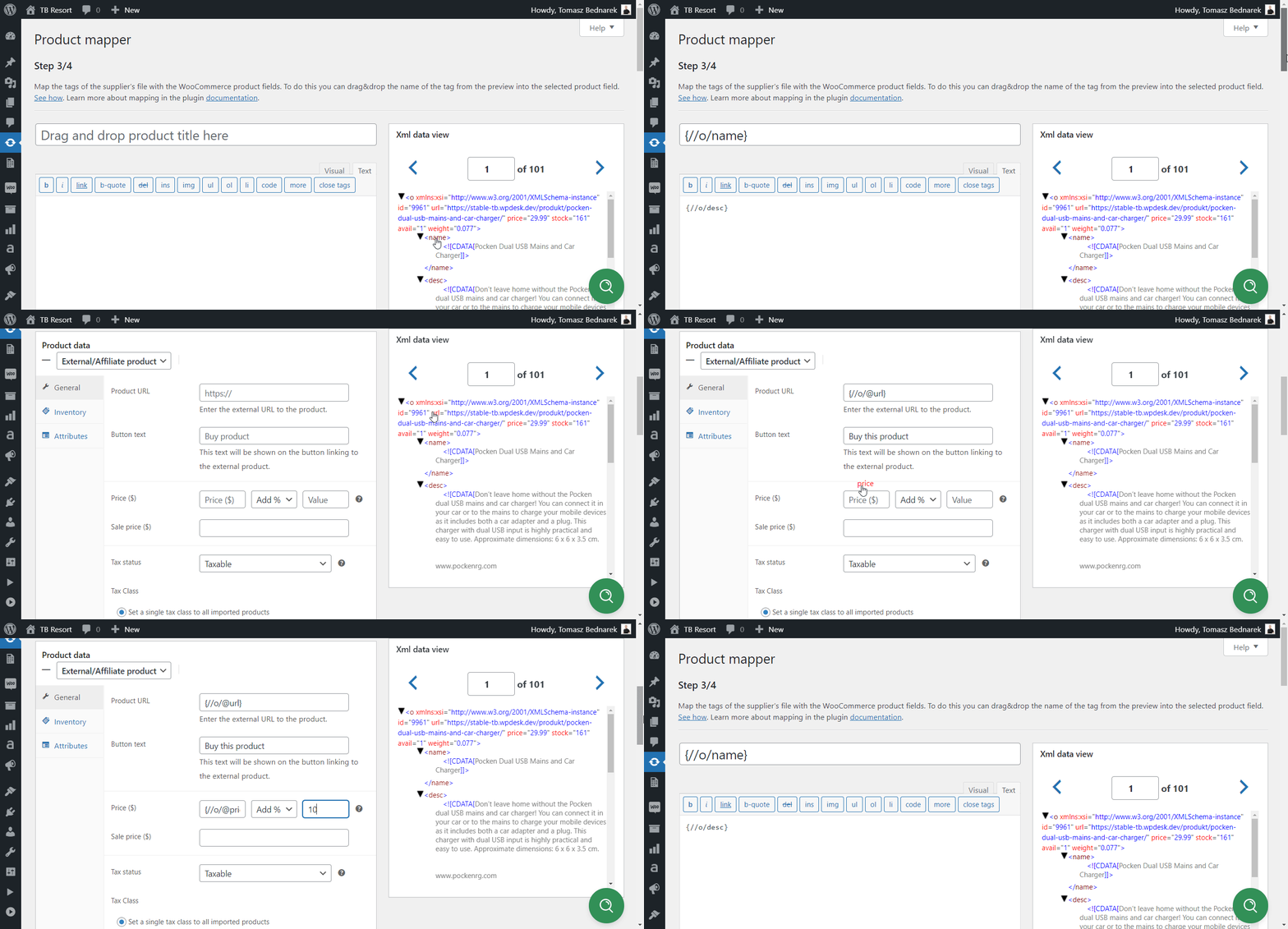
How does the Dropshipping Import Products plugin work?
The Dropshipping Import Products for WooCommerce plugin makes importing product data simple. You can search for products by URL or category, scrape product data, and import it into your store in just a few steps.
Example: If you want to import products from a supplier’s WooCommerce site, the plugin extracts the product titles, descriptions, images, and prices, and imports them into your store automatically.
Can I import products from other CRMs or WooCommerce sites?
Yes! The Dropshipping Import Products for WooCommerce plugin works with any WooCommerce store that has publicly available data. This makes it easy to import products from suppliers and other WooCommerce stores.
Example: You can import products directly from a supplier’s WooCommerce store without having to manually gather product details.
To import products to WooCommerce without using product scraper for your existing store, you need to export products to CSV or XML files.
If you use a CRM or CMS with such an option you don't need a product scraper. Only the plugin to import products where you may set the advanced field mapping and rules for product imports.
It's worth noting that product scraping and product importing solve two different problems, even though they're often used together. Scraping is about collecting data that isn't otherwise accessible in a structured format — pulling titles, prices, and images off a public webpage. Importing, on the other hand, is about taking structured data you already have, whether scraped or exported from a CRM, and getting it correctly into your WooCommerce store with the right fields, categories, and product types. If your supplier already provides a CSV or XML feed, you can skip scraping entirely and go straight to importing.
How to import product data with the plugin?
Here’s how you can get started:
- Download and install the Dropshipping Import Products for WooCommerce plugin.
WP Desk
Dropshipping Import Products for WooCommerce
Import and synchronize wholesale products with WooCommerce products. Add margin to the prices of imported products. Use conditional logic. Make your work easier.
Download for free or Go to WordPress.org💾 Active Installations: 700+ | WordPress Rating:
Works with WooCommerce 10.8 - 11.2 - Insert the product feed URL (CSV or XML).
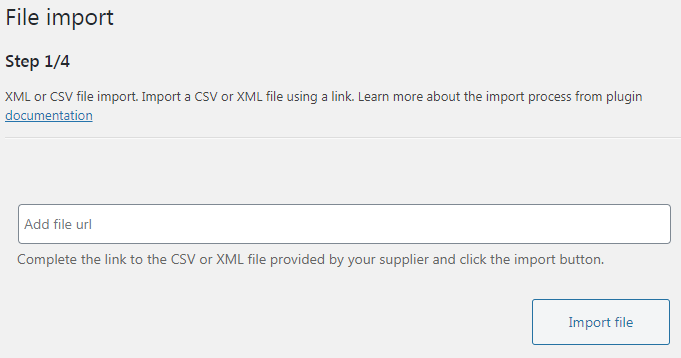
WooCommerce import variable products with images - add a CSV or XML product feed file - Decide about product data to import and product type (simple, variable, or external (in PRO)).

Add variable products in WooCommerce by importing data from XML or CSV files - Use category mapping and other options of the product mapper.
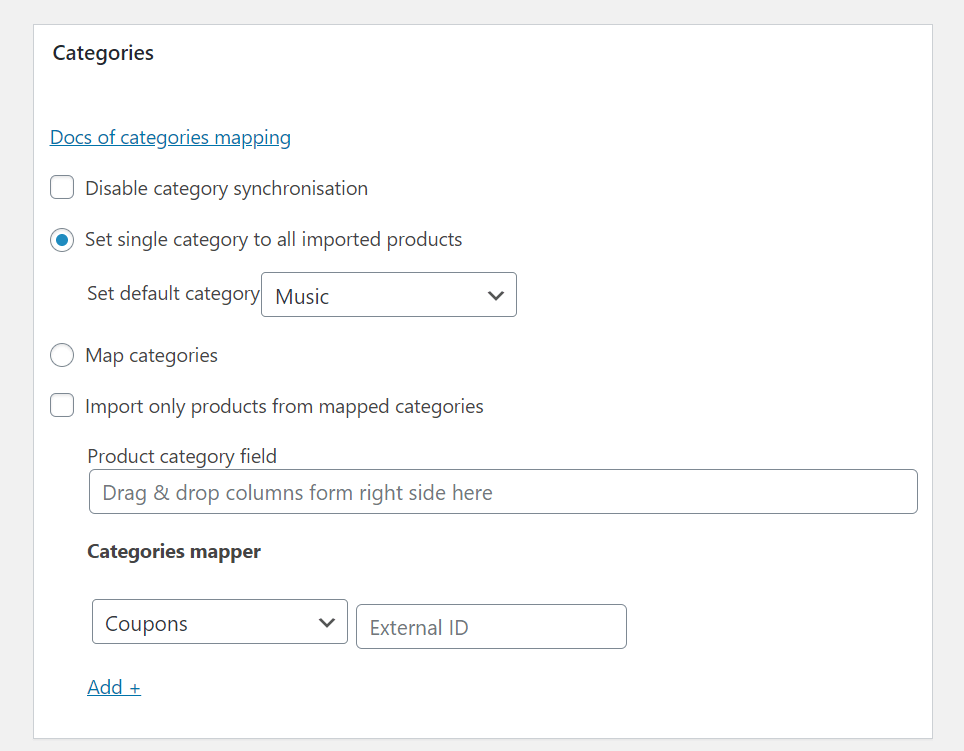
Category mapping and synchronization in Dropshipping XML WooCommerce - Choose fields to update in next import, for example, for product price updates.

Update product prices in WooCommerce with a free plugin - Set automatic schedule or conditions for products to import (in PRO).
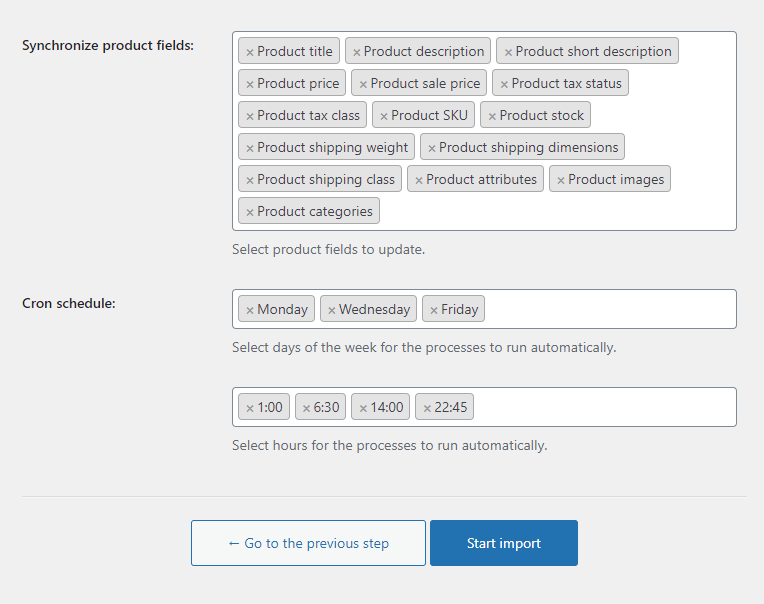
Import Options - Cron Schedule - Dropshipping XML WooCommerce - Start the import. Of course, you can set more imports or duplicate the import settings.
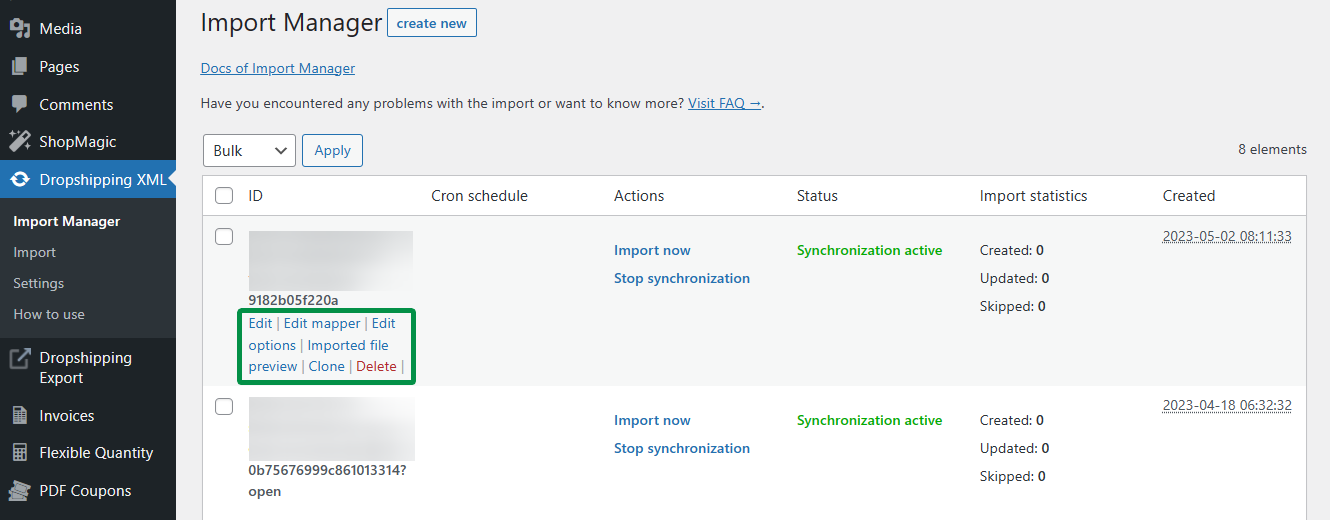
Edit product mapper, import options, and clone the import
What are the advantages of using this plugin?
This WordPress adds the advanced import options in WooCommerce. You don't need to extract product data or get data with a web scraping tool. The scraping process is only data collection, but if you already have a CSV or XML with product feed, you can start importing products.
There is a default WooCommerce product data importer, but the plugin gives you a lat more options:
- Gather data automatically - You can set the custom schedule.
- Map data fields and categories - Import product details into specific product fields.
- Automated updates - Product data like prices and stock levels update automatically.
- Import product images - No need to upload them to the server.
With the Dropshipping Import Products for WooCommerce plugin, you can quickly import products and keep your store updated easily.
One of the most overlooked benefits of an automated import workflow is consistency across your catalog. When products are added manually one at a time, small inconsistencies creep in – a missing description here, a mismatched category there. An import plugin applies the same field mapping and rules to every product in the feed, so whether you're importing ten items or ten thousand, each one follows the same structure. This consistency matters not just for a clean-looking store, but also for SEO, since well-structured, complete product data tends to perform better in search results than sparse or inconsistent listings.
What features does the free version of the Dropshipping plugin have?
The free version of the Dropshipping Import Products for WooCommerce plugin offers basic features:
- Import product titles, descriptions, images, and prices.
- Add and update simple and variable products in WooCommerce.
- Assign new products to product categories.
- Use product field mapping.
- Synchronize specific fields in future imports (product updates).
- Import more product feeds.
- Add products as drafts.
Dropshipping Import Products for WooCommerce
Import and synchronize wholesale products with WooCommerce products. Add margin to the prices of imported products. Use conditional logic. Make your work easier.
💾 Active Installations: 700+ | WordPress Rating:
However, some features, such as product imports based on conditions and automatic updates, are only available in the PRO version.
What are the benefits of the PRO version of the Dropshipping plugin?
The PRO version unlocks:
- Conditional logic for importing products - Choose specific products based on categories or other criteria.
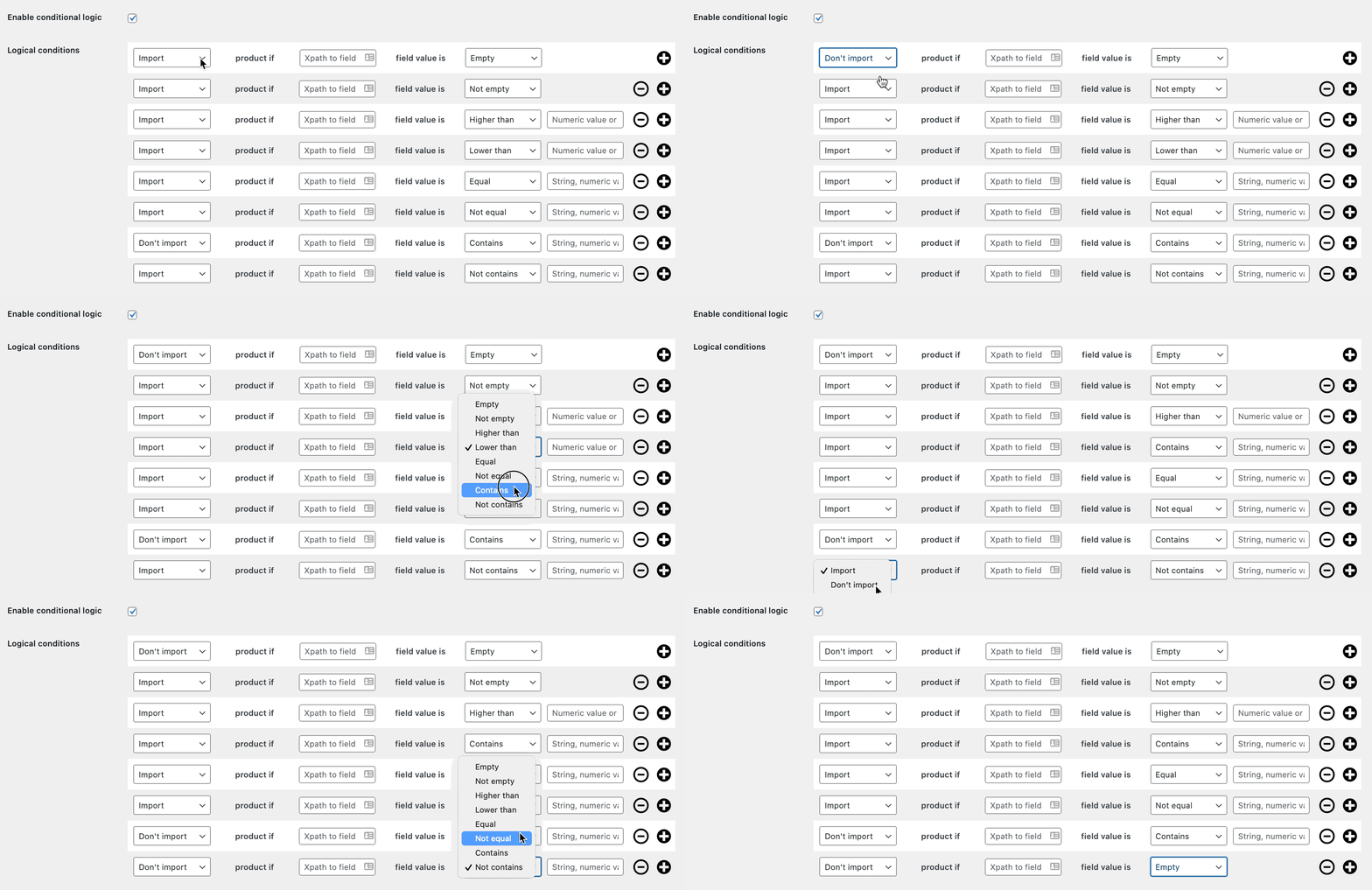
The plugin can import WooCommerce products with images also based on conditions - Automatic updates - Synchronize your store with supplier changes automatically based on schedule.
- Bulk update prices - Use price modifier to change prices during imports or product updates.
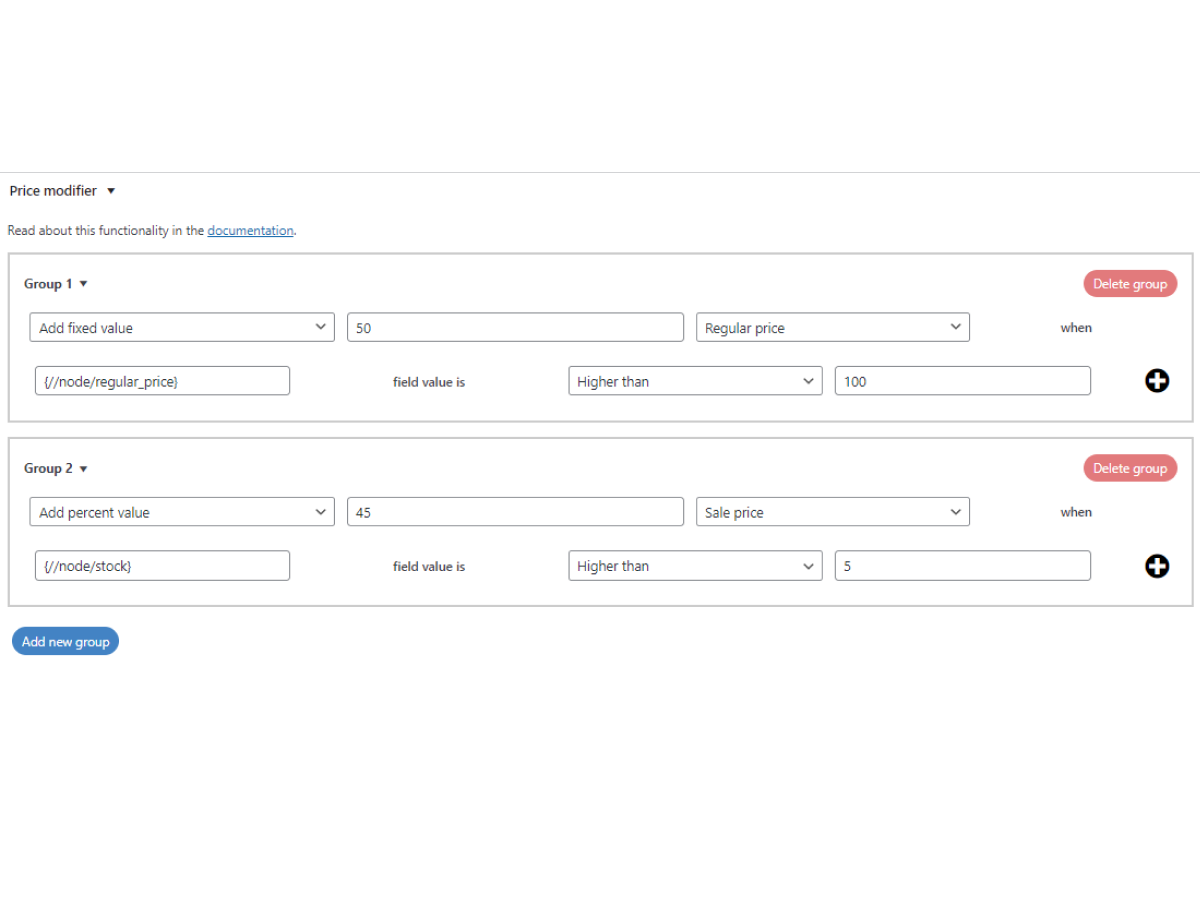
Dropshipping XML - Import products to WooCommerce - price modifier - Delete products automatically - if they are not present in the future updates.
- Import external/ affiliate products.
- No limit for imported images.
Comparison Table: Free vs PRO Features
| Feature | Free Version | PRO Version |
|---|---|---|
| Bulk product imports | Yes | Yes |
| Price modifier | No | Yes |
| Conditional logic | No | Yes |
| Automatic updates | No | Yes |
| External/affiliate products | No | Yes |
| Delete products automatically | No | Yes |
| Product image limit | Yes | No |
| Custom filters | No | Modify data of the fly |
| Free Version | PRO Version |
How to use product scraping with the import plugin in WooCommerce?
To get started:
- First, get the product feed (in CSV or XML) or scrape products from your website.
- Then, install the free version of the Dropshipping Import Products for WooCommerce plugin.
- Configure the plugin to import the product data you need (product titles, descriptions, prices, etc.). The plugin can add new products and update existing ones.
- You may also use advanced import options (conditional logic, schedules, price modifiers, etc.) with PRO.
Summary
- Product Scraping automates importing product data, saving time and reducing errors.
- WooCommerce scrapers ensure your product data is always up to date.
- Scraping tools help you efficiently manage your store and reduce manual work.
- You may also try to export products from your existing CRM or CMS, or get a product feed.
- Dropshipping Import Products for WooCommerce simplifies product imports with a few clicks.
- The free version works for basic imports, while the PRO version offers conditional logic and automatic updates.
By using product scraping and the Dropshipping Import Products for WooCommerce plugin, you can save time and keep your store updated with the latest products.
Dropshipping Import Products for WooCommerce
Import and synchronize wholesale products with WooCommerce products. Add margin to the prices of imported products. Use conditional logic. Make your work easier.
💾 Active Installations: 700+ | WordPress Rating:
FAQ
What is WooCommerce product scraping used for?
Product scraping automatically extracts product data — titles, prices, descriptions, and images — from a website, which can then be imported into a WooCommerce store instead of being entered manually.
Do I need a scraper if my supplier already provides a product feed?
No. If your supplier or CRM can export a CSV or XML feed, you can skip scraping entirely and import that feed directly using the Dropshipping Import Products for WooCommerce plugin.
Can WooCommerce product imports update existing products automatically?
Yes. The plugin can synchronize specific fields, like prices and stock levels, on future imports, and the PRO version adds fully automatic, scheduled updates without manual re-import.



Leave a Reply