
• Skip to primary navigation
  • Skip to main content
  • Skip to primary sidebar
  • Skip to footer
WP Desk = premium plugins for WordPress & WooCommerce
  • Plugins
        • Checkout & OrdersMake your work easier and automate the orders. Adjust the order form to your needs and make it more useful to your customers. Print order labels directly from WooCommerce. Put the orders in order using our plugins. Find out how to streamline the procurement process in your store.
          • Flexible Checkout Fields
          • Active Payments
          • Automatic Payment Status
          • One Click Return for WooCommerce
          • Print Orders and Address Labels
          • Flexible Subscriptions Recurring Shipping
          • Flexible Subscriptions Payment Retry
          • Flexible Subscriptions Stock Management
        • ProductsThese plugins will help you manage your WooCommerce products. Here you will find the plugins to import and update products from XML or CSV files. Then you can change the product unit of measure, show the lowest price in the last 30 days (Omnibus Directive), or let customers name the product price!
          • Flexible Product Fields
          • Dropshipping Import Products
          • Dropshipping FTP Import Products
          • Dropshipping Export Products
          • Custom Price
          • WP Desk Omnibus
          • Flexible Quantity Calculator
          • Dropshipping Orders Export
        • MarketingPromote your store online. Add products from your shop to price comparison websites directly from WooCommerce. Acquire new customers and communicate with your existing ones. Build a customer base and communicate with clients using one of the most effective marketing tools, namely e-mail marketing. Check out our promotional tools!
          • Flexible Pricing
          • Flexible Wishlist - Analytics & Emails
          • OLX WooCommerce
          • Flexible PDF Coupons
          • ShopMagic
          • Flexible Invoices
  • Bundle🔥
  • WP Desk Care
  • Support
  • Blog
  • My Account
  • 0

More results

WooCommerce Live Chat: Answering the Pre-Sale Question at Two in the Morning

WordPress tips & plugins

patrycja.wojas3 minutes readUpdated: 2026-10-26Updated: 2026-10-26
blog category heading image

Most of the questions that stop a sale are small. Does this fit, will it arrive before Christmas, can I return it if it does not. They are asked at the moment of decision, which in November is frequently at two in the morning, and an unanswered one is simply a closed tab.

Contents

  • What live chat actually recovers
  • Why this matters more in a peak season
  • What to put in place before the season
  • Summary
  • Frequently asked questions
    • Is chat worth it for a small store?
    • Where should the widget appear?
    • What happens to chats outside working hours?

What live chat actually recovers

The orders lost to a question nobody was awake to answer. That is a smaller category than chat vendors suggest and a larger one than most shop owners assume, and it concentrates almost entirely in the hours when support is offline.
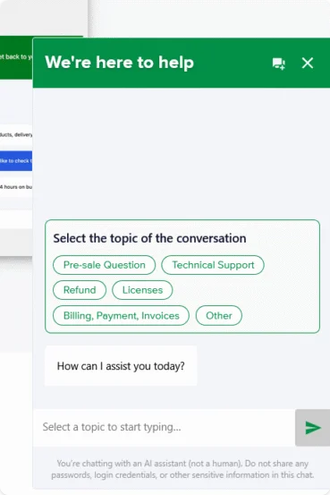
The questions themselves are predictable. Delivery timing is the first, and in the four weeks before Christmas it is most of the volume. Sizing and compatibility are the second, and they are the ones where a wrong guess becomes a return. Returns policy is the third, asked by customers who are deciding whether the risk of being wrong is acceptable.

What all three share is that the answer already exists somewhere on the site. The customer could not find it, or did not trust that the page applied to their case.

Why this matters more in a peak season

Because the traffic arrives outside working hours and the deadline is real.

A question asked in March can wait until Tuesday, because the customer can too. The same question asked on 10 December cannot, since the person asking is deciding between your shop and one that will answer them now, and the delivery cut-off is doing the deciding for both of you.

Volume is the second reason. A store taking four hundred orders a week gets questions at a rate no small team answers individually, and the result is either slow replies to everyone or fast replies to whoever asked first.

Which is why the useful version of this is not a person sitting in a chat window. It is something that answers the predictable questions immediately and hands over the rest.

What to put in place before the season

Write down the twenty questions you already answer every week. This is the whole of the preparation that matters, whether the answers are going to be given by a person, a saved reply or something automated, and most stores have never written the list.

Make sure whatever answers can see the store. A chat tool that knows your products, stock and delivery options gives a different quality of answer from one working off a static script, and the difference shows on exactly the questions customers actually ask. There is more on that distinction in our piece on an AI chatbot that knows your store.

Decide in advance what gets escalated and to whom. Anything about an existing order, a refund or a complaint belongs with a person, and the handover is where a badly set up chat does the most damage.

And switch it off if nobody can staff the escalation. A widget that promises a reply and delivers nothing is worse than none, because it turned a browsing customer into an ignored one.

The difference between a useful answer and a generic one is whether the chat can read the store. Flexible Chat answers from your own products, stock and delivery options, and hands anything about an existing order to a person.

Summary

Live chat recovers the orders lost to a question nobody was awake to answer, and that loss concentrates in the hours when support is offline. The questions are predictable: delivery timing, which is most of the volume in the four weeks before Christmas; sizing and compatibility, where a wrong guess becomes a return; and the returns policy, asked by people deciding whether being wrong is affordable. All three have answers already published on the site, so chat is mostly the shortest path to information the store has.

It matters more at peak because the traffic arrives outside working hours and the delivery cut-off is real: a question asked in March can wait until Tuesday, one asked on 10 December cannot. Volume is the other reason, since a store taking four hundred orders a week cannot answer individually without either slowing down for everyone or serving whoever asked first. Four things to prepare: write down the twenty questions you already answer every week, which almost no store has done; make sure whatever answers can see products, stock and delivery options rather than working from a static script; decide what gets escalated to a person, which is anything about an existing order, refund or complaint; and switch the widget off entirely if nobody can staff that escalation.

Frequently asked questions

These three decide whether chat is worth running.

Is chat worth it for a small store?

It depends on whether the questions are repetitive, not on size. A shop with twenty orders a week and the same three questions benefits more than a larger one with unpredictable enquiries.

Where should the widget appear?

On product and delivery pages rather than everywhere. A chat prompt on the checkout competes with the thing you want the customer to finish.

What happens to chats outside working hours?

They should either be answered automatically or collect an address and say when a reply will come. What they must not do is sit unacknowledged until morning.

3 minutes read100 views

patrycja.wojas

Product Content Hero

LinkedIn Profile

Patrycja has 14 years of experience in copywriting and SEO. She is one of the few specialists in Poland who writes with equal confidence about mor...

Powered by WP Desk

WP Desk brings you great WooCommerce plugins. We strive to save your time and money by speeding up your processes. Use our plugins to build a better store. Awesome support included in the package.

Premium WooCommerce Plugins →
WP Desk › Blog › WordPress tips & plugins › WooCommerce Live Chat: Answering the Pre-Sale Question at Two in the Morning

Primary Sidebar

Contents

  • What live chat actually recovers
  • Why this matters more in a peak season
  • What to put in place before the season
  • Summary
  • Frequently asked questions
    • Is chat worth it for a small store?
    • Where should the widget appear?
    • What happens to chats outside working hours?

Flexible Chat (PRO) £29

A WooCommerce plugin that adds a lightweight, customizable AI chat widget to your site.

Add to cart or View Details
WP Desk
Plugins used by 239,799+ shops
Last Updated: 2026-09-21
Works with WooCommerce 9.8 - 11.1

Stay updated on our how-to articles

WP Desk news, WooCommerce tips, promo codes - right to your inbox.

By entering your e-mail, you agree to our Terms & Conditions and Privacy Policy.

By entering your e-mail, you agree to our Terms & Conditions and Privacy Policy.

Footer

WP Desk - WooCommerce Plugins

At WP Desk we create great WooCommerce plugins with awesome support. Save time and money with our e-commerce solutions. See how we can help you improve your e-store →

Secured by Comodo

WP Desk

  • About us
  • Giving Back
  • Blog
  • Get Support
  • Contact us

Products

  • Premium Plugins
  • WP Desk Care
  • Documentation
  • WooCommerce Invoices
  • Email Marketing
  • PDF Coupons

Legal

  • Terms & Conditions
  • Refund Policy
  • Support Policy
  • Privacy Policy

© 2026 WP Desk

We value your privacy

We use necessary cookies to make our site work. We'd also like to set additional cookies to understand site usage, enhance your browsing experience, and serve personalized ads or content. By clicking ‘Accept All,’ you consent to our use of additional cookies.

Functional Always active
The technical storage or access is strictly necessary for the legitimate purpose of enabling the use of a specific service explicitly requested by the subscriber or user, or for the sole purpose of carrying out the transmission of a communication over an electronic communications network.
Preferences
The technical storage or access is necessary for the legitimate purpose of storing preferences that are not requested by the subscriber or user.
Statistics
The technical storage or access that is used exclusively for anonymous statistical purposes. Without a subpoena, voluntary compliance on the part of your Internet Service Provider, or additional records from a third party, information stored or retrieved for this purpose alone cannot usually be used to identify you. The technical storage or access that is used exclusively for anonymous statistical purposes. Without a subpoena, voluntary compliance on the part of your Internet Service Provider, or additional records from a third party, information stored or retrieved for this purpose alone cannot usually be used to identify you.
Marketing
The technical storage or access is required to create user profiles to send advertising, or to track the user on a website or across several websites for similar marketing purposes.
  • Manage options
  • Manage services
  • Manage {vendor_count} vendors
  • Read more about these purposes
View preferences
  • {title}
  • {title}
  • {title}