
• Skip to primary navigation
  • Skip to main content
  • Skip to primary sidebar
  • Skip to footer
WP Desk = premium plugins for WordPress & WooCommerce
  • Plugins
        • Checkout & OrdersMake your work easier and automate the orders. Adjust the order form to your needs and make it more useful to your customers. Print order labels directly from WooCommerce. Put the orders in order using our plugins. Find out how to streamline the procurement process in your store.
          • Flexible Checkout Fields
          • Active Payments
          • Automatic Payment Status
          • One Click Return for WooCommerce
          • Print Orders and Address Labels
          • Flexible Subscriptions Recurring Shipping
          • Flexible Subscriptions Payment Retry
          • Flexible Subscriptions Stock Management
        • ProductsThese plugins will help you manage your WooCommerce products. Here you will find the plugins to import and update products from XML or CSV files. Then you can change the product unit of measure, show the lowest price in the last 30 days (Omnibus Directive), or let customers name the product price!
          • Flexible Product Fields
          • Dropshipping Import Products
          • Dropshipping FTP Import Products
          • Dropshipping Export Products
          • Custom Price
          • WP Desk Omnibus
          • Flexible Quantity Calculator
          • Dropshipping Orders Export
        • MarketingPromote your store online. Add products from your shop to price comparison websites directly from WooCommerce. Acquire new customers and communicate with your existing ones. Build a customer base and communicate with clients using one of the most effective marketing tools, namely e-mail marketing. Check out our promotional tools!
          • Flexible Pricing
          • Flexible Wishlist - Analytics & Emails
          • OLX WooCommerce
          • Flexible PDF Coupons
          • ShopMagic
          • Flexible Invoices
  • Bundle🔥
  • WP Desk Care
  • Support
  • Blog
  • My Account
  • 0

More results

WooCommerce Conditional Checkout Fields: Showing a Field Only When It Matters

WordPress tips & plugins

patrycja.wojas3 minutes readUpdated: 2026-11-26Updated: 2026-11-05
blog category heading image

A checkout field that concerns one customer in twenty is still read by all twenty. Conditional logic lets a store ask a question only of the customers it concerns, so one checkout can serve several kinds of customers without making it longer for all of them.

Contents

  • What conditional logic does to a checkout
  • The conditions worth setting up
  • What to watch when the rules start stacking
  • Summary
  • Frequently asked questions
    • Can a condition depend on another conditional field?
    • What happens to a hidden field's value if the condition changes?
    • Do conditional fields work with the block-based checkout?
    • Related Articles
  • 10-step WooCommerce review to help you understand why WooCommerce is the best e-commerce platform

What conditional logic does to a checkout

Conditional logic attaches a rule to a checkout field, so the field appears only when the rule is met. The customer who matches the rule sees the field, everybody else does not, and the checkout is as short as possible for each person, not just on average.

This matters because without conditional logic a store has to compromise. A store selling to both businesses and consumers either shows a tax number field to everyone, which annoys consumers, or to nobody, which forces business customers to contact support. Neither option is good.

The rules themselves are usually simple. They depend on what is in the cart, on an option chosen earlier in the checkout, on the shipping country or on an order total above a set amount. The hard part is not building the rules but planning which fields really need them.

The conditions worth setting up

The most common condition is a choice between a business and a private customer at the top of the form, with the tax number, company name and invoice fields shown only to business customers. If most of your customers are consumers, this removes three fields from most orders.

The second is a shipping method condition: customers who choose a pickup point see a pickup point selector, and everybody else sees the address fields. A checkout that asks for both asks at least one question the customer cannot answer.

The third is a country condition for your own fields that apply only in some countries, such as a tax number or customs information for shipments outside the EU. WooCommerce already adjusts the state and postcode fields to the selected country on its own.

The fourth is a product condition for anything tied to what the customer is buying, such as engraving text, an age confirmation or a licence number. These fields belong to specific products, not to the whole checkout.
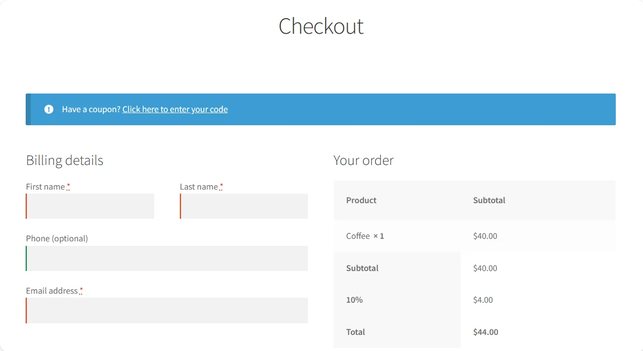
Checkout field options in Flexible Checkout Fields for WooCommerce

What to watch when the rules start stacking

Validation has to follow the condition. A hidden field that is still required blocks the order, and the customer sees a checkout that will not submit for no visible reason, which is the worst way a form can fail.

Test combinations, not single fields. Three yes-or-no conditions give eight paths through the checkout, and the one that breaks is rarely the one anybody tested. A business customer from abroad choosing a pickup point is the kind of combination that appears in real orders but not in tests.

Keep the number of rules small. A checkout with fourteen conditional fields is something nobody on the team fully understands a few months later, and somebody who does not know what the fourteenth rule was for will eventually change it. Our comparison of plugins that speed up the WooCommerce checkout shows how different tools handle checkout fields.

The part worth getting right is that validation follows the rule, so a hidden field never blocks an order. Conditional Checkout Fields sets the condition and the required status together, on cart contents, country, total or an earlier selection.

Summary

Conditional logic attaches a rule to a checkout field, so the field appears only for the customers it concerns and the checkout is as short as possible for each person. Without it, a store selling to businesses and consumers has to show the tax number field to everyone or to nobody. The rules usually depend on cart contents, an earlier choice, the shipping country or the order total. Four conditions are the most useful: a business or private customer choice that shows the company and invoice fields only to businesses, a shipping method condition that shows a pickup point selector or an address, a country condition for your own fields that apply only in some countries, and a product condition for fields such as engraving text or an age confirmation. As the rules grow, make sure validation follows the condition so a hidden required field does not block the order, test combinations of conditions rather than single fields, and keep the number of rules small enough that the team still understands each one.

Frequently asked questions

These three questions come up when the rules start piling up.

Can a condition depend on another conditional field?

In many plugins it can, but it is better to avoid it. Chained conditions make the checkout unpredictable, and a flat set of rules is easier to understand and test.

What happens to a hidden field's value if the condition changes?

The value should be cleared. Otherwise a customer who switches the shipping method can send an address they no longer want to use. Test this case separately.

Do conditional fields work with the block-based checkout?

It depends on the plugin, because the block checkout and the classic checkout handle fields differently. WP Desk telemetry from August 2026 shows that 87% of WooCommerce stores still use the classic checkout. Check which one your store uses before you choose a plugin.
Related Articles

WooCommerce Review

10-step WooCommerce review to help you understand why WooCommerce is the best e-commerce platform

In this WooCommerce review I will guide you through 10 reasons why WooCommerce should be your e-commerce platform of choice. Life is a series of choic...

3 minutes read100 views

patrycja.wojas

Product Content Hero

LinkedIn Profile

Patrycja has 14 years of experience in copywriting and SEO. She is one of the few specialists in Poland who writes with equal confidence about mor...

Powered by WP Desk

WP Desk brings you great WooCommerce plugins. We strive to save your time and money by speeding up your processes. Use our plugins to build a better store. Awesome support included in the package.

Premium WooCommerce Plugins →
WP Desk › Blog › WordPress tips & plugins › WooCommerce Conditional Checkout Fields: Showing a Field Only When It Matters

Primary Sidebar

Contents

  • What conditional logic does to a checkout
  • The conditions worth setting up
  • What to watch when the rules start stacking
  • Summary
  • Frequently asked questions
    • Can a condition depend on another conditional field?
    • What happens to a hidden field’s value if the condition changes?
    • Do conditional fields work with the block-based checkout?

Checkout Fields for Blocks - Woo Conditional Checkout Fields Add-on £49

The plugin to customize the WooCommerce checkout form with Blocks by adding new fields based on conditions (produts in the cart, payment or shipping method and fields value choosen in chekout).

💾 Active Installations: 1,000+ | WordPress Rating:

Add to cart or View Details
WP Desk
1,000+ Active Installations
Last Updated: 2026-11-21
Works with WooCommerce 11.0 - 11.3

Stay updated on our how-to articles

WP Desk news, WooCommerce tips, promo codes - right to your inbox.

By entering your e-mail, you agree to our Terms & Conditions and Privacy Policy.

By entering your e-mail, you agree to our Terms & Conditions and Privacy Policy.

Footer

WP Desk - WooCommerce Plugins

At WP Desk we create great WooCommerce plugins with awesome support. Save time and money with our e-commerce solutions. See how we can help you improve your e-store →

Secured by Comodo

WP Desk

  • About us
  • Giving Back
  • Blog
  • Get Support
  • Contact us

Products

  • Premium Plugins
  • WP Desk Care
  • Documentation
  • WooCommerce Invoices
  • Email Marketing
  • PDF Coupons

Legal

  • Terms & Conditions
  • Refund Policy
  • Support Policy
  • Privacy Policy

© 2026 WP Desk

We value your privacy

We use necessary cookies to make our site work. We'd also like to set additional cookies to understand site usage, enhance your browsing experience, and serve personalized ads or content. By clicking ‘Accept All,’ you consent to our use of additional cookies.

Functional Always active
The technical storage or access is strictly necessary for the legitimate purpose of enabling the use of a specific service explicitly requested by the subscriber or user, or for the sole purpose of carrying out the transmission of a communication over an electronic communications network.
Preferences
The technical storage or access is necessary for the legitimate purpose of storing preferences that are not requested by the subscriber or user.
Statistics
The technical storage or access that is used exclusively for anonymous statistical purposes. Without a subpoena, voluntary compliance on the part of your Internet Service Provider, or additional records from a third party, information stored or retrieved for this purpose alone cannot usually be used to identify you. The technical storage or access that is used exclusively for anonymous statistical purposes. Without a subpoena, voluntary compliance on the part of your Internet Service Provider, or additional records from a third party, information stored or retrieved for this purpose alone cannot usually be used to identify you.
Marketing
The technical storage or access is required to create user profiles to send advertising, or to track the user on a website or across several websites for similar marketing purposes.
  • Manage options
  • Manage services
  • Manage {vendor_count} vendors
  • Read more about these purposes
View preferences
  • {title}
  • {title}
  • {title}