Selling online has gone from classic a product-based system to subscriptions. There are many ecommerce platforms to start an online store. WooCommerce is a free add-on for WordPress - the most popular CMS. In this article, you may learn how to add subscriptions and get recurring payments in WooCommerce.
Contents
- What are exactly subscriptions and recurring payments?
- How to add subscriptions in WooCommerce (for free)?
- Recurring payments options
- Payment retry automation and optimization
- Recurring shipping for advanced subscriptions
- Subscriptions and recurring payments in WooCommerce summary
- 7 Plugin Alternatives for WooCommerce Subscriptions and something new.
- Your store needs WooCommerce product subscriptions.
- Making payments easier: Exploring WooCommerce payment plan plugins
- Recurring Shipping in E-Commerce: A Game-Changer for Businesses and Consumers
- Enhancer for WooCommerce Subscriptions
What are exactly subscriptions and recurring payments?
If you think a one-time payment is better and you don't need more invoices each month, this article is not for you 🙂.
Do you know any subscription-based streaming or gaming software? Or maybe you buy a box diet each month or rent a car. Of course, these are some examples of subscriptions with recurring payments.
What are subscriptions?
A subscription is a sales model with regular payments for products e.g. games, gym, car, learning, food, etc. You could even think about a mortgage in these terms as you have to pay each month for it. Why do you need subscriptions? Users do not have to pay a lot at once, they can play or use a gym without buying stuff. It's also possible that they will engage because monthly or weekly payments are not so painful for pockets.
For store owners, they present an opportunity to increase sales with stable recurring payments. What's more, a user once acquired is more likely to stay, and you can build trust over time, for example, with email marketing or discount codes.
Why recurring payments?
One-time payments have their drawbacks. Subscriptions can help:
- increase user retention and brand trust
- offer cross-selling products and upsell
- automate billing and invoicing
- get payment security and stable sales (cashflow)
- build better communication and user experience
- try different product bundles, recurring payment cycles, a sign-up fee, or free trials
- customize the offer based on data and feedback
- add a new method of payment without adding new products
As you can see, changing the sales model to subscriptions gives some benefits.
How to add subscriptions in WooCommerce (for free)?
If you already have WordPress running on your server, go to step 3. If you have WordPress and WooCommerce, go to step 5.
How to change a website into subscription platform?
-
Domain and hosting
Usually, you may buy both things from the same company (hosting provider). They are necessary to install WordPress and build the website. A website for selling subscriptions with recurring payments should have SSL and standard ecommerce elements.
Starting with a basic hosting can be enough. But if you plan to scale, hosting with appropriate server and memory limits may be necessary. Otherwise, you may have to change it after the store gets more traffic.
-
WordPress
WordPress is the most popular (as of 2024) content management system. It can be used for blogs, company sites, news, or ecommerce. You may install it for free on a server with a domain (internet address). Usually, the hosting panel allows installing WordPress directly.
You can also download WordPress to install the software. WordPress gives some how-to guides on the installation process.
-
WooCommerce
Adding new features in WordPress is possible with extensions (plugins). The same applies to an ecommerce functionality. The most popular plugin here is WooCommerce which allows changing the WordPress environment from a simple blog to an advanced ecommerce ecosystem.
Installing and activating WooCommerce is simple (with questions and predefined options).
-
Add products
Ecommerce without products doesn't work. WooCommerce gives four types of products. Simple products are mostly the easiest to start with. The product description, price, image, attributes, etc. can be set from one editing screen.
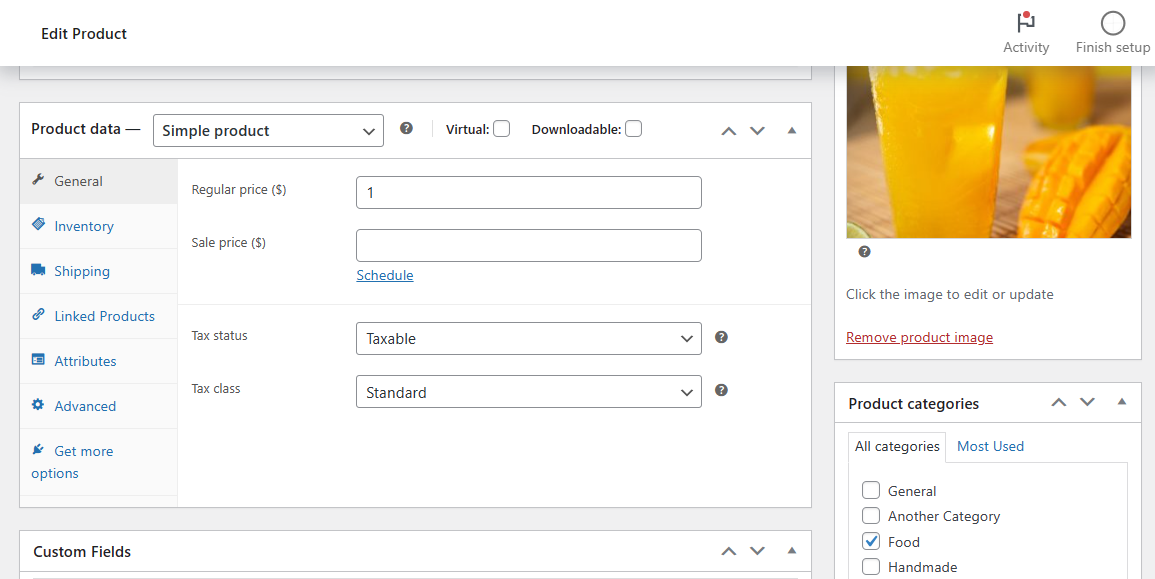
After adding products, you can test WooCommerce by placing and processing orders.
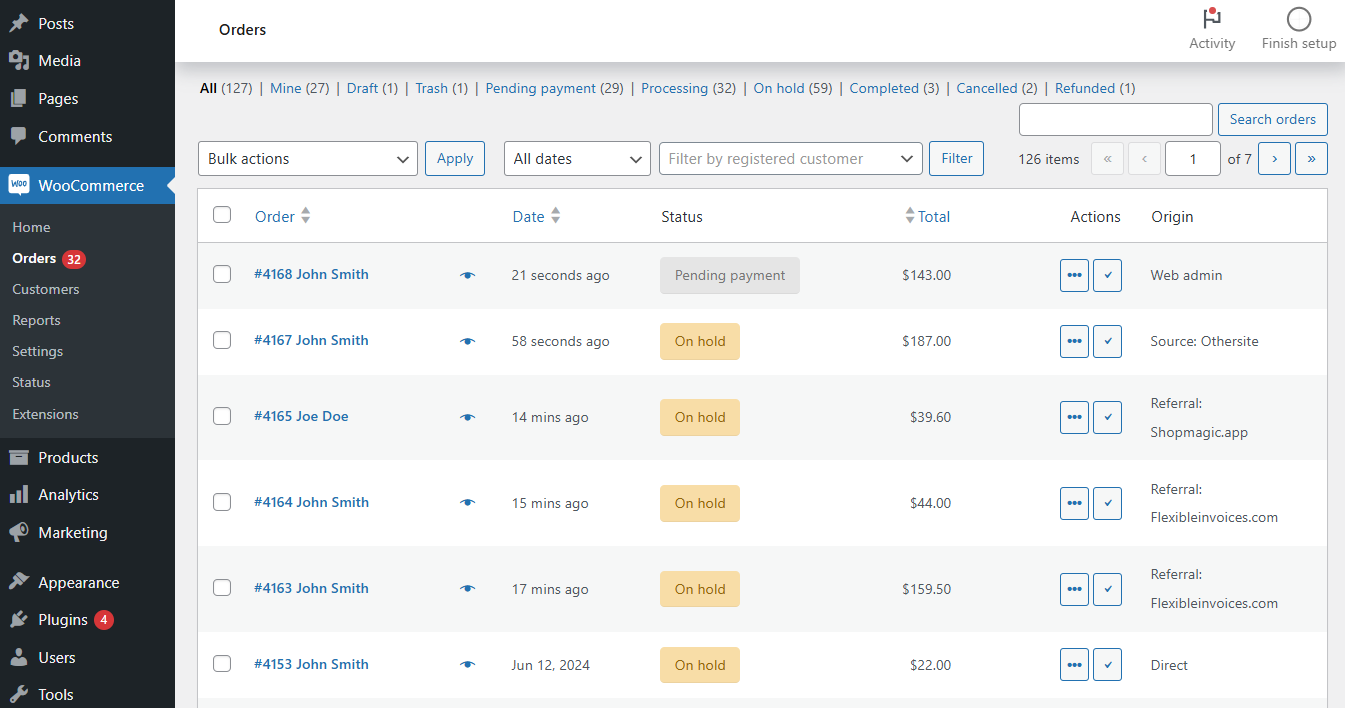
What's more, WooCommerce can be further customized with new features e.g. PDF invoices or email marketing automation.
-
Flexible Subscriptions
One of the free plugins for WooCommerce by WP Desk is Flexible Subscriptions. This extension introduces a new model for selling - a subscription.

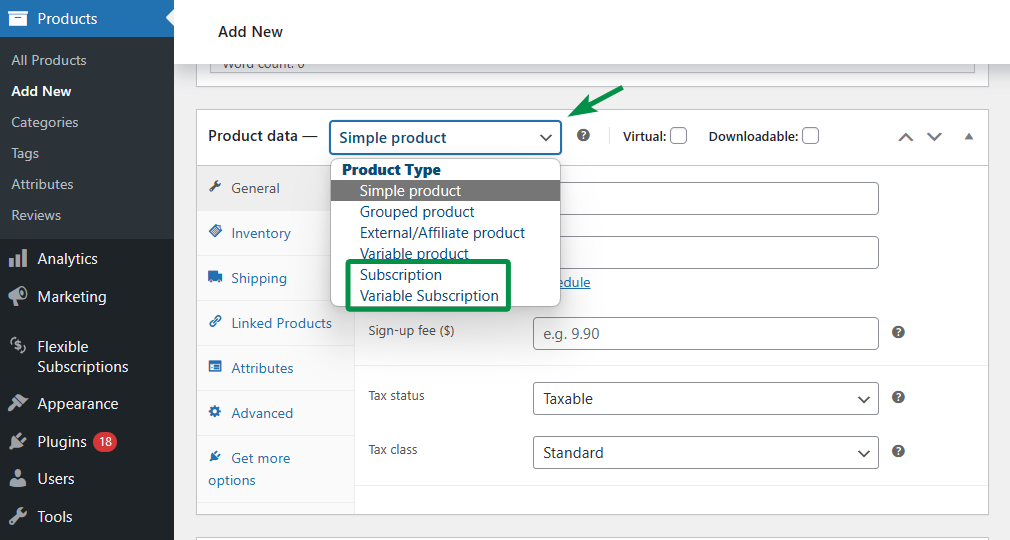
In fact, the plugin allows adding and customizing simple and variable subscriptions for existing products. Just by changing the product type.
-
Adjust plugin settings
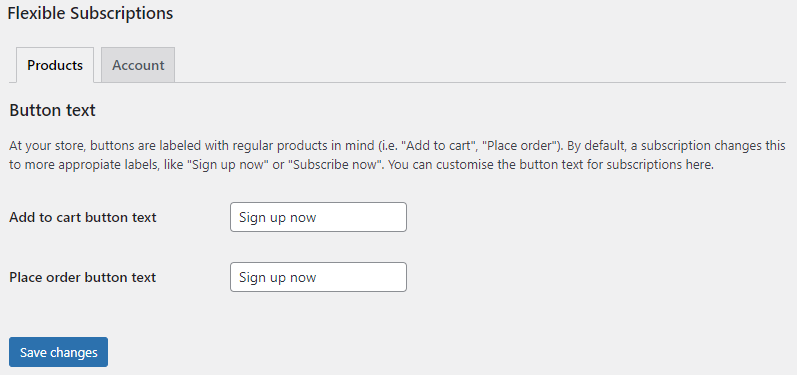
You may first set up general options.
-
Add subscriptions
Next, you may add a new subscription with the necessary information, prices, initial fee, billing cycles, etc. The subscription may have shipping, a free trial, recurring payment settings, or attributes. There is a lot to decide in the subscription-based model.
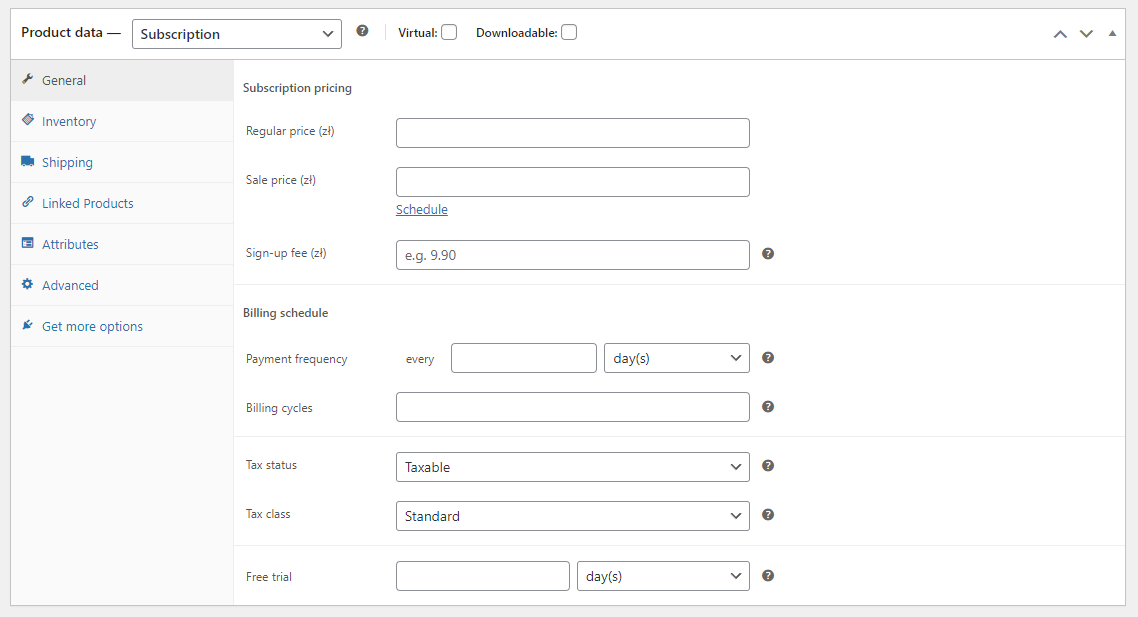 You may use the plugin to add both simple and variable subscriptions. You can find more about the plugin in the WordPress repository.
 -
Recurring payments
The Flexible Subscriptions plugin allows recurring payments but also supports manual payment methods. Depending on the WooCommerce settings and additional payment gateways available.
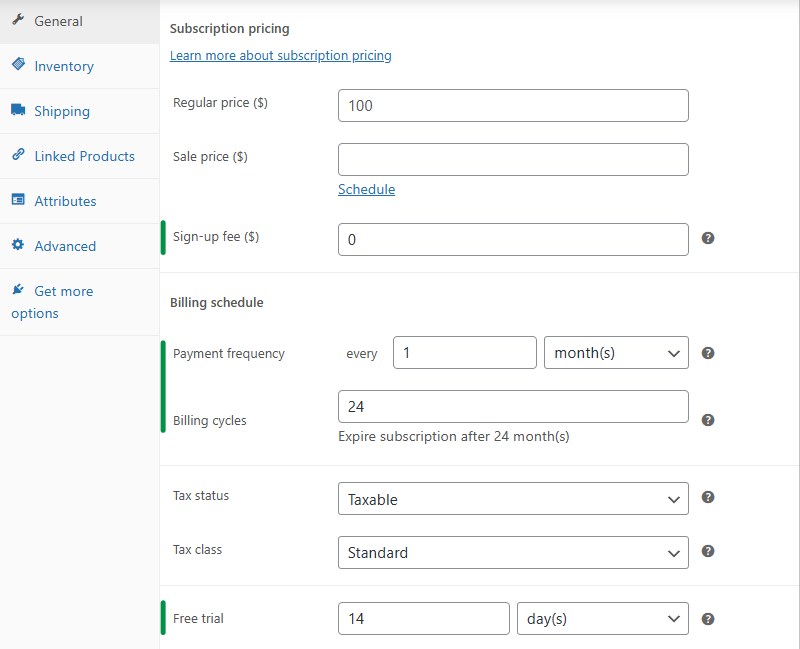
Subscriptions generate one order per billing cycle. The plugin will use the payment method from the first order for the next payments. If a user chooses a recurring payment e.g. credit card, the future payments will be processed automatically. Till the subscription ends or a user cancels the subscription.
-
Customize emails
Flexible Subscriptions integrates with WooCommerce as it uses its orders.
You may customize WooCommerce email templates using PHP and HTML.
If you're looking for an email customizer, you can also check out ShopMagic - a free plugin for marketing automation in WordPress and WooCommerce. It allows building additional email templates to handle communication about recurring payments and subscriptions.Finally, you may test subscriptions and recurring payments to see how the new subscription-based products work.
Recurring payments options
Billing every month can give financial stability in ecommerce. However, standard payment methods can lead to subscription abandonment depending on the payment intervals. To overcome that, you may:
- enable (or force) recurring payments for subscriptions with appropriate payment gateways
- change the number of payments (daily, weekly, monthly, yearly) to find the balance between pricing and frequency
-
As you can see, you may customize the subscription recurring payments with Flexile Subscriptions.
Payment retry automation and optimization
A number of payments and payment gateways are a starting ground. No matter the settings, you may lose some subscriptions.
An expired card, a payment gateway issue, forgotten payments, a temporary server malfunction - are some events when payments may fail.
But, there is a way to lower the number of failed subscription payments. The Payment Retry add-on.
WP DeskFlexible Subscriptions Payment Retry £39
Add-on for Flexible Subscriptions Free. This extension allows setting the retrying payment rules for subscriptions after failed payments. Recover more subscriptions automatically.
Add to cart or View DetailsLast Updated: 2026-10-07Works with WooCommerce 10.8 - 11.2The extension allows setting up the custom payment retry flow for subscriptions and recurring payments.
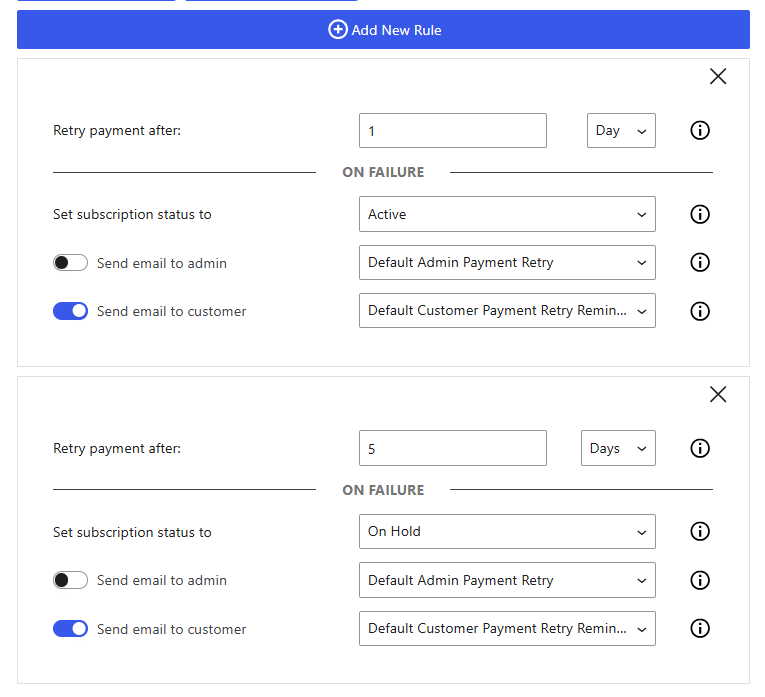
Payment retrials and email notifications for subscriptions Also, you may enable additional email notifications for payment attempts.
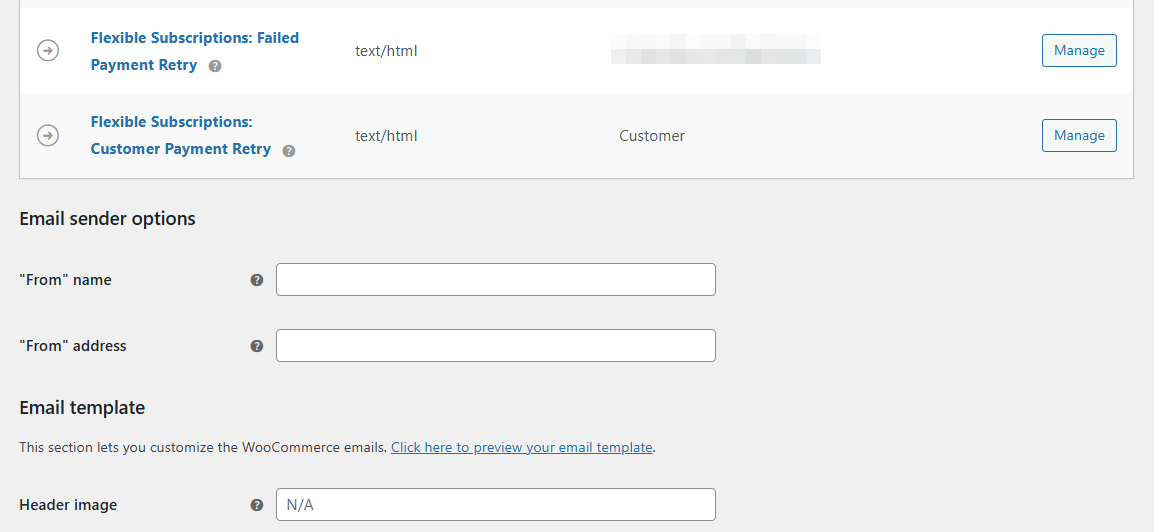
Email templates for payment attempt Of course, it's possible to customize the email templates.

Email template to on payment retry If you need more emails, you may add new emails for different messages and communication optimization.
How to add a new custom email template? You may copy the PHP template to the theme's folder, duplicate the email template, change the template's name, customize the template, and save the new file. The plugin will recognize the additional email template.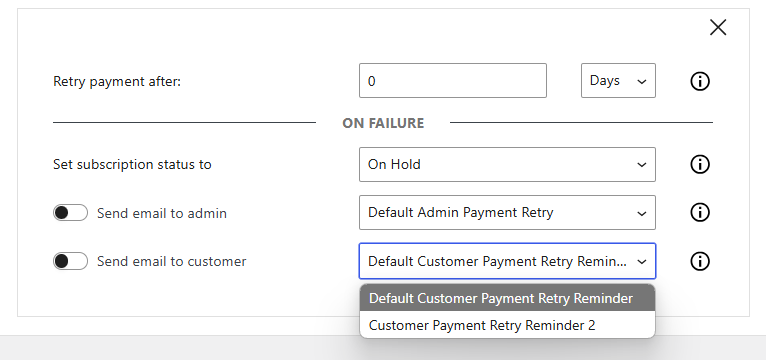
Recurring shipping for advanced subscriptions
Last but not least, Flexible Subscriptions are not just about recurring payments. The second add-on allows setting up a product shipping schedule (cycles) different from the subscription payments.
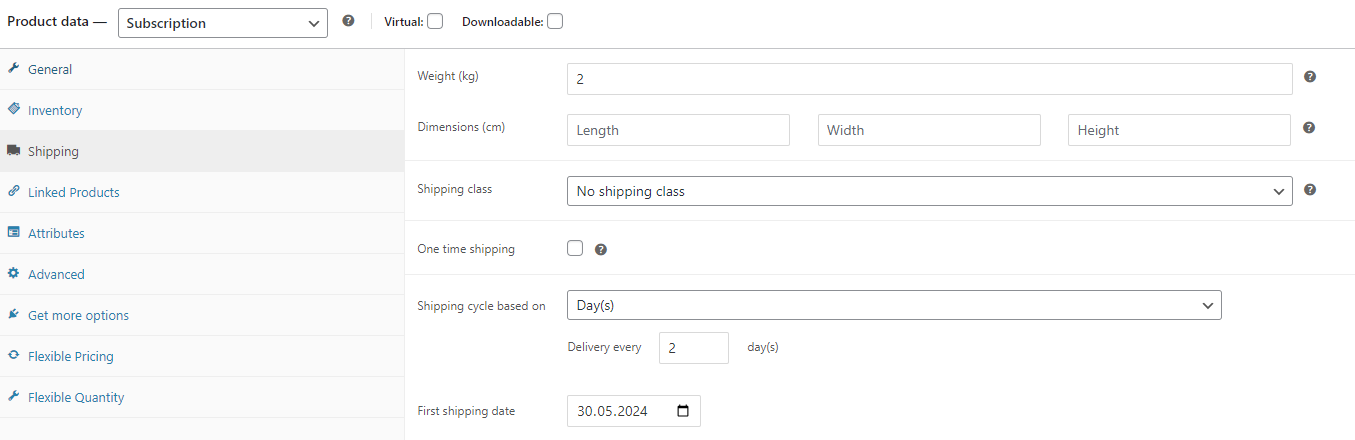 You may read more about the add-on.
Subscriptions and recurring payments in WooCommerce summary
In this blog post, you could understand the basics of the subscription-based model. Also, how to use WordPress and free plugins to add subscriptions in an online store.
Are you interested in ecommerce and would like to check out the plugins? You may get the free plugin for WordPress/ WooCommerce below or test subscriptions in a free demo.
Download Flexible Subscriptions →
You may also enhance the plugin with advanced options for subscription payments (payment retry with email notifications).