
• Skip to primary navigation
  • Skip to main content
  • Skip to primary sidebar
  • Skip to footer
WP Desk = premium plugins for WordPress & WooCommerce
  • Plugins
        • Checkout & OrdersMake your work easier and automate the orders. Adjust the order form to your needs and make it more useful to your customers. Print order labels directly from WooCommerce. Put the orders in order using our plugins. Find out how to streamline the procurement process in your store.
          • Flexible Checkout Fields
          • Active Payments
          • Automatic Payment Status
          • One Click Return for WooCommerce
          • Print Orders and Address Labels
          • Flexible Subscriptions Recurring Shipping
          • Flexible Subscriptions Payment Retry
          • Flexible Subscriptions Stock Management
        • ProductsThese plugins will help you manage your WooCommerce products. Here you will find the plugins to import and update products from XML or CSV files. Then you can change the product unit of measure, show the lowest price in the last 30 days (Omnibus Directive), or let customers name the product price!
          • Flexible Product Fields
          • Dropshipping Import Products
          • Dropshipping FTP Import Products
          • Dropshipping Export Products
          • Custom Price
          • WP Desk Omnibus
          • Flexible Quantity Calculator
          • Dropshipping Orders Export
        • MarketingPromote your store online. Add products from your shop to price comparison websites directly from WooCommerce. Acquire new customers and communicate with your existing ones. Build a customer base and communicate with clients using one of the most effective marketing tools, namely e-mail marketing. Check out our promotional tools!
          • Flexible Pricing
          • Flexible Wishlist - Analytics & Emails
          • OLX WooCommerce
          • Flexible PDF Coupons
          • ShopMagic
          • Flexible Invoices
  • Bundle🔥
  • WP Desk Care
  • Support
  • Blog
  • My Account
  • 0

More results

How to Sell Subscriptions with a One-Time Setup Fee in WooCommerce

Subscriptions for WooCommerce

patrycja.wojas3 minutes readUpdated: 2026-10-28Updated: 2026-10-07
blog category heading image

To sell a subscription for only some variations of a WooCommerce product, build the item as a variable product and add the One-Time Payment add-on for Flexible Subscriptions, which enables recurring billing on the variations you pick and leaves the rest as ordinary one-time purchases. One product page then carries both buying models: the customer chooses the size, version or flavour, and the purchase model follows that choice. This guide covers the setup, how to label it so nobody is surprised at checkout, and how to price the two options against each other.

Contents

  • One product, two ways to buy it
  • What this setup solves
  • When this is the right approach
    • Product sizes with different consumption rates
    • Flavours and variants customers rotate
    • Software and licences with two pricing models
    • Services with an optional recurring tier
  • How to set it up
    • Step 1: Build the product as a variable product
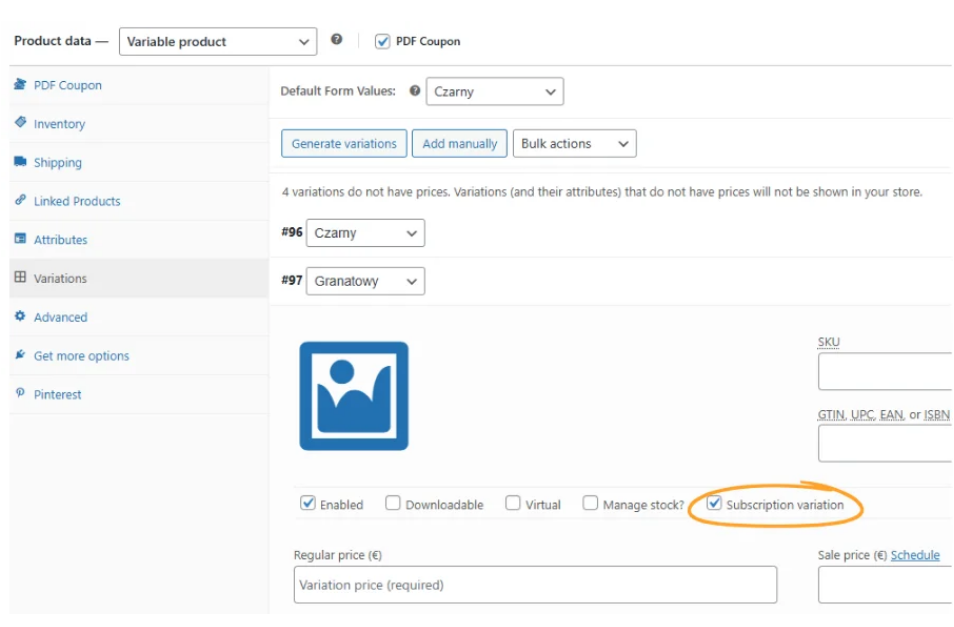
    • Step 2: Enable subscriptions on the chosen variations only
    • Step 3: Make the difference obvious on the product page
    • Step 4: Test the mixed cart
  • Pricing the two models
  • Summary
  • Frequently asked questions
    • Can one WooCommerce product have both subscription and one-time variations?
    • What happens in a cart with both a subscription and a one-time product?
    • Do new variations become subscriptions automatically?
    • Does this work with the block checkout?
    • How much cheaper should the subscription variation be?

One product, two ways to buy it

Not every variation of a product makes sense as a subscription. A 250 g bag of coffee suits a monthly delivery, a 5 kg catering pack does not. A monthly plan fits a standard licence, a lifetime version by definition does not.

Forcing one model onto the whole product means either losing the one-time buyers or managing two near-identical products in the catalogue.

What this setup solves

With subscriptions enabled only for selected variations, a single product page can offer both. The customer picks the size, the version or the flavour, and the purchase model follows that choice automatically.

The One-Time Payment add-on for Flexible Subscriptions makes that possible: subscriptions apply to the variations you choose, while the rest of the product stays a normal one-time purchase.
If you are still deciding which subscription plugin to build this on, start with the comparison of WooCommerce Subscriptions alternatives.

When this is the right approach

Product sizes with different consumption rates

Small and medium packs run out predictably, which is what makes a subscription attractive. Bulk sizes last unpredictably long, so a recurring delivery becomes an annoyance rather than a convenience.

Popular sizes are also the ones that sell out, which makes stock control for renewals worth setting up at the same time.

Flavours and variants customers rotate

In categories where customers like to change what they receive, a subscription on one flavour and single purchases on the rest reflects how people actually shop.

Software and licences with two pricing models

An annual licence as a subscription, a lifetime version as a single payment, both on the same page, with no duplicate product entries to keep in sync.

Services with an optional recurring tier

A one-off consultation and a monthly retainer are the same service at different intensities. Variations keep them together, which helps the customer compare.

How to set it up

Step 1: Build the product as a variable product

The structure comes first. Create the attributes, generate the variations and price each one. This is standard WooCommerce work, with no subscription logic involved yet.

Step 2: Enable subscriptions on the chosen variations only

Select which variations should be sold as subscriptions. Leave the others as they are. Review this list after any catalogue change, because new variations do not inherit the setting by default.

Step 3: Make the difference obvious on the product page

This is where most implementations fail. If selecting a size silently changes a purchase into a recurring commitment, you will get refund requests. Label the subscription variations explicitly, state the billing cycle next to the price, and keep the wording the same in the cart.

Step 4: Test the mixed cart

Add a subscription variation and a one-time product to the same basket and complete the order. Check that the renewal schedule applies only to the subscription line and that the payment method chosen at checkout supports recurring charges.

Pricing the two models

A subscription price lower than the one-time price is the usual arrangement, and the discount buys predictability. Five to fifteen per cent is a common range. Below that the incentive is too weak to change behaviour, above it you are paying heavily for a commitment the customer can cancel next month.

FLEXIBLE SUBSCRIPTIONS
One-Time Payment add-on
Turn recurring billing on for selected product variations and keep the rest as one-time purchases.
See the add-on »

Summary

Selling subscriptions on selected variations keeps one product page for two buying models. Build the variable product first, enable subscriptions only where recurring delivery makes sense, label the difference clearly on the page, and test a mixed cart before you publish.

Frequently asked questions

Can one WooCommerce product have both subscription and one-time variations?

Yes. That is exactly what this setup is for, and it removes the need to maintain two near-identical products in the catalogue.

What happens in a cart with both a subscription and a one-time product?

The order contains both lines, and the renewal schedule applies only to the subscription one. Test it before launch, because the payment method chosen at checkout has to support recurring charges.

Do new variations become subscriptions automatically?

No. Review the setting whenever you add variations, otherwise a new size will quietly stay one-time only.

Does this work with the block checkout?

Yes. Flexible Subscriptions supports both the classic checkout and the Cart and Checkout Blocks.

How much cheaper should the subscription variation be?

Five to fifteen per cent below the one-time price is the common range. Below that the incentive is too weak to change behaviour, above it you are paying heavily for a commitment the customer can cancel next month.

3 minutes read100 views

patrycja.wojas

Product Content Hero

LinkedIn Profile

Patrycja has 14 years of experience in copywriting and SEO. She is one of the few specialists in Poland who writes with equal confidence about mor...

Powered by WP Desk

WP Desk brings you great WooCommerce plugins. We strive to save your time and money by speeding up your processes. Use our plugins to build a better store. Awesome support included in the package.

Premium WooCommerce Plugins →
WP Desk › Blog › WooCommerce checkout & orders › Subscriptions for WooCommerce › How to Sell Subscriptions with a One-Time Setup Fee in WooCommerce

Primary Sidebar

Contents

  • One product, two ways to buy it
  • What this setup solves
  • When this is the right approach
    • Product sizes with different consumption rates
    • Flavours and variants customers rotate
    • Software and licences with two pricing models
    • Services with an optional recurring tier
  • How to set it up
    • Step 1: Build the product as a variable product
    • Step 2: Enable subscriptions on the chosen variations only
    • Step 3: Make the difference obvious on the product page
    • Step 4: Test the mixed cart
  • Pricing the two models
  • Summary
  • Frequently asked questions
    • Can one WooCommerce product have both subscription and one-time variations?
    • What happens in a cart with both a subscription and a one-time product?
    • Do new variations become subscriptions automatically?
    • Does this work with the block checkout?
    • How much cheaper should the subscription variation be?

Flexible Subscriptions One-Time Payment Add-on £39

Want to offer subscriptions only for selected product variations – for example, one size, version, or flavor? With the One-Time Payment Subscription Add-on for the free Flexible Subscriptions plugin, you can easily choose which product variations will work as subscriptions and which will remain regular one-time purchases.

Add to cart or View Details
WP Desk
Plugins used by 239,800+ shops
Last Updated: 2026-10-22
Works with WooCommerce 10.8 - 11.2

Stay updated on our how-to articles

WP Desk news, WooCommerce tips, promo codes - right to your inbox.

By entering your e-mail, you agree to our Terms & Conditions and Privacy Policy.

By entering your e-mail, you agree to our Terms & Conditions and Privacy Policy.

Footer

WP Desk - WooCommerce Plugins

At WP Desk we create great WooCommerce plugins with awesome support. Save time and money with our e-commerce solutions. See how we can help you improve your e-store →

Secured by Comodo

WP Desk

  • About us
  • Giving Back
  • Blog
  • Get Support
  • Contact us

Products

  • Premium Plugins
  • WP Desk Care
  • Documentation
  • WooCommerce Invoices
  • Email Marketing
  • PDF Coupons

Legal

  • Terms & Conditions
  • Refund Policy
  • Support Policy
  • Privacy Policy

© 2026 WP Desk

We value your privacy

We use necessary cookies to make our site work. We'd also like to set additional cookies to understand site usage, enhance your browsing experience, and serve personalized ads or content. By clicking ‘Accept All,’ you consent to our use of additional cookies.

Functional Always active
The technical storage or access is strictly necessary for the legitimate purpose of enabling the use of a specific service explicitly requested by the subscriber or user, or for the sole purpose of carrying out the transmission of a communication over an electronic communications network.
Preferences
The technical storage or access is necessary for the legitimate purpose of storing preferences that are not requested by the subscriber or user.
Statistics
The technical storage or access that is used exclusively for anonymous statistical purposes. Without a subpoena, voluntary compliance on the part of your Internet Service Provider, or additional records from a third party, information stored or retrieved for this purpose alone cannot usually be used to identify you. The technical storage or access that is used exclusively for anonymous statistical purposes. Without a subpoena, voluntary compliance on the part of your Internet Service Provider, or additional records from a third party, information stored or retrieved for this purpose alone cannot usually be used to identify you.
Marketing
The technical storage or access is required to create user profiles to send advertising, or to track the user on a website or across several websites for similar marketing purposes.
  • Manage options
  • Manage services
  • Manage {vendor_count} vendors
  • Read more about these purposes
View preferences
  • {title}
  • {title}
  • {title}