
• Skip to primary navigation
  • Skip to main content
  • Skip to primary sidebar
  • Skip to footer
WP Desk = premium plugins for WordPress & WooCommerce
  • Plugins
        • Checkout & OrdersMake your work easier and automate the orders. Adjust the order form to your needs and make it more useful to your customers. Print order labels directly from WooCommerce. Put the orders in order using our plugins. Find out how to streamline the procurement process in your store.
          • Flexible Checkout Fields
          • Active Payments
          • Automatic Payment Status
          • One Click Return for WooCommerce
          • Print Orders and Address Labels
          • Flexible Subscriptions Recurring Shipping
          • Flexible Subscriptions Payment Retry
          • Flexible Subscriptions Stock Management
        • ProductsThese plugins will help you manage your WooCommerce products. Here you will find the plugins to import and update products from XML or CSV files. Then you can change the product unit of measure, show the lowest price in the last 30 days (Omnibus Directive), or let customers name the product price!
          • Flexible Product Fields
          • Dropshipping Import Products
          • Dropshipping FTP Import Products
          • Dropshipping Export Products
          • Custom Price
          • WP Desk Omnibus
          • Flexible Quantity Calculator
          • Dropshipping Orders Export
        • MarketingPromote your store online. Add products from your shop to price comparison websites directly from WooCommerce. Acquire new customers and communicate with your existing ones. Build a customer base and communicate with clients using one of the most effective marketing tools, namely e-mail marketing. Check out our promotional tools!
          • Flexible Pricing
          • Flexible Wishlist - Analytics & Emails
          • OLX WooCommerce
          • Flexible PDF Coupons
          • ShopMagic
          • Flexible Invoices
  • Bundle🔥
  • WP Desk Care
  • Support
  • Blog
  • My Account
  • 0

More results

WooCommerce Checkout Fields: What to Add and What to Remove Before Peak Season

WordPress tips & plugins

patrycja.wojas3 minutes readUpdated: 2026-10-29Updated: 2026-10-26
blog category heading image

The default WooCommerce checkout asks for about a dozen things. Some of them you need, some of them your courier needs, and at least two of them nobody has looked at since the shop was built. Every one of them is a place a customer can stop.

Contents

  • Which fields to remove and which to keep
  • What is worth adding
  • What to check before the traffic arrives
  • Summary
  • Frequently asked questions
    • How many fields is too many?
    • Should fields be removed or just made optional?
    • Can checkout fields differ by country?
    • Related Articles
  • Add a QR Code reader for WooCommerce to your store.
  • Add a tip or donation at the WooCommerce Checkout Page

Which fields to remove and which to keep

Keep anything required to deliver the order, charge for it or issue the document that goes with it. Remove everything else, and apply the test field by field rather than screen by screen.

The company name field is the usual first casualty in a store selling to consumers. It is shown to everybody, filled in by a small minority, and in most shops exists because the default template includes it.

The second address line is the second. It is genuinely needed in some markets and for some couriers, and genuinely dead weight in others, which makes it a question about your own delivery data rather than about checkout theory.

The phone number is the one worth arguing about. Couriers increasingly require it, customers increasingly resent it, and the resolution is usually to keep it and say in one line why it is being asked for. A field with a reason attached is answered far more often than the same field without.

What is worth adding

Anything that prevents a failed delivery or a support message, which is a much shorter list than it sounds.

Delivery instructions is the strongest candidate in a peak season, because a parcel left in the wrong place in December is a complaint with a deadline attached. It costs one optional field and removes a category of problem.

A gift message field earns its place in November and December and should be removed afterwards. The same is true of a requested delivery date where your fulfilment can honour one, and not at all true where it cannot.

What is not worth adding is anything you will not read. A how did you hear about us field that nobody analyses is a question asked of every customer for no return, and the same information is available from your analytics. Our guide to shipping and billing address fields goes through which of the defaults are genuinely required.
What to check before the traffic arrives

Test the checkout on a phone, with one hand, in a hurry. That is how most of December's orders will be placed, and it surfaces problems that are invisible on a desktop, such as a field that triggers the wrong keyboard or a validation message that appears above the fold the customer is looking at.

Check every field's validation against a real foreign address. Postcode rules in particular are a common source of checkouts that work perfectly for domestic customers and reject everybody else.

And count the fields. Not as an exercise in minimalism, but because the number is the single figure most correlated with abandonment, and most stores are surprised by their own total.

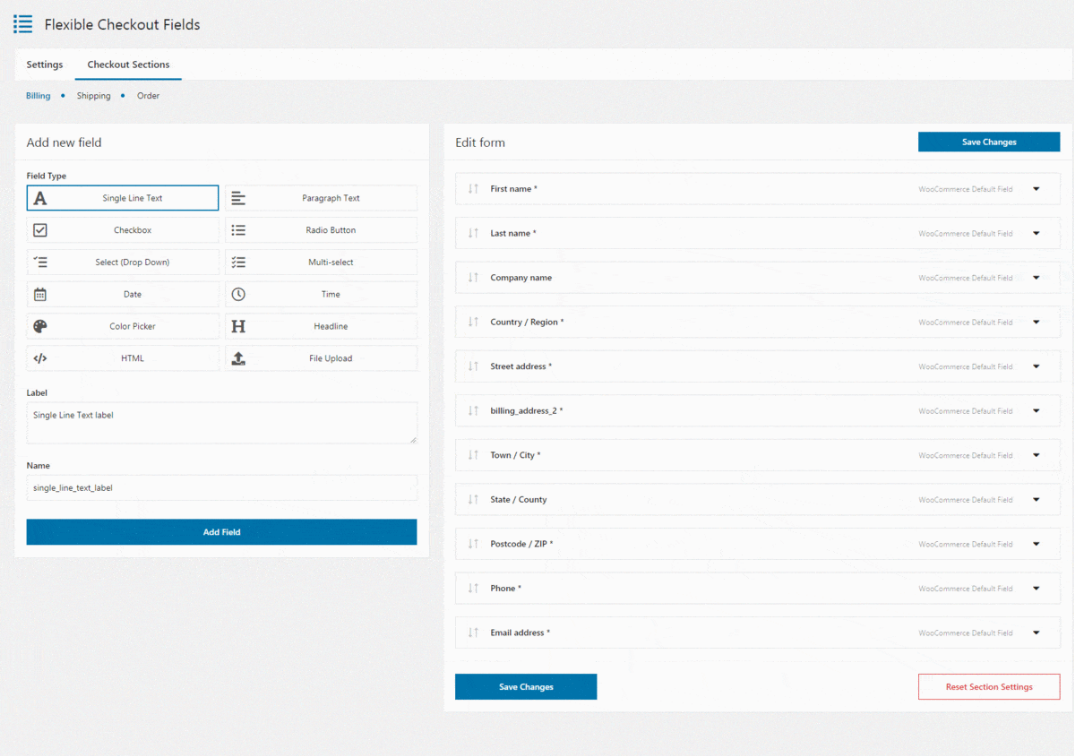
Adding a seasonal field in November and taking it out in January should not involve a template. Flexible Checkout Fields PRO adds, removes, reorders and relabels checkout fields from the admin, including per country.

Summary

Keep any field required to deliver the order, charge for it or issue the accompanying document, and remove the rest, testing field by field. The company name field is usually the first to go in a consumer store, since it is shown to everyone and used by few. The second address line depends on your markets and couriers rather than on any general rule. The phone number is the contested one: couriers want it, customers resist it, and the usual resolution is to keep it with one line explaining why, because a field with a stated reason is completed far more often.

Worth adding is anything that prevents a failed delivery or a support message. Delivery instructions is the strongest seasonal candidate, since a parcel left in the wrong place in December is a complaint against a deadline. A gift message field earns November and December and should come out afterwards, as should a requested delivery date unless fulfilment can honour it. Nothing should be added that will not be read. Before the traffic arrives, three checks: use the checkout on a phone one-handed, since that is how December orders arrive; test validation against a real foreign address, because postcode rules routinely reject everyone outside the home market; and count the fields, as the total is the figure most closely tied to abandonment and most stores guess it wrong.

Frequently asked questions

These three come up in every checkout review.

How many fields is too many?

There is no universal number, but every field past the ones needed to deliver and invoice should have a reason somebody can state out loud.

Should fields be removed or just made optional?

Optional still costs attention, since the customer reads it before skipping it. Remove what is not needed and make optional only what some customers genuinely use.

Can checkout fields differ by country?

They should, since address formats and courier requirements differ. A single field set applied worldwide is how stores end up asking for a state from customers who do not have one.


Related Articles

Add a QR Code reader for WooCommerce to your store.

In the competitive world of online shopping, it's crucial for online shop managers to stay ahead of the game. One way to drive engagement, boost custo...
WooCommerce donation or tip on cart and checkout

Add a tip or donation at the WooCommerce Checkout Page

Recent months have been a period of changing plans for eateries and adapting to new realities. Even those facilities that were reluctant to WooCommerc...

3 minutes read100 views

patrycja.wojas

Product Content Hero

LinkedIn Profile

Patrycja has 14 years of experience in copywriting and SEO. She is one of the few specialists in Poland who writes with equal confidence about mor...

Powered by WP Desk

WP Desk brings you great WooCommerce plugins. We strive to save your time and money by speeding up your processes. Use our plugins to build a better store. Awesome support included in the package.

Premium WooCommerce Plugins →
WP Desk › Blog › WordPress tips & plugins › WooCommerce Checkout Fields: What to Add and What to Remove Before Peak Season

Primary Sidebar

Contents

  • Which fields to remove and which to keep
  • What is worth adding
  • What to check before the traffic arrives
  • Summary
  • Frequently asked questions
    • How many fields is too many?
    • Should fields be removed or just made optional?
    • Can checkout fields differ by country?

Flexible Checkout Fields PRO WooCommerce £59

Edit, add new or hide unnecessary fields from the WooCommerce checkout form. Add pricing to fields and use conditional logic. It's all about conversions and better user experience. NEW: now you can set multiple conditions (OR) under one or more condition groups (AND).

💾 Active Installations: 80,000+ | WordPress Rating:

Add to cart or View Details
WP Desk
80,000+ Active Installations
Last Updated: 2026-10-22
Works with WooCommerce 10.8 - 11.2

Stay updated on our how-to articles

WP Desk news, WooCommerce tips, promo codes - right to your inbox.

By entering your e-mail, you agree to our Terms & Conditions and Privacy Policy.

By entering your e-mail, you agree to our Terms & Conditions and Privacy Policy.

Footer

WP Desk - WooCommerce Plugins

At WP Desk we create great WooCommerce plugins with awesome support. Save time and money with our e-commerce solutions. See how we can help you improve your e-store →

Secured by Comodo

WP Desk

  • About us
  • Giving Back
  • Blog
  • Get Support
  • Contact us

Products

  • Premium Plugins
  • WP Desk Care
  • Documentation
  • WooCommerce Invoices
  • Email Marketing
  • PDF Coupons

Legal

  • Terms & Conditions
  • Refund Policy
  • Support Policy
  • Privacy Policy

© 2026 WP Desk

We value your privacy

We use necessary cookies to make our site work. We'd also like to set additional cookies to understand site usage, enhance your browsing experience, and serve personalized ads or content. By clicking ‘Accept All,’ you consent to our use of additional cookies.

Functional Always active
The technical storage or access is strictly necessary for the legitimate purpose of enabling the use of a specific service explicitly requested by the subscriber or user, or for the sole purpose of carrying out the transmission of a communication over an electronic communications network.
Preferences
The technical storage or access is necessary for the legitimate purpose of storing preferences that are not requested by the subscriber or user.
Statistics
The technical storage or access that is used exclusively for anonymous statistical purposes. Without a subpoena, voluntary compliance on the part of your Internet Service Provider, or additional records from a third party, information stored or retrieved for this purpose alone cannot usually be used to identify you. The technical storage or access that is used exclusively for anonymous statistical purposes. Without a subpoena, voluntary compliance on the part of your Internet Service Provider, or additional records from a third party, information stored or retrieved for this purpose alone cannot usually be used to identify you.
Marketing
The technical storage or access is required to create user profiles to send advertising, or to track the user on a website or across several websites for similar marketing purposes.
  • Manage options
  • Manage services
  • Manage {vendor_count} vendors
  • Read more about these purposes
View preferences
  • {title}
  • {title}
  • {title}