
• Skip to primary navigation
  • Skip to main content
  • Skip to primary sidebar
  • Skip to footer
WP Desk = premium plugins for WordPress & WooCommerce
  • Plugins
        • Checkout & OrdersMake your work easier and automate the orders. Adjust the order form to your needs and make it more useful to your customers. Print order labels directly from WooCommerce. Put the orders in order using our plugins. Find out how to streamline the procurement process in your store.
          • Flexible Checkout Fields
          • Active Payments
          • Automatic Payment Status
          • Flexible Refund and Return Order
          • Print Orders and Address Labels
          • Flexible Subscriptions Recurring Shipping
          • Flexible Subscriptions Payment Retry
          • Flexible Subscriptions Stock Management
        • ProductsThese plugins will help you manage your WooCommerce products. Here you will find the plugins to import and update products from XML or CSV files. Then you can change the product unit of measure, show the lowest price in the last 30 days (Omnibus Directive), or let customers name the product price!
          • Flexible Product Fields
          • Dropshipping Import Products
          • Dropshipping FTP Import Products
          • Dropshipping Export Products
          • Custom Price
          • WP Desk Omnibus
          • Flexible Quantity Calculator
          • Dropshipping Orders Export
        • MarketingPromote your store online. Add products from your shop to price comparison websites directly from WooCommerce. Acquire new customers and communicate with your existing ones. Build a customer base and communicate with clients using one of the most effective marketing tools, namely e-mail marketing. Check out our promotional tools!
          • Flexible Pricing
          • Flexible Wishlist - Analytics & Emails
          • OLX WooCommerce
          • Flexible PDF Coupons
          • ShopMagic
          • Flexible Invoices
  • Bundle🔥
  • WP Desk Care
  • Support
  • Blog
  • My Account
  • 0

More results

WooCommerce EAN - manage EAN numbers for free 🚀

News, WooCommerce quantity & price

Przemysław Rosa2 minutes read2026-06-06
blog category heading image

WooCommerce is one of the most popular tools for building online stores, and with the Flexible EAN WooCommerce plugin, you can streamline your store management even further. This plugin allows you to easily add EAN numbers to products, both simple and variable, which is incredibly useful when selling on platforms like Google Merchant. 📈

Contents

  • Table of Contents
  • What is Flexible EAN WooCommerce?
  • Key Features
  • 🛣️ Roadmap – Integrations with Other Tools
  • How to Install Flexible EAN WooCommerce?
  • Summary
    • Related Articles
  • Advanced product quantities, decimals, and new units in WooCommerce
  • Use Measurement Price Calculator for WooCommerce (free plugin)
  • WooCommerce Products - The basics of e-commerce product management

Table of Contents

✅ What is Flexible EAN for WooCommerce? ⇣
✅ Key Features ⇣
✅ Integrations with Other Tools ⇣
✅ How to Install the Plugin? ⇣
✅ Download Flexible EAN plugin from the repository →

What is Flexible EAN WooCommerce?

Flexible EAN WooCommerce is a free plugin that enables you to generate and manage EAN/GTIN numbers for products in WooCommerce stores. The EAN (European Article Number) is a unique barcode that allows product identification worldwide. With the Flexible EAN WooCommerce plugin, managing EANs is simple and essential for a properly functioning online store, especially when integrating with external platforms.

Key Features

Flexible EAN WooCommerce offers both manual and automatic generation of EAN numbers for simple and variable products. This plugin allows adding EAN to a product’s structured data, which enhances the visibility of products in search engines.

⚙️ The plugin allows you to generate EAN numbers in various ways:

  • In product settings, where you can generate an EAN with one click.
  • Globally in the plugin settings, where you can generate EAN codes in the selected standard for all products in the store.
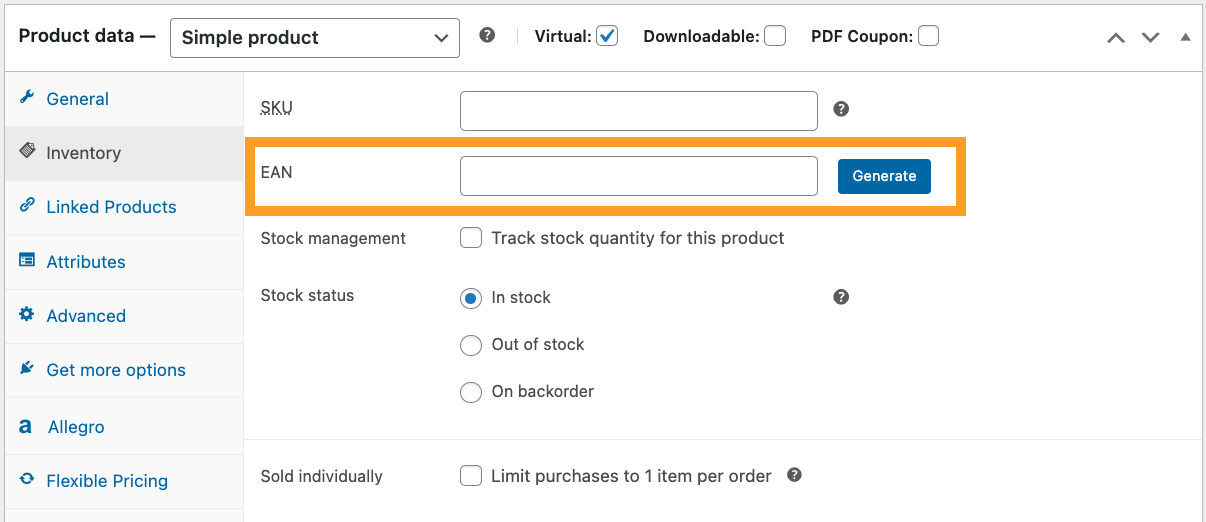
WooCommerce EAN - Generate EAN code in product settings

🔎 Additionally, to make management easier, the EAN code will be displayed:

  • In the EAN column in the product list in the WooCommerce panel.
  • Optionally on the product page, where you can choose to display the EAN above or below the product price.
  • Optionally on the cart page (under product names).
  • Optionally on the order page.
  • Optionally on the category page (in the product list on the front store page).
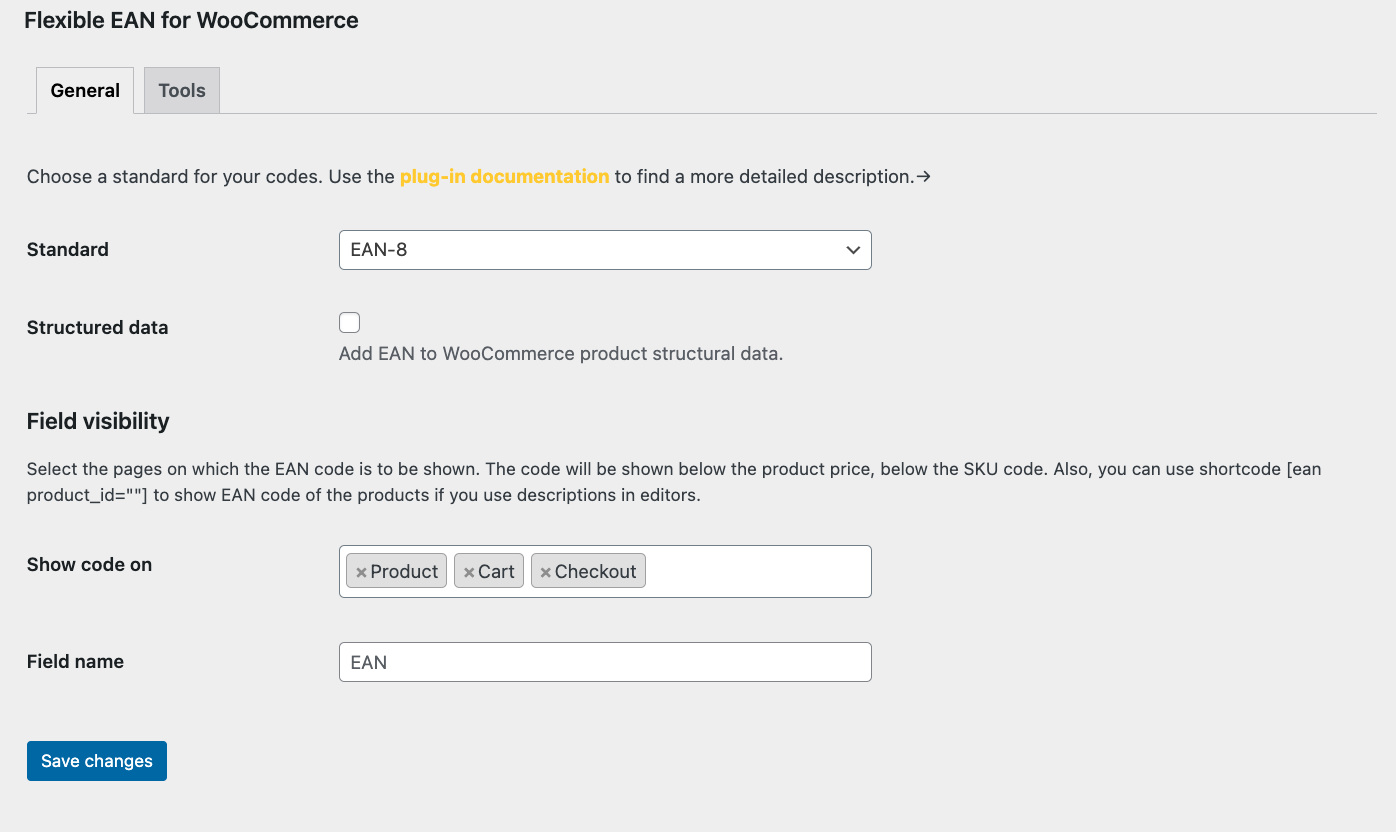
WooCommerce EAN - Main settings with options for generation and display

Thanks to the plugin, the EAN will also be displayed under the product name in the cart and checkout pages, making it easier for customers to identify products at every stage of their purchase.

Shortcode Support: The plugin also supports the shortcode [ean product_id=""], which allows you to display the EAN anywhere on the page.

🛣️ Roadmap – Integrations with Other Tools

Flexible EAN WooCommerce will not only be a tool for generating EAN numbers. In the near future, we will work on integrating it with popular WooCommerce plugins from WP Desk. With this tool, you’ll be able to pass EAN numbers to plugins such as:

  • Dropshipping XML Import Products →
  • Dropshipping XML Export Products →
  • Flexible Invoices for WooCommerce →

How to Install Flexible EAN WooCommerce?

🤓 Installing the plugin is incredibly easy. Simply go to the Plugins section in the WordPress admin panel, search for Flexible EAN WooCommerce, and click Install. Once the plugin is installed and activated, you can immediately start using its features, including EAN management.

Summary

Flexible EAN WooCommerce is a fantastic solution for any WooCommerce store that wants to easily manage EAN numbers. The plugin is not only free but also offers integration with other tools, making it an essential asset for any online store. Thanks to it, managing EAN numbers becomes fast and efficient.

Download the plugin from the repository →

Related Articles

WooCommerce advanced product quantities and decimal quantity

Advanced product quantities, decimals, and new units in WooCommerce

Today, I will show you how to implement in WooCommerce the advanced product quantities and new units of measure. You’ll learn how to manage quantities...
How to use Measurement Price Calculator for WooCommerce (free plugin)

Use Measurement Price Calculator for WooCommerce (free plugin)

In this article, I will show you Flexible Quantity in action - a FREE measurement price calculator for WooCommerce plugin. If you want to sell product...
WooCommerce product manager plugin guide

WooCommerce Products - The basics of e-commerce product management

Launching and running a WooCommerce shop is very simple in the long-term perspective. The beginnings are difficult in any field. To make a start easy ...

2 minutes read3507 views

Przemysław Rosa

Product Owner at WP Desk

LinkedIn Profile

Przemek has over 15 years of experience in product and project management and has been part of WP Desk since 2017. As a data-driven Product Owner, ...

Powered by WP Desk

WP Desk brings you great WooCommerce plugins. We strive to save your time and money by speeding up your processes. Use our plugins to build a better store. Awesome support included in the package.

Premium WooCommerce Plugins →
WP Desk › Blog › WooCommerce products › WooCommerce quantity & price › WooCommerce EAN - manage EAN numbers for free 🚀

Primary Sidebar

Contents

  • Table of Contents
  • What is Flexible EAN WooCommerce?
  • Key Features
  • 🛣️ Roadmap – Integrations with Other Tools
  • How to Install Flexible EAN WooCommerce?
  • Summary

Stay updated on our how-to articles

WP Desk news, WooCommerce tips, promo codes - right to your inbox.

By entering your e-mail, you agree to our Terms & Conditions and Privacy Policy.

By entering your e-mail, you agree to our Terms & Conditions and Privacy Policy.

Footer

WP Desk - WooCommerce Plugins

At WP Desk we create great WooCommerce plugins with awesome support. Save time and money with our e-commerce solutions. See how we can help you improve your e-store →

Secured by Comodo

WP Desk

  • About us
  • Giving Back
  • Blog
  • Get Support
  • Contact us

Products

  • Premium Plugins
  • WP Desk Care
  • Documentation
  • WooCommerce Invoices
  • Email Marketing
  • PDF Coupons

Legal

  • Terms & Conditions
  • Refund Policy
  • Support Policy
  • Privacy Policy

© 2026 WP Desk

We value your privacy

We use necessary cookies to make our site work. We'd also like to set additional cookies to understand site usage, enhance your browsing experience, and serve personalized ads or content. By clicking ‘Accept All,’ you consent to our use of additional cookies.

Functional Always active
The technical storage or access is strictly necessary for the legitimate purpose of enabling the use of a specific service explicitly requested by the subscriber or user, or for the sole purpose of carrying out the transmission of a communication over an electronic communications network.
Preferences
The technical storage or access is necessary for the legitimate purpose of storing preferences that are not requested by the subscriber or user.
Statistics
The technical storage or access that is used exclusively for anonymous statistical purposes. Without a subpoena, voluntary compliance on the part of your Internet Service Provider, or additional records from a third party, information stored or retrieved for this purpose alone cannot usually be used to identify you. The technical storage or access that is used exclusively for anonymous statistical purposes. Without a subpoena, voluntary compliance on the part of your Internet Service Provider, or additional records from a third party, information stored or retrieved for this purpose alone cannot usually be used to identify you.
Marketing
The technical storage or access is required to create user profiles to send advertising, or to track the user on a website or across several websites for similar marketing purposes.
  • Manage options
  • Manage services
  • Manage {vendor_count} vendors
  • Read more about these purposes
View preferences
  • {title}
  • {title}
  • {title}