• Skip to primary navigation
  • Skip to main content
  • Skip to primary sidebar
  • Skip to footer
WP Desk = premium plugins for WordPress & WooCommerce
  • Plugins
        • Checkout & OrdersMake your work easier and automate the orders. Adjust the order form to your needs and make it more useful to your customers. Print order labels directly from WooCommerce. Put the orders in order using our plugins. Find out how to streamline the procurement process in your store.
          • Flexible Checkout Fields
          • Active Payments
          • Automatic Payment Status
          • Flexible Refund and Return Order
          • Print Orders and Address Labels
          • Flexible Subscriptions Recurring Shipping
          • Flexible Subscriptions Payment Retry
          • Flexible Subscriptions Stock Management
        • ProductsThese plugins will help you manage your WooCommerce products. Here you will find the plugins to import and update products from XML or CSV files. Then you can change the product unit of measure, show the lowest price in the last 30 days (Omnibus Directive), or let customers name the product price!
          • Flexible Product Fields
          • Dropshipping Import Products
          • Dropshipping FTP Import Products
          • Dropshipping Export Products
          • Custom Price
          • WP Desk Omnibus
          • Flexible Quantity Calculator
          • Dropshipping Orders Export
        • MarketingPromote your store online. Add products from your shop to price comparison websites directly from WooCommerce. Acquire new customers and communicate with your existing ones. Build a customer base and communicate with clients using one of the most effective marketing tools, namely e-mail marketing. Check out our promotional tools!
          • Flexible Pricing
          • Flexible Wishlist - Analytics & Emails
          • OLX WooCommerce
          • Flexible PDF Coupons
          • ShopMagic
          • Flexible Invoices
  • Bundle🔥
  • WP Desk Care
  • Support
  • Blog
  • My Account
  • 0

More results

Complete customization of your WooCommerce store for the Omnibus Directive

Plugin Updates, WooCommerce quantity & price

Damian Machnik4 minutes read2025-08-20

Our solution for adapting your WooCommerce store to the Omnibus Directive is very popular. That's why we decided to add many new functionalities to the plugin, which directly respond to the reported needs. From this post, you will learn more about the most important functionalities of our plugin.

Contents

  • Omnibus Directive already in effect
  • New features in Omnibus plugin for WooCommerce from WP Desk
    • Selectable range of days for showing the lowest price
    • Display the lowest price only for products on promotion or all products
    • Full support for variant and subscription products
    • Flexible Subscriptions for WooCommerce - Bundle
    • Ability to choose the method of searching for the lowest product price
    • Option to select a message when the new price is the lowest one
    • Ability to set the exact content of the message
    • Choosing where to display the Omnibus lowest price
  • Summary
    • Related Articles
  • Omnibus Directive - make your WooCommerce store ready for changes
  • Lowest product price in WooCommerce (Omnibus Directive and marketing perks).
  • WooCommerce price history in the WP Desk Omnibus plugin.
  • WooCommerce Omnibus and WPML join forces!

Omnibus Directive already in effect

Some time ago, we wrote about the fact that the Omnibus Directive will soon be implemented into European law. Actually, we wrote about it a long time ago, when few people had yet heard of the Omnibus. The original date of entry into force of the provisions from this directive was set for May 28, 2022. However, life writes its scenarios, so the date was eventually moved for some of the countries to January 1, 2023.

We don't want to duplicate ourselves, so if you're looking for basic knowledge on how Omnibus works in a WooCommerce store, I refer you to this article. There, you will also find answers to questions such as:

  • What changes are being made to the law by the Omnibus Directive, and how does this relate to WooCommerce stores?
  • What are the penalties for not complying with the new obligations and, for example, not displaying the lowest price information?
  • How can our Omnibus plugin help your WooCommerce store?

Nevertheless, time passes and as we got a lot of feedback from you, we decided to publish a major update of the plugin, which introduces a great deal of changes and new features. Hence, the article in question.

Regardless of this post, if you experience any problems while installing or configuring the plugin, then I encourage you to visit our documentation.

In addition to the above-mentioned documentation, our support department is also at your service. We will be delighted to answer all your questions, both before and after you purchase our product. The support we provide is one of the pillars on which our operation is based.

This applies not only to the Omnibus for WooCommerce. Amazing product support is part of our WP Desk DNA.

New features in Omnibus plugin for WooCommerce from WP Desk

As the introduction part ends, I propose to slowly move to the substance. After all, you are here to learn a little more about the configuration and capabilities of our plugin. So, how are the Omnibus settings, not only for displaying the lowest price before discounting? Slightly below, you'll find the main (new) functionalities of the plugin listed. However, let's start with a screenshot:
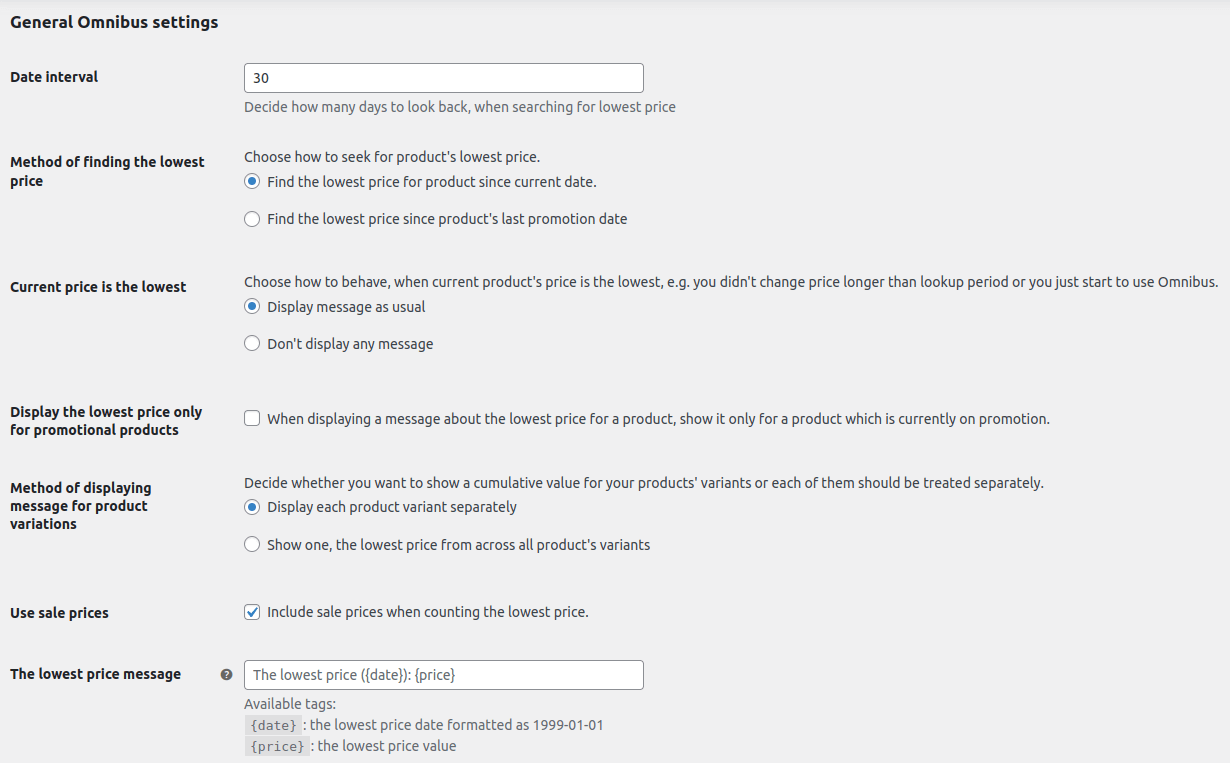
Omnibus main settings

Selectable range of days for showing the lowest price

By default, the law requires e-commerce stores to show the lowest price for the last 30 days. However, nothing prevents you from extending this time. I may surprise you, but we have many clients who do just that. For example, they show the lowest price for a period of 90 or 180 days.

This is part of the transparent pricing policy that these stores very often have as part of their marketing strategy. So if you want to show the lowest WooCommerce price for more than 30 days - go ahead!

Display the lowest price only for products on promotion or all products

This is another of the options that supports conducting transparent pricing. Nevertheless, an option. Well, you can choose whether the message about the last lowest price of a product should be displayed only for products for promotions. This is the requirement by for example Polish law. However, you can also choose to show the lowest WooCommerce price for all products in your offer.

Omnibus lowest price for promotional

Full support for variant and subscription products

WooCommerce's store is not only about simple products. WooCommerce itself allows you to create variant products. In addition, more and more products that are offered in e-commerce stores are sold in a subscription model.

Flexible Subscriptions for WooCommerce - Bundle

WP Desk's free plugin to sell simple and variable subscriptions and handle recurring payments in WooCommerce. Compatible with WP Desk Omnibus.

Download for free or Go to WordPress.org
WP Desk
1,000+ Active Installations
Last Updated: 2026-08-20

Therefore, our product introduces full support for displaying the lowest price for variant and subscription products. In fact, we even go a step further, as we make it possible to distinguish the treatment of variants. What's at stake here? Depending on the assortment you sell, you may want your variant product to be a separate product, or you may want products within a variant to be treated as one. And our plugin allows you to apply this choice to the display of the lowest price, i.e. whether it should be displayed only for one variant product or the same for all of them.

Omnibus support for variations

Ability to choose the method of searching for the lowest product price

This is an important setting, especially if you use the price message display only for products on promotion. Our plugin allows you to choose whether to look for the lowest price of a product from the date or from the last discounted product. We added this setting because the WP Desk Omnibus plugin for WooCommerce is distributed globally, and some of the settings are different for each country.

Different methods for the lowest price message

Option to select a message when the new price is the lowest one

A small addition but a nice addition. This is about the ability to choose when the current price of a product is also the lowest price. Such a situation may arise when you are just starting to use Omnibus or when you haven't changed prices longer than in terms of checking the lowest price. Our plug-in will allow you to choose whether to show the lowest price message or simply not show it.

Select message for the lowest price

Ability to set the exact content of the message

The settings, we offer, also allow you to customize the content of the message displayed. At the time we created the plug-in, it was not yet clear whether there is (will be) one right content for this message. Therefore, we decided to add a field where each owner will be able to freely set the content of the lowest price message to, for example, the lowest price of the 30 days preceding the discount.

Set exact content of the message

Choosing where to display the Omnibus lowest price

By default, the message about the lowest price of the product for the last 30 days is displayed on the product card. Within this page, we have given you 11 hooks to customize where this message is displayed.

However, the product page itself is not everything. With our plugin, you can display the message about the lowest price of the product also on many other subpages. This can be, for example, a store, category or attribute page.
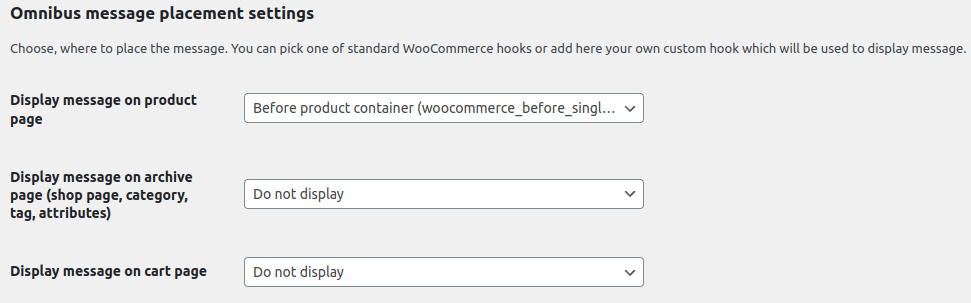
Omnibus extra settings

PS. If you need further customization, nothing prevents you from adding your own hooks.

Summary

That would probably be it roughly. As I mentioned in the introduction, the first entry in our miniseries on Omnibus introduced the plug-in's capabilities. This one, on the other hand, was mainly aimed at presenting the more advanced options and configuration possibilities of the product.

This is a good time to thank you for every idea we have received and will receive. Thanks to you, our solution for bringing stores into compliance with the Omnibus Directive is simply better.
Related Articles

Omnibus directive for WooCommerce

Omnibus Directive - make your WooCommerce store ready for changes

WooCommerce Omnibus plugin by WP Desk is a respondes to the new EU Directive, which is about to come into force. We face up to changes that are coming...
Lowest product price in WooCommerce

Lowest product price in WooCommerce (Omnibus Directive and marketing perks).

Getting your WooCommerce store to comply with the Omnibus Directive means showing the lowest product prices of the last 30 days. Today I'm going to sh...
WooCommerce price list

WooCommerce price history in the WP Desk Omnibus plugin.

WP Desk Omnibus plugin can display minimum advertised price of the last 30 days. But, there's good news. The plugin has a new feature 🎉. Today I will ...
Omnibus WooCommerce WPML

WooCommerce Omnibus and WPML join forces!

Good news! WooCommerce Omnibus and WPML are joining forces, and thus translations and currency conversions of Omnibus WooCommerce are possible with gr...

4 minutes read3580 views

Damian Machnik

Product Manager at WP Desk

Damian is a Product Manager with over 10 years of experience in IT, including 5 years in digital product development and remote team management. He...

Powered by WP Desk

WP Desk brings you great WooCommerce plugins. We strive to save your time and money by speeding up your processes. Use our plugins to build a better store. Awesome support included in the package.

Premium WooCommerce Plugins →
WP Desk › Blog › WooCommerce products › WooCommerce quantity & price › Complete customization of your WooCommerce store for the Omnibus Directive

Primary Sidebar

Contents

  • Omnibus Directive already in effect
  • New features in Omnibus plugin for WooCommerce from WP Desk
    • Selectable range of days for showing the lowest price
    • Display the lowest price only for products on promotion or all products
    • Full support for variant and subscription products
    • Flexible Subscriptions for WooCommerce – Bundle
    • Ability to choose the method of searching for the lowest product price
    • Option to select a message when the new price is the lowest one
    • Ability to set the exact content of the message
    • Choosing where to display the Omnibus lowest price
  • Summary

WP Desk Omnibus £69

Ensure your WooCommerce store complies with the EU Omnibus Directive and shows the lowest product price in the last 30 days. Use the WP Omnibus WordPress plugin to meet the new Directive and gain customer trust.

💾 Active Installations: 5000+ | 🔄 Last update: 2026-08-17

Add to cart or View Details
WP Desk
Plugins used by 239,741+ shops
Last Updated: 2026-08-17
Works with WooCommerce 10.7 - 11.0

Stay updated on our how-to articles

WP Desk news, WooCommerce tips, promo codes - right to your inbox.

By entering your e-mail, you agree to our Terms & Conditions and Privacy Policy.

By entering your e-mail, you agree to our Terms & Conditions and Privacy Policy.

Footer

WP Desk - WooCommerce Plugins

At WP Desk we create great WooCommerce plugins with awesome support. Save time and money with our e-commerce solutions. See how we can help you improve your e-store →

Secured by Comodo

WP Desk

  • About us
  • Giving Back
  • Blog
  • Get Support
  • Contact us

Products

  • Premium Plugins
  • WP Desk Care
  • Documentation
  • WooCommerce Invoices
  • Email Marketing
  • PDF Coupons

Legal

  • Terms & Conditions
  • Refund Policy
  • Support Policy
  • Privacy Policy

© 2026 WP Desk

We value your privacy

We use necessary cookies to make our site work. We'd also like to set additional cookies to understand site usage, enhance your browsing experience, and serve personalized ads or content. By clicking ‘Accept All,’ you consent to our use of additional cookies.

Functional Always active
The technical storage or access is strictly necessary for the legitimate purpose of enabling the use of a specific service explicitly requested by the subscriber or user, or for the sole purpose of carrying out the transmission of a communication over an electronic communications network.
Preferences
The technical storage or access is necessary for the legitimate purpose of storing preferences that are not requested by the subscriber or user.
Statistics
The technical storage or access that is used exclusively for anonymous statistical purposes. Without a subpoena, voluntary compliance on the part of your Internet Service Provider, or additional records from a third party, information stored or retrieved for this purpose alone cannot usually be used to identify you. The technical storage or access that is used exclusively for anonymous statistical purposes. Without a subpoena, voluntary compliance on the part of your Internet Service Provider, or additional records from a third party, information stored or retrieved for this purpose alone cannot usually be used to identify you.
Marketing
The technical storage or access is required to create user profiles to send advertising, or to track the user on a website or across several websites for similar marketing purposes.
  • Manage options
  • Manage services
  • Manage {vendor_count} vendors
  • Read more about these purposes
View preferences
  • {title}
  • {title}
  • {title}