
• Skip to primary navigation
  • Skip to main content
  • Skip to primary sidebar
  • Skip to footer
WP Desk = premium plugins for WordPress & WooCommerce
  • Plugins
        • Checkout & OrdersMake your work easier and automate the orders. Adjust the order form to your needs and make it more useful to your customers. Print order labels directly from WooCommerce. Put the orders in order using our plugins. Find out how to streamline the procurement process in your store.
          • Flexible Checkout Fields
          • Active Payments
          • Automatic Payment Status
          • One Click Return for WooCommerce
          • Print Orders and Address Labels
          • Flexible Subscriptions Recurring Shipping
          • Flexible Subscriptions Payment Retry
          • Flexible Subscriptions Stock Management
        • ProductsThese plugins will help you manage your WooCommerce products. Here you will find the plugins to import and update products from XML or CSV files. Then you can change the product unit of measure, show the lowest price in the last 30 days (Omnibus Directive), or let customers name the product price!
          • Flexible Product Fields
          • Dropshipping Import Products
          • Dropshipping FTP Import Products
          • Dropshipping Export Products
          • Custom Price
          • WP Desk Omnibus
          • Flexible Quantity Calculator
          • Dropshipping Orders Export
        • MarketingPromote your store online. Add products from your shop to price comparison websites directly from WooCommerce. Acquire new customers and communicate with your existing ones. Build a customer base and communicate with clients using one of the most effective marketing tools, namely e-mail marketing. Check out our promotional tools!
          • Flexible Pricing
          • Flexible Wishlist - Analytics & Emails
          • OLX WooCommerce
          • Flexible PDF Coupons
          • ShopMagic
          • Flexible Invoices
  • Bundle🔥
  • WP Desk Care
  • Support
  • Blog
  • My Account
  • 0

More results

WooCommerce Packing Slip: Getting Orders Out the Door When Volume Triples

WordPress tips & plugins

patrycja.wojas3 minutes readUpdated: 2026-10-27Updated: 2026-10-27
blog category heading image

Packing is the part of a store that does not scale by itself. Marketing scales, the server scales with money, and packing scales only by somebody moving faster. The two places that time disappears are the printer and the admin screen, and both can be fixed before the volume arrives.

Contents

  • What slows packing down
  • What to change before the season
  • How to organise the physical side
  • Summary
  • Frequently asked questions
    • Should the invoice go in the box?
    • How many orders should one batch contain?
    • Do packing slips need to show prices?

What slows packing down

Opening one order at a time. In a default WooCommerce setup, printing documents for forty orders means forty page loads, forty print dialogues and forty opportunities to lose your place in the list.

The arithmetic is unforgiving. Thirty seconds of clicking per order is twenty minutes on forty orders and three hours on four hundred, and it is three hours spent by the person who should be packing boxes.

The second drain is the mismatch between what is on the document and what the packer needs. A packing slip showing prices, payment method and billing address is showing three things nobody picking items off a shelf will read, while frequently omitting the one thing they do need, which is the product location or SKU in a legible size.

The third is the label. Printing address labels separately from packing documents handles every order twice and introduces the error that costs most, the right parcel with the wrong label.
What to change before the season

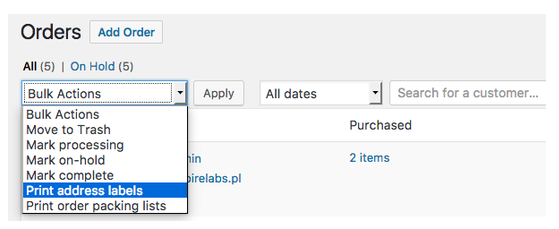
Print in bulk, from the orders list, with a filter applied. Select the orders at the status you pack from, print them all in one document, and work through the stack. This single change removes most of the clicking.

Put the packing document and the address label in the same operation. Whether they come out as one page or two, they should be produced together and in the same order, because what prevents mislabelling is that the two never get separated.

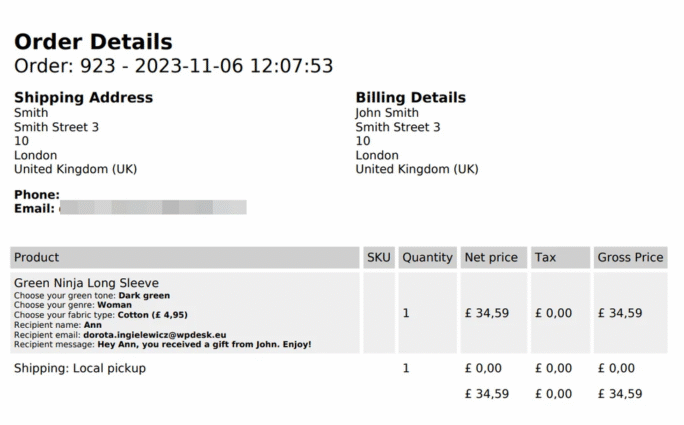
Strip the document down to what the packer uses: order number, items, quantities, SKUs, any gift or delivery note, and nothing else. Prices belong on the invoice, which is a different document with a different reader.

And check the address data itself before December. Labels fail on the same few things every year, which are missing house numbers, a phone number the courier requires and a second address line that was never collected. Our guide to shipping and billing address fields covers which ones your courier actually needs.
How to organise the physical side

Print in batches that match what fits on the table. A stack of two hundred documents is a stack somebody loses their place in, and forty is a batch that gets finished before anything interrupts it.

Pack in the order the documents came out, not in the order that looks efficient. Reordering the stack to group similar items feels faster and is how a document ends up with the wrong parcel.

And keep one person on exceptions. Gift orders, split shipments and anything with a note take several times longer, and mixing them into the main flow slows the whole line.

Bulk printing from the orders list is the change that removes the three hours. Print Orders and Address Labels produces packing documents and labels for a whole selection in one operation, in the same order, so the two never get separated.

Summary

Packing does not scale on its own, and the time goes in two places: the printer and the admin screen. Printing documents one order at a time means a page load, a print dialogue and a lost place in the list for every order, which at thirty seconds each is three hours across four hundred orders. The document itself is usually wrong for its reader, showing prices, payment method and billing address to somebody picking items off a shelf while omitting a legible SKU. And printing labels separately from packing documents handles each order twice while introducing the costliest error there is, the right parcel with the wrong label.

Four changes before the season: print in bulk from a filtered orders list, produce the packing document and the address label in one operation so they never get separated, strip the document to order number, items, quantities, SKUs and any delivery note, and audit the address data for the things labels fail on, which are missing house numbers, absent phone numbers and uncollected second address lines. On the floor: batch to what fits on the table, around forty rather than two hundred; pack in the order the documents printed rather than regrouping by item, since regrouping is how documents and parcels separate; and put one person on exceptions, because gift orders and split shipments take several times longer and slow the whole line when mixed in.

Frequently asked questions

These three come up when volume rises.

Should the invoice go in the box?

It depends on your market and on whether the order is a gift. Many stores now send it by email and include only a packing document, which also solves the gift problem.

How many orders should one batch contain?

As many as one person finishes without stopping, which for most setups is between twenty and fifty. The right number is the one where nobody puts the stack down.

Do packing slips need to show prices?

Generally no, and omitting them is usually better. The accounting document is separate and goes to a different reader.

3 minutes read100 views

patrycja.wojas

Product Content Hero

LinkedIn Profile

Patrycja has 14 years of experience in copywriting and SEO. She is one of the few specialists in Poland who writes with equal confidence about mor...

Powered by WP Desk

WP Desk brings you great WooCommerce plugins. We strive to save your time and money by speeding up your processes. Use our plugins to build a better store. Awesome support included in the package.

Premium WooCommerce Plugins →
WP Desk › Blog › WordPress tips & plugins › WooCommerce Packing Slip: Getting Orders Out the Door When Volume Triples

Primary Sidebar

Contents

  • What slows packing down
  • What to change before the season
  • How to organise the physical side
  • Summary
  • Frequently asked questions
    • Should the invoice go in the box?
    • How many orders should one batch contain?
    • Do packing slips need to show prices?

Print Orders and Address Labels WooCommerce £39

Speed up the fulfillment process, packing, and shipping by printing address labels and order details. Print and send packing slips to your customers. It's easy!

💾 Active Installations: 7000+ | 🔄 Last update: 2026-10-07

Add to cart or View Details
WP Desk
Plugins used by 239,800+ shops
Last Updated: 2026-10-07
Works with WooCommerce 10.8 - 11.2

Stay updated on our how-to articles

WP Desk news, WooCommerce tips, promo codes - right to your inbox.

By entering your e-mail, you agree to our Terms & Conditions and Privacy Policy.

By entering your e-mail, you agree to our Terms & Conditions and Privacy Policy.

Footer

WP Desk - WooCommerce Plugins

At WP Desk we create great WooCommerce plugins with awesome support. Save time and money with our e-commerce solutions. See how we can help you improve your e-store →

Secured by Comodo

WP Desk

  • About us
  • Giving Back
  • Blog
  • Get Support
  • Contact us

Products

  • Premium Plugins
  • WP Desk Care
  • Documentation
  • WooCommerce Invoices
  • Email Marketing
  • PDF Coupons

Legal

  • Terms & Conditions
  • Refund Policy
  • Support Policy
  • Privacy Policy

© 2026 WP Desk

We value your privacy

We use necessary cookies to make our site work. We'd also like to set additional cookies to understand site usage, enhance your browsing experience, and serve personalized ads or content. By clicking ‘Accept All,’ you consent to our use of additional cookies.

Functional Always active
The technical storage or access is strictly necessary for the legitimate purpose of enabling the use of a specific service explicitly requested by the subscriber or user, or for the sole purpose of carrying out the transmission of a communication over an electronic communications network.
Preferences
The technical storage or access is necessary for the legitimate purpose of storing preferences that are not requested by the subscriber or user.
Statistics
The technical storage or access that is used exclusively for anonymous statistical purposes. Without a subpoena, voluntary compliance on the part of your Internet Service Provider, or additional records from a third party, information stored or retrieved for this purpose alone cannot usually be used to identify you. The technical storage or access that is used exclusively for anonymous statistical purposes. Without a subpoena, voluntary compliance on the part of your Internet Service Provider, or additional records from a third party, information stored or retrieved for this purpose alone cannot usually be used to identify you.
Marketing
The technical storage or access is required to create user profiles to send advertising, or to track the user on a website or across several websites for similar marketing purposes.
  • Manage options
  • Manage services
  • Manage {vendor_count} vendors
  • Read more about these purposes
View preferences
  • {title}
  • {title}
  • {title}