• Skip to primary navigation
  • Skip to main content
  • Skip to primary sidebar
  • Skip to footer
WP Desk = premium plugins for WordPress & WooCommerce
  • Plugins
        • Checkout & OrdersMake your work easier and automate the orders. Adjust the order form to your needs and make it more useful to your customers. Print order labels directly from WooCommerce. Put the orders in order using our plugins. Find out how to streamline the procurement process in your store.
          • Flexible Checkout Fields
          • Active Payments
          • Automatic Payment Status
          • Flexible Refund and Return Order
          • Print Orders and Address Labels
          • Flexible Subscriptions Recurring Shipping
          • Flexible Subscriptions Payment Retry
          • Flexible Subscriptions Stock Management
        • ProductsThese plugins will help you manage your WooCommerce products. Here you will find the plugins to import and update products from XML or CSV files. Then you can change the product unit of measure, show the lowest price in the last 30 days (Omnibus Directive), or let customers name the product price!
          • Flexible Product Fields
          • Dropshipping Import Products
          • Dropshipping FTP Import Products
          • Dropshipping Export Products
          • Custom Price
          • WP Desk Omnibus
          • Flexible Quantity Calculator
          • Dropshipping Orders Export
        • MarketingPromote your store online. Add products from your shop to price comparison websites directly from WooCommerce. Acquire new customers and communicate with your existing ones. Build a customer base and communicate with clients using one of the most effective marketing tools, namely e-mail marketing. Check out our promotional tools!
          • Flexible Pricing
          • Flexible Wishlist - Analytics & Emails
          • OLX WooCommerce
          • Flexible PDF Coupons
          • ShopMagic
          • Flexible Invoices
  • Bundle🔥
  • WP Desk Care
  • Support
  • Blog
  • My Account
  • 0

More results

How to test WooCommerce checkout (8 free plugins)

Checkout, WooCommerce checkout fields, WordPress tips & plugins

WP Desk3 minutes readUpdated: 2025-07-02Updated: 2026-06-05
blog category heading image

Checkout is the final step that makes or breaks your store's conversions. If something doesn’t work — the form loads incorrectly, payment fails, or the order isn’t saved — you lose a customer. Testing your WooCommerce checkout ensures everything works smoothly before your users encounter issues.

In this article, we’ll walk you through 8 crucial areas you should test on your checkout page.

For each one, we’ll show a free WordPress plugin that can help.

You’ll also learn how to improve checkout fields with the Flexible Checkout Fields plugin — without writing code.

So, what, when, why, and how to test WooCommerce checkout?

Contents

  • What is checkout testing and how it improves WooCommerce performance?
  • How to test WooCommerce checkout – 8 areas to check with free plugins
    • 1. Test cart and checkout page loading
    • 2. Test payment gateway functionality
    • 3. Test checkout (without payments)
    • 4. Test discount and coupon code behavior
    • 5. Test email notifications after checkout
    • 6. Improve mobile responsiveness and UX
    • 7. Test guest checkout and account registration
    • 8. Test redirection after placing an order
  • Improve checkout fields with Flexible Checkout Fields (free)
    • Extra PRO features worth mentioning
  • Summary: why checkout testing matters and how plugins help
    • Key points

What is checkout testing and how it improves WooCommerce performance?

What: Checkout testing is the process of verifying that your WooCommerce checkout page works as expected.

That means checking form behavior, payment gateways, cart logic, custom fields, redirection, email notifications, page speed, and more.

When: It’s especially important after major updates, installing new plugins, building websites, improving conversion rate, or customizing the checkout form.

Why: With good testing habits, you’ll catch errors before they reach customers to repair or optimize WooCommerce checkout. And by using free plugins, you can make this process much easier.

How to test WooCommerce checkout – 8 areas to check with free plugins

Before testing WooCommerce checkout you may read the post about checkout settings.

1. Test cart and checkout page loading

Use the Health Check & Troubleshooting plugin to isolate conflicts.

Health Check disables all plugins for your user session so you can test your site in a clean environment.

  • Temporarily deactivate all other plugins
  • Test if checkout loads without errors
  • Verify if your theme causes conflicts
  • Great for plugin compatibility checks
Health Check & Troubleshooting banner image
source: https://wordpress.org/plugins/health-check/
You may combine the health check with page speed insights, pingdom tool, and a plugin for page speed optimization.

2. Test payment gateway functionality

The WooCommerce Payments plugin allows you to simulate payments in test mode.

It integrates directly with WooCommerce and supports sandbox testing.

  • Enable test mode for credit card payments
  • Try valid and invalid test card numbers
  • Check if orders are processed correctly
  • Ensure no errors appear during submission

WooPayments: Integrated WooCommerce Payments banner image
source: https://wordpress.org/plugins/woocommerce-payments/

3. Test checkout (without payments)

Use the WooCommerce Order Test to test the purchase with "payment".

The plugin to simulate purchase but with no actual payment.

  • Check the order processing
  • No payment refunds when testing WooCommerce checkout
  • Test how order is added
  • Check every step of the purchase (except payment)
WooCommerce Order Test banner image
source: https://wordpress.org/plugins/woo-order-test/

4. Test discount and coupon code behavior

You don't need a plugin to test the discounts added with coupons of sale prices.

Just check the order in WooCommerce → Orders → Edit order screen to see if discounts are added properly.

But, you may also use Flexible PDF Coupons a plugin to set gift cards and vouchers that use WooCommerce discounts and test them.

Flexible PDF Coupons – Gift Cards & Vouchers for WooCommerce banner image
source: https://wordpress.org/plugins/flexible-coupons/

5. Test email notifications after checkout

Use WP Mail Logging to monitor outgoing WooCommerce emails.

This plugin can store all emails sent by your site.

  • Track order confirmation emails
  • Verify email content and format
  • Debug issues with missing emails
  • See timestamps and recipients
WP Mail Logging banner image
source: https://wordpress.org/plugins/wp-mail-logging/

6. Improve mobile responsiveness and UX

Install Fluid Checkout for WooCommerce – Lite for mobile testing and adjusting checkout for mobile.

Testing on real devices is ideal — but plugins help preview changes fast.

  • Adjust checkout layout for mobile
  • Ensure buttons are visible and accessible
  • Add multistep checkout to compare with classic checkout
  • Optimize usability
Fluid Checkout for WooCommerce – Lite banner image
source: https://wordpress.org/plugins/fluid-checkout/

7. Test guest checkout and account registration

To enable guest checkout you may use WooCommerce settings.

Enable WooCommerce guest checkout

Then, you can use User Switching to test different roles quickly.

  • Check if guest orders are allowed
  • Test customer registration during checkout
  • Switch between admin, customer, and guest
  • Verify if order meta is saved correctly

User Switching banner image
source: https://wordpress.org/plugins/user-switching/

8. Test redirection after placing an order

Use the Redirection plugin to manage and test post-checkout URLs.

WooCommerce should take users to the order confirmation page.

  • Track checkout redirect behavior
  • Create conditional redirect rules
  • Log 404 or unexpected redirects
  • Improve user flow and reduce confusion
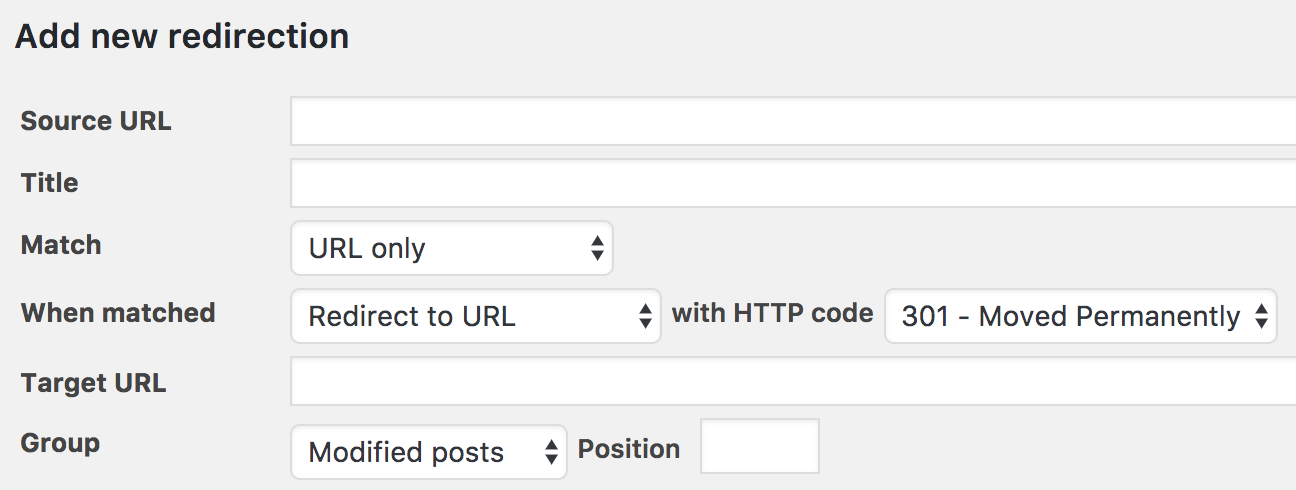
Redirection settings image
source: https://wordpress.org/plugins/redirection/

Improve checkout fields with Flexible Checkout Fields (free)

Once your core checkout works, the next step is to optimize the user experience.

The Flexible Checkout Fields plugin lets you easily add, remove, or edit fields — all without touching code.

Here are some features of the free version:

  • Add custom fields like text, textarea, checkbox, and select
  • Choose where fields appear: billing, shipping, other
  • Hide default WooCommerce fields you don’t need
    Hide a form field with Flexible Checkout Fields for WooCommerce
    Hide a form field with Flexible Checkout Fields for WooCommerce
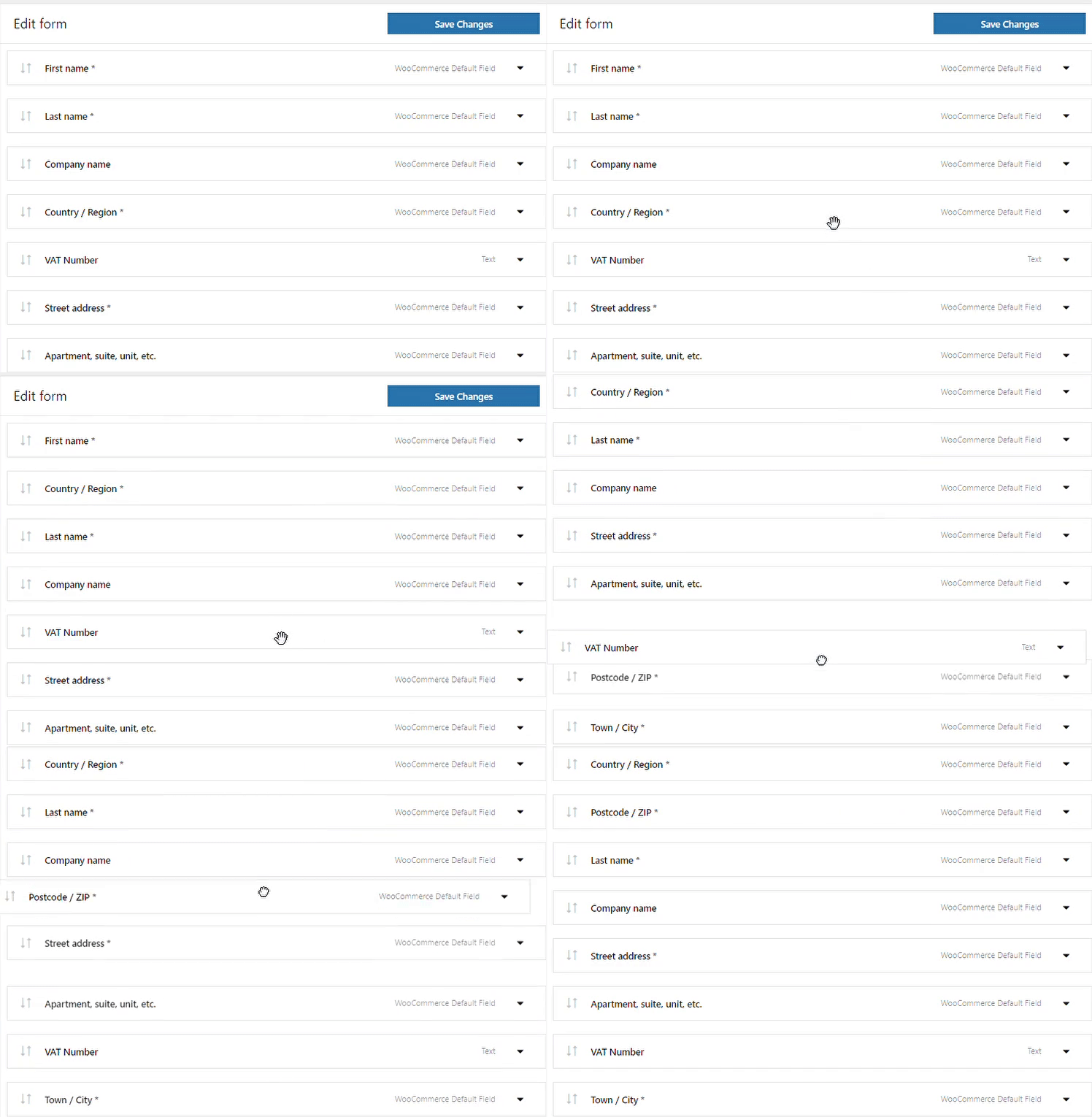
  • Reorder fields using drag & drop
    Reorder checkout fields in WooCommerce
    Reorder checkout fields in WooCommerce
  • Mark fields as required or optional
  • Assign custom labels, placeholders, and tooltips

Flexible Checkout Fields works seamlessly with WooCommerce and is ideal for adding delivery notes, company IDs, or any extra information you want to store.

Extra PRO features worth mentioning

If you need more power, the PRO version adds premium functionality for advanced use cases.

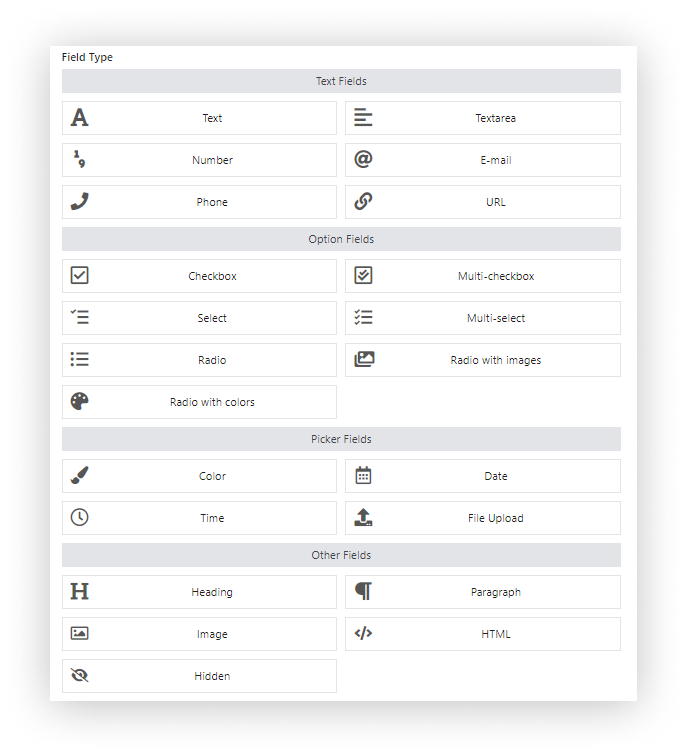
  • Additional field types
    Flexible Checkout Fields for WooCommerce - field types
    Flexible Checkout Fields for WooCommerce - field types
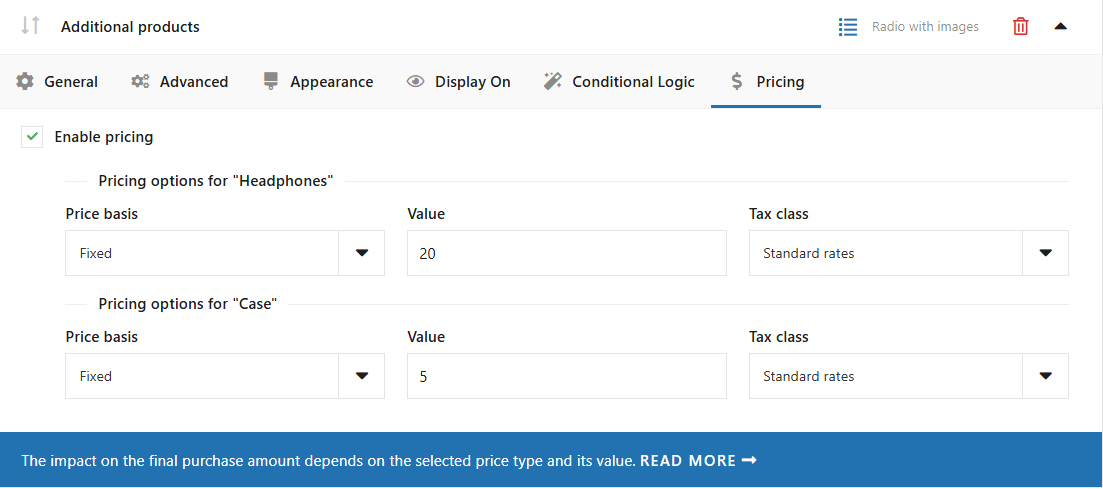
  • Pricing per field
    Additional pricing per form field example in Flexible Checkout Fields PRO WooCommerce
    Additional pricing per form field example in Flexible Checkout Fields PRO WooCommerce
  • Display fields conditionally based on shipping or payment method
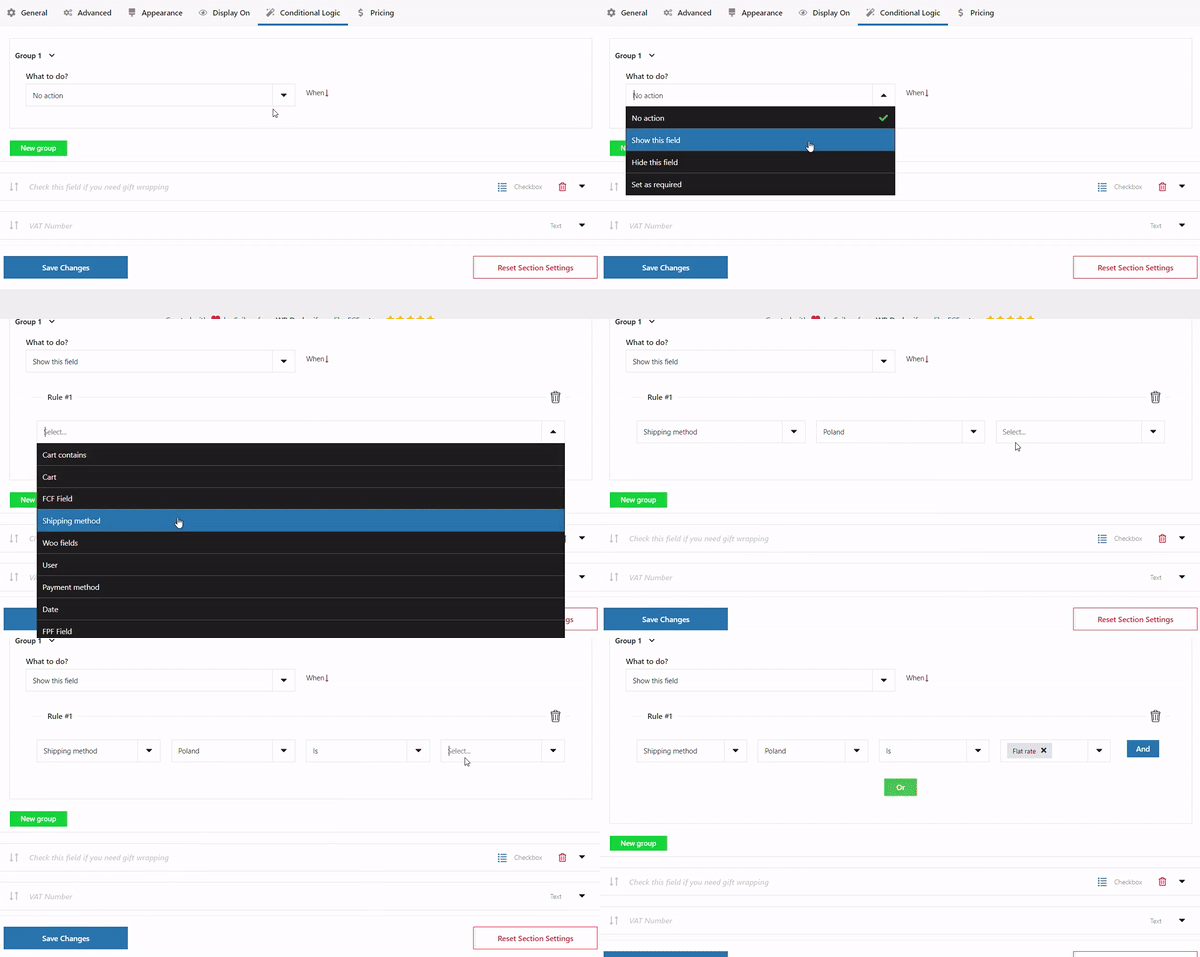
    WooCommerce conditional checkout fields
    WooCommerce conditional checkout fields
  • Show fields only for specific products in the cart

If you’re running a store that relies on custom delivery details or B2B fields, this upgrade pays off quickly.

Summary: why checkout testing matters and how plugins help

Testing your WooCommerce checkout isn’t just for developers - it’s essential for any store owner. A broken field, a failed payment, or an email that never arrives can cost you real sales.

Thankfully, with the right free plugins, you can test every step of the checkout journey and make sure your store runs smoothly.

Key points

  • Test payment, validation, emails, mobile experience, page speed, and more
  • Use free plugins from WordPress.org to simulate real scenarios
  • Flexible Checkout Fields helps you edit checkout fields easily
  • Upgrade to PRO for advanced rules, field types, and conditions
  • Regular testing ensures fewer issues and better conversions

3 minutes read6574 views

Reader Interactions

Leave a Reply Cancel reply

Your email address will not be published. Required fields are marked *

WP Desk

...

Powered by WP Desk

WP Desk brings you great WooCommerce plugins. We strive to save your time and money by speeding up your processes. Use our plugins to build a better store. Awesome support included in the package.

Premium WooCommerce Plugins →
WP Desk › Blog › WordPress tips & plugins › How to test WooCommerce checkout (8 free plugins)

Primary Sidebar

Contents

  • What is checkout testing and how it improves WooCommerce performance?
  • How to test WooCommerce checkout – 8 areas to check with free plugins
    • 1. Test cart and checkout page loading
    • 2. Test payment gateway functionality
    • 3. Test checkout (without payments)
    • 4. Test discount and coupon code behavior
    • 5. Test email notifications after checkout
    • 6. Improve mobile responsiveness and UX
    • 7. Test guest checkout and account registration
    • 8. Test redirection after placing an order
  • Improve checkout fields with Flexible Checkout Fields (free)
    • Extra PRO features worth mentioning
  • Summary: why checkout testing matters and how plugins help
    • Key points

Flexible Checkout Fields PRO WooCommerce $59

Edit, add new or hide unnecessary fields from the WooCommerce checkout form. Add pricing to fields and use conditional logic. It's all about conversions and better user experience. NEW: now you can set multiple conditions (OR) under one or more condition groups (AND).

💾 Active Installations: 80,000+ | WordPress Rating:

Add to cart or View Details
WP Desk
80,000+ Active Installations
Last Updated: 2026-08-20
Works with WooCommerce 10.7 - 11.1

Stay updated on our how-to articles

WP Desk news, WooCommerce tips, promo codes - right to your inbox.

By entering your e-mail, you agree to our Terms & Conditions and Privacy Policy.

By entering your e-mail, you agree to our Terms & Conditions and Privacy Policy.

Footer

WP Desk - WooCommerce Plugins

At WP Desk we create great WooCommerce plugins with awesome support. Save time and money with our e-commerce solutions. See how we can help you improve your e-store →

Secured by Comodo

WP Desk

  • About us
  • Giving Back
  • Blog
  • Get Support
  • Contact us

Products

  • Premium Plugins
  • WP Desk Care
  • Documentation
  • WooCommerce Invoices
  • Email Marketing
  • PDF Coupons

Legal

  • Terms & Conditions
  • Refund Policy
  • Support Policy
  • Privacy Policy

© 2026 WP Desk

We value your privacy

We use necessary cookies to make our site work. We'd also like to set additional cookies to understand site usage, enhance your browsing experience, and serve personalized ads or content. By clicking ‘Accept All,’ you consent to our use of additional cookies.

Functional Always active
The technical storage or access is strictly necessary for the legitimate purpose of enabling the use of a specific service explicitly requested by the subscriber or user, or for the sole purpose of carrying out the transmission of a communication over an electronic communications network.
Preferences
The technical storage or access is necessary for the legitimate purpose of storing preferences that are not requested by the subscriber or user.
Statistics
The technical storage or access that is used exclusively for anonymous statistical purposes. Without a subpoena, voluntary compliance on the part of your Internet Service Provider, or additional records from a third party, information stored or retrieved for this purpose alone cannot usually be used to identify you. The technical storage or access that is used exclusively for anonymous statistical purposes. Without a subpoena, voluntary compliance on the part of your Internet Service Provider, or additional records from a third party, information stored or retrieved for this purpose alone cannot usually be used to identify you.
Marketing
The technical storage or access is required to create user profiles to send advertising, or to track the user on a website or across several websites for similar marketing purposes.
  • Manage options
  • Manage services
  • Manage {vendor_count} vendors
  • Read more about these purposes
View preferences
  • {title}
  • {title}
  • {title}