
To retry failed subscription payments in WooCommerce, install Flexible Subscriptions with the Payment Retry add-on and set three or four attempts spread across days rather than hours. Three, five and seven days after the first failure works for most stores. Keep access active through the first attempts on low-value plans, and send a notification with every retry. A large share of failed renewals succeed on a later attempt with no action from the customer at all, which is the entire case for a retry schedule.
Contents
The renewal that never arrived
Every subscription store loses part of its recurring revenue to charges that simply do not go through. The card expired last week, the balance was low that morning, the bank blocked a recurring transaction it did not recognise.
Without a retry process, each of those becomes a cancelled subscription from a customer who never decided to leave.
Why subscription payments fail in WooCommerce
Expired and reissued cards are the largest group. Banks replace numbers after fraud alerts, and the customer rarely remembers which services hold that card on file.
Insufficient funds come second, and they are usually temporary. The charge that fails on the 28th often succeeds on the 2nd.
Bank-side blocks on recurring transactions make up the rest. Some issuers treat an unfamiliar recurring merchant as suspicious on the first attempt and clear it afterwards.
That pattern is the argument for retries: a large share of failed charges succeed on a later attempt, with no action from the customer at all.
Most of these failures are also avoidable before they happen. A renewal reminder sent a few days earlier gives the customer time to replace an expired card, so the retry schedule has less work to do.
What automatic payment retries do
A retry schedule tells the store to attempt the charge again after a set interval instead of marking the subscription as failed immediately. The Payment Retry add-on for Flexible Subscriptions handles the attempts and the accompanying email notifications.
The subscription stays in a defined state during the retry window, so you decide whether the customer keeps access while the store keeps trying to collect.
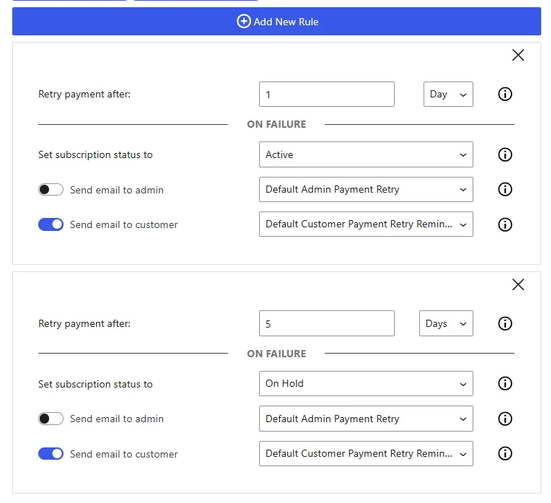
How to configure a retry schedule
Step 1: Set the number of attempts
Three or four attempts covers the realistic cases. Beyond that, each additional try recovers very little and increases the chance that your payment provider flags the pattern.
Step 2: Space the attempts across days, not hours
Retrying sixty minutes later hits the same empty account. Spacing attempts over several days addresses the most common cause, which is a temporary shortfall. A schedule of three, five and seven days after the first failure is a sensible starting point, and matching the last attempt to a typical payday improves it further.
Step 3: Decide what happens to access during the window
For low-value plans, keeping access active through the retry window usually pays off: an uninterrupted service is less likely to prompt a cancellation. For high-value or licence-based products, suspending after the second failure is the safer choice.
Step 4: Pair every retry with a message
A retry without notification means the first thing the customer hears about the problem is a cancellation. The message should say what failed, when the next attempt happens, and where to update the card.
Those notifications come from the same Emails add-on that sends the pre-renewal reminder, so both sit in one place.
What happens after the final attempt
Decide this before you turn retries on. The usual options are cancelling the subscription, moving it to on-hold so it can be reactivated later, or downgrading to a free tier if your catalogue has one.
On-hold is worth considering. Reactivating an existing subscription takes the customer one click, while signing up again takes a decision.
Whichever end state you pick, make sure it is one your subscription plugin actually supports. The alternatives comparison lists how each one handles on-hold and reactivated subscriptions.
Check the gateway before you rely on retries
A retry only works when the gateway supports repeated charges against a stored payment method. Flexible Subscriptions works with gateways that support WooCommerce subscription renewals, and WooPayments is currently removed from available methods when a subscription product is in the cart.
WP Desk telemetry from 19,803 stores, August 2026, shows 32.3% of stores running four or more payment methods. The more gateways you offer, the more important it is to confirm that each one handles renewals, because the failure will only show up on the first renewal cycle, often weeks after launch.
Summary
A failed renewal is a recoverable payment, not a lost customer. Three or four attempts spread across several days, a clear notification at each step, and a decision made in advance about what happens at the end will turn most of those failures back into completed charges.
Frequently asked questions
How many retry attempts make sense?
Three or four. Each further attempt recovers less and raises the risk of your payment provider treating the pattern as abusive.
Should customer access be blocked during retries?
Usually not in the first days. The customer rarely caused the failure, and cutting access invites the cancellation you are trying to avoid. For high-value or licence-based products, suspending after the second failure is the safer choice.
Do payment retries work with every WooCommerce gateway?
Only with gateways that support charging a stored payment method again. Check the gateway documentation before you rely on the schedule, because the problem will only appear on the first renewal cycle.
What is the difference between a retry and a payment reminder?
A reminder is sent before the charge, a retry happens after one has already failed. Stores that use both recover the most renewals.
How long should the retry window be?
Seven to ten days from the first failure. That covers a typical pay cycle, which is the most common reason a charge bounces and then clears.

