• Skip to primary navigation
  • Skip to main content
  • Skip to primary sidebar
  • Skip to footer
WP Desk = premium plugins for WordPress & WooCommerce
  • Plugins
        • Checkout & OrdersMake your work easier and automate the orders. Adjust the order form to your needs and make it more useful to your customers. Print order labels directly from WooCommerce. Put the orders in order using our plugins. Find out how to streamline the procurement process in your store.
          • Flexible Checkout Fields
          • Active Payments
          • Automatic Payment Status
          • Flexible Refund and Return Order
          • Print Orders and Address Labels
          • Flexible Subscriptions Recurring Shipping
          • Flexible Subscriptions Payment Retry
          • Flexible Subscriptions Stock Management
        • ProductsThese plugins will help you manage your WooCommerce products. Here you will find the plugins to import and update products from XML or CSV files. Then you can change the product unit of measure, show the lowest price in the last 30 days (Omnibus Directive), or let customers name the product price!
          • Flexible Product Fields
          • Dropshipping Import Products
          • Dropshipping FTP Import Products
          • Dropshipping Export Products
          • Custom Price
          • WP Desk Omnibus
          • Flexible Quantity Calculator
          • Dropshipping Orders Export
        • MarketingPromote your store online. Add products from your shop to price comparison websites directly from WooCommerce. Acquire new customers and communicate with your existing ones. Build a customer base and communicate with clients using one of the most effective marketing tools, namely e-mail marketing. Check out our promotional tools!
          • Flexible Pricing
          • Flexible Wishlist - Analytics & Emails
          • OLX WooCommerce
          • Flexible PDF Coupons
          • ShopMagic
          • Flexible Invoices
  • Bundle🔥
  • WP Desk Care
  • Support
  • Blog
  • My Account
  • 0

More results

How to Add Conditional Logic to the Country Field in WooCommerce checkout?

Checkout, Plugin Tutorials, WooCommerce checkout fields

Dorota Ingielewicz3 minutes readUpdated: 2024-02-16Updated: 2025-08-20
blog category heading image

If you've ever found yourself scratching your head, wondering how to make your WooCommerce checkout page smarter and more user-friendly, you're in for a treat. Today, we're diving into the world of conditional logic with the Flexible Checkout Fields PRO plugin. This amazing tool allows you to personalize your checkout process based on your customers' country selection. 

Contents

  • Getting Started with Flexible Checkout Fields PRO
  • The Magic of Conditional Logic
  • Setting Up Conditional Logic for the Country Field in WooCommerce checkout
  • Sample Scenarios
    • Scenario 1: VAT Number for EU Customers
    • Scenario 2: State Field for Specific Countries
    • Scenario 3: Custom Message for International Orders
  • Tips for Using Conditional Logic Effectively
  • Wrapping Up
    • Related Articles
  • Take Control of WooCommerce Edit Checkout Fields Using Smart Conditional Logic
  • How to show or hide a WooCommerce checkout field for a specific country
  • WooCommerce Conditional Logic, Custom Fields & Product Options in one plugin!
  • How to set conditional logic based on the number of products in the cart
  • Best plugin to speed up WooCommerce Checkout (conditional & custom fields)

Getting Started with Flexible Checkout Fields PRO

Before we roll up our sleeves and get to the fun part, make sure you have the Flexible Checkout Fields PRO plugin installed and activated on your WordPress site. This plugin is a powerhouse for customizing checkout fields in WooCommerce, making your checkout process as breezy or detailed as you need it to be.

💡 You may also read how to prepare the Custom WooCommerce Checkout Order Form with the FREE version of the plugin.

✅ After installing the plugin, go to its settings. You will find the plugin after installation here:
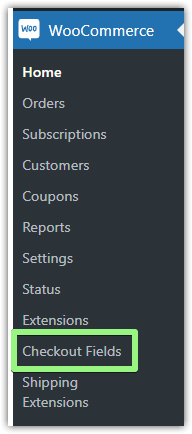
woocommerce checkout field editor
Flexible Checkout Fields in the menu

😍 The plugin itself, on the other hand, looks like this:
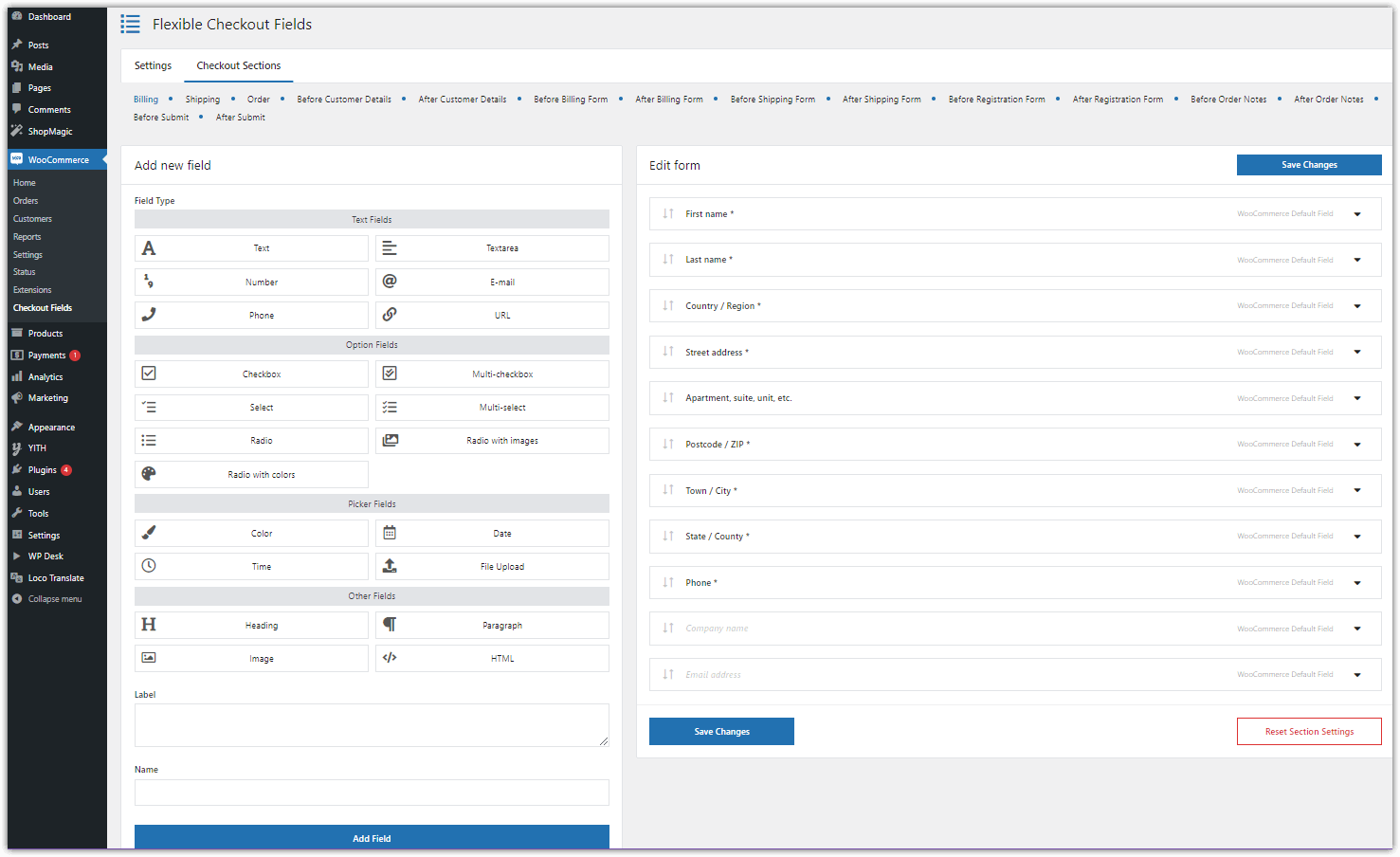
Flexible Checkout Fields PRO plugin

The Magic of Conditional Logic

Conditional logic is like having a smart assistant on your checkout page🤩. It allows you to show or hide fields based on what options the customer selects. For instance, if a customer chooses a specific country, you can tailor the checkout fields to match that country's shipping requirements or payment preferences.
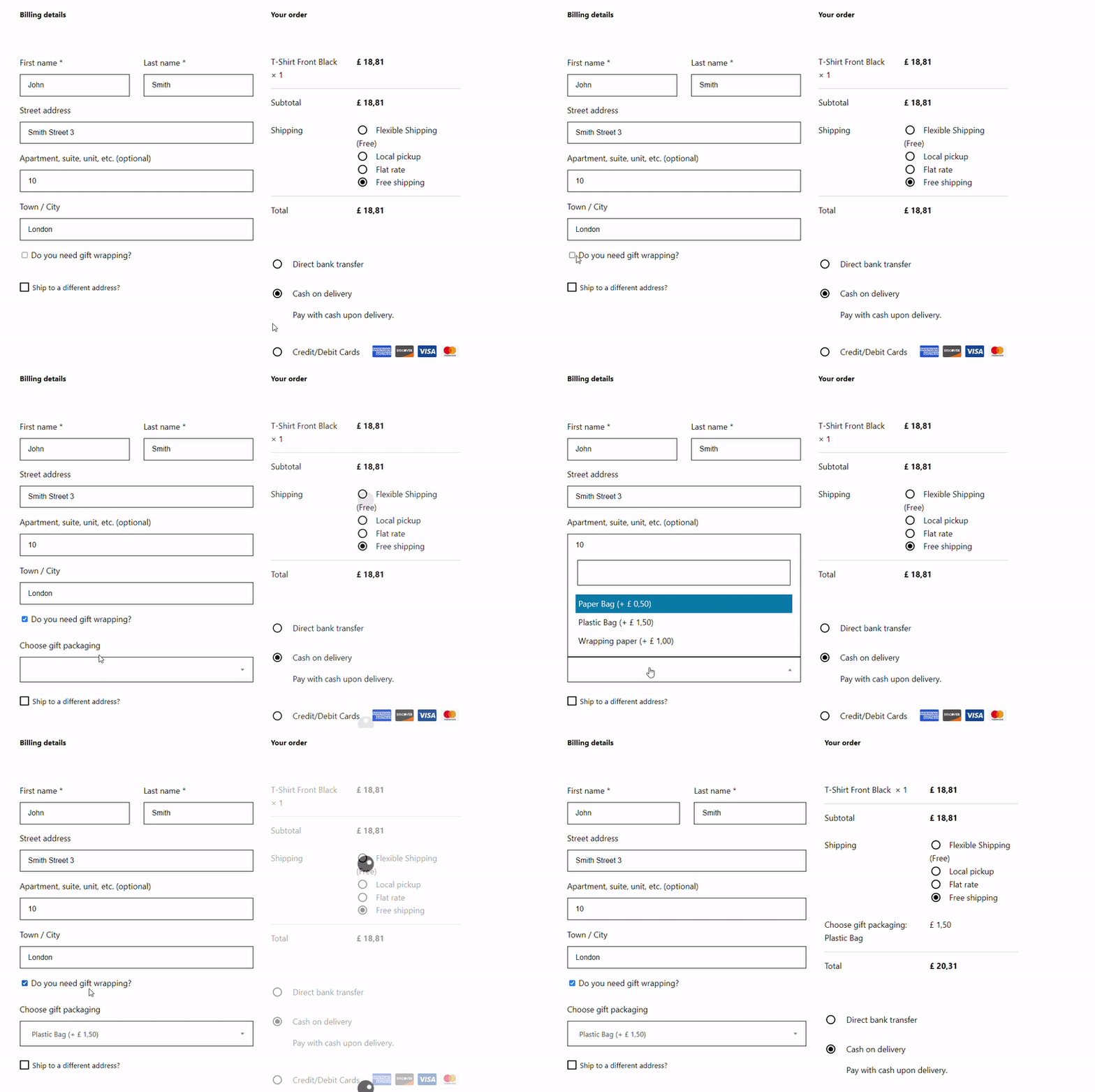
woocommerce conditional checkout fields
Conditional logic in the WooCommerce checkout - Flexible Checkout Fields PRO

Setting Up Conditional Logic for the Country Field in WooCommerce checkout

Here’s a step-by-step guide to adding conditional logic to the country field in your WooCommerce store. 

⚠️ Our starting point is that you are already in the Flexible Checkout Fields PRO plugin after its installation and activation.

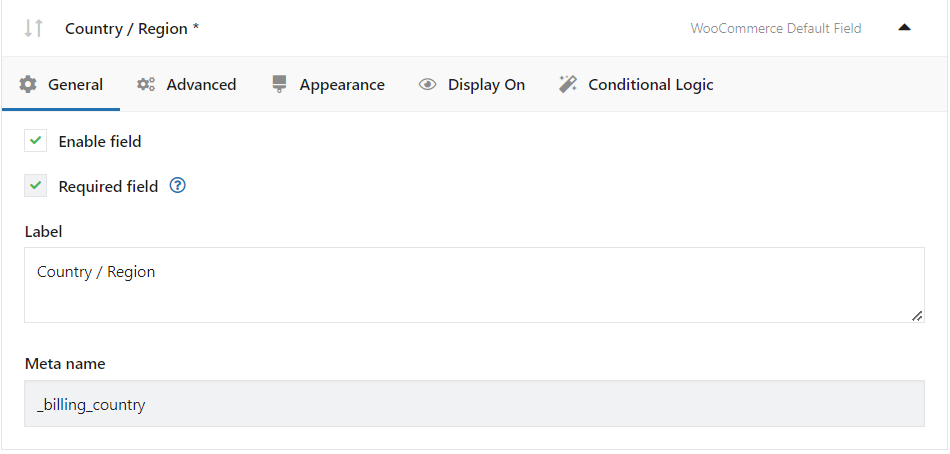
1. Edit the Country field: Look for the Country/Region WooCommerce Default Field in your list of checkout fields. Click on it to expand its settings.
wordpress form with conditional logic
Country / Region WooCommerce default Field

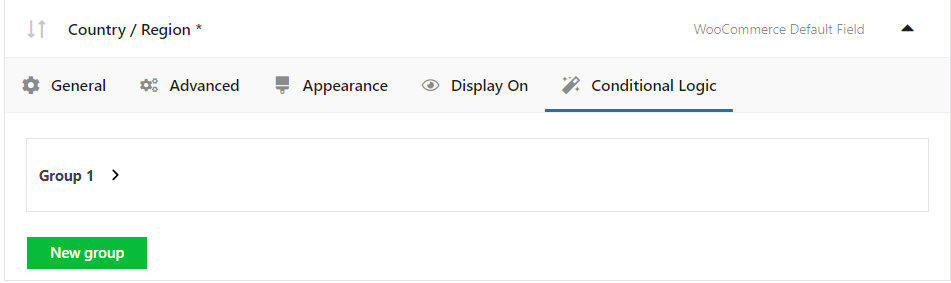
2. Enable Conditional Logic: You should see the Conditional Logic tab. Go there and start setting  up your conditions.
wordpress forms with conditional logic
Conditional logic tab in the Flexible Checkout Fields PRO plugin

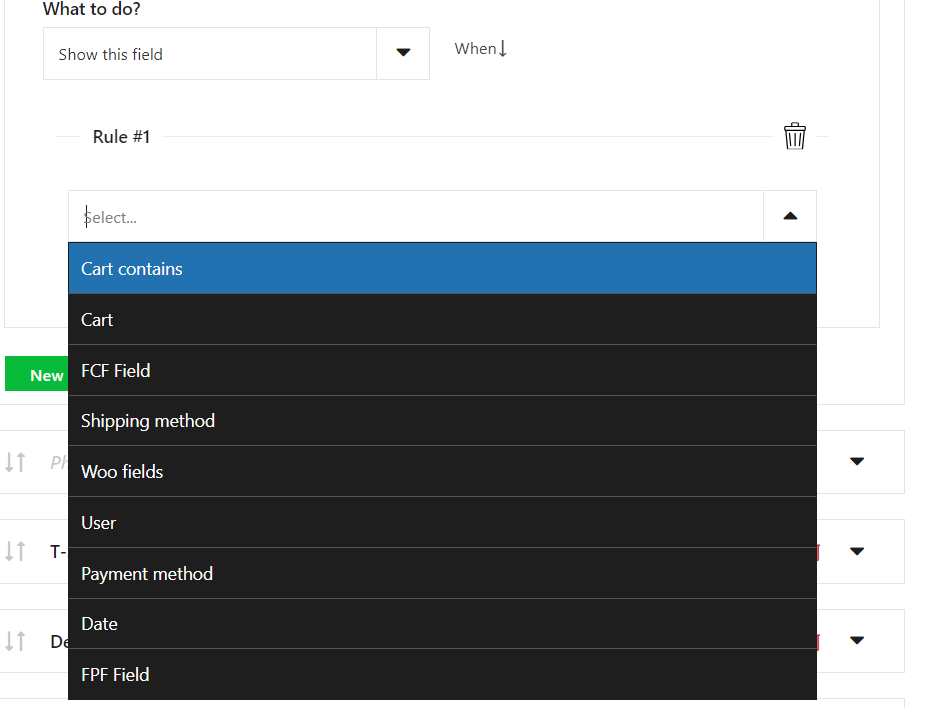
3. Set Your Conditions: Decide what fields you want to show or hide based on the customer's country selection. 
wordpress conditional forms
Available Rules: Flexible Checkout Fields PRO plugin

Sample Scenarios

Let's put this feature into action with some scenarios that show off the power of conditional logic in the checkout process🔥.

Scenario 1: VAT Number for EU Customers

You want to collect a VAT number from customers in the European Union but don't want to clutter the checkout for customers outside the EU.

      • Condition: If the country is within the EU.
      • Action: Show the VAT number field.

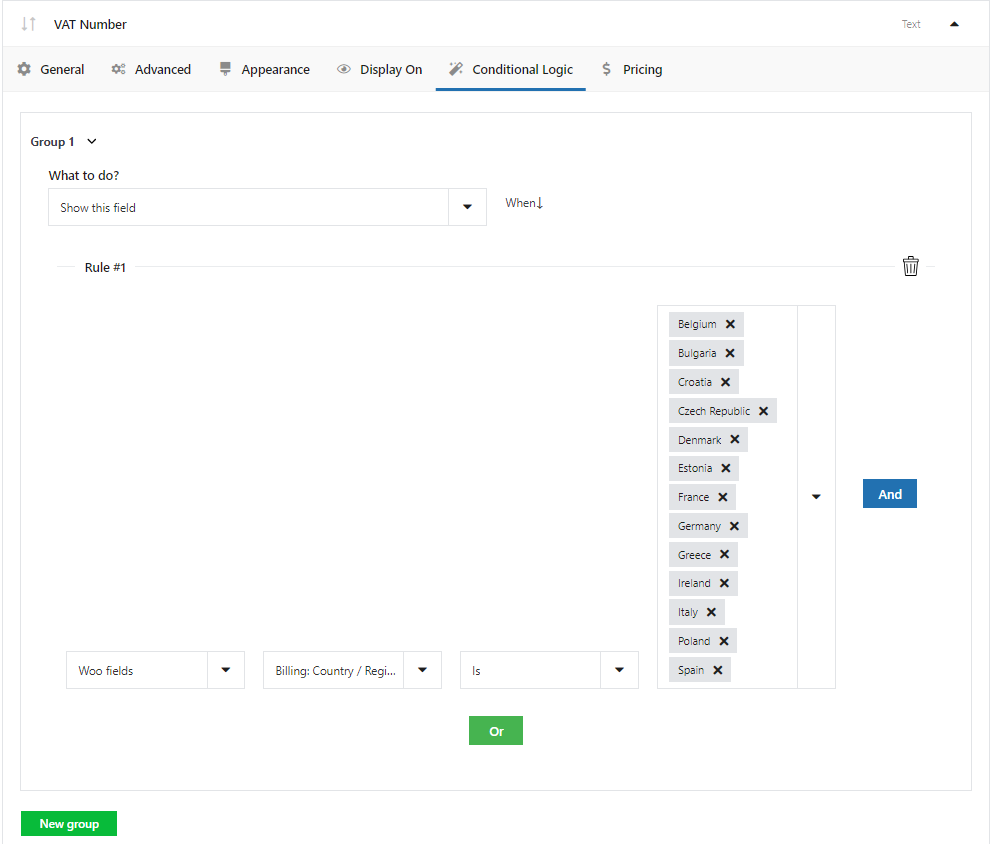
First, in the VAT Number field, go to the General tab and enable this field. 

Then, go to the conditional logic tab and set conditions in the first Group. 

🗒️ Look how I did it:
wordpress form with conditional logic based on country
VAT Number for EU Customers

In the second column that goes after Woo fields, you can select the country either of shipping or billing - keep this in mind when you set the conditions. You can also select both cases - in this case, use the logical operator AND and repeat the scenario for Billing or Shipping Country sepearately.

👉🏽 This setup ensures that only customers from the countries I have chosen and who need to provide a VAT number see the field, making the checkout cleaner for everyone else. 

Scenario 2: State Field for Specific Countries

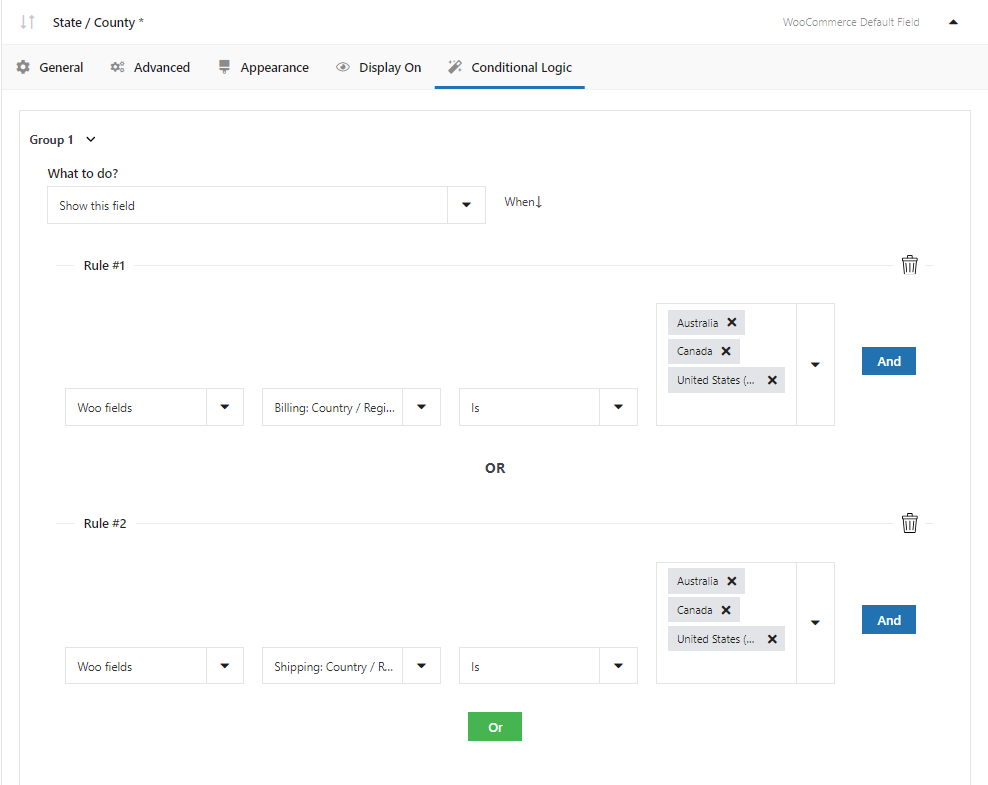
In some countries, like the USA, the state field is essential for shipping and billing. However, for countries without states or provinces, this field is unnecessary and can be confusing.

      • Condition: If the country is the USA, Canada, or Australia.
      • Action: Show the state/county  field.

🗒️ Look how I did it:

wordpress conditional forms based on county
State / County WooCommerce Default Field
Note that in this case I have applied two rules: one that applies to the country of billing and another that applies to the country of shipping.
I merged the two rules with the logical operator OR.

👉🏽 With this condition, customers from these countries will see the state field, while others won't, simplifying their checkout experience.

Scenario 3: Custom Message for International Orders

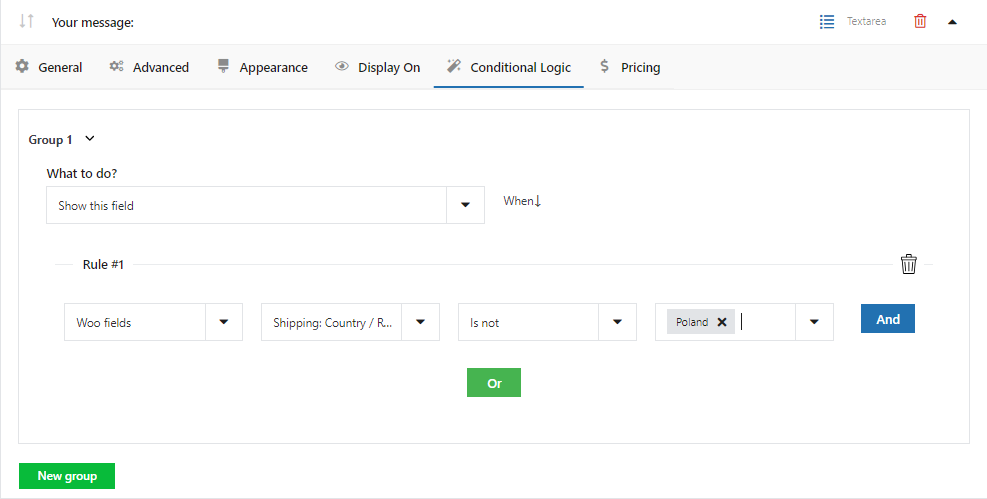
You might want to display a custom message or disclaimer for customers placing international orders, informing them about additional shipping time or customs fees.

      • Condition: If the country is not your home country.
      • Action: Show a custom message field with the necessary information.

🗒️ Look how I did it:

woocommerce conditional checkout fields
Custom message for international orders

Psst... Yes, I'm from Poland 🥟

👉🏽 This approach keeps your customers well-informed and sets the right expectations for their order.

Tips for Using Conditional Logic Effectively

      • Keep It Simple: Don't overcomplicate your checkout with too many conditions. Focus on making it easier for your customers.
      • Test Thoroughly: Always test your conditions to ensure they work as expected for different scenarios.
      • Consider User Experience: Use conditional logic to enhance the user experience, not to overwhelm your customers with fields and information.

Wrapping Up

Conditional logic is a powerful feature that can significantly enhance the checkout experience on your WooCommerce site. By tailoring the checkout process to the customer's country, you can make your site more user-friendly, increase conversions, and ensure you collect all the necessary information for a smooth order processing.

Remember, the key to effective use of conditional logic is understanding your customers and their needs. With a bit of creativity and strategic planning, you can create a checkout process that feels personalized and efficient. So go ahead, give it a try, and watch your WooCommerce store soar to new heights of customer satisfaction!

Related Articles

WooCommerce conditional checkout fields

Take Control of WooCommerce Edit Checkout Fields Using Smart Conditional Logic

In this guide, you'll learn how to configure conditional logic for checkout fields in your WooCommerce store. I'll guide you step by step through the ...
Hide checkout fields WooCommerce based on country

How to show or hide a WooCommerce checkout field for a specific country

Setting a shipping zone for a country opens the way to show or hide a WooCommerce checkout field only for customers from that country. All the necessa...
WooCommerce conditional product options and variations

WooCommerce Conditional Logic, Custom Fields & Product Options in one plugin!

Last year we released our plugin for adding product options, custom fields, and customizing your WooCommerce products. Many customers asked us to add ...
Conditional logic based on the product number in the cart

How to set conditional logic based on the number of products in the cart

Why is conditional logic useful in my store? Conditional logic in the Flexible Checkout Fields plugin Condition Cart contains > Number of ite...
Best plugin to speed up WooCommerce Checkout (flexible options)

Best plugin to speed up WooCommerce Checkout (conditional & custom fields)

Having a very slow WooCommerce checkout may result in losing customers! Today, I will show our best plugin to speed up your WooCommerce checkout page ...

3 minutes read5896 views

Dorota Ingielewicz

...

Powered by WP Desk

WP Desk brings you great WooCommerce plugins. We strive to save your time and money by speeding up your processes. Use our plugins to build a better store. Awesome support included in the package.

Premium WooCommerce Plugins →
WP Desk › Blog › WooCommerce checkout & orders › WooCommerce checkout fields › How to Add Conditional Logic to the Country Field in WooCommerce checkout?

Primary Sidebar

Contents

  • Getting Started with Flexible Checkout Fields PRO
  • The Magic of Conditional Logic
  • Setting Up Conditional Logic for the Country Field in WooCommerce checkout
  • Sample Scenarios
    • Scenario 1: VAT Number for EU Customers
    • Scenario 2: State Field for Specific Countries
    • Scenario 3: Custom Message for International Orders
  • Tips for Using Conditional Logic Effectively
  • Wrapping Up

Flexible Checkout Fields PRO WooCommerce £59

Edit, add new or hide unnecessary fields from the WooCommerce checkout form. Add pricing to fields and use conditional logic. It's all about conversions and better user experience. NEW: now you can set multiple conditions (OR) under one or more condition groups (AND).

💾 Active Installations: 80,000+ | WordPress Rating:

Add to cart or View Details
WP Desk
80,000+ Active Installations
Last Updated: 2026-08-20
Works with WooCommerce 10.7 - 11.1

Stay updated on our how-to articles

WP Desk news, WooCommerce tips, promo codes - right to your inbox.

By entering your e-mail, you agree to our Terms & Conditions and Privacy Policy.

By entering your e-mail, you agree to our Terms & Conditions and Privacy Policy.

Footer

WP Desk - WooCommerce Plugins

At WP Desk we create great WooCommerce plugins with awesome support. Save time and money with our e-commerce solutions. See how we can help you improve your e-store →

Secured by Comodo

WP Desk

  • About us
  • Giving Back
  • Blog
  • Get Support
  • Contact us

Products

  • Premium Plugins
  • WP Desk Care
  • Documentation
  • WooCommerce Invoices
  • Email Marketing
  • PDF Coupons

Legal

  • Terms & Conditions
  • Refund Policy
  • Support Policy
  • Privacy Policy

© 2026 WP Desk

We value your privacy

We use necessary cookies to make our site work. We'd also like to set additional cookies to understand site usage, enhance your browsing experience, and serve personalized ads or content. By clicking ‘Accept All,’ you consent to our use of additional cookies.

Functional Always active
The technical storage or access is strictly necessary for the legitimate purpose of enabling the use of a specific service explicitly requested by the subscriber or user, or for the sole purpose of carrying out the transmission of a communication over an electronic communications network.
Preferences
The technical storage or access is necessary for the legitimate purpose of storing preferences that are not requested by the subscriber or user.
Statistics
The technical storage or access that is used exclusively for anonymous statistical purposes. Without a subpoena, voluntary compliance on the part of your Internet Service Provider, or additional records from a third party, information stored or retrieved for this purpose alone cannot usually be used to identify you. The technical storage or access that is used exclusively for anonymous statistical purposes. Without a subpoena, voluntary compliance on the part of your Internet Service Provider, or additional records from a third party, information stored or retrieved for this purpose alone cannot usually be used to identify you.
Marketing
The technical storage or access is required to create user profiles to send advertising, or to track the user on a website or across several websites for similar marketing purposes.
  • Manage options
  • Manage services
  • Manage {vendor_count} vendors
  • Read more about these purposes
View preferences
  • {title}
  • {title}
  • {title}