

Packing is the part of a store that does not scale by itself. Marketing scales, the server scales with money, and packing scales only by somebody moving faster. The two places that time disappears are the printer and the admin screen, and both can be fixed before the volume arrives.
Contents
What slows packing down
Opening one order at a time. In a default WooCommerce setup, printing documents for forty orders means forty page loads, forty print dialogues and forty opportunities to lose your place in the list.
The arithmetic is unforgiving. Thirty seconds of clicking per order is twenty minutes on forty orders and three hours on four hundred, and it is three hours spent by the person who should be packing boxes.
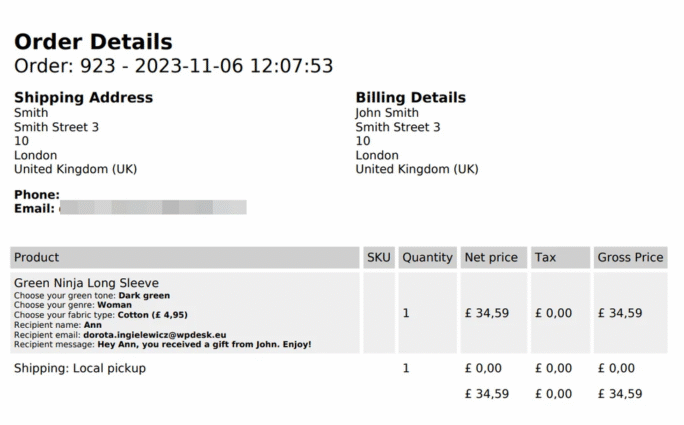
The second drain is the mismatch between what is on the document and what the packer needs. A packing slip showing prices, payment method and billing address is showing three things nobody picking items off a shelf will read, while frequently omitting the one thing they do need, which is the product location or SKU in a legible size.
The third is the label. Printing address labels separately from packing documents handles every order twice and introduces the error that costs most, the right parcel with the wrong label.
What to change before the season
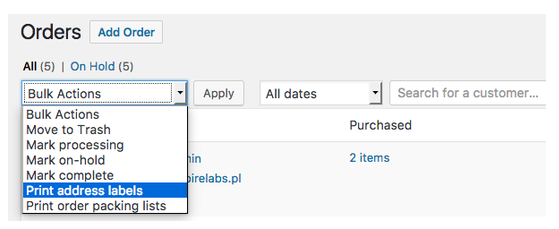
Print in bulk, from the orders list, with a filter applied. Select the orders at the status you pack from, print them all in one document, and work through the stack. This single change removes most of the clicking.
Put the packing document and the address label in the same operation. Whether they come out as one page or two, they should be produced together and in the same order, because what prevents mislabelling is that the two never get separated.
Strip the document down to what the packer uses: order number, items, quantities, SKUs, any gift or delivery note, and nothing else. Prices belong on the invoice, which is a different document with a different reader.
And check the address data itself before December. Labels fail on the same few things every year, which are missing house numbers, a phone number the courier requires and a second address line that was never collected. Our guide to shipping and billing address fields covers which ones your courier actually needs.
How to organise the physical side
Print in batches that match what fits on the table. A stack of two hundred documents is a stack somebody loses their place in, and forty is a batch that gets finished before anything interrupts it.
Pack in the order the documents came out, not in the order that looks efficient. Reordering the stack to group similar items feels faster and is how a document ends up with the wrong parcel.
And keep one person on exceptions. Gift orders, split shipments and anything with a note take several times longer, and mixing them into the main flow slows the whole line.
Bulk printing from the orders list is the change that removes the three hours. Print Orders and Address Labels produces packing documents and labels for a whole selection in one operation, in the same order, so the two never get separated.
Summary
Packing does not scale on its own, and the time goes in two places: the printer and the admin screen. Printing documents one order at a time means a page load, a print dialogue and a lost place in the list for every order, which at thirty seconds each is three hours across four hundred orders. The document itself is usually wrong for its reader, showing prices, payment method and billing address to somebody picking items off a shelf while omitting a legible SKU. And printing labels separately from packing documents handles each order twice while introducing the costliest error there is, the right parcel with the wrong label.
Four changes before the season: print in bulk from a filtered orders list, produce the packing document and the address label in one operation so they never get separated, strip the document to order number, items, quantities, SKUs and any delivery note, and audit the address data for the things labels fail on, which are missing house numbers, absent phone numbers and uncollected second address lines. On the floor: batch to what fits on the table, around forty rather than two hundred; pack in the order the documents printed rather than regrouping by item, since regrouping is how documents and parcels separate; and put one person on exceptions, because gift orders and split shipments take several times longer and slow the whole line when mixed in.
Frequently asked questions
These three come up when volume rises.
Should the invoice go in the box?
It depends on your market and on whether the order is a gift. Many stores now send it by email and include only a packing document, which also solves the gift problem.
How many orders should one batch contain?
As many as one person finishes without stopping, which for most setups is between twenty and fifty. The right number is the one where nobody puts the stack down.
Do packing slips need to show prices?
Generally no, and omitting them is usually better. The accounting document is separate and goes to a different reader.

