In November, every store decides how much to take off its prices. Fewer stores ask the opposite question: what could be added to the product that customers would pay for. The second question usually gives better margins and much less competition.
Contents
What to sell as an option instead of cutting the price
Sell as a paid option anything that costs you little and is worth something to a specific customer. The test is not whether the option is valuable in general, but whether some buyers would pay for it while the rest are not affected.
Gift wrapping is the obvious example in November, and it gives a high margin if its price covers materials and packing time. Engraving, embroidery and other personalisation come next, because a customer paying for a name on a product rarely compares your price with other stores. Remember that in the EU, products made to the customer's specifications are excluded from the right of withdrawal, so tell customers this before they buy.
Extended warranties and priority handling are the third group. Instead of an extra unit of product, they cost you a commitment, and they are often bought by customers who worry most about their order.
The simplest option is a version that costs more: a larger size, a better material or an extra colour. These are not add-ons in the usual sense, but when the product page shows them as options, the customer chooses a version instead of comparing products.
Why this beats discounting on the same traffic
A paid option raises the value of orders from customers who were already buying, while a discount lowers it.
A store running a 20% sale takes 20% off every order, including the orders that would have come at full price. A store selling a paid option takes nothing off and earns more from the customers who choose it. With the same traffic, the second approach usually gives better results, and the two can be combined.
A paid option also protects the price itself. A seasonal discount shows customers how much the product is "really" worth, and they remember that in January. A paid option shows them that the product has a better version.
Setting the fields up without breaking the page
Keep the number of visible options small. Three options are comfortable, six start to look like a form, and a product page that looks like a form can sell worse than a page with no options at all.
Show the price change as soon as the customer chooses an option. An option that silently raises the total surprises customers in the cart, makes them leave and leads to refund requests later.
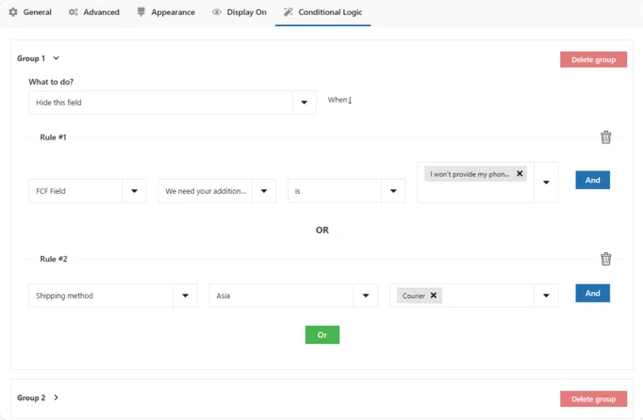
Use conditional display, so options appear only where they apply. An engraving field on a product that cannot be engraved is clutter that distracts from the purchase. Our comparison of plugins that speed up the WooCommerce checkout shows how the same rule works at the checkout.
Finally, decide what happens to the option when the product is on sale. A percentage discount that also reduces the price of the add-on is usually not intended, so settle this before the sale starts, not after you see it in an order.
Paid options only work when the surcharge is visible before the cart and the field appears only where it applies. Flexible Product Fields PRO adds priced fields to the product page with conditional logic, and shows each chosen option in the cart and in the order.
Summary
Instead of only cutting prices in November, a store can sell paid options that cost it little and are worth something to some buyers. The main types are gift wrapping, which gives a high margin if priced to cover materials and packing time, personalisation such as engraving or embroidery, which customers rarely compare between stores, extended warranties and priority handling, and more expensive versions of a product shown as options. With the same traffic, a paid option usually beats a discount, because a 20% sale reduces every order, including those that would have come at full price, while an option adds revenue only from the customers who choose it and protects the regular price. To make options work, show no more than about three on a product page, show the price change as soon as an option is chosen, display options only where they apply and decide before the sale whether the discount also covers the option.
Frequently asked questions
These three questions come up when adding paid options.
Do add-ons work on variable products?
Yes, but test this combination, because the option has to stay filled in when the customer changes the variation.
Where should the add-on price appear on the order?
Show each option with its price in the cart and in the order, not only in the product total. A customer who cannot see what they paid for the engraving will ask about it, and so will your accountant.
How many customers actually take a paid option?
It depends on the category, so measure it for each option separately rather than for all of them together. Often one popular option brings most of the extra revenue.