
• Skip to primary navigation
  • Skip to main content
  • Skip to primary sidebar
  • Skip to footer
WP Desk = premium plugins for WordPress & WooCommerce
  • Plugins
        • Checkout & OrdersMake your work easier and automate the orders. Adjust the order form to your needs and make it more useful to your customers. Print order labels directly from WooCommerce. Put the orders in order using our plugins. Find out how to streamline the procurement process in your store.
          • Flexible Checkout Fields
          • Active Payments
          • Automatic Payment Status
          • One Click Return for WooCommerce
          • Print Orders and Address Labels
          • Flexible Subscriptions Recurring Shipping
          • Flexible Subscriptions Payment Retry
          • Flexible Subscriptions Stock Management
        • ProductsThese plugins will help you manage your WooCommerce products. Here you will find the plugins to import and update products from XML or CSV files. Then you can change the product unit of measure, show the lowest price in the last 30 days (Omnibus Directive), or let customers name the product price!
          • Flexible Product Fields
          • Dropshipping Import Products
          • Dropshipping FTP Import Products
          • Dropshipping Export Products
          • Custom Price
          • WP Desk Omnibus
          • Flexible Quantity Calculator
          • Dropshipping Orders Export
        • MarketingPromote your store online. Add products from your shop to price comparison websites directly from WooCommerce. Acquire new customers and communicate with your existing ones. Build a customer base and communicate with clients using one of the most effective marketing tools, namely e-mail marketing. Check out our promotional tools!
          • Flexible Pricing
          • Flexible Wishlist - Analytics & Emails
          • OLX WooCommerce
          • Flexible PDF Coupons
          • ShopMagic
          • Flexible Invoices
  • Bundle🔥
  • WP Desk Care
  • Support
  • Blog
  • My Account
  • 0

More results

WooCommerce Quantity Discount: Bulk Pricing for Black Week Wholesale Orders

WordPress tips & plugins

patrycja.wojas3 minutes readUpdated: 2026-11-20Updated: 2026-11-05
blog category heading image

A percentage off everything reduces the margin on every order, including the ones that would have come anyway. A quantity discount gives up margin only where the basket grew to earn it, which makes it one of the discounts most worth setting up before the busy season.

Contents

  • How a quantity discount differs from a percentage off
  • Where to set the thresholds
  • Showing it so customers use it
  • Summary
  • Frequently asked questions
    • Should quantity discounts apply per product or per category?
    • Can a quantity discount be combined with a Black Week discount?
    • Do quantity discounts affect the lowest-price obligation?
    • Related Articles
  • 5 essential WooCommerce tips to boost your sales

How a quantity discount differs from a percentage off

A quantity discount links the reduction to how much the customer buys, not to the product itself. A customer buying one item pays the regular price, a customer buying five pays less per item, and the store pays for extra volume instead of discounting sales it would have made anyway.

The calculation is often better than it looks. A 10% discount on the whole catalogue applies to every order, so a store with a thousand orders discounts all thousand. A discount from five items applies only to orders that reach five, and those orders are larger. As long as the extra items bring more margin than the discount takes away, the store earns more.

It also changes what the store asks of the customer. A flat sale encourages them to buy now. A quantity discount encourages them to buy more.
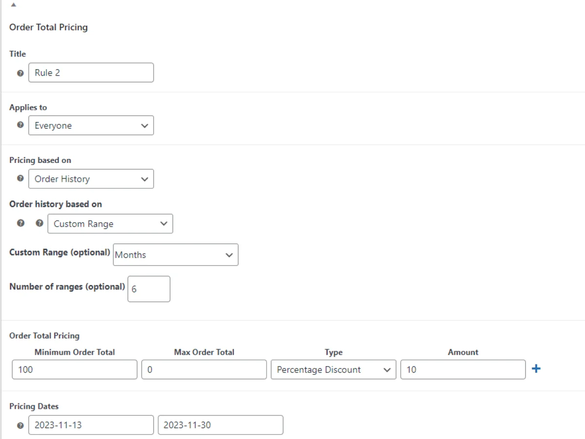
Quantity discount rule settings in a WooCommerce dynamic pricing plugin

Where to set the thresholds

Start from what customers already buy, not from round numbers. If most baskets contain two pieces of a product, the first threshold belongs at three, not at ten, because a threshold nobody reaches costs nothing but also earns nothing.

Use two or three tiers at most. A table with six rows is a pricing puzzle the customer has to study, and while they study it, they are not buying. Three tiers are comfortable: the regular price, a threshold that is easy to reach and one that rewards a really large order.

Make the differences between tiers noticeable. A second tier that saves another 2% is not worth its row in the table, and it suggests to customers that the table is only decoration.

The hardest part is knowing what your customers buy now, and that is a question about your own data, not about pricing theory. Our article on how much time stores lose on analytics shows how to get this information without a week of spreadsheets.

Showing it so customers use it

Put the discount table on the product page, above the add to cart button. A quantity discount the customer discovers only in the cart has already failed, because they decided how many items to buy earlier, on the product page.

Show what the next tier saves in money, not in percent. "Buy four more and save €18" is a message the customer can act on, while "another 3%" is a number they have to convert first.

Make it easy to reach the thresholds with the quantity field. A field that changes the quantity one by one, next to a table whose first threshold is five items, makes the customer click four times to use the offer.

Tiers are worth setting per category rather than per product, so one rule covers a whole range. Flexible Pricing builds quantity breaks as rules with their own conditions and dates, and shows the resulting table on the product page.

Summary

A quantity discount links the reduction to the number of items bought: a customer buying one pays the regular price, and a customer buying more pays less per item. Unlike a percentage discount on the whole catalogue, which reduces every order, a quantity discount applies only to larger orders, so it pays off when the extra items bring more margin than the discount costs. Set the thresholds based on what customers already buy, for example the first tier at three items if most baskets hold two, use no more than two or three tiers and make the differences between them noticeable. Show the discount table on the product page above the add to cart button, describe the savings of the next tier in money rather than in percent and make the thresholds easy to reach with the quantity field. Decide before the sale whether the quantity discount can be combined with a Black Week promotion.

Frequently asked questions

These three questions come up when setting the tiers.

Should quantity discounts apply per product or per category?

Per category works better for consumables, where customers buy a mix of products. Per product is clearer for items bought in several pieces of the same kind.

Can a quantity discount be combined with a Black Week discount?

It can, but usually not without a limit. Decide before the sale which discount applies first and whether both can apply at the same time.

Do quantity discounts affect the lowest-price obligation?

A tiered price is usually treated as a condition of purchase, not as an announced price reduction. If you advertise it as a discount, however, the rules on showing the lowest price from the previous 30 days apply. The wording of your advertising decides.

Related Articles

WooCommerce tips

5 essential WooCommerce tips to boost your sales

Do you need valuable WooCommerce tips and tricks to boost your sales? I'll give you 5 most essential WooCommerce tips and tricks. If you follow them, ...

3 minutes read101 views

patrycja.wojas

Product Content Hero

LinkedIn Profile

Patrycja has 14 years of experience in copywriting and SEO. She is one of the few specialists in Poland who writes with equal confidence about mor...

Powered by WP Desk

WP Desk brings you great WooCommerce plugins. We strive to save your time and money by speeding up your processes. Use our plugins to build a better store. Awesome support included in the package.

Premium WooCommerce Plugins →
WP Desk › Blog › WordPress tips & plugins › WooCommerce Quantity Discount: Bulk Pricing for Black Week Wholesale Orders

Primary Sidebar

Contents

  • How a quantity discount differs from a percentage off
  • Where to set the thresholds
  • Showing it so customers use it
  • Summary
  • Frequently asked questions
    • Should quantity discounts apply per product or per category?
    • Can a quantity discount be combined with a Black Week discount?
    • Do quantity discounts affect the lowest-price obligation?

Flexible Pricing WooCommerce €79

Customers love sales and pricing deals. Use this! Create promotions like Buy One Get One Free to get more sales in your store. The most dynamic pricing plugin for WooCommerce.

💾 Active Installations: 8000+ | 🔄 Last update: 2026-11-21

Add to cart or View Details
WP Desk
Plugins used by 239,830+ shops
Last Updated: 2026-11-21
Works with WooCommerce 11.0 - 11.3

Stay updated on our how-to articles

WP Desk news, WooCommerce tips, promo codes - right to your inbox.

By entering your e-mail, you agree to our Terms & Conditions and Privacy Policy.

By entering your e-mail, you agree to our Terms & Conditions and Privacy Policy.

Footer

WP Desk - WooCommerce Plugins

At WP Desk we create great WooCommerce plugins with awesome support. Save time and money with our e-commerce solutions. See how we can help you improve your e-store →

Secured by Comodo

WP Desk

  • About us
  • Giving Back
  • Blog
  • Get Support
  • Contact us

Products

  • Premium Plugins
  • WP Desk Care
  • Documentation
  • WooCommerce Invoices
  • Email Marketing
  • PDF Coupons

Legal

  • Terms & Conditions
  • Refund Policy
  • Support Policy
  • Privacy Policy

© 2026 WP Desk

We value your privacy

We use necessary cookies to make our site work. We'd also like to set additional cookies to understand site usage, enhance your browsing experience, and serve personalized ads or content. By clicking ‘Accept All,’ you consent to our use of additional cookies.

Functional Always active
The technical storage or access is strictly necessary for the legitimate purpose of enabling the use of a specific service explicitly requested by the subscriber or user, or for the sole purpose of carrying out the transmission of a communication over an electronic communications network.
Preferences
The technical storage or access is necessary for the legitimate purpose of storing preferences that are not requested by the subscriber or user.
Statistics
The technical storage or access that is used exclusively for anonymous statistical purposes. Without a subpoena, voluntary compliance on the part of your Internet Service Provider, or additional records from a third party, information stored or retrieved for this purpose alone cannot usually be used to identify you. The technical storage or access that is used exclusively for anonymous statistical purposes. Without a subpoena, voluntary compliance on the part of your Internet Service Provider, or additional records from a third party, information stored or retrieved for this purpose alone cannot usually be used to identify you.
Marketing
The technical storage or access is required to create user profiles to send advertising, or to track the user on a website or across several websites for similar marketing purposes.
  • Manage options
  • Manage services
  • Manage {vendor_count} vendors
  • Read more about these purposes
View preferences
  • {title}
  • {title}
  • {title}