• Skip to primary navigation
  • Skip to main content
  • Skip to primary sidebar
  • Skip to footer
WP Desk = premium plugins for WordPress & WooCommerce
  • Plugins
        • Checkout & OrdersMake your work easier and automate the orders. Adjust the order form to your needs and make it more useful to your customers. Print order labels directly from WooCommerce. Put the orders in order using our plugins. Find out how to streamline the procurement process in your store.
          • Flexible Checkout Fields
          • Active Payments
          • Automatic Payment Status
          • One Click Return for WooCommerce
          • Print Orders and Address Labels
          • Flexible Subscriptions Recurring Shipping
          • Flexible Subscriptions Payment Retry
          • Flexible Subscriptions Stock Management
        • ProductsThese plugins will help you manage your WooCommerce products. Here you will find the plugins to import and update products from XML or CSV files. Then you can change the product unit of measure, show the lowest price in the last 30 days (Omnibus Directive), or let customers name the product price!
          • Flexible Product Fields
          • Dropshipping Import Products
          • Dropshipping FTP Import Products
          • Dropshipping Export Products
          • Custom Price
          • WP Desk Omnibus
          • Flexible Quantity Calculator
          • Dropshipping Orders Export
        • MarketingPromote your store online. Add products from your shop to price comparison websites directly from WooCommerce. Acquire new customers and communicate with your existing ones. Build a customer base and communicate with clients using one of the most effective marketing tools, namely e-mail marketing. Check out our promotional tools!
          • Flexible Pricing
          • Flexible Wishlist - Analytics & Emails
          • OLX WooCommerce
          • Flexible PDF Coupons
          • ShopMagic
          • Flexible Invoices
  • Bundle🔥
  • WP Desk Care
  • Support
  • Blog
  • My Account
  • 0

More results

How to Automatically Retry Failed Subscription Payments in WooCommerce

Subscriptions for WooCommerce

patrycja.wojas4 minutes readUpdated: 2026-10-17Updated: 2026-10-07
blog category heading image

To retry failed subscription payments in WooCommerce, install Flexible Subscriptions with the Payment Retry add-on and set three or four attempts spread across days rather than hours. Three, five and seven days after the first failure works for most stores. Keep access active through the first attempts on low-value plans, and send a notification with every retry. A large share of failed renewals succeed on a later attempt with no action from the customer at all, which is the entire case for a retry schedule.

Contents

  • The renewal that never arrived
  • Why subscription payments fail in WooCommerce
  • What automatic payment retries do
  • How to configure a retry schedule
    • Step 1: Set the number of attempts
    • Step 2: Space the attempts across days, not hours
    • Step 3: Decide what happens to access during the window
    • Step 4: Pair every retry with a message
  • What happens after the final attempt
  • Check the gateway before you rely on retries
  • Summary
  • Frequently asked questions
    • How many retry attempts make sense?
    • Should customer access be blocked during retries?
    • Do payment retries work with every WooCommerce gateway?
    • What is the difference between a retry and a payment reminder?
    • How long should the retry window be?

The renewal that never arrived

Every subscription store loses part of its recurring revenue to charges that simply do not go through. The card expired last week, the balance was low that morning, the bank blocked a recurring transaction it did not recognise.

Without a retry process, each of those becomes a cancelled subscription from a customer who never decided to leave.

Why subscription payments fail in WooCommerce

Expired and reissued cards are the largest group. Banks replace numbers after fraud alerts, and the customer rarely remembers which services hold that card on file.

Insufficient funds come second, and they are usually temporary. The charge that fails on the 28th often succeeds on the 2nd.

Bank-side blocks on recurring transactions make up the rest. Some issuers treat an unfamiliar recurring merchant as suspicious on the first attempt and clear it afterwards.

That pattern is the argument for retries: a large share of failed charges succeed on a later attempt, with no action from the customer at all.

Most of these failures are also avoidable before they happen. A renewal reminder sent a few days earlier gives the customer time to replace an expired card, so the retry schedule has less work to do.

What automatic payment retries do

A retry schedule tells the store to attempt the charge again after a set interval instead of marking the subscription as failed immediately. The Payment Retry add-on for Flexible Subscriptions handles the attempts and the accompanying email notifications.

The subscription stays in a defined state during the retry window, so you decide whether the customer keeps access while the store keeps trying to collect.
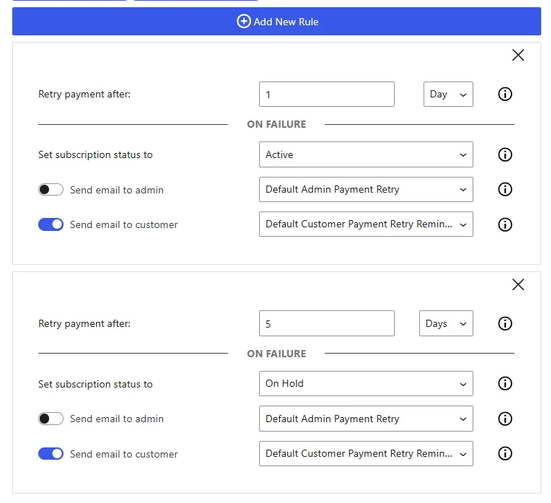
 Subscription with a failed payment in the WooCommerce admin

How to configure a retry schedule

Step 1: Set the number of attempts

Three or four attempts covers the realistic cases. Beyond that, each additional try recovers very little and increases the chance that your payment provider flags the pattern.

Step 2: Space the attempts across days, not hours

Retrying sixty minutes later hits the same empty account. Spacing attempts over several days addresses the most common cause, which is a temporary shortfall. A schedule of three, five and seven days after the first failure is a sensible starting point, and matching the last attempt to a typical payday improves it further.

Step 3: Decide what happens to access during the window

For low-value plans, keeping access active through the retry window usually pays off: an uninterrupted service is less likely to prompt a cancellation. For high-value or licence-based products, suspending after the second failure is the safer choice.

Step 4: Pair every retry with a message

A retry without notification means the first thing the customer hears about the problem is a cancellation. The message should say what failed, when the next attempt happens, and where to update the card.

Those notifications come from the same Emails add-on that sends the pre-renewal reminder, so both sit in one place.

What happens after the final attempt

Decide this before you turn retries on. The usual options are cancelling the subscription, moving it to on-hold so it can be reactivated later, or downgrading to a free tier if your catalogue has one.

On-hold is worth considering. Reactivating an existing subscription takes the customer one click, while signing up again takes a decision.

Whichever end state you pick, make sure it is one your subscription plugin actually supports. The alternatives comparison lists how each one handles on-hold and reactivated subscriptions.

Check the gateway before you rely on retries

A retry only works when the gateway supports repeated charges against a stored payment method. Flexible Subscriptions works with gateways that support WooCommerce subscription renewals, and WooPayments is currently removed from available methods when a subscription product is in the cart.

WP Desk telemetry from 19,803 stores, August 2026, shows 32.3% of stores running four or more payment methods. The more gateways you offer, the more important it is to confirm that each one handles renewals, because the failure will only show up on the first renewal cycle, often weeks after launch.

FLEXIBLE SUBSCRIPTIONS
Payment Retry add-on
Retry failed renewals on a schedule you set, with a notification at every attempt.
See the add-on »

Summary

A failed renewal is a recoverable payment, not a lost customer. Three or four attempts spread across several days, a clear notification at each step, and a decision made in advance about what happens at the end will turn most of those failures back into completed charges.

Frequently asked questions

How many retry attempts make sense?

Three or four. Each further attempt recovers less and raises the risk of your payment provider treating the pattern as abusive.

Should customer access be blocked during retries?

Usually not in the first days. The customer rarely caused the failure, and cutting access invites the cancellation you are trying to avoid. For high-value or licence-based products, suspending after the second failure is the safer choice.

Do payment retries work with every WooCommerce gateway?

Only with gateways that support charging a stored payment method again. Check the gateway documentation before you rely on the schedule, because the problem will only appear on the first renewal cycle.

What is the difference between a retry and a payment reminder?

A reminder is sent before the charge, a retry happens after one has already failed. Stores that use both recover the most renewals.

How long should the retry window be?

Seven to ten days from the first failure. That covers a typical pay cycle, which is the most common reason a charge bounces and then clears.

4 minutes read101 views

patrycja.wojas

Product Content Hero

LinkedIn Profile

Patrycja has 14 years of experience in copywriting and SEO. She is one of the few specialists in Poland who writes with equal confidence about mor...

Powered by WP Desk

WP Desk brings you great WooCommerce plugins. We strive to save your time and money by speeding up your processes. Use our plugins to build a better store. Awesome support included in the package.

Premium WooCommerce Plugins →
WP Desk › Blog › WooCommerce checkout & orders › Subscriptions for WooCommerce › How to Automatically Retry Failed Subscription Payments in WooCommerce

Primary Sidebar

Contents

  • The renewal that never arrived
  • Why subscription payments fail in WooCommerce
  • What automatic payment retries do
  • How to configure a retry schedule
    • Step 1: Set the number of attempts
    • Step 2: Space the attempts across days, not hours
    • Step 3: Decide what happens to access during the window
    • Step 4: Pair every retry with a message
  • What happens after the final attempt
  • Check the gateway before you rely on retries
  • Summary
  • Frequently asked questions
    • How many retry attempts make sense?
    • Should customer access be blocked during retries?
    • Do payment retries work with every WooCommerce gateway?
    • What is the difference between a retry and a payment reminder?
    • How long should the retry window be?

Flexible Subscriptions Payment Retry €39

Add-on for Flexible Subscriptions Free. This extension allows setting the retrying payment rules for subscriptions after failed payments. Recover more subscriptions automatically.

Add to cart or View Details
WP Desk
Plugins used by 239,791+ shops
Last Updated: 2026-10-07
Works with WooCommerce 10.8 - 11.2

Stay updated on our how-to articles

WP Desk news, WooCommerce tips, promo codes - right to your inbox.

By entering your e-mail, you agree to our Terms & Conditions and Privacy Policy.

By entering your e-mail, you agree to our Terms & Conditions and Privacy Policy.

Footer

WP Desk - WooCommerce Plugins

At WP Desk we create great WooCommerce plugins with awesome support. Save time and money with our e-commerce solutions. See how we can help you improve your e-store →

Secured by Comodo

WP Desk

  • About us
  • Giving Back
  • Blog
  • Get Support
  • Contact us

Products

  • Premium Plugins
  • WP Desk Care
  • Documentation
  • WooCommerce Invoices
  • Email Marketing
  • PDF Coupons

Legal

  • Terms & Conditions
  • Refund Policy
  • Support Policy
  • Privacy Policy

© 2026 WP Desk

We value your privacy

We use necessary cookies to make our site work. We'd also like to set additional cookies to understand site usage, enhance your browsing experience, and serve personalized ads or content. By clicking ‘Accept All,’ you consent to our use of additional cookies.

Functional Always active
The technical storage or access is strictly necessary for the legitimate purpose of enabling the use of a specific service explicitly requested by the subscriber or user, or for the sole purpose of carrying out the transmission of a communication over an electronic communications network.
Preferences
The technical storage or access is necessary for the legitimate purpose of storing preferences that are not requested by the subscriber or user.
Statistics
The technical storage or access that is used exclusively for anonymous statistical purposes. Without a subpoena, voluntary compliance on the part of your Internet Service Provider, or additional records from a third party, information stored or retrieved for this purpose alone cannot usually be used to identify you. The technical storage or access that is used exclusively for anonymous statistical purposes. Without a subpoena, voluntary compliance on the part of your Internet Service Provider, or additional records from a third party, information stored or retrieved for this purpose alone cannot usually be used to identify you.
Marketing
The technical storage or access is required to create user profiles to send advertising, or to track the user on a website or across several websites for similar marketing purposes.
  • Manage options
  • Manage services
  • Manage {vendor_count} vendors
  • Read more about these purposes
View preferences
  • {title}
  • {title}
  • {title}