
• Skip to primary navigation
  • Skip to main content
  • Skip to primary sidebar
  • Skip to footer
WP Desk = premium plugins for WordPress & WooCommerce
  • Plugins
        • Checkout & OrdersMake your work easier and automate the orders. Adjust the order form to your needs and make it more useful to your customers. Print order labels directly from WooCommerce. Put the orders in order using our plugins. Find out how to streamline the procurement process in your store.
          • Flexible Checkout Fields
          • Active Payments
          • Automatic Payment Status
          • Flexible Refund and Return Order
          • Print Orders and Address Labels
          • Flexible Subscriptions Recurring Shipping
          • Flexible Subscriptions Payment Retry
          • Flexible Subscriptions Stock Management
        • ProductsThese plugins will help you manage your WooCommerce products. Here you will find the plugins to import and update products from XML or CSV files. Then you can change the product unit of measure, show the lowest price in the last 30 days (Omnibus Directive), or let customers name the product price!
          • Flexible Product Fields
          • Dropshipping Import Products
          • Dropshipping FTP Import Products
          • Dropshipping Export Products
          • Custom Price
          • WP Desk Omnibus
          • Flexible Quantity Calculator
          • Dropshipping Orders Export
        • MarketingPromote your store online. Add products from your shop to price comparison websites directly from WooCommerce. Acquire new customers and communicate with your existing ones. Build a customer base and communicate with clients using one of the most effective marketing tools, namely e-mail marketing. Check out our promotional tools!
          • Flexible Pricing
          • Flexible Wishlist - Analytics & Emails
          • OLX WooCommerce
          • Flexible PDF Coupons
          • ShopMagic
          • Flexible Invoices
  • Bundle🔥
  • WP Desk Care
  • Support
  • Blog
  • My Account
  • 0

More results

Meet Sandra – WooCommerce Sales Analytics Plugin

Marketing Tips, News, WooCommerce order status

Przemysław Rosa3 minutes readUpdated: 2026-06-02Updated: 2026-06-02
blog category heading image

Looking for a powerful WooCommerce sales analytics plugin that delivers actionable insights?

Meet Sandra Salamander – your personal AI sales analyst for WooCommerce and intelligent WooCommerce AI chatbot that turns raw data into clear reports and smart recommendations. This isn't just another WooCommerce plugin; Sandra works directly on your store's database, giving you reliable analytics without the guesswork.
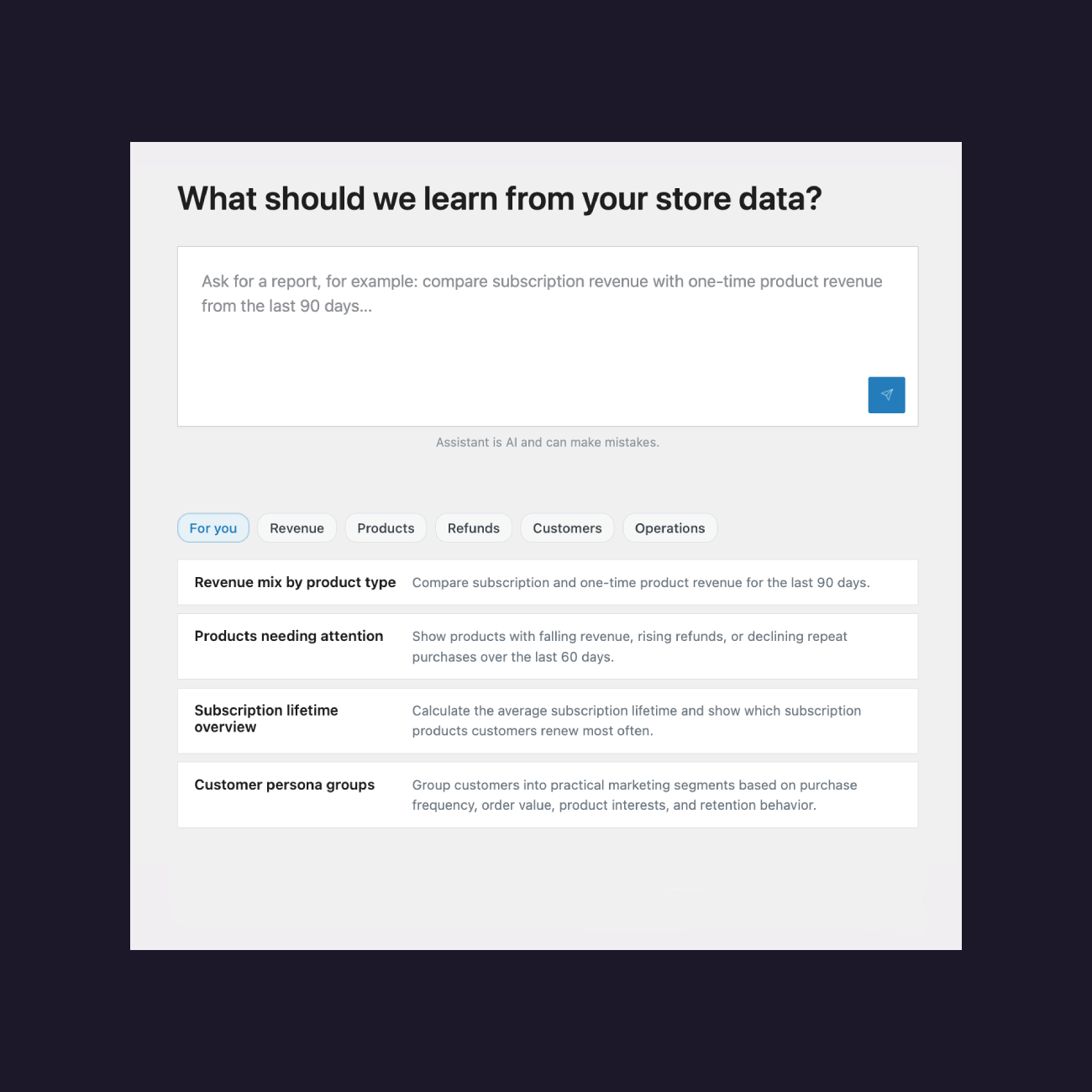
WooCommerce Sales Reports possible to generate

Contents

  • Why should you hire this AI WordPress plugin?
  • How does this WooCommerce sales analytics plugin work?
    • Step 1 – Plugin configuration
    • Step 2 – Defining the report
    • Step 3 – Reliability analysis
    • Your WooCommerce Sales Analyst
  • Unlock a world of WooCommerce sales analysis possibilities!
  • FAQ – 5 Use Cases for Sandra
  • Pricing and satisfaction guarantee
    • Your WooCommerce Sales Analyst

Why should you hire this AI WordPress plugin?

Sandra is an AI WordPress plugin that unlocks the knowledge locked inside your store's database. Here's what makes her special:

  • Reliability: By working directly on your store's database, the bot has a very clear context, which limits the risk of hallucinations.
  • Decision-making: The data in the reports lets you stay in control of your store's product and sales situation.
  • Security: Sandra reads and recalculates sales data stored in your WooCommerce store database, but she has no permissions to make changes in the database.
  • Simplification: Cross-analyses, trend analysis (e.g. retention or product sales), basket value analysis – all of this is child's play for Sandra.
  • Acceleration: Complex tasks that normally cost you time and effort can be completed within a few minutes.
  • Interpretation: Sandra will not leave you with dry data only. She can interpret the results and recommend actions to take in your store.
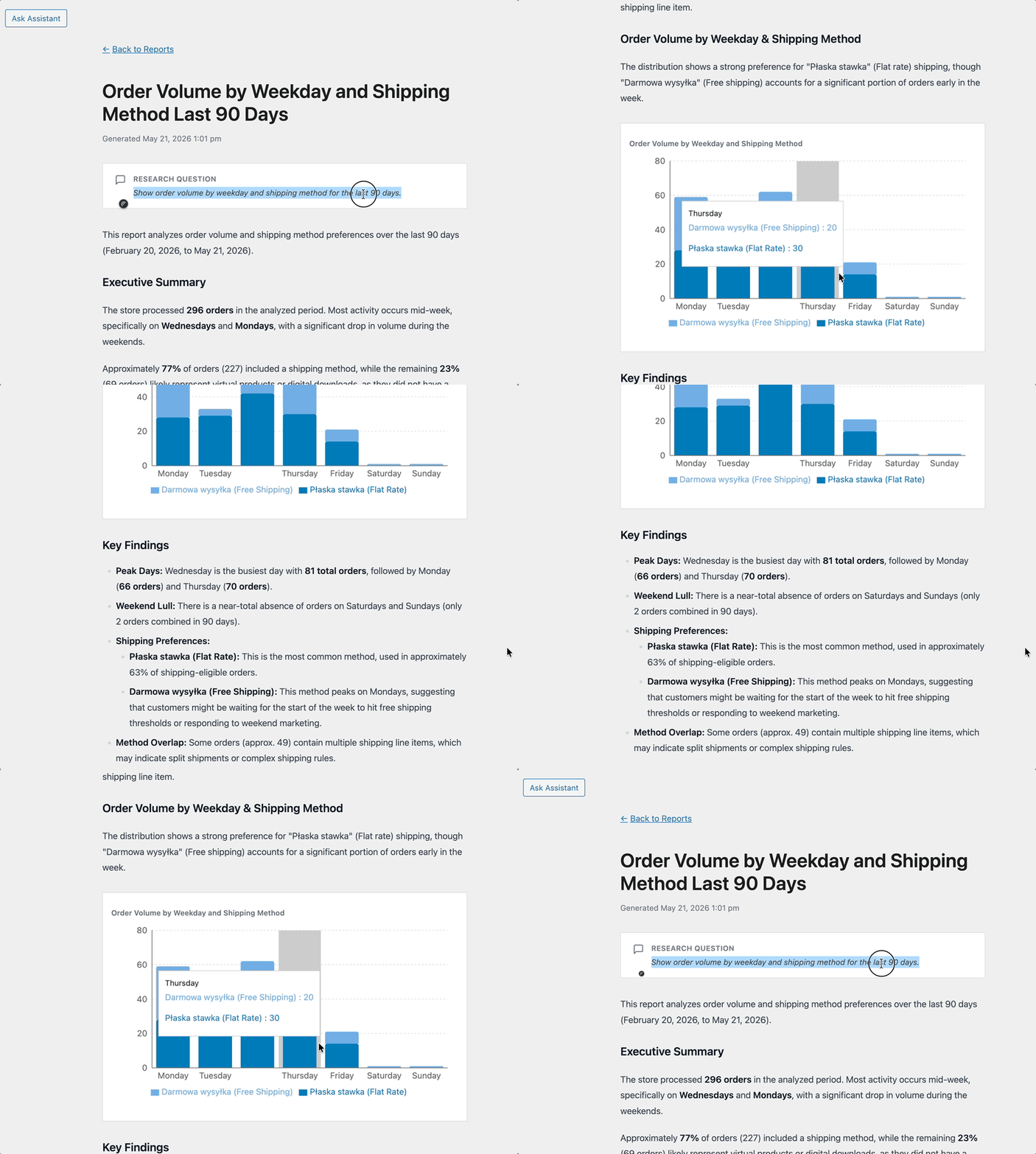
Sandras Report

How does this WooCommerce sales analytics plugin work?

Creating automated sales reports WooCommerce stores need is child's play for Sandra! Complex analyses that used to take hours are now completed in just a few minutes with complete transparency. The process has three simple steps:

Step 1 – Plugin configuration

After installing the plugin, connect it to your store. It's simple! Go to the Settings tab, click Connect, and remember to use your store's address and the email used when placing the order. This secure connection allows Sandra to directly access your WooCommerce database for accurate analysis. Once connected, you'll instantly unlock the ability to generate detailed sales reports and gain actionable insights into your store's performance.

Step 2 – Defining the report

Describe in natural language what report you need Sandra to prepare. Specify what data should be analysed and over what period so that the report matches your business question as closely as possible. The more detailed your description, the better Sandra can tailor the analysis to your specific needs. Sandra will interpret the results and provide actionable recommendations to help you make informed decisions about your store's growth.

Step 3 – Reliability analysis

Wait a moment until Sandra generates a report. Once it is ready, review its contents and go through the SQL queries she used. This will help you build trust in the report and assess how useful it is. The transparent SQL queries let you verify exactly how Sandra calculated each metric. This level of transparency ensures you can confidently use the insights for critical business decisions.

Your WooCommerce Sales Analyst

Hire Sandra Salamander to analyse and interpret your WooCommerce sales data.
Gain insights into your sales and make informed decisions about your store’s growth.

Test the plugin for free in 1st month or View Details
WP Desk
Plugins used by 239,857+ shops
Last Updated: 2026-06-02
Works with WooCommerce 10.0 - 10.3

Unlock a world of WooCommerce sales analysis possibilities!

See what kind of sales insights you will get access to when Sandra performs WooCommerce sales analysis:

  • Product revenues
  • Subscription lifetime (have you seen Flexible Subscriptions plugins?)
  • Customer cohorts (by location and orders)
  • Shopping groups
  • Coupon usage
  • Sales channels (based on Woo data)
  • Average basket value over time
  • Cart abandonment (based on Woo data)
  • Returned orders
  • Time from purchase to return
  • Stock level changes
  • And many more

FAQ – 5 Use Cases for Sandra

1. I want to understand which products generate the highest revenues

Ask Sandra for a product revenues report for the last quarter. The bot will analyze the data and highlight bestsellers, plus suggest optimization actions.

2. I'm seeing a high cart abandonment rate

Request a cart abandonment report from WooCommerce data. Sandra will show when and where customers abandon carts and suggest concrete corrective steps.

3. I want to know customer value from different regions

Ask for customer cohorts analysis by location. You'll get a breakdown of customer value from different regions with marketing recommendations.

4. I'm planning a campaign with discount coupons

Request a coupon usage report from previous campaigns. Sandra will analyze coupon effectiveness and help plan a more efficient strategy.

5. I notice fluctuations in average basket value

Ask for average basket value over time analysis. The bot will show trends, seasons, and downturns, helping you optimize your pricing strategy.

Pricing and satisfaction guarantee

Sandra offers three plans: up to 5 reports monthly, up to 50 reports (most popular), and up to 150 reports. Every plan includes the first month free, 1 year of email support, a 30-day money-back guarantee, and updates for 1 site.

If you're looking for a WooCommerce plugin that truly helps you understand your sales, Sandra is an excellent choice. This is not just a tool for automated sales reports WooCommerce – it's your partner in store growth.

Ready to transform your WooCommerce sales analysis? Hire Sandra Salamander today and start making data-driven decisions that grow your business!

Your WooCommerce Sales Analyst

Hire Sandra Salamander to analyse and interpret your WooCommerce sales data.
Gain insights into your sales and make informed decisions about your store’s growth.

Test the plugin for free in 1st month or View Details
WP Desk
Plugins used by 239,857+ shops
Last Updated: 2026-06-02
Works with WooCommerce 10.0 - 10.3

3 minutes read269 views

Przemysław Rosa

Product Owner at WP Desk

LinkedIn Profile

Przemek has over 15 years of experience in product and project management and has been part of WP Desk since 2017. As a data-driven Product Owner, ...

Powered by WP Desk

WP Desk brings you great WooCommerce plugins. We strive to save your time and money by speeding up your processes. Use our plugins to build a better store. Awesome support included in the package.

Premium WooCommerce Plugins →
WP Desk › Blog › News › Meet Sandra – WooCommerce Sales Analytics Plugin

Primary Sidebar

Contents

  • Why should you hire this AI WordPress plugin?
  • How does this WooCommerce sales analytics plugin work?
    • Step 1 – Plugin configuration
    • Step 2 – Defining the report
    • Step 3 – Reliability analysis
    • Your WooCommerce Sales Analyst
  • Unlock a world of WooCommerce sales analysis possibilities!
  • FAQ – 5 Use Cases for Sandra
  • Pricing and satisfaction guarantee
    • Your WooCommerce Sales Analyst

Your WooCommerce Sales Analyst

Hire Sandra Salamander to analyse and interpret your WooCommerce sales data.
Gain insights into your sales and make informed decisions about your store’s growth.

Test the plugin for free in 1st month or View Details
WP Desk
Plugins used by 239,857+ shops
Last Updated: 2026-06-02
Works with WooCommerce 10.0 - 10.3

Stay updated on our how-to articles

WP Desk news, WooCommerce tips, promo codes - right to your inbox.

By entering your e-mail, you agree to our Terms & Conditions and Privacy Policy.

By entering your e-mail, you agree to our Terms & Conditions and Privacy Policy.

Footer

WP Desk - WooCommerce Plugins

At WP Desk we create great WooCommerce plugins with awesome support. Save time and money with our e-commerce solutions. See how we can help you improve your e-store →

Secured by Comodo

WP Desk

  • About us
  • Giving Back
  • Blog
  • Get Support
  • Contact us

Products

  • Premium Plugins
  • WP Desk Care
  • Documentation
  • WooCommerce Invoices
  • Email Marketing
  • PDF Coupons

Legal

  • Terms & Conditions
  • Refund Policy
  • Support Policy
  • Privacy Policy

© 2026 WP Desk

We value your privacy

We use necessary cookies to make our site work. We'd also like to set additional cookies to understand site usage, enhance your browsing experience, and serve personalized ads or content. By clicking ‘Accept All,’ you consent to our use of additional cookies.

Functional Always active
The technical storage or access is strictly necessary for the legitimate purpose of enabling the use of a specific service explicitly requested by the subscriber or user, or for the sole purpose of carrying out the transmission of a communication over an electronic communications network.
Preferences
The technical storage or access is necessary for the legitimate purpose of storing preferences that are not requested by the subscriber or user.
Statistics
The technical storage or access that is used exclusively for anonymous statistical purposes. Without a subpoena, voluntary compliance on the part of your Internet Service Provider, or additional records from a third party, information stored or retrieved for this purpose alone cannot usually be used to identify you. The technical storage or access that is used exclusively for anonymous statistical purposes. Without a subpoena, voluntary compliance on the part of your Internet Service Provider, or additional records from a third party, information stored or retrieved for this purpose alone cannot usually be used to identify you.
Marketing
The technical storage or access is required to create user profiles to send advertising, or to track the user on a website or across several websites for similar marketing purposes.
  • Manage options
  • Manage services
  • Manage {vendor_count} vendors
  • Read more about these purposes
View preferences
  • {title}
  • {title}
  • {title}