
Imagine a world where your spa, salon, or fitness studio doesn't just sell services, but sells experiences – tailored, personal, and effortlessly delivered. A world where gift-giving is transformed into a seamless, high-value transaction, and your business captures new clients with irresistible, personalized offers. This isn't a distant dream; it's the tangible reality you can build today by learning how to sell service vouchers in WooCommerce, complete with customizable packages.
Service vouchers in WooCommerce are more than just discount codes; they are powerful tools that unlock new revenue streams and enhance customer loyalty. Think of them as pre-paid, personalized experiences that your customers can purchase for themselves or as thoughtful gifts for loved ones. For businesses like spas, beauty salons, or personal training studios, this means offering everything from a bespoke massage package with optional add-ons to a series of fitness sessions tailored to individual goals, all wrapped up in a beautiful, branded PDF voucher.
This comprehensive guide will walk you through the journey of setting up a dynamic, automated system to sell these sophisticated, customizable service packages in your WooCommerce store. We'll show you how to leverage the combined power of two exceptional WP Desk plugins: Flexible Product Fields PRO and Flexible Coupons PRO. Together, these tools will not only allow you to create intricate service offerings but also automate the generation of stunning, personalized PDF vouchers, turning every purchase into a delightful experience.
Contents
- The Vision: Transform Your Service Business with Customizable Vouchers
- Unlocking Potential: The Synergy of Flexible Product Fields PRO and Flexible Coupons PRO
- Step-by-Step: Setting Up Your Customizable Service Vouchers in WooCommerce
- Beyond the Basics: Advanced Strategies for Maximizing Voucher Sales
- The WP Desk Advantage: Why Choose Our Solutions?
- FAQ
The Vision: Transform Your Service Business with Customizable Vouchers
In today's competitive service industry, standing out means offering more than just a standard menu. It means offering flexibility, personalization, and an unforgettable customer journey. Customizable service vouchers are your secret weapon, allowing you to move beyond static offerings and into a realm of dynamic, client-centric sales.
Why Customizable Service Vouchers Are a Game-Changer
Picture this: a customer visits your spa's website, not just to book a standard facial, but to design a complete wellness package for a friend. They choose the type of facial, add a luxurious aromatherapy upgrade, select a personalized dedication message, and instantly receive a beautiful, branded PDF voucher. This isn't just a transaction; it's an experience from start to finish.
By implementing customizable service packages, you:
- Increase Average Order Value: Paid add-ons and premium choices naturally elevate the price point.
- Boost Customer Satisfaction: Personalization makes gifts more meaningful and services more appealing.
- Expand Your Reach: Vouchers are perfect gifts, bringing new clients through your doors.
- Simplify Operations: Automated generation frees up your staff from manual voucher creation.
The Power of Automation: Streamlining Your Sales
Manual voucher creation is a time sink. From designing to emailing, every step takes away valuable time you could spend on client care or business growth. Automation is the key to unlocking true scalability. With the right tools, you can set up a system where:
- Customers configure their ideal service package directly on your product page.
- The price dynamically adjusts based on their selections.
- A unique coupon code is automatically generated upon purchase.
- This coupon is then transformed into a beautiful, branded PDF voucher.
- The PDF voucher is automatically emailed to the recipient or purchaser.
This seamless flow not only delights your customers but also empowers your business to handle a higher volume of sales without increasing your workload. It's about working smarter, not harder.
Unlocking Potential: The Synergy of Flexible Product Fields PRO and Flexible Coupons PRO
To achieve this level of customization and automation, we turn to two powerful WooCommerce plugins from WP Desk. Each plays a distinct yet complementary role in building your ultimate service voucher system.
Flexible Product Fields PRO: Crafting Your Bespoke Service Offerings
Flexible Product Fields PRO is the engine behind your customizable service packages. It allows you to add any type of custom field to your WooCommerce products, transforming a simple product page into an interactive service builder. Imagine giving your customers the power to:
- Choose from various service tiers (e.g., 'Basic Massage,' 'Deluxe Massage,' 'Premium Massage').
- Select optional add-ons (e.g., 'Hot Stone Upgrade,' 'Aromatherapy,' 'Express Manicure').
- Input personalized messages or recipient details for their gift voucher.
- See the total price update instantly as they make their selections.
Flexible Product Fields PRO WooCommerce £59
Create a product wizard to sell engravings, gift wrapping, gift messages, business cards, stamps and optionally charge for it (fixed or percentage).
💾 Active Installations: 10,000+ | WordPress Rating:
This plugin is essential for creating the rich, interactive experience customers expect when purchasing a truly personalized gift or service.
Flexible Coupons PRO: Automating Voucher Generation and Delivery
Once your customers have designed their perfect service package, Flexible Coupons PRO takes over to bring that package to life as a professional, redeemable voucher. This isn't just a spa gift card plugin; it's a comprehensive coupon and voucher management system. Here's what it enables:
- Automatic Coupon Generation: Upon purchase, a unique WooCommerce coupon is created, reflecting the value of the chosen service package.
- Stunning PDF Vouchers: Transform these coupons into beautifully designed PDF vouchers using a powerful graphic editor.
- Dynamic Content: Embed details from your custom product fields (like recipient names or chosen services) directly into the PDF voucher using shortcodes.
- Automated Delivery: Send the PDF voucher directly to the recipient's email address, ensuring a smooth, instant delivery experience.
The synergy between these two plugins is where the magic happens. Flexible Product Fields PRO configures the 'what' and 'how much,' while Flexible Coupons PRO handles the 'how to present and deliver it beautifully.'
Ready to elevate your service business with unparalleled customization and automation? The journey to selling sophisticated, personalized service vouchers starts here. It's time to transform your WooCommerce store into a hub for exceptional experiences.
Flexible PDF Coupons WooCommerce £59
Design your own PDF coupons and sell them as gift cards, tickets, or service vouchers. Use extra add-ons and insert your own shortcodes, delay sending coupons by email, or even generate QR codes.
💾 Active Installations: 2,000+ | WordPress Rating:
Step-by-Step: Setting Up Your Customizable Service Vouchers in WooCommerce
Let's dive into the practical steps to implement this transformative solution in your WooCommerce store. This guide assumes you have both Flexible Product Fields PRO and Flexible Coupons PRO installed and activated.
1. Create Your Service Voucher Product
First, you need a base product in WooCommerce that will represent your service voucher. This will typically be a simple, virtual product.
- Go to Products > Add New in your WordPress dashboard.
- Give your product a descriptive name, e.g., "Customizable Spa Day Voucher" or "Personalized Fitness Package."
- In the "Product data" box, select "Simple product."
- Check the "Virtual" checkbox, as this is a digital voucher, not a physical item requiring shipping.
- Set an initial price. This can be a base price for the voucher, or if all options are paid, you can set it to 0 and let Flexible Product Fields PRO handle the dynamic pricing.
- Publish your product.
2. Define Customizable Options with Flexible Product Fields PRO
Now, let's add the magic of customization using Flexible Product Fields PRO. This is where you'll build the options that allow customers to tailor their service package.
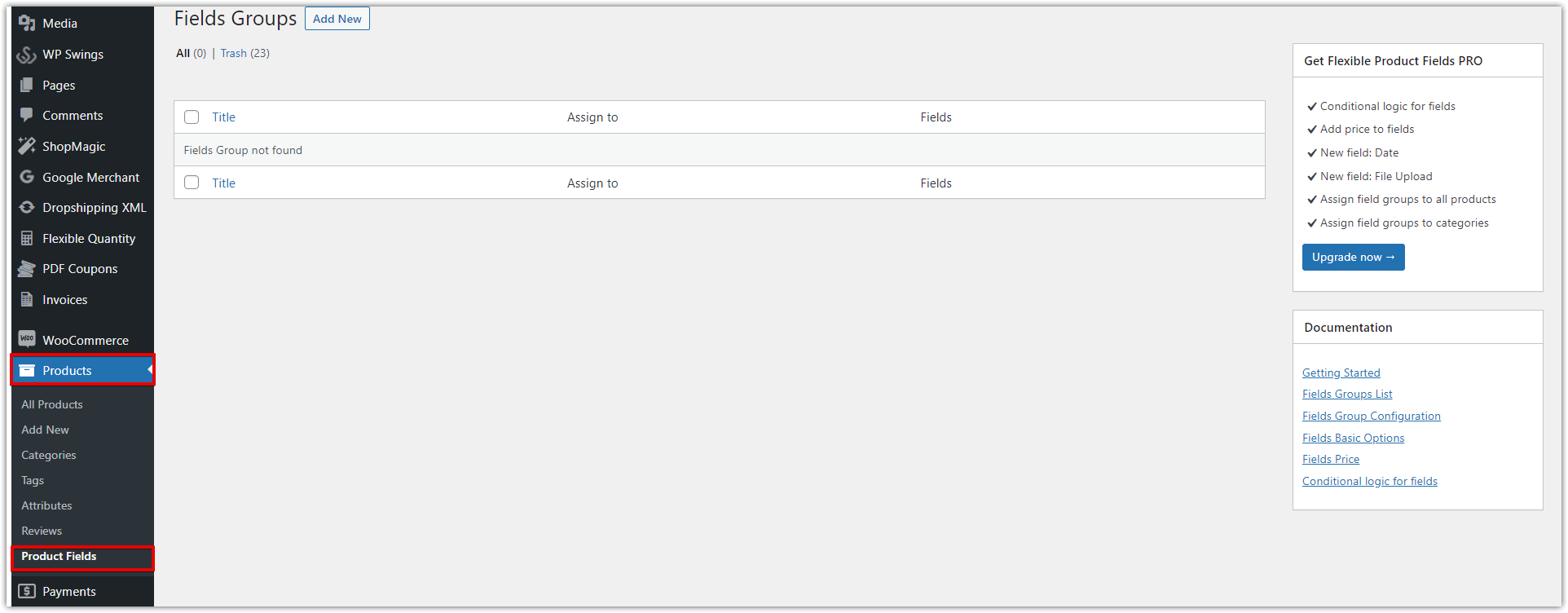
- Go to Products > Product Fields and click "Add New" to create a new group of fields.
- Give the group a clear title (e.g., "Spa Voucher Customizations").
- Under "Assignment," select your newly created service voucher product(s).
Adding Service Variants (e.g., massage types)
Offer different types of services within your voucher. For a spa, this could be various massage styles.
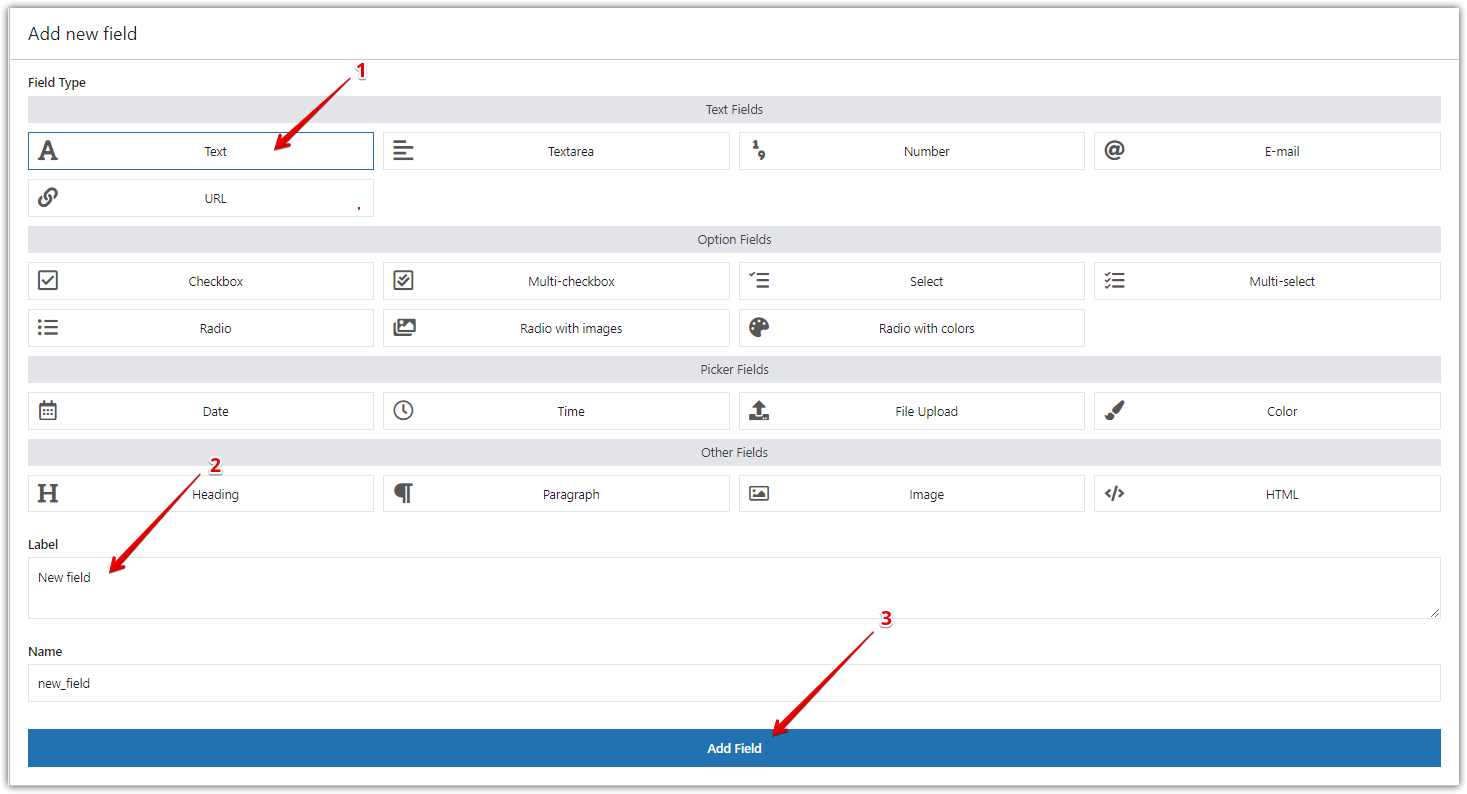
- Click "Add Field" in your field group.
- Choose a "Select" or "Radio" field type for exclusive choices.
- Label it "Choose Your Service" (or similar).
- Add options like "Swedish Massage," "Deep Tissue Massage," "Hot Stone Massage."
- Crucially, for each option, define a "Price" if it affects the total voucher value. This enables dynamic pricing.
Incorporating Paid Add-ons (e.g., peeling, aromatherapy)
Increase your average order value by offering optional paid enhancements.
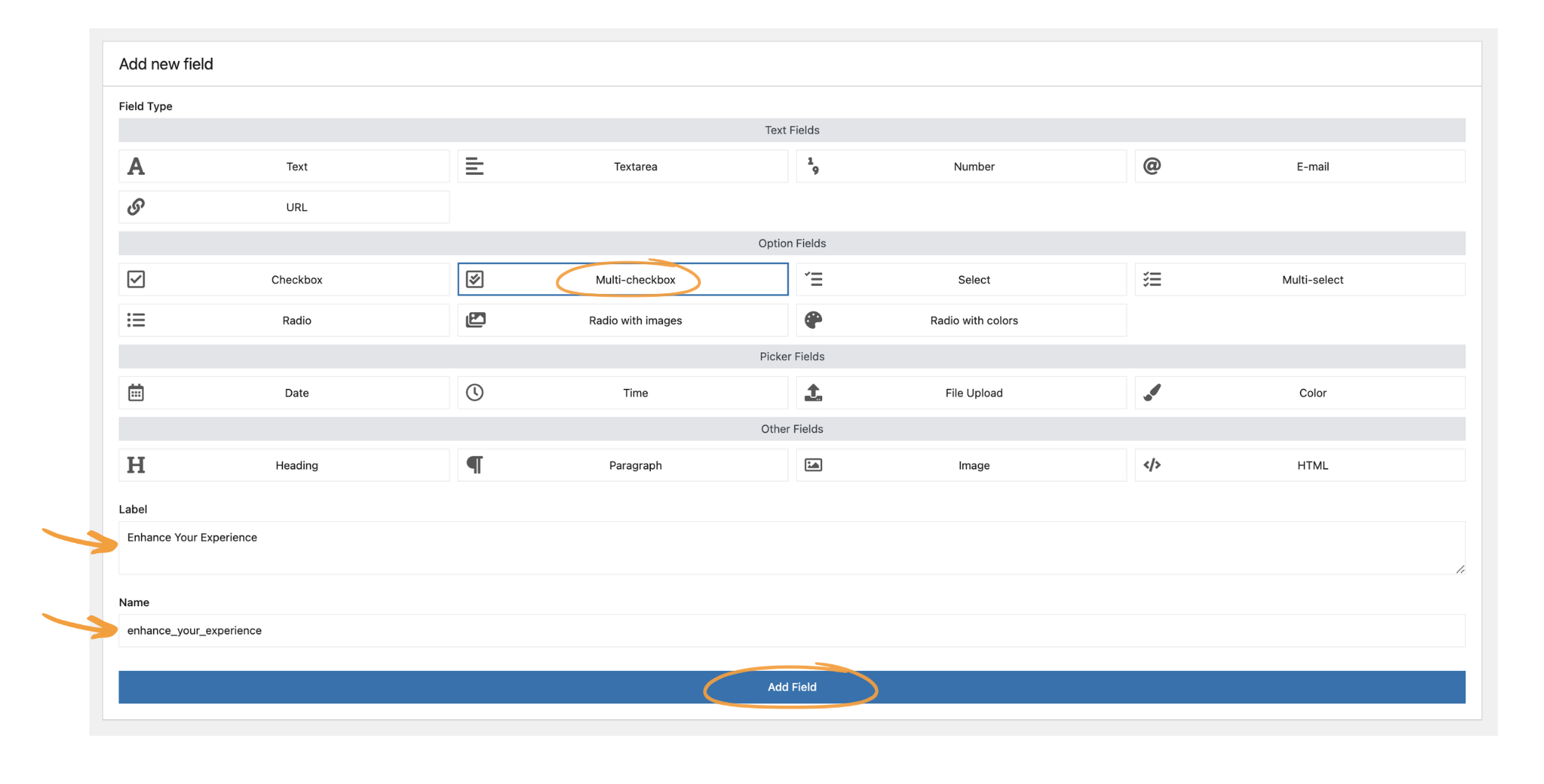
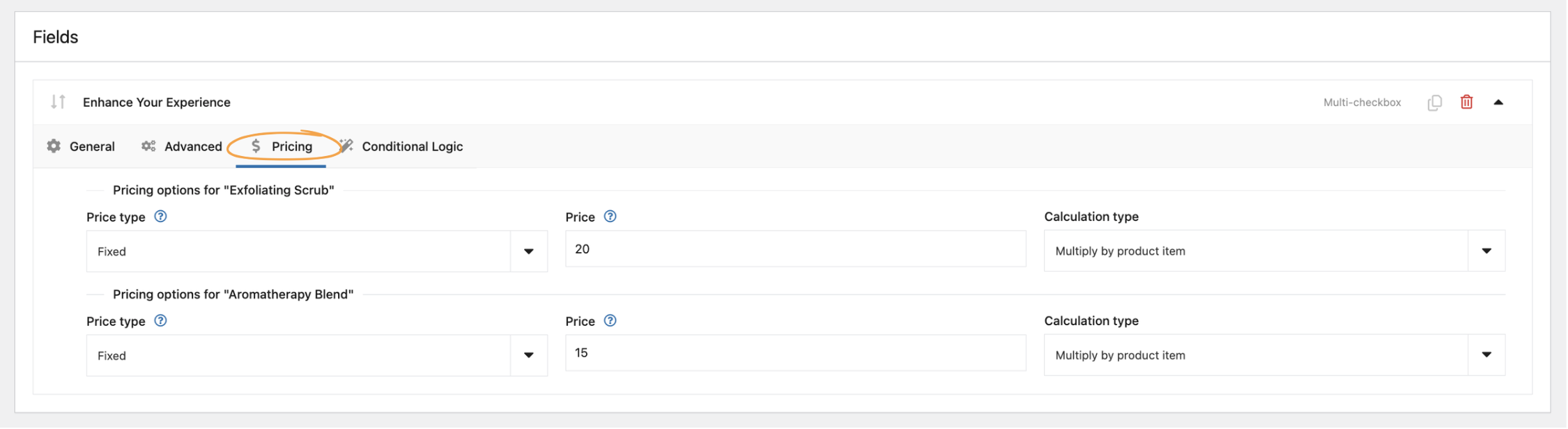
- Add another field, choosing the "Multi-checkbox" field type for multiple selections.
- Label it "Enhance Your Experience."
- Add options like "Exfoliating Scrub" (with a +$20 price), "Aromatherapy Blend" (with a +$15 price), etc.
- Ensure you set the "Price" for each checkbox option.
Enabling Personalization (dedications, recipient details)
Make the voucher truly special by allowing customers to add personal touches.
- Add a "Text" field for "Recipient Name."
- Add an "Email" field for "Recipient Email."
- Add a "Textarea" field for "Personal Dedication Message."
- Mark these fields as optional or required based on your business needs.
Dynamic Pricing: Calculating the Package Value
Flexible Product Fields PRO automatically handles dynamic pricing. As customers select options with associated prices, the total product price displayed on the front end will update in real-time. This transparency builds trust and encourages customers to explore all available enhancements.
3. Integrate Flexible Coupons PRO for Automated Voucher Creation
With your customizable product set up, it's time to connect it to Flexible Coupons PRO to automate voucher generation and delivery.
Activating PDF Coupons for Your Product
Navigate back to your service voucher product's edit screen:
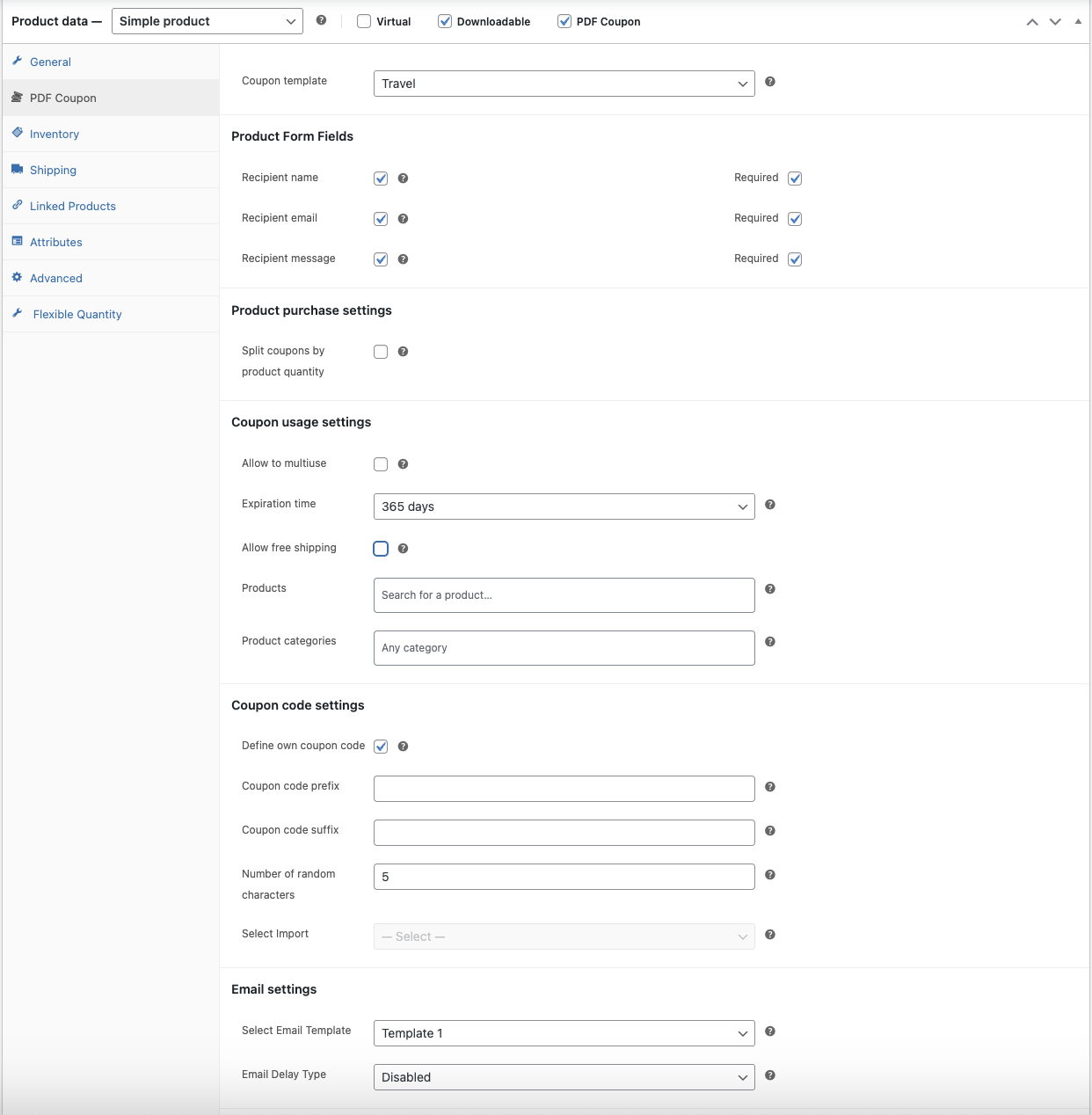
- In the "Product data" box, go to the "PDF Coupon" tab.
- Check the "Enable PDF Coupons" box.
- Select the "Virtual" option if it's not already selected.
Designing Your Stunning PDF Voucher Template
Flexible Coupons PRO includes a powerful graphic editor to design professional, branded PDF vouchers.
- Go to Marketing > PDF Coupons > Templates.
- Click "Add New" or edit an existing template.
- Use the drag-and-drop editor to add your logo, background images, text areas, and dynamic content shortcodes.
- Experiment with colors, fonts, and layouts to match your brand's aesthetic.

For more detailed guidance on creating these templates, refer to our article on PDF Gift Cards in WooCommerce, which outlines the graphic editor's features extensively.
Mapping Product Fields to Coupon Shortcodes (Crucial Synergy Point)
This is where Flexible Product Fields PRO and Flexible Coupons PRO truly shine together. You can pull the values from your custom product fields directly into your PDF voucher template.
- Install the Flexible PDF Coupons PRO - Custom Shortcodes add-on (if not already part of your PRO bundle).
- Go to Marketing > PDF Coupons > Custom Shortcodes.
- Select "Flexible Product Fields" in the first column.
- In the second column, choose the specific field you want to map (e.g., "Recipient Name," "Chosen Service," "Personal Dedication Message").
- A shortcode will automatically be generated (e.g.,
[fpf_recipient_name]). - Insert these shortcodes into your PDF voucher template in the graphic editor. When a customer purchases, these shortcodes will be replaced with their actual selections.
Automating Coupon Generation and Email Delivery
Finally, configure Flexible Coupons PRO to automatically generate and send the PDF voucher upon order completion.
- Back in your product's "PDF Coupon" tab, select your newly designed template.
- Configure options for recipient name/email fields, message fields, and how the coupon code should be generated.
- Set the coupon's expiration time (e.g., 365 days).
- Under Marketing > PDF Coupons > Settings, configure when the PDF coupon should be generated and sent (e.g., when order status changes to "Completed"). You can also choose to attach the PDF coupon as an email attachment.
By following these steps, you've created a sophisticated, automated system to sell service vouchers in WooCommerce, offering unparalleled customization and a seamless customer experience.
Beyond the Basics: Advanced Strategies for Maximizing Voucher Sales
Once your system is up and running, consider these strategies to further boost your sales and customer engagement.
Upselling and Cross-selling Opportunities
Your customizable vouchers are inherently designed for upselling (paid add-ons) and cross-selling (suggesting complementary products or services). Use WooCommerce's built-in related products features to suggest physical products that complement a spa day, like a luxury bath set, or a protein shake for a fitness package. Promote the idea of "upgrading" a gift to an even more lavish experience.
Marketing Your Customizable Service Vouchers
Don't just build it, promote it! Highlight the unique selling points of your customizable vouchers:
- Perfect Gift Solution: Position them as the ideal present for birthdays, holidays, or special occasions.
- Personalization Power: Emphasize the ability to tailor every detail to the recipient.
- Instant Gratification: Promote the immediate PDF delivery, especially for last-minute gifts.
- Visual Appeal: Showcase snippets of your beautiful PDF voucher templates in your marketing materials.
Use social media, email campaigns, and even in-store signage to spread the word about your innovative new offering. This is how you attract new clients and convert casual browsers into loyal customers.
The WP Desk Advantage: Why Choose Our Solutions?
When you decide to sell service vouchers in WooCommerce, choosing the right tools is paramount. WP Desk's plugins are not just feature-rich; they are built with your business success in mind.
Seamless WooCommerce Integration
Our plugins are developed specifically for WooCommerce, ensuring full compatibility with the latest versions and popular themes. This means fewer conflicts, smoother updates, and a system that simply "just works" for your clients, a critical factor for any developer or agency.
Unmatched Flexibility and Control
From dynamic pricing to custom shortcodes and beautiful PDF templates, our PRO versions offer an unparalleled level of flexibility. You have complete control over how your customizable service packages are configured, priced, presented, and delivered, allowing you to adapt to any business model or marketing strategy.
Dedicated Support and Documentation
We understand that implementing advanced solutions requires support. Our comprehensive documentation, including detailed guides for Flexible Coupons PRO and Flexible Product Fields, provides clear, step-by-step instructions. And should you encounter any challenges, our dedicated English-speaking support team is ready to assist, ensuring your projects are delivered faster and without unnecessary headaches.
Imagine the relief of knowing that the tools you recommend to your clients are reliable, well-documented, and backed by a team that understands your needs. That's the WP Desk promise.
Transforming your service business with customizable vouchers is not just an upgrade; it's a strategic move that positions you for sustained growth and profitability. By embracing the power of Flexible Product Fields PRO and Flexible Coupons PRO, you can create a truly unique offering that delights customers, streamlines operations, and sets you apart from the competition. Don't just sell services; sell memorable, personalized experiences.
It's time to stop dreaming about a more efficient, more profitable service business and start building it. With WP Desk, you have the tools to make it a reality. Deliver projects faster and empower your clients with plugins that just work.
Unlock the full potential...
Flexible Product Fields PRO WooCommerce £59
Create a product wizard to sell engravings, gift wrapping, gift messages, business cards, stamps and optionally charge for it (fixed or percentage).
💾 Active Installations: 10,000+ | WordPress Rating:
Flexible PDF Coupons WooCommerce £59
Design your own PDF coupons and sell them as gift cards, tickets, or service vouchers. Use extra add-ons and insert your own shortcodes, delay sending coupons by email, or even generate QR codes.
💾 Active Installations: 2,000+ | WordPress Rating:
Start selling customizable service vouchers today and watch your business flourish!
FAQ
How to sell spa vouchers in WooCommerce?
To sell spa vouchers in WooCommerce, you'll need to create a product for the voucher, then use a plugin like Flexible Product Fields PRO to add customizable options (e.g., massage type, add-ons). Finally, integrate with Flexible Coupons PRO to automatically generate and email a personalized PDF voucher upon purchase.
What is the best WordPress plugin for gift certificates for services?
For selling customizable gift certificates for services, the most effective solution is a combination of Flexible Product Fields PRO for product customization and dynamic pricing, and Flexible Coupons PRO for automated PDF voucher generation and delivery. This synergy provides unparalleled flexibility and automation.
How do I generate a PDF voucher for spa services automatically?
To automatically generate a PDF voucher for spa services, you need Flexible Coupons PRO. After setting up your service product with customizable fields using Flexible Product Fields PRO, configure Flexible Coupons PRO to create a unique coupon and convert it into a branded PDF voucher upon order completion, sending it directly to the recipient.
Can I sell experience packages in WooCommerce?
Absolutely! You can sell rich experience packages in WooCommerce by using Flexible Product Fields PRO to define all the customizable elements of the package (e.g., duration, included activities, personalization). Then, Flexible Coupons PRO can generate a beautiful PDF voucher representing the purchased experience.
How do I add recipient details to a WooCommerce service voucher?
Using Flexible Product Fields PRO, you can add custom text and email fields to your service voucher product page for recipient details. Then, with the Flexible PDF Coupons PRO - Custom Shortcodes add-on, you can map these fields to shortcodes and display the recipient's name and message directly on the generated PDF voucher.

