Contents
Introduction
This is the documentation for the Checkout Fields for Blocks - Pricing for Fields add-on. The plugin extends Checkout Fields for Blocks by adding pricing settings to custom checkout fields used in the WooCommerce block checkout.
Requirements
- WordPress 6.4 or newer
- PHP 7.4 or newer
- WooCommerce 10.9 or newer
- Checkout Fields for Blocks plugin version 1.2 or newer
To use pricing with the additional field types, install and activate Checkout Fields for Blocks - Additional Fields. The add-on adds pricing support for the following fields:
- Radio
- Multiselect
- Color
- File upload
What this plugin does
The plugin lets you add a surcharge or discount when a customer selects a priced checkout field or field option. Use it to charge for additional services, delivery preferences, gift wrapping, fast processing, installation, carry-in service, or other checkout add-ons.
When the customer selects a priced field at checkout, the plugin updates the WooCommerce cart and adds the calculated amount as a cart fee. The fee can use WooCommerce tax classes, and the price displayed next to the field follows the store setting for showing cart prices including or excluding tax.
Pricing works with the standard Checkout Fields for Blocks field types and with the field types provided by Checkout Fields for Blocks - Additional Fields. For Radio and Multiselect fields, you can price individual options. For Color and File upload fields, pricing is configured for the whole field.
Field pricing settings
In the field settings, you will find the Pricing Settings section.
- Enable pricing - activates pricing for this field. Once enabled, you can choose how the amount is calculated.
Price calculation method
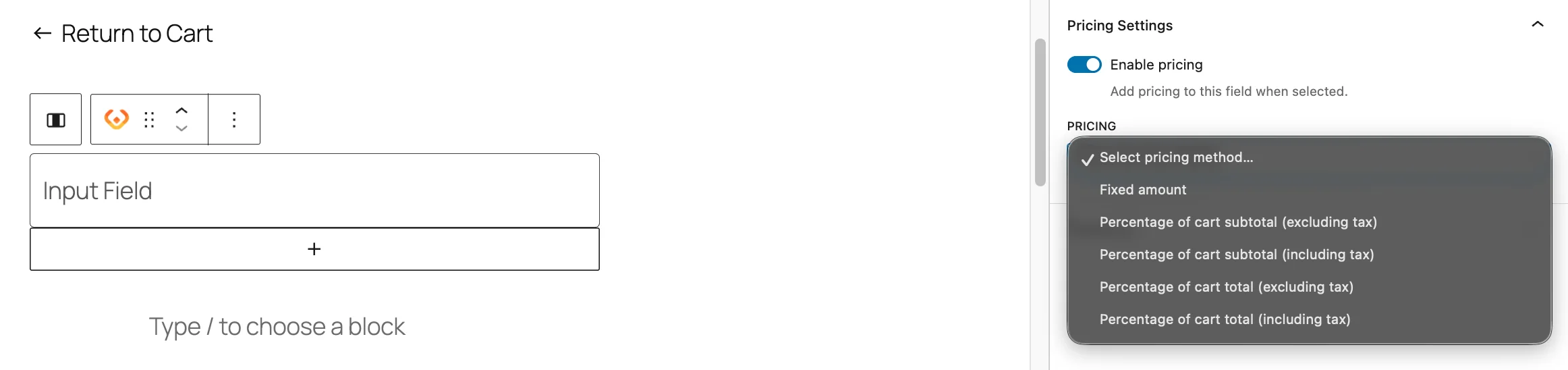
Select one of the available methods:
- Fixed amount - adds the same amount regardless of the cart value.
- Percentage of cart subtotal (excluding tax) - calculates the amount from the cart subtotal before tax.
- Percentage of cart subtotal (including tax) - calculates the amount from the cart subtotal including tax.
- Percentage of cart total - calculates the amount from the cart subtotal and shipping total including tax.
Price value
Enter the value of the surcharge or discount:
- for Fixed amount, enter a number in the store currency,
- for percentage methods, enter a percentage, for example 5 for 5%.
Tax class
Select the tax class for the surcharge or discount. If WooCommerce taxes are enabled, the plugin uses the store's tax classes, including the standard rate.
Prices for options in the field
If a field has its own options, the plugin can show separate pricing settings for each option. This lets you set a different surcharge or discount for each value selected by the customer.
This option is available for fields such as Radio and Multiselect provided by Checkout Fields for Blocks - Additional Fields.
- Each option can have its own Pricing, Price Value, and Tax Class settings.
- For Multiselect, each selected option can add its own fee. The fees are calculated separately.
- The selected option name is included in the fee label in the cart and checkout.
- This is useful when each checkout choice has a different cost, for example standard gift wrapping, premium gift wrapping, or extra-fast processing.
Pricing Additional Fields without options
Color and File upload fields do not contain a list of selectable options. To price them, enable Pricing Settings for the field and configure one pricing rule for the whole field.
- For a Color field, the configured amount is added when the customer selects a valid color.
- For a File upload field, the configured amount is added when the customer uploads a valid file.
- If the customer does not provide a value, no fee is added for the field.
Customer result
When pricing is enabled, the calculated amount is displayed next to the field label or option. After the customer selects the field value, the amount is added to the cart as a WooCommerce fee.
For option-level pricing, the fee label includes the field label and the selected option. For Multiselect, each selected priced option can appear as a separate fee.
