Contents
Key plugin features
Flexible Subscriptions Emails adds subscription-related transactional emails to WooCommerce for stores using Flexible Subscriptions. It helps customers and store admins receive the right notification when a renewal order or subscription status changes.
- Renewal order emails – send separate emails for new, processing, completed, on-hold, and invoice-based renewal orders. Customer emails are sent to the billing email address, while the New Renewal Order notification is sent to the store admin.
- Subscription status notifications – notify store admins when a subscription is cancelled or pending cancellation, expires, or is suspended. These emails include the subscription details needed to review the change.
- WooCommerce email settings – manage each notification in
WooCommerce → Settings → Emails. You can enable or disable an email, set admin recipients where applicable, change the subject and email heading, add content below the main message, and choose the email format. - Renewal-specific email handling – the plugin uses dedicated emails for Flexible Subscriptions renewal payment requests, preventing standard WooCommerce order emails from being sent for the same renewal event.
- Preview and resend support – use WooCommerce’s email preview to review subscription emails before enabling them. On a renewal order edit screen, selected renewal emails can also be resent manually.
This plugin is useful when you want renewal communication to be clearly separated from regular WooCommerce order emails. For example, customers can receive an invoice when a renewal needs manual payment, while store admins can be notified about cancelled, expired, or suspended subscriptions.
Requirements
- WordPress 6.5+ (plugin tested up to 6.9).
- WooCommerce 10.0+ (tested up to 10.3).
- PHP 7.4+.
- Active Flexible Subscriptions plugin (min. 1.6.0).
Settings Location
Go to: WooCommerce > Settings > Emails. Additional items related to subscription renewals and subscription status changes will appear on the list.
Available Emails
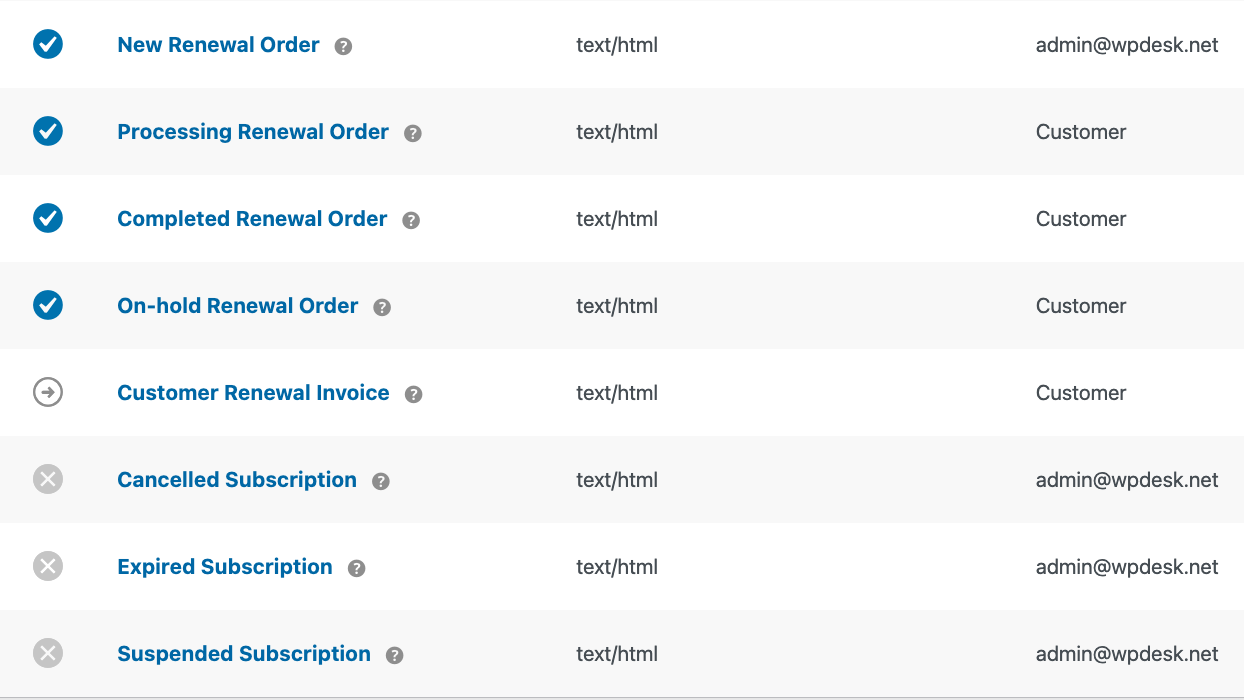
- New Renewal Order – sent to the store admin when a renewal payment request with a total greater than zero is created.
- Processing Renewal Order – sent to the customer after paying for renewal, when the order is processing.
- Completed Renewal Order – sent to the customer after renewal completion.
- On-hold Renewal Order – sent to the customer when renewal awaits manual payment confirmation.
- Customer Renewal Invoice – sent to the customer when a renewal requires manual payment, or when an automatic renewal payment fails and requires manual confirmation. The email is sent to the billing email address of the renewal order. It contains the renewal order details and lets the customer complete a payment that requires manual action.
- Cancelled Subscription – sent to the store admin when subscription is cancelled or in "pending cancellation" status.
- Expired Subscription – sent to the store admin when subscription expires.
- Suspended Subscription – sent to the store admin when subscription is suspended/paused.
Please note: the New Renewal Order email is triggered when the renewal payment request is created. It is not tied to the renewal order changing to the Processing status.
Interface Fields (Email Settings)
After clicking on a specific email, you'll see the standard WooCommerce form with fields:
- Enable/Disable – enables or disables sending of that email.
- Recipient(s) – only for admin emails; enter addresses separated by commas (default: admin address).
- Subject – you can override the subject; leave empty to use default.
- Email Header – header text; leave empty to use default.
- Additional Content – text displayed below the main email content.
- Email Type – message format (HTML / plain text / multipart, depending on WooCommerce settings).
Dynamic Placeholders in Subjects and Email Headings
You can use placeholders to include store or renewal order information in email subjects and email headings.
{blogname}– the name of your store. Available in subscription status emails.{order_date}– the creation date of the renewal order. Available in renewal order emails.{order_number}– the renewal order number. Available in renewal order emails.
Please note: {order_date} and {order_number} are not available in subscription status emails: Cancelled Subscription, Expired Subscription, and Suspended Subscription.
