
Properly updating plugins in WordPress is one of the cornerstones of maintaining a stable and secure online store. However, issues may occasionally arise that are difficult to resolve on your own — even when following official documentation. In this case study, we’ll walk you through identifying and solving an issue with updating a WP Desk plugin in WordPress.
We’ll explain why an update might not complete successfully, how server settings affect the process, and what steps can help restore plugin update functionality. This is a practical guide for store owners and administrators who want to avoid downtime and take full advantage of available extensions.
Contents
Problem Description: Plugin Update Not Working
When attempting to update a plugin from the WordPress dashboard, you might encounter a message like the following:
Warning: Undefined property: stdClass::$new_version in /wp-admin/includes/update.php on line 548

cURL error 28: Failed to connect to license.wpdesk.dev port 443: Connection timed out

Additionally, the system may display a message stating that automatic updates are not possible, suggesting you try again later or contact your hosting provider.
Case Analysis and Solution
Step 1: Analyze Error Messages
The cURL error 28 indicates a failure to connect to a remote server — in this case, the server responsible for delivering plugin updates and validating licenses. This means your WooCommerce store’s server is unable to fetch information about the available plugin version.
Combined with the Undefined property: stdClass::$new_version warning, which appears when the server receives an invalid or incomplete response, this clearly points to a problem with outgoing network connectivity.
Step 2: Rule Out Local Server Configuration Issues
Ensure that your server environment meets the following minimum technical requirements:
- PHP version 7.4 or higher
cURLlibrary enabledallow_url_fopenenabled- Active cron scheduler (
wp-cron.php) - Sufficient memory and execution time limits (e.g.,
memory_limit = 256M, max_execution_time = 60)
If all of the above are met but the issue persists, the most likely cause is a firewall or other server-level security setting blocking outgoing connections.
Step 3: Check Firewalls and Outgoing Connections
Most plugin update problems stem from blocked connections to external update servers. In such cases, contact your hosting provider and provide the exact error message, requesting that outgoing connections to the update server domain (e.g., license.wpdesk.dev) be allowed.
If your server uses a firewall, mod_security, or other filtering mechanisms, they may be blocking HTTPS requests to external servers.
In this case, we recommend providing your hosting provider with the list of IP addresses used by Cloudflare:Cloudflare IP ranges. WP Desk’s licensing server uses Cloudflare’s infrastructure, so whitelisting these IPs will allow proper connection to be established.
Step 4: Verify from the WordPress dashboard
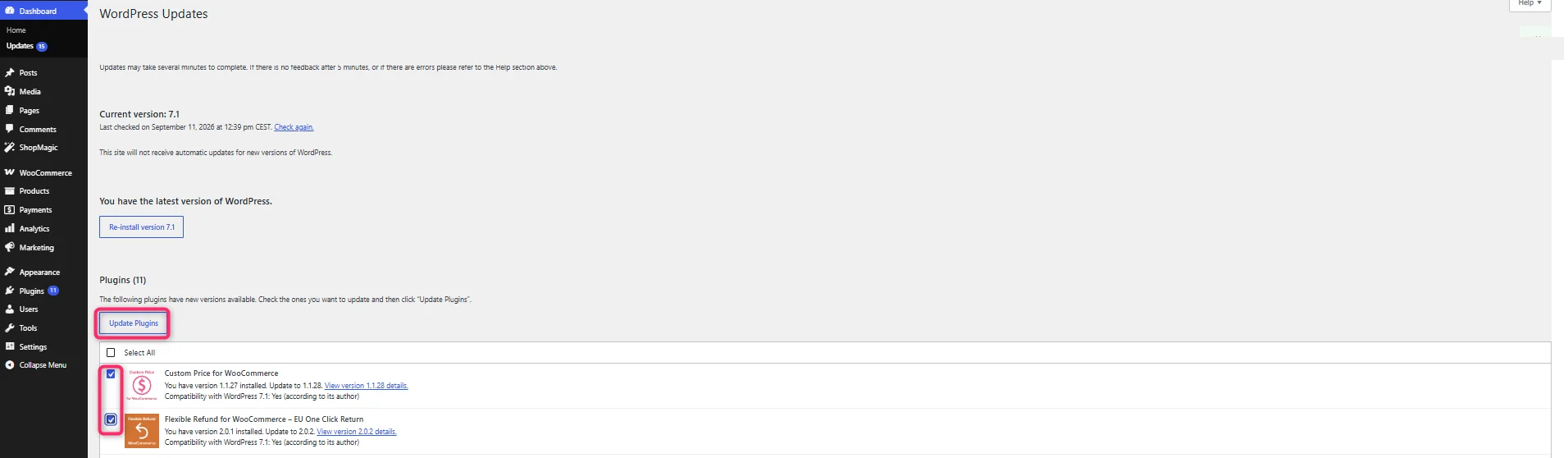
After outgoing connections are allowed, you can manually trigger an update check by going to:
Dashboard > Updates > Check again
If the connection is successfully restored, the error message will disappear and the plugin will become available for automatic update. The plugin will then be downloaded and installed without the need for any file manipulation or manual steps.
Important Note: The Plugin Works Without an Active License
It’s worth noting that the plugin will continue to function correctly even if the license server is temporarily unreachable or if the license hasn’t been activated. In such cases, the only limitations are lack of automatic updates and technical support — the plugin’s core functionality within the store remains unaffected.
How to update a WordPress plugin manually when automatic updates fail
If your hosting provider needs time to unblock outgoing connections, you do not have to wait for the fix to install a new version. Download the plugin ZIP file from your WP Desk account, go to Plugins > Add New > Upload Plugin in the WordPress dashboard and select the file. WordPress will detect that the plugin is already installed and offer to replace it, keeping your settings and database tables intact. This is the fastest manual WordPress plugin update path and it needs no FTP access at all.
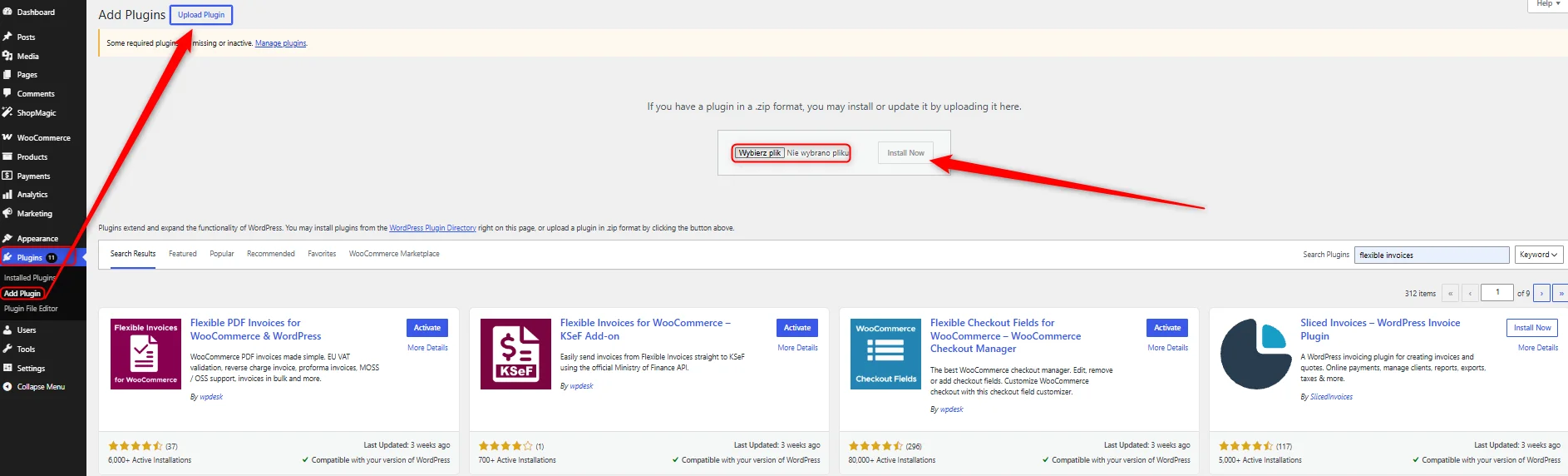
When the dashboard upload is blocked by file size limits or file editing restrictions, use FTP or your hosting file manager instead. Upload the unzipped plugin folder to /wp-content/plugins/ and overwrite the existing directory. Deactivating the plugin first is not required, but taking a backup is: if the new version introduces a database change, rolling back without one is painful. Never delete the old folder before the new files are in place, because on some configurations that removes stored settings along with it.
Before either method, check that the version you are installing matches your WordPress and WooCommerce versions. A plugin update failing to install and a plugin update failing to connect look similar in the dashboard but have different causes: the first is a compatibility or permissions problem inside your site, the second is a network problem outside it. The cURL timeout described above always belongs to the second group, so no amount of reinstalling will fix it until the connection is allowed.
Practical Tips
- Always check WooCommerce > Status > Logs for valuable diagnostic information.
- Ensure your hosting provider doesn’t block outgoing HTTPS connections — this is the most common cause of update issues.
- Keep WordPress, WooCommerce, and your plugins up to date — outdated software increases the risk of errors and compatibility issues.
- Save Cloudflare IP addresses and share them with your hosting provider if needed.
- Don’t panic over license errors — the plugin works locally, and you can always update manually via FTP if necessary.
Summary
A WordPress plugin update issue may be caused by blocked connections to the licensing server. This is a relatively common scenario on hosting environments with advanced firewalls. Diagnosing the error, contacting the hosting provider, and correctly configuring outgoing connections are usually sufficient to restore full update functionality.
At the same time, it’s important to remember that plugins will continue to operate in your WooCommerce store even without an active license. The license is required only for access to updates and technical support, not for the core functionality of the plugin.
FAQ – WordPress plugin update problems
What does cURL error 28 mean in WordPress?
It means your server tried to reach an external address and gave up before receiving an answer. The request was not rejected, it simply timed out, which almost always points to a firewall or a security rule on the hosting side blocking outgoing HTTPS traffic rather than to a fault in the plugin.
Will my plugin stop working if the license expires?
No. The plugin keeps working in your store with all its features. An expired or inactive license only removes access to automatic updates and technical support, so the store itself continues to run exactly as before.
Can I update a WordPress plugin without FTP access?
Yes. Download the ZIP file from your account and use Plugins > Add New > Upload Plugin in the dashboard. WordPress recognises the existing installation and replaces the files while keeping your settings. FTP is only needed when the upload size limit or a file permission rule blocks that route.
Why does WordPress say updates are not available when a new version exists?
WordPress caches update information and refreshes it on a schedule run by wp-cron. If cron is disabled or the connection to the update server failed, the dashboard keeps showing stale data. Going to Dashboard > Updates > Check again forces a fresh check.
Which IP addresses should my hosting provider allow?
WP Desk's licensing server runs on Cloudflare, so the hosting provider needs to allow outgoing connections to the Cloudflare IP ranges published at cloudflare.com/ips. Send them the exact error message together with the list, as that is usually enough for them to identify the blocked rule.
Remember that you can test our plugins in our free demo.

