
Are you a massage therapist or a wellness center owner tired of paying hefty monthly fees for third-party massage scheduling software? Do you wish you had more control over your booking system, your client data, and your branding? If so, you're not alone. Many small businesses find themselves trapped in expensive SaaS subscriptions that offer limited flexibility.
But what if there was another way? What if you could build a robust, feature-rich booking system right on your own WordPress website, without ongoing commissions or restrictive contracts? This guide will show you exactly how to do that. We'll walk you through creating a powerful online scheduling solution for your massage business using WordPress, WooCommerce, and a smart booking plugin – giving you full ownership and significant savings.
Massage scheduling software is a dedicated system designed to automate the booking process for massage therapists and wellness centers, allowing clients to view availability, select services, and book appointments online. For your business, this means streamlining operations, reducing administrative overhead, and providing a seamless booking experience that can significantly boost client satisfaction and appointment rates.
Contents
- Why Ditch SaaS for Your Massage Business?
- The Core Ingredients: WordPress, WooCommerce, and Flexible Product Fields
- Step-by-Step: Building Your Massage Scheduling System
- 1. Setting Up Your WordPress & WooCommerce Foundation
- 2. Installing Flexible Product Fields and the Booking Add-on
- 3. Creating Your Massage Service Product
- 4. Configuring Time Slots and Daily Capacity
- 5. Managing Date Ranges and Overlapping Bookings
- 6. Setting Up Online Payments
- 7. Automating Notifications
- Beyond the Basics: Enhancing Your Booking System
- The WP Desk Advantage: Why Choose Our Plugins?
- Ready to Take Control?
- FAQ
Why Ditch SaaS for Your Massage Business?
Third-party scheduling platforms often come with a hidden cost: control. While they offer convenience, they also introduce several drawbacks that can impact your business in the long run. Let's explore why moving away from a Software-as-a-Service (SaaS) model might be the best decision for your massage practice.
- Recurring Monthly Fees: These add up quickly, eating into your profits, especially as your business grows or if you need advanced features.
- Limited Customization: Most SaaS platforms offer pre-defined templates and features. Want a specific field for client intake or a unique booking flow? Often, you're out of luck or face additional charges.
- Vendor Lock-in: Migrating client data or switching providers can be a nightmare, making you dependent on a single company.
- Data Ownership Concerns: Who truly owns your client data? With a self-hosted solution, there's no ambiguity – it's yours.
- Branding Constraints: Your booking page might carry the SaaS provider's branding, diluting your own professional image.
By opting for a self-hosted WordPress solution, you transform these drawbacks into advantages. You gain unparalleled flexibility, cost-effectiveness, and complete ownership of your booking process and client relationships. This approach positions you to scale your business on your terms, not a third-party's.
The Core Ingredients: WordPress, WooCommerce, and Flexible Product Fields
To build your custom massage booking software, you'll need a few essential tools that work together seamlessly. Think of it as assembling a custom-built massage table – each part serves a crucial function, and together they create a superior experience.
1. WordPress: Your Flexible Foundation
WordPress is the world's most popular content management system (CMS), powering over 43% of all websites. It's free, open-source, and incredibly versatile. It provides the framework for your website and allows you to install plugins to extend its functionality.
2. WooCommerce: Your E-commerce Powerhouse
WooCommerce is the leading e-commerce plugin for WordPress, transforming your website into a fully functional online store. It handles products, carts, checkouts, and payments. For our purposes, each massage service you offer will be a 'product' in WooCommerce.
3. Flexible Product Fields Pro and the Booking Add-on: Your Scheduling Engine
This is where the magic happens for your massage appointment software. The Flexible Product Fields Pro plugin allows you to add custom fields to your WooCommerce products. But to turn a regular product into a bookable service, you'll need its dedicated Booking Add-on. This powerful extension adds specific field types like 'Date' and 'Time Slot' that are essential for scheduling appointments.
With these three components, you'll have a robust, scalable, and fully customizable booking system that truly belongs to you.
Step-by-Step: Building Your Massage Scheduling System
Let's dive into the practical steps to set up your own massage scheduling system. We'll go through the process of configuring everything, from your basic WordPress setup to advanced booking options.
1. Setting Up Your WordPress & WooCommerce Foundation
- Install WordPress: Most hosting providers offer one-click WordPress installation. If not, you can manually install it.
- Install WooCommerce: From your WordPress dashboard, go to Plugins → Add New, search for "WooCommerce," install, and activate it. Follow the setup wizard to configure basic store settings like currency, location, and shipping.
- Choose a Theme: Select a responsive and professional WordPress theme that complements your massage business brand.
- Configure Payment Gateways: In WooCommerce, navigate to WooCommerce → Settings → Payments. Enable and configure your preferred payment gateways (e.g., Stripe, PayPal, or local options). This is crucial for accepting online payments for your massage bookings.
2. Installing Flexible Product Fields and the Booking Add-on
Now, let's get the core booking functionality in place. You'll need the Flexible Product Fields PRO plugin and its Booking Add-on. These are the tools that will transform a simple WooCommerce product into a sophisticated booking slot.
- Purchase and Download: Get the Flexible Product Fields Pro plugin and the Booking for WooCommerce Add-on from WP Desk.
- Upload and Activate: Go to Plugins → Add New → Upload Plugin in your WordPress dashboard. Upload the ZIP files for both plugins and activate them.
- Verify Installation: Once activated, you should see a new menu item under Products → Product Fields, indicating that Flexible Product Fields is ready to use.
3. Creating Your Massage Service Product
Each massage service you offer (e.g., "60-minute Deep Tissue Massage," "90-minute Hot Stone Therapy") will be a separate WooCommerce product. Here's how to set one up and prepare it for booking.
- Add a New Product: Go to Products → Add New in your WordPress dashboard.
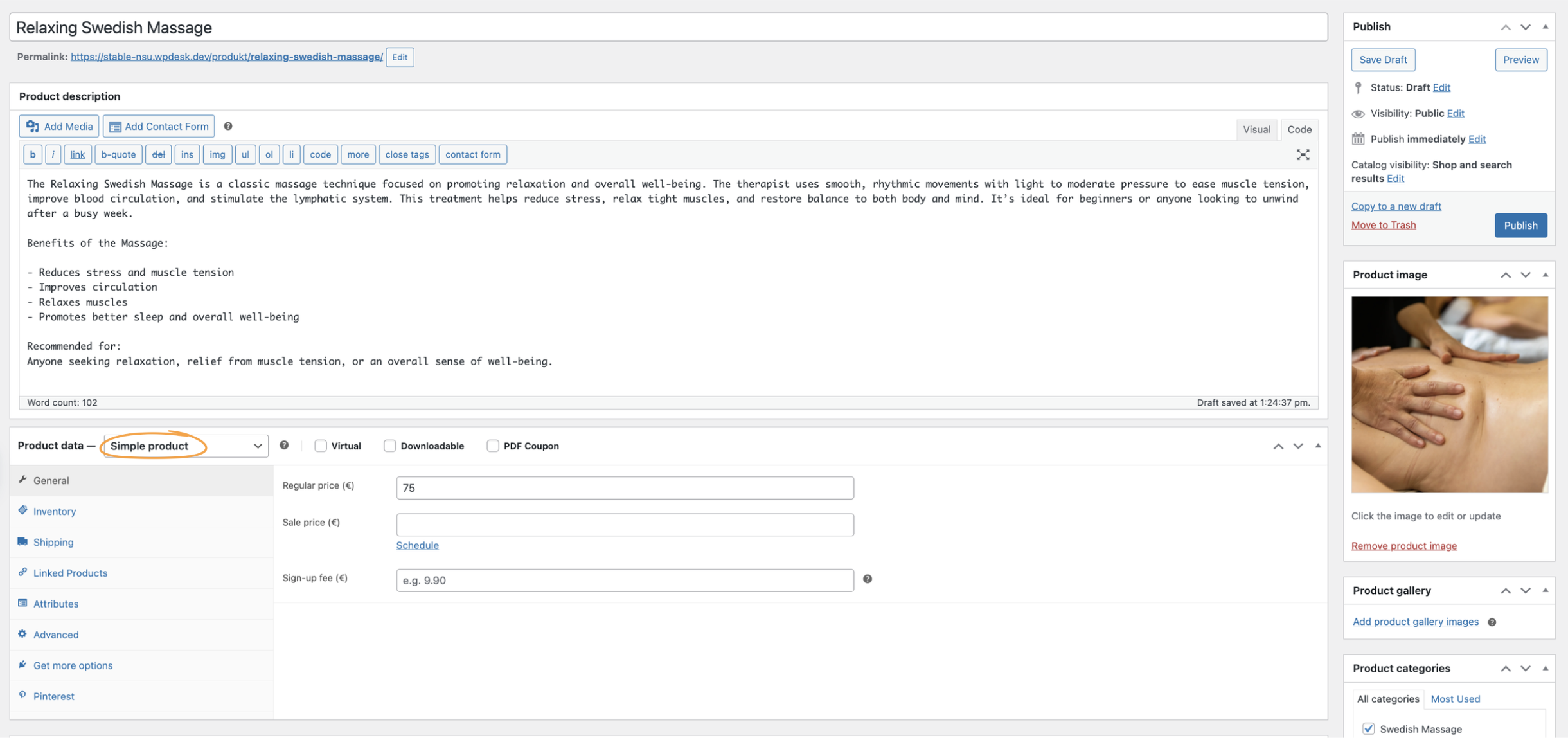
- Enter Product Details: Give your service a clear title (e.g., "Relaxing Swedish Massage"), a description, and add relevant images.
- Set Product Data: In the 'Product data' section, select 'Simple product'. Set a regular price for your massage service.
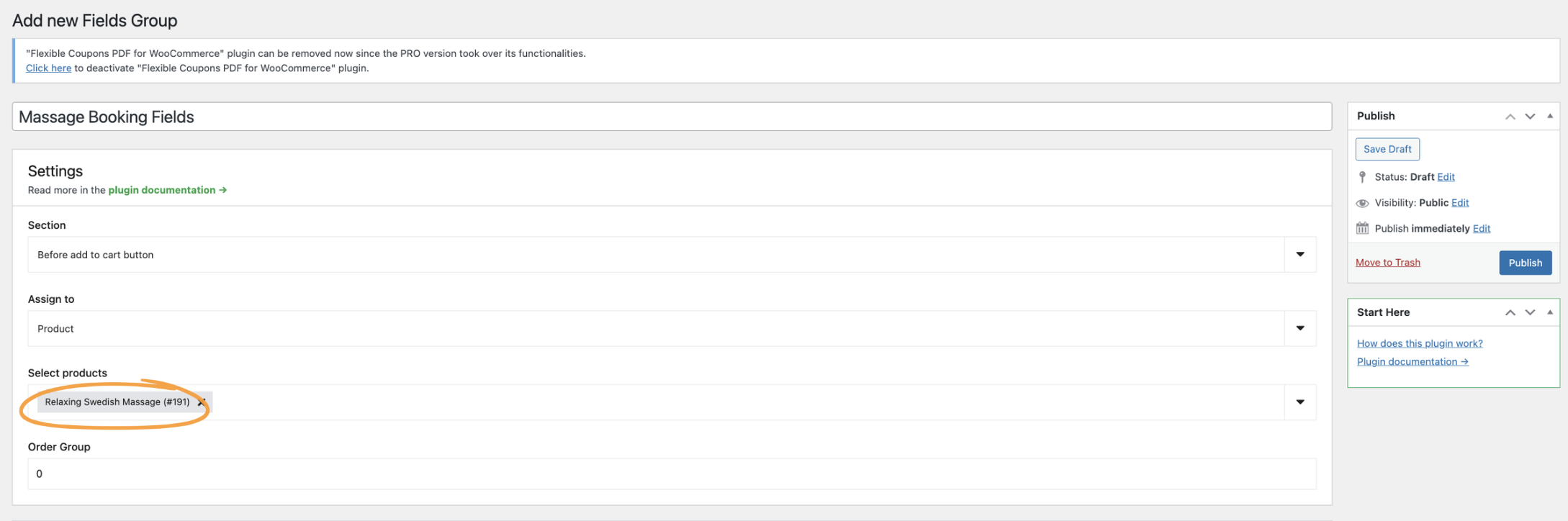
- Create a Field Group: Go to Products → Product Fields and click 'Add New' to create a new field group. Give it a descriptive name (e.g., "Massage Booking Fields").
- Assign to Product: Under 'Product Assignment', choose 'Products' and select the specific massage service product you just created. This links your custom fields to this particular service.
4. Configuring Time Slots and Daily Capacity
This is the heart of your massage scheduling software. The Booking Add-on allows you to define exactly when your services are available and how many clients you can take at once. This ensures you never double-book and manage your time effectively.
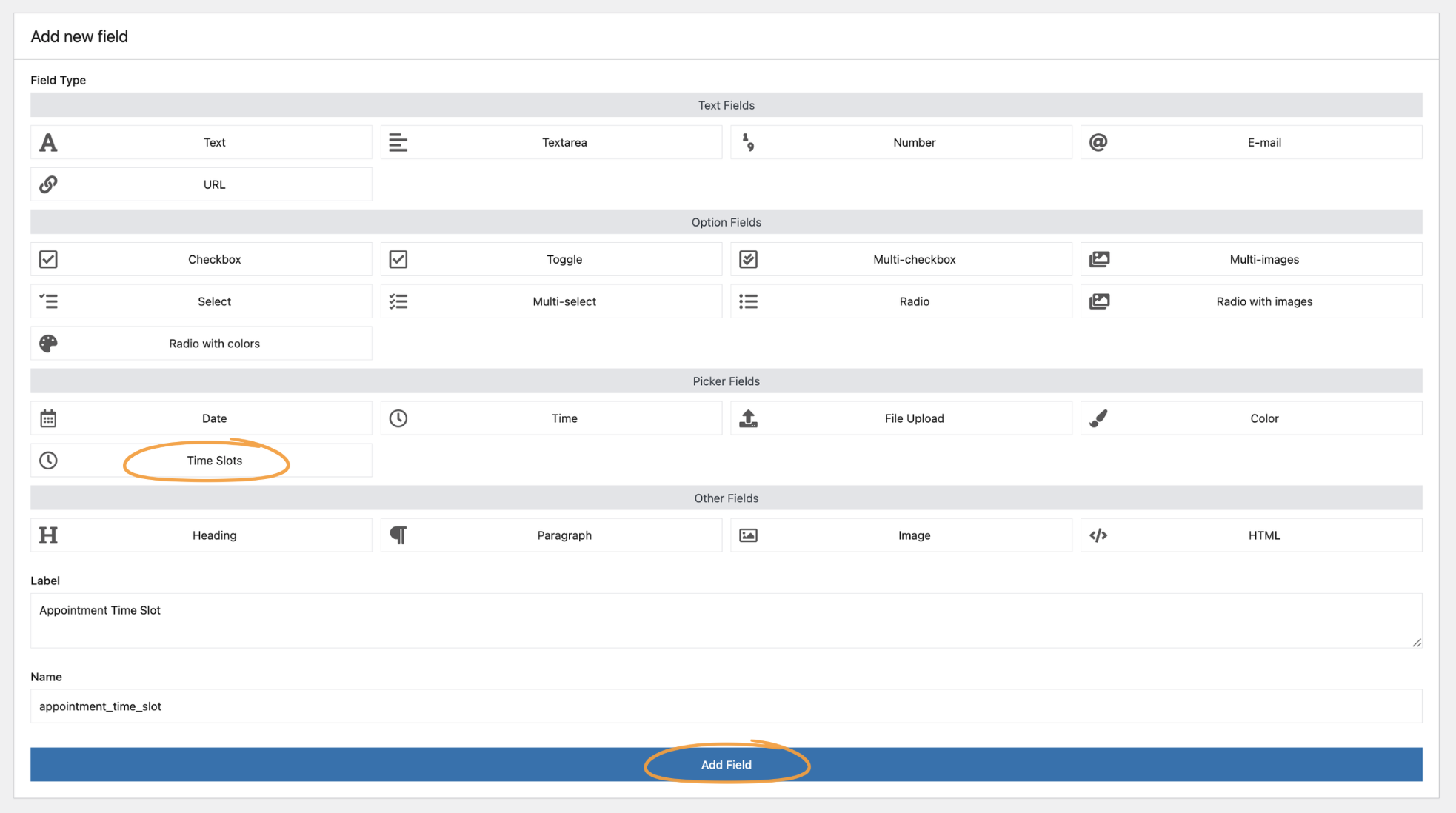
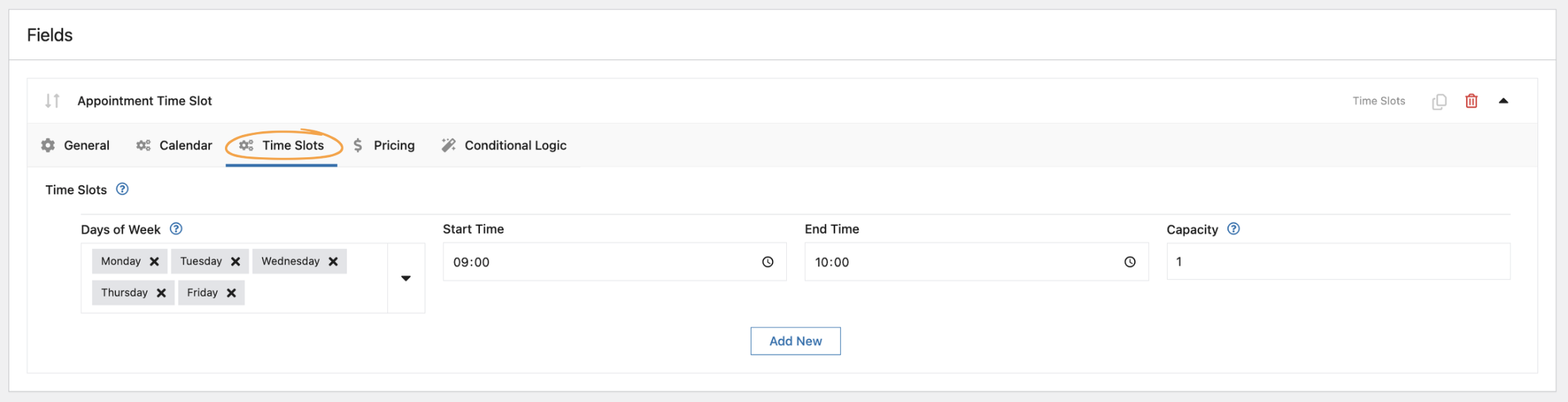
- Add a 'Time Slot' Field: Within your new field group (e.g., "Massage Booking Fields"), click 'Add New Field'.
- Select Field Type: From the 'Type' dropdown, choose 'Time Slot'.
- Define Your Schedule:
- Days of Week: Select the days you offer massage services. For example, Monday to Friday.
- Start Time & End Time: For each day, specify your working hours. For instance, if you work from 9 AM to 5 PM, you might set slots from 9:00 to 10:00, 10:00 to 11:00, and so on.
- Capacity: This is crucial. For a one-on-one massage, your capacity will likely be '1' per slot. If you have multiple therapists or rooms, you could increase this.
5. Managing Date Ranges and Overlapping Bookings
The Booking Add-on provides even more granular control over your schedule, allowing you to fine-tune how clients can select dates and manage daily booking limits. This is especially useful for handling busy periods or specific availability requirements.
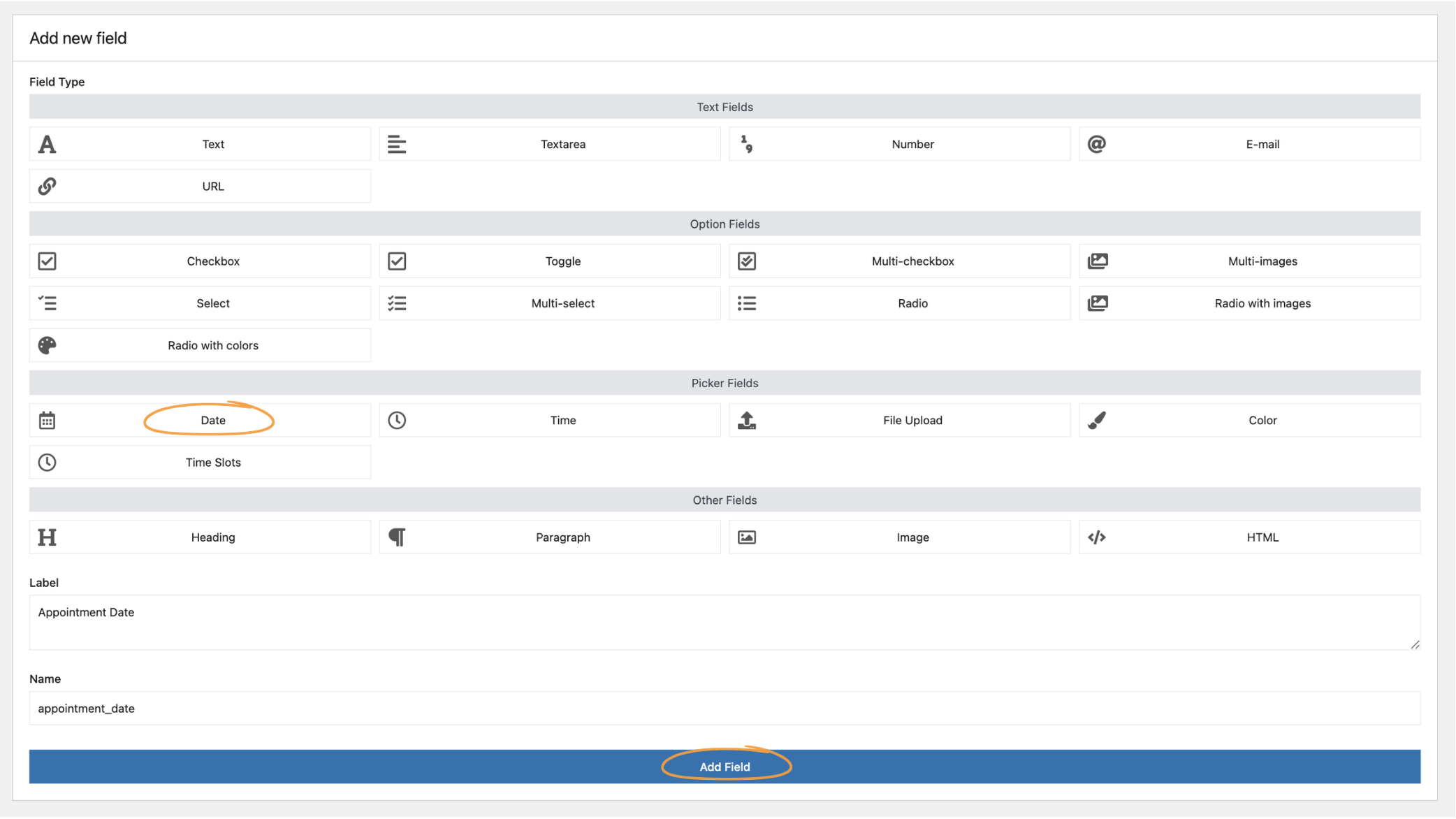
- Edit Your 'Date' Field (or add one if you haven't): If you want to control daily capacity or date ranges, you'll need to add a 'Date' field to your product's field group.
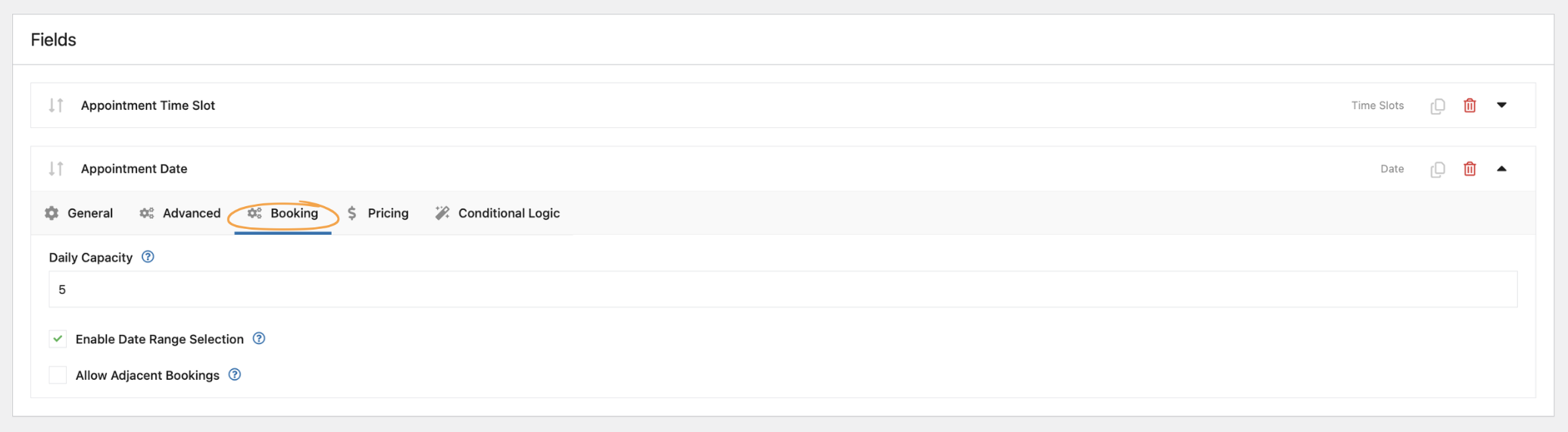
- Access Booking Tab: Once you have a 'Date' field, click on it to open its settings, then navigate to the 'Booking' tab.
- Configure Daily Capacity: Set the 'Daily Capacity' (e.g., 5) to limit the total number of bookings accepted per day, regardless of individual time slot capacities. This is useful if you have a maximum number of clients you can realistically handle in a day.
- Enable Date Range Selection: Check 'Enable Date Range Selection' if you want clients to book a series of consecutive days, which might be useful for retreats or multi-day packages.
- Allow Adjacent Bookings: The 'Allow Adjacent Bookings' option lets you decide if bookings can butt up against each other without a gap. For massage, you might want to disable this to ensure buffer time between appointments.
 6. Setting Up Online Payments
With your booking system now taking shape, you're just a few clicks away from accepting payments and fully automating your massage appointment software. WooCommerce makes it incredibly easy to integrate various payment gateways, ensuring a smooth checkout experience for your clients.
As mentioned earlier, you would have configured your payment gateways in WooCommerce → Settings → Payments. Popular options like Stripe, PayPal, and Square are widely supported. Make sure to test your payment flow thoroughly to ensure clients can complete their bookings and payments without any hitches.
7. Automating Notifications
After a client books a massage, automated communication is key. WooCommerce handles basic order notifications out-of-the-box (order confirmation, processing, completion). However, you can enhance this significantly.
For more advanced, custom notifications (e.g., appointment reminders, pre-session instructions, post-session follow-ups), you can integrate with email marketing tools or a dedicated automation plugin like ShopMagic. Plugins like this can use booking-specific placeholders (like {{ booking.start_date }} or {{ booking.product }}) to send highly personalized messages, ensuring your clients are always informed and engaged. You can learn more about available placeholders for booking automations in the ShopMagic documentation.
Beyond the Basics: Enhancing Your Booking System
Once your core massage scheduling system is up and running, you might want to add more advanced functionalities to further streamline your operations and enhance the client experience. This is where the true power of WordPress and WooCommerce shines, allowing you to expand without being tied to a single SaaS provider's roadmap.
- Client Intake Forms: Use Flexible Product Fields to create detailed intake forms directly on the product page. Ask about specific needs, medical history, or preferences before the appointment.
- Gift Certificates & Promotions: Implement advanced coupon functionalities to offer discounts, package deals, or gift certificates for your massage services.
- Recurring Appointments/Packages: For clients who book regular sessions, consider integrating a subscription plugin. This allows you to set up recurring billing and automatically schedule future appointments, making client retention much easier. The Flexible Subscriptions for WooCommerce plugin, for example, allows you to define payment frequency and even recurring shipping schedules, which, while not directly for massage, shows the flexibility for recurring events.
- Staff Management: While Flexible Product Fields handles booking slots, for multiple therapists, you might need additional plugins to assign bookings to specific staff members and manage their individual schedules.
Flexible Product Fields Add-on - Booking for WooCommerce £39
Add simple and flexible bookings to your online store — without building a separate booking system and without unnecessary configuration. Booking Calendar for WooCommerce is an add-on for the Flexible Product Fields PRO plugin that lets you sell accommodations, hourly services, and conference days using standard WooCommerce products.
Add to cart or View DetailsThe WP Desk Advantage: Why Choose Our Plugins?
When you decide to build your own massage scheduling software with WP Desk plugins, you're not just getting tools; you're getting a partnership. We understand the needs of WooCommerce store owners and developers, and our plugins are designed with real-world scenarios in mind.
- Full Compatibility: Our plugins are developed specifically for WooCommerce, ensuring seamless integration and minimal conflicts with your existing setup and future updates.
- Ease of Installation & Configuration: We strive for intuitive interfaces and clear documentation, so you can get your system up and running quickly, even if you're not a seasoned developer.
- Real Business Impact: Our solutions are crafted to directly address business challenges, helping you increase conversions, optimize workflows, and ultimately grow your revenue.
- Dedicated Support & Documentation: As the creators and owners of these plugins, we offer expert support and comprehensive documentation to guide you through every step. You're never left to figure things out on your own.
- Ownership & Control: With WP Desk, you own your data and your system. No monthly fees, no vendor lock-in, just pure control over your business operations.
Ready to Take Control?
You've seen how powerful and flexible a custom massage scheduling software can be when built on WordPress with WooCommerce and the right plugins. Stop letting expensive SaaS platforms dictate your business operations and drain your profits. It's time to take back control, own your client data, and customize your booking experience to perfectly match your brand.
Stop paying monthly commissions. Create your own massage scheduling system with WordPress and start accepting bookings today.
Flexible Product Fields Add-on - Booking for WooCommerce £39
Add simple and flexible bookings to your online store — without building a separate booking system and without unnecessary configuration. Booking Calendar for WooCommerce is an add-on for the Flexible Product Fields PRO plugin that lets you sell accommodations, hourly services, and conference days using standard WooCommerce products.
Add to cart or View DetailsFAQ
How to create massage scheduling software on WordPress without monthly fees?
You can create massage scheduling software on WordPress by combining the free WordPress and WooCommerce platforms with a powerful one-time purchase plugin like Flexible Product Fields Pro and its Booking Add-on. This setup allows you to manage appointments, time slots, and payments directly on your site, avoiding recurring SaaS costs.
What is the best plugin for massage appointment scheduling on WordPress?
For robust massage appointment scheduling on WordPress, Flexible Product Fields Pro combined with its Booking Add-on is an excellent choice. It allows you to define custom time slots, daily capacities, and integrate seamlessly with WooCommerce for product-based services and payments, offering extensive customization.
How do I set up time slots for massage services in WordPress?
To set up time slots for massage services in WordPress, use the Flexible Product Fields Booking Add-on. Create a 'Time Slot' field within a product field group, then specify the days of the week, start and end times, and the capacity for each slot. This defines when and how many appointments are available.
What are the benefits of a self-hosted massage booking system?
A self-hosted massage booking system offers full control over your data, complete customization options, and eliminates recurring monthly SaaS fees. You own your platform, can brand it entirely, and integrate it deeply with other WordPress and WooCommerce functionalities, leading to greater business flexibility and savings.
How to accept online payments for massage bookings on WordPress?
You can accept online payments for massage bookings by integrating popular payment gateways (like Stripe or PayPal) with WooCommerce. Once your massage service is set up as a WooCommerce product with booking fields, clients can complete their booking and payment during the standard WooCommerce checkout process.

