
• Skip to primary navigation
  • Skip to main content
  • Skip to footer
WP Desk = premium plugins for WordPress & WooCommerce
  • Plugins
        • Checkout & OrdersMake your work easier and automate the orders. Adjust the order form to your needs and make it more useful to your customers. Print order labels directly from WooCommerce. Put the orders in order using our plugins. Find out how to streamline the procurement process in your store.
          • Flexible Checkout Fields
          • Active Payments
          • Automatic Payment Status
          • Flexible Refund and Return Order
          • Print Orders and Address Labels
          • Flexible Subscriptions Recurring Shipping
          • Flexible Subscriptions Payment Retry
          • Flexible Subscriptions Stock Management
        • ProductsThese plugins will help you manage your WooCommerce products. Here you will find the plugins to import and update products from XML or CSV files. Then you can change the product unit of measure, show the lowest price in the last 30 days (Omnibus Directive), or let customers name the product price!
          • Flexible Product Fields
          • Dropshipping Import Products
          • Dropshipping FTP Import Products
          • Dropshipping Export Products
          • Custom Price
          • WP Desk Omnibus
          • Flexible Quantity Calculator
          • Dropshipping Orders Export
        • MarketingPromote your store online. Add products from your shop to price comparison websites directly from WooCommerce. Acquire new customers and communicate with your existing ones. Build a customer base and communicate with clients using one of the most effective marketing tools, namely e-mail marketing. Check out our promotional tools!
          • Flexible Pricing
          • Flexible Wishlist - Analytics & Emails
          • OLX WooCommerce
          • Flexible PDF Coupons
          • ShopMagic
          • Flexible Invoices
  • Bundle🔥
  • WP Desk Care
  • Support
  • Blog
  • My Account
  • 0

More results

Dropshipping Orders Export for WooCommerce

Export orders from WooCommerce to CSV, XML or JSON files in an easy way. With Dropshipping Export Orders for WooCommerce, it's child's play!

💾 Active Installations: 1000+ | 🔄 Last update: 2026-07-06

View PricingDemo Docs
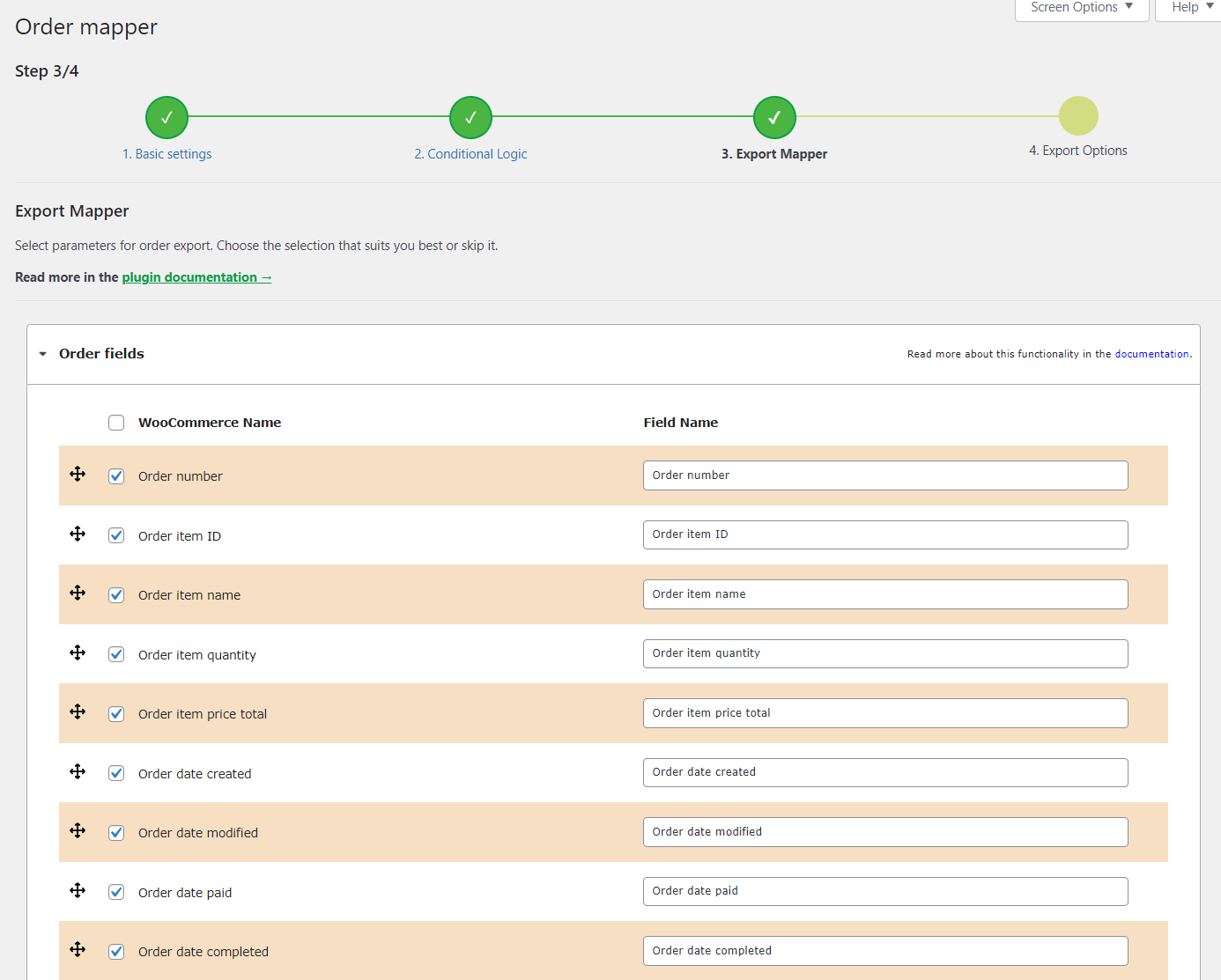
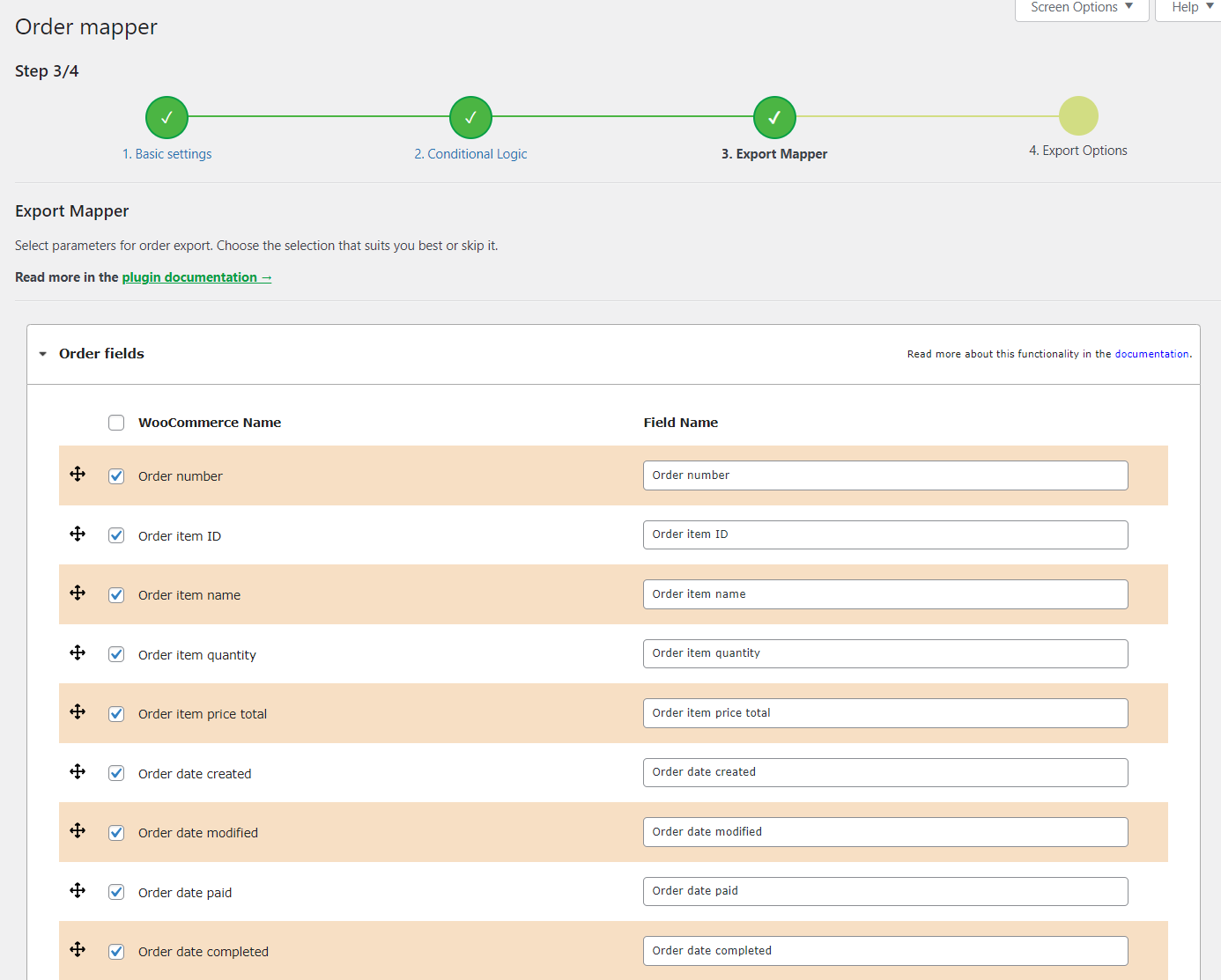
Dropshipping Orders Export for WooCommerce: Order mapper
View Screenshots
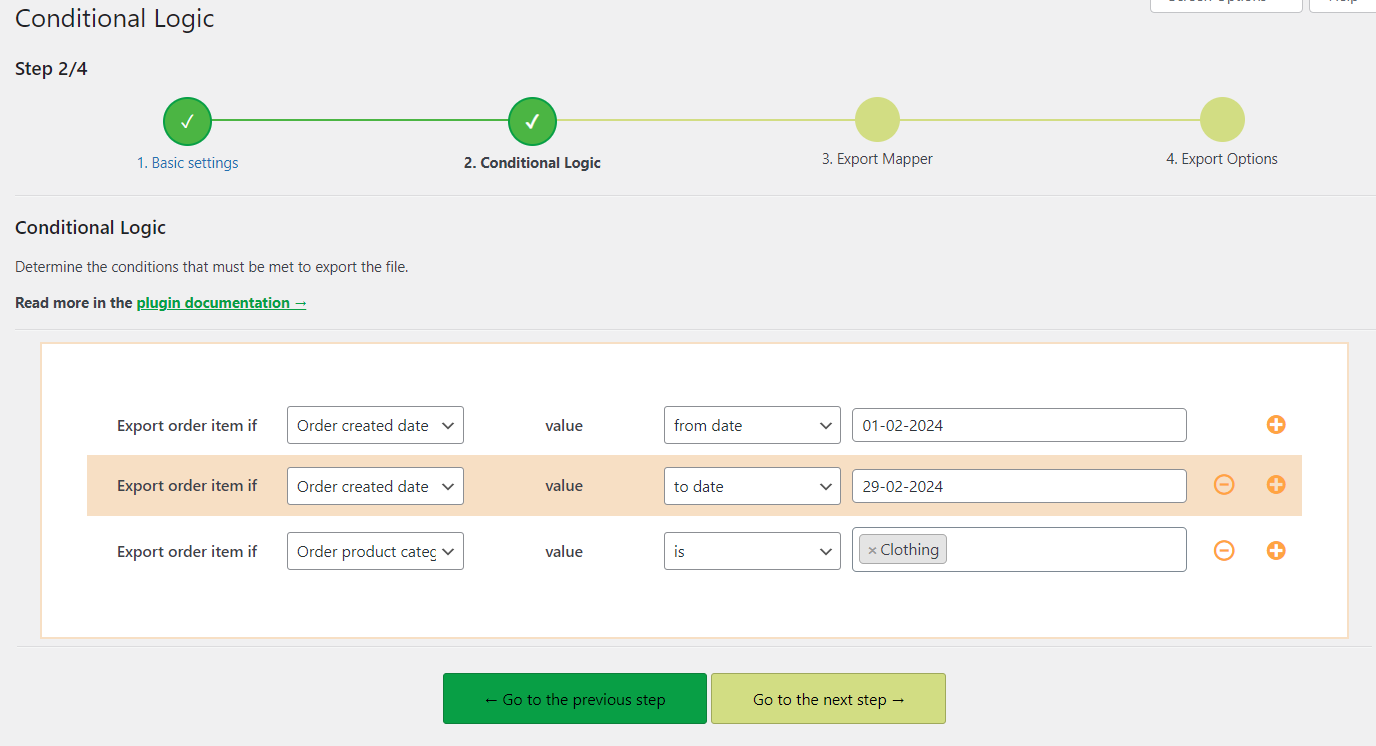
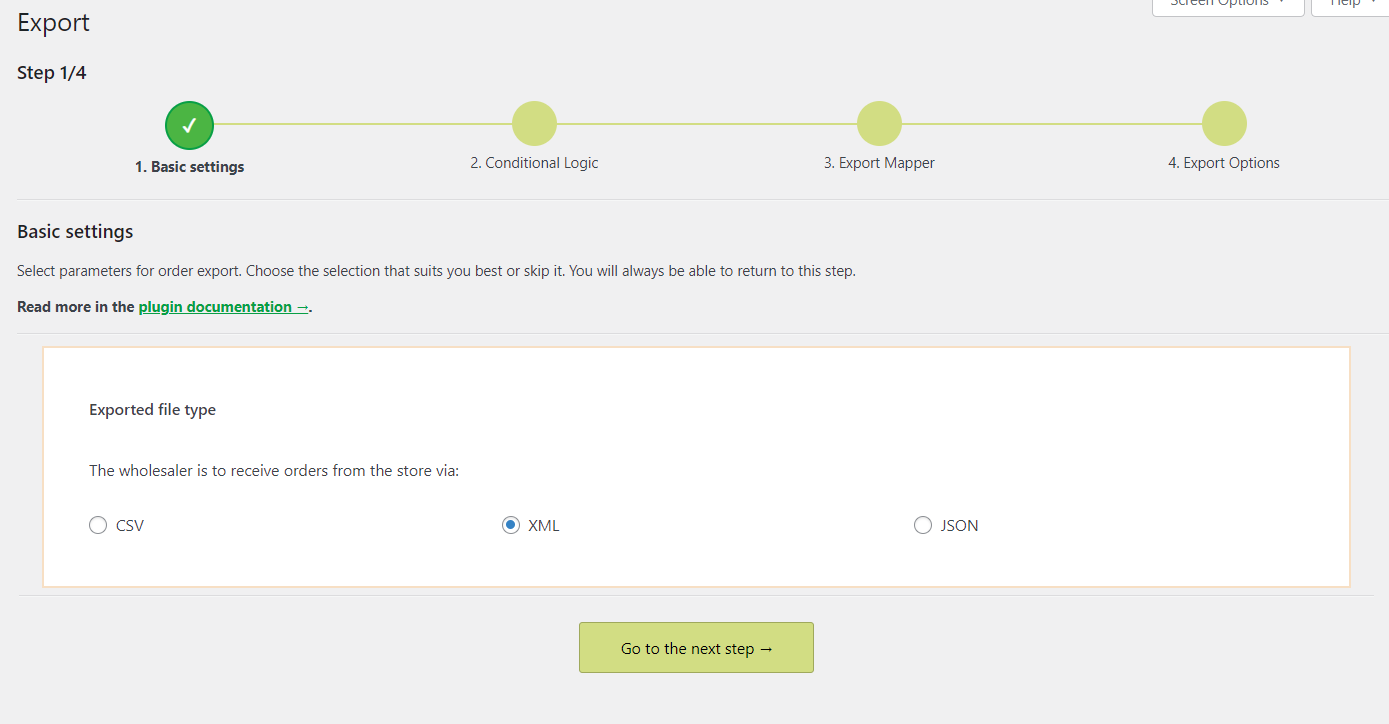
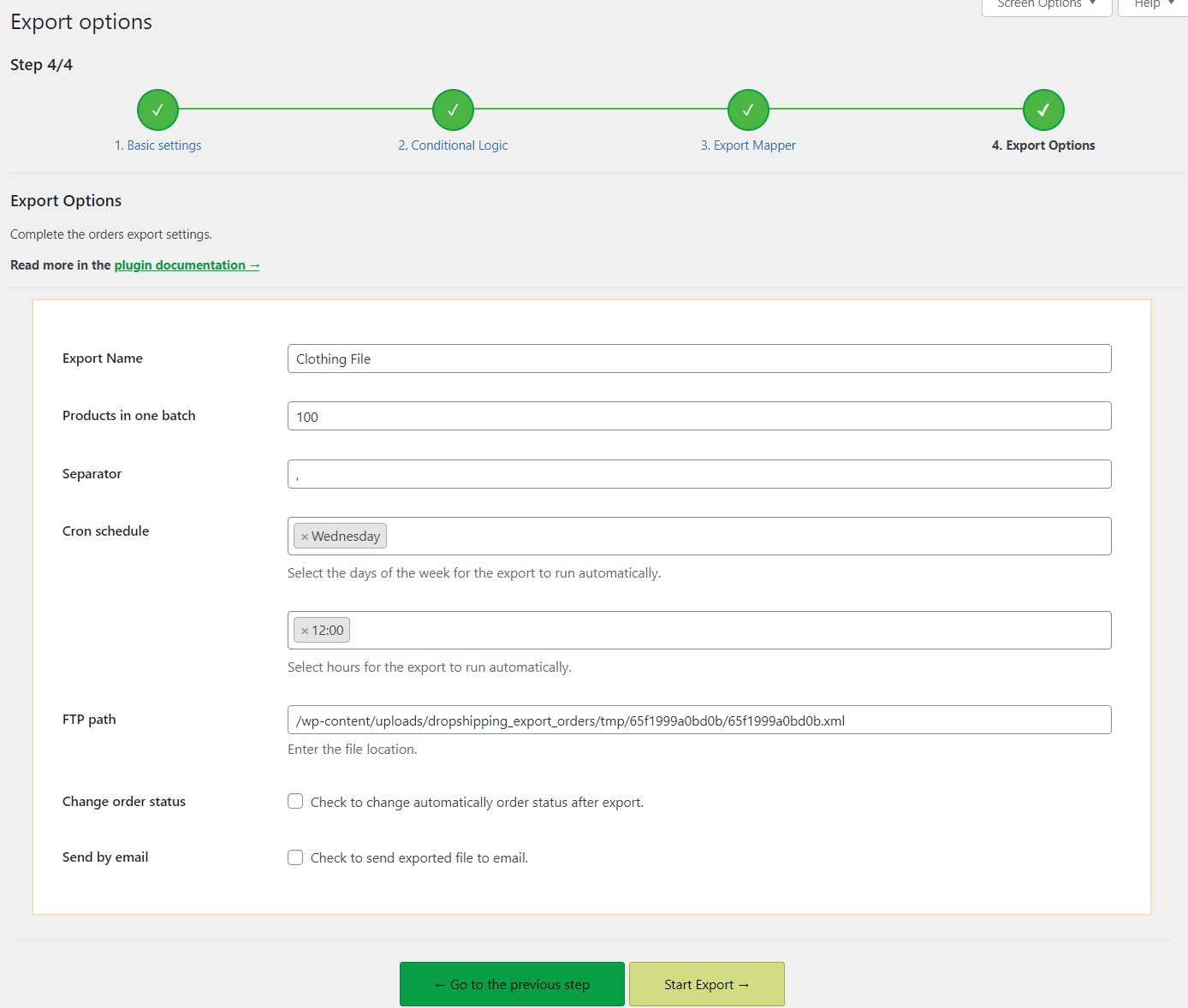
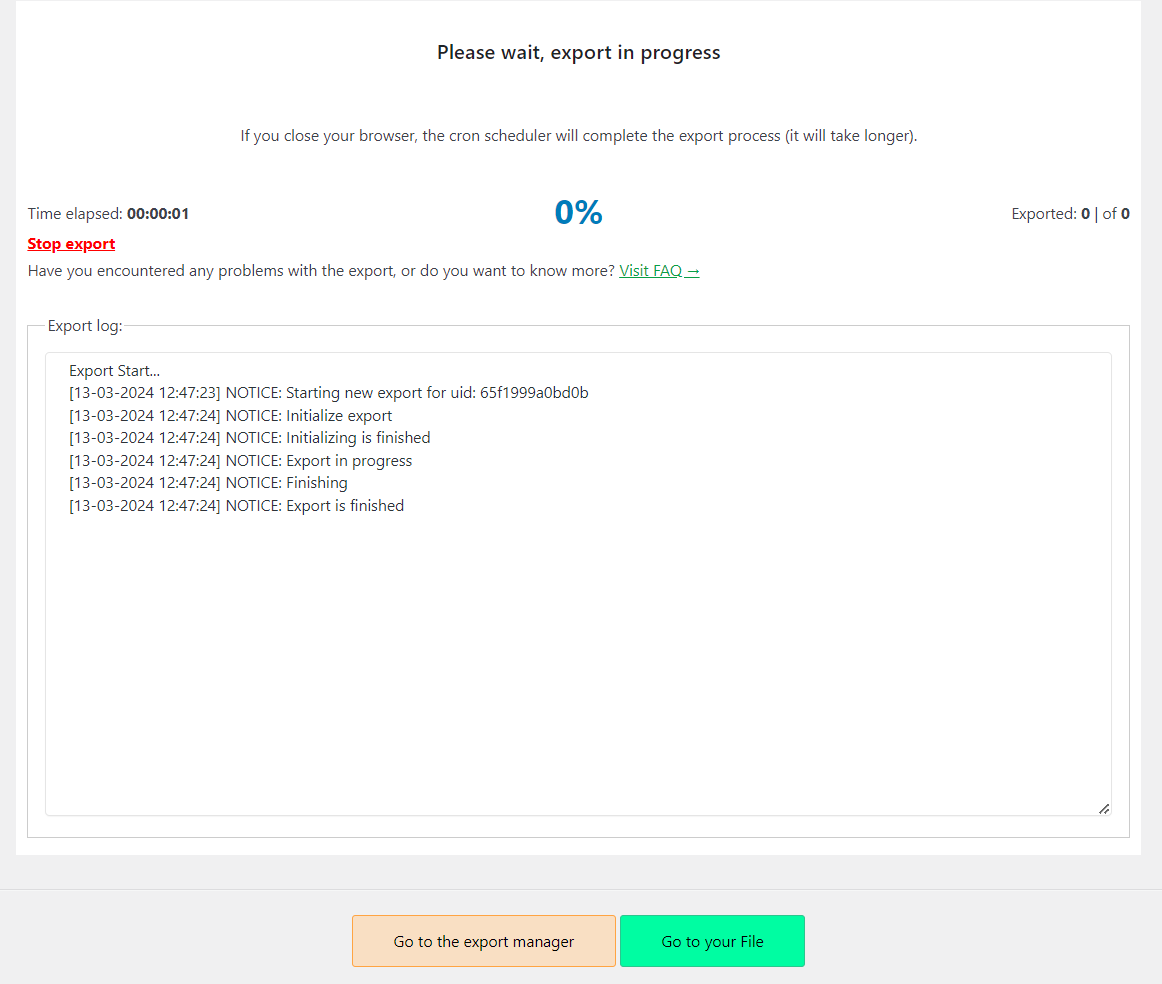
Dropshipping Orders Export for WooCommerce: Setting conditions with conditional logicDropshipping Orders Export for WooCommerce: Choosing the target file formatCron schedule, change order status automatically after the export, and other optionsExport progress screen in the Dropshipping Orders Export pluginConditional logic based on order status in the Dropshipping Orders Export plugin

Export orders from WooCommerce to CSV, XML or JSON

Great WooCommerce order export manager with user-friendly features.

Conditional Logic

Export orders from WooCommerce using advanced conditional logic.

Cron schedule

Schedule automatic synchronization - this plugin will do all the work for you!

Target file personalization

Select the data you want to export to the target file.

Automatic email

Send the file as soon as it is generated in a customized email template

File location change

Choose a location to save the file on your server

Sort exporting fields

Sort the fields you want to export.

Plugin highlights

Export orders from WooCommerce to CSV, XML or JSON file with Dropshipping Export Orders for WooCommerce.

Choose orders fields to export

In this section, all exportable fields are shown in a table. If you uncheck the checkbox next to a specific row, the field will not be exported.


WooCommerce's original field name is displayed in the second column - this name cannot be edited. In the Field name column, type your own field name - it will replace the original field name.


View Pricing

Dropshipping Export Orders for WooCommerce - orders fields to export

Choose order export file format

You can choose the right export file format (CSV, XML or JSON file).


And of course, you can also select the type of orders you want to export. If you do not specify any value, all orders in your store will be exported.


View Pricing

Dropshipping Export Orders for WooCommerce - product types and file type

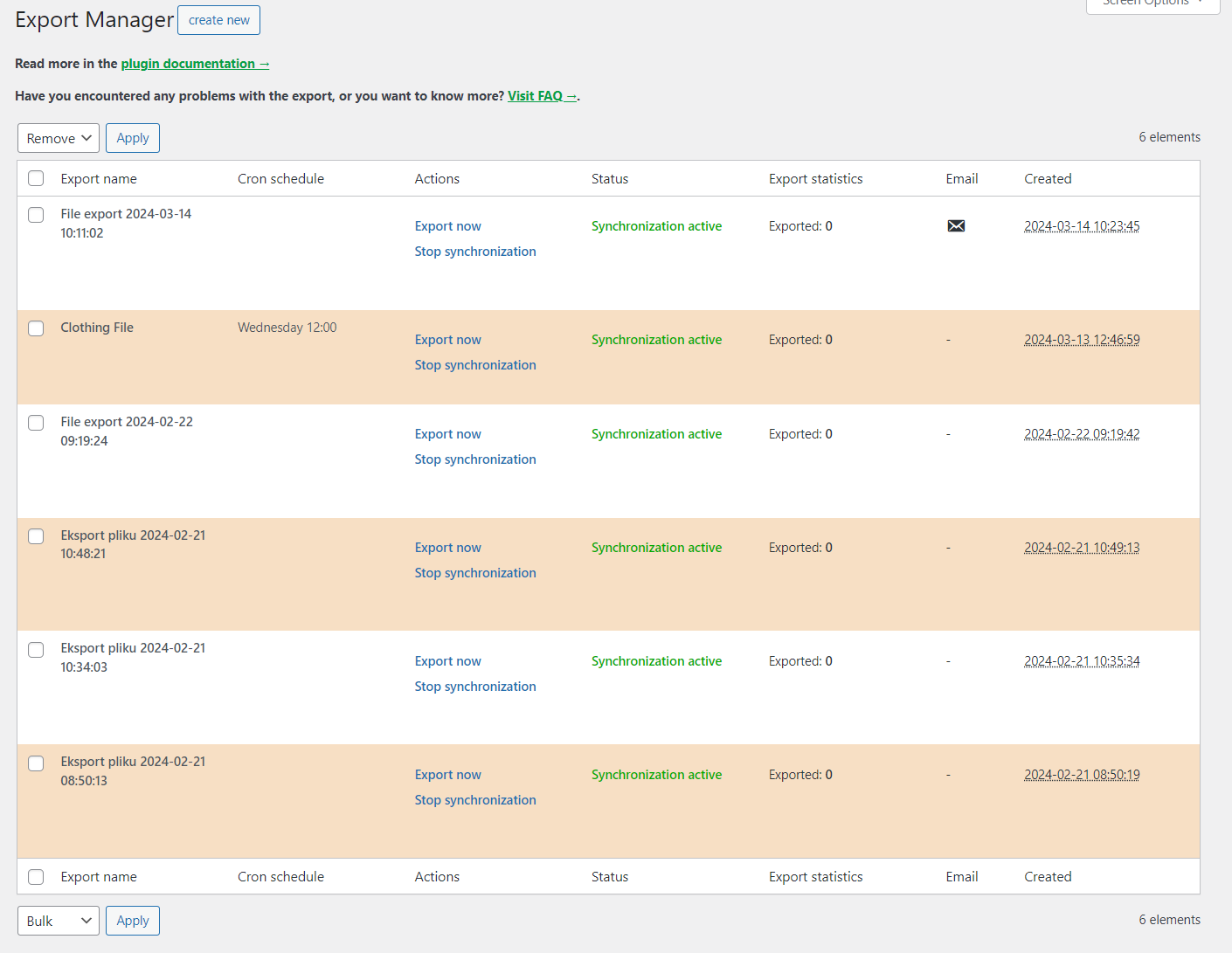
Export Manager

The plugin's export manager manages all exported files. The tab contains a table that allows you to quickly manage all exports and view their most important statistics.


From here you will also easily create another file for exporting orders. You only need to click Create new and you are done.


View Pricing

Dropshipping Export Orders for WooCommerce - export manager

1. Step one - Choose the file type

✅ You only need to follow 4 easy steps to fully customize your exported products file from WooCommerce:

Dropshipping Export Orders for WooCommerce - choose file type

✔️ Choose file type you want to export your orders to. You can choose from XML, CSV, JSON.


View Pricing

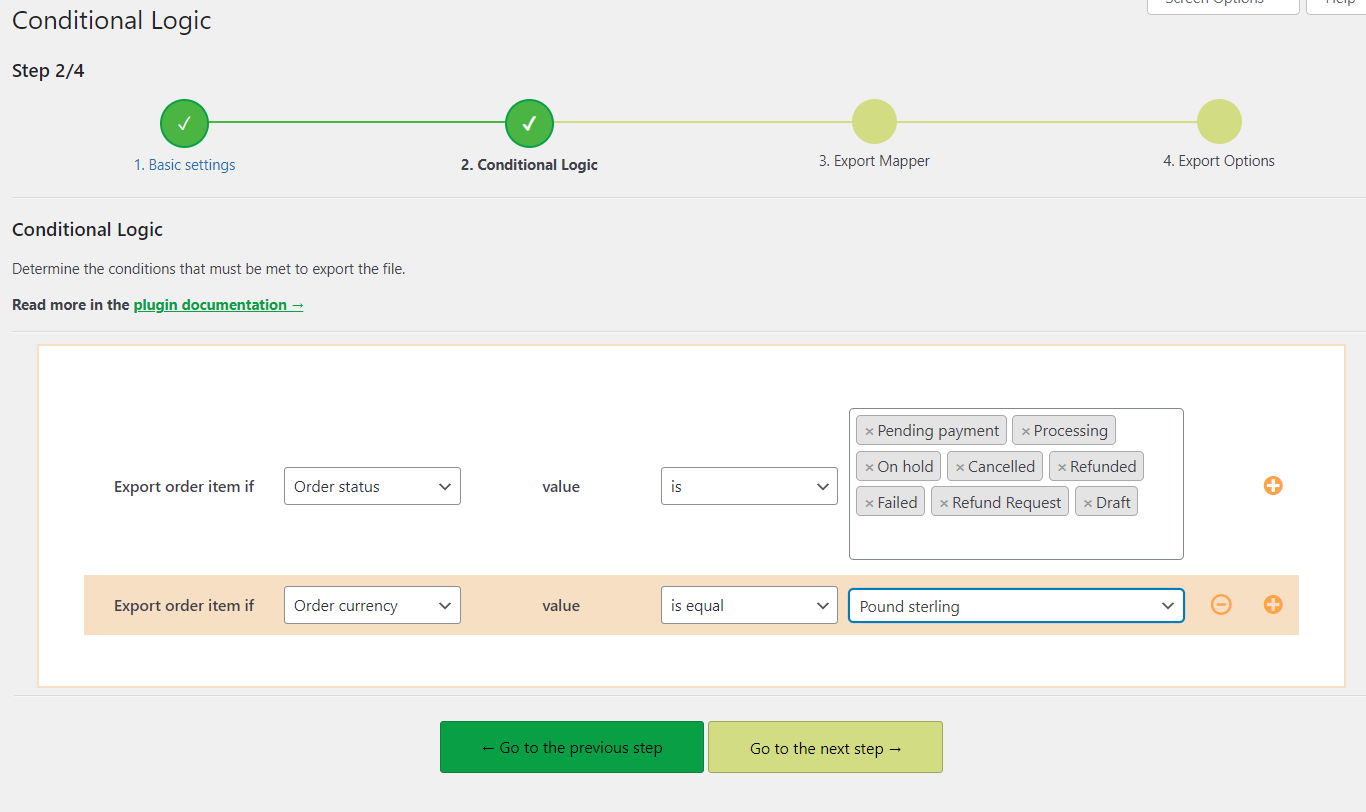
2. Step two - Conditional Logic

✅ Set the conditions for your custom WooCommerce orders export.

✔️ You can easily manage the export of orders. Determine that orders will be exported only if they meet given conditions.


Examples of conditions you can manage:


  • • Order status
  • • Order currency
  • • Order total amount
  • • Order created date
  • • Order product category or tag


View Pricing

Dropshipping Export Orders for WooCommerce - conditional logic

3. Step three - Manage file order fields

✅ Determine what orders data you want to export to your target file.

Dropshipping Export Orders for WooCommerce - manage order fields to export

It's up to you to decide what columns the exported orders file from WooCommerce will have.


✔️ Simply uncheck with the checkbox the fields you don't need in your target file.


View Pricing

4. Step four - Orders export settings

✅ Perform final changes before exporting orders.

✔️ In this last step, you can name the file you will export, set the number of orders in batches, and specify the separator.


✔️ Also, something super useful: you have the possibility to schedule a cron that will export the file for you.


Determine on what days of the week and at what time the sync should take place.


✔️ Last but not least, select file location, and enable automatic mailing to your product providers.


View Pricing

Export orders from WooCommerce

All features in brief

The ultimate Dropshipping Orders Exporter for WooCommerce has all the features you need to manage WooCommerce orders export

Conditional logic

 
✅ Numerous conditional logic conditions available
✅ Filter the exported data, for example, by order status, order date or SKU of the product in the order
✅ Among others, the available parameters in conditional logic are: is equal to, is, is in, contains, from and to date

Personalized target file

 
✅ Select the format of the destination file: CSV, XML, JSON
✅ Create a file template for export and use it in the future
✅ Rename the file according to your preferences

Automatic sync

 
✅ Set sync and export file of selected day
✅ Set sync and export file at selected time
✅ Manage synchronization: resume or pause

Helping 239,847 + WooCommerce Shops

Our customers love our plugins & support. Here are some of the featured reviews we've received:

Bundle of all plugins from WPDesk is great, I am satisfied. Lightweight and you can modify how Woocommerce will work as you need it. I can recommend.
Customer photo
Vladimir Hajduk

Piotr was very helpful. He gave me a detailed response and answered all of my questions with serious consideration. Thank you!
Customer image
Richard Purvis

Customer service was awesome, got a very personalized answer from Adrianna. Would recommend purchasing. This plugin will definitely help me out a lot.
Male vector image
Dale Eicher

Your subscription options


Choose a version tailored to your needs. You will always receive professional and friendly technical support from us.


Pay once a year. Cancel anytime with just 1 click.


  • Plugin(s) included
      • Dropshipping Orders Export for WooCommerce
        Flexible Product Fields – Multistep
        WooCommerce Conditional Checkout Fields Add-on
        Flexible Subscriptions - API Integration
        Flexible Subscriptions One-Time Payment Add-on
        Flexible Product Fields Add-on - Booking for WooCommerce
        Flexible Subscriptions - Emails
        Flexible Subscriptions Stock Management
        Flexible Subscriptions Payment Retry
        Flexible Subscriptions Recurring Shipping
        Dropshipping Export Products for WooCommerce
        Flexible Wishlist PRO - Analytics & Emails
        One Click Return for WooCommerce
        Flexible Quantity Calculator for WooCommerce
        WP Desk Omnibus
        Custom Price for WooCommerce PRO
        Dropshipping FTP Import Products for WooCommerce
        OLX WooCommerce
        Dropshipping Import Products for WooCommerce
        Automatic Payment Status WooCommerce
        Print Orders and Address Labels WooCommerce
        Flexible Pricing WooCommerce
        Active Payments WooCommerce
        Flexible Product Fields PRO WooCommerce
        Flexible Checkout Fields PRO WooCommerce
  • Future plugins i

    Newly created plugins are added to plugin bundles on an ongoing basis. Newly developed plugins are also added to ongoing subscriptions.

  • Updates
  • 1 year e-mail support
  • 30-day money back guarantee

Professional

$79 /year

  • 1 plugin PRO

  • 1 site

Buy Now

LIMITED TIME OFFER

All Plugins Bundle

Most popular 🔥

$99 /year

Read more

  • 25 plugins PRO

  • 1 site for each plugin

Buy Now

All Plugins Bundle (25 sites)

$199 /year

Read more

  • 25 plugins PRO

  • 25 sites for each plugin

Buy Now

Plugin PRO

$79 /year

1 plugin PRO

Dropshipping Orders Export for WooCommerce

Future plugins

Newly created plugins are added to plugin bundles on an ongoing basis. Newly developed plugins are also added to ongoing subscriptions.

Automatic updates for 1 site

1 year e-mail support

30-day money back guarantee

Buy Now

LIMITED TIME OFFER

All Plugins Bundle

Most popular 🔥

$99 /year

ALL 25 WP Desk plugins PRO

Future plugins

Newly created plugins are added to plugin bundles on an ongoing basis. Newly developed plugins are also added to ongoing subscriptions.

Automatic updates for 1 site

1 year e-mail support premium

30-day money back guarantee

Buy Now

Read more

All Plugins Bundle (25 sites)

$199 /year

ALL 25 WP Desk plugins PRO

Future plugins

Newly created plugins are added to plugin bundles on an ongoing basis. Newly developed plugins are also added to ongoing subscriptions.

Automatic updates for 25 sites

1 year e-mail support premium

30-day money back guarantee

Buy Now

Read more

All payments are handled by Stripe secure payments and SSL checkout. 🔒


American Express logo
Mastercard logo
Visa logo

Check Out Our Other Plugins:

  • Dropshipping Import Products for WooCommerce icon

    Dropshipping Import Products for WooCommerce

    $79

    Import and synchronize wholesale products with WooCommerce products. Add margin to the prices of imported products. Use conditional logic. Make your

    HOT
    Add to cartLearn More
  • Dropshipping Export Products for WooCommerce icon

    Dropshipping Export Products for WooCommerce

    $79

    Export products from WooCommerce to CSV or XML files in an easy way. With Dropshipping Export Products for WooCommerce, it’s child’s

    Add to cartLearn More
  • Dropshipping FTP Import Products for WooCommerce icon

    Dropshipping FTP Import Products for WooCommerce

    $39

    Add-on for Dropshipping Import Products WooCommerce PRO. Import products from XML and CSV files directly from FTP or upload the file via the WordPress

    Add to cartLearn More
  • 239,847 +

    Active Installations

    4.6/5

    Average plugin rating

    30 day

    money back guarantee

    FAQ & Plugin Details

    Learn more about the plugin and check some of the most popular questions about the purchase.

    How do our plugins' subscriptions work?

    All the plugins we offer can be purchased in a yearly subscription model and are paid annually. An active subscription entitles you to 1 year of updates and our support.

    Renewing the subscription after 12 months is optional, not required, and you can cancel it at any time. The renewal cost is the same as the initial price. You may renew the subscription if you like or not if don't need to.

    Please mind that an active subscription grants you the possibility to download the plugins' newer versions and updates, get our tech support if you encounter any problems and move and activate the API keys between the sites/domains.

    If you decide to cancel the subscription or if it expires, you can keep using our plugins. They will work the same as before but you won't be able to do the updates, get our support and transfer the plugin files between sites and activate them in the new environment.

    View terms.

    Do you have the plugin demo or trial?

    You can set up your own full featured demo here: WP Desk Demo.

    We also offer 30 day money back guarantee, so you can test the plugin risk free in your WooCommerce store.

    Where can I find the plugin documentation?

    We wrote a fine piece of docs, just follow this link: Dropshipping Orders Export for WooCommerce Docs.

    Do you offer money back guarantee?

    Absolutely. We stand strongly behind our products and offer 30 days money back guarantee. Please read our refund policy for details.

    I have more questions!

    We will be happy to help, just drop us a line and we will try to answer in 24 hours: Contact WP Desk Support.

    What payment methods do you accept?

    We accept Stripe payments including the most popular credit cards.

    All payments are handled by Stripe secure payments and SSL checkout. We do not store your credit card details.

    Details

    • Works with

      WooCommerce 10.6 - 10.9

      PHP >= 7.4

    • Last Updated

      2026-07-06

    • Version History

      View changelog

    • Categories

      Products, WooCommerce Plugins

    WP Desk › Premium Plugins › WooCommerce Plugins › Dropshipping Orders Export for WooCommerce

    Stay updated on our how-to articles

    WP Desk news, WooCommerce tips, promo codes - right to your inbox.

    By entering your e-mail, you agree to our Terms & Conditions and Privacy Policy.

    By entering your e-mail, you agree to our Terms & Conditions and Privacy Policy.

    Footer

    WP Desk - WooCommerce Plugins

    At WP Desk we create great WooCommerce plugins with awesome support. Save time and money with our e-commerce solutions. See how we can help you improve your e-store →

    Secured by Comodo

    WP Desk

    • About us
    • Giving Back
    • Blog
    • Get Support
    • Contact us

    Products

    • Premium Plugins
    • WP Desk Care
    • Documentation
    • WooCommerce Invoices
    • Email Marketing
    • PDF Coupons

    Legal

    • Terms & Conditions
    • Refund Policy
    • Support Policy
    • Privacy Policy

    © 2026 WP Desk

    We value your privacy

    We use necessary cookies to make our site work. We'd also like to set additional cookies to understand site usage, enhance your browsing experience, and serve personalized ads or content. By clicking ‘Accept All,’ you consent to our use of additional cookies.

    Functional Always active
    The technical storage or access is strictly necessary for the legitimate purpose of enabling the use of a specific service explicitly requested by the subscriber or user, or for the sole purpose of carrying out the transmission of a communication over an electronic communications network.
    Preferences
    The technical storage or access is necessary for the legitimate purpose of storing preferences that are not requested by the subscriber or user.
    Statistics
    The technical storage or access that is used exclusively for anonymous statistical purposes. Without a subpoena, voluntary compliance on the part of your Internet Service Provider, or additional records from a third party, information stored or retrieved for this purpose alone cannot usually be used to identify you. The technical storage or access that is used exclusively for anonymous statistical purposes. Without a subpoena, voluntary compliance on the part of your Internet Service Provider, or additional records from a third party, information stored or retrieved for this purpose alone cannot usually be used to identify you.
    Marketing
    The technical storage or access is required to create user profiles to send advertising, or to track the user on a website or across several websites for similar marketing purposes.
    • Manage options
    • Manage services
    • Manage {vendor_count} vendors
    • Read more about these purposes
    View preferences
    • {title}
    • {title}
    • {title}